This is a continuation of the article - see the beginning here.
The State Machine pattern gives us a massive performance advantage.
Our subscription flow has two parts: asking for the email (Step 1), and asking for the user's preferences via a complex SegmentationForm using heavy Shadcn Select and MultiSelect components (Step 2).
If we bundle all of this into one file, the client has to download the dropdown logic just to render a simple email input. Instead, we use React's lazy feature right inside our main component, conditionally rendering UI based on the step variable:
// src/components/islands/NewsletterFlow.tsx

import { lazy } from 'react'
import { NewsletterForm } from '@/domain/forms/components/NewsletterForm'
import { useSubscribeNewsletter } from '@/hooks/useSubscribeNewsletter'

// 1. We load the heavy Segmentation form ONLY when the user reaches that step
const LazySegmentationForm = lazy(() =>
  import('@/domain/forms/components/SegmentationForm').then((module) => ({
    default: module.SegmentationForm,
  }))
)

export const NewsletterFlow = ({ t, locale }) => {
  const {
    pending,
    step,
    actionError,
    setActionError,
    subscribeAction,
    segmentationAction,
  } = useSubscribeNewsletter(locale)

  // Step 3: Success State
  if (step === 'done') {
    return (
      <div>
        <h2>{t.newsletter.subscribed.title}</h2>
        <p>{t.newsletter.subscribed.description}</p>
      </div>
    )
  }

  // Step 2: Segmentation State (Lazy Loaded)
  if (step === 'segment') {
    return (
      <div>
        <h3>{t.newsletter.step.segment.title}</h3>
        <LazySegmentationForm
          t={t}
          onSubmit={segmentationAction}
          actionError={actionError}
          setActionError={setActionError}
          pending={pending}
        >
      </div>
    )
  }

  // Step 1: Initial Subscribe State (Rendered by default)
  if (step === 'subscribe') {
    return (
      <div>
        <div>{t.newsletter.step.subscribe.title}</div>
        <NewsletterForm
          t={t.messages}
          source='landing-hero'
          onSubmit={subscribeAction}
          actionError={actionError}
          setActionError={setActionError}
          pending={pending}
        >
      </div>
    )
  }
}
Because our State Machine explicitly defines the step state, Webpack/Vite knows exactly when to request the next chunk of JavaScript.
The user loads the page, downloads almost zero JS, types their email, and clicks "Subscribe." Only while the Astro Action is executing on the Cloudflare Worker does the browser silently download the chunk for the SegmentationForm.
This is how you achieve a 0ms Total Blocking Time (TBT) on the initial load while still building a rich, interactive SaaS application.
Now, we have a fully functioning flow that operates entirely on Domain Error Codes. The final piece of the puzzle is the Final Mile: transforming those codes into human-readable, localized text right before they hit the screen.
We have successfully purged human-readable strings from our validation schemas and our server actions. Both Zod and Astro Actions now speak a universal, language-agnostic language of strict literal codes (like "INVALID_EMAIL" or "EMAIL_ALREADY_EXISTS").
But end-users don't speak in literal codes. They need to see "Invalid email address" in English, or "Correo electrónico no válido" in Spanish.
If the domain logic is decoupled from the language, where exactly does the translation happen?
It happens at the very boundary of our application - at the exact moment of rendering the React UI. This is the Final Mile.
The Bridge: Passing Lightweight Dictionaries
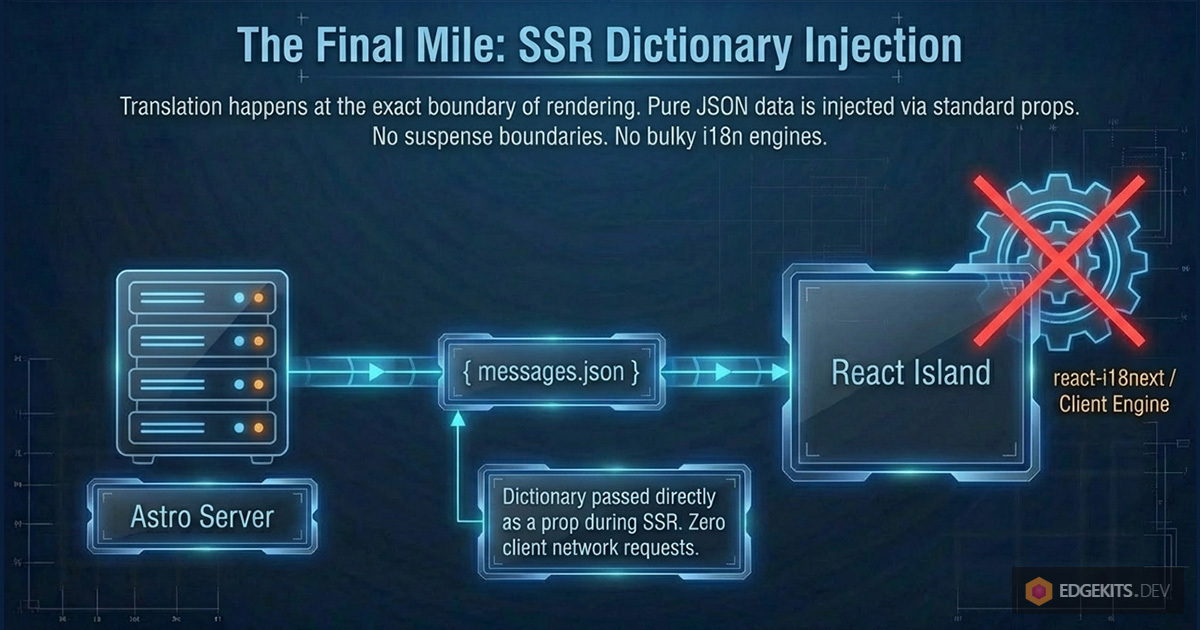
Instead of bundling a heavy i18n library (like react-i18next) and initializing translation contexts inside our React tree, we treat translations as pure data.
When the Astro server renders the page, it fetches the necessary translation namespace (e.g., messages.json) from Cloudflare KV (or the Edge Cache) and passes it directly to the React Island as a standard prop.
// src/components/islands/NewsletterFlow.tsx (Simplified)

export const NewsletterFlow = ({ t, locale }) => {
  // 't' is just a lightweight JavaScript object containing our localized strings
  const { messages, newsletter } = t

  return (
    <NewsletterForm
      // We pass only the specific dictionary needed for errors
      t={messages}
      onSubmit={subscribeAction}
      actionError={actionError} // This holds our strict code from the server
      // ...
    >
  )
}
This is the essence of Zero-JS React Hook Form localization. There are no network requests for JSON files from the client, no suspense boundaries, and no bulky i18n engines. The dictionary is just a POJO (Plain Old JavaScript Object) injected during Server-Side Rendering (SSR).
To make this completely clear, here is what that lightweight messages.json dictionary actually looks like:
// locales/en/messages.json

{
  "errors": {
    "ui": {
      "INVALID_EMAIL": "Invalid email address.",
      "EMAIL_ALREADY_EXISTS": "This email address already exists.",
      "INTERESTS_REQUIRED": "Please select at least one product.",
      "BILLING_OTHER_REQUIRED": "Please specify your billing provider."
    },
    "server": {
      "INTERNAL_SERVER_ERROR": "Something went wrong. Please try again."
    }
  },
  "common": {
    "PENDING": "Please wait",
    "SUBSCRIPTION_SUCCEED": "Thanks for your subscription!"
  }
}
The Component: FieldErrorLocalized
Inside our form, we need a component that knows how to read our domain codes and translate them using the provided dictionary.
Let's look at the anatomy of <FieldErrorLocalized >. It receives the error state from react-hook-form (which originates from Zod) and the error state from our Action (which originates from the D1 database).
// src/ui/forms/FieldErrorLocalized.tsx

import { FieldError } from '@/components/ui/field'
import { mapErrorsToI18n } from './error-mapper'

type ErrorLike = { message?: string }

interface FieldErrorLocalizedProps {
  fieldError?: ErrorLike // Error from Zod (react-hook-form)
  actionError?: string | null // Error from Astro Action
  tErrors: Record<string, string> // Our lightweight dictionary
  className?: string
}

export function FieldErrorLocalized({
  fieldError,
  actionError,
  tErrors,
  className,
}: FieldErrorLocalizedProps) {
  if (!fieldError && !actionError) return null

  // We map the domain codes to actual localized strings
  const errors = mapErrorsToI18n(
    [fieldError, actionError ? { message: actionError } : undefined],
    tErrors
  )

  if (!errors.length) return null

  // We render the standard Shadcn UI FieldError component
  return <FieldError errors={errors} className={className} >
}
The Pure Mapper
Here is the function that performs the actual translation. Because Zod and our Actions both output the domain code inside the message property, the mapping logic is beautifully simple:
// src/ui/forms/error-mapper.ts

type ErrorLike = { message?: string }

/**
 * Maps multiple error-like objects (containing domain codes) to localized messages.
 */
export function mapErrorsToI18n(
  issues: Array<ErrorLike | undefined>,
  tErrors: Record<string, string>
): ErrorLike[] {
  return issues
    .map((issue) => {
      // 1. Check if an error exists
      if (!issue?.message) return undefined

      // 2. Use the domain code (e.g., "INVALID_EMAIL") as a key in the dictionary
      const localized = tErrors[issue.message]

      // 3. If no translation is found, we don't render an empty string
      if (!localized) return undefined

      // 4. Return the translated string back in the expected format
      return { message: localized }
    })
    .filter(Boolean) as ErrorLike[]
}
The Result
By isolating localization to the very edges of the UI:
- Forms are decoupled: They don't know about i18n or Zod. They just pass errors down.
- The Domain is clean: Zod schemas and Astro Actions use strict, type-safe literal codes.
- The Bundle is tiny: We completely eliminated the need for
zod-i18n-map and any client-side localization engines. The user downloads only the exact strings needed for the current screen.
This architecture scales perfectly. Whether you add toast notifications, global process errors, or new languages, the core domain logic remains untouched, and the client performance remains at an excellent 90+.
Process Errors and Global Toasts
So far, we have covered Field-level errors - issues like a typo in an email that should be displayed directly under the input field.
But what about Process-level events? If the database connection drops unexpectedly, or if the user successfully completes the subscription flow, we need to provide global feedback. In modern UI design, this is usually handled by a Toast notification library (like Sonner).
Because our entire architecture speaks in strict domain codes, integrating localized toasts is incredibly clean. We don't want our useSubscribeNewsletter hook to import translation libraries or know about UI components. Instead, we use the Inversion of Control principle and pass simple callbacks.
Let's update our orchestrator hook to accept success and error callbacks:
// src/hooks/useSubscribeNewsletter.ts (Updated)

import { useState } from 'react'
import { actions } from 'astro:actions'
import {
  COMMON_MESSAGE_CODES,
  ERROR_MESSAGE_CODES,
  isErrorMessageCode,
  type CommonMessageCode,
  type ServerErrorCode,
} from '@/domain/messages'

export function useSubscribeNewsletter(
  locale: string,
  options: {
    onSuccess: (code: CommonMessageCode) => void
    onServerError: (code: ServerErrorCode) => void
  }
) {
  // ... state initialization

  const subscribeAction = async (values: any) => {
    // ... validation logic

    try {
      // ... action call
    } catch {
      // Server / network / unexpected errors
      options.onServerError(ERROR_MESSAGE_CODES.INTERNAL_SERVER_ERROR)
    }
  }

  const segmentationAction = async (values: any) => {
    // ... validation logic
    try {
      const { data, error } = await actions.newsLetter.segment({
        /*...*/
      })

      // ... error handling

      if (data) {
        setActionError(null)
        setStep('done')
        // Trigger the success callback with a strict domain code
        options.onSuccess(COMMON_MESSAGE_CODES.SUBSCRIPTION_SUCCEED)
      }
    } catch (error) {
      options.onServerError(ERROR_MESSAGE_CODES.INTERNAL_SERVER_ERROR)
    }
  }

  return {
    /* ... */
  }
}
Now, back in our NewsletterFlow component (our Island wrapper), we provide those callbacks. Since the wrapper already received the lightweight JSON dictionary via props during SSR, it can instantly translate the domain code and fire the toast notification.
// src/components/islands/NewsletterFlow.tsx

import { toast } from 'sonner'
import { useSubscribeNewsletter } from '@/hooks/useSubscribeNewsletter'
import type { ServerErrorCode, CommonMessageCode } from '@/domain/messages'

export const NewsletterFlow = ({ t, locale }) => {
  const { messages } = t

  const {
    // ...
    subscribeAction,
    segmentationAction,
  } = useSubscribeNewsletter(locale, {
    // We receive the domain code and map it directly to our dictionary
    onSuccess: (code: CommonMessageCode) =>
      toast.success(messages.common[code]),

    onServerError: (code: ServerErrorCode) =>
      toast.error(messages.errors.server[code]),
  })

  // ... render logic
}
And there you have it. A complete, end-to-end interactive flow that handles complex Zod validation, server-side Astro Actions, lazy-loaded components, and global toast notifications - all fully localized, fully type-safe, and without shipping a single megabyte of translation engines to the client.
API Routes, Webhooks & Internal Microservices
Throughout this article, we've relied heavily on Astro Actions for frontend-to-backend communication. In my practice, Actions are the undisputed king for UI interactions because they provide end-to-end type safety out of the box.
I use standard Astro API Routes (src/pages/api/) almost exclusively for external integrations: payment webhooks (Stripe, Paddle, LemonSqueezy), 3rd-party callbacks, or Telegram bot endpoints.
But as your SaaS scales, you will likely offload heavy background tasks to separate, internal Cloudflare Workers via Service Bindings (which allow workers to communicate with zero network latency).
Whether your boundary is an Astro Action serving a React form, or an Astro API Route serving a Telegram bot webhook, the architectural rule remains identical: Localization at the Boundary.
Imagine you have a Telegram Bot API Route that processes a subscription via an internal Billing Worker. Should that internal worker know the user's language or import dictionaries?
Absolutely not.
Internal microservices and domain logic must remain strictly language-agnostic. They communicate exclusively via machine-readable domain codes ("INSUFFICIENT_FUNDS"). It is the responsibility of the API Route (the absolute boundary facing the external world) to intercept this code and translate it right before responding:
// src/pages/api/webhooks/telegram.ts

import type { APIRoute } from 'astro'
import { fetchTranslations } from '@/domain/i18n/fetcher'

export const POST: APIRoute = async (context) => {
  const payload = await context.request.json()

  // 1. Identify the external user's preferred language (e.g., 'es')
  const userLang = payload.message?.from?.language_code || 'en'

  // 2. Call internal language-agnostic service (e.g., via Cloudflare Service Binding)
  const result = await context.locals.runtime.env.BILLING_SERVICE.chargeUser(
    payload.user_id
  )

  if (result.error) {
    // result.error is a strict domain code like "INSUFFICIENT_FUNDS"

    // 3. Fetch the dictionary specifically for this external user
    const { messages } = await fetchTranslations(
      context.locals.runtime,
      userLang,
      ['messages']
    )

    // 4. Translate at the boundary
    const text =
      messages.errors.billing[result.error] ||
      messages.errors.server.INTERNAL_SERVER_ERROR

    // Send localized response back to Telegram API
    await sendTelegramReply(payload.chat.id, text)
    return new Response('OK')
  }

  return new Response('OK')
}
By pushing localization to the extreme edges of your architecture (React Islands for the UI, and API Routes for external consumers), your internal services remain lightweight, highly cacheable, and infinitely easier to test.
Cloudflare D1 & Drizzle ORM Localization (UGC)
The final boss of internationalization is dynamic data. Translating static UI strings like "Submit" is simple, but what about data created by your users? If you are building a multi-tenant SaaS, your users might create product categories or pricing tiers that need to be localized.
How do you store this in Cloudflare D1 using Drizzle ORM? Let's look at the trade-offs of the three standard approaches.
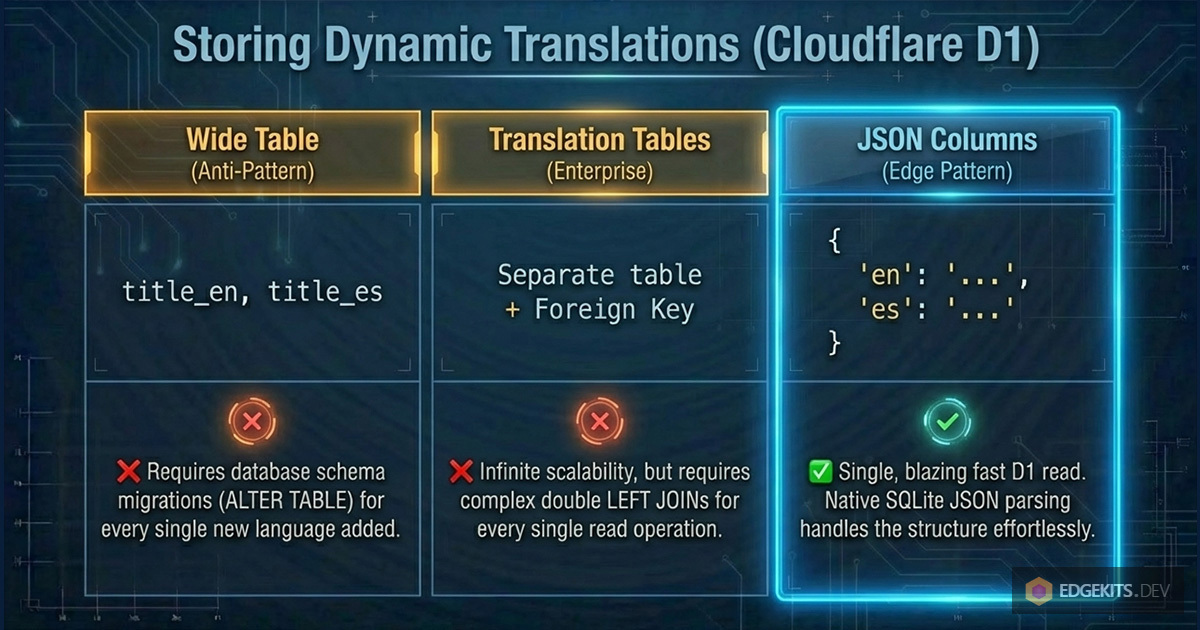
1. The Anti-Pattern: The "Wide Table"
The most common beginner mistake is adding language-specific columns to the main table:
// ❌ The Wide Table Anti-Pattern
export const products = sqliteTable('products', {
  id: integer('id').primaryKey(),
  title_en: text('title_en'),
  title_es: text('title_es'),
  title_de: text('title_de'),
})
This is an architectural dead end. Every time marketing asks to support a new language (e.g., French), you have to run a database migration (ALTER TABLE), update your Drizzle schema, and redeploy the backend.
2. The Enterprise Pattern: Translation Tables
The strict relational approach is to separate the core entity from its translations using a one-to-many relationship.
// ✅ The Relational Pattern
export const products = sqliteTable('products', {
  id: integer('id').primaryKey(),
  price: integer('price'), // Language-agnostic data
})

export const productTranslations = sqliteTable('product_translations', {
  id: integer('id').primaryKey(),
  productId: integer('product_id').references(() => products.id),
  locale: text('locale').notNull(), // 'en', 'es', 'de'
  title: text('title').notNull(),
})
Pros: Infinite scalability. Adding a new language is just inserting a new row, not modifying the schema.
Cons: It requires JOINs for every read query.
To implement Graceful Fallback (the "Split-Brain" logic we discussed in Part 1) in pure SQL, you would perform a double LEFT JOIN - once for the requested uiLocale, and once for the default fallback locale (e.g., 'en'). You then use COALESCE(es.title, en.title) to let the database automatically decide which string to return.
3. The Modern Edge Pattern: JSON Columns
Because Cloudflare D1 is built on SQLite, it has fantastic (and blazingly fast) support for JSON functions. For read-heavy Edge applications, we can leverage this to avoid JOINs entirely.
// ???? The Edge Pattern (NoSQL in SQL)
export const products = sqliteTable('products', {
  id: integer('id').primaryKey(),
  // Drizzle handles the JSON parsing automatically
  translations: text('translations', { mode: 'json' }).$type<
    Record<string, { title: string }>
  >(),
})
The stored JSON looks like this:
{
  "en": { "title": "Shoes" },
  "es": { "title": "Zapatos" }
}
Why this wins on the Edge: You retrieve the entire entity with a single, fast D1 read. There are no complex SQL joins. The Graceful Fallback logic is handled cleanly in your TypeScript DomainContext:
// Handled cleanly in the Domain Services layer
const localizedTitle =
  row.translations[uiLocale]?.title ?? row.translations['en'].title
For most SaaS use cases on Cloudflare Workers, this JSON-column approach hits the perfect sweet spot between developer experience, database performance, and schema flexibility.
Conclusion
Internationalization is rarely a feature you can just "bolt on" at the end of a project. When you treat translations as massive JavaScript bundles that must be downloaded, parsed, and executed by the client's browser, you are fundamentally crippling your application's performance.
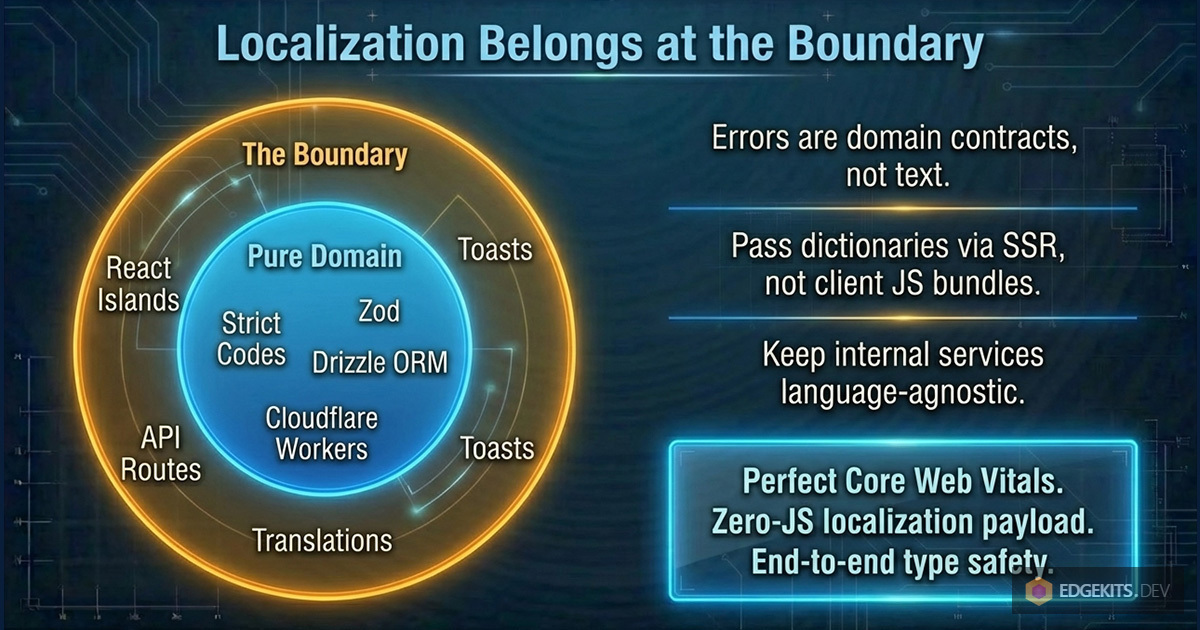
By inverting the control - by treating errors as strict domain codes, resolving languages in Astro Middleware, and isolating translations to the absolute Edge of your architecture - you achieve something rare. You get a fully localized, type-safe, complex interactive React application that still ships with a Zero-JS localization payload and perfect Core Web Vitals.
This isn't just theory. This is exactly how we built EdgeKits.
The continuation is here: Part 3: how to completely separate translation from code deployment on Cloudflare Workers. Per-namespace cache keys and the Purge API for granular, instant i18n updates.