This is a continuation of the article - see the beginning here.
The "Dumb" Client: Type-Safe i18n for Astro Islands
Astro is famous for shipping "Zero JS" by default. But in the real world, you eventually need interactivity: a Newsletter form, a Pricing toggle, or a User Dashboard. In Astro, these isolated bits of interactivity are called "Islands".
When a React Island wakes up (hydrates), it often realizes: "Wait, I need text!". The standard SPA reflex is to fire a hook like useTranslation, which triggers a network request for a JSON file, shows a loading spinner, and finally causes a Layout Shift (CLS).
The "Standard" React Way (Anti-Pattern for Edge):
// ❌ Bad: Triggers network fetch + Re-render
const { t, ready } = useTranslation()
if (!ready) return <Spinner >
return <div>{t('welcome_message')}</div>
In EdgeKits, we treat the Client as "dumb". It does not know how to fetch translations. It does not know which language is active. It simply receives data via props from the Astro Page Controller.
The Mechanism: Strict Prop Drilling
We moved the complexity from the Components to the Server. The page fetches the specific namespaces it needs from the Edge Cache and passes them down to the Island as a simple JSON object.
The EdgeKits Way:
// src/components/layout/Hero.tsx

interface HeroProps {
  // 1. Strict Type Safety: We know EXACTLY what 'hero' contains
  t: I18n.Schema['landing']['hero']
}

export function Hero({ t }: HeroProps) {
  // 2. No hooks. No generic strings. Just data.
  // 3. Renders instantly. Zero CLS.
  return <h1>{t.headline}</h1>
}
This results in Zero CLS. The HTML arrives at the browser with the text already inside the tags.
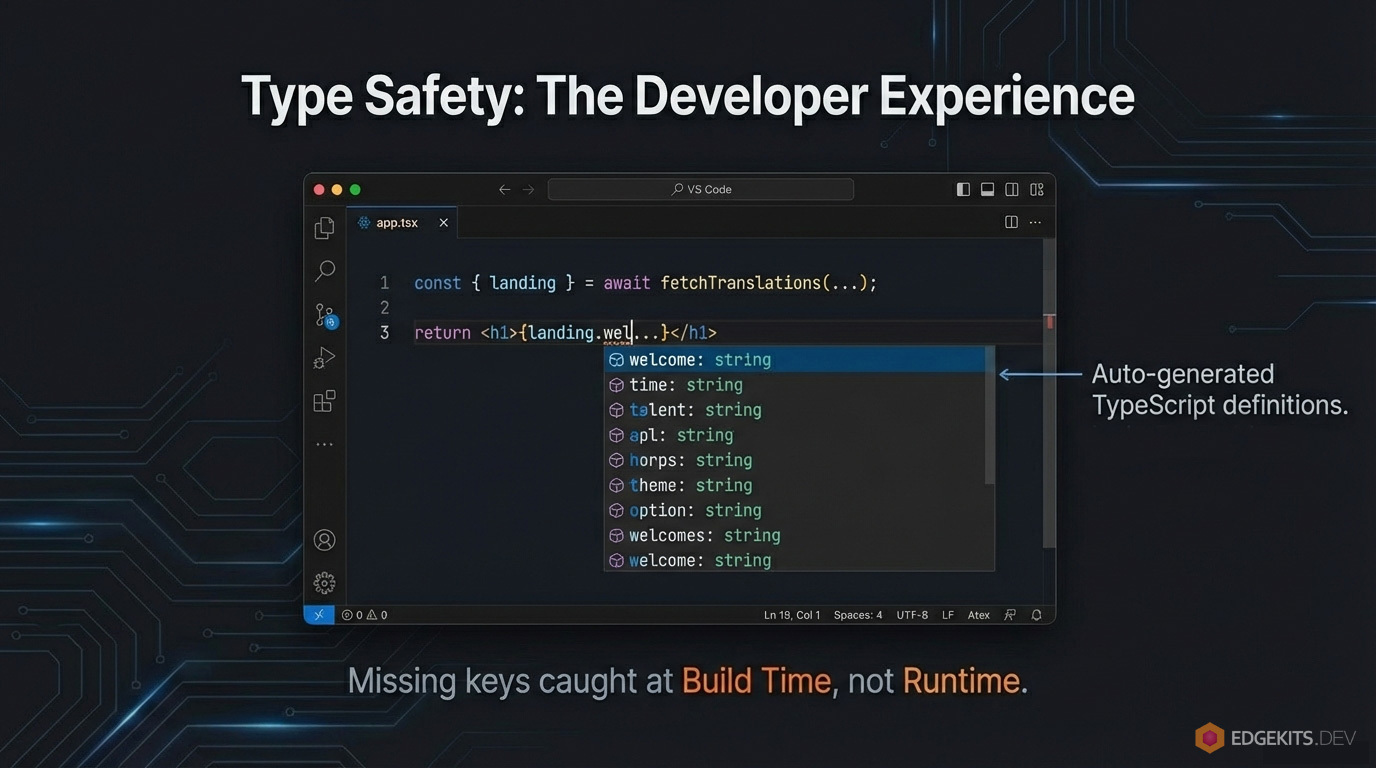
Type-Safety: "It compiles, therefore it works"
One of the biggest risks in i18n is "key drift"—when your code asks for t.description but the JSON file has t.desc. I refused to use any.
EdgeKits includes a generator script (npm run i18n:bundle) that scans your src/locales directory and generates a strict TypeScript definition file (I18n.Schema).
- If you delete a key in
en/common.json, the build fails.
- If you mistype a prop name, the build fails.
- You get autocomplete for every single string in your project.
This turns internationalization from a runtime guessing game into a compile-time guarantee.
Safe Interpolation: The fmt() Helper
Raw JSON is static, but UI is dynamic. We often need to inject variables like "Hello, {name}!".
Shipping a heavy interpolation engine like intl-messageformat to the client defeats the purpose of keeping the bundle small. Instead, I wrote a lightweight, runtime-agnostic helper called fmt().
locales/en/common.json:
{
  "welcome": "Welcome back, <strong>{name}</strong>!"
}
src/components/common/Welcome.tsx:
import { fmt } from '@/domain/i18n/format'

export function Welcome({ t, userName }) {
  // 'fmt' escapes 'userName' to prevent XSS,
  // but preserves the <strong> tag from the JSON.
  const html = fmt(t.welcome, { name: userName })

  return <span dangerouslySetInnerHTML={{ __html: html }} >
}
Localizing React Islands in Astro MDX (The "Final Boss")
Using React components inside Markdown (MDX) is easy. Using internationalized components inside Markdown is a nightmare because MDX doesn't have access to Astro.locals.
The Wrapper Pattern: SSR Prop Injection in Astro
We solve this by treating the Astro component as a "Data Controller" and the React component as a "Pure View".
Instead of making the React component fetch its own translations, we create a thin .astro wrapper that:
- Runs on the server.
- Accesses
Astro.locals.translationLocale.
- Fetches the specific translation namespace from KV (or Cache).
- Passes the data as typed props to the React component.
1. The React Component (Pure & Dumb)
// src/components/blog/islands/LocalizedCounter.tsx

import { useState } from 'react'
import { pluralIcu } from '@/domain/i18n/format'

interface LocalizedCounterProps {
  t: I18n.Schema['counter']
  initial?: number
  locale: string
}

export const LocalizedCounter = ({
  t,
  initial = 0,
  locale,
}: LocalizedCounterProps) => {
  const [count, setCount] = useState(initial)
  const formattedLabel = pluralIcu(count, locale, t.patterns)

  return (
    <div>
      <span>{count}</span>
      <span>{formattedLabel}</span>
      <button onClick={() => setCount(count + 1)}>{t.increment}</button>
    </div>
  )
}
2. The Astro Wrapper (The Bridge)
---
// src/components/blog/LocalizedCounterWrapper.astro

import { LocalizedCounter } from '@/components/blog/islands/LocalizedCounter'
import { fetchTranslations } from '@/domain/i18n/fetcher'

const { translationLocale, runtime } = Astro.locals
const { blog } = await fetchTranslations(runtime, translationLocale, ['blog'])
const t = blog.counter
---

<LocalizedCounter
  client:visible
  t={t}
  locale={translationLocale}
  labels={blog.counter}
>
3. Usage in MDX
Now we simply inject our island component wrapper into the components prop in our dynamic route, and use <LocalizedCounter > directly in our .mdx files. The specific strings needed for the counter are "baked" into the component props during the server render.
If Cloudflare KV is slow or returns an error, we cannot show a blank page.
The Safety Net: Compiled Fallbacks
We implemented a "Belt and Suspenders" approach.
- The Belt (Cloudflare KV): Stores all translations. Dynamic.
- The Suspenders (Compiled Fallbacks): We compile the Default Locale (e.g., English) directly into the Worker bundle as a JavaScript object.
How it works:
When the middleware requests translations, it performs a deepMerge operation:
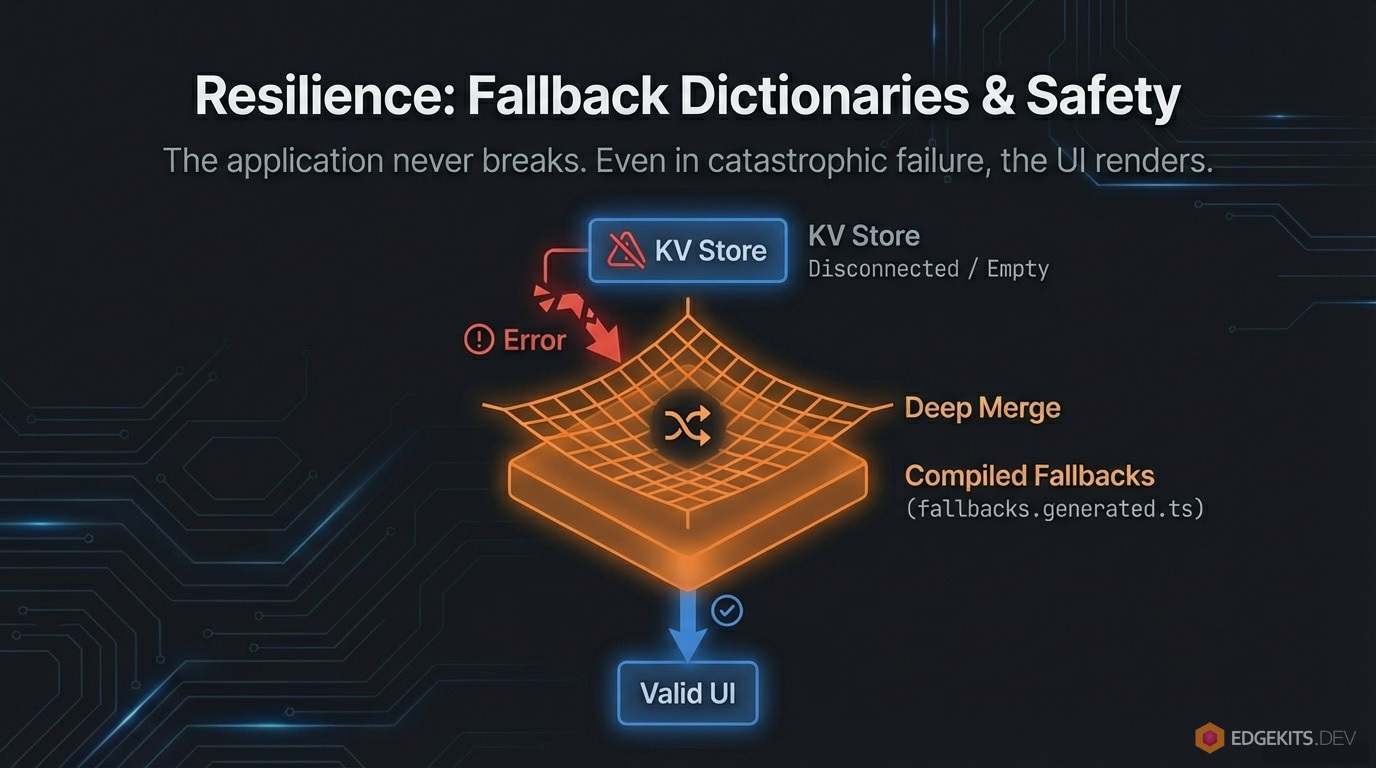
// Logic inside fetchTranslations()
const kvResult = await fetchFromKV(namespace) // Might fail or be partial
const fallback = FALLBACK_DICTIONARIES[namespace] // Always exists in memory

// If KV fails, we still render the page in English.
const finalData = deepMerge(fallback, kvResult)
This guarantees 100% Uptime for your base language.
Solving Cache Invalidation (The "Hard" Problem)
Earlier, when discussing The Cache API "Secret Sauce", we placed the Edge Cache in front of our KV store to avoid excessive reads. But how do you invalidate that cache when you fix a typo? Waiting for a TTL (Time To Live) to expire is annoying during deployments.
We solved this with Content-Based Hashing.
Every time you run the build script (npm run i18n:bundle), we calculate a SHA-hash of your translation files. This hash is injected into the code as a constant: TRANSLATIONS_VERSION.
The Cache Key structure looks like this:
project_id:i18n:v<HASH>::<locale>:<namespace>
- Scenario A (No changes): You redeploy the code, but didn't touch locales. The Hash stays the same. The Cache HIT rate remains 100%.
- Scenario B (Typo fix): You change a string in
common.json. The Hash changes. The Worker immediately starts using a new Cache Key.
The result? Instant updates for users, with zero manual cache purging required.
The Developer Experience (DX)
Working with Edge KV stores can be tedious. I didn't want to manually use wrangler kv:key put for every single JSON file.
We automated the entire workflow with three scripts:
npm run i18n:bundle: Scans src/locales, generates the TypeScript Schema, calculates the Version Hash, and prepares a single JSON payload.npm run i18n:seed: Uploads this payload to your Local KV (Miniflare) so npm run dev works offline.npm run i18n:migrate: Uploads the payload to your Production Cloudflare KV.
This makes the Edge feel just like Localhost. You change a JSON file, the types update instantly, and the data is one command away from global replication.
i18n URL Strategy: Why We Don't Translate Slugs
When building a multilingual site, the instinct is often to translate everything, including the URL path (/de/blog/architektur).
In EdgeKits, I deliberately chose not to do this. We use English Slugs across all locales (/de/blog/architecture).
Why this wins:
- Stable Sharing: The URL is clean and short in any chat app, avoiding Percent-Encoding nightmares for non-Latin alphabets.
- Simple Code: We don't need reverse-lookup maps. The file system is the source of truth.
- Automated SEO: Generating
hreflang tags becomes a simple string replacement operation.
Graceful Degradation & The "Honest UX"
By keeping the English slugs canonical, we solved the routing problem. But what happens at the file-system level?
If a user visits /es/blog/architecture, Astro will look for src/content/blog/es/architecture.mdx. If you haven't written the Spanish translation yet, the standard behavior is to throw a 404 Error. Some developers solve this by copying the English .mdx file into the /es/ folder just to prevent the crash. That is a maintenance nightmare.
Because we decoupled the user's intent (uiLocale) from the available data, we can handle this gracefully at the data-fetching layer. Inside our dynamic route ([...slug].astro), we implemented a dual-fetch fallback:
---
// pages/[lang]/blog/[...slug].astro

// ...

// 1. Try to fetch the requested translation
let post = await getEntry('blog', `${uiLocale}/${slug}`)

// 2. The Graceful Fallback: If missing, load the English original
if (!post) {
  post = await getEntry('blog', `${DEFAULT_LOCALE}/${slug}`)

  // Flag the missing content for the UI
  Astro.locals.isMissingContent = true
}

// 3. If it doesn't exist in English either, then it's a real 404
if (!post) {
  // Turns off the MissingTranslationBanner if it was triggered above
  Astro.locals.isMissingContent = false

  return Astro.rewrite(`/${uiLocale}/404/`)
}

// ...
---
The result is pure magic for the User Experience:
The article text renders in English, but the entire surrounding interface — the navigation menu, the footer, and the formatted Publish Date — remains perfectly localized in Spanish. No 404s. No duplicated files.
The Missing Translation Banner (Dual-Mode)
However, silently swapping content languages can confuse users. To solve this, I introduced the "Honest UX" pattern via a MissingTranslationBanner component.
Instead of a generic warning, the system differentiates between two distinct failure modes: Missing Content (Markdown) and Missing UI (JSON dictionaries).
Content is missing: If Astro.locals.isMissingContent was flagged by our router, the banner tells the user specifically about the text: "Sorry, this article is not yet available in your selected language."
UI is missing: What if the Markdown content exists, but a translator forgot to add blog.json to the Spanish directory? During the build phase (npm run i18n:bundle), our script statically analyzes the filesystem and generates an array of FULLY_TRANSLATED_LOCALES. If the current locale isn't in that list, the banner warns: "Sorry, this page is not yet fully available in your selected language."
Because this banner is isolated, it reads the context directly from Astro.locals and fetches its own localized strings from the messages namespace. I also added a final layer of armor: explicit hardcoded fallbacks right inside the component, just in case the messages.json dictionary itself is the one missing.
---
// src/domain/i18n/components/MissingTranslationBanner.astro

import { checkMissingTranslation } from '@/domain/i18n/resolve-locale'
import { fetchTranslations } from '@/domain/i18n/fetcher'

const missingType = checkMissingTranslation(
  Astro.locals.uiLocale,
  Astro.locals.isMissingContent,
)

let bannerText: string | null = null

if (missingType) {
  const { messages } = await fetchTranslations(
Astro.locals.runtime,
Astro.locals.translationLocale,
['messages'],
  )

  bannerText =
missingType === 'content'
  ? messages.errors.ui.MISSING_TRANSLATED_CONTENT ||
'Sorry, this article is not yet available in your selected language.'
  : messages.errors.ui.MISSING_TRANSLATED_UI ||
'Sorry, this page is not yet fully available in your selected language.'
}
---
And the function that triggers the banner:
// src/domain/i18n/resolve-locale.ts

// ...

// Checking the completeness of translations
function isFullyTranslated(locale: Locale): boolean {
  return (FULLY_TRANSLATED_LOCALES as readonly string[]).includes(locale)
}

type MissingTranslationType = 'ui' | 'content' | null

export function checkMissingTranslation(
  uiLocale: Locale,
  isMissingContent: boolean | undefined
): MissingTranslationType {
  if (!ENABLE_MISSING_TRANSLATION_BANNER) return null

  if (isFullyTranslated(uiLocale) && !isMissingContent) return null

  return isMissingContent ? 'content' : 'ui'
}
This is a robust, Zero-JS fallback mechanism that prioritizes transparency and stability above all else.
Conclusion: This Is Just the Beginning
We started this journey with a heavy, client-side approach and ended up with an architecture that is:
- Fast: Zero client-side JS for translations. 0ms CLS.
- Safe: Fully typed via generated TypeScript schemas.
- Resilient: Protected by Edge Caching and compiled Fallbacks.
- Clean: No "prop-drilling" hell, thanks to Middleware.
Parts 2 and 3 is here:
Part 2, where we tackle the Interactive Layer: Zod lazy validation, React Hook Form, and Cloudflare D1 JSON columns.
Part 3: how to completely separate translation from code deployment on Cloudflare Workers. Per-namespace cache keys and the Purge API for granular, instant i18n updates.
Get the Code
You don't have to build this from scratch. The entire architecture discussed today is available as an open-source starter kit.
Star the Repo & Start Building: https://github.com/EdgeKits/astro-edgekits-core