What you are about to see in this article is not a search for easy paths.
Let me be upfront (and I probably should have mentioned this in Part 1: if you have a simple site with two or three pages, two languages, and no interactive React Islands - just use Astro's built-in i18n routing, build it to static (output: 'static'), and don't overcomplicate your life.
But if it's a complex marketing site and/or you are building a B2B SaaS with a dynamic dashboard, tons of forms, and UGC, where users generate data and marketing demands green LCP metrics despite heavy trackers - that's when classic approaches break down, and our custom architecture pays back every minute invested in its maintenance.
All of this is dictated by my pragmatic love (if love can be pragmatic :)) for this stack and the desire to achieve maximum user convenience alongside premium Lighthouse metrics, Core Web Vitals, and proper SEO.
For a modern business, high website performance is a baseline condition for survival. You cannot count on intensive organic traffic and ad ROI if your architecture allows a "beautiful" React component to block the main thread for three long seconds.
At first glance, this task is woven from unsolvable contradictions - well then, let's try to tackle it.
Spoiler alert: I already realize that fitting all aspects of SEO-readiness and dynamic database localization into this single post is impossible. So today, I will focus strictly on the technical implementation of what was promised in Part 1.
We are still building on top of the Astro EdgeKits Core foundation, but with expanded cases. I will show you everything exactly as it is implemented in production on edgekits.dev.
The first bottleneck where the Zero-JS Astro i18n concept usually breaks down is client-side form validation. Let's see how to master react-hook-form and Zod localization on the Edge, making them work seamlessly with Shadcn UI - all without shipping heavy JSON dictionaries or client-side translation engines to the browser.
Under the Hood: The Subscription Flow Stack
To demonstrate this architecture, we will dissect the Newsletter Subscription flow. It's not just a single <input>; it's a two-step State Machine (Subscribe -> Segment -> Done) that interacts with our database.
Here is the tooling we use to make it happen:
- Database: Cloudflare D1.
- ORM & Schema Validation: Drizzle (
drizzle-orm, drizzle-kit, drizzle-zod).
- Server Logic: Astro Actions.
- Client State Management:
react-hook-form, @hookform/resolvers.
- UI Components: Extended Shadcn UI (
FieldGroup, Field, FieldLabel, Input, Select, and MultiSelect from the WebDevSimplified (WDS) Shadcn Registry by Kyle Cook.
The Bottleneck: Zod i18n and Client Bundle Bloat
When you build an interactive form in React, the industry-standard reflex is to pair react-hook-form with Zod for validation.
But when you need to internationalize those validation errors (e.g., turning "Invalid email" into "Correo electrónico no válido"), the standard ecosystem pushes you toward packages like zod-i18n-map.
This is a dead end for performance.
To make it work, you have to ship the entire Zod translation dictionary to the client. Suddenly, your carefully optimized, lightweight React Island is dragging an extra 30-50KB of JSON and localization logic into the browser. The main thread chokes, TBT (Total Blocking Time) spikes, and your Web Vitals turn yellow.
We need to validate data on the client to provide instant feedback, but we cannot afford to ship the translations. How do we break this loop?
Zero-JS Validation: Error Codes as a Domain Contract
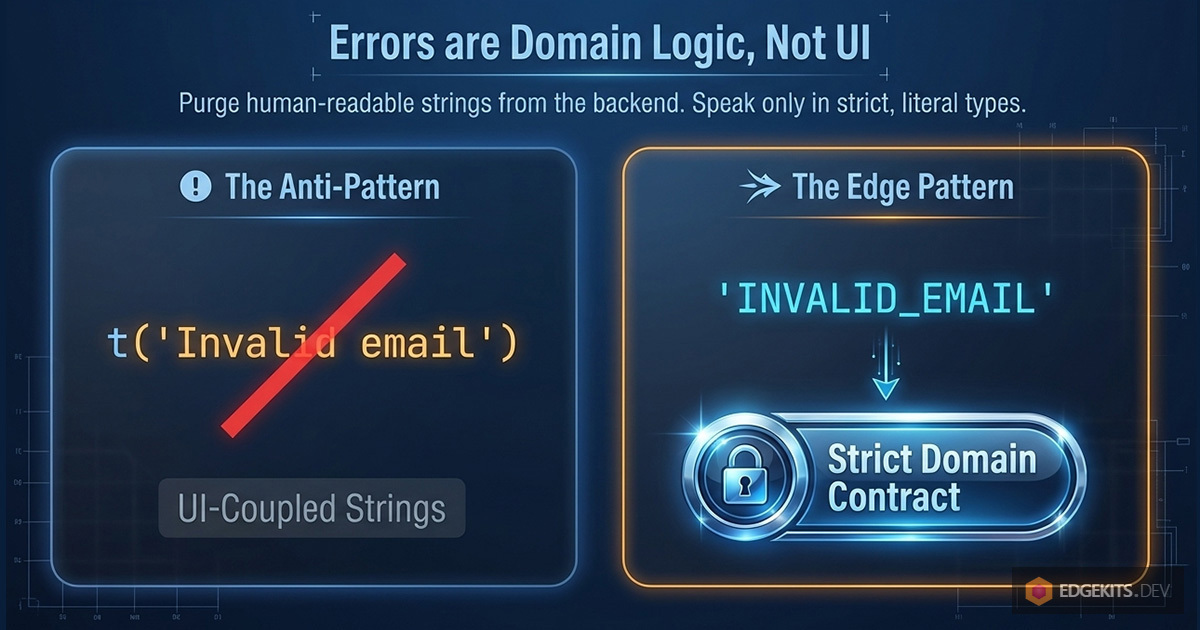
The root of the problem is treating an error as a string of text.
In a typical application, the UI, the API routes, and the domain logic all know about the t() function. Errors are translated the moment they are created. This creates a chaotic system where it is impossible to understand where an error originated, how to log it, or how to reliably change its language context.
In EdgeKits, we introduced a strict paradigm shift: An error is a part of the domain, not the UI.
Step 1: Strict Literal Types
We replaced translated strings with strict, language-agnostic literal types. We created a single, unified dictionary of error codes for the entire application.
// src/domain/messages/error-codes.ts

// Server actions/apis errors
export const SERVER_ERROR_CODES = {
  INTERNAL_SERVER_ERROR: 'INTERNAL_SERVER_ERROR',
} as const

export type ServerErrorCode =
  (typeof SERVER_ERROR_CODES)[keyof typeof SERVER_ERROR_CODES]

// UI / Validation Errors
export const UI_ERROR_CODES = {
  // Newsletter / identity
  INVALID_EMAIL: 'INVALID_EMAIL',
  EMAIL_ALREADY_EXISTS: 'EMAIL_ALREADY_EXISTS',
  FAILED_TO_INSERT_SUBSCRIBER: 'FAILED_TO_INSERT_SUBSCRIBER',
  // Segmentation
  INTERESTS_REQUIRED: 'INTERESTS_REQUIRED',
  BILLING_OTHER_REQUIRED: 'BILLING_OTHER_REQUIRED',
} as const

export type UiErrorCode = (typeof UI_ERROR_CODES)[keyof typeof UI_ERROR_CODES]

// Merge for usecases where both groups are needed
export const ERROR_MESSAGE_CODES = {
  ...SERVER_ERROR_CODES,
  ...UI_ERROR_CODES,
} as const

export type ErrorMessageCode =
  (typeof ERROR_MESSAGE_CODES)[keyof typeof ERROR_MESSAGE_CODES]
Why this matters:
as const ensures these are strict literal types, not generic strings.- We avoid TypeScript
enums, which are better for edge compatibility and serialization.
- There is only one set of error codes across the entire product.
Step 2: Zod Speaks in Codes
Now, we enforce this contract at the schema level. When we define our Zod schema for the newsletter form, we don't write human-readable messages. We map the validation failures directly to our domain codes.
// src/db/forms.ts

// In reality, this schema is wider - we're omitting those fields here for brevity and focusing on validation.

import { z } from 'zod'
import { createInsertSchema } from 'drizzle-zod'
import { subscribers } from '@/db/schema'
import { ERROR_MESSAGE_CODES } from '@/domain/messages'

const SubscriberInsertSchema = createInsertSchema(subscribers)

export const NewsletterFormSchema = SubscriberInsertSchema.pick({
  email: true,
}).extend({
  // Zod returns a domain code instead of a string
  email: z.email({ message: ERROR_MESSAGE_CODES.INVALID_EMAIL }),
})

export type NewsletterFormData = z.infer<typeof NewsletterFormSchema>
If a user enters foo@bar into the client-side form, Zod doesn't try to figure out if the user is German or Japanese. It simply returns "INVALID_EMAIL".
The validation logic is now completely decoupled from the localization layer. The client bundle remains incredibly small because it only contains the schema rules, not the dictionaries.
But what happens when the error doesn't come from Zod, but from the backend? This is where Astro Actions step in.
Astro Actions Error Handling & The DomainContext Pattern
So, Zod now returns "INVALID_EMAIL" instead of a human-readable string. But client-side validation is only the first line of defense. What happens when the data is valid, but the business logic fails on the backend? For example, the user submits an email that already exists in your database.
In Astro, the bridge between the client and the server is handled by Astro Actions. However, when running on Cloudflare Workers, we face a unique architectural challenge: bindings.
To access your D1 database or KV namespaces, you need the Cloudflare Env object. Passing this env object through every single service, repository, and utility function is a notorious DX nightmare that pollutes your domain logic with infrastructure details.
(A quick side note: If you are already using the shiny new Astro 6.x with the updated Cloudflare adapter, you can now import { env } from 'cloudflare:workers' directly anywhere in your server code. However, this project is built on Astro 5.x, where env is strictly injected into the request context. More importantly, regardless of the framework version, keeping infrastructure imports out of your domain logic remains a superior architectural pattern for testability and decoupling).
The DomainContext Solution
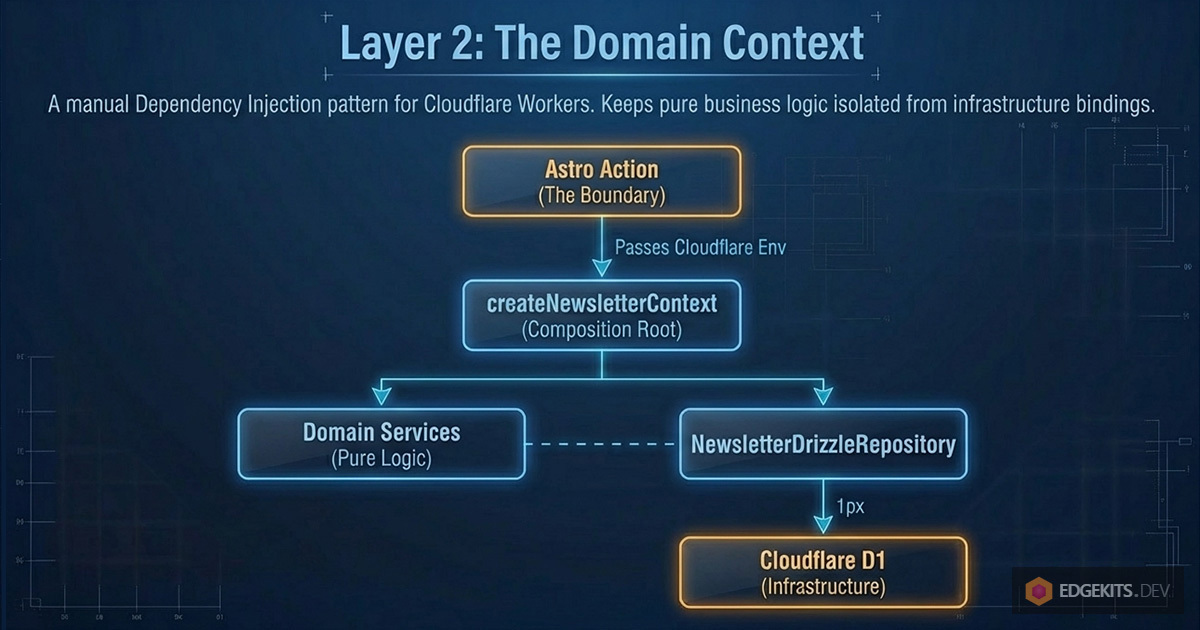
To keep our actions clean and our domain edge-native, we use a strict DomainContext pattern.
A DomainContext is a request-scoped composition root. It is the only place where the Cloudflare Env is used to wire up repositories and services. The Astro Action simply creates the context and delegates the work.
Here is a simplified diagram of this architecture:
graph TD
    A[Astro Action] -->|Passes Env| B(createNewsletterContext)
    B -->|Initializes| C[NewsletterDrizzleRepository]
    B -->|Wires up| D[Domain Services]
    D -.->|Uses| C
    C -.->|Queries| E[(Cloudflare D1)]
Let's break down what is happening here:
- Astro Action: The starting point. This is the Astro server function that receives data from the user. It passes the environment variables (Cloudflare bindings) further down the chain.
- createNewsletterContext: The initializer. It creates the execution "context" - gathering all the necessary tools for the newsletter operations in one place.
- NewsletterDrizzleRepository: The data access layer. It uses the Drizzle ORM to translate our code into raw SQL queries.
- Domain Services: The business logic. This is the "brain" of the application that decides exactly what needs to be done with the data before saving it. It uses the repository to communicate with the database.
- Cloudflare D1: The final destination. The serverless relational SQL database on the Cloudflare platform where the data is physically stored.
The takeaway: What we have here is a classic manual Dependency Injection pattern. The business logic (Services) is completely decoupled from the database operations (Repository), and everything is cleanly wired together inside a single context the exact moment the Action is invoked.
And here is the actual implementation from our codebase:
// src/domain/newsletter/context.ts

import { NewsletterDrizzleRepository } from './repository'
import { validateContact } from './services'

export function createNewsletterContext(env: Env) {
  // 1. Initialize the concrete repository with Env (D1 binding)
  const repository = new NewsletterDrizzleRepository(env)

  // 2. Return the public API of the domain
  return {
    repository,

    validateContact(input: { email: string }) {
      // The service knows about the repository interface, but knows nothing about Env
      return validateContact(repository, input)
    },

    addContactToDb: async (input: any) => {
      return await repository.insertContact(input)
    },
  }
}
To complete the picture, let's take a look at the validateContact service itself, which is invoked inside the context:
// src/domain/newsletter/services/validate-contact.ts

import { checkEmailExists } from './validation/check-email-exists'
import type { NewsletterRepository } from '../repository/interface'

export async function validateContact(
  repo: NewsletterRepository,
  input: { email: string }
) {
  await checkEmailExists(repo, input.email)
}
But where does that strict error code actually come from? Let's go one level deeper into the checkEmailExists helper to see how the circle completes:
// src/domain/newsletter/services/validation/check-email-exists.ts

import { ERROR_MESSAGE_CODES } from '@/domain/messages/error-codes'
import type { NewsletterRepository } from '../../repository'

export async function checkEmailExists(
  repo: NewsletterRepository,
  email: string
): Promise<void> {
  const exists = await repo.existsByEmail(email)

  if (exists) {
    // We throw the strict domain code, not a localized string!
    throw new Error(ERROR_MESSAGE_CODES.EMAIL_ALREADY_EXISTS)
  }
}
Everything here is crystal clear: the services layer knows absolutely nothing about Cloudflare, the Env object, or the D1 database. It simply accepts a strict, abstract repository interface (NewsletterRepository) and executes pure business logic.
This makes your domain 100% testable and completely independent of the underlying infrastructure. If you decide to migrate from D1 to PostgreSQL, or swap Drizzle for Prisma tomorrow, this code won't change by a single line.
Now, look how clean and readable the actual Astro Action becomes:
// src/actions/newsletter.ts

import { ActionError, defineAction } from 'astro:actions'
import { NewsletterActionInputSchema } from './schema'
import { createNewsletterContext } from '@/domain/newsletter/context'
import { ERROR_MESSAGE_CODES, isErrorMessageCode } from '@/domain/messages'

export const newsLetter = {
  subscribe: defineAction({
    input: NewsletterActionInputSchema,
    handler: async (input, context) => {
      // 1. Initialize the domain context using Cloudflare Env
      const newsletter = createNewsletterContext(context.locals.runtime.env)

      try {
        // 2. Execute business logic
        await newsletter.validateContact(input) // Throws if email is filthy or exists

        // Enrich data with Cloudflare Geo-IP before saving
        const { timezone, country, city } = context.locals.runtime.cf ?? {}
        const subscriberId = await newsletter.addContactToDb({
          ...input,
          timezone,
          country,
          city,
        })

        return subscriberId
      } catch (error) {
        // 3. Catch domain errors and safely escalate them to the client
        if (error instanceof Error && isErrorMessageCode(error.message)) {
          throw new ActionError({
            message: error.message, // e.g., "EMAIL_ALREADY_EXISTS"
            code: 'BAD_REQUEST',
          })
        }

        // Fallback for unexpected system crashes
        throw new ActionError({
          message: ERROR_MESSAGE_CODES.INTERNAL_SERVER_ERROR,
          code: 'INTERNAL_SERVER_ERROR',
        })
      }
    },
  }),
}
Two important details here:
- The Input Schema: Notice that we use
NewsletterActionInputSchema instead of directly reusing the database insert schema. Why? Because API inputs rarely match the database 1:1. The client sends a locale and an email, but the action enriches the payload with Cloudflare's cf object (like country and city) before passing it to the database.
- The Type Guard (
isErrorMessageCode): When the domain throws an error, we need to ensure we don't accidentally leak a raw SQL error or a stack trace to the frontend. isErrorMessageCode is a strict TypeScript type guard that checks if error.message exactly matches one of our predefined codes in ERROR_MESSAGE_CODES. If it doesn't, we swallow it and return a generic INTERNAL_SERVER_ERROR.
Reducing React Bundle Size: Lazy Loading & State
We now have a client that sends data and a server that safely returns strict Error Codes. How does the UI manage this communication flow without turning into a tangled mess of useEffect hooks?
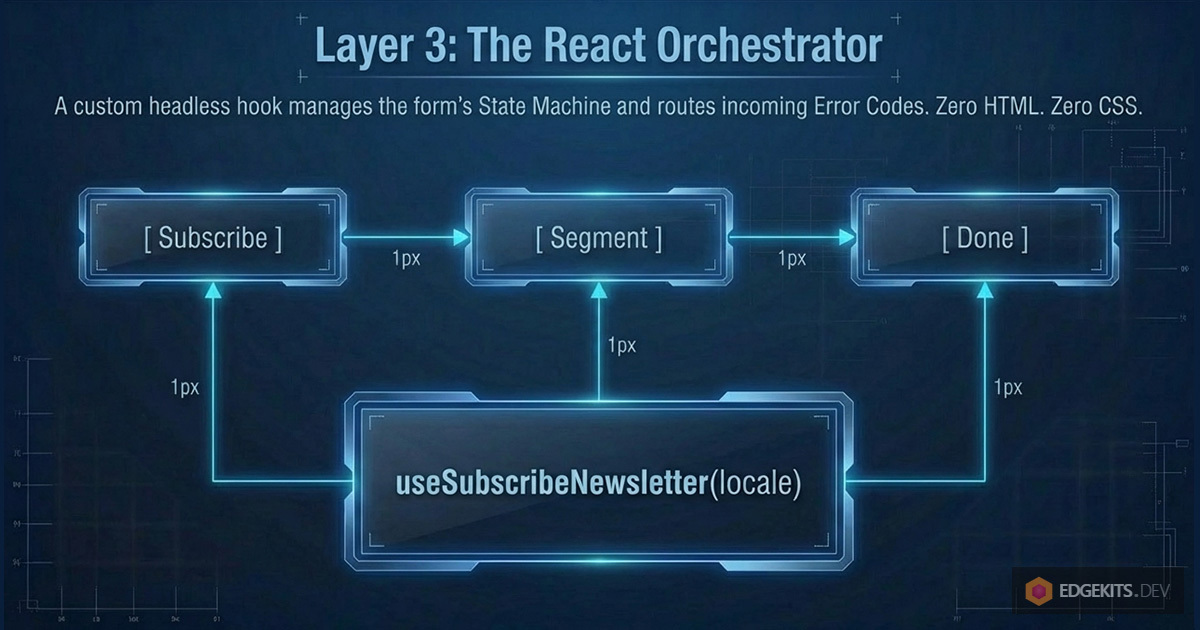
We decouple the UI components from the business process by introducing a custom hook: useSubscribeNewsletter.
This hook acts as the Orchestrator. It doesn't know anything about CSS or HTML. Its only job is to manage the form's State Machine (subscribe -> segment -> done), communicate with the Astro Action, and route the Error Codes to the React components.
// src/hooks/useSubscribeNewsletter.ts

import { useState } from 'react'
import { actions } from 'astro:actions'
import { isErrorMessageCode, ERROR_MESSAGE_CODES } from '@/domain/messages'

export function useSubscribeNewsletter(locale: string) {
  const [step, setStep] = useState<'subscribe' | 'segment' | 'done'>(
    'subscribe'
  )
  const [pending, setPending] = useState(false)
  const [actionError, setActionError] = useState<string | null>(null)
  const [subscriberId, setSubscriberId] = useState<number | null>(null)

  const subscribeAction = async (values: any) => {
    setPending(true)

    try {
      const { data, error } = await actions.newsLetter.subscribe({
        ...values,
        locale,
      })

      if (error) {
        if (error.code === 'BAD_REQUEST') {
          // Store the strict domain code (e.g., "EMAIL_ALREADY_EXISTS")
          if (isErrorMessageCode(error.message)) {
            setActionError(error.message)
            return
          }
          // Fallback for an uncovered key
          setActionError(ERROR_MESSAGE_CODES.INVALID_EMAIL)
          return
        }
        throw error
      }

      if (data) {
        setActionError(null)
        setSubscriberId(data) // Save ID for the next step
        setStep('segment') // Move state machine forward
      }
    } catch {
      // We will handle global toast notifications here later
    } finally {
      setPending(false)
    }
  }

  // segmentationAction omitted for brevity, but it follows the exact same pattern

  return { pending, step, actionError, setActionError, subscribeAction }
}
Continued here