Every team that ships an agent has the same week-three conversation. The agent picks the wrong tool. It calls three tools where one would do. It burns forty thousand tokens reading things it will never use. Somebody says "the model isn't smart enough for this," somebody else proposes a bigger model, and the bill goes up while the behavior stays the same.
Almost none of that is a reasoning failure. The tool layer is the agent's entire interface to the world, and most tool layers are accidents — a thin wrapper generated from an OpenAPI spec, descriptions copied from docstrings, responses that are whatever the ORM happened to serialize. You would not ship a public API designed that way. The model is reading that API as its only instructions.
I teach AI engineering at Cursuri-AI.ro, and in agent reviews the same eight defects come up over and over. Here they are, with the fix for each and the specific API mechanics that make the fix work.
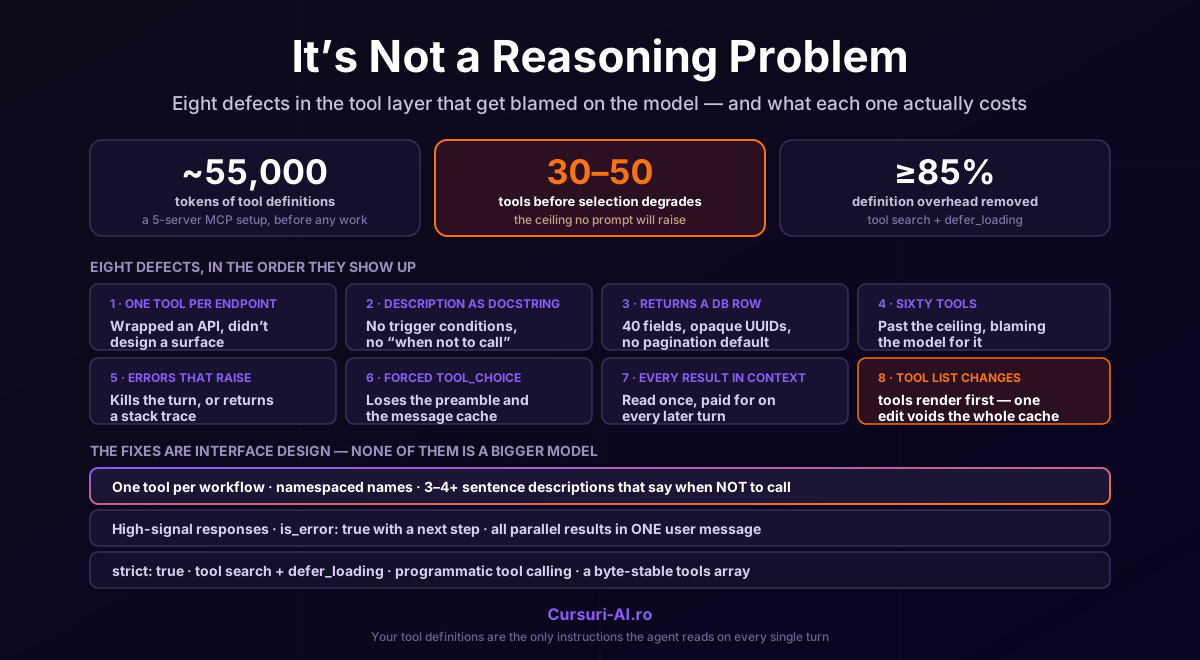
The fastest way to give an agent tools is to map one tool per endpoint. It's also the reason your agent has sixty tools, forty of which are never called, and a selection problem that no prompt will fix.
An HTTP API is designed for a caller that already knows what it wants. An agent is a caller that is deciding what it wants, from a menu it re-reads on every turn. Those are different design targets. Anthropic's guidance is explicit about consolidation: rather than a separate tool for every action — create_pr, review_pr, merge_pr — group them into a single tool with an action parameter. Fewer, more capable tools reduce selection ambiguity.
The heuristic that works: one tool per workflow the agent actually performs, not one per endpoint you happen to expose. If a human using your product would think of it as one job, it's one tool, even if it's four HTTP calls behind the scenes. Anthropic's engineering write-up on the subject, Writing effective tools for agents — with agents (September 2025), leads with exactly this: more tools don't lead to better outcomes; build for high-impact workflows instead of wrapping every endpoint.
While you're there, fix the names. Tool names must match ^[a-zA-Z0-9_-]{1,64}$, and within that, namespace by service or resource — github_list_prs, slack_send_message. This costs nothing, disambiguates overlapping functionality as the library grows, and becomes load-bearing the moment you turn on tool search (defect #4).
2. The description is a docstring, not a policy
This is the highest-leverage change in the entire article, and it's free.
A tool description is not documentation for a developer who has already decided to call the function. It is the policy the model uses to decide whether to call it at all. Anthropic's own guidance calls detailed descriptions "by far the most important factor in tool performance" and recommends at least 3–4 sentences per tool, more for complex ones, covering what the tool does, when it should be used and when it shouldn't, what each parameter means, and what the tool does not return.
That last clause is the one everybody omits, and it's where hallucinated tool calls come from. If get_stock_price returns only a price, say so — otherwise the model will reach for it when the user asks about market cap, get a number, and reason from it.
// Bad — a docstring. The model has to guess everything that matters.
{
  "name": "get_stock_price",
  "description": "Gets the stock price for a ticker.",
  "input_schema": {
    "type": "object",
    "properties": { "ticker": { "type": "string" } },
    "required": ["ticker"]
  }
}
// Good — a policy. Trigger conditions, scope, limits, parameter semantics.
{
  "name": "get_stock_price",
  "description": "Retrieves the current stock price for a given ticker symbol. The ticker must be a valid symbol for a publicly traded company on a major US exchange like NYSE or NASDAQ. Returns the latest trade price in USD. Use this when the user asks about the current or most recent price of a specific stock. It will not provide any other information about the stock or company.",
  "input_schema": {
    "type": "object",
    "properties": {
      "ticker": {
        "type": "string",
        "description": "The stock ticker symbol, e.g. AAPL for Apple Inc."
      }
    },
    "required": ["ticker"]
  }
}
Two amplifiers worth knowing:
Be prescriptive about when, not just what. Recent Opus-generation models reach for tools more conservatively than their predecessors, and an explicit trigger condition in the description ("call this when the user asks about current prices or recent events") gives measurable lift in should-call rate. If you migrated an agent to a newer model and it now under-calls your tools, this is usually the reason — and it's a description problem, not a model problem.
For format-sensitive inputs, add input_examples. It's an optional array of example input objects on the tool definition, each validated against your input_schema — an invalid example returns a 400 rather than failing silently. They're worth their weight for nested objects and optional parameters, and the cost is bounded and known: roughly 20–50 tokens for a simple example, 100–200 for a complex nested one. Note they don't apply to server-side tools, or to the computer use and browser use toolsets.
"input_examples": [
    {"location": "San Francisco, CA", "unit": "fahrenheit"},
    {"location": "Tokyo, Japan", "unit": "celsius"},
    {"location": "New York, NY"},          # shows that `unit` is optional
]
An agent's context window is a budget, and tool responses are the line item that grows without anyone approving it. A get_customer that returns 40 fields because that's what the table has will spend 800 tokens to deliver the 20 the model needed — every call, every turn, for the rest of the conversation.
Design responses for the reader:
- Return only high-signal fields. What does the agent need to decide its next step? Everything else is noise that also costs money.
- Return semantic, stable identifiers — slugs, human-meaningful names — rather than opaque internal references. A UUID tells the model nothing and cannot be reasoned about;
acme-corp can be matched against what the user said.
- Paginate, filter and truncate by default, and say so in the response. A tool that returns "showing 20 of 4,312 results; narrow with
status or created_after" is teaching the model to search better next time. A tool that returns 4,312 rows has just ended the conversation.
There is a measured ceiling here, and it's lower than most people expect: tool selection accuracy degrades once you exceed roughly 30–50 available tools. And the cost arrives before any work happens — a typical multi-server MCP setup (GitHub, Slack, Sentry, Grafana, Splunk) consumes around 55,000 tokens of tool definitions before the agent does a single useful thing.
Consolidation (defect #1) is the first lever. When you genuinely need a large library, the mechanism is the tool search tool, which flips the model from "read every definition up front" to "search the catalog and load what's needed" — typically cutting that definition overhead by more than 85%, loading only the 3–5 tools a given request actually requires.
tools = [
    # The search tool itself must NOT be deferred.
    {"type": "tool_search_tool_regex_20251119", "name": "tool_search_tool_regex"},

    # Hot path — keep your 3-5 most-used tools loaded up front.
    {"name": "github_list_prs", "description": "...", "input_schema": {...}},

    # Everything else: known to the request, absent from the context window.
    {"name": "grafana_query_range", "description": "...", "input_schema": {...},
     "defer_loading": True},
    {"name": "splunk_search", "description": "...", "input_schema": {...},
     "defer_loading": True},
]
The mechanics that trip people up:
defer_loading controls what enters the context window, not what you send. You still transmit every tool definition on every request; the API needs them server-side to run the search and expand the matches.- At least one tool must be non-deferred or the request is rejected with a 400 (
All tools cannot be deferred). Deferring the search tool itself is the classic mistake.
- Both variants — regex (
tool_search_tool_regex_20251119, Python re.search patterns, 200-char max) and BM25 (tool_search_tool_bm25_20251119, natural language, 500-char max) — search names, descriptions, argument names and argument descriptions. Which is the real reason defect #2 matters at scale: a tool with a one-line description is a tool the search can't find.
- Limits are generous: up to 10,000 deferred tools per request, 5 results per search by default.
- A deferred tool cannot carry
cache_control (400). Put your cache breakpoint on a non-deferred tool.
Rule of thumb from the docs: reach for tool search at 10+ tools, or when definitions exceed 10k tokens, or when you're aggregating MCP servers into the hundreds. Below 10 tools with small definitions, plain tool calling is the better fit — don't add the machinery for six tools.
5. Your error handling raises, or returns the string "Error"
When a tool fails, there are three things you can do, and two of them are wrong.
Wrong: let the exception escape and kill the turn. The agent had a recoverable problem — a 404 on one of five lookups — and you turned it into a failed request.
Also wrong: return "Error", or the raw stack trace. The model now knows something went wrong and nothing about what to do instead, so it retries the identical call, or invents a workaround.
Right: return a tool_result with is_error: true and a message written for a reader who has to decide what to do next.
{
    "type": "tool_result",
    "tool_use_id": block.id,
    "is_error": True,
    "content": (
        "No customer found with email '*Emails are not allowed*ple'. "
        "Emails are matched exactly and are case-sensitive. "
        "Try customer_search with a partial name, or ask the user to confirm the address."
    ),
}
That reads like an error message written by someone who wanted the caller to succeed — because that's exactly what it is. Models recover from these remarkably well; they cannot recover from KeyError: 'id'.
Two adjacent rules that cause silent damage when broken:
- Never drop a failed tool's result. Every
tool_use block needs a matching tool_result with the right tool_use_id. A missing one is a malformed conversation.
- Return all results from a parallel batch in a single user message. Parallel tool use is on by default: one assistant message can contain several
tool_use blocks. If you split the results across multiple user messages, nothing errors — you have simply taught the model, in-context, that parallel calls don't work here, and it stops making them. Your agent gets slower and nobody knows why.
tool_choice has four settings — auto (the default when tools are present), any (must call some tool), tool (must call this one), none. Forcing looks like a free reliability win. It isn't free:
- With
any or tool, the API prefills the assistant message to force a tool call, which means the model emits no natural-language text before the tool_use block — even if you asked it to. If your UI renders "Let me look that up…" while the tool runs, forcing removes it.
- Changing
tool_choice mid-conversation invalidates cached message blocks. Tool definitions and system prompt stay cached; message content gets reprocessed. Flipping the setting per turn quietly costs you your message cache.
- Forced tool use is incompatible with manual extended thinking (
thinking: {type: "enabled"}) and errors out. Adaptive thinking — including on models where thinking is on by default, like Claude Opus 5 — supports it.
Two better options for most cases. If you want the preamble and the tool, keep tool_choice: auto and ask in the user message ("…use the get_weather tool in your response") — the docs are explicit that this doesn't degrade performance. If you want a hard guarantee on the arguments, that's strict, not tool_choice:
{
    "name": "create_invoice",
    "description": "...",
    "strict": True,                  # top-level on the tool, NOT on tool_choice
    "input_schema": {
        "type": "object",
        "properties": {...},
        "required": ["customer_id", "amount_cents"],
        "additionalProperties": False,   # required for strict
    },
}
Strict mode constrains the generated call to validate exactly against your schema. Combined with tool_choice: {"type": "any"} you get both guarantees: a tool will be called, and its input will parse. And it composes with deferred loading — the strict grammar is built from the full toolset, so tool search and strict mode work together without recompilation.
7. Every intermediate result lands in the context window
Standard tool use is a round trip per call: the agent calls, the result enters its context, it reasons, it calls again. Three sequential lookups — read profile, fetch orders, check inventory — is three round trips, three latency hits, and three payloads permanently resident in context. Most of that data is read once and never needed again.
Programmatic tool calling removes the round trips. Claude writes a script that runs in the code execution container; when the script calls one of your tools, execution pauses, the call runs, and the result returns to the running code rather than to the model's context. Loops, filters and branches happen in normal control flow. Only the script's final output comes back.
tools = [
    {"type": "code_execution_20260120", "name": "code_execution"},
    {
        "name": "get_order_history",
        "description": "...",
        "input_schema": {...},
        "allowed_callers": ["code_execution_20260120"],   # callable from the script
    },
]
Token cost now scales with the final answer, not with everything the agent had to read to produce it. This is the right tool for "check these 200 records and tell me which three are anomalous" — a task that is otherwise a context-window disaster.
Constraints to know before you reach for it: it's not compatible with strict: true, disable_parallel_tool_use, forced tool_choice, or MCP tools; and when you respond to a pending programmatic call, the user message must contain only tool_result blocks, no text.
Prompt caching is a prefix match, and the render order is tools → system → messages. Tools sit at the very front. Add one tool mid-session, remove one, or reorder them, and you have changed byte zero of the prefix — every cached token after it is invalidated. On a long agent session that is a real, recurring, entirely self-inflicted bill.
There are two supported ways to have a changing tool set without paying that:
- Tool search (defect #4) is the discovery answer. Deferred tools are excluded from the system-prompt prefix, and when Claude finds one, the API appends a
tool_reference inline in the conversation and expands it. The prefix is untouched, so the cache survives.
- Mid-conversation tool changes (beta header
mid-conversation-tool-changes-2026-07-01, Claude Opus 5 onward) is the control answer, for when your application decides the tool set changed — a mode switch, a capability you want to revoke. Additions and removals are content blocks on a {"role": "system", ...} message appended to messages[]:
messages.append({
    "role": "system",
    "content": [
        {"type": "tool_removal",
         "tool": {"type": "tool_reference", "name": "deploy_to_production"}},
    ],
})
A tool you plan to add this way must already be declared in tools[] with defer_loading: True. And to change an existing tool's definition, do it across two requests: send the tool_removal first, then carry the conversation forward with the updated entry.
Use the first when the model should discover; use the second when your app should decide.
The bonus defect: everything is a bash call
One structural choice underlies several of the above. A bash tool gives the agent enormous breadth — it can do nearly anything — but it hands your harness an opaque command string, identically shaped for every action. Promote an action to a dedicated tool and the harness gets typed arguments it can act on:
- Gate it. Hard-to-reverse actions — sending a message, deleting data, calling an external API — can sit behind a confirmation.
send_email is trivial to gate; bash -c "curl -X POST ..." is not.
- Enforce invariants. A dedicated
edit tool can reject a write when the file changed since the agent last read it. Bash cannot express that.
- Render it. Some actions deserve real UI — a question the agent asks the user is far better as a modal than as text in a stream.
- Parallelize it. Read-only tools can be marked parallel-safe. Through bash, the harness can't distinguish a safe
grep from an unsafe git push, so it must serialize everything.
Start with bash for breadth; promote to dedicated tools exactly when you need to gate, enforce, render, or parallelize.
The review checklist
Run this over your tool definitions before blaming the model:
- [ ] One tool per workflow, not per endpoint. Related actions consolidated behind an
action parameter.
- [ ] Names namespaced by service, inside
^[a-zA-Z0-9_-]{1,64}$.
- [ ] Every description is 3–4+ sentences and says when not to call, and what the tool does not return.
- [ ] Every parameter has its own description; fixed sets use
enum.
- [ ]
input_examples on any tool with nested or format-sensitive input.
- [ ] Responses return high-signal fields and semantic identifiers, with pagination and truncation defaults.
- [ ] Failures come back as
tool_result with is_error: true and a next-step message.
- [ ] Every
tool_use has a matching tool_result; parallel results ship in one user message.
- [ ]
strict: true (+ additionalProperties: false) wherever malformed input would be expensive.
- [ ] Past ~30 tools or ~10k tokens of definitions: tool search with
defer_loading, hot tools kept loaded.
- [ ] Large intermediate results go through programmatic tool calling, not the context window.
- [ ] The tool array is byte-stable across a session; changes go through tool search or the mid-conversation mechanism.
Nothing here requires a bigger model. It's interface design — the same discipline you'd apply to an API used by a very capable colleague who is reading the docs for the first time on every single request.
I teach this material at Cursuri-AI.ro — including agent architecture and automation, context engineering and memory for agents, and building MCP servers and integrations. If your agent misbehaves, start by reading its tool definitions out loud — you'll usually find the bug before you finish.
