
When I started building EdgeKits.dev, the stack felt like a cheat code for 2026.
Astro on the frontend. Cloudflare Workers on the backend. All-in on the Edge. It promised and delivered incredible TTFB, out-of-the-box SEO, and cheap scalability.
Then the magic broke.
I hit the wall of Astro Internationalization (i18n). It should have been trivial: take a set of JSON files (en.json, de.json) and show the user the right text. But when I surveyed the standard ecosystem - from established tools like astro-i18next to modern solutions like Paraglide JS - I realized they all carried architectural baggage that I couldn't justify shipping in an environment where every byte and every millisecond counts.
In this deep dive, we'll build a completely Zero-JS, Edge-Native i18n architecture. I will show you how to move your routing logic to Astro Middleware, store translation dictionaries in Cloudflare KV, and render localized React Islands without shipping a single byte of JSON to the client.
Why the "Perfect Stack" Cracked
In the SPA world, we accept a lazy pattern: the client loads, detects the browser language, fetches a 50KB translation file, and then the interface makes sense. But in the world of Astro and Island Architecture, this approach starts to feel like an architectural atavism.
I tried fitting standard solutions into the constraints of Cloudflare Workers and hit three fundamental walls.
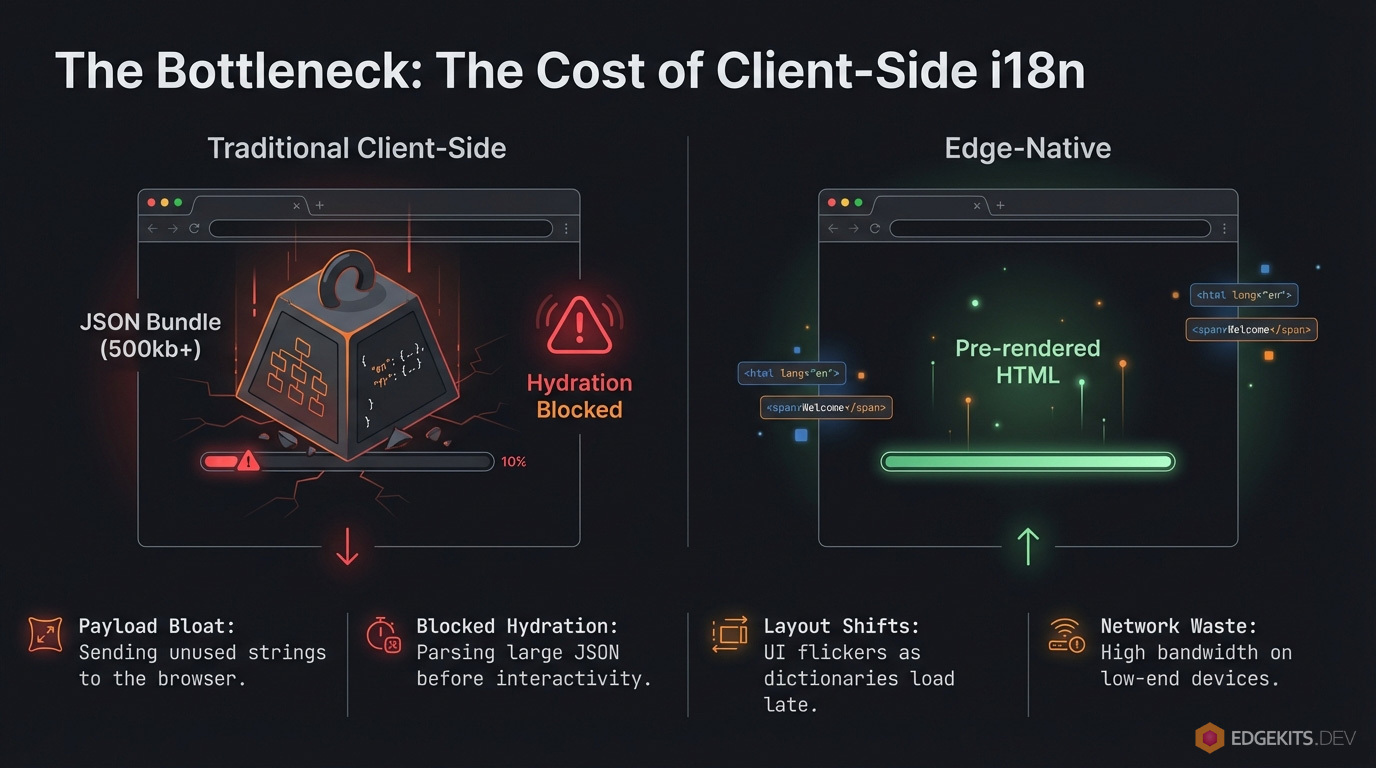
1. The "Fat Worker" Problem (Bundle Bloat)
Most libraries want you to import JSON files directly into your code. Fine for a static site. May be critical for a Worker. On Cloudflare, every byte of text becomes part of your JavaScript bundle. With a strict 3MB limit on the free tier (and 10MB on paid), "baking" translations into the Worker means stealing space from business logic. It increases cold start times.
I didn't want adding a new language to slow down my entire API.
2. Hydration Hell
This is the classic Astro + React conflict. The Server (SSR) renders English because the URL says so. The Client (React Island) wakes up, checks localStorage, sees "German," and panic-renders.
The result: A flickering UI, a console screaming about hydration mismatches, and a "broken app" feel. Trying to sync state via third-party stores (like Nano Stores) worked, but required writing boilerplate for every single button.
3. CLS and the "Jump"
If we decide not to bundle JSON but fetch it client-side (the old SPA way), we kill our Web Vitals. Users see empty space or raw translation keys while the JSON flies over the wire. For a project obsessed with performance, this was unacceptable.
The Paradigm Shift: Translations are Data, Not Code
Take Paraglide JS, for example. Its compiler and tree-shaking are brilliant. It solves the client-side bloat perfectly. But as I mapped out the architecture for a growing SaaS, I realized it introduced a set of invisible taxes I wasn't willing to pay.
1. The "Fat Worker" Paradox
Tree-shaking is great for the browser, but it simply moves the weight to the Server. Paraglide compiles translations into code. To render SSR, the Worker must load all that code into memory. This is the trap.
On Cloudflare, you have a hard limit on script size (3MB Free / 10MB Paid). "Baking" encyclopedias of text into your executable binary is an anti-pattern. I didn't want my deployment to fail - or my cold starts to spike - just because I added a German translation.
2. The Dynamic Content Gap
Static tools only solve half the problem. Paraglide handles your "Save" button, but it ignores your database. My SaaS runs on Cloudflare D1. How do I translate user-generated content? How do I run SQL LIKE queries on compiled functions? I was staring at a future where I had to maintain two separate i18n stacks: one for the UI (compiled code) and one for the Data (DB).
3. High-Complexity Maintenance
Finally, it trades Latency for Fragility. By adopting a compiler-based approach, you marry your build pipeline to a specific tool. If the workerd runtime updates and the compiler lags, your build breaks. And despite the tooling, it doesn't actually prevent hydration mismatches - if you forget to pass a prop or initialize a store correctly on the client, the UI still flickers.
I needed something else. I wanted i18n to behave like a Content Delivery Service:
- The Edge is the Source of Truth: It decides the language based on URL, cookies, and headers.
- The Client is "Dumb": It receives ready-to-render data. No guessing.
- Zero-JS Payload: Translations are injected into HTML or component props during SSR.
I needed a system that keeps translations close to the user (Cloudflare KV), caches them at the edge (Cache API), and feeds them to Astro components without bloating the Worker bundle. I couldn't find a solution that met these requirements while maintaining full Type-Safety.
That left me with only one option: build a bespoke architecture from scratch.
Edge-Native i18n Architecture: Inverting Control
In a traditional SPA, the client is the boss. It loads, checks navigator.language, and issues a network request for a translation file. This is a "Pull" architecture.
I flipped this model. In EdgeKits, the Client is dumb. It does not guess the language - and it certainly doesn't fetch it over the network. It receives the language as a constraint from the Server.
This is a "Push" architecture.
The Request Flow
Everything happens before the first byte of HTML is flushed to the browser. We moved the "Router" logic entirely into Cloudflare Workers via Astro Middleware.
Here is the lifecycle of a request:
- Interception: The request hits the Cloudflare Worker.
- Resolution: Our Middleware analyzes the request immediately - checking URL paths (
/de/), cookies, and headers.
- Data Fetch: The Worker checks the Edge Cache. If it's a miss, it fetches from KV and hydrates the cache.
- Injection: Translations are injected directly into Astro props.
- Rendering: Astro generates HTML with strings baked in.
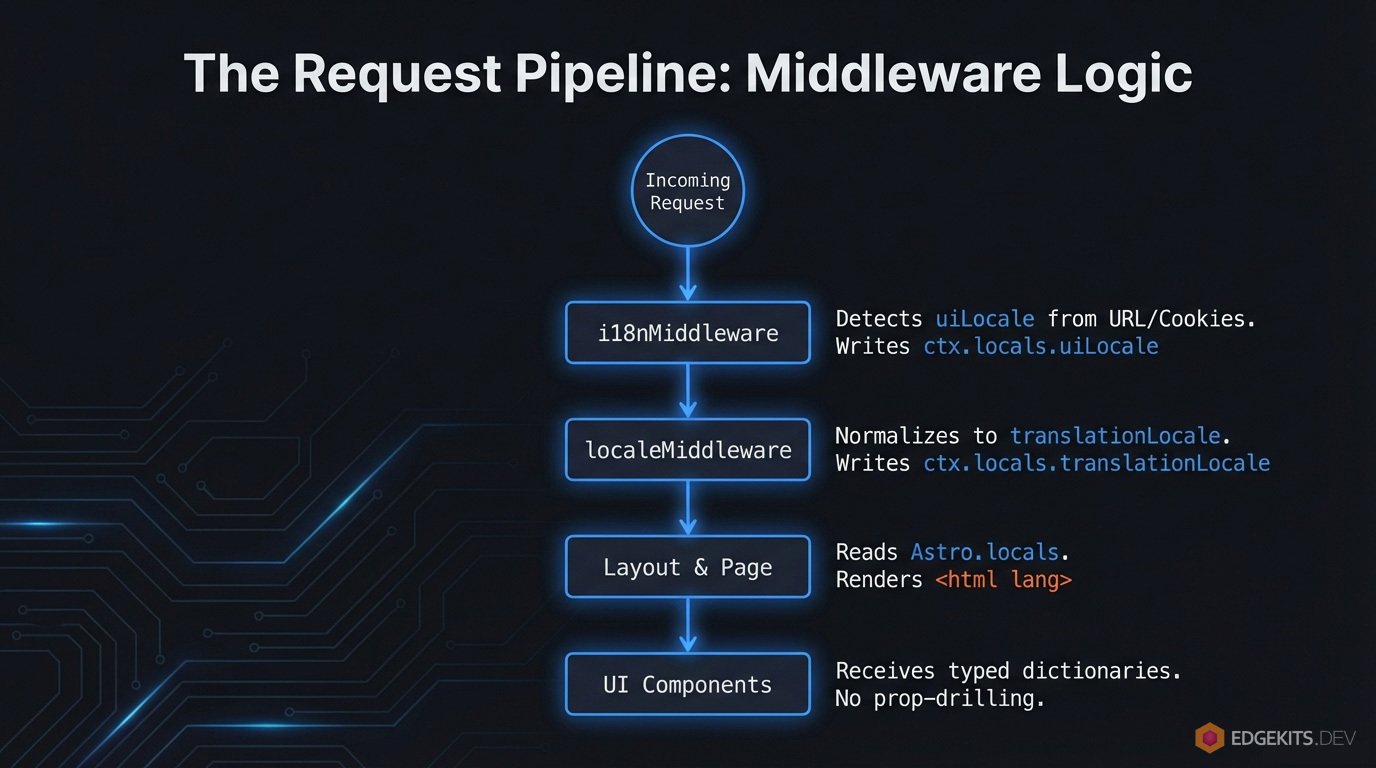
By the time the React Island wakes up on the client, the text is already there. No useEffect. No loading spinners. The component hydrates over HTML that matches its props exactly.
The Core Logic: Decoupling Intent from Data
The critical architectural decision here was to split the concept of "Current Locale" into two distinct variables.
Most i18n frameworks tightly couple the URL to the Data. If a user visits /ja/ (Japanese) but you haven't deployed the translation files yet, standard adapters usually force a 302 Redirect back to English. This changes the URL and disrupts the user's intent.
Worse, if the server falls back to English but the client-side router initializes with locale='ja' (derived from the URL), you trigger a Hydration Mismatch. The server sends English HTML, but the client expects Japanese logic, causing the UI to flicker or reset.
I introduced a "Split Brain" model in the request context to prevent this:
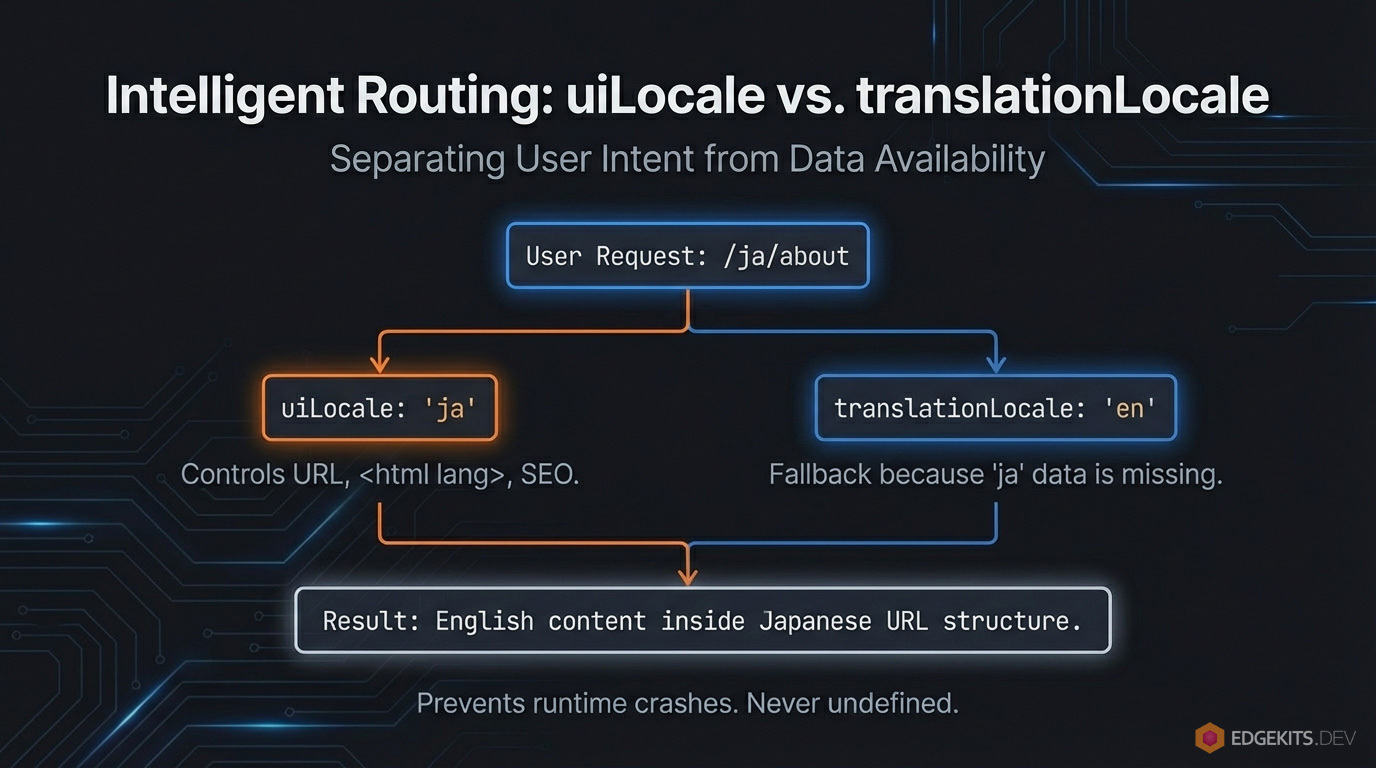
uiLocale (The Intent): What the user wants to see. This controls the URL (/ja/about), the <html lang="ja"> tag, and SEO metadata.translationLocale (The Data): What we can actually show. This controls the dictionary loaded from KV.
Why this matters:
If a user visits /ja/about but we haven't translated the marketing page into Japanese yet, the system doesn't redirect.
uiLocale remains "ja" (preserving the URL and user preference).translationLocale gracefully falls back to "en".
The site never breaks with undefined is not a function. The user sees the interface in English, but the app structure remains stable. This is Graceful Degradation baked into the core.
Cloudflare KV Data Layer: Solving the "Fat Worker"
The standard advice for i18n is simple: "Just import your JSON files." For a static site, that works. For a Serverless application, it is an architectural trap.
On Cloudflare, your code and your assets compete for the same resources. The Worker script size limit is strict - 3MB on the Free plan and 10MB on Paid.
If you "bake" your translations into the JavaScript bundle, you are stealing space from your business logic. Every time you add a new language or a new blog post translation, your Worker gets fatter. Your cold starts get slower. And eventually, you hit the wall.
I refused to ship text as code.
The Solution: KV as the Source of Truth
I moved the translation dictionaries out of the _worker.js bundle and into Cloudflare KV. In this architecture, translations are treated strictly as external data. They are stored with keys like: edgekits:landing:en, edgekits:common:de.
This decouples the deployment of code from the deployment of content. You can fix a typo in the German pricing page without redeploying the entire application backend.
Edge Caching: The Cache API "Secret Sauce"
KV is fast, but it is not instant. It requires a sub-request. It also costs money - the Free tier caps you at 100,000 reads per day. For a high-traffic application, hitting KV on every single request is a non-starter.
To solve this, the architecture places the Cache API (caches.default) in front of KV.
When a request comes in:
- The Worker checks the Edge Cache for
edgekits:landing:en.
- Hit: It serves instantly (sub-millisecond latency).
- Miss: It fetches from KV, constructs the response, and puts it into the Cache with a
stale-while-revalidate directive.

The Economic Logic: I accept the latency cost (and the KV bill) on the 1st request to buy 0ms latency and zero KV read costs for the next 10,000 requests. This allows the system to serve millions of users while staying comfortably within the limits of the Free tier.
The Trade-off: HTML Payload Size
There is no free lunch in engineering. By removing the translations from the JavaScript bundle (Zero-JS), I effectively moved that weight into the HTML document.
Since the Client is "dumb" and doesn't fetch JSON, the server must inject the translation data directly into the DOM (usually via props or a script tag) so the React components can hydrate.
The Risk: If you load a massive 50KB JSON file for a page that only displays "Hello World", your initial HTML download size bloats. This can hurt your Time to First Byte (TTFB).
Pro Tip: Namespace Splitting
To mitigate the payload risk, adoption of Namespace Splitting is mandatory. Do not dump every string into a single global common.json. That is a lazy pattern inherited from the SPA era.
Instead, break your translations into granular domains:
buttons.json (Global UI elements)landing.json (Landing page only)pricing.json (Pricing page only)dashboard.json (App only)
In EdgeKits, the fetchTranslations function accepts an array of namespaces. On the Landing Page, I only load ['common', 'hero']. The heavy dashboard strings are never fetched from KV and never injected into the HTML. This keeps the initial document lightweight while ensuring the client has exactly - and only - what it needs to render.
Astro Middleware: The i18n Routing Controller
In a standard Astro app, you might be tempted to check the locale inside your .astro pages or layout files.
Don't.
If you calculate the locale in a Layout, you have already executed too much code. You need to know the language before you render a single component.
I moved this logic entirely into src/domain/i18n/middleware/i18n.ts. This file acts as the "Air Traffic Controller" for the application. It runs on the Edge, intercepts every request, and determines the uiLocale before Astro even boots up the page rendering process.
The Detection Hierarchy
Here, a hierarchy of authority for determining the user's language naturally presents itself, where the user's explicit intent always takes precedence over implicit signals.

- URL (The King): If the path is
/es/about, the user wants Spanish. Period. This is the primary source of truth.
- Cookie (The Override): If the user is at the root
/ (where no language is specified) but has a locale cookie, I respect that preference.
- Browser Header (Astro Native): If no URL prefix and no cookie exist, I leverage Astro's built-in
context.preferredLocale to handle the standard Accept-Language negotiation automatically.
- Geo-IP (The Safety Net): If all else fails, I use the Cloudflare
request.cf.country property to make a best-guess based on location.
The Implementation
Here is the middleware that orchestrates this. It handles the “Soft 404” problem, keeps the Cookie in sync with the URL, and does all the heavy lifting required for seamless i18n routing:
// src/domain/i18n/middleware/i18n.ts

import type { MiddlewareHandler } from 'astro'
import { LocaleSchema, type Locale } from '@/domain/i18n/schema'
import { DEFAULT_LOCALE } from '@/domain/i18n/constants'
import { getCookieLang, setCookieLang } from '@/domain/i18n/cookie-storage'
import { mapCountryToLocale } from '@/domain/i18n/country-to-locale-map'
import { resolveLocaleForTranslations } from '@/domain/i18n/resolve-locale'

const PUBLIC_FILE_REGEX =
  /\.(ico|png|jpg|jpeg|svg|webp|gif|css|js|map|txt|xml|json|woff2?|avif)$/i
const IGNORED_PREFIXES = [
  '/api',
  '/assets',
  '/_astro',
  '/_image',
  '/_actions',
  '/favicon',
]

type I18nMiddlewareContext = Parameters<MiddlewareHandler>[0]

function shouldBypassI18n(pathname: string): boolean {
  if (PUBLIC_FILE_REGEX.test(pathname)) return true
  if (IGNORED_PREFIXES.some((p) => pathname.startsWith(p))) return true
  return false
}

function applySecurityHeaders(response: Response): Response {
  return response
}

function buildLocalizedPath(locale: Locale, rest: string[]): string {
  const suffix = rest.join('/')
  return suffix ? `/${locale}/${suffix}/` : `/${locale}/`
}

function resolveFallbackLocale(context: I18nMiddlewareContext): Locale {
  const cookieLocale = getCookieLang(context.cookies)
  if (cookieLocale) return cookieLocale

  const browserRaw = context.preferredLocale
  if (browserRaw) {
    let parsed = LocaleSchema.safeParse(browserRaw)
    if (parsed.success) return parsed.data

    const short = browserRaw.split('-')[0]
    parsed = LocaleSchema.safeParse(short)
    if (parsed.success) return parsed.data
  } else {
    const country = context.locals.runtime?.cf?.country
    const geoLocale = mapCountryToLocale(country)
    let parsed = LocaleSchema.safeParse(geoLocale)
    if (parsed.success) return parsed.data
  }

  return DEFAULT_LOCALE
}

export const i18nMiddleware: MiddlewareHandler = async (context, next) => {
  const url = new URL(context.request.url)
  const pathname = url.pathname

  const segments = pathname.split('/').filter(Boolean)
  const firstSegment = segments[0] ?? null

  let safeLocale = DEFAULT_LOCALE
  if (firstSegment) {
    const parsed = LocaleSchema.safeParse(firstSegment)
    if (parsed.success) {
      safeLocale = parsed.data
    }
  }

  context.locals.uiLocale = safeLocale
  context.locals.translationLocale = resolveLocaleForTranslations(safeLocale)

  if (shouldBypassI18n(pathname)) {
    const response = await next()
    const contentType = response.headers.get('content-type') || ''
    const isHtml = contentType.includes('text/html')
    const isRedirect = response.status >= 300 && response.status < 400

    if (isHtml && !isRedirect) {
      return new Response('Not found', {
        status: 404,
        headers: { 'Content-Type': 'text/plain; charset=utf-8' },
      })
    }
    return response
  }

  const fallbackLocale = resolveFallbackLocale(context)

  if (!firstSegment) {
    const target = buildLocalizedPath(fallbackLocale, [])
    if (pathname !== target) {
      return applySecurityHeaders(context.redirect(target, 302))
    }
    return applySecurityHeaders(await next())
  }

  const parsed = LocaleSchema.safeParse(firstSegment)
  const urlLocale: Locale | null = parsed.success ? parsed.data : null

  if (urlLocale) {
    setCookieLang(context.cookies, urlLocale)
    context.locals.uiLocale = urlLocale
    context.locals.translationLocale = resolveLocaleForTranslations(urlLocale)

    const normalized = buildLocalizedPath(urlLocale, segments.slice(1))
    if (pathname !== normalized) {
      return applySecurityHeaders(context.redirect(normalized, 302))
    }
    return applySecurityHeaders(await next())
  }

  const target = buildLocalizedPath(fallbackLocale, segments)
  if (pathname !== target) {
    return applySecurityHeaders(context.redirect(target, 302))
  }
  return applySecurityHeaders(await next())
}
This function resolves the actual locale we need to request from KV. It gracefully falls back to a default if a translation bundle for the current UI locale is missing:
// src/domain/i18n/resolve-locale.ts

export function resolveLocaleForTranslations(locale: Locale): Locale {
  return hasTranslations(locale) ? locale : DEFAULT_LOCALE
}
The Edge Capability: Geo-IP Fallback
You might notice the mapCountryToLocale helper in the fallback logic. This is where we leverage the Edge platform.
Cloudflare exposes the visitor's country code in every request. Here is a simple, O(1) lookup map to convert codes like DE (Germany) or BR (Brazil) into supported locales.
// src/domain/i18n/country-to-locale-map.ts

import type { Locale } from './schema.ts'

const GEO_MAP: Record<string, Locale> = {
  // --- ANGLOSPHERE ---
  US: 'en',
  GB: 'en',
  // --- DACH ---
  DE: 'de',
  // --- LATAM + SPAIN ---
  ES: 'es',
  // Asia
  JP: 'ja',
}

export function mapCountryToLocale(country: unknown): string | undefined {
  if (typeof country !== 'string') return undefined
  return GEO_MAP[country.toUpperCase()]
}
Why This Design?
This middleware establishes context.locals.uiLocale as the single source of truth.
The React components don't check localStorage. The Layout doesn't parse the URL. They simply read uiLocale from the context. By treating the URL as the strict authority for state, we eliminate the possibility of a "Split Brain" scenario where the URL says English but the Interface renders German.
Continued here