Hi everyone!
I'm a college junior, and I built FramePort while working on Tomato, my custom 32-bit computer with a dual-LUT ALU running on an Artix-7 FPGA.
I wanted to see its HDMI output beside my assembly code without constantly switching to OBS. So I built a VS Code extension that brings live video capture directly into the editor.
FramePort supports HDMI capture cards, cameras, and other compatible video sources, with features including:
- Live video preview with adjustable scaling
- Screenshot capture
- Silent MP4 recording
Although I originally built it for Tomato, I figured it could also be useful for Raspberry Pi projects, embedded systems, and other hardware-development workflows.
Here's FramePort running alongside Tomato's assembly code:
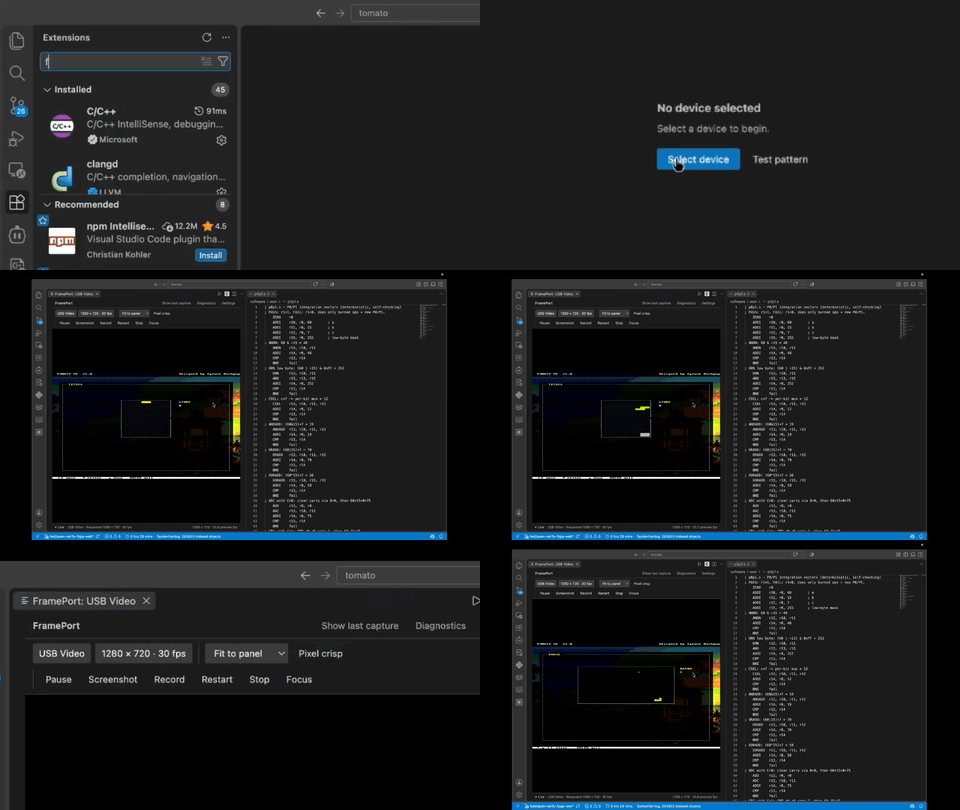
FramePort is now available on Open VSX as a public preview for macOS. It requires FFmpeg and a compatible capture device.
Try FramePort: https://open-vsx.org/extension/tmarhguy/frameport
Source code: https://github.com/tmarhguy/frameport
I'd love feedback from anyone interested in testing FramePort or contributing to its development!
