You've done this. Don't lie.
# "just for testing, I'll remove it later"
const API_KEY = "sk-prod-abc123supersecretdonotcommit"

git add .
git commit -m "fix stuff"
git push
3 minutes later:
GitHub Secret Scanning Alert: We found a secret in your repo...
Yeah. We've all been there.
Meet PasteShield
PasteShield is a VS Code extension that watches your clipboard like a hawk. Every time you hit Ctrl+V, it scans the content before it lands in your file.
Think of it as a bouncer at the door of your codebase.
No cloud. No subscription. No telemetry. 100% offline. Free forever.
See it in action
You paste an API key → PasteShield goes "hold on bestie" →
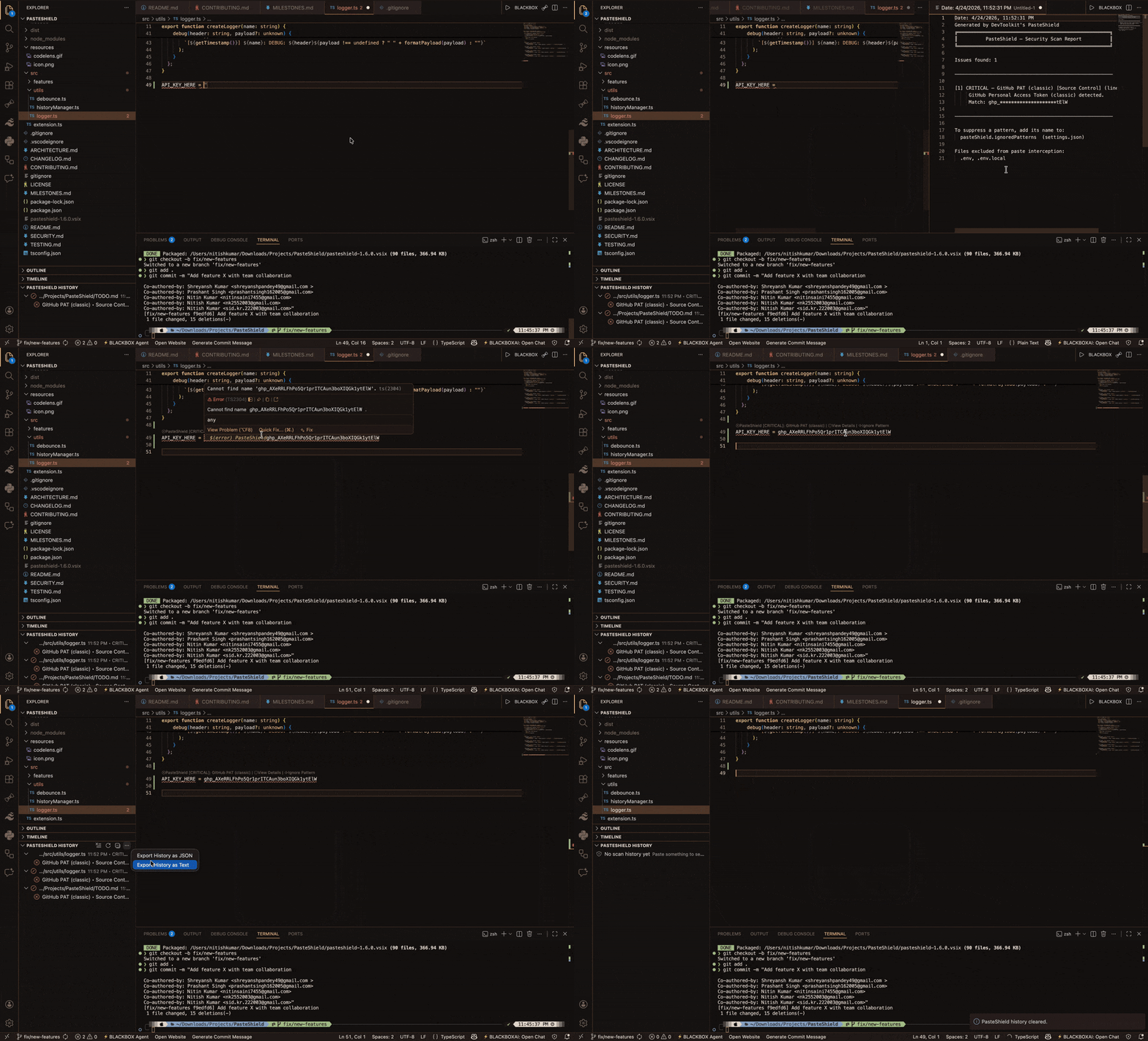
Three choices. Zero drama:
- Cancel — yeah don't do that
- Show Details — tell me more
- Paste Anyway — I know what I'm doing (do you though)
Also catches stuff already in your file
It doesn't just guard the door — it also checks if anything sketchy already got in, via CodeLens annotations right above the suspicious line:
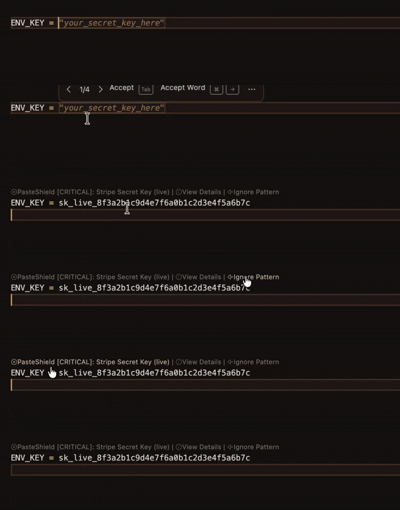
No hunting through files. The warning is right there, above the guilty line.
What does it catch? Everything, basicall
~200 patterns. 25+ categories. Scanned in under 50ms.
| Vibe | Examples caught |
|---|
| AI keys | OpenAI, Anthropic, Gemini, Groq, DeepSeek, xAI... |
| Cloud creds | AWS, GCP, Azure — all the big ones |
| Payment secrets | Stripe, Razorpay, PayPal, Square |
| DB connections | MongoDB, Postgres, Supabase, Redis |
| Auth tokens | GitHub PAT, JWT, Slack, Discord |
| PII | SSNs, credit cards, Aadhaar, PAN, IBAN |
| Unsafe code | eval(), innerHTML, SQL injection patterns |
| ...and 18 more | Mobile/IoT, Maps, CDN, Crypto, Web3 |
Too loud? Tune the noise level:
"pasteShield.minimumSeverity": "high"
// critical | high | medium (default) | low
Not ready to be blocked? Try silent mode
New in v1.7 — silent mode logs everything to the sidebar without interrupting your paste.
Perfect if you're the type who wants data before commitment (reasonable, honestly).
"pasteShield.silentMode": true
See the full history in the sidebar, export it as JSON, sleep better at night.
For teams
Drop a .pasteshield-policy.json in your repo (or host it at a URL) and your whole team gets the same rules automatically.
{
  "template": "strict",
  "rules": [
    { "type": "block_pattern", "pattern": "openai-api-key" },
    { "type": "audit_logging", "enabled": true }
  ]
}
One update → everyone's protected. No Slack message needed.
Where it stores your secrets
v1.7 upgraded this significantly. Credentials go into your OS keychain — Windows Credential Manager, macOS Keychain, Linux libsecret — via VS Code's native SecretStorage API.
Nothing in settings.json. Nothing in plaintext. Nothing in the cloud.
And if you actually want to store detected secrets properly, it integrates with:
HashiCorp Vault · AWS Secrets Manager · Azure Key Vault · Google Secret Manager
All from inside VS Code. No tab switching.
vs Gitleaks / git-secrets
Not a competition — they're complementary:
You type/paste  →  [PasteShield catches it here] ← THIS
      ↓
You commit      →  [Gitleaks / git-secrets catch it here]
      ↓
You push        →  [GitHub Secret Scanning catches it here]
      ↓
Production      →  [Too late]
PasteShield is your first line of defense. Use all of them.
Install in 10 seconds
Option 1: VS Code Marketplace → search PasteShield → Install
Option 2: Quick Open (Ctrl+P) and paste:
ext install NK2552003.pasteshield
That's it. It starts working immediately. No config needed.
What's coming
The roadmap is genuinely exciting:
- ML-based false-positive reduction — smarter, fewer annoying alerts
- CLI version — run it in CI/CD pipelines
- SARIF output — plug into GitHub Advanced Security
- Auto secret rotation via provider APIs
- Community pattern marketplace — share and import rulesets
TL;DR
You paste something sketchy → PasteShield yells at you → you don't get fired →
Free. Offline. 200+ patterns. Works in under 50ms.
Built by Sid Kr. (NK2552003). MIT licensed. No VC funding, no upsell, no BS.
GITHUB
MARKETPLACE VSCODE
Drop a ⭐ on GitHub if this saved your job once. Or twice.


