Let me be real with you.
Last semester, I was convinced I was putting in solid hours every day. I'd sit down at 10am, open VS Code, and look up at the clock — it'd be 4pm. Six hours. That felt productive.
But when exam season hit and I needed to actually measure what I'd been doing, I had nothing. No data. No proof to myself. Just vibes and a half-finished project.
I tried timer apps. I tried Toggl. I tried writing it down in Obsidian. None of it stuck because the context switch killed me — having to go outside my editor to log a session meant I just... didn't.
And VS Code? VS Code, which I live in for 8+ hours a day, had absolutely nothing built in for this.
No session timer. No focus score. No "hey, you've been idle for 20 minutes, are you still actually working?" No Pomodoro. No history of which projects ate your week. Nothing.
That gap felt absurd to me. So I built something.
Meet FocusForge
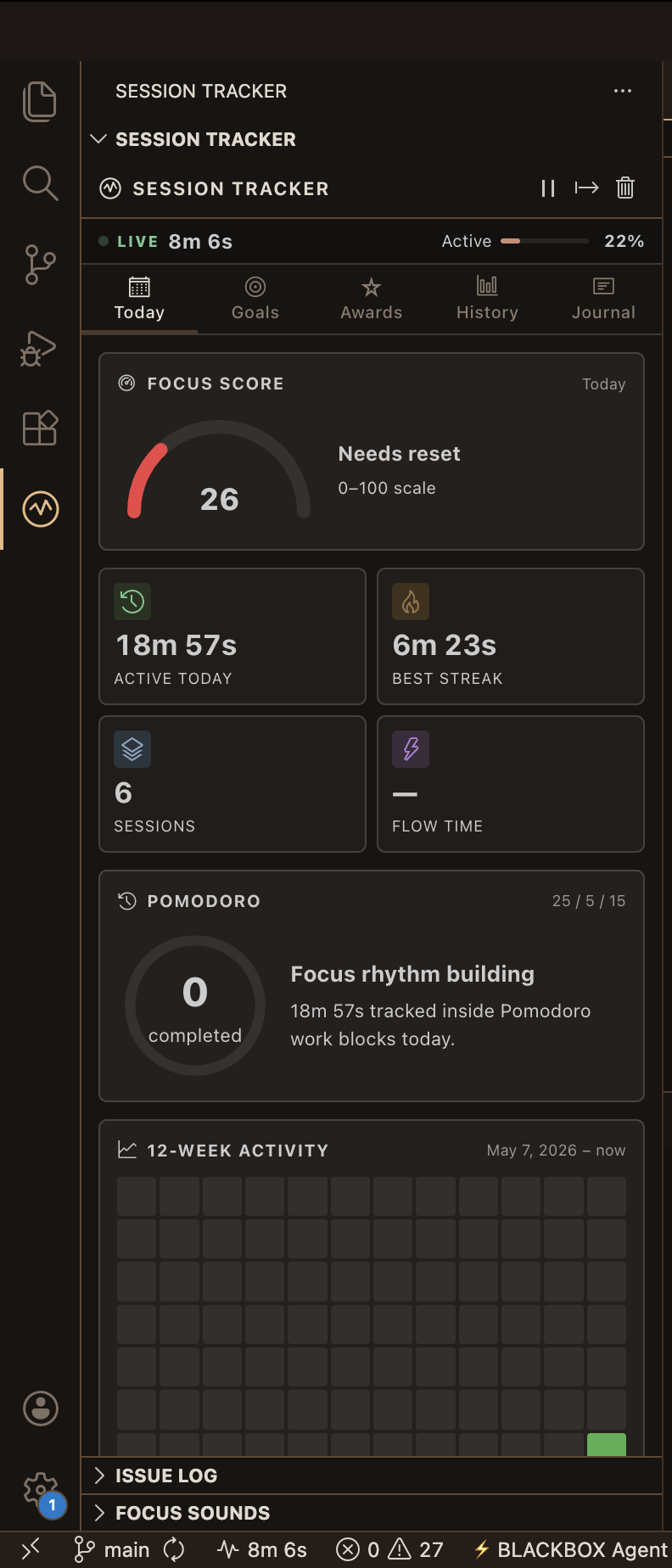
FocusForge: Coding Session Tracker — a VS Code extension that turns your editor into a local-first productivity cockpit.
It tracks what actually matters:
- Real active time — not just "window open" time. It detects when you're idle and separates it from genuine work time.
- Focus Score — a live gauge built from your active ratio, flow minutes, break hygiene, and idle interruptions.
- Pomodoro Mode — 25/5/15 defaults, auto-advance, sound, status badges, all native inside VS Code.
- Flow State detection — once you've been heads-down for 25 minutes straight, it recognizes that and tracks it separately.
- Project analytics — auto-detected from your Git workspace so you know exactly where your hours are going.
- Session journal — add a mood, a one-liner about what you worked on, blockers. Perfect for standups.
- 100+ achievements — because learning to code is hard, and small wins matter.
- GitHub Issue integration — log, comment, close issues right from your sidebar.
- Weekly reports — Markdown or HTML, saved locally in
.vscode/session-reports/.
All of it lives in your VS Code global state. No cloud. No account. No extension-owned backend. Your data is yours.
The Problem VS Code Doesn't Solve (Yet)
Here's what surprised me when I started building this: VS Code is incredibly powerful but treats your time as completely invisible.
You can see which file you're editing. You can see Git blame. You can see lint errors in real time. But it has no concept of:
- How long you've been coding today vs. how long you've had the editor open
- Whether you're in a flow state or just context-switching every 3 minutes
- Which project is actually consuming your week (hint: never the one you think)
- How many Pomodoros you completed before you hit burnout
- What you were working on last Tuesday when your team asks in standup
For students especially — where there's no manager tracking your hours, no ticket system forcing structure — this invisibility is brutal. You lose entire weeks without realizing it.
FocusForge makes all of that visible.
How It Actually Works
When you open VS Code with FocusForge installed, it starts a session automatically. From there:
The Today tab gives you a live dashboard — active time, idle time, efficiency percentage, current state (active / idle / paused / flow / deep work), a Focus Score gauge with color zones, and a 12-week contribution-style heatmap.
Deep Work Mode is my personal favourite. It's a focused coding block that hides the activity bar, mutes notifications, and gives you a full-screen distraction-free environment with a countdown. When you're studying for a test or pushing to finish a feature before deadline, this mode is the difference.
The History tab shows a 14-session bar chart with clickable detail panels — active time, efficiency, focus score, peak streak, flow time, break counts, commits made during the session, and language breakdown.
The Journal is lightweight on purpose. Just a mood, a one-liner, optional blockers. The weekly view is perfect for async standups and self-reflection.
GitHub Issue Log connects to your local repo automatically. No setup beyond a GitHub token if you want remote repos. You can create, comment, close, and log issue completions — and they'll show up in your weekly report.
Install It
Search FocusForge in the VS Code Extensions tab, or:
ext install NK2552003.focusforge
Or grab it directly from the VS Code Marketplace →
The Soundtrack to Your Flow State
Here's a feature I didn't plan but ended up loving more than almost anything else in FocusForge.
I was three hours into a debugging session once, headphones in, streaming musicforprogramming.net in a separate tab. The kind of slow, atmospheric, textural music specifically curated for deep coding work — no lyrics, no sudden drops, just long drifting soundscapes that keep your brain in a calm, engaged state.
And then my tab crashed. Lost the music. Lost the flow. Closed my laptop out of frustration.
That's when I discovered isdampe's music-for-programming — a Node.js CLI that streams musicforprogramming.net (and toggleable rain from rainymood.com) directly into your terminal. Beautiful little tool. But it still meant context-switching out of my editor.
So I brought it inside.
FocusForge's Ambient Audio panel streams directly from musicforprogramming.net — 70+ episodes of handpicked coding soundscapes, from drone textures to modular synthesis to field recordings — all playable right from your VS Code sidebar. No browser tab. No Spotify. No notifications from a separate app.
You can:
- Browse and play any episode from the musicforprogramming.net catalogue
- Toggle rain overlay on/off (yes, rain + ambient music is genuinely incredible for focus)
- Set volume independently
- Auto-start audio when a session begins
- Audio pauses automatically when you go idle — resumes when you're back
The pausing-on-idle part is what makes it feel intentional. The music isn't just background noise — it's tied to your actual work state. When you're in flow, it plays. When you drift away, it quietly stops. When you return, it picks back up. It mirrors your focus in a way that nothing else does.
Huge credit to isdampe for the original music-for-programming repo that inspired this, and to the team at musicforprogramming.net for building one of the most genuinely useful resources for developers that almost nobody talks about.
Why I'm Sharing This
I've seen a lot of "I built a thing" posts where the tool is clearly built for a portfolio and never used by anyone including the author. That's not this.
I use FocusForge starting today as i published it now. I think it will change on how I think about my sessions. The journal alone has saved me in standup conversations more times than I can count.
If you're a student grinding through projects, a developer freelancing without a time-tracking system, or just someone who wants to know where their coding hours actually go — this was built for you.
Go forge something.
Built with TypeScript, VS Code Extension API, and a lot of late-night sessions that FocusForge dutifully tracked.


