Digging into a new universe of data streaming after IBM’s recent accquisition of Confluent!
Introduction
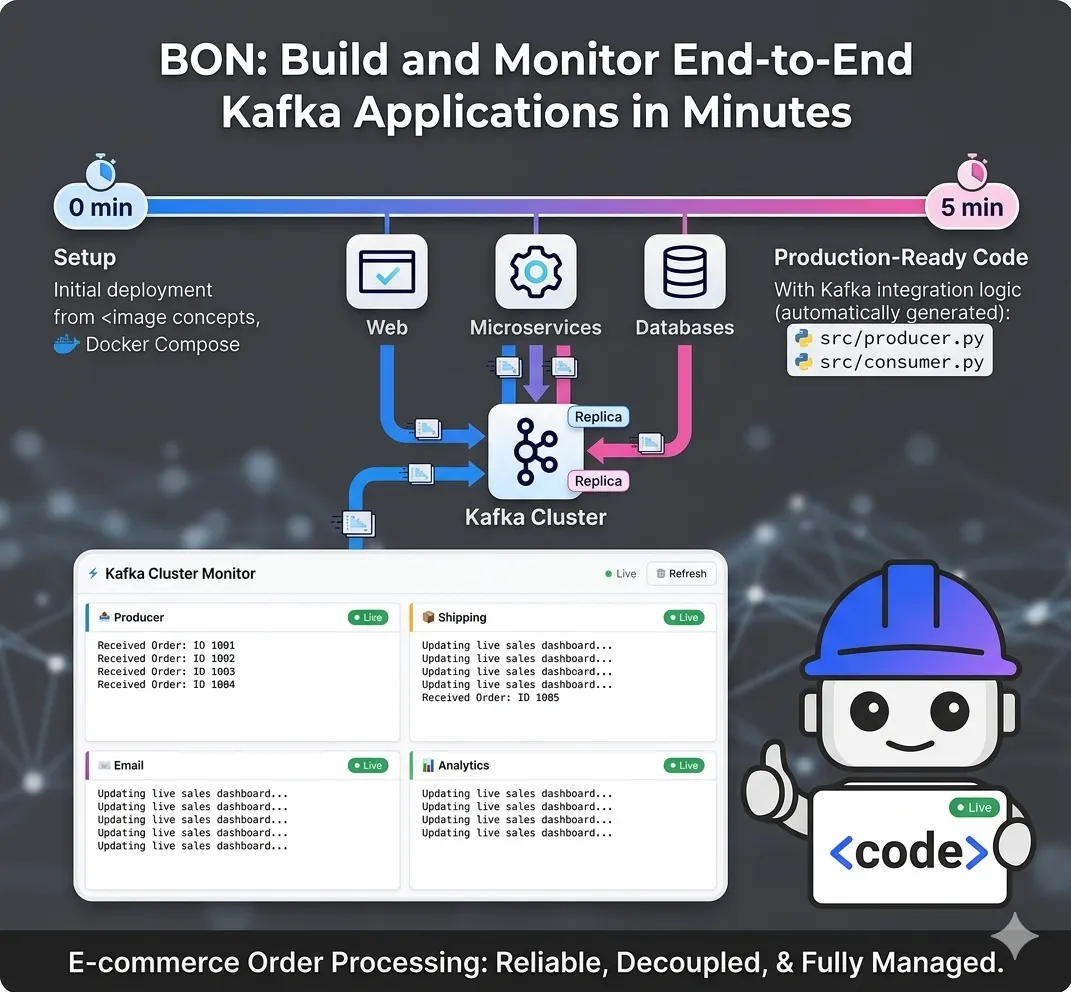
Data is no longer a static asset — it’s a live pulse. Following IBM’s $11B acquisition of Confluent, the bridge between real-time streaming and enterprise AI has never been shorter. I’m diving into the new universes of data-in-motion to see how this ‘Smart Data’ foundation is changing the game for hybrid cloud and agentic AI.
In the traditional world of data, systems often talk to each other like a game of “telephone” — one service calls another, which calls another, creating a fragile web of dependencies. If one system goes down or slows down, the entire chain breaks. Event streaming changes this paradigm by turning data into a continuous flow of events.
Apache Kafka acts as the “central nervous system” for this flow. Instead of direct connections, services publish events to a central cluster, and any interested service can “tune in” to listen. This decoupling allows businesses to react to customer actions in real-time — whether that’s processing a payment, updating a live dashboard, or triggering a delivery — without the systems ever needing to know each other exists.
Implementation: Building an E-commerce Stream
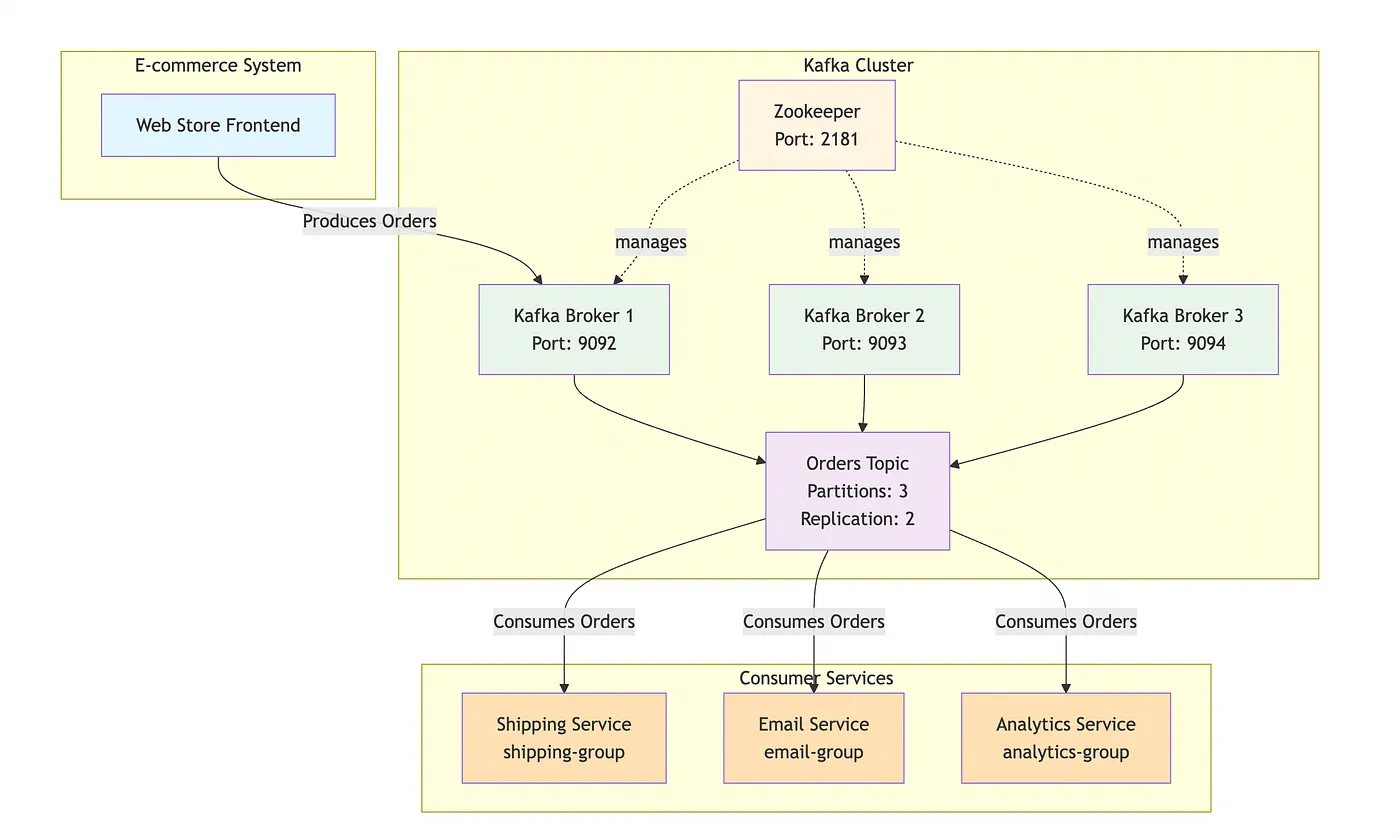
Using two basic code samples I found on the net, one as a “producer” and one as a “consumer” to explain the concepts of Kafka, I asked Bob to build a simple comprehensive application.
from confluent_kafka import Producer
import json

# Configuration for connecting to the Kafka cluster
config = {'bootstrap.servers': 'localhost:9092'}
producer = Producer(config)

def delivery_report(err, msg):
    if err is not None:
        print(f"Message delivery failed: {err}")
    else:
        print(f"Order sent to {msg.topic()} [{msg.partition()}]")

# Simulate an order
order_data = {
    "order_id": 1001,
    "user": "jane_doe",
    "total": 59.99,
    "items": ["Wireless Mouse", "Keyboard"]
}

# Trigger the send (Asynchronous)
producer.produce(
    'orders',
    key="1001",
    value=json.dumps(order_data),
    callback=delivery_report
)

producer.flush() # Wait for any outstanding messages to be delivered
from confluent_kafka import Consumer

config = {
    'bootstrap.servers': 'localhost:9092',
    'group.id': 'shipping-group', # Helps Kafka track which orders this group has seen
    'auto.offset.reset': 'earliest'
}

consumer = Consumer(config)
consumer.subscribe(['orders'])

try:
    while True:
        msg = consumer.poll(1.0) # Check for new messages every 1 second
        if msg is None: continue
        if msg.error():
            print(f"Consumer error: {msg.error()}")
            continue

        print(f"Received Order: {msg.value().decode('utf-8')}")
        print("Action: Initiating packaging and shipping...")
finally:
    consumer.close()
After reading my conceptual samples, Bob provided the application structure which follows.
The Producer: Capturing the Event
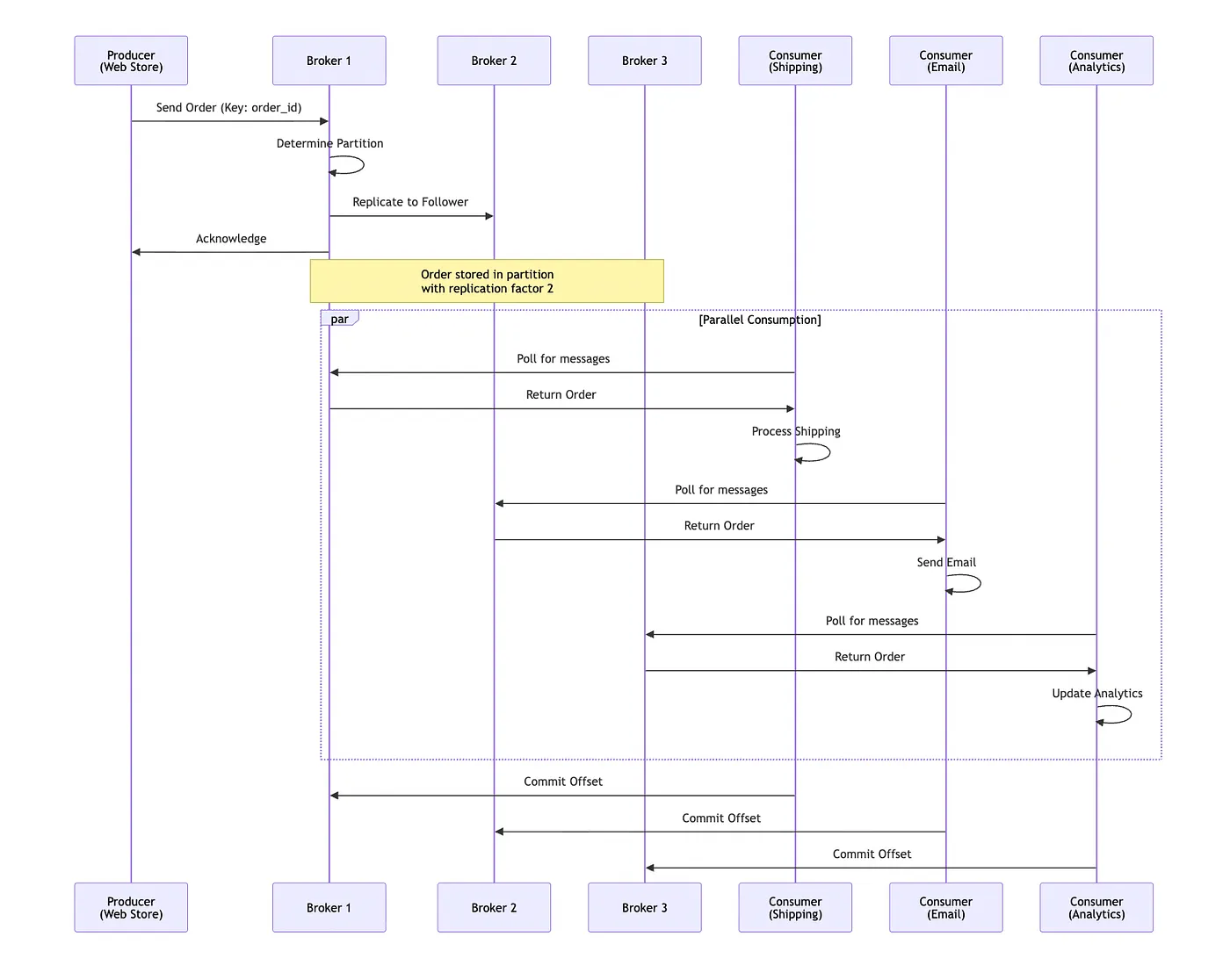
The Producer (found in src/producer.py) acts as the storefront. When an order is placed, it creates a JSON-serializable dictionary containing the order ID, user details, and items. It uses the confluent-kafka library to "produce" this message to a topic called orders, using the order_id as a key to ensure all updates for a specific order land in the same partition. A delivery callback function is utilized to provide immediate feedback on whether the message successfully reached the Kafka broker or if a retry is necessary.
"""
Kafka Producer - E-commerce Order Processing System
Simulates an online store sending order events to Kafka
"""

from confluent_kafka import Producer
import json
import time
import random
from datetime import datetime

# Configuration for connecting to the Kafka cluster
config = {
    'bootstrap.servers': 'localhost:9092',
    'client.id': 'ecommerce-producer'
}

producer = Producer(config)

def delivery_report(err, msg):
    """
    Callback function called once for each message produced to indicate delivery result.
    Triggered by poll() or flush().
    """
    if err is not None:
        print(f"❌ Message delivery failed: {err}")
    else:
        print(f"✅ Order sent to topic '{msg.topic()}' [partition {msg.partition()}] at offset {msg.offset()}")

# Sample product catalog
PRODUCTS = [
    {"name": "Wireless Mouse", "price": 29.99},
    {"name": "Mechanical Keyboard", "price": 89.99},
    {"name": "USB-C Cable", "price": 12.99},
    {"name": "Laptop Stand", "price": 45.00},
    {"name": "Webcam HD", "price": 79.99},
    {"name": "Headphones", "price": 149.99},
    {"name": "Monitor 27\"", "price": 299.99},
    {"name": "Desk Lamp", "price": 34.99}
]

USERS = ["alice_smith", "bob_jones", "charlie_brown", "diana_prince", "eve_adams"]

def generate_order(order_id):
    """Generate a random order"""
    num_items = random.randint(1, 4)
    items = random.sample(PRODUCTS, num_items)

    order_data = {
        "order_id": order_id,
        "user": random.choice(USERS),
        "timestamp": datetime.now().isoformat(),
        "items": [item["name"] for item in items],
        "total": round(sum(item["price"] for item in items), 2),
        "status": "pending"
    }
    return order_data

def produce_orders(num_orders=10, delay=2):
    """
    Produce multiple orders to Kafka

    Args:
        num_orders: Number of orders to generate
        delay: Delay in seconds between orders
    """
    print(f" Starting E-commerce Order Producer")
    print(f" Will produce {num_orders} orders with {delay}s delay between each")
    print(f" Connected to Kafka at: {config['bootstrap.servers']}")
    print("-" * 70)

    for i in range(1, num_orders + 1):
        try:
            # Generate order
            order_data = generate_order(1000 + i)

            # Print order details
            print(f"\n Order #{order_data['order_id']}:")
            print(f"   User: {order_data['user']}")
            print(f"   Items: {', '.join(order_data['items'])}")
            print(f"   Total: ${order_data['total']}")

            # Produce message to Kafka
            producer.produce(
                topic='orders',
                key=str(order_data['order_id']),
                value=json.dumps(order_data),
                callback=delivery_report
            )

            # Trigger delivery reports by polling
            producer.poll(0)

            # Wait before next order
            if i < num_orders:
                time.sleep(delay)

        except KeyboardInterrupt:
            print("\n⚠️  Producer interrupted by user")
            break
        except Exception as e:
            print(f"❌ Error producing message: {e}")

    # Wait for all messages to be delivered
    print("\n⏳ Flushing remaining messages...")
    producer.flush()
    print("✅ All orders sent successfully!")

if __name__ == "__main__":
    import sys

    # Parse command line arguments
    num_orders = int(sys.argv[1]) if len(sys.argv) > 1 else 10
    delay = float(sys.argv[2]) if len(sys.argv) > 2 else 2

    try:
        produce_orders(num_orders, delay)
    except KeyboardInterrupt:
        print("\n Producer stopped")
    except Exception as e:
        print(f"❌ Fatal error: {e}")

# Made with Bob
The Consumer: Decoupled Processing
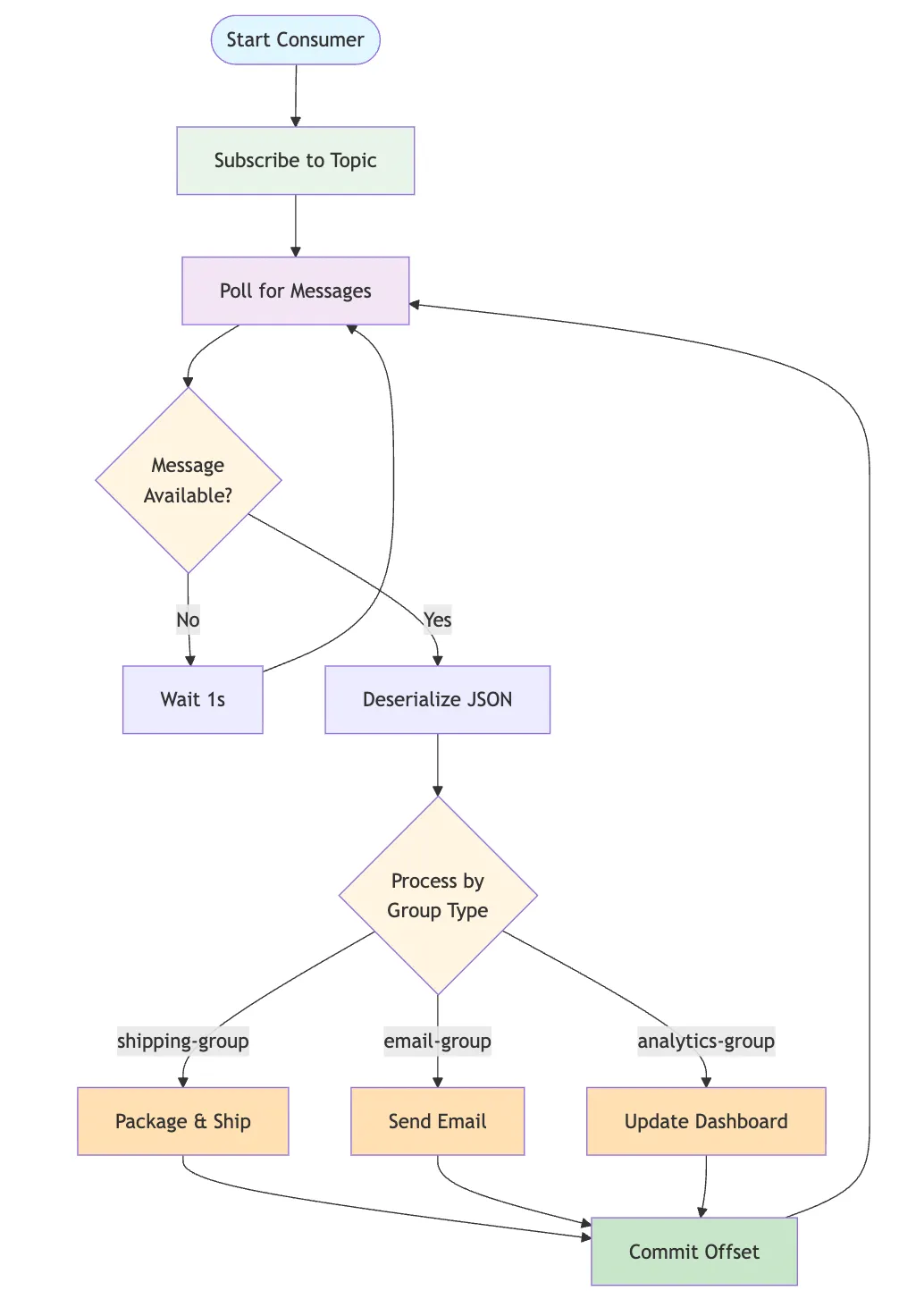
The Consumer logic (found in src/consumer.py) demonstrates the power of Consumer Groups. Multiple independent services—Shipping, Email, and Analytics—all subscribe to the same orders topic simultaneously. Because each service belongs to its own group (e.g., shipping-group), Kafka tracks their progress (offsets) individually. This means the Shipping department can process messages at its own pace without affecting the speed of the Email service or the Analytics dashboard.
"""
Kafka Consumer - E-commerce Order Processing System
Simulates different departments (Shipping, Email, Analytics) consuming order events
"""

from confluent_kafka import Consumer, KafkaError
import json
import sys
from datetime import datetime

def create_consumer(group_id, bootstrap_servers='localhost:9092'):
    """
    Create and configure a Kafka consumer

    Args:
        group_id: Consumer group identifier
        bootstrap_servers: Kafka broker addresses

    Returns:
        Configured Consumer instance
    """
    config = {
        'bootstrap.servers': bootstrap_servers,
        'group.id': group_id,
        'auto.offset.reset': 'earliest',  # Start from beginning if no offset exists
        'enable.auto.commit': True,
        'auto.commit.interval.ms': 1000,
        'session.timeout.ms': 6000,
        'client.id': f'{group_id}-client'
    }

    return Consumer(config)

def process_shipping(order):
    """Process order for shipping department"""
    print(f"\n SHIPPING DEPARTMENT")
    print(f"   Order ID: {order['order_id']}")
    print(f"   Customer: {order['user']}")
    print(f"   Items to pack: {', '.join(order['items'])}")
    print(f"   ✅ Initiating packaging and shipping process...")

def process_email(order):
    """Process order for email service"""
    print(f"\n EMAIL SERVICE")
    print(f"   Order ID: {order['order_id']}")
    print(f"   Recipient: {order['user']}")
    print(f"   Total: ${order['total']}")
    print(f"   ✅ Sending order confirmation email...")

def process_analytics(order):
    """Process order for analytics dashboard"""
    print(f"\n ANALYTICS DASHBOARD")
    print(f"   Order ID: {order['order_id']}")
    print(f"   Revenue: ${order['total']}")
    print(f"   Items count: {len(order['items'])}")
    print(f"   Timestamp: {order['timestamp']}")
    print(f"   ✅ Updating live sales dashboard...")

# Department processors mapping
PROCESSORS = {
    'shipping-group': process_shipping,
    'email-group': process_email,
    'analytics-group': process_analytics
}

def consume_orders(group_id, topic='orders'):
    """
    Consume orders from Kafka topic

    Args:
        group_id: Consumer group (shipping-group, email-group, analytics-group)
        topic: Kafka topic to subscribe to
    """
    consumer = create_consumer(group_id)
    consumer.subscribe([topic])

    processor = PROCESSORS.get(group_id, process_shipping)
    department = group_id.replace('-group', '').upper()

    print(f" Starting {department} Consumer")
    print(f" Consumer Group: {group_id}")
    print(f" Subscribed to topic: {topic}")
    print(f" Connected to Kafka at: localhost:9092")
    print("-" * 70)
    print("⏳ Waiting for messages... (Press Ctrl+C to stop)\n")

    try:
        message_count = 0
        while True:
            # Poll for messages (timeout in seconds)
            msg = consumer.poll(timeout=1.0)

            if msg is None:
                continue

            if msg.error():
                if msg.error().code() == KafkaError._PARTITION_EOF:
                    # End of partition event
                    print(f" Reached end of partition {msg.partition()}")
                else:
                    print(f"❌ Consumer error: {msg.error()}")
                continue

            # Process the message
            try:
                message_count += 1
                order_data = json.loads(msg.value().decode('utf-8'))

                print(f"\n{'='*70}")
                print(f" Message #{message_count} received from partition {msg.partition()} at offset {msg.offset()}")

                # Call the appropriate processor
                processor(order_data)

                print(f"{'='*70}")

            except json.JSONDecodeError as e:
                print(f"❌ Failed to decode message: {e}")
            except Exception as e:
                print(f"❌ Error processing message: {e}")

    except KeyboardInterrupt:
        print(f"\n\n⚠️  Consumer interrupted by user")
        print(f" Total messages processed: {message_count}")

    finally:
        # Close the consumer to commit final offsets
        print(" Closing consumer...")
        consumer.close()
        print("✅ Consumer closed successfully")

if __name__ == "__main__":
    # Parse command line arguments
    if len(sys.argv) < 2:
        print("Usage: python consumer.py <group_id> [topic]")
        print("\nAvailable consumer groups:")
        print("  - shipping-group   : Processes orders for shipping")
        print("  - email-group      : Sends confirmation emails")
        print("  - analytics-group  : Updates analytics dashboard")
        print("\nExample: python consumer.py shipping-group")
        sys.exit(1)

    group_id = sys.argv[1]
    topic = sys.argv[2] if len(sys.argv) > 2 else 'orders'

    if group_id not in PROCESSORS:
        print(f"⚠️  Warning: Unknown group_id '{group_id}'. Using default processor.")

    try:
        consume_orders(group_id, topic)
    except Exception as e:
        print(f"❌ Fatal error: {e}")
        sys.exit(1)

# Made with Bob
The Cluster: Ensuring Reliability
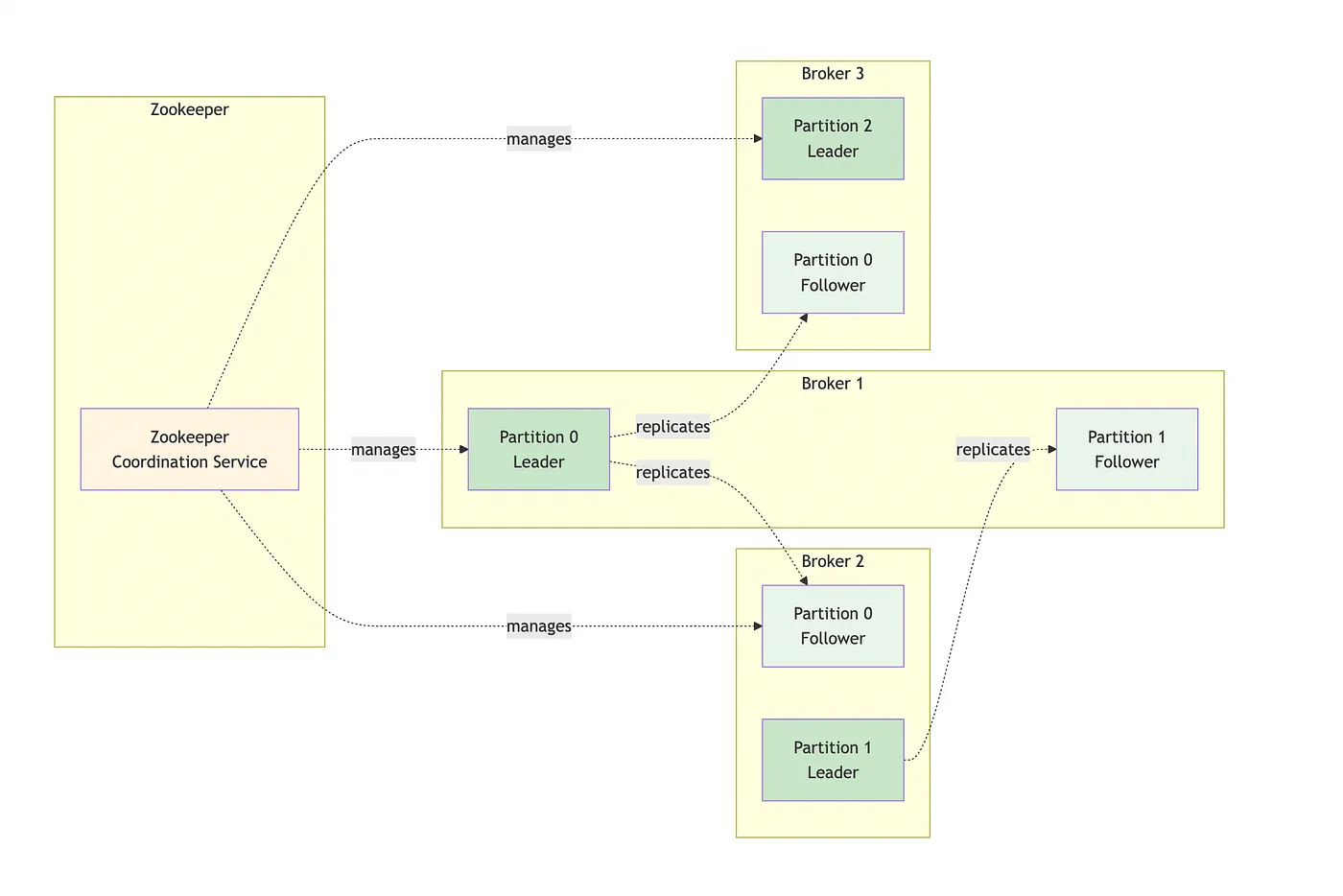
The heart of the system is the Broker Kafka Cluster (defined in docker-compose.yml and [Architecture.md](https://github.com/aairom/kafka-101/blob/main/Docs/Architecture.md)). By running three brokers coordinated by Zookeeper, the architecture ensures High Availability. Each data partition is replicated across at least two brokers; if one broker fails, another automatically takes over as the "leader," ensuring that no orders are lost and the system remains online. This fault tolerance is what makes Kafka "production-ready" compared to simple message queues.
version: '3.8'

services:
  zookeeper:
    image: confluentinc/cp-zookeeper:7.5.0
    hostname: zookeeper
    container_name: zookeeper
    ports:
      - "2181:2181"
    environment:
      ZOOKEEPER_CLIENT_PORT: 2181
      ZOOKEEPER_TICK_TIME: 2000
    volumes:
      - zookeeper-data:/var/lib/zookeeper/data
      - zookeeper-logs:/var/lib/zookeeper/log

  kafka-broker-1:
    image: confluentinc/cp-kafka:7.5.0
    hostname: kafka-broker-1
    container_name: kafka-broker-1
    depends_on:
      - zookeeper
    ports:
      - "9092:9092"
      - "19092:19092"
    environment:
      KAFKA_BROKER_ID: 1
      KAFKA_ZOOKEEPER_CONNECT: 'zookeeper:2181'
      KAFKA_LISTENER_SECURITY_PROTOCOL_MAP: PLAINTEXT:PLAINTEXT,PLAINTEXT_HOST:PLAINTEXT
      KAFKA_ADVERTISED_LISTENERS: PLAINTEXT://kafka-broker-1:29092,PLAINTEXT_HOST://localhost:9092
      KAFKA_OFFSETS_TOPIC_REPLICATION_FACTOR: 2
      KAFKA_TRANSACTION_STATE_LOG_MIN_ISR: 2
      KAFKA_TRANSACTION_STATE_LOG_REPLICATION_FACTOR: 2
      KAFKA_GROUP_INITIAL_REBALANCE_DELAY_MS: 0
      KAFKA_AUTO_CREATE_TOPICS_ENABLE: 'true'
      KAFKA_JMX_PORT: 9101
      KAFKA_JMX_HOSTNAME: localhost
    volumes:
      - kafka-broker-1-data:/var/lib/kafka/data

  kafka-broker-2:
    image: confluentinc/cp-kafka:7.5.0
    hostname: kafka-broker-2
    container_name: kafka-broker-2
    depends_on:
      - zookeeper
    ports:
      - "9093:9093"
      - "19093:19093"
    environment:
      KAFKA_BROKER_ID: 2
      KAFKA_ZOOKEEPER_CONNECT: 'zookeeper:2181'
      KAFKA_LISTENER_SECURITY_PROTOCOL_MAP: PLAINTEXT:PLAINTEXT,PLAINTEXT_HOST:PLAINTEXT
      KAFKA_ADVERTISED_LISTENERS: PLAINTEXT://kafka-broker-2:29093,PLAINTEXT_HOST://localhost:9093
      KAFKA_OFFSETS_TOPIC_REPLICATION_FACTOR: 2
      KAFKA_TRANSACTION_STATE_LOG_MIN_ISR: 2
      KAFKA_TRANSACTION_STATE_LOG_REPLICATION_FACTOR: 2
      KAFKA_GROUP_INITIAL_REBALANCE_DELAY_MS: 0
      KAFKA_AUTO_CREATE_TOPICS_ENABLE: 'true'
      KAFKA_JMX_PORT: 9102
      KAFKA_JMX_HOSTNAME: localhost
    volumes:
      - kafka-broker-2-data:/var/lib/kafka/data

  kafka-broker-3:
    image: confluentinc/cp-kafka:7.5.0
    hostname: kafka-broker-3
    container_name: kafka-broker-3
    depends_on:
      - zookeeper
    ports:
      - "9094:9094"
      - "19094:19094"
    environment:
      KAFKA_BROKER_ID: 3
      KAFKA_ZOOKEEPER_CONNECT: 'zookeeper:2181'
      KAFKA_LISTENER_SECURITY_PROTOCOL_MAP: PLAINTEXT:PLAINTEXT,PLAINTEXT_HOST:PLAINTEXT
      KAFKA_ADVERTISED_LISTENERS: PLAINTEXT://kafka-broker-3:29094,PLAINTEXT_HOST://localhost:9094
      KAFKA_OFFSETS_TOPIC_REPLICATION_FACTOR: 2
      KAFKA_TRANSACTION_STATE_LOG_MIN_ISR: 2
      KAFKA_TRANSACTION_STATE_LOG_REPLICATION_FACTOR: 2
      KAFKA_GROUP_INITIAL_REBALANCE_DELAY_MS: 0
      KAFKA_AUTO_CREATE_TOPICS_ENABLE: 'true'
      KAFKA_JMX_PORT: 9103
      KAFKA_JMX_HOSTNAME: localhost
    volumes:
      - kafka-broker-3-data:/var/lib/kafka/data

volumes:
  zookeeper-data:
  zookeeper-logs:
  kafka-broker-1-data:
  kafka-broker-2-data:
  kafka-broker-3-data:

# Made with Bob
The Monitor: Real-Time Observability
To manage this distributed flow, the Monitor Runner (monitor_runner.py) provides a unified view of the entire ecosystem. It orchestrates the lifecycle of the producer and all consumer threads while capturing their standard output into a web-based dashboard. This allows developers to see the "path of a message" in real-time: from the moment the Producer sends Order #1001 to the moment all three consumer groups acknowledge and process it.
"""
Kafka Monitor Web Server
Provides a web interface to monitor producer and consumer outputs in real-time
"""

import asyncio
import json
import subprocess
import threading
from datetime import datetime
from pathlib import Path
from http.server import HTTPServer, SimpleHTTPRequestHandler
import socketserver

class TerminalMonitor:
    """Monitor terminal outputs and store them"""

    def __init__(self):
        self.outputs = {
            'producer': [],
            'shipping': [],
            'email': [],
            'analytics': []
        }
        self.max_lines = 1000  # Keep last 1000 lines per terminal

    def add_output(self, terminal_id, line):
        """Add a line to terminal output"""
        timestamp = datetime.now().strftime('%H:%M:%S')
        entry = {
            'timestamp': timestamp,
            'line': line
        }

        if terminal_id in self.outputs:
            self.outputs[terminal_id].append(entry)
            # Keep only last max_lines
            if len(self.outputs[terminal_id]) > self.max_lines:
                self.outputs[terminal_id] = self.outputs[terminal_id][-self.max_lines:]

    def get_outputs(self):
        """Get all terminal outputs"""
        return self.outputs

    def clear_terminal(self, terminal_id):
        """Clear a specific terminal"""
        if terminal_id in self.outputs:
            self.outputs[terminal_id] = []

    def clear_all(self):
        """Clear all terminals"""
        for terminal_id in self.outputs:
            self.outputs[terminal_id] = []

# Global monitor instance
monitor = TerminalMonitor()

class MonitorRequestHandler(SimpleHTTPRequestHandler):
    """Custom HTTP request handler"""

    def do_GET(self):
        """Handle GET requests"""
        if self.path == '/':
            self.path = '/monitor.html'
        elif self.path == '/api/outputs':
            self.send_response(200)
            self.send_header('Content-type', 'application/json')
            self.send_header('Access-Control-Allow-Origin', '*')
            self.end_headers()
            self.wfile.write(json.dumps(monitor.get
