A few weeks ago, we were dealing with a situation that every cloud engineer eventually faces.
A customer environment needed to be recovered in another region, and we were under time pressure.
At that moment, one of the lesser-known AWS capabilities became incredibly useful.
Exporting AMIs directly to S3.
Using this approach, we were able to:
- export the machine image
- replicate it to another region
- restore it as a new AMI
- bring the customer workloads back online
Without needing to share KMS keys or redesign the environment.
That experience reminded me that sometimes the most useful AWS features are the ones people rarely talk about.
Let’s walk through how this works.
What is AMI Store and Restore?
AWS allows you to export an Amazon Machine Image (AMI) to an S3 bucket.
Instead of keeping the AMI only inside EC2 metadata, AWS converts it into a portable binary artifact.
This artifact can then be:
- archived
- replicated to another region
- restored later as a new AMI
Think of it as creating a portable machine image backup.
Architecture Overview
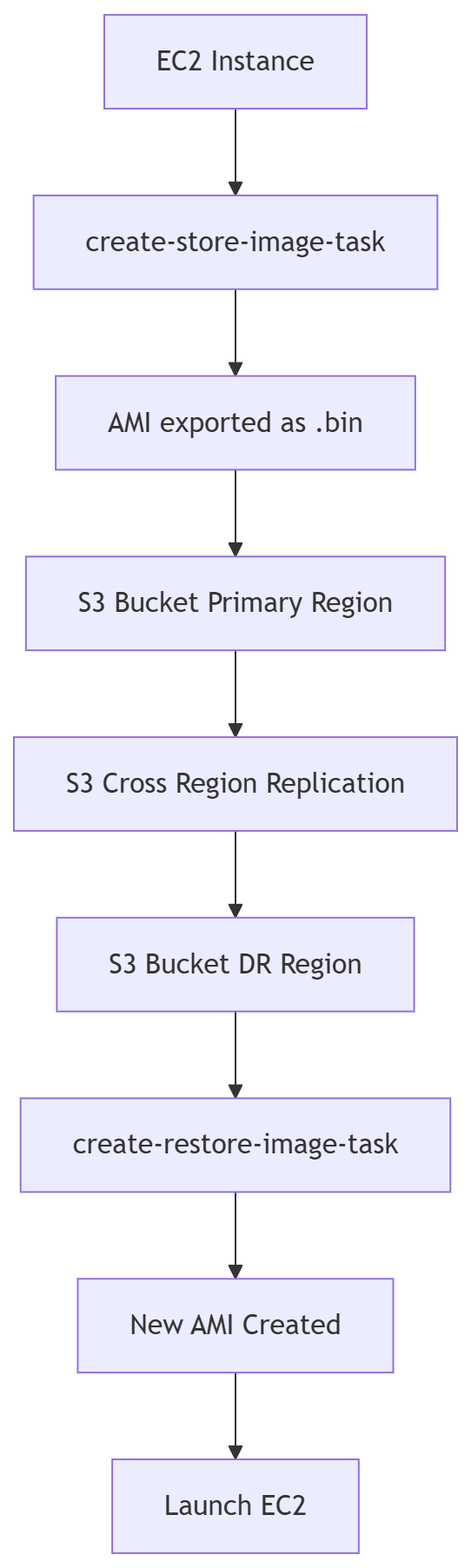
Step 1 — Export the AMI to S3
aws ec2 create-store-image-task \
--image-id ami-xxxx \
--bucket demo-dr-us-east-1-backup \
--region us-east-1
AWS converts the AMI into a compressed .bin artifact.
Example response:
{
 "ObjectKey": "ami-xxxx.bin"
}
Step 2 — Monitor the Export Task
aws ec2 describe-store-image-tasks \
--region us-east-1
Possible states:
InProgressCompletedFailed
Once completed, the artifact appears in S3.
Step 3 — Verify in S3
aws s3 ls s3://demo-dr-us-east-1-backup
Example output:
ami-0abc123.bin
Step 4 — Replicate to Another Region
Using S3 Cross Region Replication (CRR), the artifact can automatically move to another region.
Primary Region (USA)
        │
        ▼
S3 Bucket
        │
        │ CRR
        ▼
Backup Region (Mumbai)
This ensures the AMI artifact is safely stored in the DR region.
Step 5 — Restore the AMI
From the destination region:
aws ec2 create-restore-image-task \
--bucket demo-dr-ap-south-1-backup \
--object-key ami-xxxx.bin \
--name restored-ami \
--region ap-south-1
This creates a new AMI.
Check for the progess in the destination region AMI Console
Step 6 — Launch the Instance
aws ec2 run-instances \
--image-id ami-new \
--instance-type t3.medium
And the system is restored.
What Happens with KMS Encrypted AMIs?
During export:
- AWS internally decrypts the snapshots
- packages them into the artifact
- restores them in the destination region with new encrypted snapshots
This means you don’t need to share KMS keys across regions, which is often restricted in enterprise environments.
When Should You Use This?
This approach is great for:
- enterprise DR strategies
- KMS encrypted instance migrations
- long term infrastructure backups
- cross account migrations
- compliance driven archival
Disclaimer: Large AMI Exports May Take Time
When using create-store-image-task, the AMI is exported and stored in Amazon S3 as a binary .bin file.
If the AMI contains large EBS volumes, the resulting artifact can be tens or even hundreds of gigabytes.
In such cases, AWS uploads the image to S3 using multipart upload.
This means:
- The export process can take significant time depending on the AMI size.
- Multiple parts are uploaded in parallel to improve reliability.
- The .bin file will only appear in S3 after the export task is completed.
Because of this, it's important to monitor the store task status before assuming the artifact is available.
You can check the task prsk progress using:
aws ec2 describe-store-image-tasks --region <region>
Final Thoughts
Most AWS engineers never touch store-image-task.
But it’s one of those hidden features that becomes incredibly useful when things go wrong.
In disaster recovery planning, the goal isn’t just backup.
The goal is portability and recovery independence.
Exporting AMIs to S3 gives you exactly that.