An engineering journey through feature flag management, release safety, real infrastructure, incident investigation, and verified application recovery.
Introduction
A feature flag can change application behavior in seconds without requiring a new deployment. That flexibility is powerful, but it also introduces an important operational question:
What happens when the configuration itself becomes the source of an incident?
Imagine enabling an experimental checkout experience in production, only to discover that customers can no longer complete their orders.
Which configuration changed? Was the same configuration tested in development? What did the last working state look like? Can we recover safely without accidentally changing unrelated features?
I built FlagPilot AI to explore a practical answer to these questions.
FlagPilot AI is an open-source release safety workspace that extends self-hosted Flagsmith with configuration drift detection, snapshots, explainable risk assessment, incident investigation, and human-approved, verified rollbacks.
The project began as my submission for the WeMakeDevs Toggle Wars Hackathon — Track 03: Build on Open Source Flagsmith.
However, it became much more than a hackathon submission. It became an opportunity to explore release engineering, real infrastructure, API integration, operational safety, and the challenges of building software that can recover from failure.
Watch FlagPilot AI in Action
Watch the complete 2-minute, 28-second project demonstration on YouTube
The demonstration shows a working self-hosted Flagsmith integration, environment drift detection, a controlled checkout failure, an incident investigation, and a successful human-approved rollback.
1. The Problem: Feature Flags Are Easy to Change, but Recovery Is More Complicated
Feature flags allow developers to separate code deployment from feature activation.
Instead of deploying a new application version every time a feature needs to be enabled or disabled, developers can modify its configuration remotely.
However, configuration introduces another layer of operational complexity.
Consider an application with three environments:
- Development
- Staging
- Production
An experimental checkout feature might be enabled in Development, disabled in Staging, and accidentally enabled in Production.
Some differences are intentional. Others represent configuration drift that deserves investigation.
When a configuration-related incident occurs, developers may need to:
- Compare feature states across environments.
- Investigate recent configuration changes.
- Identify affected application behavior.
- Find a previously working configuration.
- Restore selected feature states.
- Verify that the recovery actually succeeded.
These challenges motivated the central design principle behind FlagPilot AI:
A configuration change should be observable, reviewable, and recoverable.
The goal was not to replace Flagsmith or build another feature flag platform. Instead, I wanted to create a complementary operational safety layer around an existing open-source platform.
2. What Is FlagPilot AI?
FlagPilot AI brings several release safety workflows into a single developer-oriented workspace.
Its main capabilities include:
| Capability | Purpose |
|---|
| Environment comparison | Identify differences between feature configurations |
| Configuration snapshots | Preserve a recovery reference |
| Release Firewall | Highlight potentially risky configuration changes |
| Rollback preview | Inspect proposed changes before execution |
| Human approval | Require explicit operator confirmation |
| Post-write verification | Verify resulting feature states against Flagsmith |
| Incident Timeline | Connect configuration observations with application outcomes |
| Developer CLI | Provide terminal-based operational workflows |
| Interactive checkout | Demonstrate real configuration-driven failure and recovery |
Rather than treating recovery as an isolated operation, FlagPilot AI connects configuration visibility, investigation, approval, and verification.
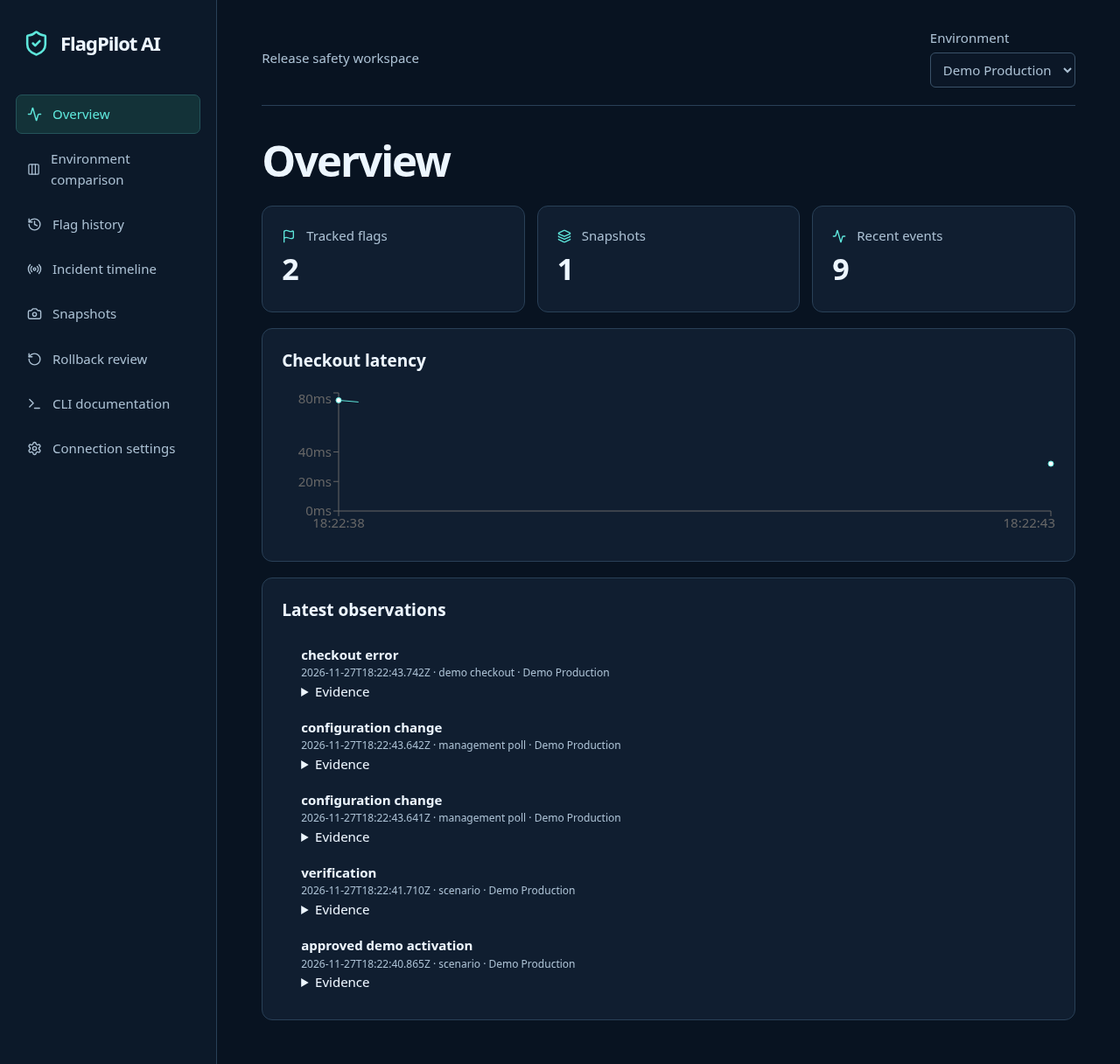
Figure 1: The FlagPilot AI dashboard provides an operational workspace for investigating configuration changes and managing recovery workflows.
3. System Architecture and Technology Stack
The project follows a modular architecture that separates application behavior, configuration management, operational evidence, and human interaction.
Technology stack
| Technology | Responsibility |
|---|
| Next.js | Operator dashboard and checkout application |
| TypeScript | Shared models, operational logic, API integration, and CLI |
| Flagsmith | Feature flag management and evaluation |
| PostgreSQL | Flagsmith database |
| SQLite | Local operational evidence and snapshots |
| Docker Compose | Reproducible infrastructure |
| Flagsmith SDK | Runtime feature flag evaluation |
| Playwright | Browser-based application testing |
| GitHub Actions | Automated acceptance validation |
| GitHub Codespaces | Remote development and demonstration environment |
High-level architecture
                   Operator
                      |
              +-------+-------+
              |               |
          Dashboard          CLI
              |               |
              +-------+-------+
                      |
               FlagPilot Core
                 |    |    |
                 |    |    +---- Configuration Poller
                 |    |
                 |    +--------- SQLite Evidence Store
                 |
         Flagsmith Management API
                 |
             Flagsmith
                 |
             PostgreSQL

                 ^
                 |
         Official Flagsmith SDK
                 |
          Checkout Application
The dashboard and CLI share operational logic through reusable TypeScript packages.
A polling process observes configuration changes, while the checkout application evaluates feature flags using the official Flagsmith SDK.
The management API is responsible for inspecting and modifying configurations. The SDK is responsible for evaluating configurations inside the application.
This separation is important because changing a feature flag and observing its effect on application behavior are two different operations.
4. Engineering Decision One: Configuration Drift Is Not Always a Bug
One of the first problems I wanted to address was environment drift.
A simplistic comparison tool might mark every difference between environments as an error.
However, development and production environments often need different configurations.
For example:
| Feature flag | Development | Production |
|---|
| experimental_checkout | ON | OFF |
| inject_checkout_failure | OFF | OFF |
Enabling an experimental feature in Development while keeping it disabled in Production is entirely reasonable.
The important question is whether that difference is understood and intentional.
FlagPilot AI compares feature configurations across environments and allows an operator to inspect differences and acknowledge intentional drift.
During my live demonstration, I deliberately created a configuration difference using the following project script:
node --env-file=.env scripts/development-drift.ts --confirm
The dashboard displayed the experimental checkout flag as enabled in Development and disabled in Production.
This was not a hardcoded dashboard example. It was an actual configuration difference retrieved from the self-hosted Flagsmith instance.
The engineering trade-off: Detecting differences does not establish which environment contains the correct configuration. That decision still requires release context and human judgment.
5. Engineering Decision Two: Capture a Working Configuration Before Changing It
A rollback requires a reliable recovery target.
Simply knowing that a feature was previously disabled may not be enough when multiple features, configuration values, and environments are involved.
FlagPilot AI supports timestamped configuration snapshots.
A snapshot captures feature states for an environment, creating a reference that can later be reviewed and used during recovery.
The following is a simplified illustration of the feature states involved in the demonstration:
{
  "environment": "Demo Production",
  "features": [
    {
      "name": "experimental_checkout",
      "enabled": false,
      "value": null
    },
    {
      "name": "inject_checkout_failure",
      "enabled": false,
      "value": null
    }
  ]
}
This example illustrates the relevant recovery configuration rather than reproducing the complete internal snapshot schema.
Snapshots create an important operational distinction between the current configuration and a previously captured configuration.
However, a saved snapshot is not automatically guaranteed to represent a healthy application. Its usefulness depends on the circumstances under which it was captured.
In the demonstration, the recovery configuration was captured while checkout was functioning correctly.
The incident scenario then used that configuration as its recovery reference.
6. Engineering Decision Three: Make Release Risk Explainable
I wanted FlagPilot AI to help operators understand why a configuration change might deserve additional attention.
This led to the Release Firewall.
Rather than claiming that a machine learning model can predict production incidents, the project uses deterministic risk heuristics.
The review process considers conditions such as:
- Whether a change affects a production environment.
- Whether a sensitive feature is being activated.
- Whether a feature has exceeded its configured expiry.
The reasoning behind this approach is intentionally straightforward.
A production configuration change deserves attention because it affects a more sensitive environment. Activating a feature explicitly identified as risky deserves additional scrutiny. An expired flag may represent technical debt or an outdated operational assumption.
The risk score is accompanied by reasons so the operator can understand what contributed to it.
During my rollback demonstration, the review interface displayed a heuristic risk score of 30/100, associated with a production configuration change.
An important distinction is that this score does not mean that the release has a statistically measured 30% probability of failure.
It is a review aid, not a calibrated probability or an incident prediction model.
Why not use an autonomous AI agent?
Although the project is named FlagPilot AI, its current release-risk and recovery logic is based on explicit rules rather than an autonomous LLM agent.
For operations that can modify sensitive application behavior, predictability and human control were more important to me than adding a model simply for the sake of using one.
A future AI-assisted layer could summarize incident evidence or recommend recovery options, while preserving explicit human approval.
7. Engineering Decision Four: Separate Rollback Preview, Approval, and Verification
A rollback is itself a configuration change.
If it is performed without appropriate safeguards, it can create another incident.
That is why I did not want the recovery workflow to become an unrestricted one-click operation.
FlagPilot AI separates rollback into distinct stages:
Select a recovery snapshot
            |
Choose affected feature flags
            |
Preview current and target states
            |
Review configuration risk
            |
Explicit human approval
            |
Apply selected changes
            |
Read the resulting Flagsmith state
            |
Record verification outcomes
The operator can inspect which feature flags will change and what their target states will be.
After applying a change, FlagPilot performs a fresh read of the affected Flagsmith configuration to verify the resulting state.
This distinction matters because a successful HTTP response does not necessarily establish that the final system state matches the operator's intention.
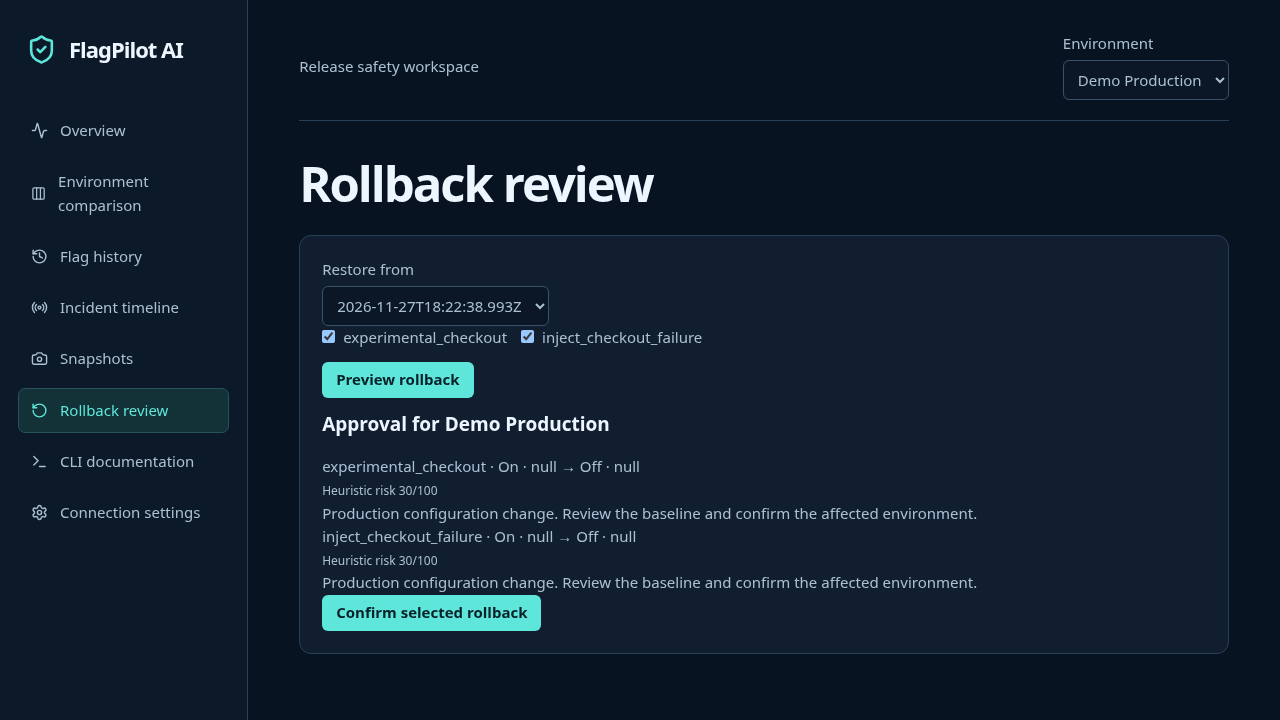
Figure 2: The rollback review interface allows operators to inspect proposed feature flag changes before explicitly approving recovery.
During the checkout incident, the rollback preview displayed the following transitions:
| Feature | Current state | Recovery state |
|---|
| experimental_checkout | ON | OFF |
| inject_checkout_failure | ON | OFF |
After confirming the selected rollback, the application reported a verified recovery transaction, with both affected feature states observed as disabled.
The next step was to retry checkout itself.
Configuration verification and application recovery are related, but they are not interchangeable.
Verifying that two flags were restored does not prove that every application dependency is healthy. The final checkout request provided additional evidence that the demonstrated failure had been resolved.
8. Engineering Decision Five: Connect Configuration Changes with Application Evidence
Configuration management becomes more useful when it can be examined alongside application behavior.
The Incident Timeline brings together observed feature flag changes, checkout request outcomes, recorded latency, and recovery-related evidence.
The checkout application records actual request results rather than displaying a fictional monitoring graph.
The polling process observes configuration transitions from Flagsmith.
Together, these sources provide an operational sequence that a developer can investigate.
Healthy checkout
      |
Recovery snapshot captured
      |
Experimental configuration activated
      |
Checkout failure observed
      |
Incident investigated
      |
Rollback approved
      |
Configuration restored and verified
      |
Successful checkout observed
This timeline helps explain what happened during the controlled demonstration.
There is still an important limitation: events occurring close together do not automatically establish causality.
Polling can also miss changes that happen between observations.
A production observability system would need stronger event collection, correlation, and integration with application tracing and upstream audit mechanisms.
For this prototype, the timeline provides a useful starting point for connecting configuration operations with visible application outcomes.
9. Reproducing a Real Incident: Healthy Checkout to Failure and Recovery
I wanted the demonstration to show more than dashboard navigation.
Instead of preparing static screenshots of a hypothetical incident, I created a controlled feature-flag-driven checkout failure.
The demonstration uses two feature flags:
experimental_checkout
inject_checkout_failure
The experimental flag controls the checkout execution path. The failure flag introduces a controlled failure on the experimental path.
The stable path remains available when experimental checkout is disabled.
Stage 1: Establish a healthy baseline
I started the self-hosted Flagsmith infrastructure, the FlagPilot dashboard, the checkout application, and the configuration poller.
The first checkout request completed successfully using the stable path.
Demo order completed.
stable · 108 ms
This provided the working baseline.
Stage 2: Introduce the controlled failure
I executed the project's incident scenario:
node --env-file=.env scripts/scenario.ts --confirm
The script captured a recovery snapshot and activated the configuration used for the failure demonstration.
When I submitted another checkout request, the application entered its experimental path and returned the intentionally injected failure.
Local failure injection interrupted checkout.
experimental · 73 ms
This demonstrated an actual application behavior change caused by feature flag configuration.
Stage 3: Investigate the incident
I opened the Incident Timeline and inspected the recorded checkout failure alongside the observed flag changes.
The dashboard provided configuration evidence and application request outcomes.
I then opened Rollback Review and selected the recovery snapshot captured before the incident.
Stage 4: Review and approve the rollback
Both affected feature flags were selected for recovery.
The interface showed their current enabled states and the disabled states recorded in the selected snapshot.
After reviewing the proposed changes, I explicitly confirmed the operation.
FlagPilot executed the selected changes and verified the resulting configuration through Flagsmith.
Both feature states were successfully verified as disabled.
Stage 5: Confirm application recovery
Finally, I submitted another checkout request.
Demo order completed.
stable · 89 ms
The application returned to its stable execution path.
Observed demonstration results
| Stage | Checkout path | Result | Observed latency |
|---|
| Before incident | Stable | Success | 108 ms |
| During incident | Experimental | Injected failure | 73 ms |
| After rollback | Stable | Success | 89 ms |
These are individual observations from my demonstration, not benchmark averages or evidence of a performance improvement.
The incident was intentionally generated inside an isolated demonstration environment rather than occurring in a real production system.
The important result was the successful end-to-end recovery workflow against an actual self-hosted Flagsmith instance.
10. Giving Developers a CLI, Not Just a Dashboard
A graphical interface is useful for incident investigation and reviewing sensitive changes, but developers also need terminal-based workflows.
FlagPilot AI includes its own CLI for interacting with the operational workspace.
The CLI and dashboard reuse shared operational logic rather than implementing entirely independent configuration systems.
Developers can explore the available commands using:
npm run cli -- --help
The health command provides an additional way to inspect the configured integration:
npm run cli -- health
This makes the project more approachable for developers who prefer terminal workflows.
FlagPilot's CLI is a project-specific interface. It should not be confused with the official Flagsmith CLI.
11. Real Development Challenges: Building Under Infrastructure Constraints
Challenge 1: Limited laptop storage
One of my biggest practical challenges was not related to TypeScript or API design.
It was infrastructure.
Running Flagsmith, PostgreSQL, container images, and development dependencies locally required storage that my laptop could not comfortably provide.
Rather than replacing the Flagsmith integration with a mocked backend, I moved the infrastructure to GitHub Codespaces.
Docker and Node.js ran remotely, while I accessed the application through my local browser.
That allowed me to preserve the real self-hosted architecture without installing Docker Desktop on my laptop.
The remote environment successfully ran the following infrastructure:
| Component | Version |
|---|
| Flagsmith | 2.295.2 |
| PostgreSQL | 15.5 |
| Node.js | 24.22.2 |
| npm | 11.19.1 |
| Docker Compose | 5.6.1 |
It reinforced a practical lesson:
Infrastructure constraints should encourage creative engineering solutions, not force a project to pretend its technical requirements do not exist.
Challenge 2: Accessing remote services safely
Running containers remotely was only part of the solution.
I also needed to access Flagsmith, the operator dashboard, and the checkout application without exposing sensitive management interfaces publicly.
The solution was GitHub CLI port forwarding:
gh codespace ports forward 8000:8000 3000:3000 3001:3001
Once forwarding was active, I could access the services through loopback addresses:
| Service | Local address |
|---|
| Flagsmith | 127.0.0.1:8000 |
| FlagPilot dashboard | 127.0.0.1:3000 |
| Checkout demonstration | 127.0.0.1:3001 |
Using consistent loopback addresses also helped preserve the application's origin validation assumptions.
The demonstration environment did not need to become a publicly exposed production deployment.
After recording and validation, the remote development environment could be stopped to avoid unnecessary resource consumption.
Challenge 3: Successful builds were not enough
A compiled application is not necessarily a functioning application.
For FlagPilot AI, a successful TypeScript build could not prove that:
- Flagsmith was reachable.
- Feature configurations could be retrieved.
- Real application flag evaluations worked.
- A configuration change affected checkout behavior.
- An approved rollback restored the intended states.
- Database state survived container recreation.
These requirements motivated an automated acceptance workflow using GitHub Actions.
Instead of relying on compilation alone, the workflow starts the actual infrastructure and exercises the integrated system.
12. Automated Validation: Testing Against Real Infrastructure
The validation strategy combines several levels of testing.
| Test category | Purpose |
|---|
| Unit tests | Validate shared operational logic |
| Live integration tests | Exercise actual Flagsmith integration |
| Browser tests | Validate user-facing workflows |
| Persistence checks | Verify state after container recreation |
| Build checks | Validate both Next.js applications |
| Acceptance artifacts | Preserve test evidence |
The hosted CI environment starts a pinned Flagsmith instance and PostgreSQL database.
It bootstraps the isolated instance, seeds feature configurations, starts both applications, exercises incident recovery, and checks persistence.
An earlier recorded acceptance run produced:
| Test category | Tests passed |
|---|
| Unit tests | 21 |
| Live integration tests | 4 |
| Browser tests | 2 |
| Total | 27 |
That acceptance run reported no failed or skipped tests.
The persistence check also passed.
Automated acceptance pipeline
Source validation
        |
Unit tests
        |
Build dashboard and checkout
        |
Start Flagsmith and PostgreSQL
        |
Bootstrap isolated infrastructure
        |
Run live integration tests
        |
Execute browser recovery tests
        |
Verify database persistence
        |
Collect acceptance evidence
        |
Upload validation artifacts
The automated workflow collects shareable acceptance evidence, including browser recordings and screenshots.
Subsequent documentation and repository updates were also checked through GitHub Actions.
This does not establish that the application is free from defects, but it provides more meaningful evidence than a demonstration built entirely around mock responses.
The complete testing implementation, validation documentation, workflow history, and acceptance artifacts are available through the project's GitHub repository.
13. Security Was Part of the Design
Because FlagPilot AI can modify feature configurations, security boundaries matter.
The prototype incorporates several safeguards:
- Management credentials remain server-side.
- Recovery writes require explicit configuration enablement.
- The operator interface requires authentication.
- Origin validation helps restrict unintended access.
- Approval and verification are separated from the initial rollback preview.
- Local operational evidence is retained for investigation.
For example, the following environment variable explicitly enables configuration writes:
FLAGPILOT_WRITES=true
Without that intentional configuration, upstream feature-state modifications are disabled by default.
However, this setting is only one safety boundary. It is not a replacement for infrastructure security, access control, or production authorization policies.
Developers should never commit actual management keys, operator tokens, or private environment files to a public repository.
The project includes a security policy documenting its current assumptions and limitations.
14. Getting Started with FlagPilot AI
FlagPilot AI is available under the MIT license.
The repository includes the application source, reusable packages, Docker Compose infrastructure, automated tests, and setup documentation.
Prerequisites
- Git
- A compatible Node.js environment
- npm
- Docker Engine with Docker Compose
- A web browser
GitHub Codespaces can also be used if local infrastructure or storage is limited.
Step 1: Clone the repository
Visit the project repository linked at the end of this article and clone it using Git.
Open the project directory:
cd flagpilot-ai
Step 2: Install dependencies
npm ci
Step 3: Initialize local configuration
For a fresh installation:
node scripts/init.mjs
Step 4: Start the self-hosted infrastructure
docker compose config --quiet

docker compose up -d --wait
Inspect the container status:
docker compose ps -a
Open the local Flagsmith interface on port 8000.
Create the required account, organization, project, and management credentials according to the repository documentation.
Configure the generated private environment file.
Never expose the actual management key or operator token.
Step 6: Prepare the demonstration environment
node --env-file=.env scripts/seed.ts --confirm

node --env-file=.env scripts/demo-key.ts

node --env-file=.env scripts/development-drift.ts --confirm
Step 7: Start the application processes
Start the dashboard in one terminal:
npm run dev
Start the checkout application in another terminal:
npm run demo
Start the configuration poller in a third terminal:
npm run poll
Step 8: Open the applications
FlagPilot Dashboard:
127.0.0.1:3000

Checkout Application:
127.0.0.1:3001
Step 9: Reproduce the controlled incident
After establishing a healthy baseline and configuring the isolated demonstration environment, run:
node --env-file=.env scripts/scenario.ts --confirm
Investigate the resulting incident, select the recovery snapshot, review the affected feature states, and explicitly approve the rollback.
Retry checkout to observe the recovered application behavior.
These steps are intended for the isolated demonstration environment, not an existing production Flagsmith project.
For complete setup requirements, authentication instructions, and configuration details, follow the official project README.
15. Current Limitations and Future Improvements
FlagPilot AI is a functional hackathon prototype, not an enterprise-certified release management platform.
There are several areas where I would like to continue improving it.
Stronger production authorization
Production adoption would require individual identities, role-based permissions, stronger authentication, and potentially multi-person approval workflows.
More robust configuration observation
Polling provides useful configuration evidence but may miss intermediate transitions.
Integration with richer event sources and upstream audit information would improve visibility.
Concurrent configuration changes
Real production environments can have multiple operators and automation systems changing configurations.
Recovery needs stronger concurrency safeguards and conflict handling.
More comprehensive rollback semantics
The demonstrated recovery focuses on selected default feature states.
More advanced workflows would need to address additional configuration structures, targeting rules, and complex dependencies.
AI-assisted incident investigation
A future AI-assisted layer could summarize incident evidence, explain configuration differences, and recommend recovery options.
Any such integration should preserve explicit human approval before sensitive writes.
Production-scale evaluation
The project has been validated in isolated development and CI environments.
It has not undergone large-scale production load testing or an independent security assessment.
These limitations are important because successful prototype validation should not be confused with universal production readiness.
16. What Building FlagPilot AI Taught Me
This project reinforced several engineering lessons.
First, feature flag management and release safety are related but distinct problems.
Making a feature easy to activate does not automatically make its activation safe.
Second, configuration verification should involve reading the resulting state.
A successful write response should not be treated as the only evidence of recovery.
Third, operational dashboards become more valuable when they present real evidence.
The most meaningful part of the project was observing an actual application failure and subsequent recovery.
Fourth, infrastructure constraints do not necessarily require compromising integration quality.
GitHub Codespaces and hosted CI made it possible to exercise real services despite limited local resources.
Fifth, explainable rules can be more appropriate than autonomous AI for sensitive operations.
A transparent heuristic and explicit human approval provide a useful foundation for future AI-assisted workflows.
Finally, building for failure is just as important as building for success.
A system should not only demonstrate what happens when everything works. It should also demonstrate how failures are investigated and how recovery can be verified.
17. Why Open Source Matters
One of the reasons I enjoyed working with Flagsmith was its self-hosted architecture.
Being able to run the underlying platform inside an isolated environment made it possible to reproduce configuration changes, simulate failure, inspect recovery, and execute automated integration tests.
FlagPilot AI builds around the integration surfaces of Flagsmith without requiring a custom fork of its core platform.
That creates an opportunity for other developers to inspect the implementation, reuse parts of the operational logic, experiment with alternative workflows, and contribute improvements.
To me, this is one of the most interesting aspects of building on open-source infrastructure:
Rather than recreating an existing platform, developers can extend it to address complementary engineering problems.
I would like to acknowledge the Flagsmith open-source community and WeMakeDevs for creating an opportunity to explore these ideas through the Toggle Wars hackathon.
Final Thoughts
FlagPilot AI started with a simple question:
What if recovering from a bad feature flag change could become a deliberate, observable, and verifiable workflow?
The resulting project combines self-hosted feature management, environment comparison, configuration snapshots, explainable risk assessment, human approval, and verified recovery into a single operational workspace.
The most rewarding part was watching the complete demonstration unfold against real infrastructure:
Healthy checkout → Configuration change → Controlled failure → Human-approved rollback → Verified recovery.
It is not the final answer to every release engineering problem, but it is a working foundation that I would like to continue improving.
FlagPilot AI has been successfully submitted to the WeMakeDevs Toggle Wars Hackathon under Track 03: Build on Open Source Flagsmith.
Whether you are interested in feature flags, DevOps, release engineering, self-hosted infrastructure, or building reliable open-source applications, I would love to hear your feedback.
Explore FlagPilot AI
GitHub Repository: FlagPilot AI — Open Source Project
The repository contains the complete source code, installation guide, automated testing evidence, architecture documentation, security policy, and contribution guidelines.
License: MIT
If you find the project interesting, consider exploring the source code, sharing feedback, or contributing improvements.
I would particularly appreciate hearing from developers who have experience with feature flag incidents, configuration drift, or production recovery workflows.
How does your team recover when a configuration change—not a code deployment—causes an application failure?
About the Author
I'm Imran Ghafoor, a developer interested in artificial intelligence, practical software engineering, open-source development, and building applications that solve real-world problems.
Thanks for reading, and happy coding!
Build confidently. Release responsibly. Recover safely.