By Imran Ghafoor · Python · Flask · React · PyMuPDF · Tesseract · Groq · GPT-OSS · Docker · Render
A receipt looks simple until you try to turn it into reliable software data. The vendor may be printed at the top, the date may use an unfamiliar format, and the largest number on the page is not necessarily the amount paid. Sometimes there is no text layer at all—just a photograph embedded in a PDF.
I built DocuMind AI to explore a practical answer: combine conventional document extraction with an open-weight language model, validate its output, and let a person approve the final record. It began as a Hacktoberfest Side Hustle project and became a useful exercise in building an end-to-end AI application under real hosting constraints.
Try the live demo · Explore the GitHub repository
Demo Access Code: Demo_documind@678!
The live version is a shared, temporary demo. Use only fictional invoices and receipts; the demo access code is available in the original DEV Community project post.
The Problem: Recognizing Text Is Not Understanding a Document
Imagine a freelancer with PDF invoices, phone photos of receipts, and scanned bills. Each document contains information that should eventually become a consistent expense record: vendor, date, currency, subtotal, tax, total, and category.
OCR can recognize words, but it does not necessarily decide which amount is the final payable total or whether an ambiguous date means March 4 or April 3. An LLM can help interpret context, but it introduces its own failure modes: missing values, invented fields, inconsistent JSON, and amounts that look plausible but are wrong.
That led to the guiding rule for DocuMind AI:
AI output is a proposal, not a confirmed financial fact.
The application therefore separates document ingestion, text extraction, semantic interpretation, validation, and human confirmation. A successful API response alone does not make a document an expense.
How the System Fits Together
The frontend is built with React, TypeScript, Vite, and Tailwind CSS. Flask handles document uploads and API requests, while SQLAlchemy manages application records. The processing pipeline sits behind the API so the browser never needs to run OCR or hold the AI provider's secret key.
           PDF / PNG / JPG upload
                     |
                     v
              Flask validation
                     |
               +-----+------+
               |            |
               v            v
          PyMuPDF       Tesseract OCR
       (selectable text)  (scan/image)
               |            |
               +-----+------+
                     |
                 Plain text
                     |
                     v
            Groq + GPT-OSS 20B
                     |
               Suggested JSON
                     |
              Python validation
                     |
              Human review queue
                     |
           Confirmed expense record
                     |
            Dashboard / CSV reports
This separation makes debugging more useful. If a total is wrong, I can investigate whether the text was recognized incorrectly, the model interpreted the text incorrectly, or the final value needs a user correction.
Engineering Decision 1: Read Native PDFs Before Running OCR
One implementation choice I wanted to preserve was not running OCR on every PDF. Digital PDFs often contain selectable text. Rendering those pages into images and running OCR would add work without necessarily improving the result.
The backend uses PyMuPDF first, then checks whether enough native text was extracted. Here is a shortened excerpt of the actual decision logic in backend/app/services/extraction.py:
native = "\n".join(
    doc[i].get_text("text") for i in range(pages)
).strip()

if len(re.sub(r"\s+", "", native)) >= settings.min_pdf_text_chars:
    return ExtractionResult(native, "pdf_text", pages, warnings)

# Otherwise, fall back to the OCR path.
The application's default threshold is 40 non-whitespace characters. That is a heuristic, not a perfect scanned-PDF detector. A nearly empty digital document may also fall back to OCR, and a document with a little selectable text may still have important information embedded as images.
For a scanned PDF, the backend renders pages using PyMuPDF and passes the resulting images to Tesseract. Direct PNG/JPG uploads go to Tesseract as well. The server imposes page, image-pixel, and timeout limits so one large document does not consume unlimited resources.
Trade-off: The hybrid approach handles common digital and scanned files without assuming that either method is always sufficient. It still struggles with very poor scans, unusual layouts, and handwriting. I have not measured extraction accuracy on a representative benchmark dataset.
Engineering Decision 2: Make the LLM Return Data, Not a Paragraph
Once the text has been extracted, the next task is interpretation. The deployed demo is configured for openai/gpt-oss-20b, an open-weight model accessed through Groq's hosted inference API.
I did not run the language model inside the Render container. Hosted inference kept the web service focused on document processing and application logic, which mattered for a resource-limited demo.
The backend requests a JSON object containing document type, vendor, date, currency, subtotal, tax, total amount, expense category, and a short summary. A fictional receipt might produce a proposal like this:
{
  "document_type": "receipt",
  "vendor": "ABC Electronics & Stationery",
  "document_date": "2026-10-18",
  "currency": "PKR",
  "subtotal": "5500.00",
  "tax": "500.00",
  "total_amount": "6000.00",
  "expense_category": "Office Supplies",
  "short_summary": "Stationery and equipment purchase"
}
This JSON is an illustrative target structure using synthetic data, not a published model-accuracy measurement.
Rather than hard-coding one SDK throughout the project, backend/app/services/ai.py communicates through an OpenAI-compatible chat-completions interface. The request includes the configured model, a system instruction, document text, and JSON response mode when supported:
body = {
    "model": self.s.ai_model,
    "temperature": 0,
    "max_completion_tokens": self.s.ai_max_completion_tokens,
    "messages": [
        {"role": "system", "content": system},
        {"role": "user", "content": user},
    ],
}

if self.s.ai_json_mode:
    body["response_format"] = {"type": "json_object"}
The prompt explicitly asks the model not to invent missing values, to return null when uncertain, and to treat the uploaded document as untrusted text. The client also distinguishes authentication problems, rate limits, timeouts, and invalid output. Groq's structured-output documentation describes the available JSON-oriented response options and their different guarantees.
There is an important boundary here: asking for JSON does not make the values correct. That is why the next stage does not simply insert the model response into financial reports.
Engineering Decision 3: Validate and Review Before Confirming
DocuMind AI validates the proposed fields on the server. Dates must be real calendar dates, currencies must use three-letter codes, categories must match supported values, and monetary amounts must be non-negative, finite, and appropriately normalized.
The validation code deliberately treats model suggestions differently from human edits. This excerpt is taken from backend/app/validation.py:
def validate_fields(raw: dict, *, lenient: bool) -> ValidationResult:
    """lenient=True: invalid AI values become null + warnings.
    lenient=False: invalid user values become errors."""
    result = ValidationResult()
    for name in FIELD_NAMES:
        value = raw.get(name)
        if _blank(value):
            result.fields[name] = None
            continue
        try:
            result.fields[name] = _PARSERS[name](value)
        except FieldError as exc:
            result.fields[name] = None
            if lenient:
                result.warnings.append(
                    f"{name}: {exc} (value discarded, please check the document)"
                )
            else:
                result.errors[name] = str(exc)
    return result
A model response such as "document_date": "2026-15-45" should become a warning, not a believable date. A human editing a record should receive an actionable validation error instead of silently losing their input.
The application also performs soft consistency checks. If subtotal + tax differs from the total, it warns the reviewer. It does not automatically declare the document invalid because legitimate invoices can include shipping, discounts, or rounding.
The Review Queue is where these safeguards become visible. The interface lets users inspect an original document alongside suggested values, correct fields, and confirm a record explicitly. It also records whether a value came from AI, a template, or a person.
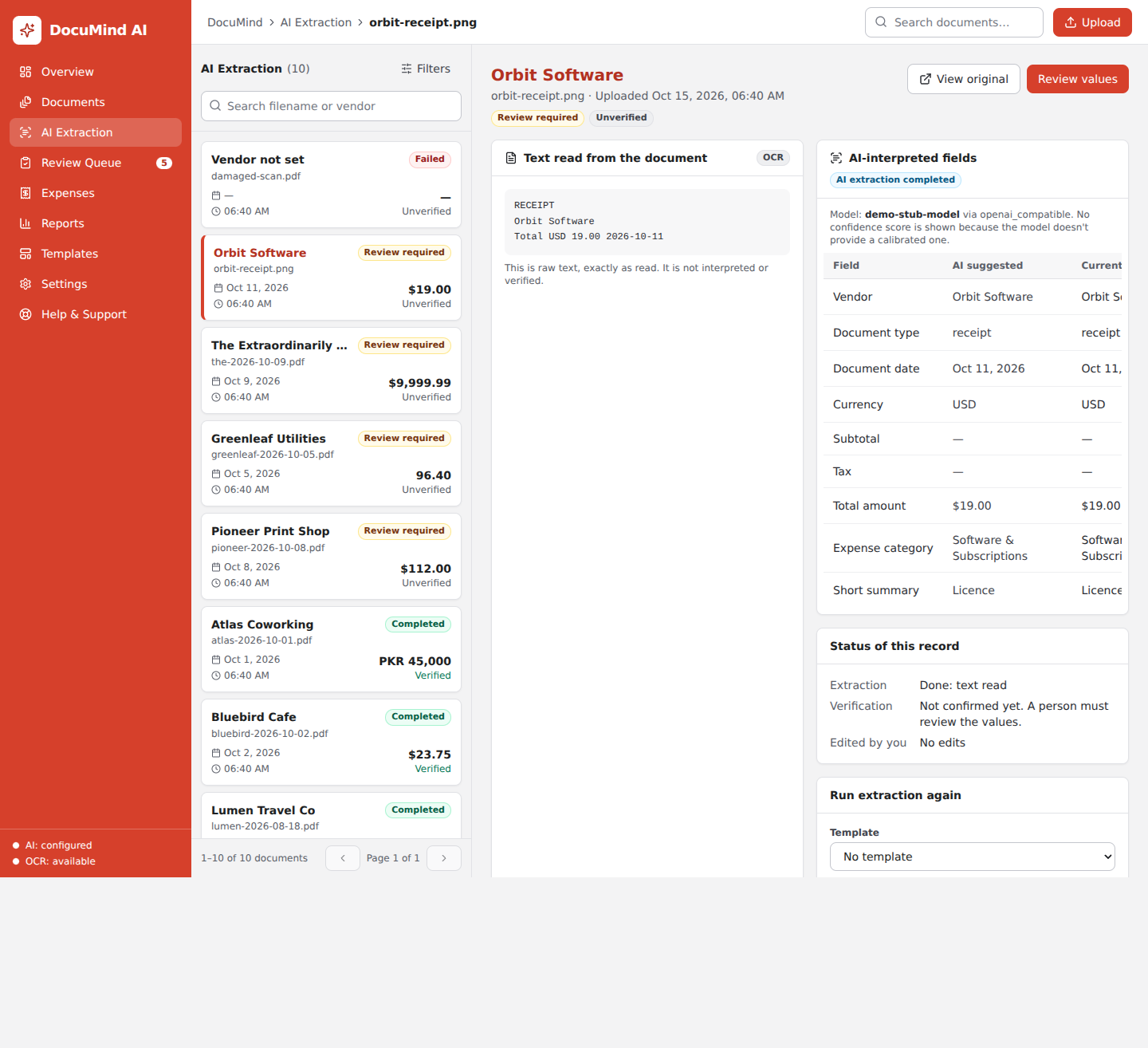
Figure 1. The extraction workspace presents model-suggested fields for inspection.
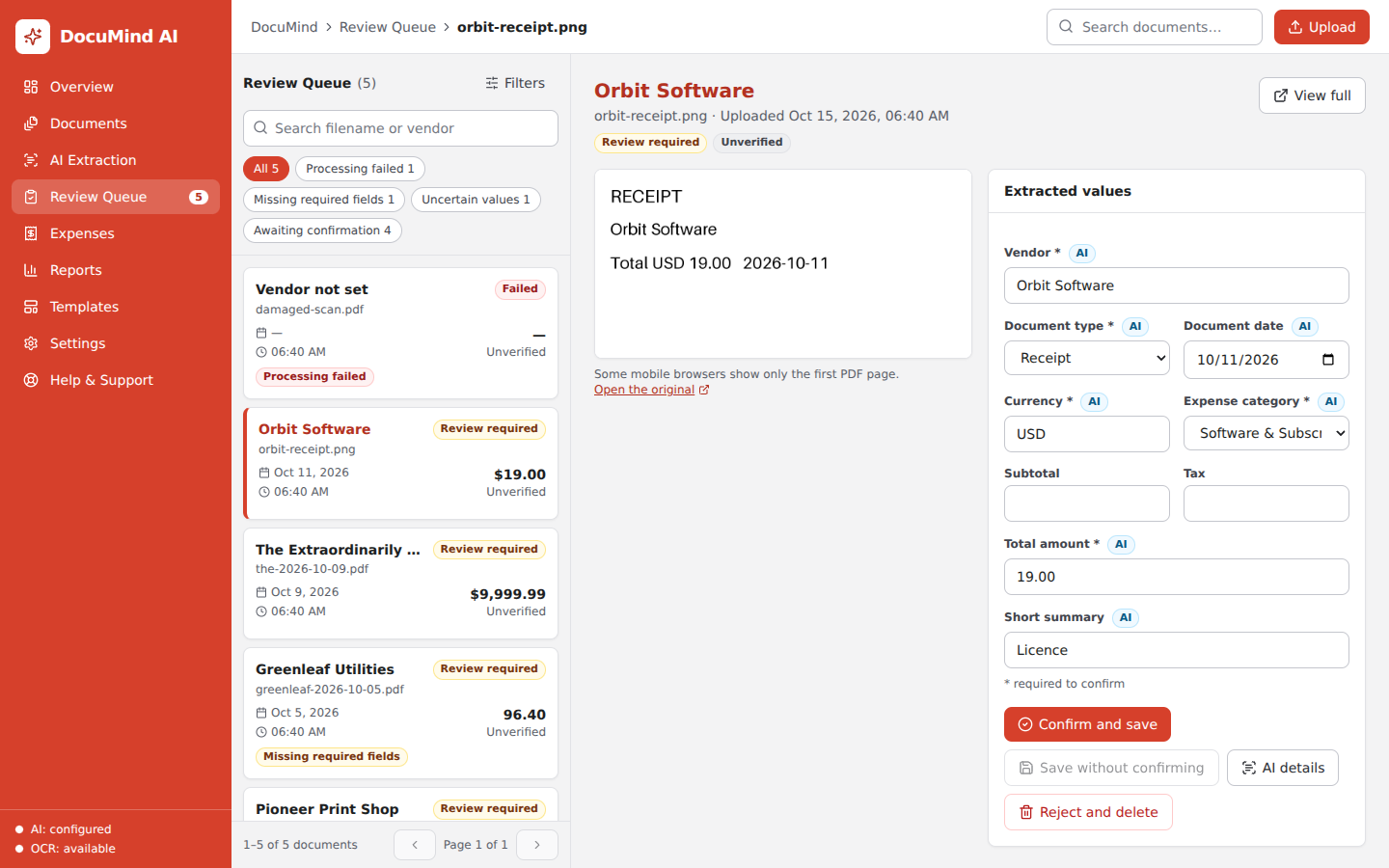
Figure 2. The review workflow separates a processed document from a confirmed expense.
Only confirmed records contribute to expense totals. That design choice matters more to me than making the application appear fully automatic.
Three Real Challenges Behind the Live Demo
1. OCR belonged on the server, not on my laptop
Early in deployment planning, I had to separate local development dependencies from runtime dependencies. If users access DocuMind AI through a website, they should not need to install OCR software on their machines.
The solution was to package Tesseract inside the backend's Docker image. The relevant lines from backend/Dockerfile are:
FROM python:3.12-slim-bookworm

RUN apt-get update && apt-get install -y --no-install-recommends \
    tesseract-ocr tesseract-ocr-eng \
    && tesseract --version \
    && tesseract --list-langs \
    && rm -rf /var/lib/apt/lists/*
That made the OCR runtime part of the deployment artifact, rather than an assumption about the hosting machine. For details on Tesseract's capabilities and language data, see the official Tesseract documentation.
2. The first deployment plan was unnecessarily expensive for a prototype
An initial infrastructure configuration estimated approximately $31.25 per month, covering a larger backend instance, database, and persistent upload storage. Those resources can be appropriate for a long-lived application, but I only needed a temporary hackathon demonstration.
I moved to a separate render-free.yaml Blueprint and kept the paid configuration separate. The free-demo configuration limits files to 3 MB, processes up to 3 PDF pages, reduces OCR rendering to 100 DPI, and stores the SQLite database and uploads in temporary storage.
The trade-off is significant: Render's free web services may spin down, and local files—including a SQLite database—can be lost after a spin-down, restart, or redeployment. The live demo is therefore not suitable for real financial records or permanent storage. Render documents these free-tier limitations.
This experience reinforced a practical lesson: optimize infrastructure for the purpose of the deployment, not for the imagined future version of the product.
3. API configuration was a deployment problem of its own
While setting up GroqCloud, I encountered an API-key creation error: “We couldn't verify this request.” It was a useful reminder that an AI application can fail before model inference even begins—account verification, credentials, environment variables, and provider availability all need attention.
After resolving the key setup and deploying the application, the Flask health endpoint returned:
{
  "ai_configured": true,
  "database": "ok",
  "ocr_available": true,
  "status": "ok",
  "version": "0.1.0"
}
That response confirmed the application could see its configuration, database, and OCR runtime. It did not prove that the language model was accurate. I separately uploaded synthetic receipts and tested the browser workflow after deployment.
What I Tested—and What I Haven't Claimed
I tested the live demo with fictional receipt and invoice documents, including PDF and image formats, and used the dashboard to inspect extracted information and the review workflow. The project also contains automated backend, frontend, and browser-test suites, which are available in the repository.
The most important distinction is between a working workflow and a validated extraction benchmark. I have not published field-level precision, recall, error rates, or a statistically meaningful comparison against competing document AI systems. I also have not claimed paying customers.
A useful next evaluation would build a labeled set of invoices with varied scan quality and layouts, then measure vendor/date/amount extraction separately. Accuracy on a few clean synthetic receipts would not be enough to support production claims.
What Would Have to Change Before Real Customers Could Use It?
The current demo uses a shared access code and short-lived signed sessions. That is convenient for reviewers, but it is not multi-user authentication or document-level isolation. Combined with temporary local storage and the fact that document text is sent to a third-party inference provider, it means the demo should be used only with synthetic data.
Before treating this as a real SaaS product, I would prioritize proper accounts and authorization, persistent database and object storage, background OCR/AI jobs, privacy controls and retention policies, duplicate detection, and systematic model evaluation. In particular, synchronous extraction is simple for a prototype but becomes a bottleneck as document volume and processing time increase.
Lessons I'd Carry Into the Next AI Project
The most useful lesson was not a new prompt technique. It was learning to keep recognition, interpretation, validation, and approval as different responsibilities.
- Use specialized tools first. PyMuPDF and Tesseract do work that does not require an LLM.
- Treat model output as untrusted input. JSON parsing, value validation, and consistency checks belong in application code.
- Design for failures. An unavailable AI provider should not cause an uploaded document to disappear or be falsely marked as successfully extracted.
- Make the user's decision visible. Confirmation and field provenance make the resulting reports easier to trust.
- Be explicit about prototype limitations. A live URL does not imply reliable storage, multi-user security, or measured accuracy.
I used AI development assistance during the prototyping and iteration process, but the architecture, hosted configuration, repository, and live workflow are open to inspection. I would rather describe what the system actually does than present an unmeasured result as a breakthrough.
Try the Project and Explore the Code
Live demo: DocuMind AI on Render
Demo Access Code: Demo_documind@678!
Source code: Imran-Ghafoor594/documind-ai
Original project showcase: DEV Community — DocuMind AI: Turning Receipts into Business Insights
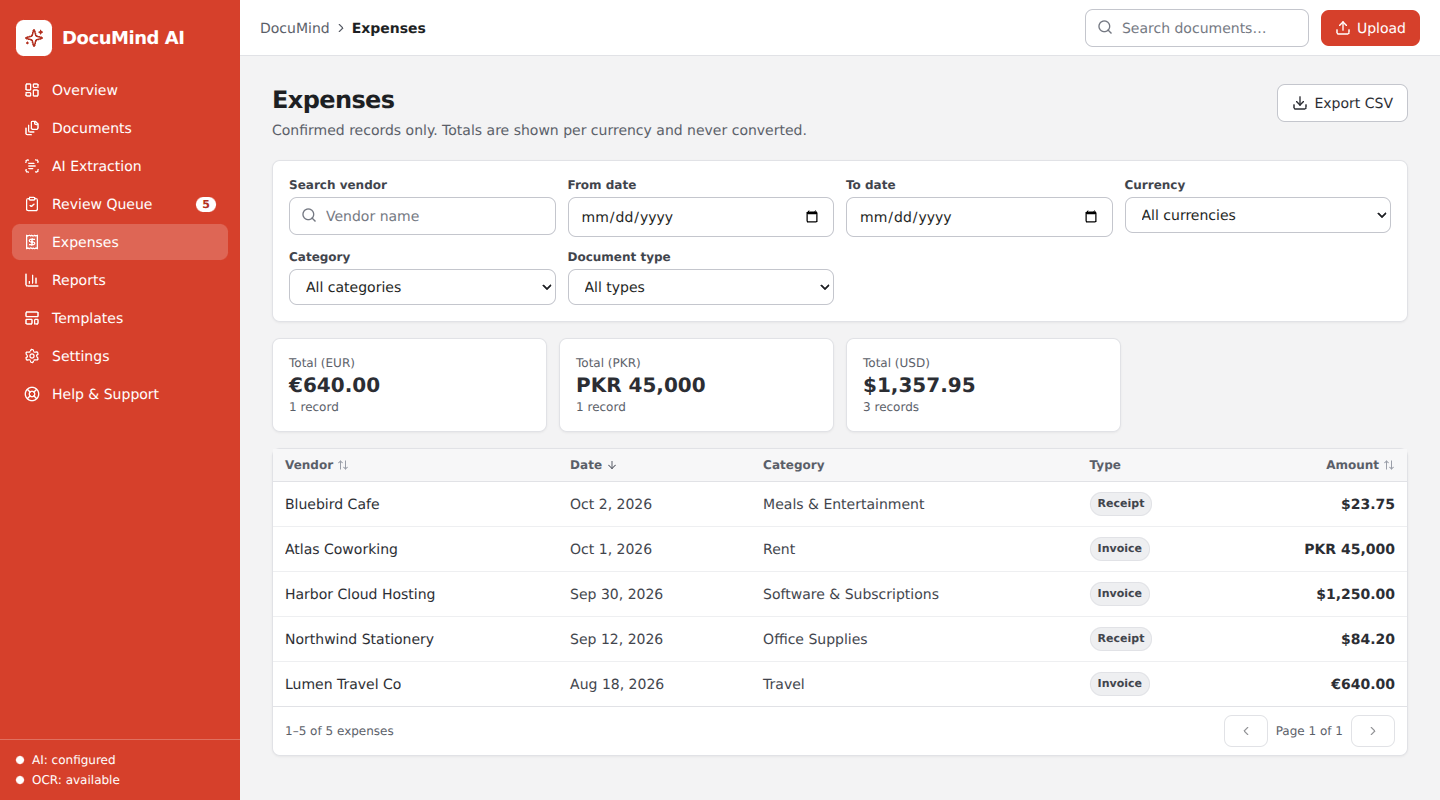
Figure 3. Confirmed records feed the expense view rather than unreviewed AI output.
DocuMind AI started as a small side-hustle concept: help people spend less time copying invoice fields into spreadsheets. Building it turned into a broader engineering lesson about how to add AI without surrendering data quality to it. The result is still a prototype—but it is an inspectable, deployed prototype with clearly defined boundaries and a path toward a more reliable system.
About the author: I'm Imran Ghafoor, an AI developer pursuing a Bachelor's degree in Artificial Intelligence. I work on practical projects involving machine learning, computer vision, and LLM-based applications.
Find more of my work on GitHub and my portfolio.