AI-SLOP Detector v3.18.1 — Ship Code. Not Slop.
Find unfinished implementations, suspicious code patterns, and misleading claims before they reach production.
57 detection rules. Five programming languages. Free, open source, and MIT licensed.
No API key. No model download. No network calls during analysis.
GitHub · PyPI · npm · VS Code Marketplace
1. What is AI-SLOP Detector?
AI-SLOP Detector is an evidence-based static analysis tool that helps developers identify suspicious, incomplete, and misleading implementations in software.
It addresses a problem that has become increasingly important in the age of AI-assisted development: code that looks finished but may not actually implement what it promises.
A function accepts parameters it never uses. An authentication check always returns True. A payment handler reports success after an exception. A documented feature contains little more than a placeholder.
Such code can be syntactically valid, follow formatting conventions, and even pass an incomplete test suite.
The challenge is not whether the code looks professional. It is whether there is meaningful implementation behind its appearance.
AI-SLOP Detector examines source code without executing it and provides actionable information about suspicious implementations:
- The affected file and source location.
- The detection rule and severity.
- The reason the implementation was flagged.
- Evidence supporting the finding.
- A suggested correction.
It does not attempt to determine whether a human or an AI wrote the code. It analyzes what is actually present in the implementation.
Whether you write code manually, use GitHub Copilot, work with Claude Code, or build applications with autonomous coding agents, the same principle applies: generated code deserves engineering review.
2. Get Started in 60 Seconds
Getting started requires no account, API key, or configuration file.
Install with pip
pip install ai-slop-detector
Navigate to your project directory and run:
slop-detector --project .
That's it. Your first project scan is ready to run.
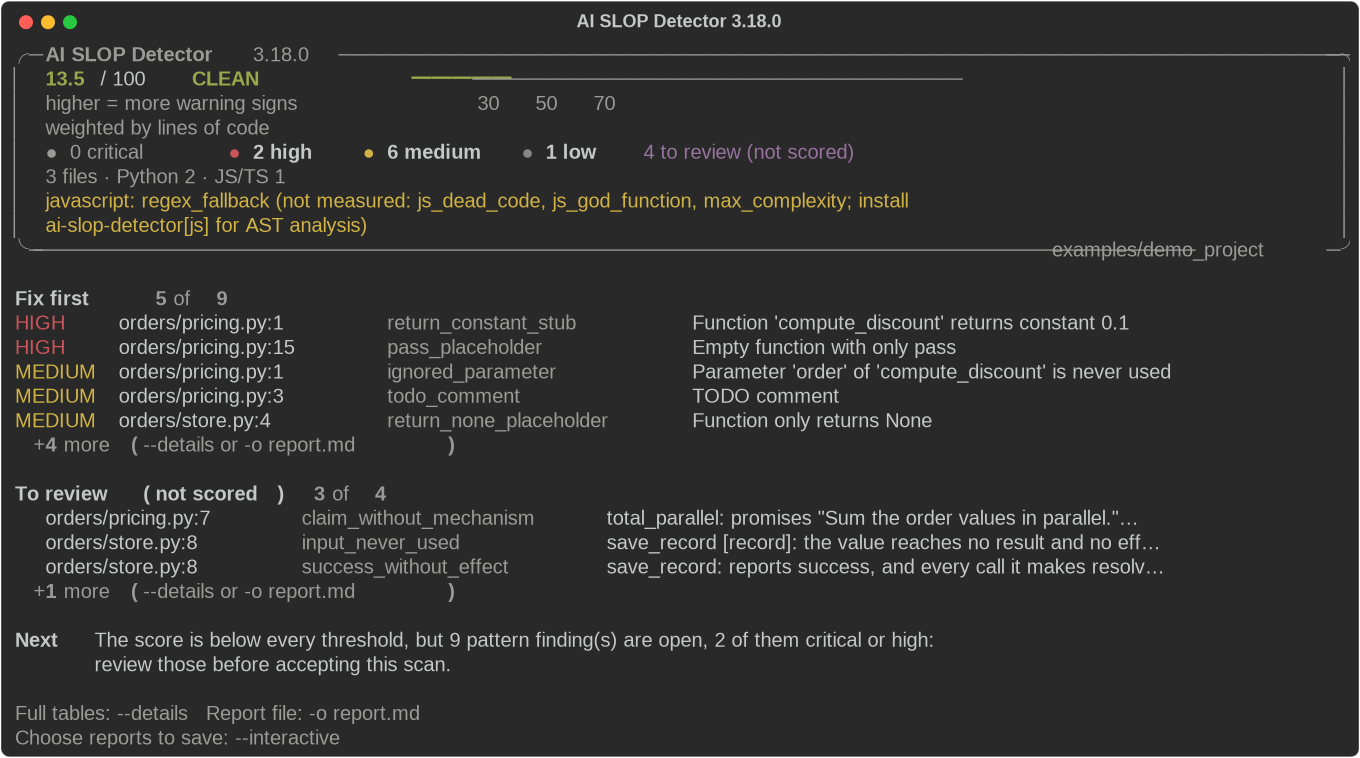
The terminal summary presents your project's deficit score, findings by severity, affected languages, priority findings, and a suggested next step.
Run without installing into your project environment
If you use uv:
uvx ai-slop-detector --project .
Run through npm
npx ai-slop-detector --project .
The npm package uses the same Python analysis backend.
Analyze a single file
slop-detector src/main.py
Inspect detailed analysis
slop-detector --project . --details
Install the VS Code extension
Search for AI-SLOP Detector in the Visual Studio Code Marketplace or run:
code --install-extension Flamehaven.vscode-slop-detector
The base Python package supports Python 3.8 and later.
Complete Installation and Usage Guide
Consider a function like this:
def compute_discount(order):
    """Compute the discount for the order."""
    return 0.1
The function has valid syntax, a meaningful name, a documented purpose, and a numerical return value.
But it never reads order.
Where is the actual discount calculation?
Perhaps a fixed discount is intentional. Perhaps the developer forgot to implement the pricing rules. Perhaps an AI assistant generated a placeholder and moved on.
Static analysis cannot establish the business intention on its own. What it can do is identify the discrepancy and give the developer a concrete reason to investigate.
Now consider a more concerning example:
def save_transaction(transaction):
    try:
        database.save(transaction)
    except Exception:
        return True
The exception handler reports success even when saving the transaction raises an exception.
Or consider:
def calculate_risk(transaction):
    logger.info("Calculating transaction risk")
    return 0.0
A logging statement makes the function appear more substantial, but the returned value is still independent of the transaction.
These are the kinds of implementation-level warning signs AI-SLOP Detector is designed to investigate.
The goal is not to produce the largest possible number of warnings. It is to produce findings that developers can understand, challenge, and act on.
4. 57 Detection Rules Across Five Programming Languages
AI-SLOP Detector v3.18.1 supports Python, JavaScript, TypeScript, Go, and Rust through four language-specific analyzer groups.
| Language | Detection Rules | Analysis Method |
|---|
| Python | 39 | Abstract Syntax Tree |
| JavaScript / TypeScript | 8 | Tree-sitter or regex |
| Go | 6 | Language-specific regex analysis |
| Rust | 4 | Token scanner or tree-sitter |
| Total | 57 | |
The detector investigates several families of implementation problems.
Python
- Constant-return stubs.
- Ignored function parameters.
- Failures disguised as successful operations.
- Incomplete implementations.
- Suspicious imports and dependency declarations.
- Provider conflicts.
- Excessive structural complexity.
- Exact duplicate implementations.
- Discrepancies between documented promises and source structure.
JavaScript and TypeScript
const processPayment = (payment: any) => {};
The analyzer investigates empty arrow functions, permissive any types, loose equality, leftover debugging statements, and additional structural patterns when the optional parser is available.
Go
result, _ := processTransaction()
The analyzer examines ignored errors, inappropriate panic-based handling, empty functions, and other Go-specific warning signs.
Rust
fn validate_transaction() -> bool {
    todo!()
}
The Rust analyzer investigates constructs such as todo!(), unimplemented!(), leftover dbg!() calls, and task markers.
The important distinction is that each language has its own analysis contract. Python-specific measurements are not artificially applied to Go or Rust.
For the full JavaScript and TypeScript structural checks, install the optional parser on Python 3.10 or later:
pip install "ai-slop-detector[js]"
Every scan records the analysis mode used. A measurement that was unavailable is not silently presented as completed.
Explore All 57 Detection Rules
5. Smarter Python Dependency Analysis
One of the most significant improvements in the v3.18 release series is evidence-based Python import provider resolution.
Consider these perfectly legitimate imports:
from PIL import Image
from sklearn.model_selection import train_test_split
The import names are PIL and sklearn.
But the distributions providing those imports are commonly named Pillow and scikit-learn.
A dependency analyzer that simply compares import names against package declarations can misunderstand legitimate code.
AI-SLOP Detector distinguishes between the import name, the distribution that provides it, dependency declarations, installed package evidence, and the environment from which that evidence was obtained.
The v3.18 release series introduces more precise dependency-related findings:
| Rule | What It Investigates |
|---|
phantom_import | No known provider, declaration, or installed distribution supplies the import within the observed evidence. |
undeclared_dependency | A provider is known, but the dependency is not properly declared within the applicable scope. |
provider_conflict | The observed distribution providing a module differs from the declared provider. |
phantom_member | A referenced member cannot be established from the applicable module evidence. |
The analyzer can inspect project-local virtual environments as files without executing them.
It also reads additional dependency declaration formats, including PEP 735 dependency groups and uv development dependencies.
Where available evidence is insufficient, the analyzer can preserve uncertainty rather than automatically produce a high-severity accusation.
This matters because an unresolved import is not necessarily an invented package, and an installed distribution is not necessarily the distribution a project intended to use.
Import Provider Resolution Documentation
6. Understand Your Project at a Glance
AI-SLOP Detector assigns a deficit score between 0 and 100 to analyzed files.
Higher scores indicate more warning signs.
| Deficit Score | Classification |
|---|
| Below 30 | CLEAN |
| 30 to below 50 | SUSPICIOUS |
| 50 to below 70 | INFLATED_SIGNAL |
| 70 and above | CRITICAL_DEFICIT |
The project-level score is weighted by lines of code.
However, a low score is not a certificate of correctness.
A project can receive a CLEAN classification while still containing important individual findings. The terminal summary keeps those findings visible and identifies what deserves attention first.
The detector also distinguishes between a completed measurement and one that could not be performed.
Structured results include information about scan coverage, measurement state, score validity, and analysis modes.
If nothing could be successfully analyzed, the result is NOT EVALUATED, not a misleading clean score.
Python analysis also provides a separate hollow-code review channel for suspicious implementations that deserve investigation but are not sufficiently established as scored findings.
These review candidates do not increase the deficit score.
This separation allows the detector to surface uncertainty without converting every suspicion into a penalty.
How the Analysis Works · Scoring Model
7. One Scan. Multiple Ways to Work With the Results.
A terminal summary is useful when you want an immediate answer.
A detailed report is useful when investigating a large project, reviewing a pull request, documenting technical debt, or collaborating with a team.
AI-SLOP Detector supports both approaches.
Generate an HTML report
slop-detector --project . -o report.html
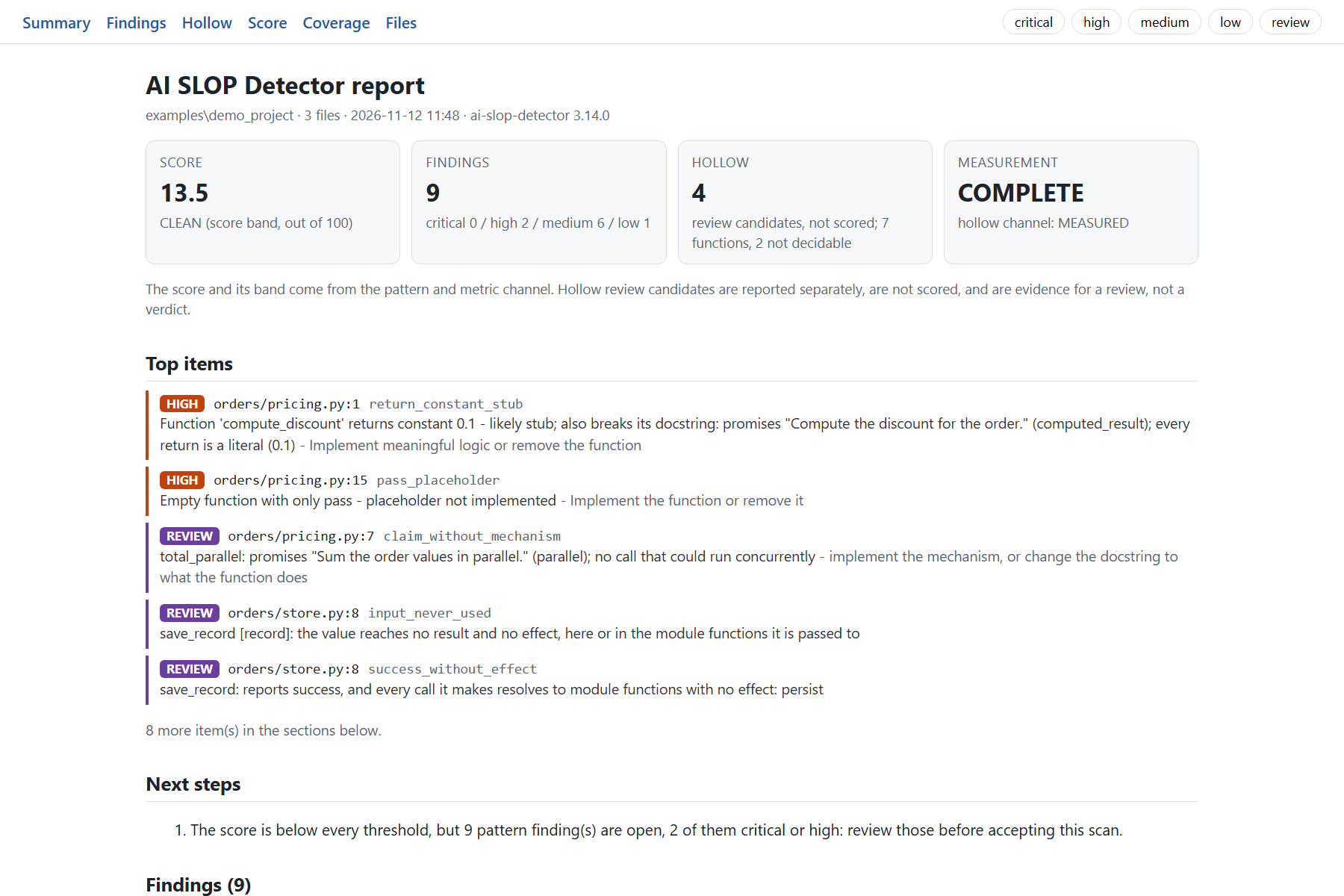
The HTML report brings together project measurements, findings, source locations, severity levels, supporting evidence, and suggested corrections.
Scored findings and unscored review candidates remain separate.
Generate a PDF report
slop-detector --project . -o report.pdf
PDF generation requires a compatible installed browser.
Export structured JSON
slop-detector --project . --json --output slop.json
Generate a complete report bundle
slop-detector --project . --report-dir slop-report
Available outputs include:
- Terminal summaries.
- Detailed metric tables.
- Markdown reports.
- HTML reports.
- PDF reports.
- Structured JSON.
- AI-oriented JSON Lines.
- AI Work Orders.
The same analysis can therefore support individual developers, engineering teams, automated quality gates, and AI-assisted development workflows.
Reporting Documentation
8. From Finding Slop to Helping Fix It
Detection alone is not enough.
One of the problems with automated code review is that an AI coding agent may try to make a warning disappear rather than correct the implementation responsible for it.
It might add a suppression comment, change a threshold, rename a function, or remove code.
The report becomes cleaner. The actual software may not become better.
This is why AI-SLOP Detector provides an AI Work Order.
Generate an AI Work Order
slop-detector --project . --format ai-md
The work order is a structured Markdown document intended for developers and AI coding agents.
It includes:
- Individual findings with stable identities.
- Source locations and implementation evidence.
- A SHA-256 digest binding the finding to the scanned source.
- Rule-specific verification questions.
- Suggested repair directions.
- Explicit restrictions against superficial fixes.
- A structured response format.
- Requirements for rescanning and verification.
Why source binding matters
Imagine that an AI agent receives an analysis report and then modifies several files.
How does it know whether the remaining findings still refer to the same source code?
Each scanned file is associated with its SHA-256 digest. If the file changes, the work-order contract requires the agent to hold the stale item and obtain fresh analysis.
This prevents the report from being treated as permanently valid evidence.
ACK, REJECT, or HOLD
An agent is not required to blindly agree with every finding.
| Response | Meaning |
|---|
| ACK | Accept the finding and address it. |
| REJECT | Challenge the finding with supporting evidence. |
| HOLD | Stop because the evidence or authorization is insufficient. |
REJECT is particularly important.
Static analysis has limitations. A developer may know that a constant return is intentional, that a callback is registered dynamically, or that an implementation follows a framework-specific convention.
The work order allows that evidence to be recorded instead of encouraging unnecessary changes.
What counts as a meaningful correction?
The work-order contract requires an accepted repair to be checked through a subsequent scan using the same configuration, regression checks, and the project's tests.
It explicitly rejects techniques that merely conceal a finding.
These instructions establish a review discipline; they do not guarantee that an external AI agent will follow every instruction correctly.
The objective is not a cleaner report. The objective is better code.
Explore the AI Work Order Specification
9. Built for AI-Assisted Development
AI-SLOP Detector can be integrated into existing AI coding workflows without requiring access to the model that generated the code.
It provides structured CLI output and a dedicated Claude Code skill.
The Claude Code integration supports three review activities:
| Command | Purpose |
|---|
review | Examine code changes and newly introduced findings. |
pulse | Understand the project's current condition and repair priorities. |
sweep | Investigate a particular family of implementation problems. |
A typical development workflow looks like this:
Write or generate code
        ↓
Run AI-SLOP Detector
        ↓
Inspect findings and source evidence
        ↓
Verify, challenge, or accept the findings
        ↓
Make justified corrections
        ↓
Rescan and run regression tests
        ↓
Human review and commit
This adds an evidence-based review layer to the AI development process.
Instead of asking a generative model to evaluate its own output using another broad prompt, you provide it with findings produced by a separate static analysis engine.
The analyzer investigates the source independently of the generative model.
For programmatic consumption, AI-oriented JSON Lines are also available:
slop-detector --project . --format ai
This output can be incorporated into custom developer tools, automation pipelines, or agent-assisted review workflows.
Claude Code Skill Documentation · Agent Workflow
10. Code Review Directly Inside VS Code
Not every developer wants to switch between a terminal, an editor, and a browser to understand a code-quality finding.
The AI-SLOP Detector VS Code extension brings the local analysis backend into the development environment.
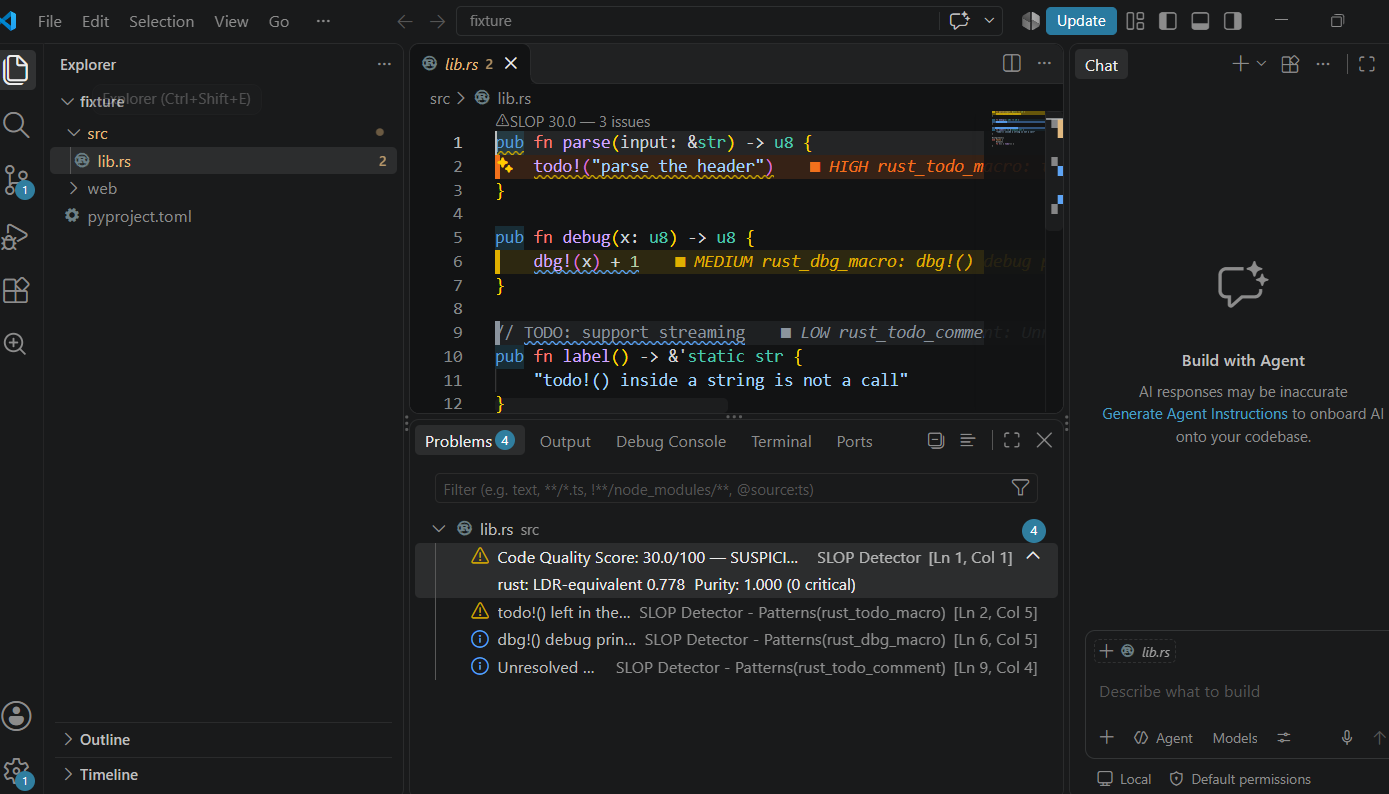
The extension provides:
- Inline findings at affected source locations.
- Severity indicators.
- Hover messages explaining findings and suggested corrections.
- Integration with the Problems panel.
- A project sidebar organized by file score.
- File scores in the status bar.
- Work-order integration for AI-assisted review.
Version 3.18.1 improves alignment between the extension and the updated dependency-resolution backend.
It includes corrected import-related Quick Fix behavior, gate commands, history commands, and pre-commit hook commands.
The goal is to make code-quality investigation part of the normal development workflow rather than a separate activity performed only before a release.
Install AI-SLOP Detector for VS Code
VS Code Extension Documentation
11. Integrate It Into Your CI/CD Pipeline
AI-assisted development can increase the speed at which software is written.
That does not remove the need for quality gates.
AI-SLOP Detector can be used in continuous integration pipelines to examine implementation-level warning signs before changes are merged or released.
For GitHub Actions:
- name: AI-SLOP Gate
  run: |
    pip install ai-slop-detector==3.18.1
    slop-detector --project . --ci-mode hard --ci-report
Three CI modes are available.
| Mode | Behavior |
|---|
| Soft | Report findings without failing the build. |
| Hard | Fail the build when defined quality conditions are violated. |
| Quarantine | Escalate files after repeated violations. |
The gate evaluates analyzed files across all supported languages.
Python-specific measurements are applied only where they are actually available.
Start with soft mode
For established repositories, immediately enabling strict gates may create unnecessary disruption.
Start by understanding the existing codebase:
slop-detector --project . --ci-mode soft --ci-report
Investigate the findings, establish an appropriate baseline, and then introduce stricter conditions when your team understands the measurements.
Use a hard gate when appropriate
slop-detector --project . --ci-mode hard --ci-report
Pre-commit integration is also available for teams that prefer to review suspicious implementations earlier in the development process.
CI/CD Integration Guide
12. Adapt the Review to Your Codebase
A financial application, a scientific computing library, a healthcare integration system, and a machine-learning inference engine do not necessarily follow the same implementation conventions.
A useful detector needs to account for those differences without arbitrarily lowering its standards.
AI-SLOP Detector supports project-specific configuration, domain-aware initialization, local scan history, and advisory calibration.
Initialize project configuration
slop-detector --init
The initialization process detects the project's domain, applies relevant configuration thresholds, and reports the changes.
Review local calibration recommendations
slop-detector . --self-calibrate
The calibration mechanism uses comparable local scan history to provide advisory recommendations.
It distinguishes between warnings that disappeared after source changes, warnings that remained unchanged, ordinary suppressions, and explicitly declared false positives.
An unchanged warning is not automatically a false positive.
A warning that disappears is not automatically a verified repair.
The tool does not silently modify scoring weights. Developers retain control over whether to adopt recommendations.
Configuration Guide · Self-Calibration Documentation
13. Local Analysis, Without an External AI Service
One of the design priorities behind AI-SLOP Detector is that developers should be able to inspect their own source code without uploading it to another service.
The analysis engine requires:
- No API key.
- No external LLM.
- No model download.
- No remote inference service.
- No network calls during a scan.
- No execution of the source code being analyzed.
Installation and package downloads may require network access, but the analysis itself operates locally.
For an explicitly read-only scan:
slop-detector --project . --read-only
This mode avoids writing to the project or the user's home directory.
The analysis is deterministic under equivalent source, configuration, and analysis conditions.
The repository also contains regression controls that refuse Python socket connections and verify that the tested scan and reporting workflow do not attempt them.
There is an important distinction between local analysis and sharing its results.
Generated reports can contain source excerpts, file paths, function names, and implementation details. If you voluntarily send those reports to an external AI service, treat them with the same care as the original source.
Security Considerations
14. We Test the Detector, Not Just the Code It Analyzes
Building a static analysis tool introduces a difficult engineering problem.
What happens when the detector itself is wrong?
A rule can produce excessive false positives. A test can pass without actually protecting the intended behavior. A report can silently omit findings. A CI gate can reach the wrong decision even when the analysis is correct.
During several months of development, AI-SLOP Detector was subjected to real-repository replays, synthetic controls, targeted mutation testing, adversarial fixtures, cross-language experiments, and release verification.
Several of these experiments exposed mistakes in our own assumptions.
Correcting complexity measurements
An earlier implementation treated physical formatting as part of function complexity.
Large literal tables, multiline arguments, and certain control structures inflated the measurements.
After correcting the structural analysis, an eighteen-repository replay produced the following changes:
| Detection Rule | Findings Removed | Findings Added |
|---|
god_function | 608 | 0 |
nested_complexity | 471 | 0 |
deep_nesting | 472 | 0 |
| Total | 1,551 | 0 |
These were changes in findings caused by corrected measurements, not 1,551 independently confirmed software defects.
Testing the tests themselves
The project also uses targeted mutation testing.
Instead of assuming that a passing regression suite protects an implementation, selected parts of the implementation are deliberately broken to determine whether the tests detect the change.
| Selected Development Campaign | Mutants Caught |
|---|
| v3.11.0 scan-service contracts | 25/25 |
| v3.12.0 detection-rule contracts | 21/21 |
| v3.14.0 identity and report contracts | 64/64 |
| v3.14.0 hollow-code and promise controls | 69/69 |
| v3.15.0 report contracts, final campaign | 24/24 |
| v3.15.2 multilingual gate | 11/11 |
These are targeted mutation campaigns, not whole-project mutation coverage or universal detection accuracy.
A CI gate that incorrectly passed
One particularly useful experiment involved a Go fixture that received a deficit score of 100 and three critical findings.
The hard CI gate nevertheless returned exit code 0.
The analyzer had identified the problems. The gate had failed to evaluate them.
The correction changed the gate's decision without changing the findings or deficit score.
Real repositories from different engineering domains
The development studies also included real codebases from:
- Biomedical research.
- Healthcare integration.
- Financial and numerical software.
- Document processing.
- Machine-learning inference infrastructure.
- Visual AI workflows.
- Web applications.
- Command-line tools.
These repository studies exposed legitimate engineering conventions that synthetic fixtures alone would not have revealed.
They were maintainer-run software experiments, not evidence of production adoption in those industries.
The v3.17.0 release pipeline completed all 14 CI jobs, with 11,252 passing Python test executions across its five-interpreter matrix.
Independent validation remains an open task. External reproductions, counterexamples, and rule-level evaluations are particularly welcome.
The development history, regression controls, and public experiment artifacts are available for inspection.
Regression Tests · GitHub Actions · Validation
Development Articles on DEV Community
15. What Is New in AI-SLOP Detector v3.18.1?
The v3.18 release series brings together several important improvements in dependency analysis and developer experience.
v3.18.0 — Evidence-Based Import Provider Resolution
- More precise relationships between import names and Python distributions.
- Explicit evidence for dependency-related findings.
- Support for additional dependency declaration formats.
- Inspection of project-local virtual environments as files.
- More careful treatment of uncertain imports.
- New undeclared-dependency and provider-conflict rules.
- Improved import-resolution boundaries.
v3.18.1 — Developer Experience and Documentation Corrections
- Updated VS Code integration with the v3.18 backend.
- Corrected import-related Quick Fix behavior.
- Corrected gate and history commands.
- Corrected pre-commit hook commands.
- Documentation alignment with the current implementation.
Version 3.18.1 preserves the findings and scoring behavior introduced in v3.18.0.
The current release brings together multilingual analysis, structured reporting, source-bound review evidence, AI Work Orders, editor integration, CI gates, local history, and advisory calibration.
Full Release History · Changelog · Release Notes
16. Does It Replace Ruff, ESLint, SonarQube, or Your Tests?
No.
Different engineering tools answer different questions.
A linter can enforce syntax and style conventions. A type checker can investigate type consistency. A security scanner can identify particular vulnerability patterns. Runtime tests can establish behavior under tested conditions.
AI-SLOP Detector focuses on a complementary problem: identifying suspicious implementation structure, incomplete functionality, and discrepancies between what source code appears to promise and what its structure supports.
| Engineering Layer | Primary Purpose |
|---|
| Formatting and linting | Code conventions and static rule violations |
| Type checking | Type consistency |
| Security analysis | Potential vulnerability and security-policy violations |
| Runtime testing | Behavior under executed test conditions |
| AI-SLOP Detector | Suspicious implementations and structural evidence |
There is overlap between these categories, and the capabilities of other tools depend on their configurations and enabled rules.
AI-SLOP Detector is not intended to replace them.
It does not establish who authored the code. It does not prove runtime correctness. It does not replace security review, human judgment, or a comprehensive test suite.
Use it as another engineering review layer, especially when working with rapidly generated or frequently modified software.
17. Try It on a Repository You Already Trust
The most interesting experiment might not be scanning a newly generated project.
Try scanning a repository that already passes its linter and existing tests.
A project you know well.
A project you believe is clean.
Run:
uvx ai-slop-detector --project .
Or:
pip install ai-slop-detector
slop-detector --project .
Look at what the detector finds.
Investigate the implementations you may have overlooked. Challenge the findings you disagree with. Examine whether the suggested corrections make sense for your codebase.
If AI-SLOP Detector identifies something useful, I would like to hear about it.
If it identifies something incorrectly, a reproducible counterexample is equally valuable.
The purpose of an open-source analysis tool is not to demand trust. It is to give developers something they can inspect, test, challenge, and improve.
18. Repository, Installation, and Resources
AI-SLOP Detector is free, open source, and available under the MIT License.
If you find the project useful, consider giving it a star on GitHub, sharing it with another developer, or contributing a reproducible test case.
Every useful counterexample helps improve the detector.
AI-SLOP Detector v3.18.1
Ship Code. Not Slop.
Developed and maintained by Flamehaven Labs.
https://github.com/flamehaven01/AI-SLOP-Detector