A month ago, I wrote about the future of offline blockchain transactions and some of the exciting work already being done by companies in the Bitcoin and Solana ecosystems.
I decided to take that exploration a step further.
Alongside @jackdotsol, I built PAT (Primitive Airborne Transaction), a Solana-based payment protocol that allows users to make blockchain payments using two alternative settlement rails: USSD and QR codes.
Interesting, right?
Yes, it is!
PAT is live on Solana Devnet, and you can try it out yourself at pat-sol.vercel.app.
The idea is pretty straightforward. Payments shouldn't always depend on having an active internet connection. With PAT, users can reserve spending capacity while online and subsequently make payments using whatever connectivity is available to them.
This article is a practical, step-by-step guide to using PAT's USSD payment rail. We'll walk through the prerequisites, wallet funding, phone enrollment and the process of completing a USSD blockchain transaction.
Let's get started!
Prerequisites
Before interacting with PAT, you'll need the following:
A Solana wallet: You'll need this to connect to PAT and authorize your payment reservation. I personally use Solflare, but other compatible Solana wallets will work.
An Africa's Talking account: PAT uses Africa's Talking for its USSD gateway integration. Create an account at accounts.africastalking.com. For this walkthrough, we'll use its USSD sandbox environment.
Step 1: Fund Your Wallet on Solana Devnet
PAT is currently deployed on Solana Devnet, so you'll need to ensure your wallet is connected to the Devnet cluster before proceeding.
Getting Devnet SOL
SOL is required for network transaction fees and account rent.
- Copy your Solana wallet address.
- Visit the Solana Faucet.
- Select Devnet.
- Paste your wallet address and request Devnet SOL.
- Wait for the transaction to be confirmed.
Getting Devnet USDC
For the USSD payment rail, PAT uses USDC as its payment currency. Therefore, having Devnet SOL alone isn't sufficient; you'll also need USDC in your wallet.
To obtain test USDC:
- Visit the Circle Faucet.
- Connect your Solana wallet or provide your wallet address, depending on the faucet's available options.
- Select the Solana Devnet network.
- Request Devnet USDC.
- Wait for the tokens to arrive in your wallet.
You should now have both SOL and USDC in your Devnet wallet.
A quick distinction: SOL covers network fees and account rent, while USDC is the token you'll use to make payments through PAT's USSD rail.
Step 2: Access PAT and Connect Your Wallet
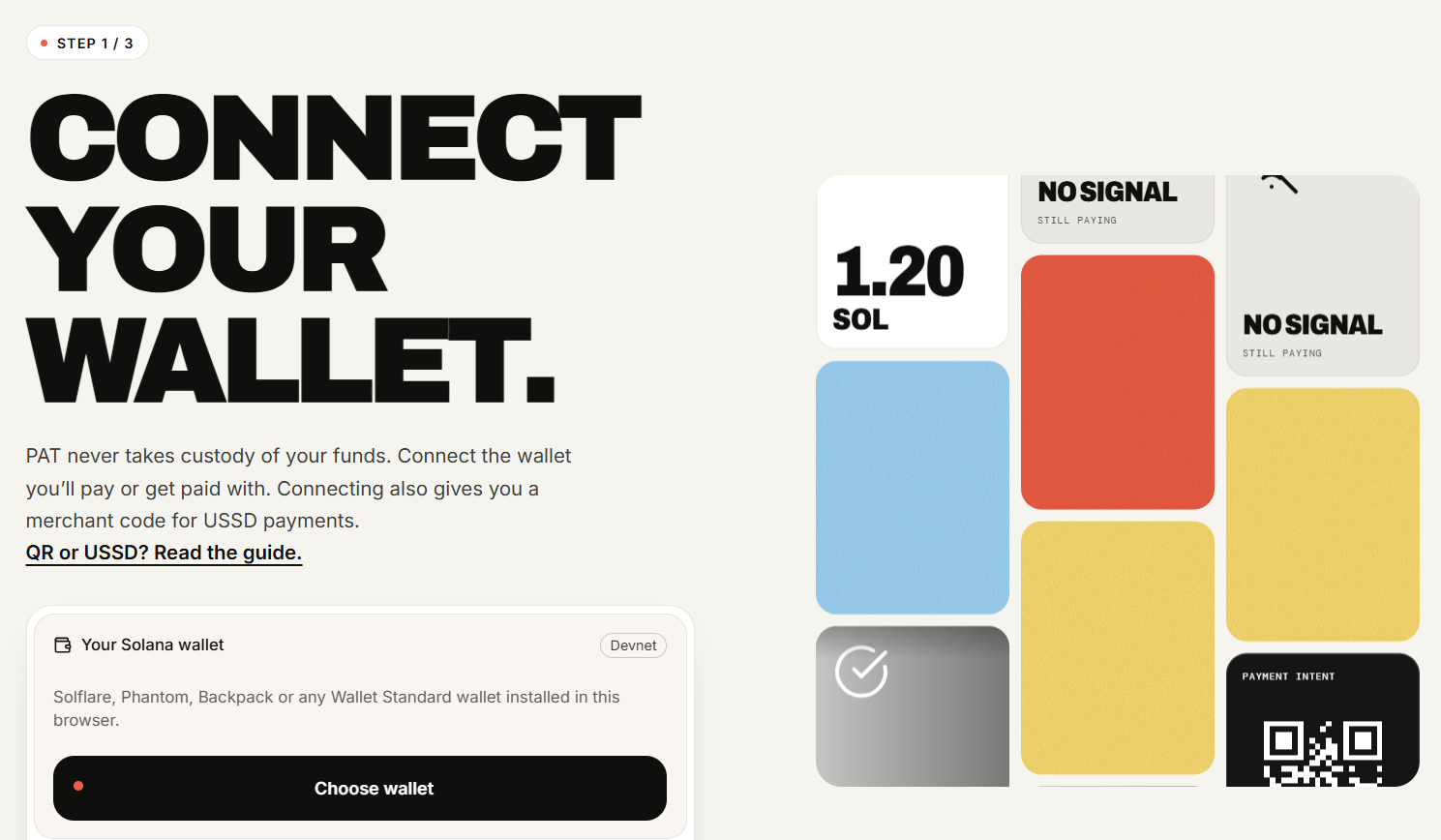
Visit pat-sol.vercel.app.
Connect your funded Solana wallet to the application. Ensure you're using the Devnet network.
PAT provides different interfaces for interacting with its payment rails. For this tutorial, we'll focus on the USSD functionality.
Navigate to the reservation section to begin setting up your USSD payment allowance.
Step 3: Create a USSD Payment Reservation
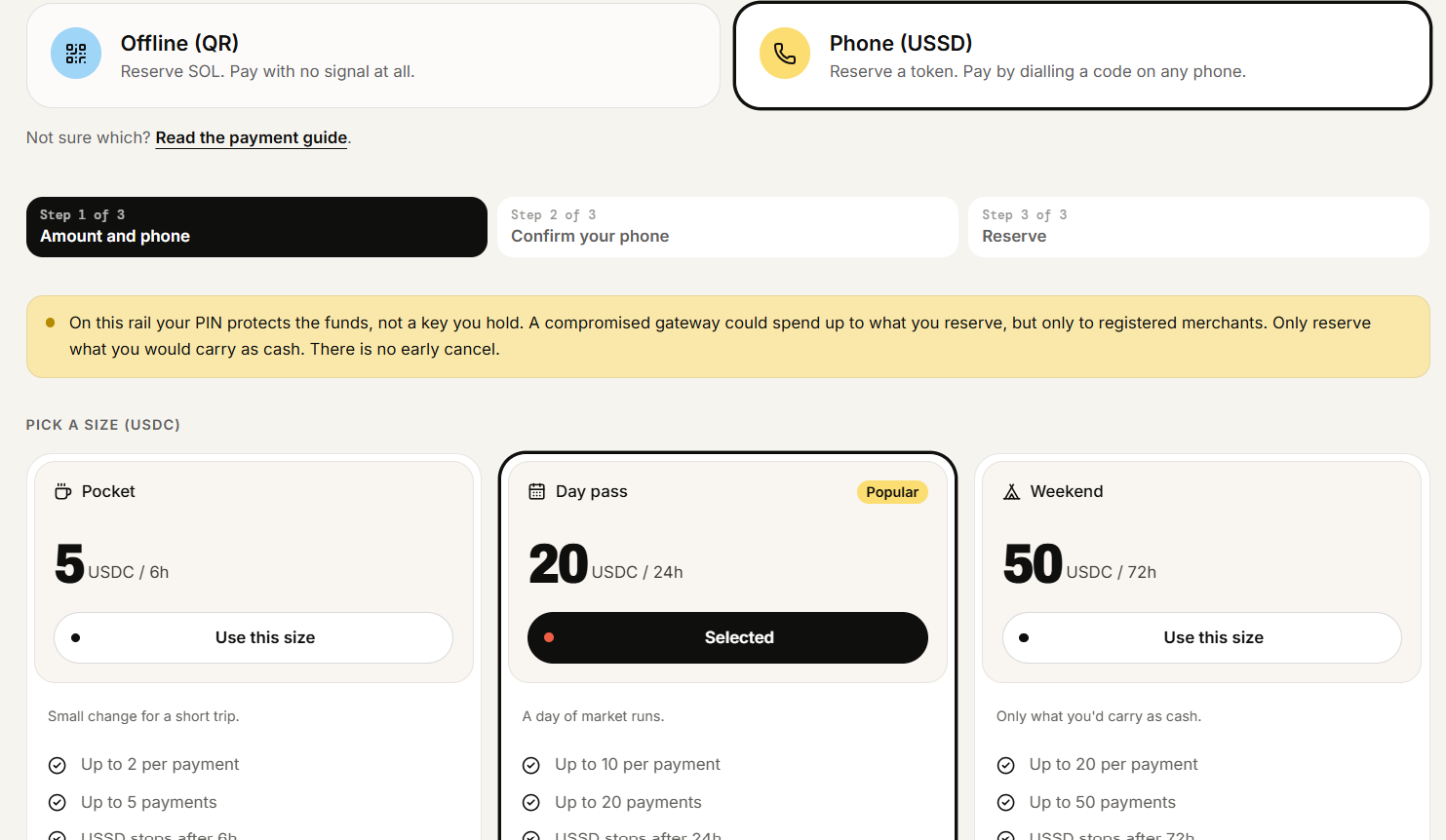
This is one of the most important steps in using PAT.
Unlike conventional blockchain payments, where a transaction is initiated and signed whenever a payment is made, PAT allows you to reserve a specific amount beforehand.
Think of it as setting aside a spending allowance for subsequent payments.
On the Reserve page:
- Select USDC as your payment token.
- Enter the amount you want to reserve.
- Provide the phone number you'll use for USSD payments.
- Set a four-digit PIN for authorizing payments.
Your reservation also has spending limits and an expiry period. These parameters determine how much can be spent and how long the delegated payment authorization remains active.
Link your phone number
After providing your details, PAT generates a six-digit link code.
This code is used to associate your phone number with your reservation.
Open the Africa's Talking USSD simulator and initiate a session using PAT's registered service code:
*384*50549#
Select the option to Link this phone and enter the six-digit code displayed in your PAT application.
Once the gateway verifies the code, your phone number is linked to the enrollment process.
Authorize your reservation
Return to the PAT application and complete the wallet authorization.
Your wallet will request approval for an on-chain transaction containing two instructions:
reserve_delegated: Creates your reservation, delegates settlement authority to PAT's gateway and moves your USDC into a token vault controlled by the reservation.PAT-ENROLL-v2 memo: Associates the wallet authorization with your verified phone enrollment.
Approve the transaction.
Once confirmed, your reservation is active and your phone is enrolled.
What's happening behind the scenes?
Your USDC is held in a vault associated with your reservation. The gateway keeper receives limited authority to settle payments from that reservation, subject to the spending capacity, per-payment limit, expiry and registered merchant restrictions enforced by the Solana program.
The gateway does not receive unrestricted access to your wallet.
Step 4: Set Up a Merchant Account
Before making a payment, you'll need a merchant who can receive USSD payments through PAT.
PAT automatically generates a unique 10-digit merchant code for every wallet that connects to the application.
However, generating a code and activating it are two different things.
To accept USSD payments, the merchant must:
- Connect their Solana wallet to PAT.
- Navigate to the Merchant page.
- Locate their generated merchant code.
- Click Activate.
- Approve the wallet signature request.
Once activated, the merchant code is registered on-chain against the merchant's payout wallet.
This registration ensures that payments sent to the merchant code can only be settled into the registered payout address.
The merchant can now share their 10-digit code with customers.
Note: Merchant activation is a one-time process for a merchant wallet.
Step 5: Make a Payment Using USSD
Now for the interesting part!
With your reservation active, your phone linked and a merchant code available, you can initiate a payment without using mobile data.
For this demonstration, we'll use the Africa's Talking sandbox simulator.
Open the simulator and initiate a USSD session using:
*384*50549#
You'll be presented with PAT's USSD menu.
Follow these steps:
- Select the option to make a payment.
- Enter the merchant's 10-digit code.
- Enter the amount you want to pay.
- Confirm the merchant details displayed.
- Enter your four-digit PIN to authorize the payment.
The gateway verifies your enrollment and PIN before creating a payment request.
If the details are valid, the payment is queued for settlement.
What happens after you authorize the payment?
Once the gateway receives your payment request, its background keeper takes over.
The keeper:
- Retrieves the pending payment.
- Checks whether the payment has already been settled.
- Submits a
settle_delegated instruction to the Solana program.
- Pays the merchant from the reservation's USDC vault.
- Updates the payment status.
The Solana program independently verifies the reservation, delegate authority, merchant registration, token mint, payment limits and available capacity before allowing the transfer.
You don't need to sign another wallet transaction for every USSD payment.
Step 6: Confirm Your Transaction
After successful settlement, two things happen.
For the payer:
You'll receive an SMS notification confirming the payment.
For the merchant:
The payment appears on the Merchant page, where its status changes to Confirmed.
You can also inspect the transaction on Solana Explorer by searching for its transaction signature or payment account address.
The Payment PDA is PAT's on-chain source of truth for a completed payment.
Step 7: Track Your Reservations and Payments
PAT also provides a Ledger interface for monitoring your reservations.
From here, you can inspect your payment activity and reservation details.
You can also:
- Track your reservation's spending capacity.
- Monitor payment activity.
- Link your phone to an existing reservation.
- Withdraw unspent USDC after the reservation's withdrawal window has elapsed.
For the USSD rail, the reservation cannot be withdrawn immediately after its expiry timestamp. The withdrawal window is enforced on-chain, with withdrawals permitted only after the settlement deadline.
This ensures that the payment system respects its predefined settlement and withdrawal rules.
A Few Things to Keep in Mind
Before experimenting with PAT, here are some important considerations:
1. USSD currently runs on the Africa's Talking sandbox.
PAT's service code, *384*50549#, is registered on Africa's Talking's sandbox environment. You should use the simulator to test the USSD functionality. It is not yet available as a live USSD service across regular mobile networks.
2. Use Devnet assets only.
PAT is currently deployed on Solana Devnet. The SOL and USDC used in this tutorial are test assets, not real money.
3. Your reservation has spending limits.
You cannot spend beyond your reserved capacity or the configured per-payment limit. Payments must also be made within the reservation's active window.
4. Protect your PIN.
Your four-digit PIN authorizes USSD payments. Keep it private and do not share it with anyone.
5. USSD and QR have different trust models.
The QR rail uses a payment authorization signed by the payer. The USSD rail relies on PIN verification by the gateway and delegated settlement authority. Both have different security assumptions and limitations.
What's Next?
Building PAT has been an interesting exploration of how blockchain payment systems can accommodate real-world connectivity challenges.
We started with a simple question: What happens when someone wants to make a blockchain payment but doesn't have internet access?
The result is a protocol that explores two different approaches.
With QR codes, users can sign payment authorizations completely offline and hand them to merchants for subsequent settlement.
With USSD, users can initiate payments using GSM connectivity without requiring mobile data or a smartphone at payment time.
Neither approach eliminates the need for connectivity throughout the entire payment lifecycle. Instead, PAT moves the necessary blockchain interactions to the moments when connectivity is available and makes the actual payment experience more flexible.
We're still exploring improvements, additional security mechanisms and possibilities for extending the protocol.
If you're interested in offline payments, Solana development, fintech infrastructure or financial inclusion, we'd love to have you explore PAT.
Try it out: pat-sol.vercel.app
USSD sandbox code: *384*50549#
GitHub: Hilda-Enyioko
This is only the beginning of our exploration into making blockchain payments accessible beyond conventional internet-connected devices.