Nov 18, 2026 · David Matamoros · Commercial AI Director · 8 min read
To direct a multi-shot AI commercial without your actor or product morphing between cuts, separate your reference lock from your final resolution pass: scout camera blocking in Vidu Q4 540p (~72 credits per 5s clip on Basic Yearly) using your uploaded character, prop, and audio references, then promote only the winning take to 1080p, 2K, or 4K.
If you have ever burned half a month's video budget rendering 1080p clips only to realize the camera panned the wrong way or the actor's jacket changed color, you know why single-tier workflows fail. Below is how reference-to-video scene direction works inside Vidu Q4, how the broader 2026 Image-to-Video leaderboard stacks up on Artificial Analysis, copy-and-recreate prompts for multi-reference scenes, where Vidu Q4 falls short, and the exact credit math behind 9,600 credits/year for $96.00.
How do Vidu Q4 and Vidu Q3 split studio workloads?
Inside the live Vidu Q4 workspace, you do not use one heavyweight setting for every test. The studio pairs two complementary engines — Vidu Q4 (540p / 720p / 1080p / 2K / 4K with image-to-video, multi-image, and audio references) and Vidu Q3 (480p / 720p for fast scene descriptions and camera language exploration):
| Studio Engine | Supported Resolutions | Reference Inputs | Best Production Role |
|---|
| Vidu Q3 | 480p / 720p | Prompt + scene & camera direction + optional sound | Early script-to-storyboard camera angle tests |
| Vidu Q4 (Draft Tier) | 540p / 720p | Start Image + Multi-Image References + Audio Reference | Locking character performance, prop interaction & timing |
| Vidu Q4 (Master Tier) | 1080p / 2K / 4K | Locked Reference Set + Approved Seed/Prompt | Final commercial delivery for YouTube, CTV, and paid social |
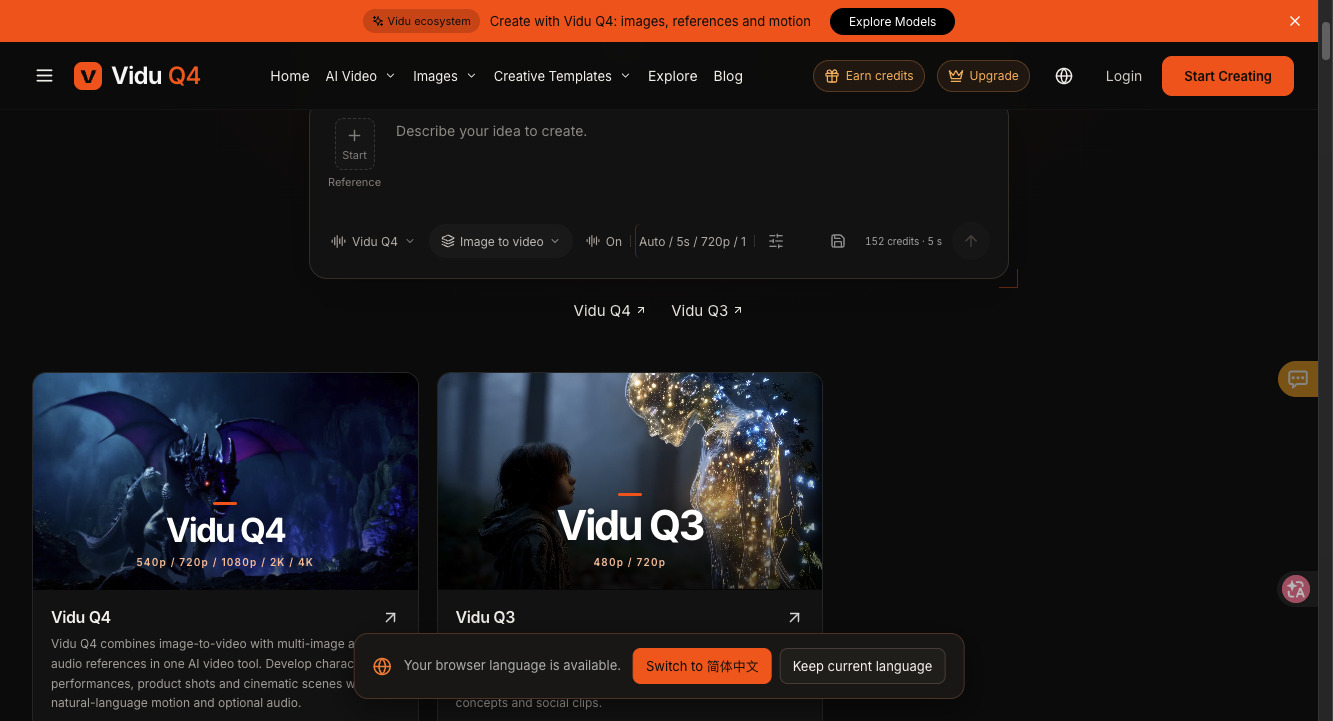
Source: viduai.co Multi-Reference Video Studio
How does the 2026 Image-to-Video benchmark landscape look?
On the live Artificial Analysis Image-to-Video Leaderboard (AA-Video-I2V v2.1, ranked by human preference votes on clips generated with audio), Dreamina Seedance 2.5 holds #1 at 1,161 Elo and Seedance 2.0 holds #3 at 1,141 Elo, while Vidu's earlier tracked Vidu Q3 Turbo baseline sits at 1,006 Elo ($2.70/min API rate) and Vidu Q3 Pro sits at 991 Elo ($8.40/min). While a standalone Vidu Q4 Arena entry is still unverified on the public board, Vidu Q4's main studio advantage is combining multi-image + audio reference conditioning with a native 540p -> 4K resolution ladder inside one browser workflow.
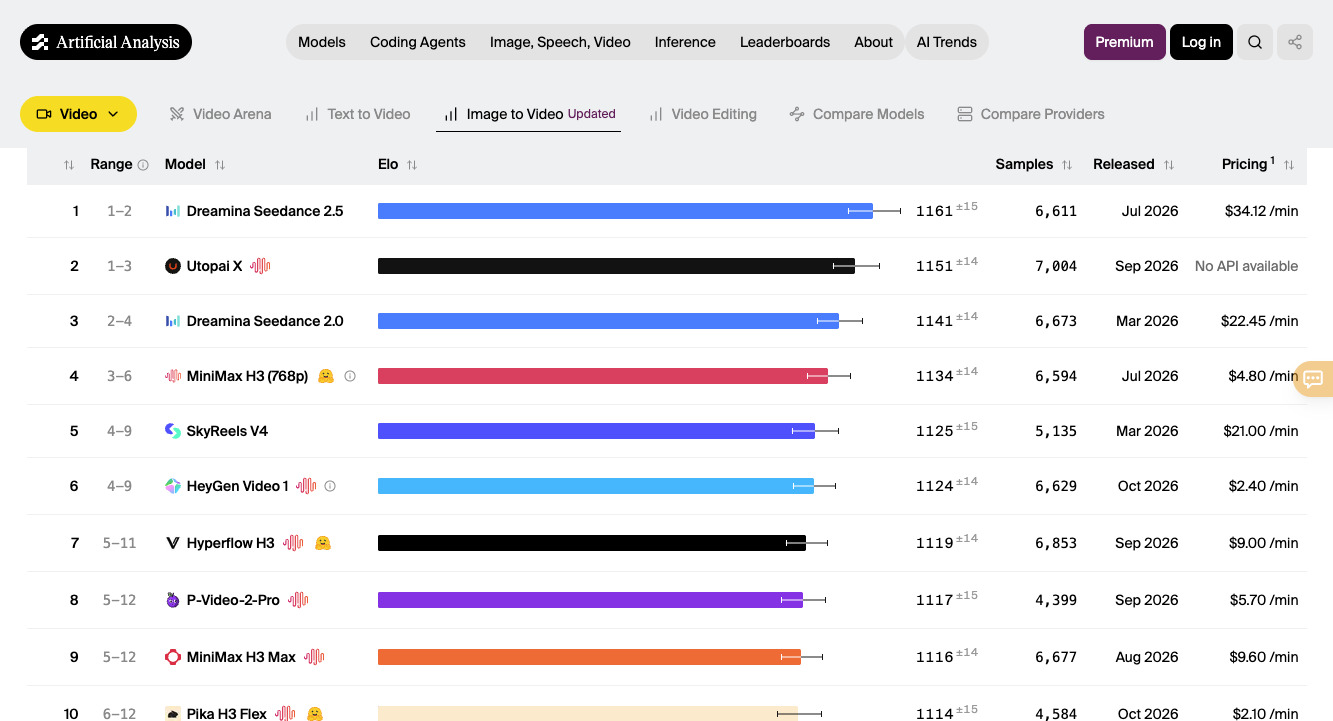
Source: Artificial Analysis Image-to-Video Leaderboard (AA-Video-I2V v2.1)
Step 1 — How do you lock character, prop, and audio references in one scene?
When switching the workspace tab from Start (single opening frame) to Reference (multi-asset conditioning), upload three distinct clean plates: (1) a neutral medium shot of your actor, (2) a clear product or prop photo on a plain backdrop, and (3) an optional audio reference clip for pacing and sound alignment.
What it does: Keeps the actor's face and the product's physical proportions consistent while the camera moves — insider credit-saving tip: run your first three camera blocking tests at 540p (~72 credits per 5s clip) rather than 720p (~152 credits) or 4K. At $96.00/year for 9,600 credits on the Basic Yearly plan ($0.0100 per credit), each 540p test costs just $0.72, letting you test two dozen angles for under $18.
VIDU Q4 — MULTI-REFERENCE COMMERCIAL SCENE PROMPT (5S, 540P SCOUT -> 4K MASTER):
Using the uploaded character reference (@ref_actor) and terracotta ceramic mug (@ref_prop), film a medium-close 50mm tracking shot inside a sunlit Nordic timber kitchen. The actor lifts the steaming terracotta mug with both hands, pauses by the rain-speckled window, and smiles subtly as warm morning light catches the rising steam. Sync subtle ceramic clink and gentle rain ambiance to the audio track.
Where Vidu Q4 falls short, honestly:
- Unverified standalone Vidu Q4 Elo on Artificial Analysis: Public Arena leaderboards currently list
Vidu Q3 Turbo (1,006 Elo) and Vidu Q3 Pro (991 Elo), whereas a standalone Vidu Q4 blind-vote row has not yet been published — always test your own reference assets in 540p first.
- 5-second base pacing on complex multi-action prompts: Stuffing three separate physical actions (walking across a room, sitting down, and pouring coffee) into a single 5-second generation forces unnatural fast-forward motion. Limit each 5-second prompt to one camera move + one primary human action.
- Over-crowded reference slots: Uploading reference images that already have busy, conflicting backgrounds confuses scene lighting. Use clean or isolated subject references whenever possible.
How much do Vidu Q4 videos actually cost in credits?
Unlike opaque studios that hide per-clip burn rates, viduai.co/pricing explicitly publishes how many 5-second Vidu Q4 videos fit inside its entry annual plan:
- Basic Yearly Plan:
$8.00/month ($96.00/year, saving ~20% off $9.99/mo) for 9,600 credits / year ($0.0100 USD per credit).
- Published 5-Second Clip Capacity on
9,600 Credits:
- Up to 133 Vidu Q4 videos at
540p $\rightarrow$ ~72.18 credits per 5s clip (~$0.72)
- Up to 63 Vidu Q4 videos at
720p $\rightarrow$ ~152.38 credits per 5s clip (~$1.52)
- Pro Yearly Plan (Recommended):
$192.00/year (saving ~20% compared with twelve monthly payments totaling $239.88).
| Studio Production Stage | Resolution & Duration | Credits per 5s Clip | Effective USD (Basic Annual) | Annual Capacity (9,600 Pool) |
|---|
| Stage 1: Camera & Reference Scout | Vidu Q4 · 540p (5s) | ~72 credits | ~$0.72 / video | Up to 133 videos |
| Stage 2: Social & Client Review Cut | Vidu Q4 · 720p (5s) | ~152 credits | ~$1.52 / video | Up to 63 videos |
| Stage 3: Hybrid 5-Shot Campaign | 15 × 540p scouts + 5 × 720p/1080p finals | 1,080 + ~760–1,100 | ~$18.40 – $21.80 total | Leaves ~75% of annual pool free |
Got any questions left?
When should I switch from Vidu Q3 to Vidu Q4?
Use Vidu Q3 (480p / 720p) when you only have a written text idea and want to audition rough camera angles (dolly in, crane up, handheld pan). Switch to Vidu Q4 (540p / 720p / 1080p / 2K / 4K) as soon as you want to lock a specific actor face, product photo, and audio reference across shots.
Why does a 10-second video use more credits than the 133-video estimate?
The 133 videos at 540p and 63 videos at 720p benchmarks on viduai.co/pricing are calculated on standard 5-second videos; extending clip duration or stepping up to 1080p, 2K, or 4K scales credit usage proportionally.
Does the workspace display the exact credit cost before generating?
Yes — the bottom control bar inside the Vidu Q4 generator dynamically calculates and displays the credit quote for your chosen model (Vidu Q4 vs Q3), duration (5s+), and resolution (540p through 4K) before you click generate.