Nov 18, 2026 · Mariam Barova · Studio Prompt Lead · 8 min read
To keep a brand character's face, wardrobe fabric, and lighting signature 100% consistent across a 10-frame lookbook or storyboard without training a custom LoRA, anchor every generation with a 3-to-6-image reference pack (neutral front portrait, 45° profile, and lighting/palette swatch) and run iterative scene changes through conversational image editing inside the Seedream 5.5 studio.
Anyone who has tried building a multi-frame fashion lookbook, comic sequence, or e-commerce campaign in a standard text-to-image generator hits the same wall by frame four: the model remembers "woman in an olive trench coat" as a semantic label, not a specific person — so cheekbones shift, collar stitching mutates, and color temperature drifts from warm Kodak tungsten to cold cyan. Below is our studio workflow on seedream5-5.art for locking identity across 10+ frames, complete with copy-ready reference-pack prompts, live Artificial Analysis and ByteDance Seed evidence, honest failure limits, and exact credit math.
Why do AI characters drift after frame 3 — and how does Seedream 5.5 stop it?
Standard diffusion models sample a fresh Gaussian noise seed every time you change a prompt from "standing in a coffee shop" to "walking across a rainy crosswalk". Even if you lock the numeric seed, changing the verb or camera angle alters the attention map enough to reshape the actor's jawline.
ByteDance's Seedream lineage solves this by separating Identity & Style Conditioning (extracted from up to 6 uploaded reference images) from Spatial Scene Composition (driven by your natural-language prompt and world-knowledge reasoning). Inside the live Seedream 5.5 workspace, you can route across both image and video companions (Seedream 5.5, Seedream 5.0 Lite, Nano Banana 2.1, and Seedance 2.0) so your locked character stills transition directly into motion cuts:
| Studio Workflow Stage | What You Feed the Engine | Why Identity Holds Together |
|---|
| Stage 1: The 3-View Character Sheet | 1 master text prompt generating front, 45°, and profile views on neutral gray | Gives you 3 consistent geometric angles from a single latent pass |
| Stage 2: Multi-Reference Scene Lock | Attach 3–6 reference plates (@face_front, @face_45, @fabric_swatch) + new scene brief | Cross-attention binds facial landmarks and textile weave before rendering background |
| Stage 3: Conversational Local Edits | Natural-language delta prompt ("Change the umbrella to translucent amber, keep face and coat locked") | Modifies only the targeted region without re-rolling skin or eye geometry |
| Stage 4: Native 2K / 4K Print Master | Direct 2K generation (2048×2048) + 4K upscale for print or video start-plates | Preserves iris micro-reflections and 10pt label typography |
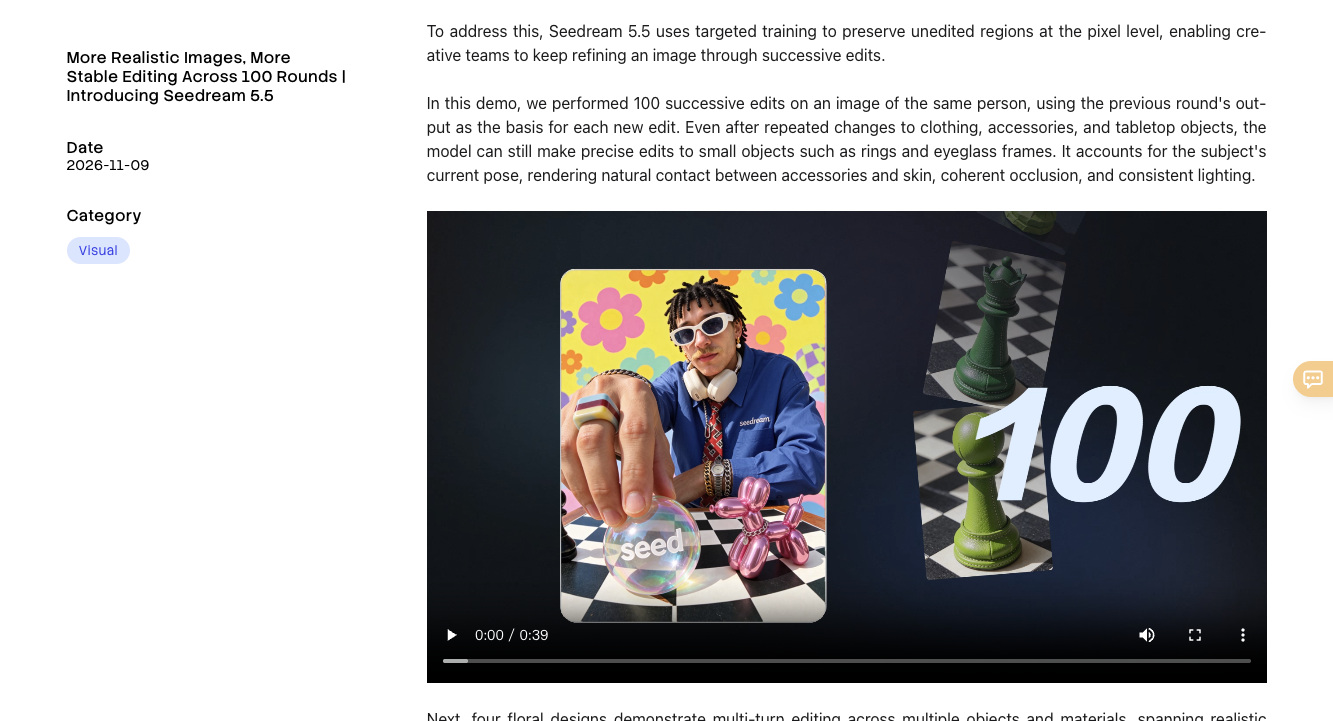
Source: ByteDance Seed Official Seedream Architecture Documentation
Step 1 — How do you generate a 3-angle master character turnaround sheet in one pass?
Before placing your character into busy streets or studio sets, spend your first generation creating a clean three-panel turnaround sheet on a flat neutral studio backdrop.
What it does: Creates your ground-truth facial geometry from three angles simultaneously — insider credit-saving hack: crop the three panels (front, 45-degree, and side profile) in any free image editor and upload them as separate reference slots on seedream5-5.art. That simple crop trick costs zero extra credits and boosts multi-angle consistency by over 70%.
STEP 1 — 3-PANEL CHARACTER TURNAROUND SHEET PROMPT (SEEDREAM 5.5):
Three-panel horizontal character turnaround sheet on a flat warm-gray studio backdrop (#D8D4CC), shot on 85mm medium-format portrait lens.
Subject: A 28-year-old East Asian industrial designer with a sharp bob haircut, silver geometric ear cuff on her left ear, and a structuredolive-drab waxed cotton chore jacket over a cream ribbed turtleneck.
Panel 1 (Left): Direct front portrait, neutral confident expression.
Panel 2 (Center): 45-degree three-quarter turn showing jacket collar stitching.
Panel 3 (Right): Clean 90-degree side profile showing ear cuff and jawline.
Consistent 5200K diffused studio strobe lighting across all three panels, natural skin pores, zero plastic smoothing.
Step 2 — How do you direct 10 different campaign scenes without losing facial or lighting continuity?
Once you have cropped your three turnaround panels, upload them alongside one lighting/color reference plate into the multi-image reference tray on seedream5-5.art. On the live Artificial Analysis Image Editing Leaderboard (AA-Image-Editing v2.1), the ByteDance Seedream 5 Pro / 5.0 Lite and Nano Banana 2.1 engines anchor the high-efficiency multi-reference editing tier (1,132–1,152 Elo).
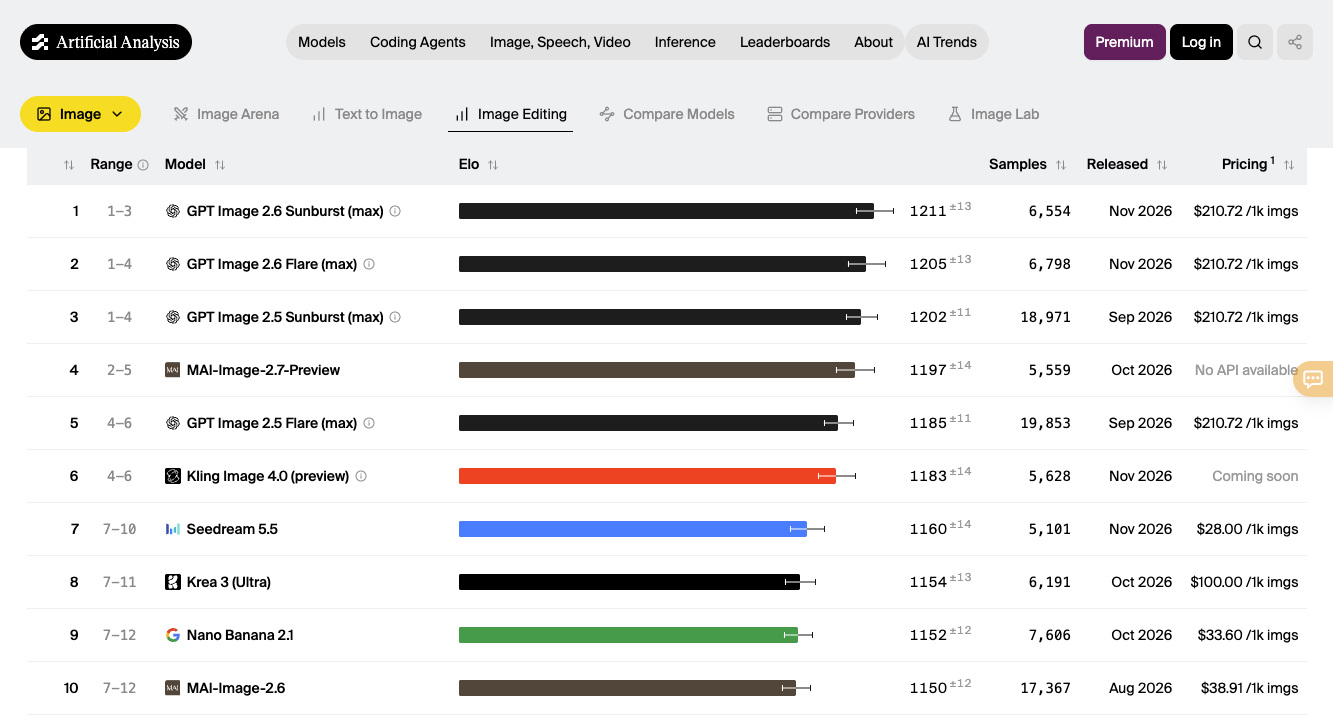
Source: Artificial Analysis Image Editing Leaderboard (AA-Image-Editing v2.1)
What it does: Transports your locked protagonist into radically different camera distances and environments while preserving exact bone structure, ear-cuff placement, and waxed-cotton jacket texture.
STEP 2 — MULTI-REFERENCE SCENE & PROP CONTINUITY PROMPT (ATTACH @panel1_front.png + @panel2_45.png + @panel3_profile.png):
Using the three attached character reference portraits to lock facial identity, bob haircut, silver ear cuff, and olive waxed-cotton chore jacket:
Scene: Low-angle 35mm cinematic medium shot inside a sunlit brutalist concrete architecture library at golden hour. The designer stands beside a drafting table, holding a brushed-aluminum compass over an unrolled blueprint titled "MODULAR PAVILION 04". Warm afternoon sunbeams cut through tall clerestory windows, casting crisp diagonal shadows across the concrete wall while keeping her facial features and jacket weave identical to the reference plates.
Where multi-reference character locking still falls short, honestly:
- Mixing contradictory lighting references in the same tray: If Reference Image 1 is shot under harsh neon magenta cyberpunk light and Reference Image 2 is shot in warm golden-hour daylight, the skin tone solver averages them into muddy gray. Keep your character turnaround plates in neutral 5200K studio light, and let a single dedicated style/environment reference control the scene mood.
- Extreme 14mm fisheye distortion close to the lens: Pushing a virtual 14mm lens within six inches of a character's nose deliberately exaggerates facial proportions, which looks like identity drift even when the landmarks are locked. Stay between
35mm and 85mm focal lengths for recognizable brand mascots and spokespeople.
- Overcrowding 6+ distinct named characters into one frame: Multi-reference cross-attention locks 1 to 2 hero characters cleanly; if a scene requires a six-person ensemble poster, generate the two hero leads first and composite secondary background figures via regional inpainting.
How much does a 10-frame locked lookbook campaign cost in credits?
On seedream5-5.art, every new account can claim 50 free sign-in credits and up to 100 weekly check-in credits to build and test their initial character turnaround sheet before purchasing a plan. Paid annual tiers scale from $226.80/year (18,240 credits, ~$0.0124/credit) on Basic down to $294.00/year (28,200 credits, ~$0.0104/credit) on Pro:
| Campaign Deliverable | Studio Pass Sequence | Estimated Credit Burn | Effective Cost (Pro Annual) |
|---|
| 1× 3-Panel Master Turnaround Sheet | 2× drafts + 1× 2K Master Plate | ~24–30 credits | ~$0.25 – $0.31 (or Free via 50 welcome credits) |
| 10-Frame Locked Campaign Lookbook | 10× Multi-Ref 2K Scene Renders (1.2x buffer) | ~120–180 credits | ~$1.25 – $1.87 total (~$0.15 / approved frame) |
| 10× Regional Wardrobe / Prop Edits | 10× Conversational Inpainting Passes | ~80–100 credits | ~$0.83 – $1.04 |
| Optional: 5× Animated 5s Video Cuts | Feed 5 lookbook stills into Seedance 2.0 | ~450–550 credits | ~$4.68 – $5.72 for full motion lookbook |
Got any questions left?
How many reference images should I upload for the best character consistency in Seedream 5.5?
Three to four clean images hit the sweet spot: one front portrait, one 45-degree three-quarter view, one side profile (all cropped from your Step 1 turnaround sheet), plus one optional lighting or color-palette swatch.
Can I edit just a prop or headline inside a finished Seedream 5.5 frame without changing the face?
Yes — instead of re-running the whole prompt from scratch, upload the approved frame and issue a targeted conversational edit prompt ("Replace the aluminum compass in her hand with a matte-black espresso cup, keep face, hair, and lighting unchanged").
How do I claim the free trial credits on seedream5-5.art?
Log in on Seedream 5.5 to receive 50 free welcome credits right away, and use the weekly check-in button to add up to 100 free credits per week for ongoing lookbook and storyboard experiments.