Invoices from the field rarely arrive as clean PDFs. They arrive as phone photos: the invoice lying on a stack of other papers, a coffee receipt on top of it, or a sheet held against a car dashboard. I wanted to know which extraction setup holds up in those conditions, what goes wrong, and what a team can do about it in a few lines of code.
This post is a small comparison. Every number comes from real API calls, and every raw response was saved so the scoring could be re-run without calling AWS again. The code snippets below are the code I used, trimmed to the parts that matter. I ran each one against the saved responses to check that it reproduces the numbers in this post. The last section explains how the benchmark is built, so you can rebuild it for your own documents.
TL;DR
- Out of the box, no tool got the invoice total right on more than 83% of the 40 photos. For Textract and BDA, the usual failure was not reading the text. It was picking the wrong amount: "Amount paid", "Amount due" or a previous balance.
- Small configuration changes moved totals as much as the choice of tool. A label filter plus a confidence-gated crop took Textract from 42.5% to 85% on totals. A custom BDA blueprint took BDA from 67.5% to 100%.
- A subtotal + tax = total check catches most OCR mistakes but few vision-model mistakes. Nova 2 Lite passed that check on 35 of 40 photos, and 20 of those had a wrong field, mostly the date or the invoice number.
- Using Textract for the values and Nova 2 Lite as a cross-check auto-approved 22 of 40 invoices with zero silent errors, for about $11 per 1,000.
- On photographed pages of a 6-page invoice, checking each page against its own carried-forward amount flagged every page with a real error and missed none.
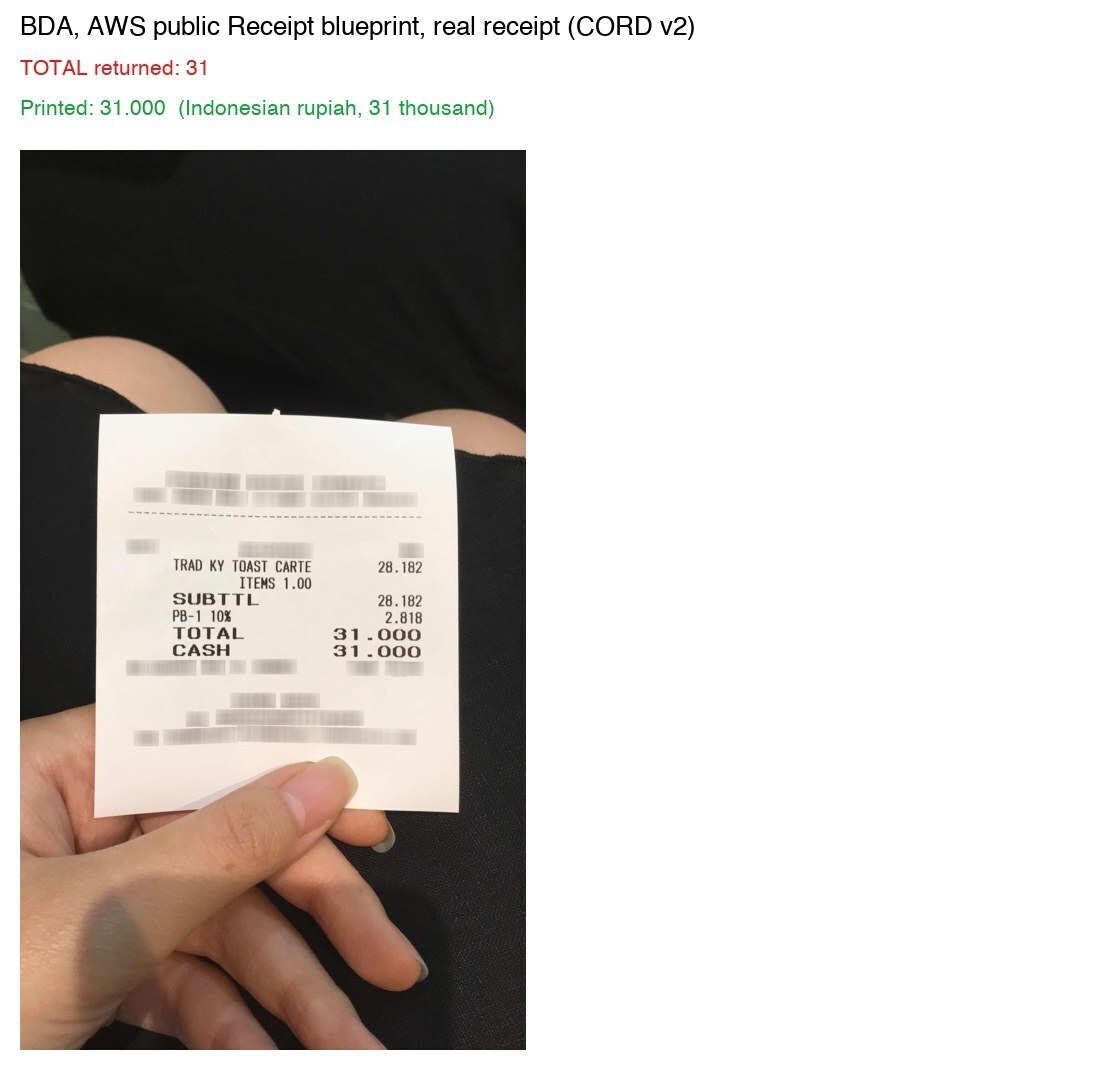
- On 95 real receipts with a labelled total, Textract read it right 97.9% of the time. BDA and Nova often read "31.000" (Indonesian rupiah) as 31.
What was tested
Data. Three sets.
The first set is 5 synthetic invoices in 2 layouts, each photographed in 8 scenes: flat, angled, blur and glare, folded, low light, a stack of papers, a receipt lying on the invoice, and a dark dashboard-like background with a fuel receipt and a parking stub. That makes 40 images. The invoices are generated, so the answer key is exact, and every background paper has known values too. They contain traps that come up in accounts payable work: "Amount paid" and "Balance due" next to "Total", a "Previous balance" line, separate "Invoice to" and "Deliver to" blocks, and DD/MM/YYYY dates.
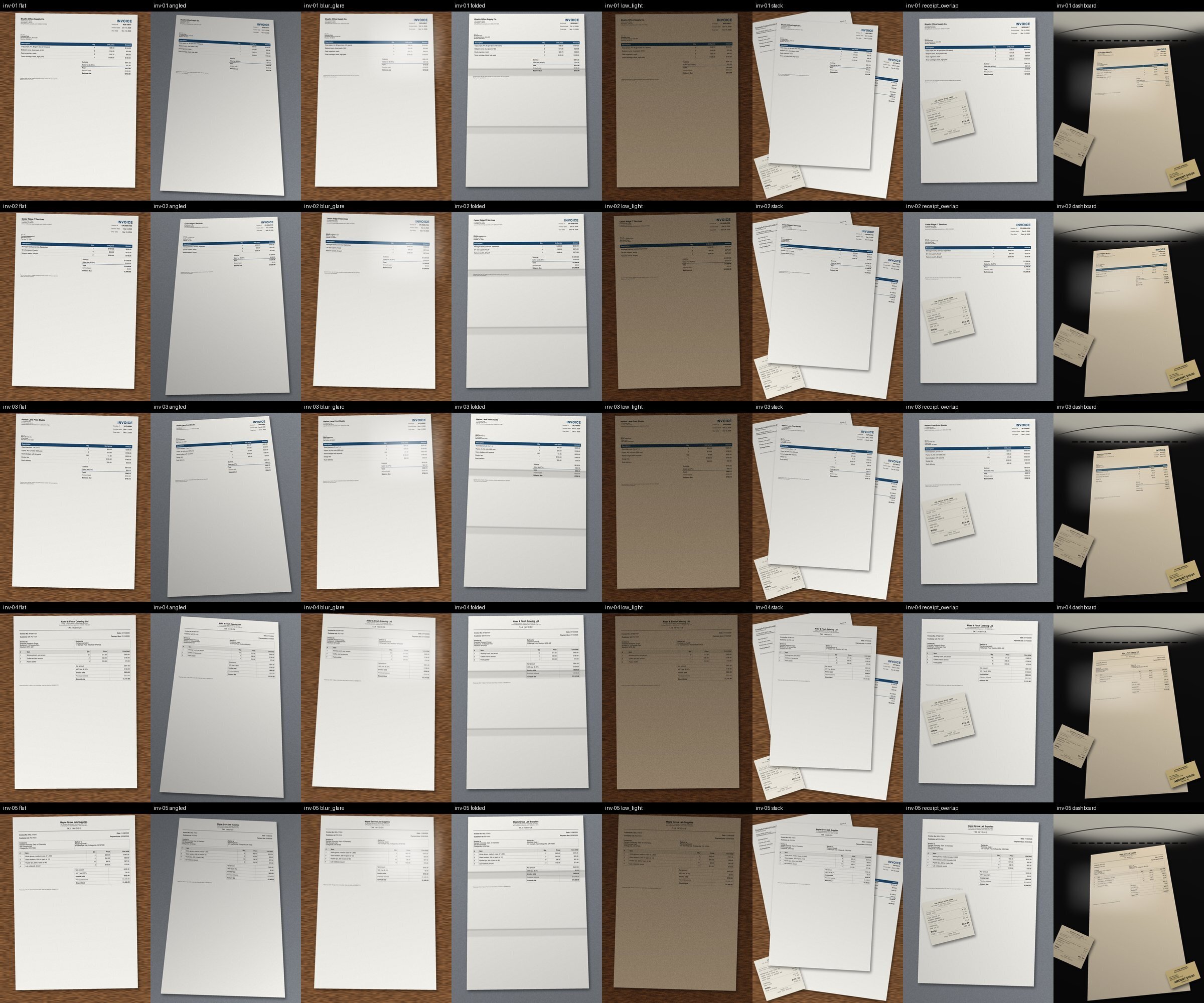
The second set is the CORD v2 test split: 100 real phone photos of receipts from Indonesia (CC BY 4.0). 95 of them have a labelled total.
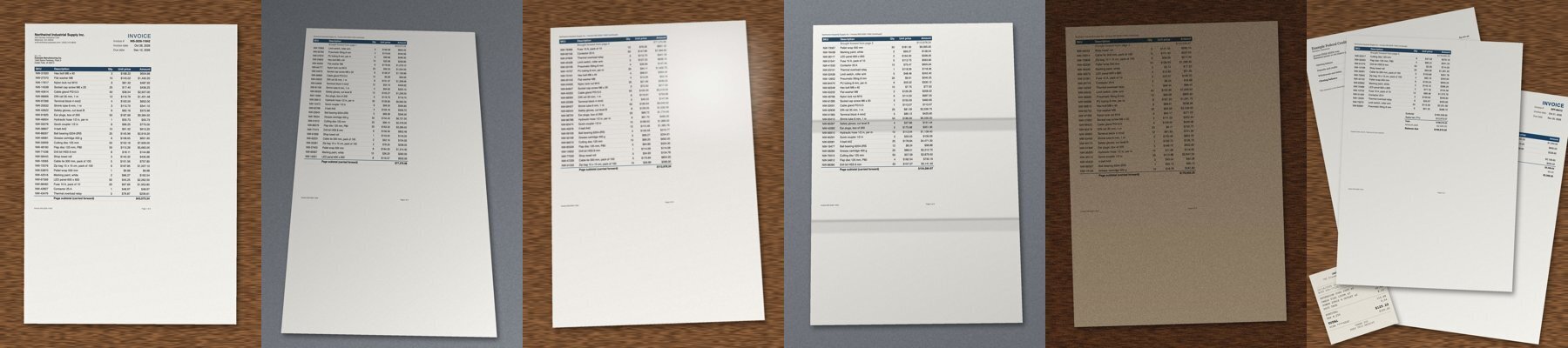
The third set is one synthetic 6-page invoice with 149 line items. Each page ends with "Page subtotal (carried forward)" and the next page starts with "Brought forward". The header is only on page 1 and the totals are only on page 6. It was tested twice: as a clean PDF, and with each page photographed in a different scene and combined into one PDF, the way a phone scanner app would.
Tools. All run in us-west-2.
- Amazon Textract AnalyzeExpense (synchronous for single images, StartExpenseAnalysis for the 6-page PDF)
- Amazon Bedrock Data Automation (BDA) with the AWS public Invoice and Receipt blueprints, and with a custom blueprint
- Claude Sonnet 4.5 and Amazon Nova 2 Lite on Amazon Bedrock, through the
us. inference profiles, with one JSON prompt that asks for each value plus a 0 to 1000 bounding box (the prompt follows the pattern in aws-samples/sample-document-information-localization), temperature 0
- Pre-processing before Textract: Apple Vision document detection with perspective correction, and PaddleOCR's DocPreprocessor (orientation plus UVDoc unwarping)
- A spatial check after Textract: textract-field-memory, an open-source library I wrote that learns where fields sit on a known layout (earlier post)
Two modes for Textract and BDA. Out of the box means defaults and the highest-confidence answer. Configured means the change a team would make after reading the output once. The vision models ran with one prompt and no tuning. The configured changes are shown as code below, so you can judge whether they are fair.
Result 1: accuracy on 40 photos
Brackets are 95% intervals. With 40 images they are wide, and that is the honest size of this study.
| Setup | Mode | Invoice total right | All 6 key fields right | Median latency | Cost / 1,000 |
|---|
| Textract AnalyzeExpense | default | 42.5% (29 to 58) | 42.5% | 3.7 s | $10.00 |
| BDA, public Invoice blueprint | default | 67.5% (52 to 80) | 65.0% | 25.9 s | $40.00 |
| Claude Sonnet 4.5 | default | 70.0% (55 to 82) | 50.0% | 6.8 s | $10.70 |
| Amazon Nova 2 Lite | default | 82.5% (68 to 91) | 37.5% | 3.7 s | $1.07 |
| Textract + label filter + confident crop | configured | 85.0% (71 to 93) | 82.5% | 4.0 s | $10.00 |
| BDA, custom blueprint | configured | 100.0% (91 to 100) | 67.5% | 25.2 s | $40.00 |
The six key fields are vendor, invoice number, invoice date, subtotal, tax and total. BDA latency includes the S3 upload and polling for the asynchronous job.
Textract read the text well. The problem was which amount it labelled TOTAL. On Layout A it took the "Amount paid" line, which is printed as a negative number such as -$100.00, on 7 of 24 photos. On Layout B it was worse: 14 of 16 photos returned the amount due or the previous balance.
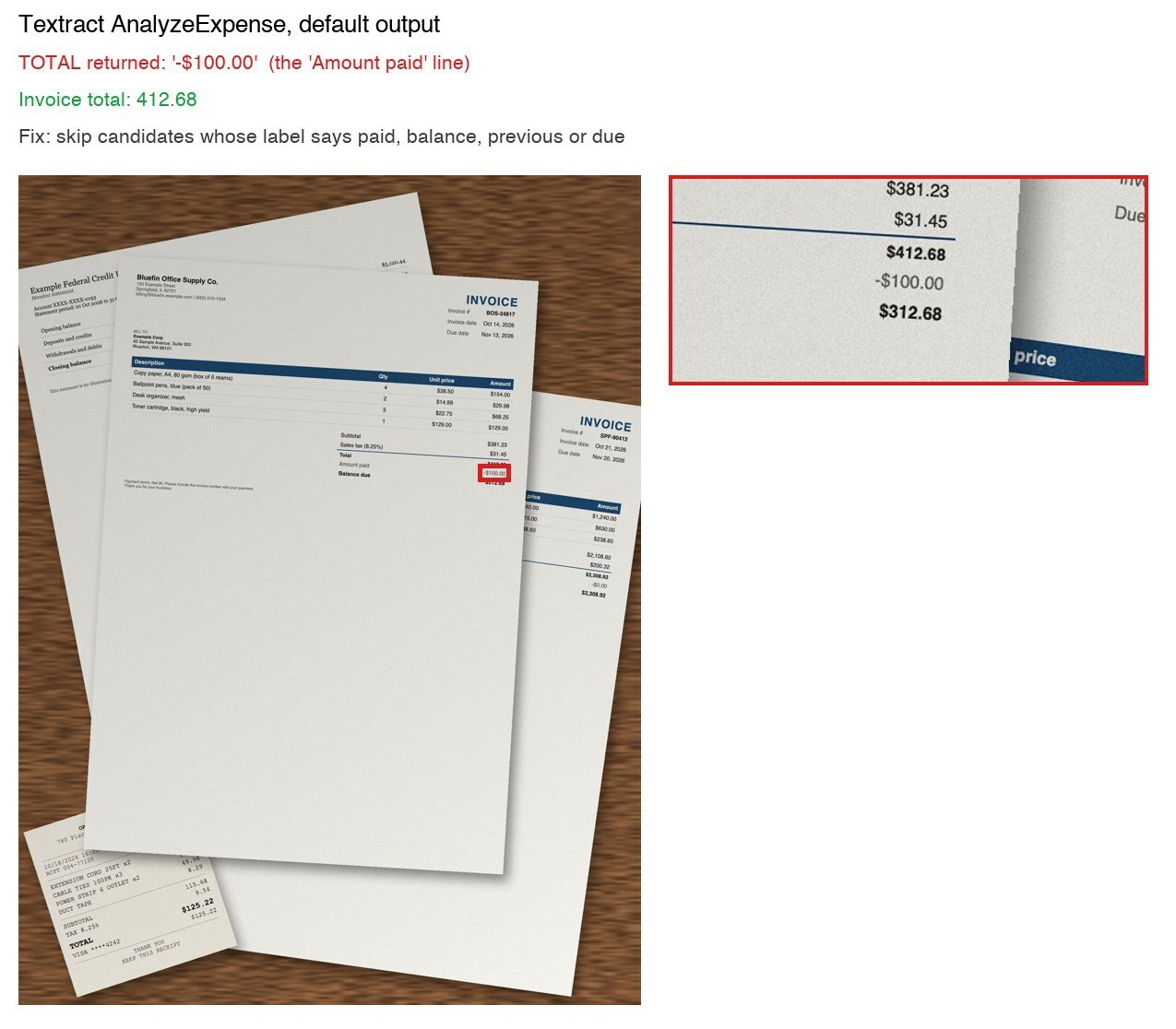
Every candidate in the AnalyzeExpense response carries the label printed next to it, so the fix is a few lines:
import re

FIELDS = {"VENDOR_NAME": "vendor_name", "INVOICE_RECEIPT_ID": "invoice_number",
          "INVOICE_RECEIPT_DATE": "invoice_date", "DUE_DATE": "due_date",
          "RECEIVER_NAME": "customer_name", "SUBTOTAL": "subtotal", "TAX": "tax", "TOTAL": "total"}
NOT_THE_TOTAL = re.compile(r"paid|balance|previous|due", re.I)
SKIP_LABEL = {"TOTAL": NOT_THE_TOTAL, "SUBTOTAL": NOT_THE_TOTAL, "TAX": NOT_THE_TOTAL,
              "RECEIVER_NAME": re.compile(r"deliver|ship", re.I)}
MONEY = {"SUBTOTAL", "TAX", "TOTAL"}


def pick_fields(response, configured=True):
    """Highest-confidence candidate per field, skipping amounts that are not the invoice total."""
    best = {}
    for doc in response["ExpenseDocuments"]:
        for f in doc["SummaryFields"]:
            kind = f["Type"]["Text"]
            value = (f.get("ValueDetection") or {}).get("Text", "")
            label = (f.get("LabelDetection") or {}).get("Text", "")
            if kind not in FIELDS or not value:
                continue
            if configured and kind in MONEY and value.strip().startswith("-"):
                continue  # "Amount paid" is printed as a negative number
            if configured and kind in SKIP_LABEL and SKIP_LABEL[kind].search(label):
                continue
            rank = (f["Type"].get("Confidence", 0), f["ValueDetection"].get("Confidence", 0))
            if kind not in best or rank > best[kind][0]:
                best[kind] = (rank, value)
    return {FIELDS[k]: v for k, (_, v) in best.items()}
On real receipts the same filter cost 3.2 points (97.9% to 94.7%), so it is a per-document-type choice, not a free win.
BDA's public blueprint defines TOTAL as the amount due
The public Invoice blueprint defines TOTAL as "total amount due including subtotal and tax". On the two invoices that print a previous balance, it returned the amount due on 13 of 16 photos.
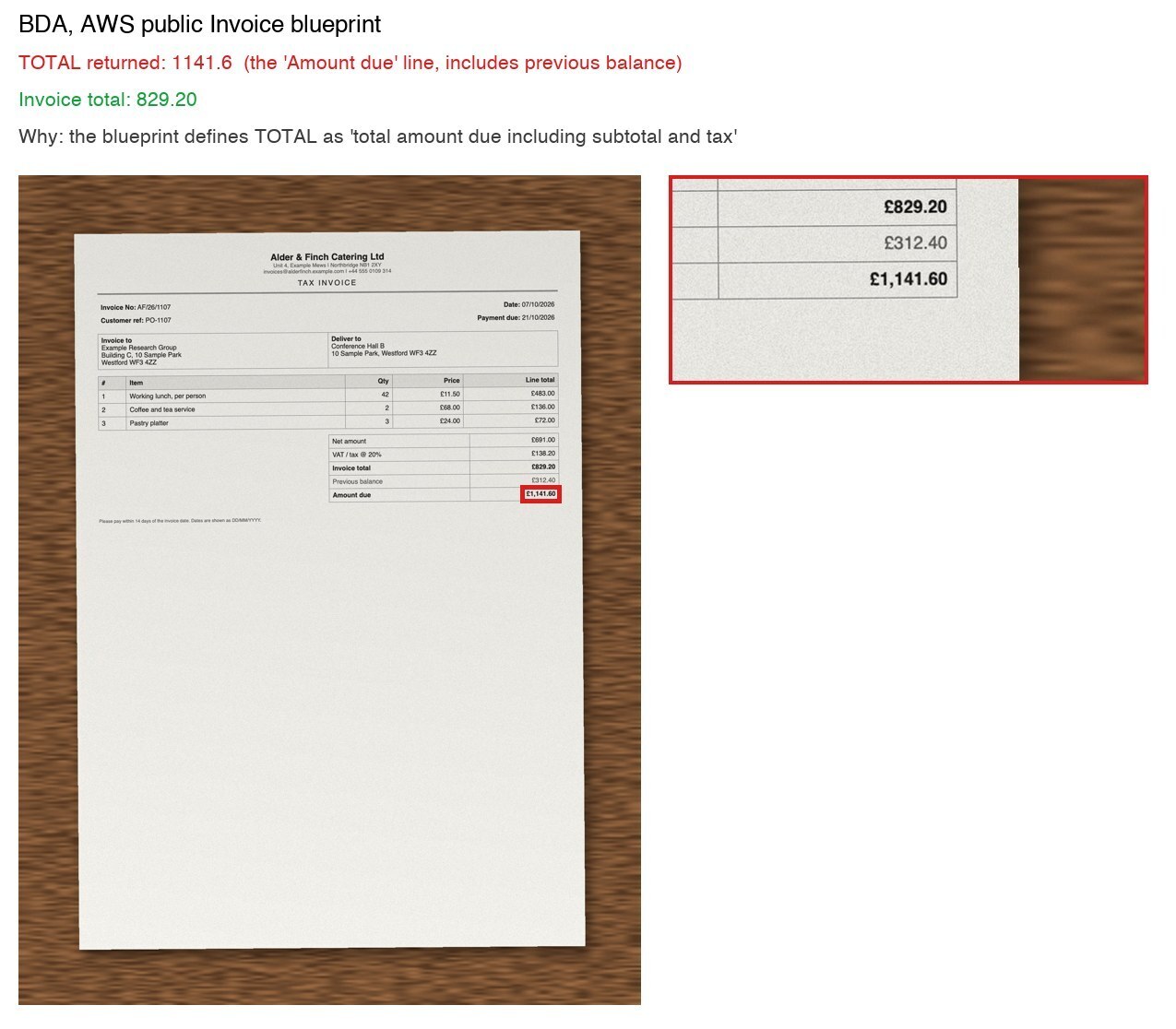
A custom blueprint that asks for the two amounts separately got every total right. This is the full schema (9 fields):
import json
import boto3

S = lambda t, i: {"type": t, "inferenceType": "explicit", "instruction": i}

SCHEMA = {
    "$schema": "http://json-schema.org/draft-07/schema#",
    "description": "A single invoice photographed on a desk or dashboard. "
                   "Other papers may be visible; use only the invoice.",
    "class": "Invoice",
    "type": "object",
    "properties": {
        "VENDOR_NAME": S("string", "Name of the company that issued the invoice, from the invoice header"),
        "INVOICE_NUMBER": S("string", "The invoice number exactly as printed"),
        "INVOICE_DATE": S("string", "Invoice issue date as YYYY-MM-DD. If the invoice says dates "
                                    "are DD/MM/YYYY, convert accordingly"),
        "DUE_DATE": S("string", "Payment due date as YYYY-MM-DD, same date-format rule as INVOICE_DATE"),
        "CUSTOMER_NAME": S("string", "Name in the Bill to or Invoice to block. Not the Deliver to or "
                                     "Ship to block"),
        "SUBTOTAL": S("number", "Subtotal or net amount before tax"),
        "TAX": S("number", "Total tax or VAT amount on this invoice"),
        "INVOICE_TOTAL": S("number", "Total of this invoice: subtotal plus tax. Not the balance due, "
                                     "amount due, amount paid or previous balance"),
        "AMOUNT_DUE": S("number", "Amount due or balance due, if printed separately from the "
                                  "invoice total"),
    },
}

bda = boto3.client("bedrock-data-automation", region_name="us-west-2")
bda.create_blueprint(blueprintName="invoice-benchmark-total-vs-due", type="DOCUMENT",
                     blueprintStage="LIVE", schema=json.dumps(SCHEMA))
One date problem remained. Both Layout B invoices state "Dates are shown as DD/MM/YYYY". The custom blueprint converted 07/10/2026 correctly on all 8 photos of one invoice, and read 11/08/2026 as November 8 on all 8 photos of the other. Instructions guide the model; they do not guarantee the result.
Cropping helps on clutter, fails on the dashboard
Apple Vision's document detection helped on stacks of paper (Textract fields went from 60% to 87.5% right on that scene) and failed on the dashboard scene, where it detected the wrong region with a confidence of about 0.41.
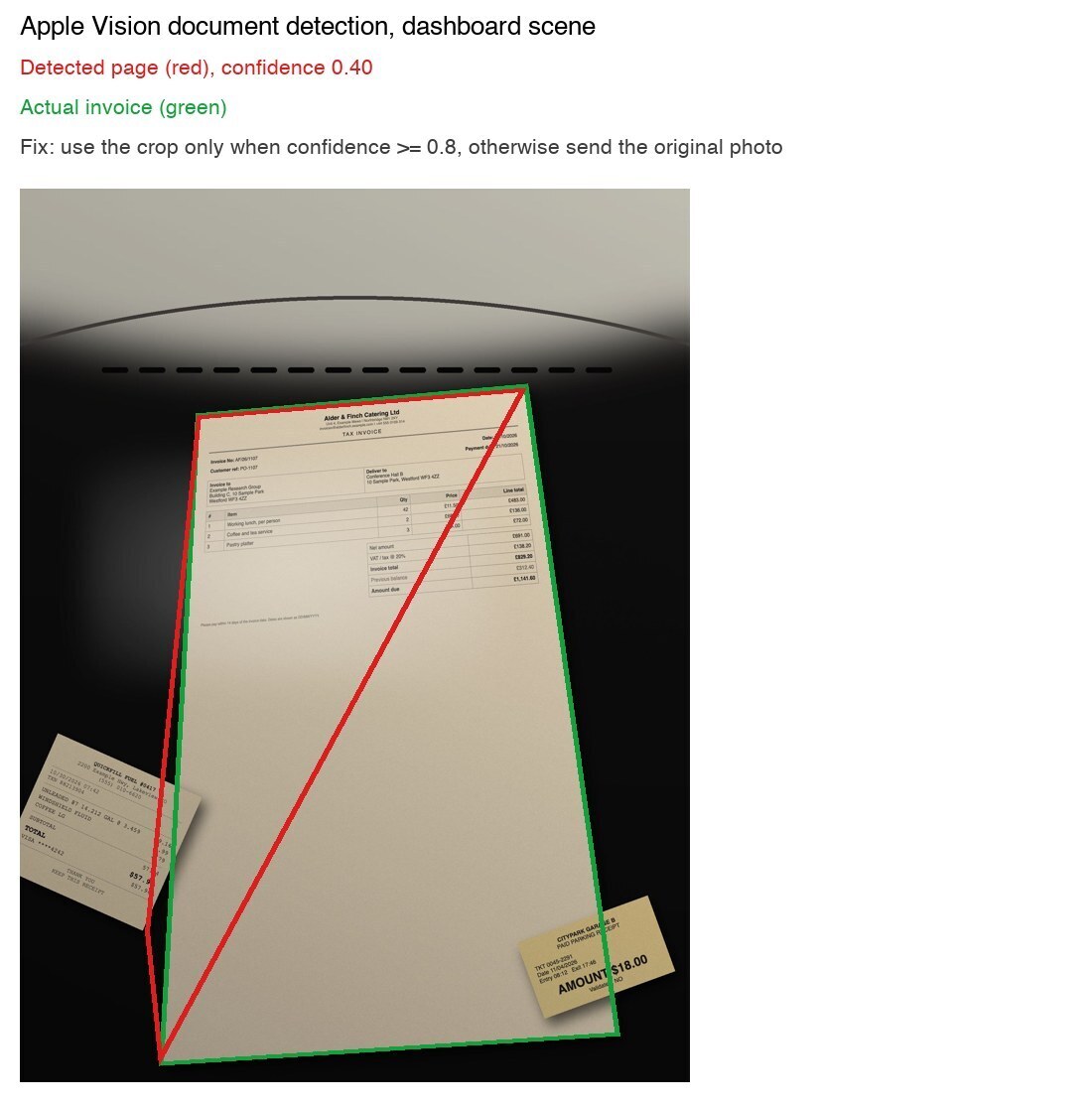
Using the crop only when the detector is confident kept the gain and removed the loss:
CROP_MIN_CONFIDENCE = 0.8

def image_to_send(original, cropped, crop_confidence):
    return cropped if crop_confidence >= CROP_MIN_CONFIDENCE else original
In this set every dashboard crop scored about 0.41 and every other crop scored 0.855 or more, so the threshold was not tested on borderline cases.
PaddleOCR's unwarping helped Textract on the cluttered scenes (stack 60% to 70%, receipt on top 72.5% to 82.5%, dashboard 40% to 50% of fields) and made no difference on angled photos. Its orientation step turned 5 upright pages by 90 degrees, and totals stayed at 42.5%.
textract-field-memory did not help on uncropped photos: no learned template matched any of them. My reading is that the page sits in a different spot in every photo, but I did not test that directly. After cropping, it flagged 46 of 63 wrong fields for review, and also flagged 43 of 257 correct ones. That makes it a review signal, not an extractor.
Result 2: what this means in production
Accuracy does not tell you how much work is left. Two numbers do: how many invoices can be approved without a person, and how many errors slip through.
| Rule | Auto-approved | Silent errors | Cost / 1,000 |
|---|
| Nova 2 Lite, validation only | 35 of 40 | 20 | $1.07 |
| Claude Sonnet 4.5, validation only | 34 of 40 | 14 | $10.70 |
| BDA custom blueprint, validation only | 35 of 40 | 8 | $40.00 |
| Textract configured, validation only | 34 of 40 | 1 | $10.00 |
| Textract configured values, Nova 2 Lite as cross-check | 22 of 40 | 0 | $11.07 |
| Textract configured values, BDA custom as cross-check | 30 of 40 | 1 | $50.00 |
A silent error is an approved invoice with any of the six key fields wrong. Validation and the cross-check look like this:
from datetime import datetime


def money(text):
    """'$1,141.60' -> 1141.6, '-$100.00' -> -100.0, 412.68 -> 412.68."""
    if text is None:
        return None
    if isinstance(text, (int, float)):
        return round(float(text), 2)
    m = re.search(r"(-?)[$£€]?(\d+(?:\.\d+)?)", str(text).replace(",", "").replace(" ", ""))
    return round(float(m.group(1) + m.group(2)), 2) if m else None


def validates(f):
    """Key fields present and subtotal + tax = total, to the cent."""
    s, t, total = money(f.get("subtotal")), money(f.get("tax")), money(f.get("total"))
    if None in (s, t, total):
        return False
    if any(not str(f.get(k) or "").strip() for k in ("vendor_name", "invoice_number", "invoice_date")):
        return False
    return abs(s + t - total) <= 0.011


def iso_date(value):
    """Only unambiguous formats. 07/10/2026 could be July or October, so it returns None."""
    for fmt in ("%Y-%m-%d", "%b %d, %Y"):
        try:
            return datetime.strptime(str(value or "").strip(), fmt).date().isoformat()
        except ValueError:
            pass
    return None


def same(a, b, field):
    if field == "invoice_date":
        da, db = iso_date(a), iso_date(b)
        return True if None in (da, db) else da == db
    if field in ("subtotal", "tax", "total"):
        return money(a) is not None and money(a) == money(b)
    norm = lambda x: re.sub(r"[^a-z0-9]", "", str(x or "").lower())
    return bool(norm(a)) and norm(a) == norm(b)


def auto_approve(values, cross_check):
    """Approve with the first tool's values only when both tools pass validation and agree."""
    return (validates(values) and validates(cross_check) and
            all(same(values.get(k), cross_check.get(k), k)
                for k in ("invoice_number", "invoice_date", "subtotal", "tax", "total")))
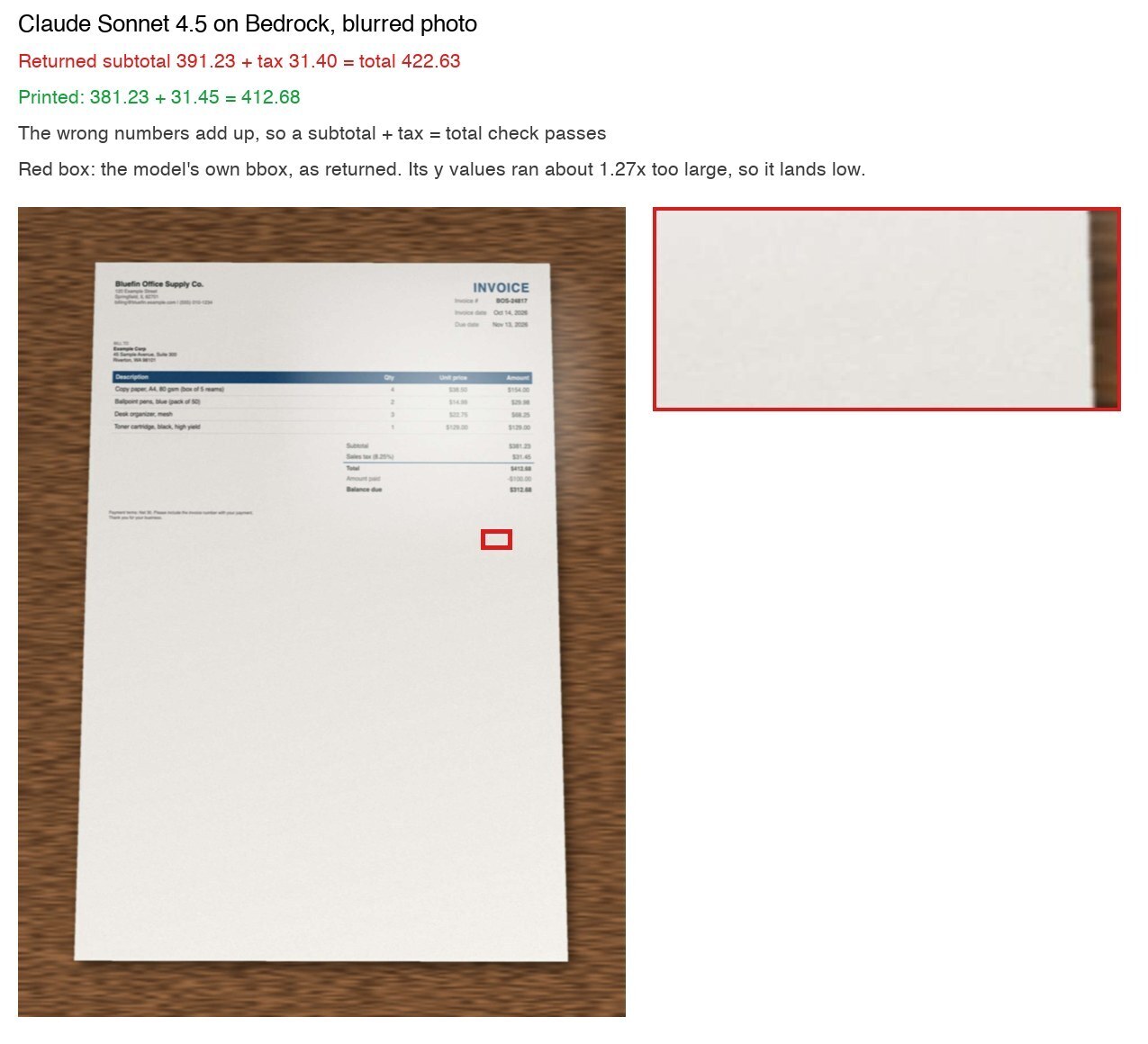
The arithmetic check works well for Textract: none of the 23 Textract photos with a wrong amount passed it. It works poorly for the vision models, for two reasons. Most of their silent errors are in fields the check never looks at: of Nova's 20, the date was wrong on 15 and the invoice number on 7. Some of their money errors also add up. Sonnet read 381.23 + 31.45 = 412.68 on a blurred photo as 391.23 + 31.40 = 422.63, and 6 of the 12 Sonnet photos with a wrong amount passed the check this way.
Agreement routing works, and the order matters. With Textract supplying the values and Nova checking them, 22 invoices were approved and none were wrong. Swapping the roles (Nova values, Textract check) approved the same 22 with 9 silent errors, all of them dates. Textract returns the date as printed, so a DD/MM/YYYY date cannot be compared safely, and Nova's conversion of those dates was its weak spot.
All 8 of BDA custom's silent errors are the 11/08/2026 date from Result 1.
Result 3: real receipts
95 of the 100 CORD receipts have a labelled total.
| Setup | Total right | Read 31.000 as 31 |
|---|
| Textract AnalyzeExpense | 97.9% (93 to 99) | 0 |
| Claude Sonnet 4.5 | 91.6% (84 to 96) | 1 |
| Amazon Nova 2 Lite | 83.2% (74 to 89) | 12 |
| BDA, public Receipt blueprint | 76.8% (67 to 84) | 20 |
If your documents use a dot as the thousands separator, test that case first. It accounts for 20 of BDA's 22 misses and 12 of Nova's 16.
Result 4: a 6-page invoice with 149 line items
Long invoices add problems that single pages do not have: the header and totals sit on different pages, every page has a running subtotal that looks like a total, and a model has to return about 150 rows without dropping or repeating one.
Textract and BDA read the whole PDF natively, so they need no chunking. For the vision models I tested two ways. The first sends all 6 pages in one call. The second is structure-aware chunking: page 1 is read first, then pages 2 to 6 in parallel, each told the vendor, invoice number and date that page 1 returned. Each page is then checked against its own printed running totals, and each page's brought-forward amount must equal the previous page's carried-forward amount:
from decimal import Decimal


def cents(x):
    try:
        return Decimal(str(x)).quantize(Decimal("0.01"))
    except Exception:
        return None


def pages_to_review(pages, subtotal):
    """pages: the model's JSON for each page, in order, with brought_forward, carried_forward and
    line_items. subtotal: from the totals block on the last page. Returns the page numbers to review."""
    flagged, prev = [], None
    for n, p in enumerate(pages, 1):
        if not p:
            flagged.append(n)
            prev = None
            continue
        lines = sum((cents(li.get("amount")) or Decimal(0)) for li in p.get("line_items") or [])
        start = cents(p.get("brought_forward")) or Decimal(0)
        end = cents(p.get("carried_forward"))
        if end is None and n == len(pages):
            end = subtotal
        chained = prev is None or start == prev
        if end is None or not chained or lines + start != end:
            flagged.append(n)
        prev = cents(p.get("carried_forward"))
    return flagged
A flagged page is read once more by the other model at 1.5x size. Code, not the model, merges the pages and checks that all lines add up to the subtotal.
For Textract, the fix is different. StartExpenseAnalysis returns results per page and labels each page's "Page subtotal (carried forward)" as TOTAL with a confidence above 99.9. Take totals from the last page only:
def last_page_only(response):
    def page(doc):
        return max((f.get("PageNumber", 0) for f in doc["SummaryFields"]), default=0)
    last = max(page(d) for d in response["ExpenseDocuments"])
    return {"ExpenseDocuments": [d for d in response["ExpenseDocuments"] if page(d) == last]}


def pick_fields_multipage(response):
    fields = pick_fields(response)
    totals = pick_fields(last_page_only(response))
    fields.update({k: totals.get(k) for k in ("subtotal", "tax", "total")})
    return fields
Clean PDF:
| Setup | Total | Line items right | Latency | Cost |
|---|
| Textract async, default | wrong (balance due) | 149 of 149, plus 5 running-total rows taken as items | 18 s | $0.06 |
| Textract async, label filter only | wrong (a page 3 carried-forward amount) | 149 of 149 | 18 s | $0.06 |
| Textract async, label filter + totals from last page | right | 149 of 149 | 18 s | $0.06 |
| BDA, public Invoice blueprint | right | 107 of 149 | 135 s | $0.24 |
| BDA, custom blueprint | right | not in schema | 37 s | $0.24 |
| Sonnet 4.5, whole document | right | 149 of 149 | 87 s | $0.16 |
| Sonnet 4.5, page chunks + checksum | right | 149 of 149 | 48 s | $0.18 |
| Nova 2 Lite, whole document | right | 149 of 149 | 38 s | $0.02 |
| Nova 2 Lite, page chunks + checksum | right | 149 of 149 | 21 s | $0.03 |
BDA's public blueprint got every line amount right but returned the wrong quantity on 42 of them, mostly the quantity of a nearby row. Those amounts still add up to the subtotal, so a sum check cannot catch it. A quantity times unit price check per row would. On the clean PDF, chunking did not change accuracy, and it roughly halved latency because the pages run in parallel.
Photographed pages (flat, angled, blur, folded, low light, and page 6 on a stack of other papers):
| Setup | Total | Line items right | Lines add up to subtotal |
|---|---|---|---|
| Textract async, label filter + totals from last page | right | 144 of 149 | no |
| BDA, public Invoice blueprint | right | 105 of 149 | yes |
| Sonnet 4.5, whole document | wrong (tax misread) | 129 of 149 | no |
| Sonnet 4.5, page chunks + checksum | right | 123 of 149 | no |
| Nova 2 Lite, whole document | right | 127 of 149 | no |
| Nova 2 Lite, page chunks + checksum | right | 136 of 149 | no |
No setup got every line right on the photos. That is the real result, and it is why the checks matter. Textract and every vision-model setup failed the final "lines add up to subtotal" check, so none of them would be approved silently. BDA's public blueprint passed it while 44 rows did not match on amount and quantity.
The page checksum is the part I would reuse. It flagged every page that had a wrong line, for both models, and missed none:
| Model | Pages with a real error | Flagged | Flagged but fine | Missed |
|---|
| Sonnet 4.5 | 3 | 3 | 1 | 0 |
| Nova 2 Lite | 4 | 4 | 1 | 0 |
The one false flag per model was page 4. Its lines were right, but the carried-forward amount on the blurred photo of page 3 was misread, so the chain check failed on the next page. The retry was less useful: reading a flagged page again with the other model at 1.5x size fixed 1 of the 7 pages with real errors. On photos, chunking tells you which pages a person should look at. It does not repair them. One more thing to watch: Sonnet's chunked run returned the customer as "Eastside Manufacturing Co.", a name that is not on the invoice ("Example Manufacturing Co." is). The whole-document call read it correctly.
Other things worth knowing
- Run-to-run variance. At temperature 0, both Bedrock models gave the same answer in all 3 runs for about 94% of fields. Total accuracy moved by up to 2.5 points between runs.
- Bounding boxes from vision models. Nova 2 Lite's boxes overlapped the printed value 91.6% of the time. Sonnet 4.5's boxes overlapped 0% as returned. Its y values ran about 1.27 times too large, and dividing y by 4/3 brought 64.4% into overlap. If you need boxes for an audit trail, verify them.
- Malformed output. Sonnet returned JSON with an extra closing brace on 2 of 100 receipts and 1 of 120 invoice calls. Nova returned a malformed reply on 1 receipt and 2 invoice calls. Decode the first JSON object and log when you had to:
import json


def first_json(text):
    try:
        return json.JSONDecoder().raw_decode(text[text.find("{"):])[0]
    except ValueError:
        return None
- Line items on single pages. The BDA public blueprint got every line item amount and quantity right on all 40 photos. Textract found 82% of them (88% with the confident crop).
Which setup for which job
| If you need | Start with |
|---|
| Lowest cost, with a person reviewing | Nova 2 Lite, around $1 per 1,000. Do not auto-approve on an arithmetic check alone |
| Auto-approval with few silent errors | Textract with a label filter and confident crop, cross-checked by a cheap vision model |
| Line items on single-page invoices | BDA public Invoice blueprint. On long invoices, check quantity times unit price per row |
| Line items on long or multi-page invoices | Textract async with totals from the last page had the most lines right here. Add a page-level running-total checksum to whichever tool you use, so a person reviews only the flagged pages |
| Bounding boxes you can show an auditor | Textract and BDA return a box for every value. I did not measure the accuracy of either; verify any vision-model box |
| Photos with lots of other papers | A document crop gated on the detector's confidence |
Cost
Prices are on-demand list prices in us-west-2, checked on the Textract and Bedrock pricing pages: Textract AnalyzeExpense $0.010 per page, BDA custom output $0.040 per page (the rate for blueprints with up to 30 fields; the public Invoice blueprint has 19, the Receipt blueprint 16 and my custom blueprint 9), Claude Sonnet 4.5 $3.30 and $16.50 per million input and output tokens, and Nova 2 Lite $0.33 and $2.75. The model prices are for the us. profiles used here. The global. profiles are about 10% cheaper ($3 and $15, $0.30 and $2.50).
The whole study, including the 6-page runs and three runs I later replaced, cost about $14.18 at list price.
Limits
This is a small study: 5 invoice designs in 2 layouts photographed 40 ways, 100 real receipts from one country, and one 6-page invoice run once per setup. The photo scenes are generated; the dashboard is a drawn background, not a car. ML Kit and VisionKit phone scanners were not tested. The vision models used one prompt with no tuning, while Textract and BDA got one round of configuration.
How the benchmark is built
If you want to run the same comparison on your own documents, this is the structure. It has four stages, and each stage writes files the next one reads.
| Stage | What it does | Output |
|---|
| 1. Generate | Render each invoice from HTML with headless Chrome, and write the exact answer key from the same data | Invoice PNG and PDF, answer_key.json |
| 2. Photograph | Warp each invoice onto a background with Pillow (perspective, blur, glare, folds, noise, other papers on top or behind) and record which background papers are in each shot | 40 JPEGs, a per-photo key with the background values |
| 3. Call | Send each image to each tool once and save the full raw response with its measured latency | One JSON file per image per tool |
| 4. Score | Read the saved responses, apply the configured rules, compare with the answer key | Tables, per-field outcomes, failure images |
The answer key carries the traps. Generating the invoices means the key is exact, and it can list every other amount printed on the page, so a wrong answer can be classified instead of just counted:
{
  "inv-01": {
    "layout": "A",
    "vendor_name": "Bluefin Office Supply Co.",
    "invoice_number": "BOS-24817",
    "invoice_date": "2026-10-14",
    "due_date": "2026-11-13",
    "customer_name": "Example Corp",
    "currency": "USD",
    "subtotal": "381.23",
    "tax": "31.45",
    "total": "412.68",
    "line_items": [{"description": "Copy paper, A4, 80 gsm (box of 5 reams)",
                    "quantity": 4, "unit_price": "38.50", "amount": "154.00"}],
    "traps": {"amount_paid": "100.00", "balance_due": "312.68"}
  }
}
The background papers (another invoice, a bank statement, receipts, a parking stub) get their own key, and a check at generation time makes sure none of their amounts equals an amount on a main invoice. Otherwise a background value could not be told apart from a trap.
Every call is made once and saved. Scoring then runs from disk, so you can change a rule and re-score in seconds without paying again:
import json
import time
from pathlib import Path


def cached_call(folder, case_id, fn):
    """Run fn() once and save {'latency_s', 'called_at', 'response'}; later runs read the file."""
    path = Path("results/raw") / folder / (case_id.replace("/", "__") + ".json")
    path.parent.mkdir(parents=True, exist_ok=True)
    if path.exists():
        return json.loads(path.read_text())
    start = time.time()
    response = fn()
    record = {"latency_s": round(time.time() - start, 3),
              "called_at": time.strftime("%Y-%m-%dT%H:%M:%SZ", time.gmtime()),
              "response": response}
    path.write_text(json.dumps(record, indent=1, default=str))
    return record
Each money field gets one of five outcomes. This is what turns "79% accurate" into "it picked the amount-paid line":
def classify_money(pred, truth, traps, background_values):
    """correct, trap (another amount on the same invoice), background (an amount on another
    paper in the photo), wrong, or missing."""
    value = money(pred)
    if value is None:
        return "missing"
    if value == money(truth):
        return "correct"
    # "Amount paid" is printed as a negative number, so compare magnitudes for traps.
    if abs(value) in {abs(money(t)) for t in traps.values()}:
        return "trap"
    if value in background_values:
        return "background"
    return "wrong"
Dates follow the tool's format. A tool that returns ISO dates must convert correctly, and swapping day and month counts as a trap. A tool that returns the printed text must match the printed text. Line items match only when amount and quantity are both right.
The real receipts come from the CORD v2 test split on Hugging Face (naver-clova-ix/cord-v2, CC BY 4.0). Parse the labels and the predictions with the same function, because the labels mix formats ("60.000", "63,000.00", "9.500,00").
If you run invoices through any of these tools, I would like to hear which failure you hit most: the wrong amount, the wrong date, or the wrong row.