Advanced SQL analytics for running a hospital database.
Introduction
Structured Query Language is essential and common in most industry sectors. In healthcare reporting, SQL plays a critical role in analytics. PostgreSQL lets data scientists take those transaction records and pull out operational insights, so you can make decisions. In this guide we go through the main SQL techniques, using a hospital database schema; patients , doctors, departments , wards, diagnoses, procedures, and visits.
First, before anything else we need to create our database schema. Connect to PostgerSQL DBMS and run a new sql script to start.
- Create a schema
hospital
create schema hospital;
- Check to which schema you are connected.
show search_path;
- If connected to a different schema, set connection to your
hospital schema.
set search_path to hospital;
Now you are set to begin creating your tables. Run the following codes to create the different tables and insert data into the newly created tables:
Doctors Table
--create doctors table

create table hospital.doctors (
doctor_id int primary key,
doctor_name varchar(50) not null,
doctor_gender varchar(20),
doctor_specialty varchar(20),
doctor_experience_years int
);

select * from hospital.doctors;

-- insert data into doctors

insert into hospital.doctors (doctor_id, doctor_name, doctor_gender, doctor_specialty, doctor_experience_years)
values
(101, 'DR.Brian Mwangi', 'Male', 'Cardiologist', 12),
(102, 'Dr. Sarah Wanjiku', 'Female', 'General Physician', 9),
(103, 'Dr. Peter Otieno', 'Male', 'Orthopedic Surgeon', 15),
(104, 'Dr. Faith Chebet', 'Female', 'Pediatrician', 8);
Departments Table
-- create departments table

create table hospital.department (
department_id int primary key,
department_name varchar (50) not null
);


select * from hospital.department;

-- insert data into departments

insert into hospital.department (department_id, department_name)
values
(10, 'Cardiology'),
(20, 'General Medicine'),
(30, 'Orthopedics'),
(40, 'Pediatrics');
Departments Table
-- create diagnosis table

create table hospital.diagnosis (
diagnosis_id int primary key,
diagnosis_name varchar(50),
diagnosis_category varchar(50)
);

select * from hospital.diagnosis;

--insert data into diagnosis table

insert into hospital.diagnosis (diagnosis_id, diagnosis_name, diagnosis_category)
values
(501,'Hypertension', 'Chronic Disease'),
(502, 'Malaria', 'Infectious Disease'),
(503, 'Fracture', 'Injury'),
(504, 'Pneumonia', 'Respiratory Disease'),
(505, 'Diabetes', 'Chronic Disease'),
(506, 'Typhoid', 'Infectious'),
(507, 'Asthma', 'Respiratory Disease'),
(508, 'Back Pian', 'Musculoskeletal'),
(509, 'Gastritis', 'Digestive Disease'),
(510, 'Heart Failure', 'Chronic Disease'),
(511, 'Flu', 'Respiratoey Disease'),
(512, 'Kidney Infection', 'Infectious Disease'),
(513, 'Anaemia', 'Blood Disorder'),
(514, 'Sprain', 'Injury'),
(515, 'Gastroenteritis', 'Digestive Disease'),
(516, 'Dislocation', 'Injury'),
(517, 'Migraine', 'Neurological Disorder'),
(518, 'Chest Pain', 'Cardiovascular Disease');
Wards Table
-- create wards table

create table hospital.wards (
ward_id int primary key,
ward_name varchar (50)
);

-- insert data into wards
insert into hospital.wards (ward_id, ward_name)
values
(100, 'Cardiac Care Unit'),
(200, 'General Ward'),
(300, 'Surgical Ward'),
(400, 'Childrens Ward');

select * from hospital.wards;
Patients Table
-- create patients table
create table hospital.patients (
patient_id serial primary key,
patient_name varchar(50) not null,
patient_gender varchar(20),
patient_age int,
county varchar(30),
sub_county varchar(30)
);

--insert data into patients
insert into hospital.patients (patient_name, patient_gender, patient_age, county, sub_county)
values
('Amina Otieno', 'Female', 34, 'Nairobi', 'Westlands'),
('John Kariuki', 'Male', 42,' Kiambu', 'Thika'),
('Grace Naliaka', 'Female', 28, 'Kakamega', 'Lurambi'),
('David Mutua', 'Male', 55, 'Machakos', 'Athi River'),
('Esther Achieng', 'Female', 63, 'Kisumu', 'Kisumu Central'),
('Mohamed Ali', 'Male', 19, 'Mombasa', 'Nyali'),
('Lucy Wambui', 'Female', 7, 'Nakuru', 'Naivasha'),
('Samuel Kiptoo', 'Male', 39, 'Uasin Gishu', 'Eldoret East'),
('Mary Wairumu', 'Female', 31, 'Murang''a', 'Kiharu'),
('Peter Ouma', 'Male', 46, 'Siaya', 'Bondo'),
('Brian Omondi', 'Male', 24, 'Kisumu', 'Kisumu East'),
('Catherine Musyoka', 'Female', 52, 'Kitui', 'Kitui Central'),
('Daniel Maina', 'Male', 16, 'Nyeri', 'Othaya'),
('Eunice Moraa', 'Female', 44, 'Kisii', 'Bonchari'),
('Francis Njuguna', 'Male', 60, 'Laikipia', 'Nyanyuki'),
('Hellen Jepchirchir', 'Female', 37, 'Bomet', 'Sotik'),
('Isaac Kamau', 'Male', 29, 'Nairobi', 'Kasarani'),
('Jane Muthoni', 'Female', 22, 'Meru', 'Imenti North'),
('Kevin Barasa', 'Male', 48, 'Bungoma', 'Webuye'),
('Lilian Adhiambo', 'Female', 26, 'Homa Bay', 'Rangwe'),
('Moses Cheruiyot', 'Male', 33, 'Kericho', 'Ainamoi'),
('Nadia Hussein', 'Female', 5, 'Garissa', 'Dadaab'),
('Patrick Muli', 'Male', 51, 'Makueni', 'Wote'),
('Ruth Nekesa', 'Female', 41, 'Trans Nzoia', 'Kitale'),
('Josephine Wekesa', 'Female', 36, 'Busia', 'Matayos');

select * from hospital.patients;
Procedures Table
create table hospital.procedures (
procedure_id int primary key,
procedure_name varchar (50) not null,
procedure_category varchar (20)
);

--insert data into procedures
insert into hospital.procedures (procedure_id, procedure_name, procedure_category)
values
(701, 'Blood Pressure Monitoring', 'Diagnostic'),
(702, 'Malaria Test', 'Laboratory'),
(703, 'X-ray', 'Imaging'),
(704, 'Chest X-ray', 'Imaging'),
(705, 'Blood Sugar Test', 'Laboratory'),
(706, 'Full Blood Count', 'Laboratory'),
(707, 'Nebulization', 'Treatment'),
(708, 'Physiotherapy', 'Treatment'),
(709, 'Endoscopy', 'Diagnostic'),
(710, 'ECG', 'Diagnostic'),
(711, 'Consultation', 'Consultation'),
(712, 'Joint Support Bandage', 'Treatment'),
(713, 'IV Fluids', 'Treatment'),
(714, 'Closed Reduction', 'Treatment'),
(715, 'Pain Management', 'Treatment');


select * from hospital.procedures;
Visits Table
-- create visits table (Fact Table)

create table hospital.visits (
visit_id int primary key,
visit_date date not null,
patient_id int not null references hospital.patients(patient_id),
doctor_id int not null references hospital.doctors(doctor_id),
department_id int not null references hospital.department(department_id),
ward_id int references hospital.wards(ward_id),
diagnosis_id int references hospital.diagnosis(diagnosis_id),
procedure_id int references hospital.procedures(procedure_id),
admission_type varchar(20) not null
    check (admission_type in ('Outpatient', 'Inpatient', 'Emergency')),
length_of_stay_days int default 0
    check (length_of_stay_days >= 0),
triage_level varchar(10)
    check (triage_level in ('Red', 'Orange', 'Yellow', 'Green')),
insurance_provider varchar(50),
total_bill_kes numeric(10,2) not null
    check (total_bill_kes >= 0),
payment_method varchar(20),
follow_up_required varchar(3)
    check (follow_up_required in ('Yes', 'No')),
patient_satisfaction_score numeric(3,1)
    check (patient_satisfaction_score between 0 and 5)
);

--insert data into visits table
insert into hospital.visits (visit_id, visit_date, patient_id, doctor_id, department_id, ward_id, diagnosis_id,
procedure_id, admission_type, length_of_stay_days, triage_level, insurance_provider, total_bill_kes, payment_method,
follow_up_required, patient_satisfaction_score)
values
(1001, '2026-06-01', 1, 101, 10, 100, 501, 701, 'Outpatient', 0, 'Green', 'NHIF', 3500, 'Cash', 'Yes', 4.5),
(1002, '2026-06-01', 2, 102, 20, 200, 502, 702, 'Outpatient', 0, 'Yellow', 'Britam', 2500, 'Insurance', 'No', 4.1),
(1003, '2026-06-02', 3, 103, 30, 300, 503, 703, 'Inpatient', 3, 'Red', 'AAR', 28000, 'Insurance', 'Yes', 4.3),
(1004, '2026-06-02', 4, 104, 40, 400, 504, 704, 'Inpatient', 4, 'Red', 'None', 42000, 'Cash', 'Yes', 3.9),
(1005, '2026-06-03', 5, 101, 10, 100, 505, 705, 'Outpatient', 0, 'Yellow', 'CIC', 4000, 'Mobile Money', 'Yes', 4.7),
(1006, '2026-06-03', 6, 102, 20, 200, 506, 706, 'Outpatient', 0, 'Green', 'None', 3000, 'Cash', 'No', 4.0),
(1007, '2026-06-04', 7, 104, 40, 400, 507, 707, 'Outpatient', 0, 'Yellow', 'NHIF', 5500, 'Insurance', 'Yes', 4.6),
(1008, '2026-06-04', 8, 103, 30, 300, 508, 708, 'Outpatient', 0, 'Green', 'None', 6500, 'Cash', 'Yes', 4.2),
(1009, '2026-06-05', 9, 102, 20, 200, 509, 709, 'Outpatient', 0, 'Yellow', 'Jubilee', 15000, 'Insurance', 'No', 3.8),
(1010, '2026-06-05', 10, 101, 10, 100, 510, 710, 'Inpatient', 5, 'Red', 'AAR', 76000, 'Insurance', 'Yes', 4.4),
(1011, '2026-06-06', 1, 101, 10, 100, 505, 705, 'Outpatient', 0, 'Green', 'NHIF', 4200, 'Mobile Money', 'Yes', 4.8),
(1012, '2026-06-06', 11, 102, 20, 200, 502, 702, 'Outpatient', 0, 'Green', 'None', 2300, 'Cash', 'No', 4.0),
(1013, '2026-06-07', 12, 101, 10, 100, 501, 710, 'Outpatient', 0, 'Yellow', 'Britam', 7000, 'Insurance', 'Yes', 4.5),
(1014, '2026-06-07', 13, 104, 40, 400, 511, 711, 'Outpatient', 0, 'Green', 'None', 1800, 'Cash', 'No', 4.1),
(1015, '2026-06-08', 14, 103, 30, 300, 503, 703, 'Inpatient', 2, 'Red', 'CIC', 24000, 'Mobile Money', 'Yes', 4.6),
(1016, '2026-06-08', 15, 102, 20, 200, 512, 706, 'Inpatient', 3, 'Orange', 'Jubilee', 36000, 'Insurance', 'Yes', 3.7),
(1017, '2026-06-09', 16, 101, 10, 100, 510, 710, 'Inpatient', 6, 'Red', 'AAR', 82000, 'Insurance', 'Yes', 4.2),
(1018, '2026-06-09', 17, 102, 20, 200, 509, 711, 'Outpatient', 0, 'Green', 'None', 2000, 'Cash', 'No', 4.0),
(1019, '2026-06-10', 18, 104, 40, 400, 507, 707, 'Outpatient', 0, 'Yellow', 'NHIF', 5200, 'Mobile Money', 'Yes', 4.7),
(1020, '2026-06-10', 19, 103, 30, 300, 508, 708, 'Outpatient', 0, 'Green', 'Britam', 6500, 'Insurance', 'No', 4.1),
(1021, '2026-06-11', 2, 101, 10, 100, 501, 701, 'Outpatient', 0, 'Yellow', 'Britam', 3800, 'Insurance', 'Yes', 4.3),
(1022, '2026-06-11', 20, 102, 20, 200, 513, 706, 'Outpatient', 0, 'Green', 'None', 3200, 'Mobile Money', 'No', 4.4),
(1023, '2026-06-12', 21, 103, 30, 300, 514, 712, 'Outpatient', 0, 'Yellow', 'NHIF', 7200, 'Cash', 'Yes', 4.0),
(1024, '2026-06-12', 22, 104, 40, 400, 515, 713, 'Inpatient', 2, 'Orange', 'None', 18500, 'Cash', 'Yes', 4.5),
(1025, '2026-06-13', 5, 101, 10, 100, 501, 710, 'Outpatient', 0, 'Yellow', 'CIC', 7600, 'Insurance', 'Yes', 4.6),
(1026, '2026-06-13', 23, 102, 20, 200, 506, 706, 'Inpatient', 2, 'Orange', 'Jubilee', 29000, 'Insurance', 'Yes', 3.9),
(1027, '2026-06-14', 24, 103, 30, 300, 516, 714, 'Inpatient', 1, 'Red', 'AAR', 33000, 'Insurance', 'Yes', 4.2),
(1028, '2026-06-14', 7, 104, 40, 400, 511, 711, 'Outpatient', 0, 'Green', 'NHIF', 1900, 'Mobile Money', 'No', 4.8),
(1029, '2026-06-15', 25, 102, 20, 200, 517, 715, 'Outpatient', 0, 'Yellow', 'Britam', 4800, 'Cash', 'Yes', 4.1),
(1030, '2026-06-15', 10, 101, 10, 100, 518, 710, 'Emergency', 1, 'Red', 'AAR', 22000, 'Insurance', 'Yes', 4.4);

select * from hospital.visits;
After creating our database schema, we will begin modelling the data using different advanced SQL functions.
1. SQL Window Functions
Window functions do computations on related rows in a table while maintaining the individuality of each rows.
OVER, PARTITION BY, ORDER BY, and Window Frames
The OVER clause describes the rows for the window function operation.
PARTITION BY defines different partitions for each result set.ORDER BY defines row order in each partition.- Window frames define different limits such as
ROWS BETWEEN UNBOUNDED PRECEDING AND CURRENT ROW for cumulative sums and ROWS BETWEEN 2 PRECEDING AND CURRENT ROW for moving averages.
Ranking Window Functions
Ranking functions provide numeric ordering according to specified criteria.
ROW_NUMBER provides a distinct numeric integer value to each row within a partition.RANK provides identical rank values to ties, but skips other numbers.DENSE_RANK provides identical rank values to ties, but does not skip numbers.NTILE divides rows in partitions into buckets of equal size.
Question: How can hospital management rank inpatient visits by total bill within each admission type?
select
    v.visit_id,
    p.patient_name,
    v.admission_type,
    v.total_bill_kes,
    row_number() over (partition by v.admission_type order by v.total_bill_kes desc) as row_num,
    rank() over (partition by v.admission_type order by v.total_bill_kes desc) as rnk,
    dense_rank() over (partition by v.admission_type order by v.total_bill_kes desc) as dense_rnk,
    ntile(2) over (partition by v.admission_type order by v.total_bill_kes desc) as bill_tier
from hospital.visits v
join hospital.patients p on v.patient_id = p.patient_id
where v.admission_type = 'Inpatient'
limit 5;
Expected Results

Explanation
ROW_NUMBER gives values from 1 to 5. - The values obtained by
RANK and DENSE_RANK will be same as there are no duplicate bill values.
- NTILE assigns the best bills to Tier 1.
Value & Navigation Window Function
Navigation functions retrieve values based on relative rows.
LAG retrieves values from previous row.LEAD retrieves values from next row.FIRST_VALUE gives the first value of the expression in the frame.LAST_VALUE gives the last value of the expression in the frame bounds like ROWS BETWEEN UNBOUNDED PRECEDING AND UNBOUNDED FOLLOWING.
Question: How can we monitor patient billing process through multiple hospital visits?
select
    v.visit_id,
    v.patient_id,
    v.visit_date,
    v.total_bill_kes,
    lag(v.total_bill_kes, 1, 0.00) over (partition by v.patient_id order by v.visit_date) as prev_bill,
    lead(v.total_bill_kes, 1, 0.00) over (partition by v.patient_id order by v.visit_date) as next_bill,
    first_value(v.total_bill_kes) over (partition by v.patient_id order by v.visit_date) as initial_bill,
    last_value(v.total_bill_kes) over (
        partition by v.patient_id
        order by v.visit_date
        rows between unbounded preceding and unbounded following
    ) as final_bill
from visits v
where v.patient_id in (1, 2)
order by v.patient_id, v.visit_date;
Expected Results

Explanation
LAG retrieves previous visit invoices and LEAD retrieves future visit invoices.FIRST_VALUE and LAST_VALUE store the first and last visit invoices respectively.
Aggregate Window Functions
Aggregate functions SUM, AVG, COUNT, MIN, and MAX calculate moving sums and moving averages when combined with OVER.
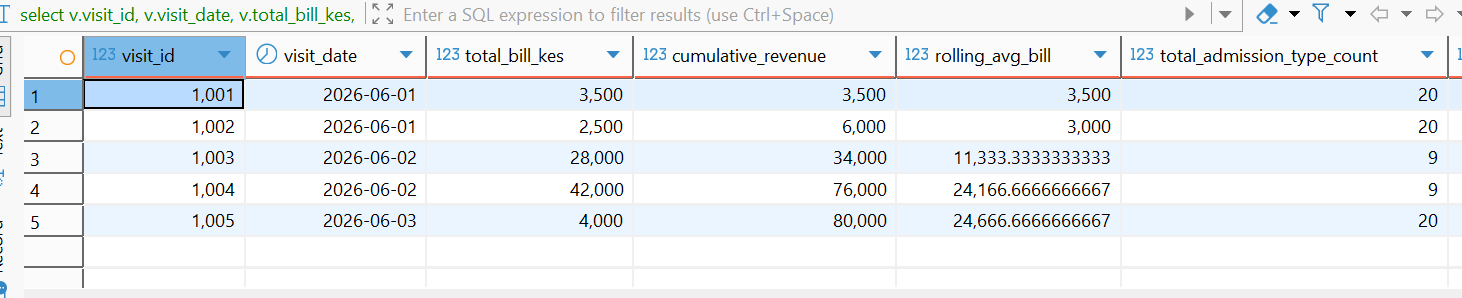
Question: In what way do we determine cumulative income, rolling average billings, categories, and billings for departments on each visit?
select
    v.visit_id,
    v.visit_date,
    v.total_bill_kes,
    sum(v.total_bill_kes) over (order by v.visit_date, v.visit_id) as cumulative_revenue,
    avg(v.total_bill_kes) over (
        order by v.visit_date
        rows between 2 preceding and current row
    ) as rolling_avg_bill,
    count(*) over (partition by v.admission_type) as total_admission_type_count,
    min(v.total_bill_kes) over (partition by v.admission_type) as min_admission_bill,
    max(v.total_bill_kes) over (partition by v.admission_type) as max_admission_bill
from hospital.visits v
order by v.visit_date, v.visit_id
limit 5;
Expected Results
Explanation
SUM forms a running total. AVG calculates a 3 row moving average. COUNT, MIN, and MAX present group statistics without collapsing rows.
2. SQL Joins
Joins combine columns from multiple tables using related key columns.
INNER JOIN
INNER JOIN returns rows with matching key values in both tables.
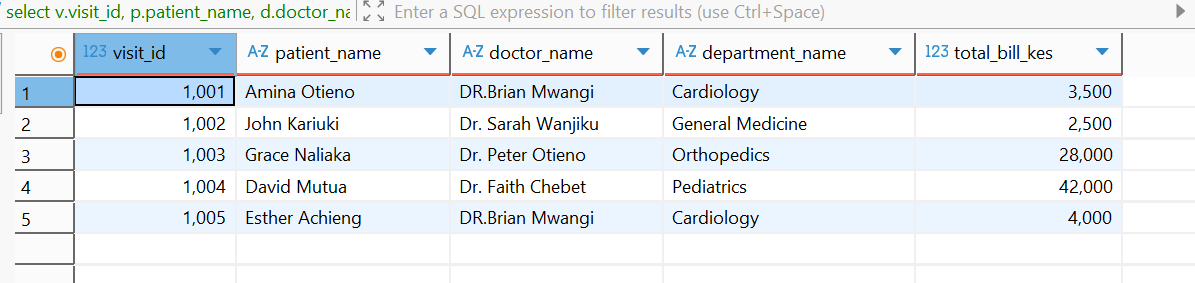
Question: How do we generate a visit report combining patient names, attending doctors, and clinical departments?
select
    v.visit_id,
    p.patient_name,
    d.doctor_name,
    dept.department_name,
    v.total_bill_kes
from hospital.visits v
inner join hospital.patients p on v.patient_id = p.patient_id
inner join hospital.doctors d on v.doctor_id = d.doctor_id
inner join hospital.department dept on v.department_id = dept.department_id
limit 5;
Expected Results
Explanation
INNER JOIN Matches keys across visits, patients, doctors, and department tables.
LEFT JOIN
The LEFT JOIN produces all the rows from the left table and the matched rows from the right table. Fields in the right table without a match produce NULL.
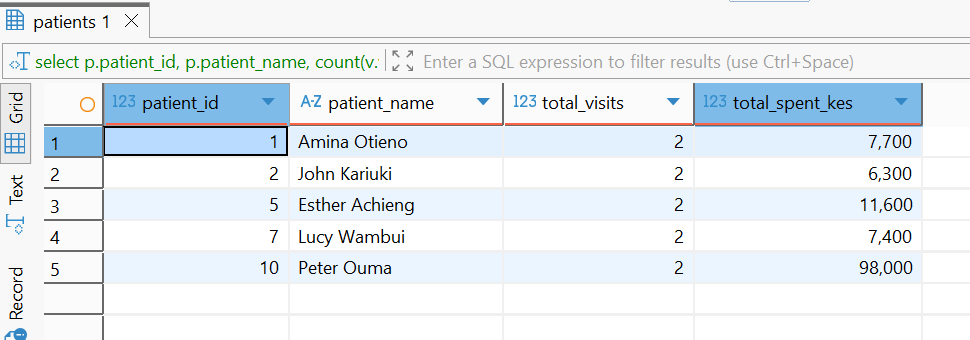
Question: How can we study the number of visits and expenses of patients without losing those that have no visits at all?
select
    p.patient_id,
    p.patient_name,
    count(v.visit_id) as total_visits,
    coalesce(sum(v.total_bill_kes), 0.00) as total_spent_kes
from hospital.patients p
left join hospital.visits v on p.patient_id = v.patient_id
group by p.patient_id, p.patient_name
order by total_visits desc, p.patient_id
limit 5;
Expected Results
Explanation
- All patient records are retained using
LEFT JOIN.
- Patients having no visits will have
COUNT as 0 while COALESCE will convert NULL sums to 0.00.
RIGHT JOIN
RIGHT JOIN retrieves all records from right table and matching records from left table.
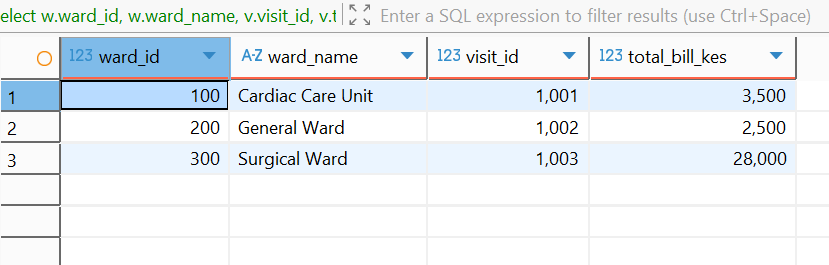
Question: How can hospital administration ensure that all physical wards are reflected in admission records?
select
    w.ward_id,
    w.ward_name,
    v.visit_id,
    v.total_bill_kes
from hospital.visits v
right join hospital.wards w on v.ward_id = w.ward_id
where v.visit_id is null or v.visit_id <= 1003;
Expected Results
Explanation
- All wards are kept in
RIGHT JOIN.
- The Childrens Ward will be with
NULL visits if no match occurs.
FULL OUTER JOIN
FULL OUTER JOIN will display all records if there is a match in either left or right record.
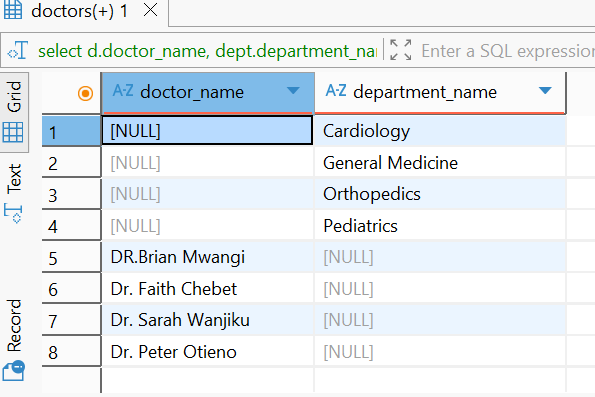
Question: How do we perform auditing of doctor and department records for unassigned doctors or unmapped departments?
select
    d.doctor_name,
    dept.department_name
from hospital.doctors d
full outer join hospital.department dept on d.doctor_id = dept.department_id;
Expected Results
Explanation
- Null values will be returned in the rows where there is no relationship between doctor and department IDs.
CROSS JOIN
CROSS JOIN results in a Cartesian product where each row in the first table is paired up with each row of the second table.
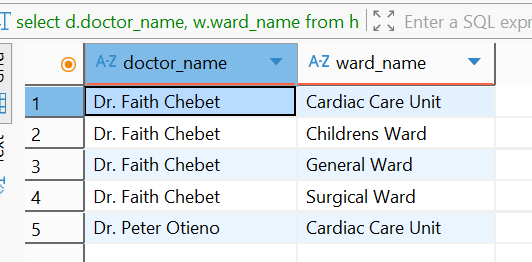
Question: How can hospital managers get a complete list of all pairings of physicians with hospital wards for coverage planing?
select
    d.doctor_name,
    w.ward_name
from hospital.doctors d
cross join hospital.wards w
order by d.doctor_name, w.ward_name
limit 5;
Expected Results
Explanation
- Joining 4 doctors with 4 wards results in 16 combination rows.
SELF JOIN
SELF JOIN involves joining a table to itself for comparing rows in the same table.
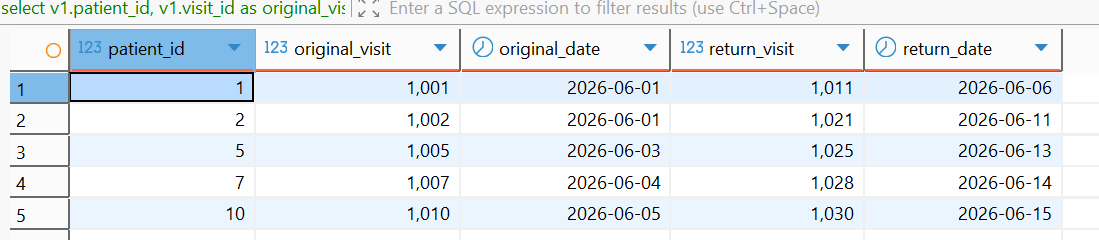
Question: In what way can readmission of patients be identified by matching their first visit to their next visit?
select
    v1.patient_id,
    v1.visit_id as original_visit,
    v1.visit_date as original_date,
    v2.visit_id as return_visit,
    v2.visit_date as return_date
from hospital.visits v1
inner join hospital.visits v2 on v1.patient_id = v2.patient_id and v1.visit_id < v2.visit_id
order by v1.patient_id
limit 5;
Expected Results
Explanation
- Linking visits on patient ID where
v1.visit_id is less than v2.visit_id matches distinct visits per patient.
Join Summary
INNER JOIN matches rows in both tables.LEFT JOIN keeps all left table rows.RIGHT JOIN keeps all right table rows.FULL OUTER JOIN keeps all rows from both tables.CROSS JOIN produces Cartesian pairs.SELF JOIN compares rows within one table.
3. Common Table Expressions (CTEs)
A CTE is a named temporary table created within a WITH clause.
Simple CTEs
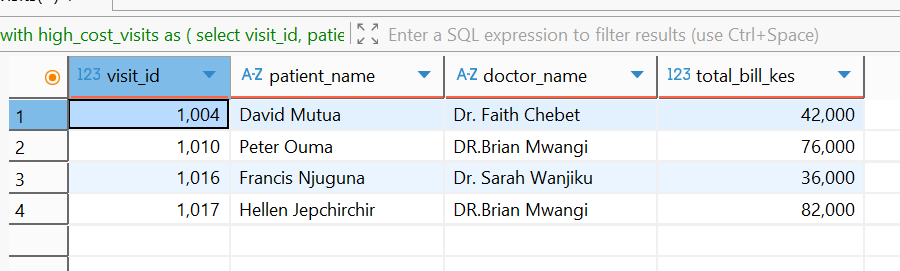
Question: What approach should be used to identify costly inpatient treatments and connect them with patients and their physicians?
with high_cost_visits as (
    select
        visit_id,
        patient_id,
        doctor_id,
        total_bill_kes,
        admission_type
    from hospital.visits
    where total_bill_kes >= 35000.00
)
select
    h.visit_id,
    p.patient_name,
    d.doctor_name,
    h.total_bill_kes
from high_cost_visits h
join hospital.patients p on h.patient_id = p.patient_id
join hospital.doctors d on h.doctor_id = d.doctor_id;
Expected Results
Explanation
- CTE will filter out high cost visits first to keep the subsequent join clean.
Multiple Chained CTEs
Question: How do we find out department revenues, overall average, and top performing departments?
with dept_revenue as (
    select
        department_id,
        sum(total_bill_kes) as total_revenue,
        count(visit_id) as total_visits
    from hospital.visits
    group by department_id
),
dept_benchmark as (
    select
        avg(total_revenue) as benchmark_avg_revenue
    from dept_revenue
)
select
    d.department_name,
    dr.total_revenue,
    dr.total_visits,
    round(db.benchmark_avg_revenue, 2) as benchmark_avg
from dept_revenue dr
join hospital.department d on dr.department_id = d.department_id
cross join dept_benchmark db
where dr.total_revenue > db.benchmark_avg_revenue;
Expected Results

Explanation
dept_revenue calculates the total revenue for each department, dept_benchmark calculates the average and the last SELECT statement filters departments whose revenues are greater than the average.
Recursive CTEs
Recursive CTEs create a sequence by means of an anchor query and recursive query linked by UNION ALL operator.
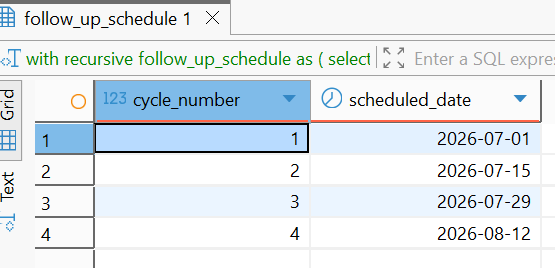
Question: How can the hospital management create a biweekly follow up schedule?
with recursive follow_up_schedule as (
    select
        1 as cycle_number,
        cast('2026/07/01' as date) as scheduled_date
    union all
    select
        cycle_number + 1,
        cast(scheduled_date + interval '14 days' as date)
    from follow_up_schedule
    where cycle_number < 4
)
select * from follow_up_schedule;
Expected Results
Explanation
- Cycle number 1 starts from
July 1 2026 as the anchor date, and the recursive query keeps adding 14 days till cycle number is 4.
CTEs vs. Subqueries
CTEs provide well-defined top-level modules, which can be used again and again, while subqueries within the WHERE or FROM clause tend to complicate code and cannot be executed recursively.
4. SQL Subqueries
A subquery is a query nested inside another SQL query.
Subquery Types
Scalar Subquery fetches one row and one column.Non-correlatedSubquery executes only once and independently.Correlated Subquery uses columns of outer query and executes for every row of outer query.Nested Subquery uses subqueries in subqueries.
Subqueries in SELECT Clauses
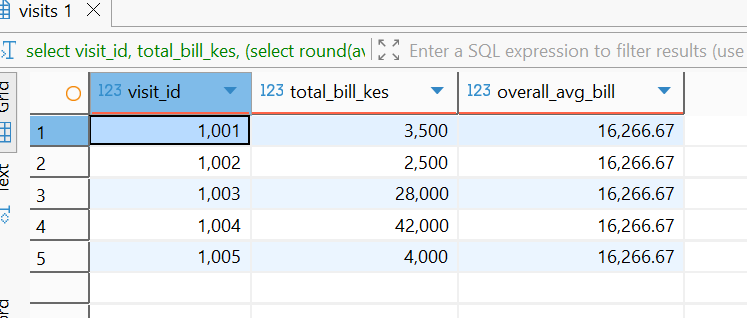
Question: How can individual patient bills be shown along with the total hospital average bill?
select
    visit_id,
    total_bill_kes,
    (select round(avg(total_bill_kes), 2) from hospital.visits) as overall_avg_bill
from hospital.visits
where visit_id between 1001 and 1005;
Expected Results
Explanation
- Scalar subquery evaluates to average
16266.67 for all rows.
Using Subqueries in FROM Clauses (Derived Table)
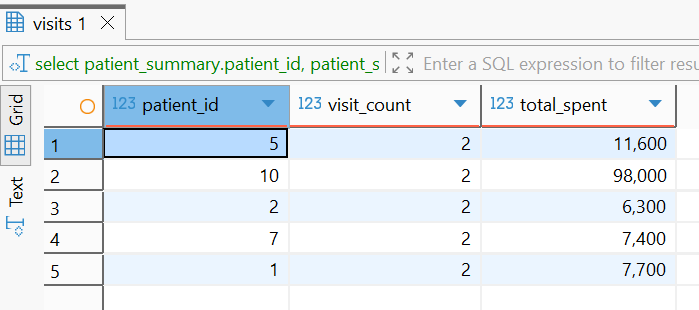
Question: How do we query the pre-aggregated metrics of patients using an inline derived table?
select
    patient_summary.patient_id,
    patient_summary.visit_count,
    patient_summary.total_spent
from (
    select
        patient_id,
        count(visit_id) as visit_count,
        sum(total_bill_kes) as total_spent
    from hospital.visits
    group by patient_id
) as patient_summary
where patient_summary.visit_count > 1;
Expected Results
Explanation
- The
FROM subquery groups the number of visits per patient into table alias patient_summary, subject to WHERE.
Subqueries in WHERE Clause
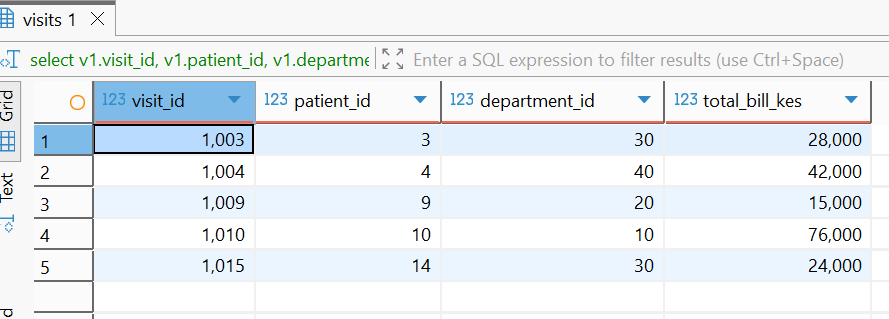
Question: What is the correlated subquery to find visits where the total bill is greater than the average bill of that particular department?
select
    v1.visit_id,
    v1.patient_id,
    v1.department_id,
    v1.total_bill_kes
from hospital.visits v1
where v1.total_bill_kes > (
    select avg(v2.total_bill_kes)
    from hospital.visits v2
    where v2.department_id = v1.department_id
)
limit 5;
Expected Results
Explanation
- The inner query calculates the average billing amount for each department based on outer query department IDs.
Question: Which physicians have admitted any patients as inpatients?
select
    d.doctor_id,
    d.doctor_name,
    d.doctor_specialty
from hospital.doctors d
where exists (
    select 1
    from hospital.visits v
    where v.doctor_id = d.doctor_id
      and v.admission_type = 'inpatient'
);
Expected Results

Explanation
EXISTS returns true when there is a row for a visit that matches.
Question: How can we find visits where the billing value is greater than all the outpatient visit bills?
select
    visit_id,
    patient_id,
    total_bill_kes,
    admission_type
from hospital.visits
where total_bill_kes > all (
    select total_bill_kes
    from hospital.visits
    where admission_type = 'outpatient'
)
limit 5;
Expected Results
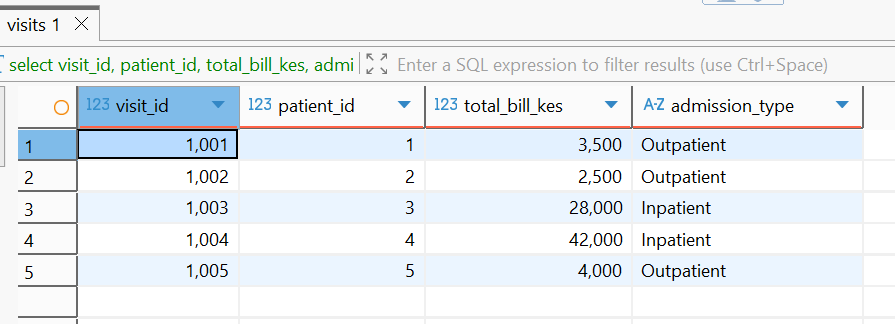
Explanation
- The internal query locates outpatient charges up to
15000.00. ALL filters visits more than 15000.00.
Conclusion
Understanding the concepts of window functions, joins, common table expressions, and subqueries helps in creating strong PostgreSQL queries that enable healthcare workers to review their operations and enhance financial efficiency. Such information enables healthcare providers to offer quality pateint care which meets patient outcomes.
GitHub
For the completed project visit my GitHub project Hospital Database
