The Authentication Problem
Let's face it: develop a custom authentication service is conceptually straightforward but practically troublesome. You either allow user registration or not, then authenticate by taking a look at username and password (likely hashed) against database, then provide user profile results for authorized users. Throughout the process you might set browser cache, deal with (generated) API keys for app usages (so password need not be sent every time). It's a handful of steps, and lots of work to code everything piece by piece. Worse, there is a whole database to worry about. One would naturally expect, such a thing should just exist as a service. Yes, there is.
Quick Comparison
|Platform|What it is|Free tier|Pros|Cons|
|-|-|-|-|-|
|AWS Cognito | Amazon’s identity and user‑management service for web and mobile apps, integrating natively with API Gateway/Lambda and Amplify JS. | 10,000 MAUs for direct/social sign‑in + 50 MAUs for SAML/OIDC federation; Identity Pools are free | No extra vendor to learn; pay only for MAUs above free tier; built‑in social and SAML/OIDC support; AWS‑managed hosted UI. | Learning curve around User Pools vs Identity Pools and IAM policies.|
|Auth0 | Popular identity platform with SDKs for nearly every framework. | 25,000 MAUs; unlimited social & Okta connections; 5 organizations; 5 actions/forms; passwordless & custom domain | Intuitive, developer‑friendly dashboard; extensible via Rules (JavaScript); excellent documentation. | Pricing increases sharply above free tier.|
|Firebase Authentication | Google’s auth service, part of Firebase/GCP. | Unlimited email/password, anonymous, and most social sign‑ins; pay only for phone‑SMS verification | Fastest setup for web/mobile; pre‑built UI widgets; seamless integration with other Firebase services. | SMS‑based authentication incurs per‑message cost.|
|Supabase Auth | Open‑source Firebase alternative built on PostgreSQL. | Unlimited API requests; 50,000 MAUs; 500 MB database; 5 GB bandwidth; 1 GB file storage; community support | True SQL under the hood; you own your data; robust JS client. | Free projects pause after 1 week of inactivity; limited to 2 active projects.|
|Netlify Identity | Netlify’s built‑in auth service powered by GoTrue. | Up to 1,000 registered users per site | Seamless drop‑in for Netlify‑hosted. | Limited to Netlify sites; basic compared to full‑blown IDaaS; deprecated as of Feb 28, 2025 .|
|Okta Developer Edition | Enterprise‑grade identity platform in a developer sandbox. | 100 MAUs | Enterprise features: OpenID Connect federation, SCIM provisioning, lifecycle hooks, universal directory | Console can feel heavy for hobby projects.|
Recommendations:
- Full AWS: Use AWS Cognito (with Amplify libraries) to stay within the AWS ecosystem and enjoy a free tier up to 10 K direct/social MAUs and 50 MAUs for SAML/OIDC.
- Rapid prototyping: Firebase Authentication for the fastest setup (unlimited email/password/social; pay only for SMS).
- SQL‑power & control: Supabase Auth if you need open‑source Postgres‑based auth with a 50 K MAU free tier and 500 MB of built‑in storage.
For reasons I would not disclose, we picked Firebase for Divooka and other Methodox services.
The Setup
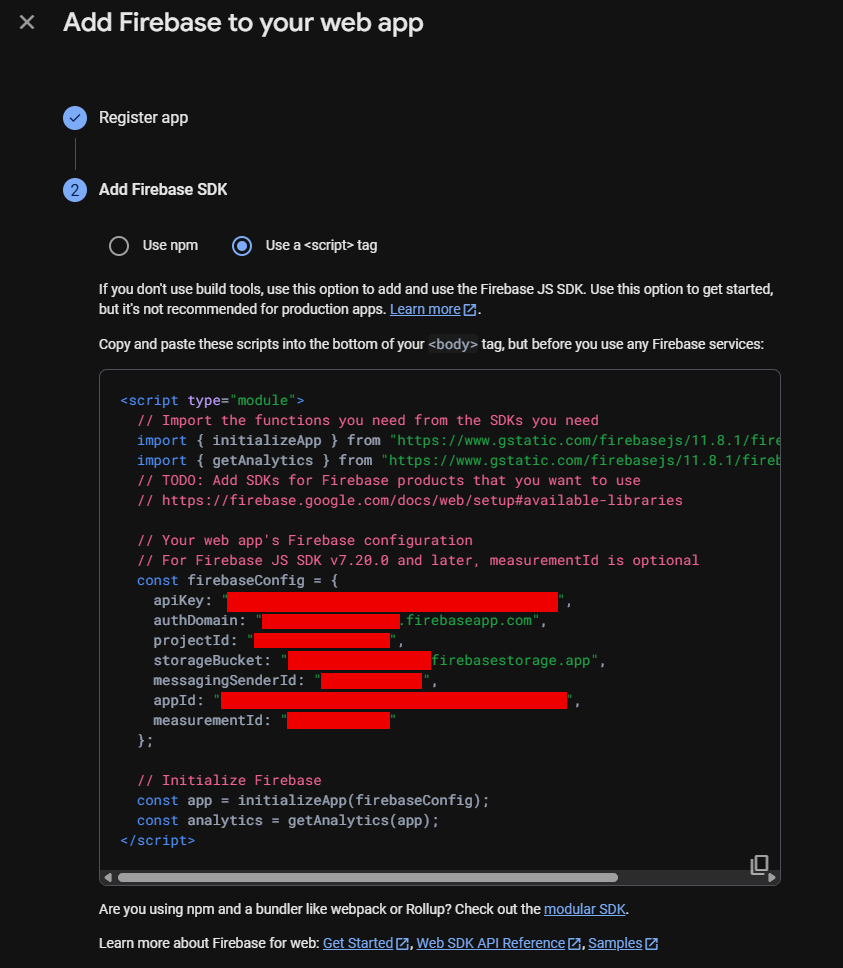
For Firebase Auth, the "API Key" just identifies the application and can totally be shown on the client side script.
<!DOCTYPE html>
<html>
<head>
  <meta charset="utf-8"/>
  <title>Custom Email/Password Auth</title>
  <script type="module">
    import { initializeApp } from "https://www.gstatic.com/firebasejs/11.8.1/firebase-app.js";
    import {
      getAuth,
      createUserWithEmailAndPassword,
      updateProfile,
      signInWithEmailAndPassword,
      signOut
    } from "https://www.gstatic.com/firebasejs/11.8.1/firebase-auth.js";

    // Firebase web config
    // For Firebase JS SDK v7.20.0 and later, measurementId is optional
    const firebaseConfig = {
        apiKey: "*********************",
        authDomain: "*********************",
        projectId: "*********************",
        storageBucket: "*********************",
        messagingSenderId: "*********************",
        appId: "*********************",
        measurementId: "*********************"
    };
    // Initialize Firebase
    const app = initializeApp(firebaseConfig);
    const auth = getAuth(app);

    // Register a new user
    async function registerUser() {
      const email = document.getElementById("regEmail").value;
      const password = document.getElementById("regPass").value;
      const username = document.getElementById("regName").value;
      try {
        const cred = await createUserWithEmailAndPassword(auth, email, password);
        // Set a displayName on the Firebase user record
        await updateProfile(cred.user, { displayName: username });
        alert("Registration successful! You can now log in.");
      } catch (e) {
        console.error(e);
        alert("Registration error: " + e.message);
      }
    }

    // Login existing user
    async function loginUser() {
      const email = document.getElementById("loginEmail").value;
      const password = document.getElementById("loginPass").value;
      try {
        const cred = await signInWithEmailAndPassword(auth, email, password);
        const idToken = await cred.user.getIdToken();

        // Call your API
        const resp = await fetch("https://myapi.com/profile", {
          headers: { "Authorization": "Bearer " + idToken }
        });
        if (!resp.ok) throw new Error(await resp.text());
        const profile = await resp.json();
        document.getElementById("output").textContent = JSON.stringify(profile, null, 2);
      } catch (e) {
        console.error(e);
        alert("Login error: " + e.message);
      }
    }

    // Logout
    function logoutUser() {
      signOut(auth);
      document.getElementById("output").textContent = "";
      alert("Signed out");
    }

    window.onload = () => {
      document.getElementById("btnRegister").onclick = registerUser;
      document.getElementById("btnLogin").onclick    = loginUser;
      document.getElementById("btnLogout").onclick   = logoutUser;
    };
  </script>
</head>
<body>
  <h2>Register</h2>
  <input id="regName"  type="text"     placeholder="Username"/><br/>
  <input id="regEmail" type="email"    placeholder="Email"/><br/>
  <input id="regPass"  type="password" placeholder="Password"/><br/>
  <button id="btnRegister">Register</button>

  <hr/>

  <h2>Login</h2>
  <input id="loginEmail" type="email"    placeholder="Email"/><br/>
  <input id="loginPass"  type="password" placeholder="Password"/><br/>
  <button id="btnLogin">Log In</button>
  <button id="btnLogout">Log Out</button>

  <h3>Profile:</h3>
  <pre id="output"></pre>
</body>
</html>
Create API Key
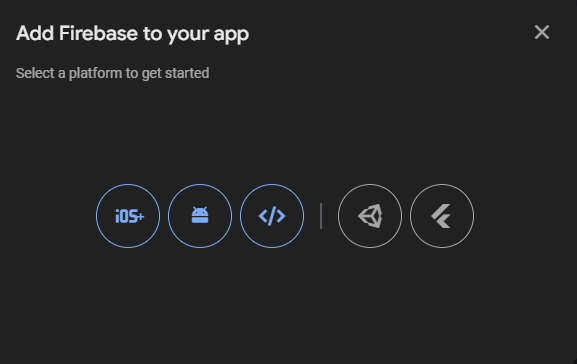
To create API key, navigate to the project then find "Add App" in Project Settings, which is a hidden menu.

References
Official doc on API key, which is not very clear without pictures: here