I promise this isn't another post saying AI is making us dumber.
AI does make us faster, and we can't afford to give that up. But if you're not careful, "faster" quietly turns into "I shipped this and can't explain it". This post is about a way to use AI that keeps the speed and leaves you understanding what you did.
I'll explain the problem first, then walk through one of my day-to-day tasks, triaging static analysis (SAST) findings, done two ways: with a one-line "just triage it" prompt, and with AI used to help me understand. Both reach the same verdicts. Only one of them leaves me able to defend those verdicts.
Prefer video?
https://youtu.be/z_A_UVAFx0M
️ The long way is where the learning happens
Every task is a trip from "task" to "done". The long way is reading, searching, trying, failing and trying again. It's slow, but that's where you pick up tools, debugging habits, patterns, mental models, trade-offs and skills.
Humans take the path of least resistance, so we've always looked for shortcuts. Copying an answer from Stack Overflow was the classic one.
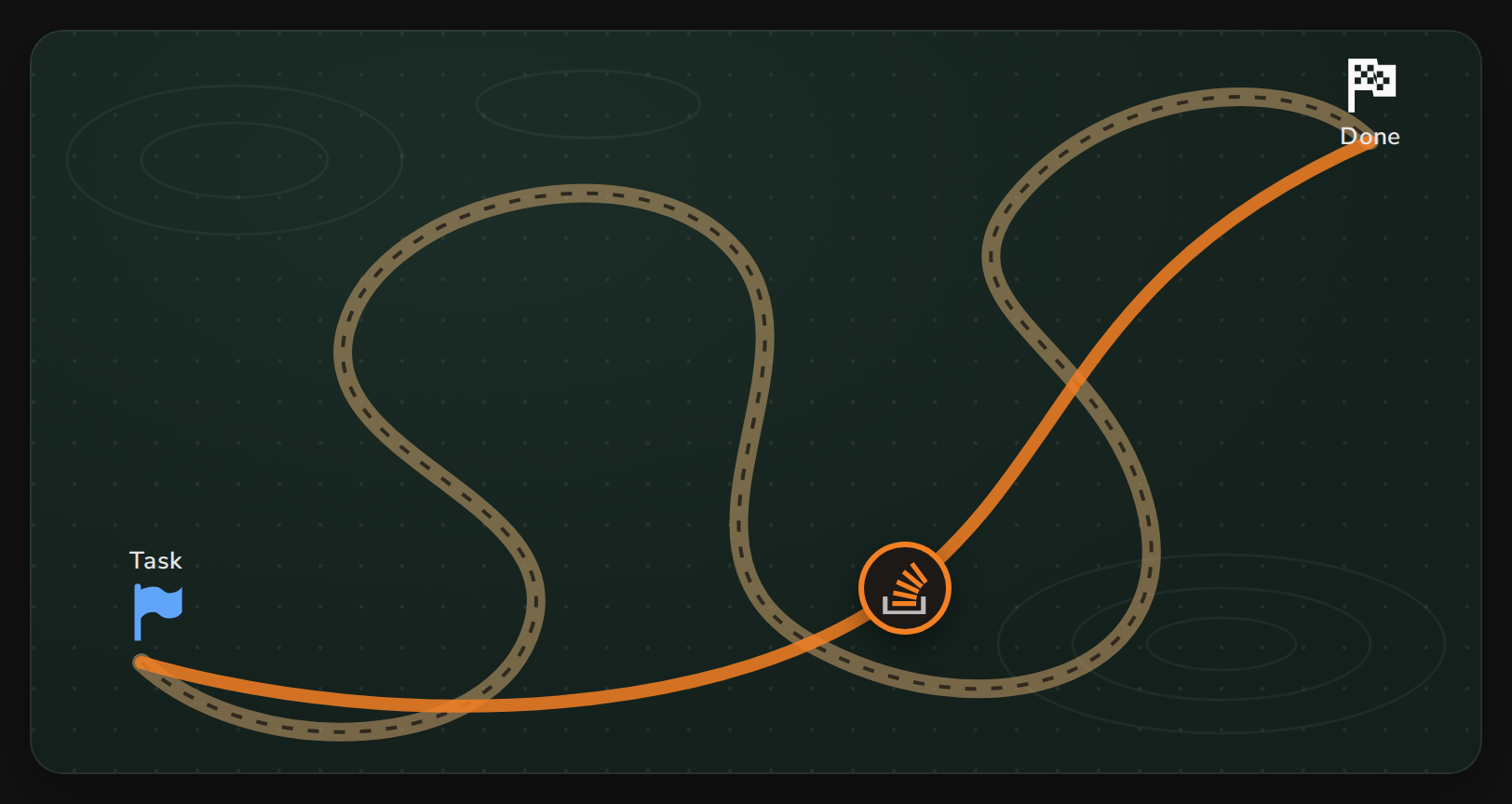
⚡ AI is the ultimate shortcut
Now a huge share of our tasks can be done, fully or partly, by telling AI: "do it for me". Most of the time the result is good enough.
That shortcut skips the long way entirely. We also can't simply refuse it: what's expected of us has gone up, because everyone can now get more done with AI.
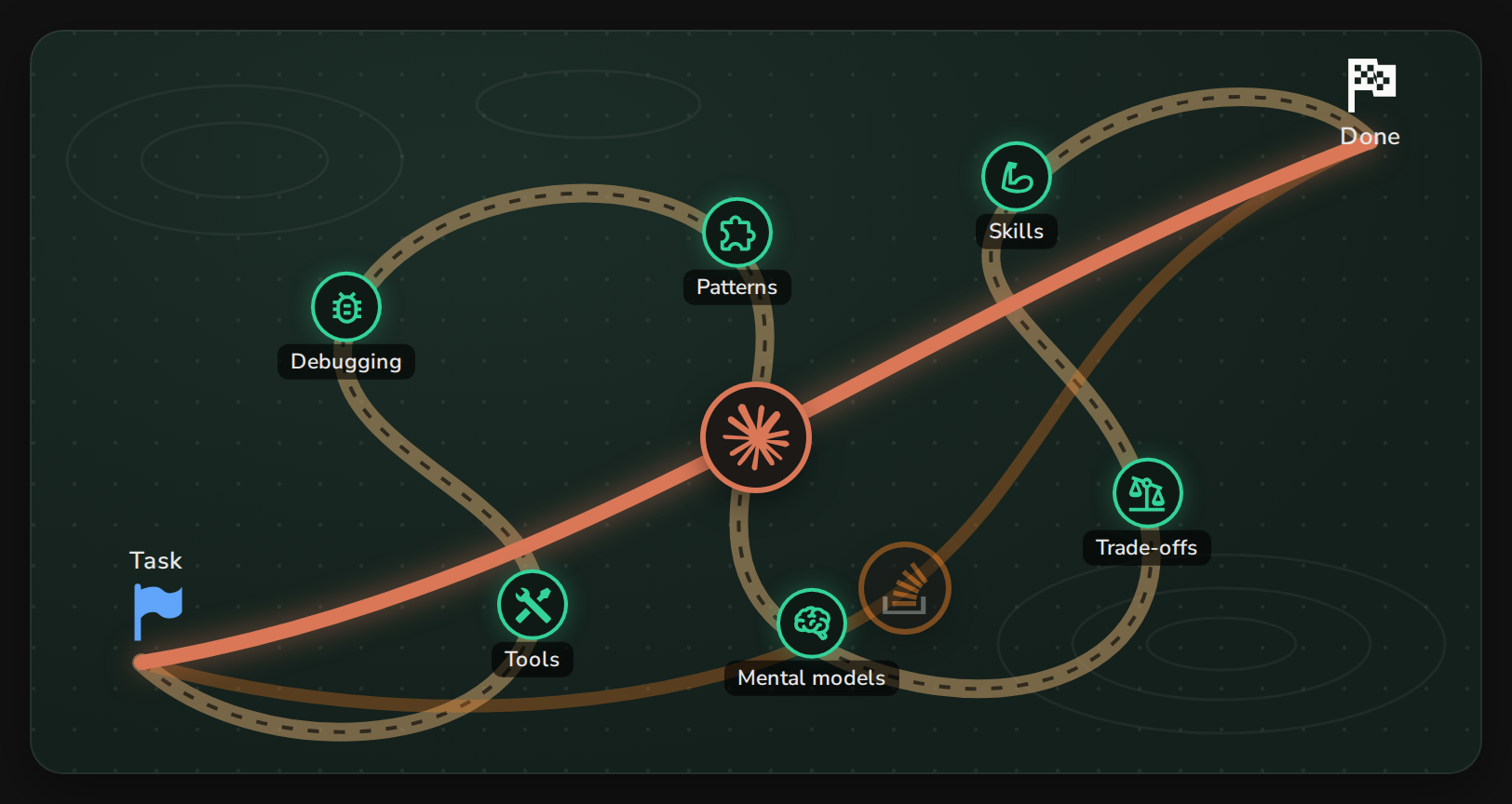
️ Cognitive debt
Skip the learning once and nothing happens. But each time you take the shortcut, you finish a task without fully understanding how it works or why it was done that way. That gap is cognitive debt.
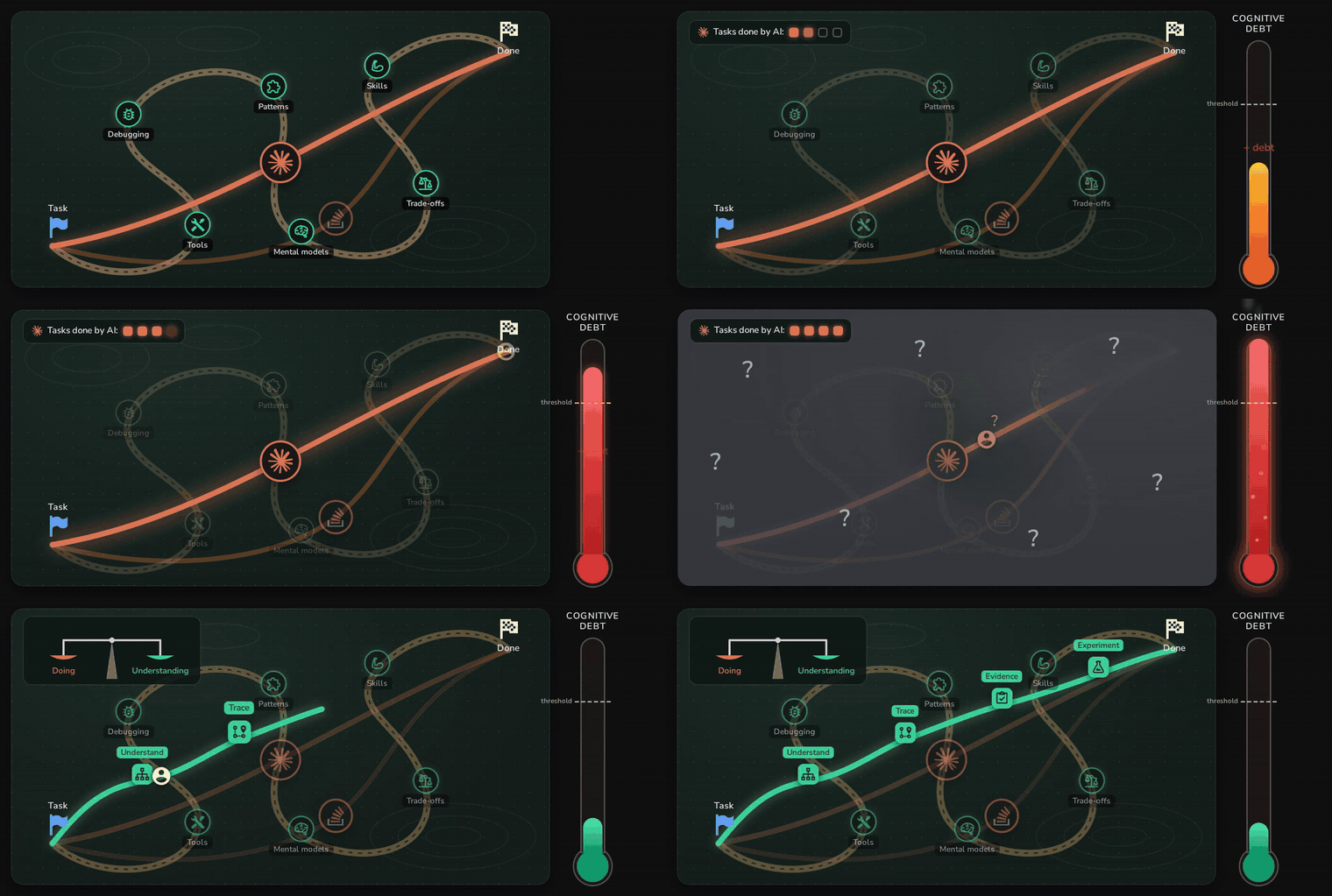
The debt stays invisible for a while. Then one day you hit a problem AI can't solve, and you have no idea where you are, where to start or where to go. We've all heard of codebases that were thrown away because rebuilding them was easier than understanding them, sometimes even for the AI that wrote them.
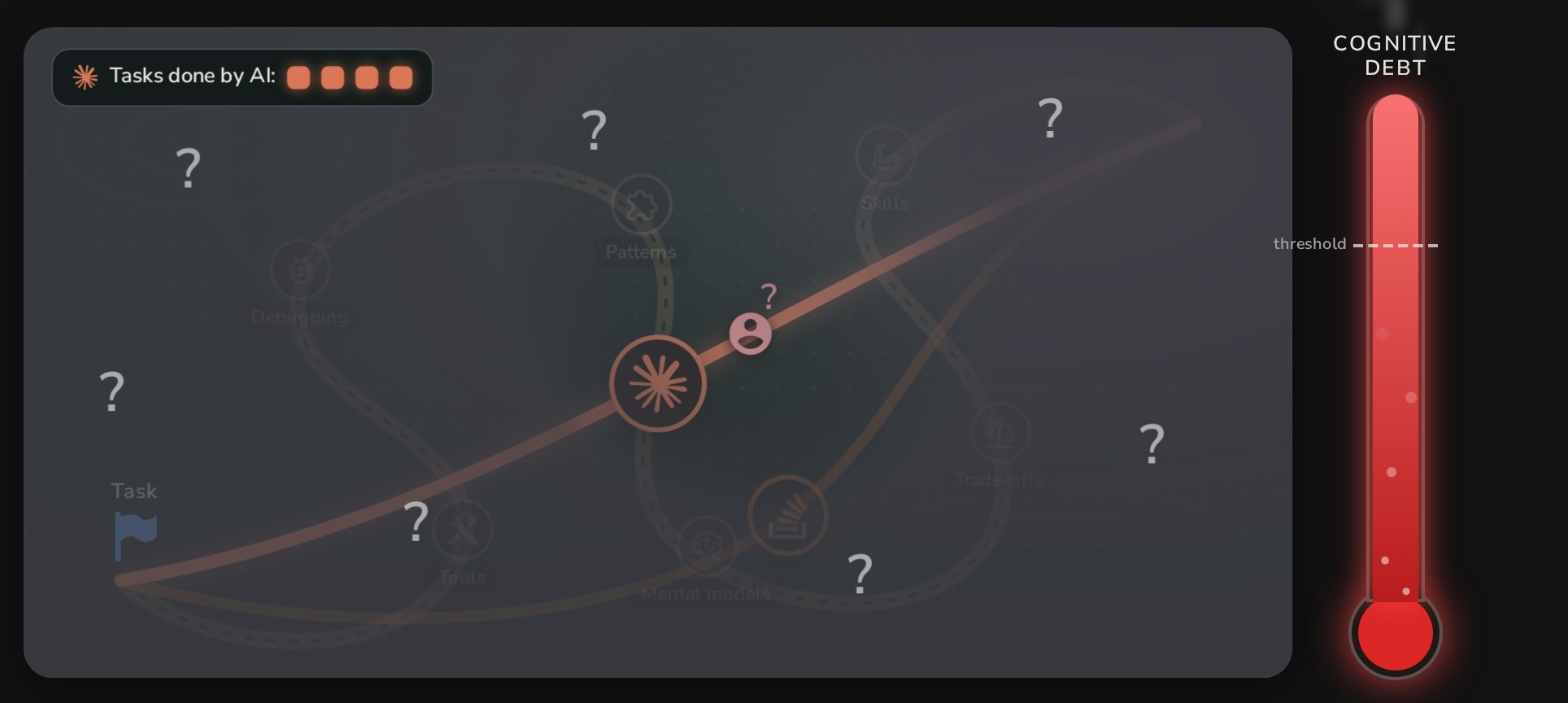
⚖️ The fix: a shortcut that balances doing and understanding
The answer isn't to stop using AI. It's to take a slightly longer shortcut, one that balances two things:
- Doing: finishing the task, fast.
- Understanding: knowing what was done, how, and why (the decisions and trade-offs), and learning to do it yourself.
You're still much faster than on the long way, but you arrive smarter instead of in debt.
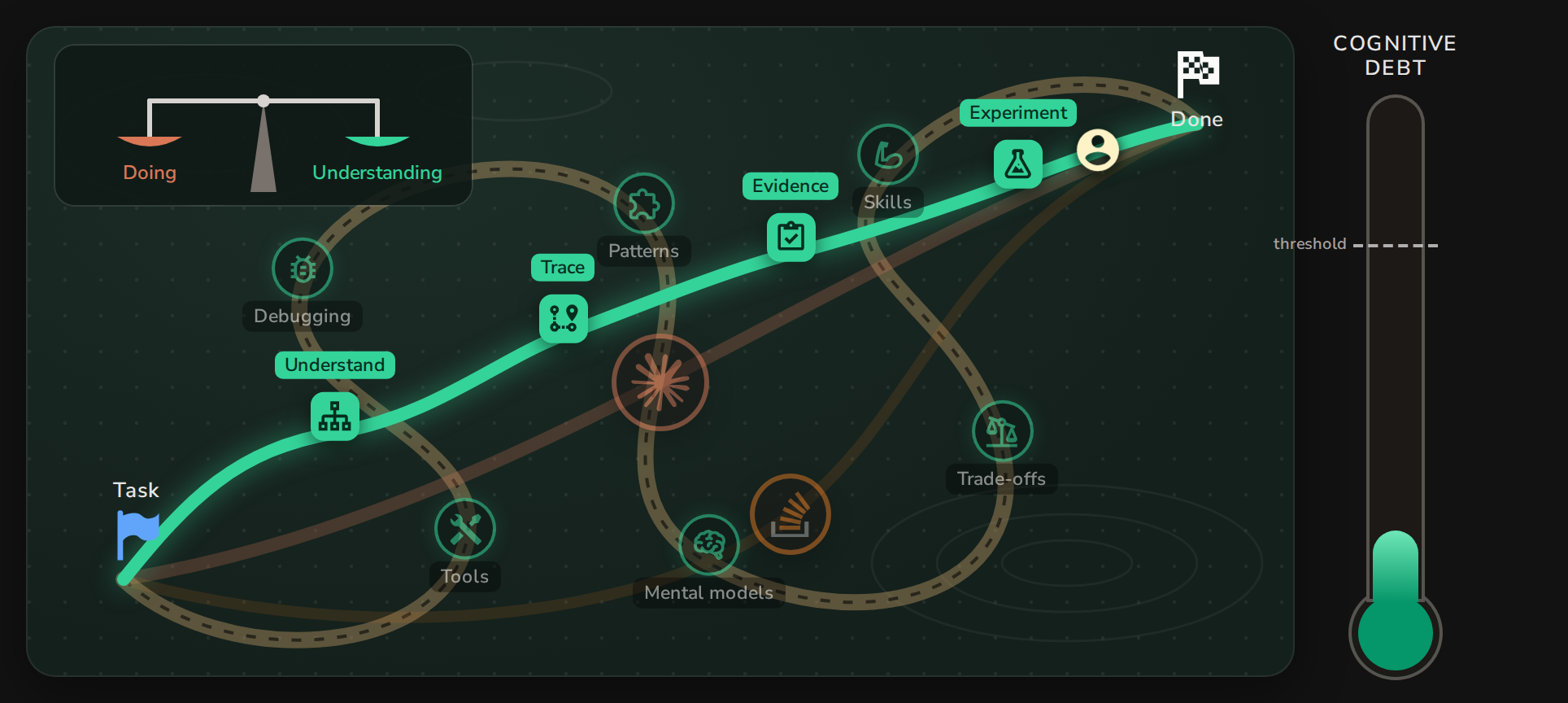
You don't need to do this for everything. Set a threshold based on risk: a throwaway script can take the fast path. A decision you'll have to defend, like a security finding, can't.
The good news: AI is also very good at helping you understand. Here's what that looks like on a real task.
The demo: triaging Semgrep findings
The app is a small Express + PostgreSQL order tracker, built in layers like a real app: route → middleware → controller → service → repository. Customers list their orders, download CSV exports and leave comments. Admins see revenue reports.
Demo repo: mohamed-osama-aboelkheir/ai-sast-triage-demo. It's deliberately vulnerable. main is the clean app; reference-output has everything the AI produced in this post.
I ran Semgrep (the free p/default ruleset) and got a handful of findings, all marked as blocking:
- SQL injection in
orderRepository.js (ORDER BY ${orderBy})
- SQL injection in
reportRepository.js (FROM ${tableName})
- Path traversal in
exportService.js
- XSS through an unescaped EJS tag in
comments.ejs
- No CSRF middleware in
app.js
As an AppSec engineer, my job is to decide which are real, how severe they are, and which ones are worth an engineer's time. And let's say I don't know this codebase well.
⚡ Approach 1: "just triage it"
The shortest path: open Claude Code, paste the Semgrep output, and ask:
semgrep scan returned the below results, please triage the findings and let me know which are true and which are false positive, and suggest severity and fixes
A couple of minutes later I had a tidy answer:
- SQL injection in
ORDER BY: true positive, High
- Path traversal in
/exports: true positive, High
- Table name in
reportRepository: false positive
<%- %> XSS: false positive- Missing CSRF middleware: false positive
It's a good answer, and it even explains itself. But look at the two SQL injection findings:
// src/repositories/orderRepository.js — flagged
`SELECT id, total, status, created_at FROM orders
 WHERE user_id = $1 AND ($2::text IS NULL OR status = $2)
 ORDER BY ${orderBy}`
// src/repositories/reportRepository.js — flagged
`SELECT count(*)::int AS orders, coalesce(sum(total), 0) AS revenue FROM ${tableName}`
Same library, same pattern: a variable pasted into the SQL text. One is "High", the other is "false positive". If I don't know the codebase, I can't tell whether that's right. I could still copy the verdicts into tickets and move on. That's fast, and it's exactly how cognitive debt builds up. And the moment an engineer pushes back with "this isn't exploitable", I have nothing to say.
So let's take the two SQL injection findings and do it again, with AI helping me understand.
Approach 2: understand, trace, decide, prove
I packaged each step as a Claude Code skill in the appsec-skills plugin, so you can repeat it:
/plugin marketplace add mohamed-osama-aboelkheir/appsec-untangled-resources
/plugin install appsec-skills@appsec-untangled
Each step leaves a file you can read, check and reuse, not chat text you throw away.
1. ️ Understand: read the code like a story
Looking at the two flagged files on their own doesn't tell me much. What's orderRepository.find? Who calls reportRepository.summary? Code is written to be used by people, so the useful context is the story: which user action reaches this line, and what passes through on the way.
Let's start by understanding the context using the /appsec-skills:code-walkthrough skill to explain how the affected backend routes work, and how users interact with them.
The code-walkthrough skill produces two things for each flow:
- a sequence diagram: one column per layer, a colour band per phase, for security controls, for untrusted input and ⚠️ for the sink;
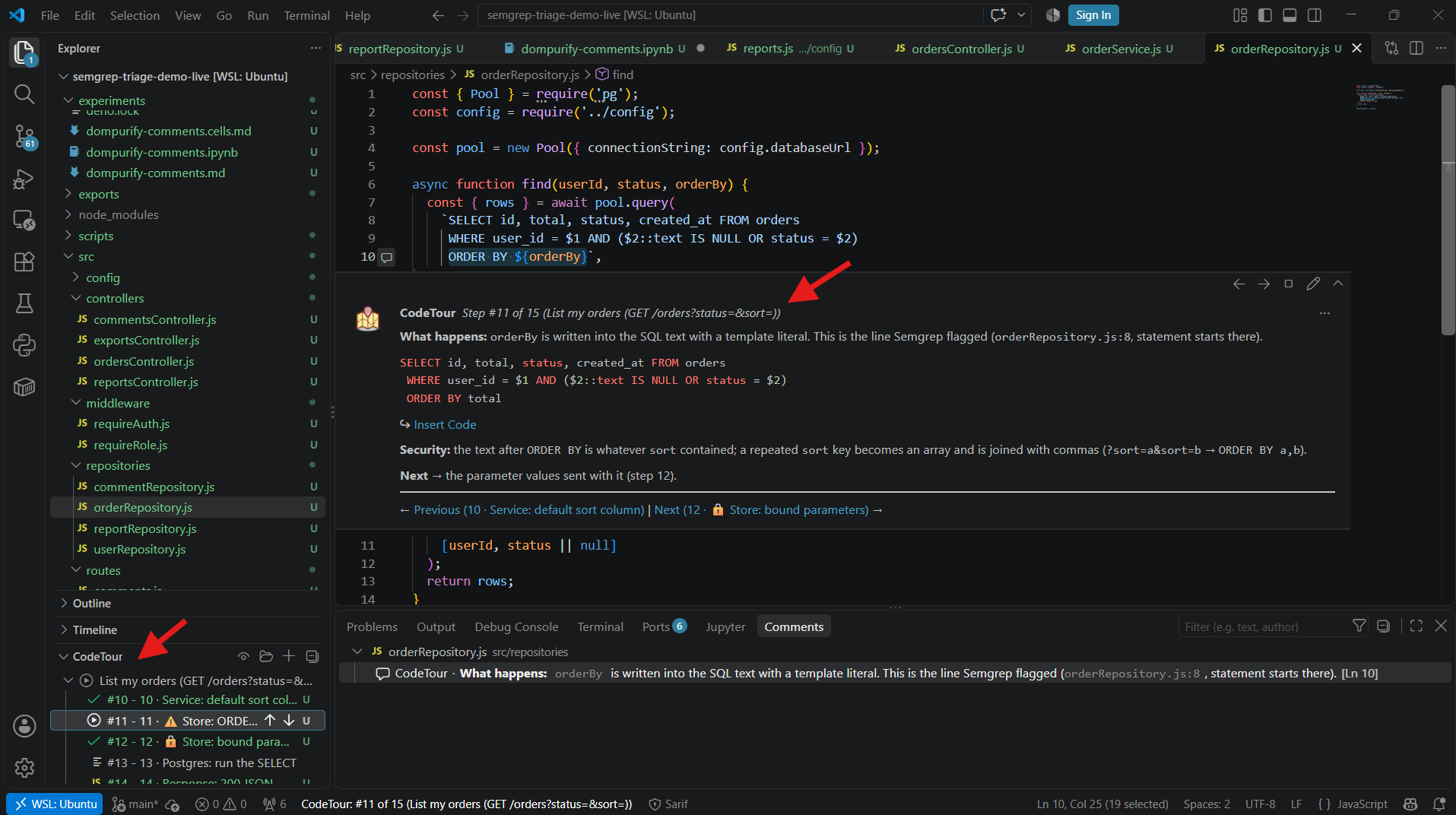
- a CodeTour file, a VS Code extension that walks you through the code step by step, the way the engineer who wrote it would. Step N in the tour is step N in the diagram.
Here's the story for GET /orders (the full diagram also covers the 401/400/500 exits):
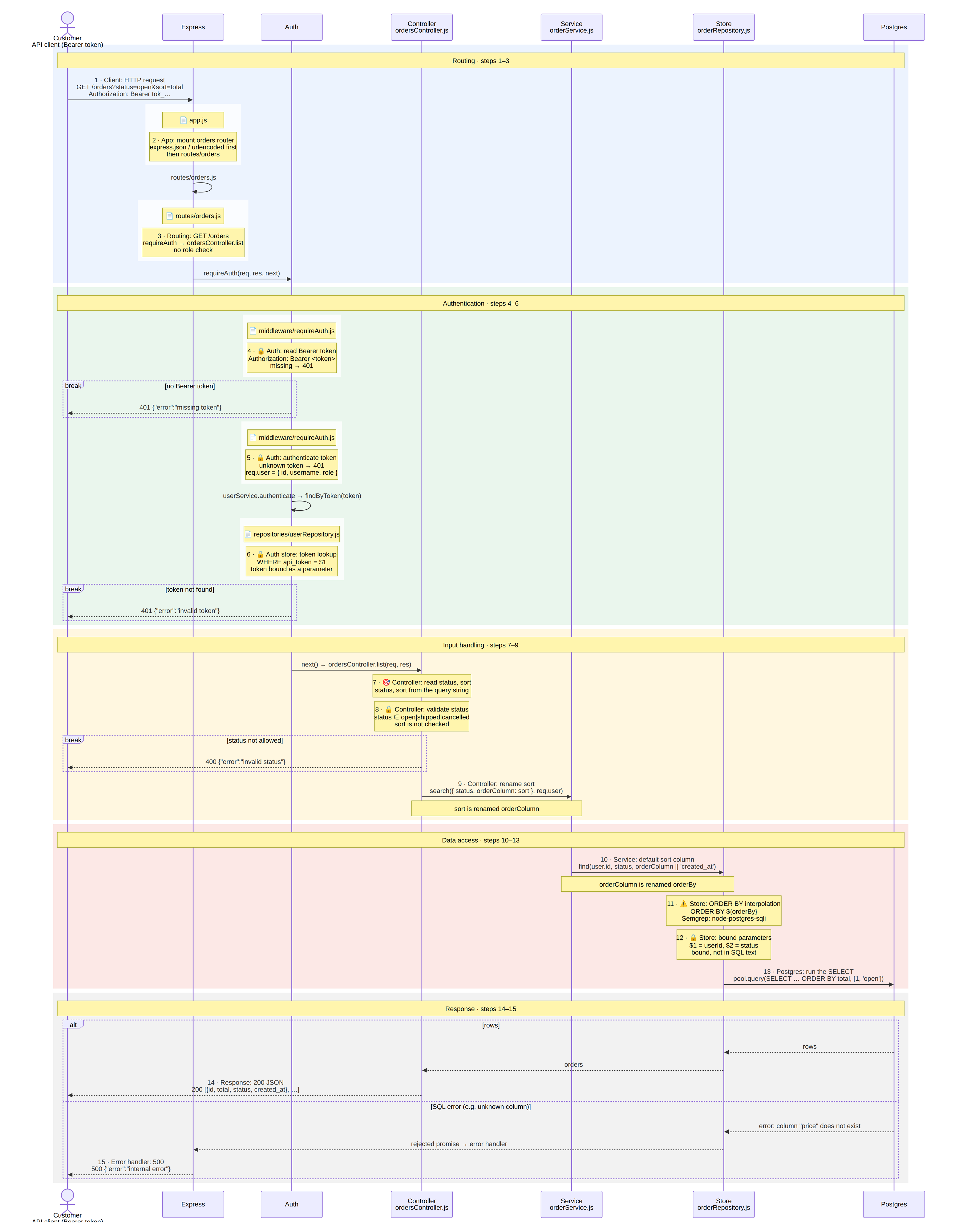
Two steps stand out:
- Step 8: the controller validates
status against an allowlist, but sort is not checked.
- Steps 9–10:
sort is renamed orderColumn, then orderBy, on its way down to the query.
The second story, GET /reports/:reportId, is different. It needs an admin, and the controller uses reportId to look up an entry in a config object. Unknown IDs get a 404:
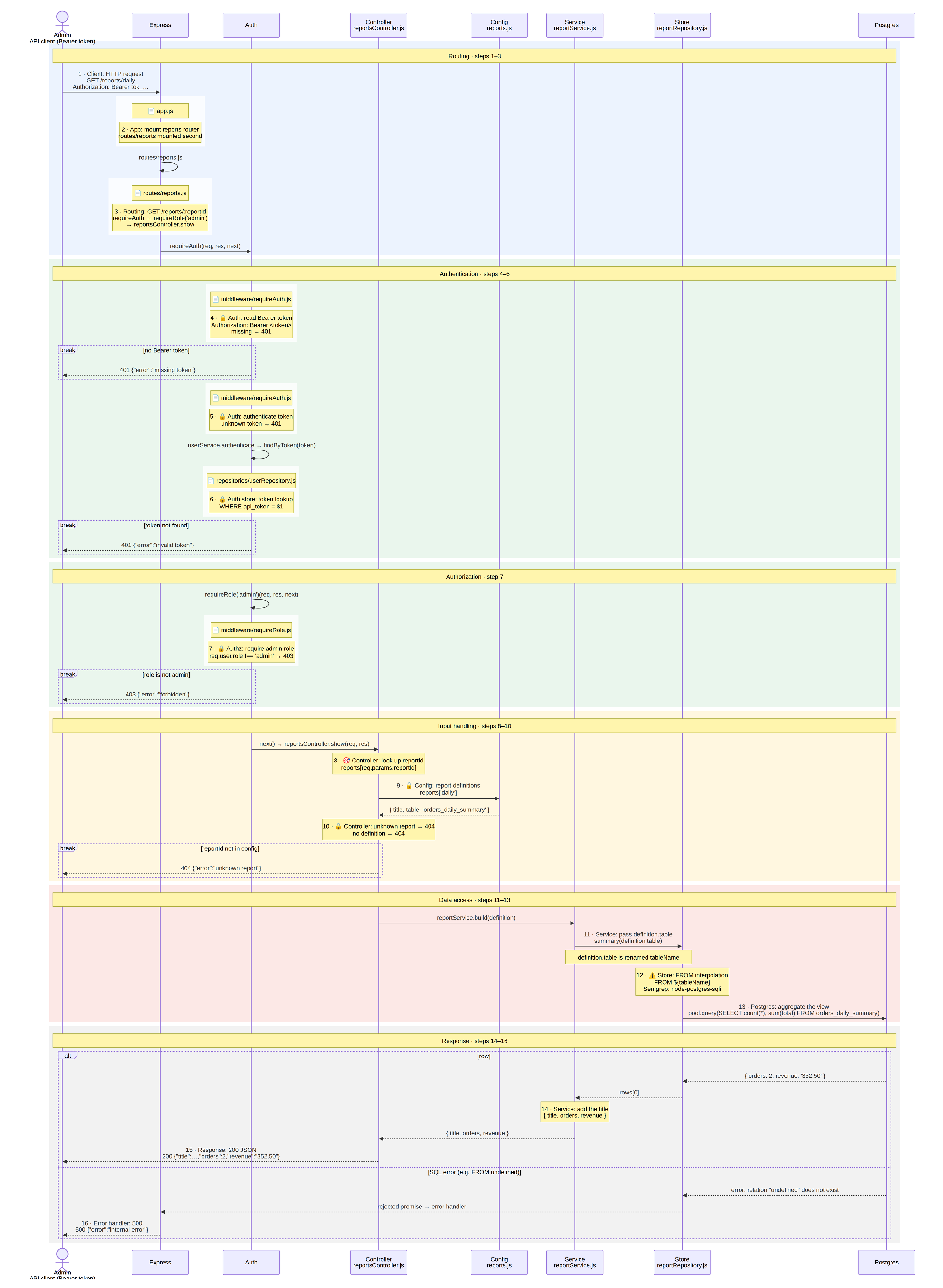
If you were paying attention, you may already see the difference. If not, that's what the next step is for.
2. Trace: source-to-sink
Source-to-sink analysis asks one question: does user input reach the dangerous function, and does anything stop it on the way?
Now using this context, perform the /appsec-skills:source-to-sink analysis for both findings, and share a verdict on whether each is a true or false positive.
The skill walks back from each sink, hop by hop. It draws one chain of code cards per source, with the value in bold on every line and arrows named after what the value is called next.
Finding 1: a red chain (user input) goes from req.query.sort straight to ORDER BY. The only check on the way () covers status, not sort:
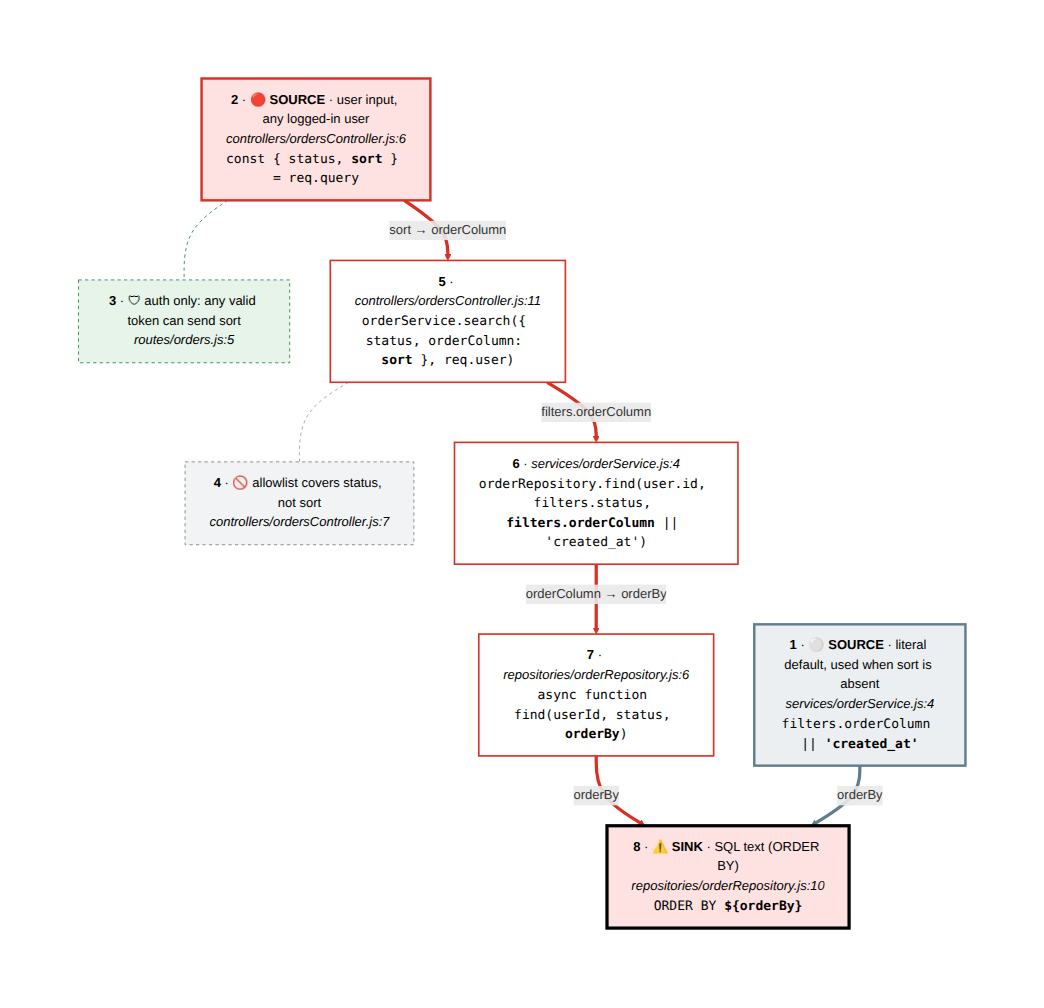
Here's that path in the code (controller, service):
// src/controllers/ordersController.js
exports.list = async (req, res) => {
  const { status, sort } = req.query;
  if (status && !ALLOWED_STATUSES.includes(status)) {   // only status is checked
    return res.status(400).json({ error: 'invalid status' });
  }
  const orders = await orderService.search({ status, orderColumn: sort }, req.user);
  res.json(orders);
};

// src/services/orderService.js
exports.search = (filters, user) =>
  orderRepository.find(user.id, filters.status, filters.orderColumn || 'created_at');
$1 and $2 are bound parameters, but column names can't be bound, so ORDER BY ${orderBy} takes whatever the user sends. True positive.
Finding 2: the user's reportId stops ✋ at a lookup into a hard-coded object. The value that actually reaches FROM is a blue chain (config), not user input:
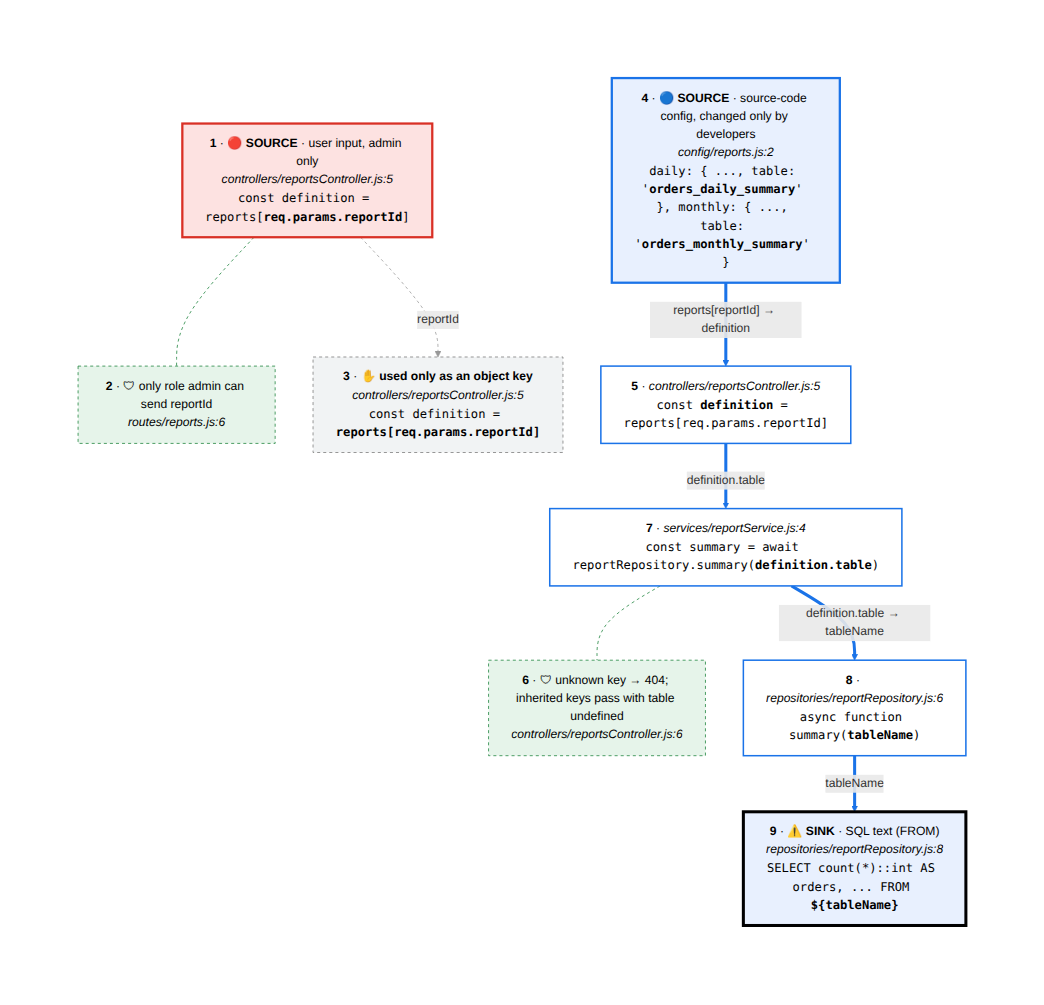
(controller, config)
// src/config/reports.js
module.exports = {
  daily:   { title: 'Orders in the last 24 hours', table: 'orders_daily_summary' },
  monthly: { title: 'Orders this month',           table: 'orders_monthly_summary' },
};

// src/controllers/reportsController.js
const definition = reports[req.params.reportId];   // input picks an entry...
if (!definition) return res.status(404).json({ error: 'unknown report' });
res.json(await reportService.build(definition));   // ...the table name comes from config
The user chooses which trusted value is used. They never supply SQL. False positive. It's still worth a low-priority fix (an allowlist, or Object.hasOwn, so /reports/constructor doesn't return a 500), but it's nowhere near as urgent as finding 1.
The two sinks look identical. Only the trace tells them apart.
I reached the same verdicts as the one-line prompt. The difference is that I can now defend them: I can show an engineer the exact path, the missing check and the fix.
3. Decide: an output template with evidence
That worked for two findings. To do it at scale, I use another trick: an output template. When I triage by hand, I look for the same things every time: the sink, the inputs that reach it, the path between them, the controls on that path, and then a verdict and a severity. So I make the AI fill in exactly those fields.
Now using this context, use /appsec-skills:semgrep-triage to triage both findings.
The semgrep-triage skill runs source-to-sink for every finding, checks each control against a wiki of mitigations and known bypasses, and writes one report. Here are the important parts for finding 1 (abridged):
F1 · SQL injection in ORDER BY via sort · ✅ True positive · High ⬆️
- Inputs reaching it:
req.query.sort (any logged-in user) reaches the sink unchanged; ⚪ 'created_at' is the constant default.
- Controls on the path:
requireAuth: decides who can send sort, not what it contains.- Status allowlist: checks
status only.
- Parameterised query: binds
userId and status; identifiers can't be bound.
- Sort allowlist: none.
- Severity: High = Impact High × Likelihood Medium.
ORDER BY accepts sub-selects, so the row order becomes a yes/no oracle over the whole database, including the admin's API token. Any logged-in user can reach it.
- Why Semgrep says less: the rule's MEDIUM/LOW is generic. It can't see that
orderBy comes straight from the query string.
- Suggested fix: an allowlist of sort columns, right next to the existing status check:
const SORT_COLUMNS = new Map([['total', 'total'], ['status', 'status'], ['created_at', 'created_at']]);

if (sort !== undefined && !SORT_COLUMNS.has(sort)) {
  return res.status(400).json({ error: 'invalid sort' });
}
const orders = await orderService.search({ status, orderColumn: SORT_COLUMNS.get(sort) }, req.user);
The part I care about most is Evidence (Manual Reproduction): the steps to reach the same conclusion myself, without trusting the AI.
- Read the sink:
src/repositories/orderRepository.js:7-11.
- Find who calls it:
grep -rn "orderRepository.find" src → orderService.js:4.
- Find where
orderColumn is set: grep -rn "orderColumn" src → ordersController.js:11, orderColumn: sort.
- Find where
sort comes from: ordersController.js:6, req.query. The only check (:7) is on status.
- Find who can send it:
routes/orders.js:5, requireAuth only.
- Confirm locally:
?sort=total → 200 sorted by total; ?sort=price → 500, and the server log shows column "price" does not exist. The value reached the SQL text.
And for the false positive, the report doesn't just dismiss it. It says when it would become real, and what to do with the rule:
- Would become a true positive if:
tableName were ever taken from the request.
- Rule decision: keep the rule enabled (it found a real bug in F1) and suppress this one instance with a comment that points to the triage.
<!-- OPTIONAL SCREENSHOT PLACEHOLDER: the rendered triage report (docs/triage/semgrep-triage.md or the
Obsidian note) showing the F1 header, "Controls on the path", and the collapsed
"Evidence (Manual Reproduction)" callout expanded. -->
The template does two things. It makes the AI follow the steps I would follow. (Without it, a model will often give a verdict, then admit "actually I didn't check X" when you push.) And it teaches me the pattern every time I read a report. If you'd like to test yourself first, run it with --learn: you give your own verdict, then compare.
4. Prove: an experiment instead of trust
Now the XSS finding. The template prints each comment unescaped:
<!-- src/views/comments.ejs:18 -->
<div><%- comment.html %></div>
<%- doesn't escape HTML, so Semgrep flags it. The triage traced user input from POST /comments to this line, and found one control on the way (source):
// src/utils/markdown.js
exports.render = (text) => DOMPurify.sanitize(marked.parse(text));
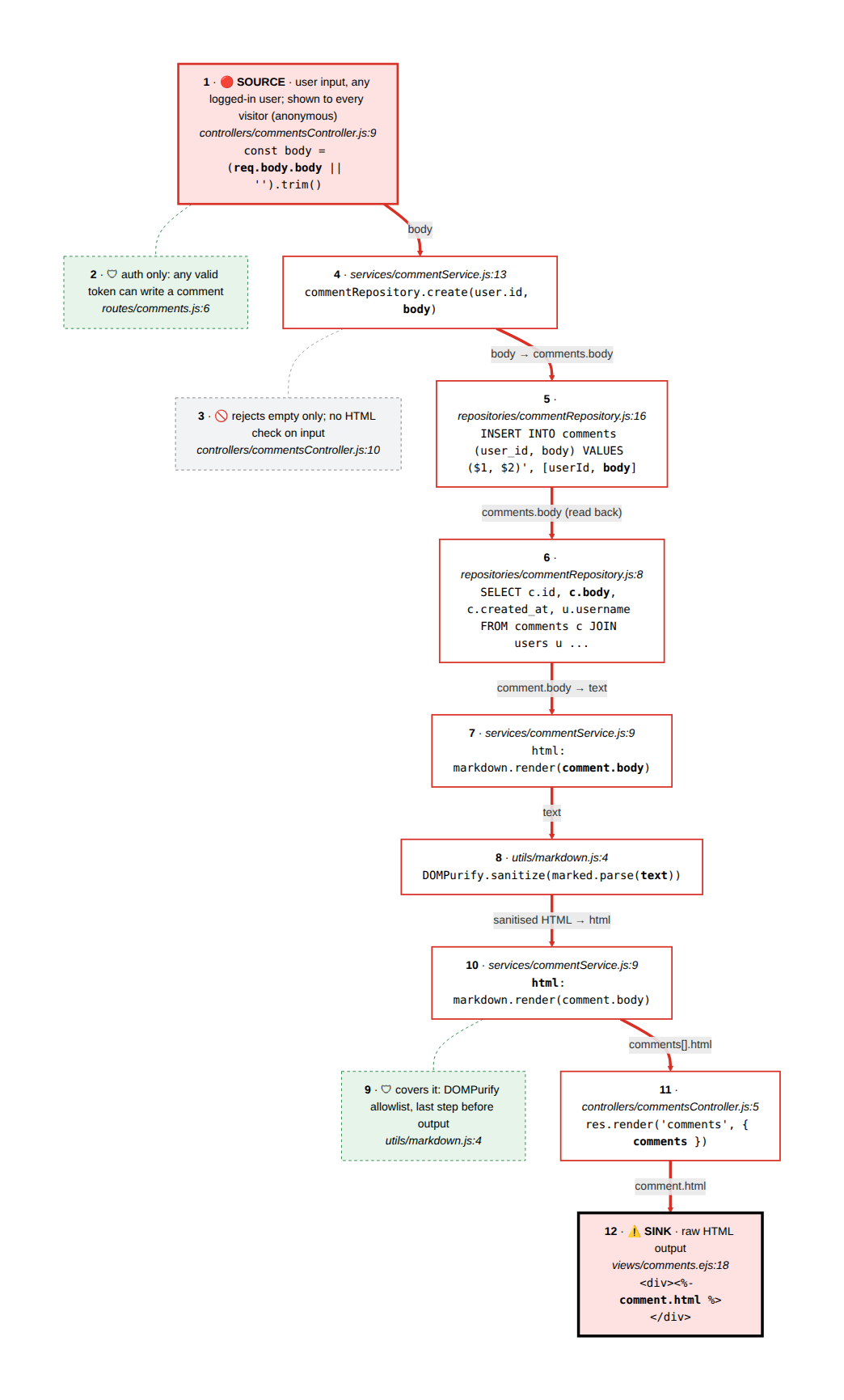
Verdict: false positive, because DOMPurify removes the payload. But say I've never used DOMPurify. Why is it enough? I could read the docs. Or I could ask AI to build me a small experiment I can run myself:
Create an /appsec-skills:security-experiment to explain how DOMPurify sanitize mitigates XSS with a simple example.
The security-experiment skill writes a Jupyter notebook (a Deno kernel, with the app's real library versions and its real template). It sends one classic payload through the app's steps, one cell per step, first without DOMPurify and then with it:
── Without DOMPurify ──
▶ marked.parse(text)
  <p>Package arrived damaged <img src="x" onerror="alert('XSS')"></p>
  ⚠️  dangerous: onerror="alert('XSS')"

── With DOMPurify ──
▶ DOMPurify.sanitize(html)
  <p>Package arrived damaged <img src="x"></p>
  ✅ nothing dangerous left

▶ what DOMPurify removed
  ✂️  onerror="alert('XSS')" from <img>: event handlers are not on its allowlist
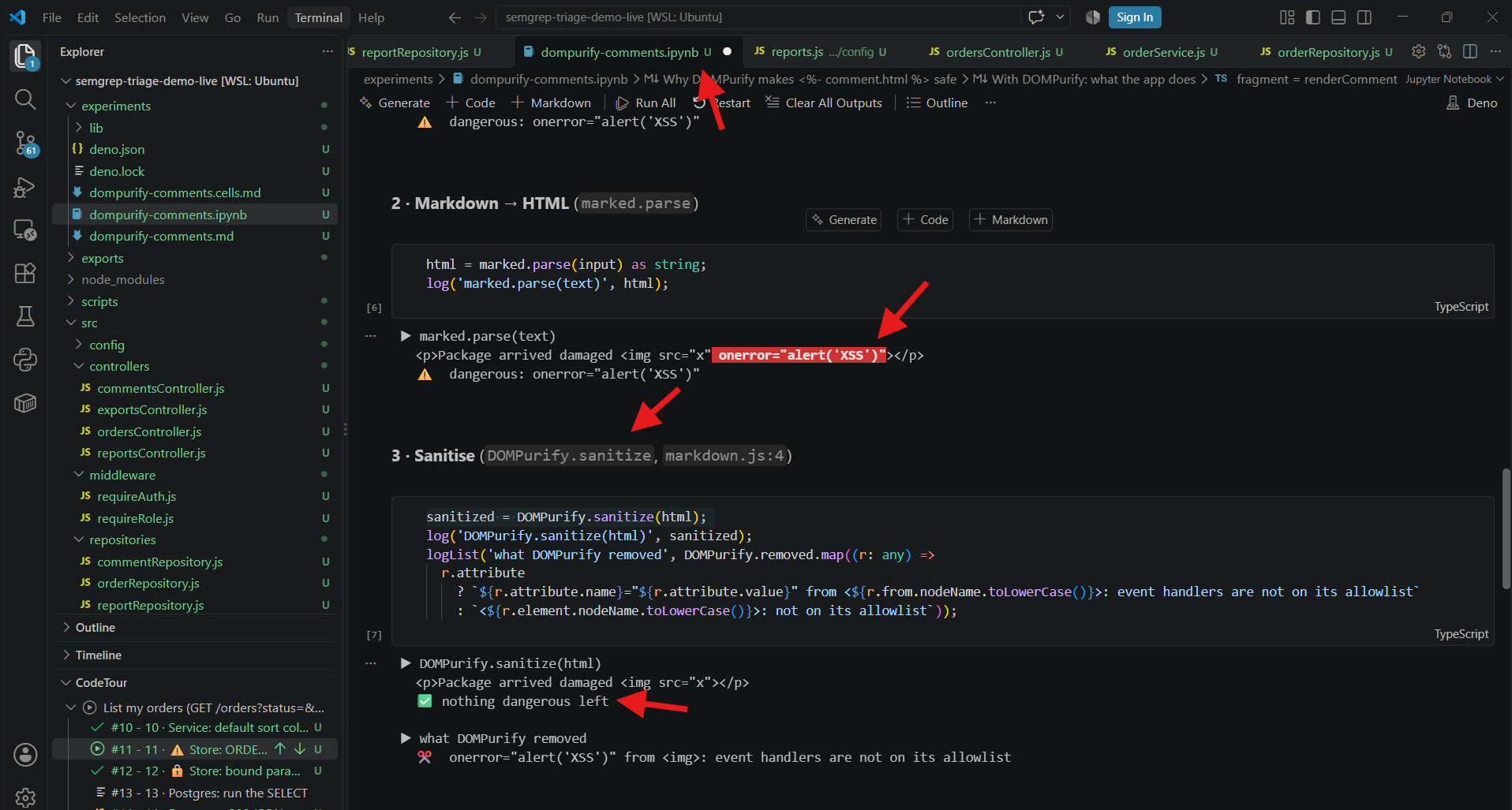
The notebook ends with why that's enough (it runs on every render, after marked, as the last step before <%-) and what would break it (removing it, moving it to input only, changing the HTML after sanitising, or an outdated version with a known bypass). I saw the control work. I didn't just take its word for it.
✅ Same verdicts, very different engineer
After both approaches:
- Approach 1 gave me verdicts in two minutes. I couldn't explain them, and the next similar finding would take just as long, because I learned nothing.
- Approach 2 gave me the same verdicts with a few short prompts, plus:
- diagrams and tours of how the feature actually works;
- a trace showing exactly why two identical-looking findings differ;
- a report with reproduction steps and a tested fix I can hand to the engineer;
- an experiment that taught me how DOMPurify works.
I can now go to the engineering team with a priority I can stand behind: fix the ORDER BY injection now; the table-name pattern is a low-priority hardening task.
Takeaway
None of these techniques are specific to security. Wherever you use AI, you can ask it to:
- Visualise: turn code into a diagram and a guided tour, so you read it as a story;
- Trace: follow one value through the layers instead of trusting a summary;
- Template: make it fill in the fields you would check yourself, with evidence;
- Experiment: build something small you can run, to see the claim hold;
- Quiz you: give your own answer first, then compare (
--learn).
AI is a powerful tool, and using it does make you more efficient. Just keep an eye on the cognitive debt. Balance doing and understanding, so you're faster now and not stuck later.
Try it yourself
- Demo app (deliberately vulnerable) and every AI output from this post: ai-sast-triage-demo
- The skills: appsec-skills (
code-walkthrough, source-to-sink, semgrep-triage, security-experiment). PRs are welcome.
- More on YouTube: AppSec Untangled
How do you use AI to learn and not just to finish tasks? Tell me in the comments. I'd love to add more ideas to the skills.
