In previous installments, we designed the FastAPI backend and Supabase database architecture, built the Glassmorphism React client, and engineered the interactive fitness, reading, cinema, and Kanban modules.
Yet in software engineering, one principle remains non-negotiable: data sovereignty.
Most subscription-based commercial apps commit the same calculated mistake: they allow users to enter data effortlessly for free, but when you want to export your records, you are met with obscure JSON dumps, truncated exports, or paywalls. If the company pivots or discontinues the service, your life telemetry is trapped in a closed silo.
When designing LifeOps, I established a golden rule: no recorded data would ever be held hostage. At any given moment, the user must be able to generate a beautifully styled, executive Word document (.docx) ready for printing or client presentation, a multi-sheet audit workbook in Excel (.xlsx) with dedicated tabs, and raw CSV backups with UTF-8 BOM ready for direct ingestion in PowerBI or spreadsheet tools without manual encoding fixes.
Best of all: implemented under a Zero-Disk in-memory architecture without saving temporary files to server disks. Let's see how it was engineered! 🚀
[!TIP]
Test the live app: You can generate and download your own reports in the production build of LifeOps at https://datalaria.com/apps/lifeops/.
🗺️ LifeOps Series Roadmap
To understand how every architectural layer fits together, this series spans 5 structured installments:
- 🟢 Part 1: Personal Operating System Architecture and FastAPI + Supabase Backend
- 🟢 Part 2: React Frontend with Glassmorphism, 360° Dashboard, and Design System
- 🟢 Part 3: Core Interactive Modules: Fitness, Library, Cinema, and Professional Kanban Board
- 🟢 Part 4 (This article): Executive Word (.docx) Reporting Engine and Multi-Sheet Excel (.xlsx) Export
- 🟢 Part 5: 24/7 Zero-Cost Cloud Deployment ($0/month), Mobile UX, and PWA
1. Zero-Disk Architecture: In-Memory RAM Generation with io.BytesIO 🧠⚡
Many online tutorials suggest a hazardous pattern for backend file downloads:
- Write a temporary file to disk (e.g.
/tmp/report_123.docx).
- Populate the document.
- Serve it over HTTP.
- Schedule a background cronjob or script to delete it later.
In ephemeral cloud containers or serverless tiers (such as Render.com's free instances), this pattern is a recipe for failure:
- Ephemeral storage is strictly constrained; multiple concurrent downloads will rapidly exhaust container disk space (Out of Disk Space crash).
- If an unhandled exception occurs mid-execution, orphaned temporary files remain uncleaned.
- Parallel requests can suffer race conditions or filename collisions if collision prevention is not meticulously handled.
In LifeOps, we built a Zero-Disk pipeline:
┌─────────────────────────────────────────────────────────────┐
│ 1. Frontend Request: POST /api/v1/reports/generate          │
└──────────────────────────────┬──────────────────────────────┘
                               │
                               ▼
┌─────────────────────────────────────────────────────────────┐
│ 2. FastAPI: Optimized relational query in Supabase          │
│    activities(*, workouts, books, films) + tasks + projects │
└──────────────────────────────┬──────────────────────────────┘
                               │
                               ▼
┌─────────────────────────────────────────────────────────────┐
│ 3. In-Memory Engine: python-docx / openpyxl                 │
│    doc.save(buffer) where buffer = io.BytesIO()             │
│    buffer.seek(0)                                           │
└──────────────────────────────┬──────────────────────────────┘
                               │
                               ▼
┌─────────────────────────────────────────────────────────────┐
│ 4. Direct Streaming HTTP Response:                          │
│    Response(content=buffer.getvalue(), media_type=docx)     │
│    Header: Content-Disposition: attachment; filename=...    │
└─────────────────────────────────────────────────────────────┘
The document is composed directly in memory RAM, buffered inside an io.BytesIO object, streamed to the client browser, and automatically reclaimed by Python's garbage collector once the response cycle ends. Zero disk I/O, zero file collision hazards, and maximum throughput.
2. Executive Word (.docx) Generation with python-docx 📄✨
For compiling Microsoft Word documents in Python, python-docx is the industry standard. However, default documents often appear rudimentary, featuring generic fonts and tables lacking inner cell padding.
To achieve an executive-grade aesthetic, I developed utility helpers that directly manipulate the underlying OpenXML elements (docx.oxml):
from docx import Document
from docx.shared import Inches, Pt, RGBColor
from docx.oxml import parse_xml
from docx.oxml.ns import nsdecls

# LifeOps Brand Palette
COLOR_PRIMARY_HEX = "0B0F17"    # Dark Obsidian
COLOR_EMERALD_HEX = "10B981"    # Emerald Accent
COLOR_BG_LIGHT_HEX = "F8FAFC"   # Soft Table Fill

def set_cell_background(cell, fill_hex: str):
    """Applies a solid background color to a Word table cell."""
    tcPr = cell._tc.get_or_add_tcPr()
    shd = parse_xml(f'<w:shd {nsdecls("w")} w:fill="{fill_hex}"/>')
    tcPr.append(shd)

def set_cell_margins(cell, top=100, bottom=100, left=150, right=150):
    """Sets inner cell padding (in twips, 20 twips = 1 pt)."""
    tcPr = cell._tc.get_or_add_tcPr()
    tcMar = parse_xml(
        f'<w:tcMar {nsdecls("w")}>'
        f'<w:top w:w="{top}" w:type="dxa"/>'
        f'<w:bottom w:w="{bottom}" w:type="dxa"/>'
        f'<w:left w:w="{left}" w:type="dxa"/>'
        f'<w:right w:w="{right}" w:type="dxa"/>'
        f'</w:tcMar>'
    )
    tcPr.append(tcMar)
2.1. Available Report Templates
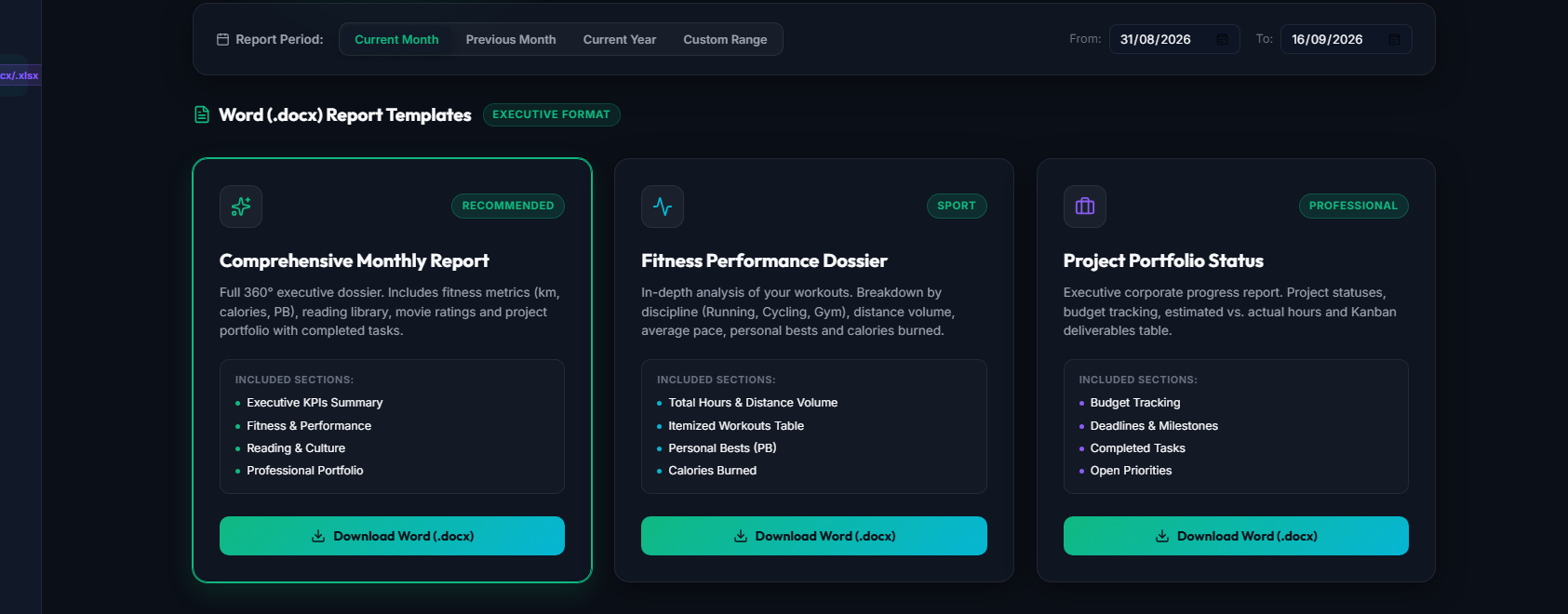
The reporting service supports three purpose-built templates:
- Monthly Integral Summary (
monthly_summary): The complete 360° dossier. Aggregates monthly fitness distance, reading progress, cinema log, and active project deliverables.
- Fitness Performance Dossier (
sport_performance): Built for athletic analysis: total volume in kilometers, average paces, heart rate distributions, and Personal Best (PB) records.
- Project Portfolio Status (
project_status): Engineered for professional management: deliverable statuses, overdue deadlines, and the complete chronological progress log extracted from the JSONB comments column.
2.2. In-Memory Assembly
The entrypoint constructs the document and streams it directly to the buffer:
import io

def generate_docx_report(template_type: str, user_email: str, date_from, date_to, data: dict) -> io.BytesIO:
    doc = Document()

    # Uniform executive page margins (2 cm / 0.8 inches)
    for section in doc.sections:
        section.top_margin = Inches(0.8)
        section.bottom_margin = Inches(0.8)
        section.left_margin = Inches(0.8)
        section.right_margin = Inches(0.8)

    if template_type == "sport_performance":
        _build_sport_report(doc, user_email, date_from, date_to, data)
    elif template_type == "project_status":
        _build_project_report(doc, user_email, date_from, date_to, data)
    else:
        _build_monthly_integral_report(doc, user_email, date_from, date_to, data)

    buffer = io.BytesIO()
    doc.save(buffer)
    buffer.seek(0)
    return buffer
3. Multi-Sheet Excel (.xlsx) Workbooks with openpyxl 📊📗
Word dossiers provide polished executive summaries, but for quantitative analysis, pivot tables, or PowerBI models, the premier format is Excel (.xlsx).
Using openpyxl, we compile an audit workbook consolidating the user's entire cloud schema across 5 formatted thematic worksheets:
from openpyxl import Workbook
from openpyxl.styles import Font, PatternFill, Alignment, Border, Side
from openpyxl.utils import get_column_letter

def export_full_excel(user_id: str) -> io.BytesIO:
    wb = Workbook()
    wb.remove(wb.active)  # Drop default empty sheet

    # Corporate Styling
    header_fill = PatternFill(start_color="1E293B", end_color="1E293B", fill_type="solid")
    header_font = Font(name="Calibri", size=11, bold=True, color="FFFFFF")
    data_font = Font(name="Calibri", size=10)
    thin_border = Border(
        left=Side(style="thin", color="E2E8F0"),
        right=Side(style="thin", color="E2E8F0"),
        top=Side(style="thin", color="E2E8F0"),
        bottom=Side(style="thin", color="E2E8F0"),
    )

    sheets_config = [
        ("🏃 Sport & Fitness", _fetch_sport_data),
        ("📚 Book Library", _fetch_books_data),
        ("🎬 Cinema & TV", _fetch_films_data),
        ("📋 Tasks Kanban", _fetch_tasks_data),
        ("💼 Project Portfolio", _fetch_projects_data),
    ]

    for title, fetcher in sheets_config:
        ws = wb.create_sheet(title=title)
        ws.views.sheetView[0].showGridLines = True  # Gridlines always visible

        data = fetcher(user_id)
        if data:
            headers = [h.replace("_", " ").upper() for h in data[0].keys()]
            ws.append(headers)

            # Style Header Row
            for cell in ws[1]:
                cell.fill = header_fill
                cell.font = header_font
                cell.alignment = Alignment(horizontal="center", vertical="center")
            ws.row_dimensions[1].height = 24

            # Populate Rows with Cell Borders
            for row_idx, item in enumerate(data, start=2):
                ws.append(list(item.values()))
                for col_idx in range(1, len(headers) + 1):
                    c = ws.cell(row=row_idx, column=col_idx)
                    c.font = data_font
                    c.border = thin_border

            # Dynamic auto-fitting column widths
            for col in ws.columns:
                max_len = max(len(str(cell.value or "")) for cell in col)
                col_letter = get_column_letter(col[0].column)
                ws.column_dimensions[col_letter].width = max(max_len + 4, 12)

    buffer = io.BytesIO()
    wb.save(buffer)
    buffer.seek(0)
    return buffer
Professional Touches:
showGridLines = True: By default, Excel hides gridlines on worksheets featuring background styling. Forcing this flag ensures crisp readability.- Smart Auto-Fit Columns: Automatically calculates the longest string in each column and adds a 4-character safety buffer, eliminating truncated headers or numerical
### overflow errors.

4. CSV Backups: The Secret of UTF-8 BOM (\ufeff) 🛡️
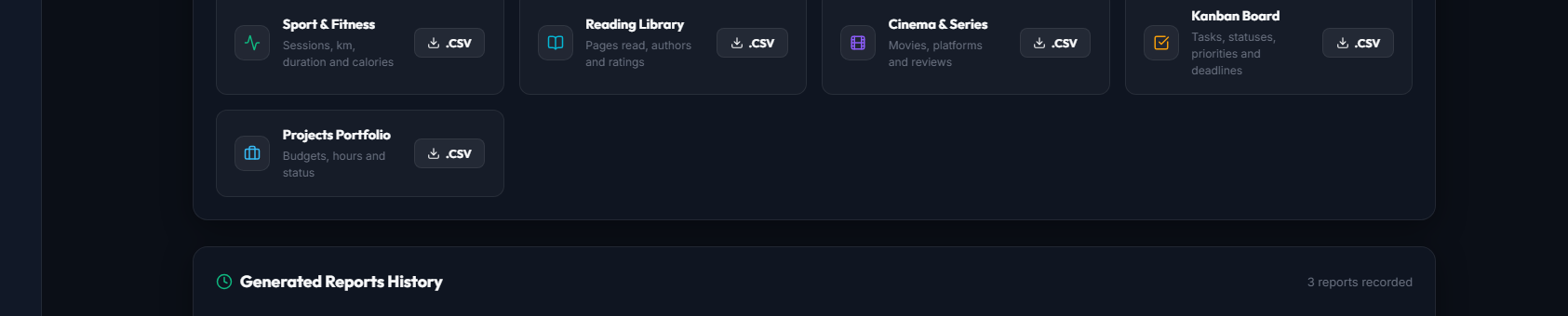
For data engineers requiring raw tabular feeds for Python scripts or command-line pipelines, LifeOps exposes entity-level CSV downloads.
However, a notorious challenge exists: Microsoft Excel on Windows mishandles standard UTF-8 CSVs, converting accented characters and international letters (such as "Kilómetros" or "Diseño") into garbled symbols (mojibake), while frequently failing to split columns properly.
The elegant technical solution is prepending the UTF-8 Byte Order Mark (BOM) (\ufeff) and utilizing semicolon (;) delimiters:
import io
import csv

def export_entity_csv(entity: str, user_id: str) -> bytes:
    data = fetcher(user_id)
    output = io.StringIO()

    # 1. Prepend UTF-8 BOM so Excel opens accents natively
    output.write("\ufeff")

    if data:
        writer = csv.DictWriter(output, fieldnames=list(data[0].keys()), delimiter=";", quoting=csv.QUOTE_MINIMAL)
        writer.writeheader()
        for row in data:
            writer.writerow(row)

    return output.getvalue().encode("utf-8")
When users double-click the resulting file, Excel opens it perfectly without encoding dialogs, preserving accented strings and clean column separation.
5. Server Hardening: Anti-DoS Rate Limiting with slowapi ⏱️
Generating .docx documents and .xlsx workbooks requires significant CPU cycles and transient memory allocation. An automated script or abusive client sending 50 parallel requests could easily overwhelm Render's free container memory limits.
To protect uptime, we enforced IP and user-level rate limits with slowapi:
from slowapi import Limiter
from slowapi.util import get_remote_address

limiter = Limiter(key_func=get_remote_address)

# Strict rate limit for intensive Word (.docx) and Excel (.xlsx) compiles
@router.post("/generate")
@limiter.limit("10/minute")
def generate_report(request: Request, req: GenerateReportRequest, user = Depends(get_current_user)):
    ...

# Rate limit for lightweight CSV exports
@router.get("/export/csv")
@limiter.limit("20/minute")
def export_csv(request: Request, entity: str, user = Depends(get_current_user)):
    ...
If a client exceeds the threshold, FastAPI instantly responds with an HTTP 429 Too Many Requests, shielding backend memory for other users.
6. Frontend Center: Reports & Export UI (ReportsPage.jsx) 💻
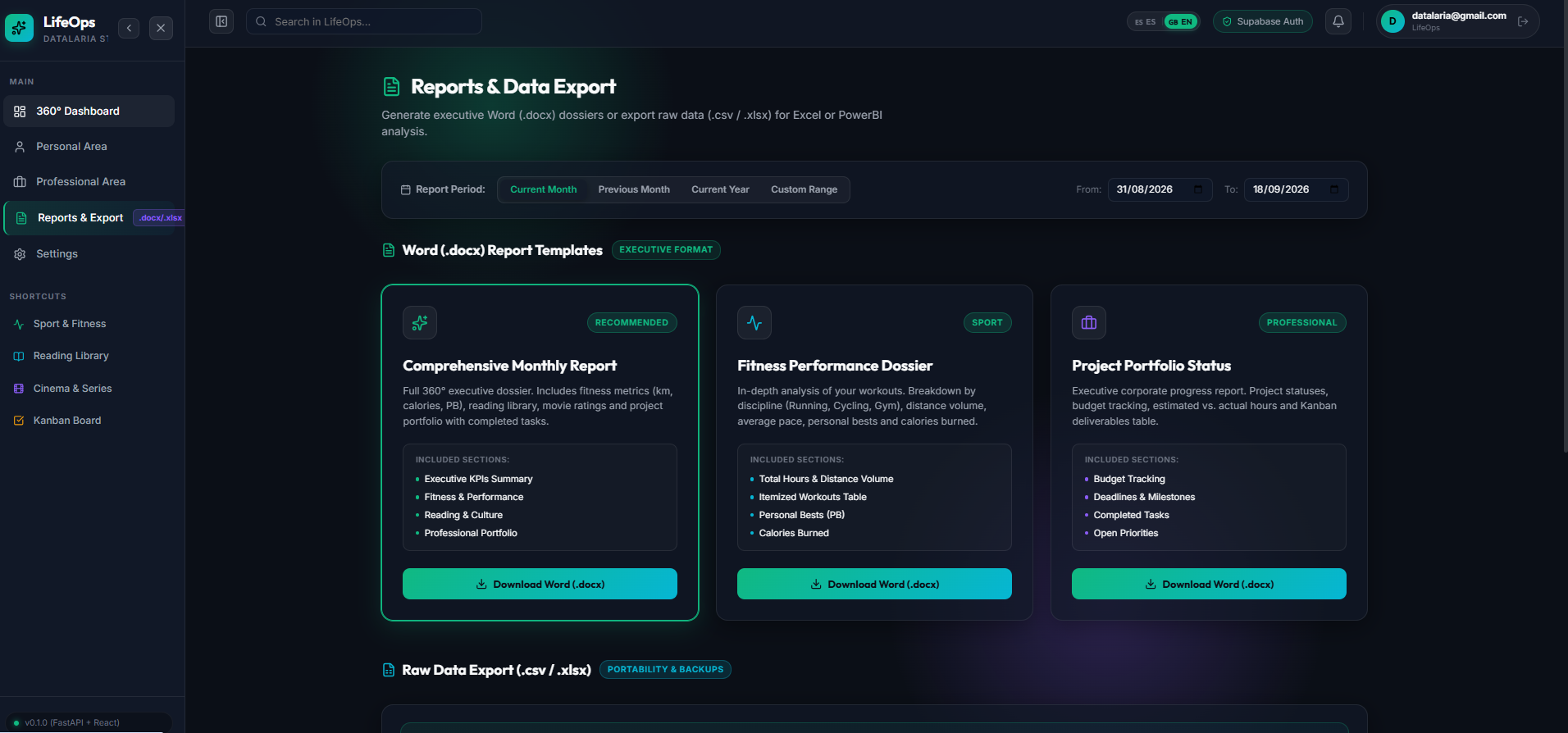
In our React client, the /reports route provides an intuitive command center:
- Interactive Template Cards: Clear previews explaining the target audience of each report.
- Period Selectors: Instant shortcuts for Current Month, Previous Month, or custom date ranges.
- Native Streaming Downloads: The browser handles streaming binary payloads via
Blob APIs.
const response = await fetch(`${API_BASE_URL}/api/v1/reports/generate`, {
  method: 'POST',
  headers: {
    'Content-Type': 'application/json',
    'Authorization': `Bearer ${token}`
  },
  body: JSON.stringify(requestPayload)
});

const blob = await response.blob();
const downloadUrl = window.URL.createObjectURL(blob);
const link = document.createElement('a');
link.href = downloadUrl;
link.download = filename;
link.click();
window.URL.revokeObjectURL(downloadUrl);

Conclusion & What's Next 🎯
With our reporting engine completed, LifeOps elevates from a web dashboard into an executive asset generator and portable data hub.
We have our cloud architecture, our dark-mode interface, our daily tracking modules, and our data export engine. Only one final milestone remains to conclude the series: production cloud deployment and mobile engineering.
In Part 5 (the final installment of this series), we will cover:
- 24/7 Zero-Cost Cloud Deployment ($0/month) on Render.com and Netlify, with proxy rewrites and automated SSL.
- Ergonomic Mobile UX: Sticky Bottom Navigation Bar, touch-friendly Off-Canvas Drawer, and floating modales using
React.createPortal.
- Progressive Web App (PWA): Direct home-screen installation without app store friction.
References & Useful Links 🔗
See you in the final installment! Do you export your personal app data to Excel or Word? Share your workflow in the comments below. 👇