Interaction to Next Paint Breakdown: Solving first move lag in BareBoard
Background
So I was developing this dumb chess board which only contains presentation logic, emits event when a piece is touched and moved and doesn't have any move calculation/validation logic whatsoever. The idea was to ship it as a web component for the community and use it as the chess board for the project I was developing (known as 8bye8). I noticed that my piece stayed mid air for around half-a-second after I dropped the piece on target square which appeared to me as rendering delay. The solution of the problem led me to the Performance Tab in Chrome Dev Tools to investigate INP Breakdown.
What is INP ?
From web.dev -
When a user interacts with the page, those interactions should be as fast as possible. The amount of time it takes for an interaction to complete—ending when the browser presents the next frame to show the results of the interaction—is known as interaction latency. This is an aspect of page performance that the Interaction to Next Paint metric measures.
The amount of time it takes for the browser to present the next frame in response to a user interaction is known as the interaction's presentation delay. The goal of an interaction is to provide visual feedback in order to signal to the user that something has occurred, and visual updates can involve some amount of layout work in order to achieve that goal.
To understand INP, we'll first need to understand what an interaction is. Simply, for the purposes of INP, only the following interaction types are observed:
INP consists of three subparts -
Input Delay: The time before any callback for an interaction is handled.
Processing Duration: The time for all the callbacks to execute.
Presentation Delay: The time after the callbacks have been executed until the frame is presented on the user's screen.
The Issue
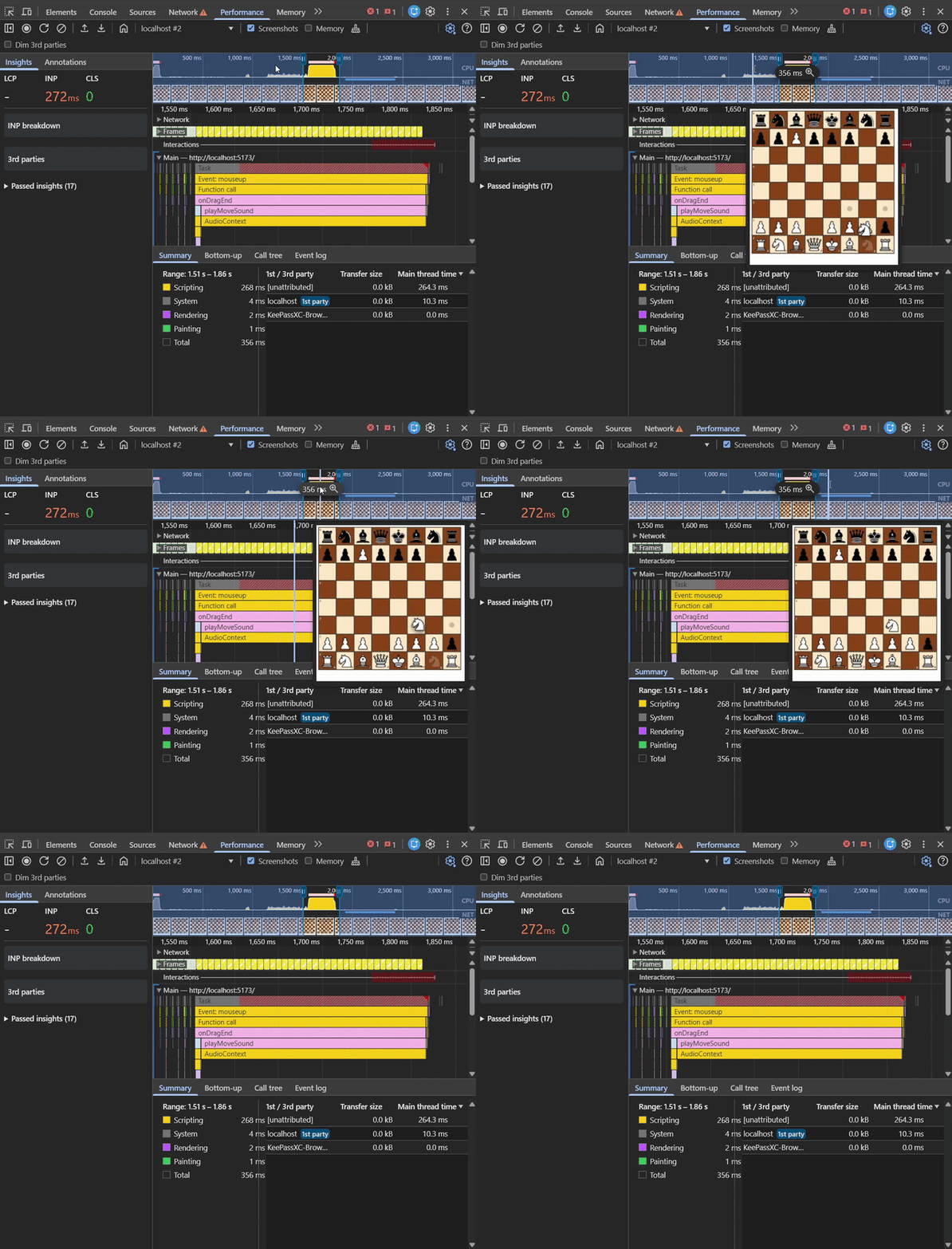
As you can see in the gif, that I dropped the piece at around 1500ms but it stays in the air until about 1800ms. This resulted in a janky looking interaction when I made the first move.
Starting the Analysis
Step 1: Go to Performance Tab in Chrome
Step 2: In Environment settings, apply CPU throttling to 4x/6x slowdown to ensure consistent reproduction
Step 3: Record (Ctrl+E)
Step 4: Play the Move
Step 5: Stop Recording
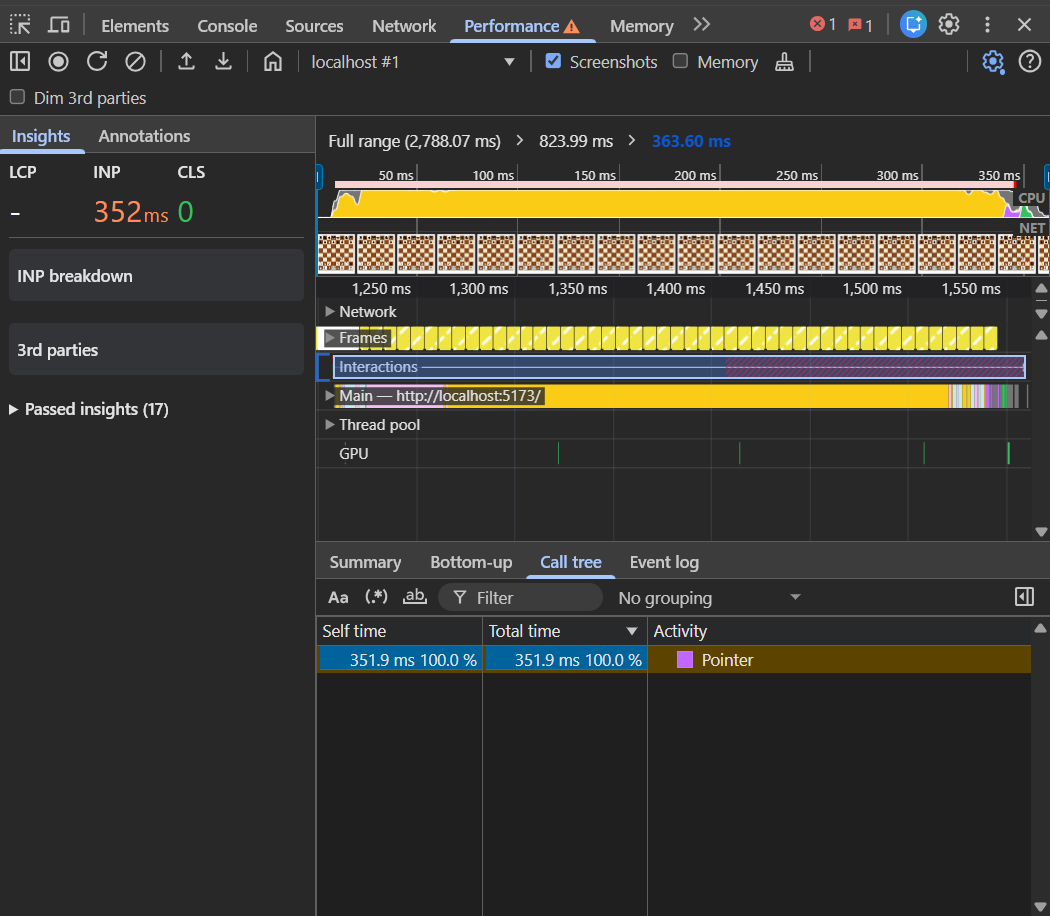
With throttling enabled, we are able to get even bigger INP (352ms). For the rest of the article, this will be our basis of investigation.
Interpreting the analysis
Hovering over Interactions shows us that -
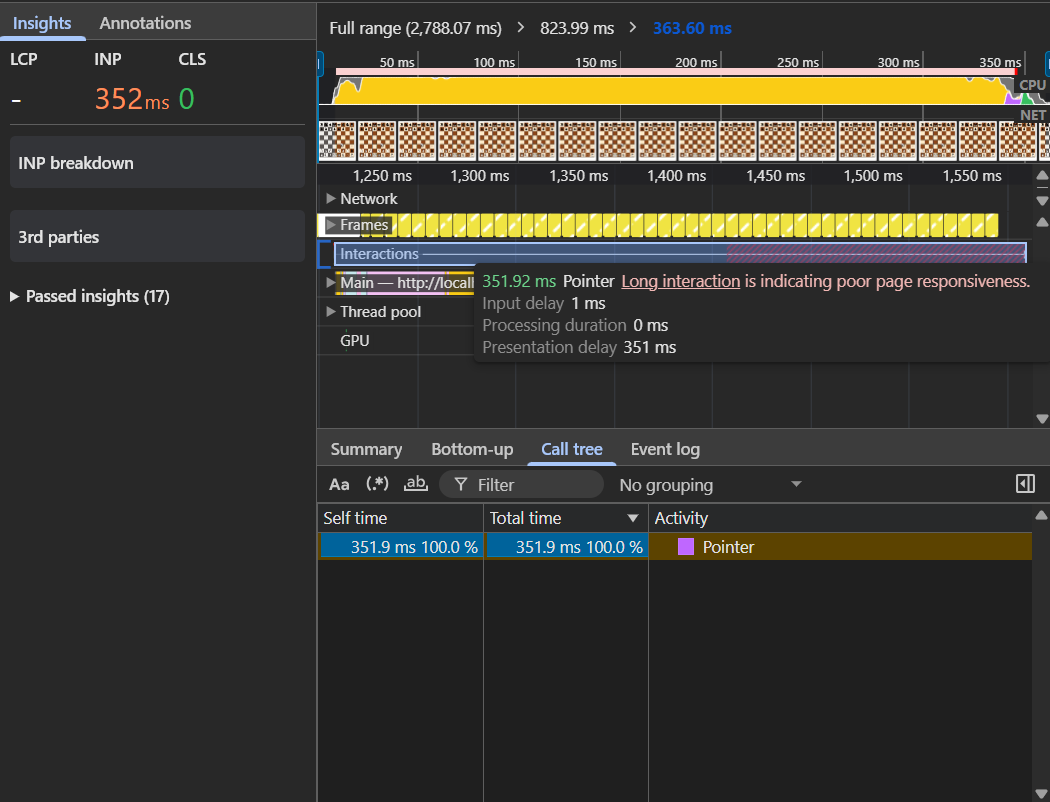
the delay is due to Presentation delay.
Clicking on Main shows us the main culprit -
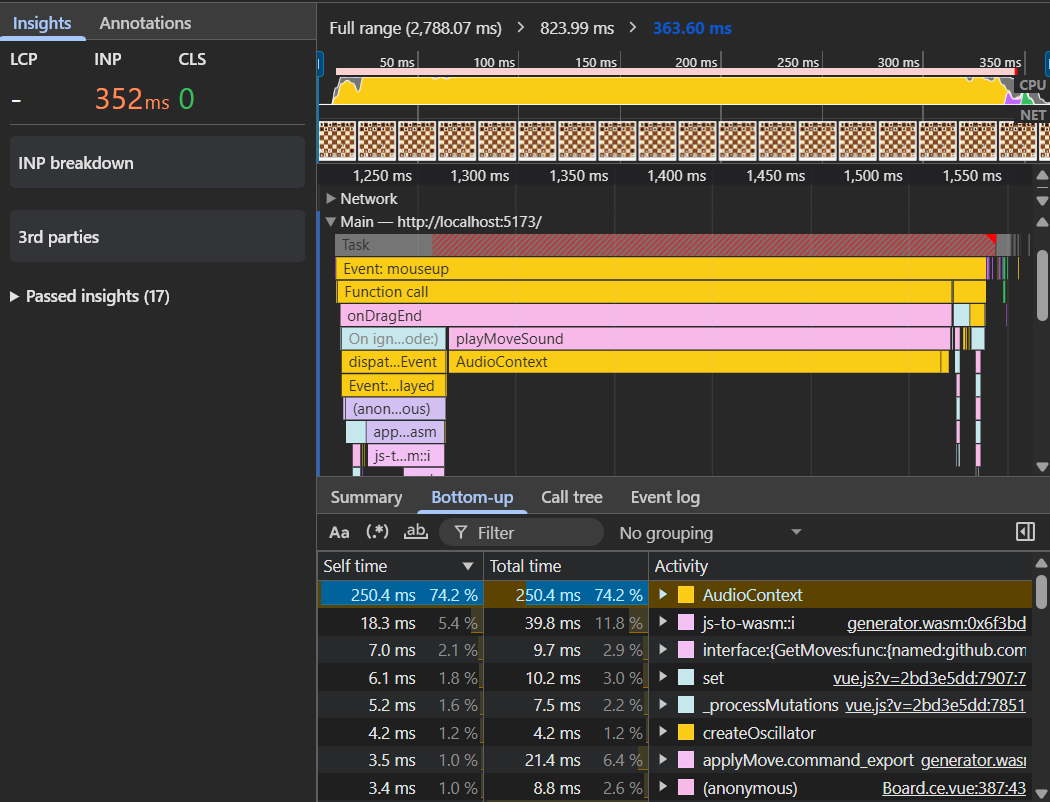
We are using AudioContext to generate a "thud" sound when a piece is dropped. Since I didn't want to increase the size of my bareboard unnecessarily, I thought it would be best to just generate it using Web Audio API. You can read more about it on MDN
Let's look at the code where it happens -
function playMoveSound() {
  if (!props.enableSound) return

  // If the user provided a custom URL, play that
  if (props.moveSoundUrl) {
    const audio = new Audio(props.moveSoundUrl)
    audio.play().catch((err) => console.warn('Audio blocked:', err))
    return
  }

  try {
    const AudioContext = window.AudioContext || (window as any).webkitAudioContext;
    const ctx = new AudioContext();
    const osc = ctx.createOscillator();
    const gainNode = ctx.createGain();

    osc.type = 'sine'; // Deep smooth tone
    osc.frequency.setValueAtTime(150, ctx.currentTime); // Start low
    osc.frequency.exponentialRampToValueAtTime(40, ctx.currentTime + 0.05); // Drop fast for a "thud"

    gainNode.gain.setValueAtTime(1, ctx.currentTime); // Start loud
    gainNode.gain.exponentialRampToValueAtTime(0.001, ctx.currentTime + 0.1); // Fade out instantly

    osc.connect(gainNode);
    gainNode.connect(ctx.destination);

    osc.start();
    osc.stop(ctx.currentTime + 0.1);
  } catch (e) {
    // Silent fail if browser blocks AudioContext
  }
}
On a closer look, we find that this line -
const ctx = new AudioContext();
is causing the issue. If we could somehow not do this operation when dropping the piece for the first time, it should resolve the problem.
The Fix
On first instinct, it appears that we can just shift the initialization to when the user touches the piece instead of when he drops it, but that would be like playing Whack-a-Mole with the INP delay.
A second thought would be that we can do it when the user clicks anywhere on the board, but usually the first click a user makes is on the piece itself, so that wouldn't work as well.
Turns out, the proper solution is to do initialization when the component loads not on first user interaction -
let sharedAudioCtx: AudioContext | null = null;

onMounted(() => {
  if (!props.enableSound || props.moveSoundUrl) return;

  try {
    const AudioContext = window.AudioContext || (window as any).webkitAudioContext;
    sharedAudioCtx = new AudioContext();
    // State is naturally 'suspended' here due to browser policies
  } catch (e) {
    console.warn("Web Audio API not supported", e);
  }
})

function wakeUpAudio() {
  if (sharedAudioCtx && sharedAudioCtx.state === 'suspended') {
    sharedAudioCtx.resume().catch(() => {});
  }
}
There's one issue though, when we were calling new AudioContext() upon user interaction, the browser didn't put it in a suspended state. You can only play sounds using AudioContext upon user interaction (to prevent website from playing annoying sounds to uninterested users).
This fix initializes the audioContext without user interaction hence the browser would put it in a suspended state. This is in accordance with the spec.
Due to this, we need to call resume on the audioContext instance upon user interaction, thankfully that's an instantaneous operation.
function wakeUpAudio() {
  if (sharedAudioCtx && sharedAudioCtx.state === 'suspended') {
    sharedAudioCtx.resume().catch(() => {});
  }
}

<template>
  <div
      class="bareboard-wrapper"
      @pointerdown.capture.once="wakeUpAudio"
  >
...
This ensures that the context is in running state as soon as the user clicks anywhere on the board (whether it is on the piece or not).
Now we only re-use the existing warm instance to play the sound -
function playMoveSound() {
  if (!props.enableSound) return

  if (props.moveSoundUrl) {
    const audio = new Audio(props.moveSoundUrl)
    audio.play().catch((err) => console.warn('Audio blocked:', err))
    return
  }

  try {
    if (!sharedAudioCtx) return;

    const osc = sharedAudioCtx.createOscillator();
    const gainNode = sharedAudioCtx.createGain();
...
Let's check how we are doing now -
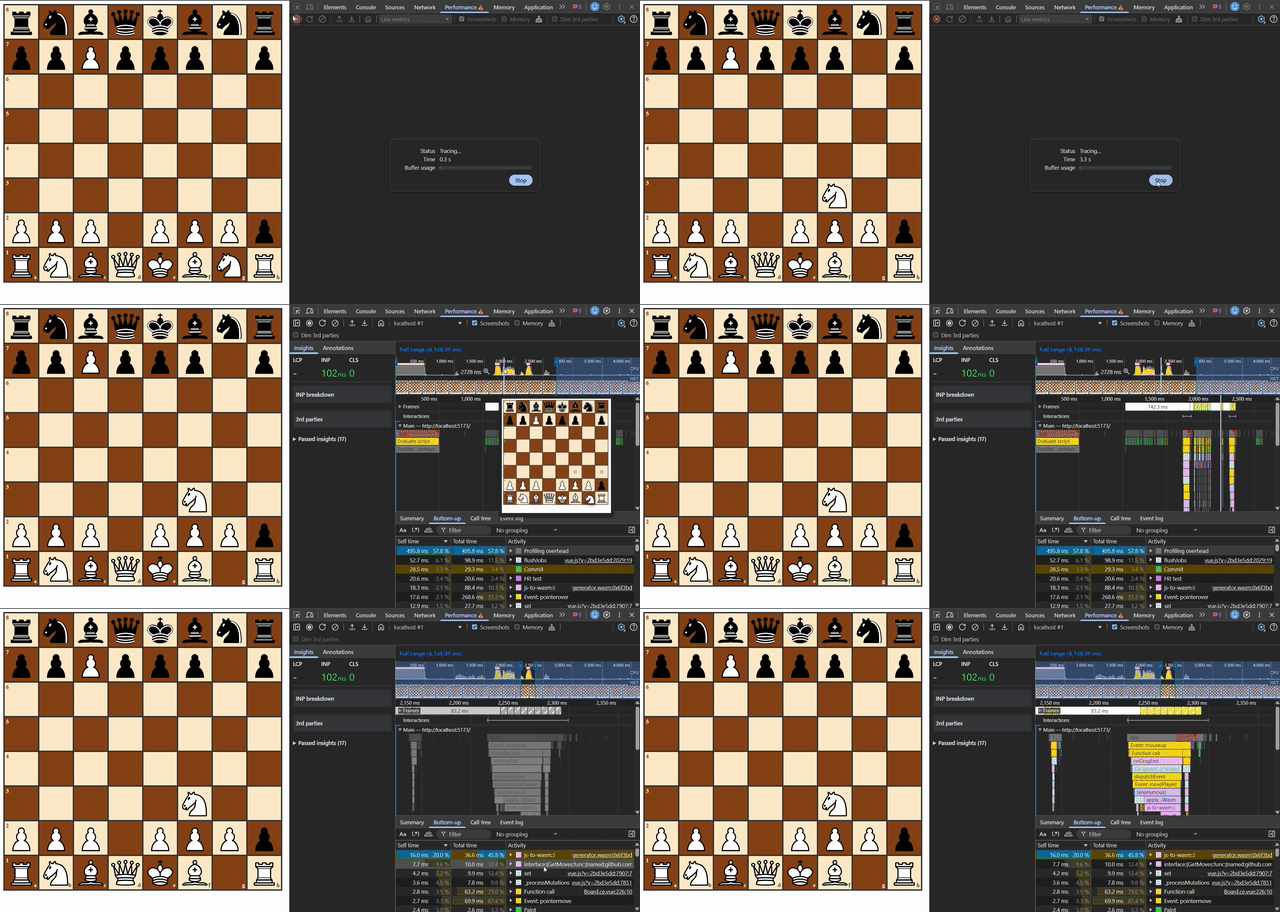
The INP is down to 102 ms !! This is well within the limits (200ms) and the onDragEnd function is down to 50ms from around 250ms.
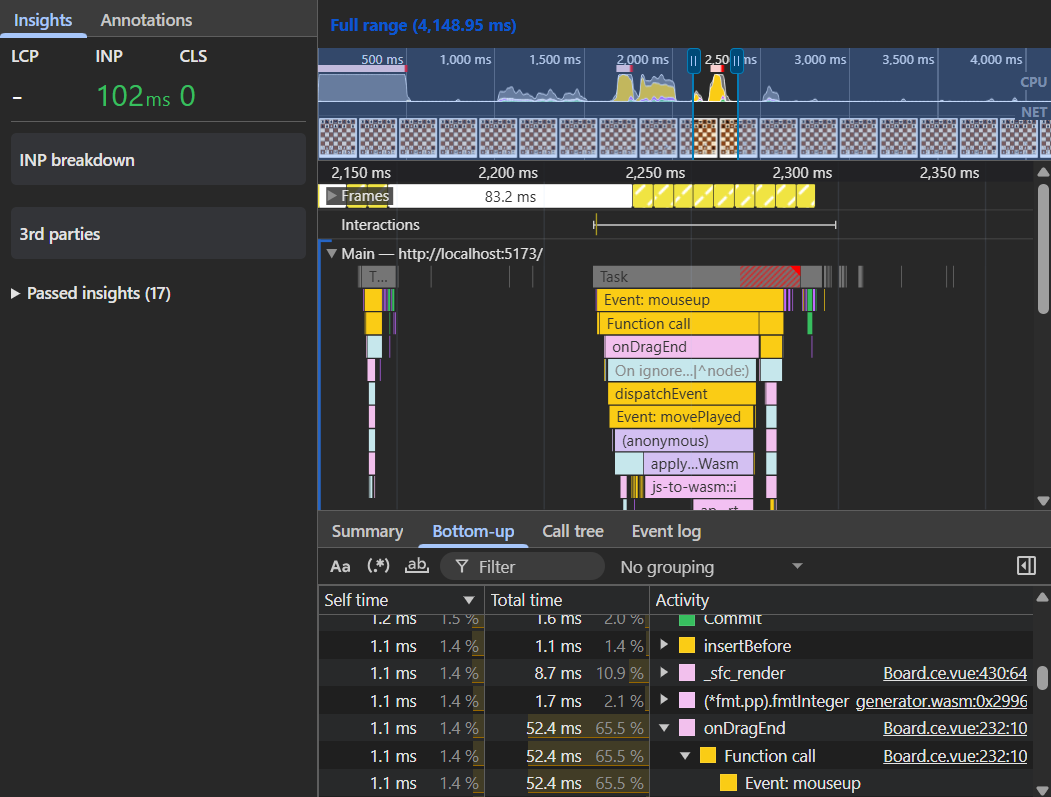
Bonus
You might have notice js-to-wasm::i and generator.wasm in the screenshots. Since the board doesn't contain any calculation or move logic, we provide the valid sqaures on touch of a piece to the Bareboard from our consumer. The consumer in this case is a simple index.html file which imports generator.wasm file which is created by compiling d4d5 (another piece of the puzzle of 8bye8 suite that's written in Go for headless move verification) to wasm. d4d5 is going to run on the server to check if the move played by user is valid. We are compiling the same code to wasm to generate valid moves and to highlight the squares. The valid squares are passed to the BareBoard so that it can highlight the squares and allow a valid move to be played
Let's look at what happens when we touch a piece and drop a piece -
function startDrag(event: MouseEvent, piece: string, rankIndex: number, fileIndex: number) {
  event.preventDefault()

  const isWhitePiece = piece === piece.toUpperCase()
  const isWhiteTurn = activeColor.value === 'w'

  if (isWhitePiece !== isWhiteTurn) {
    return
  }

  activeDrag.value = {
    piece,
    fromRank: rankIndex,
    fromFile: fileIndex,
    x: event.clientX,
    y: event.clientY,
  }

  const fromRank = activeDrag.value.fromRank
  const fromFile = activeDrag.value.fromFile

  emit('pieceTouched', {
    fileIndex: fromFile,
    rankIndex: fromRank,
  })

  window.addEventListener('mousemove', onDragMove)
  window.addEventListener('mouseup', onDragEnd)
}
function onDragEnd(event: MouseEvent) {
  if (!activeDrag.value) return

  window.removeEventListener('mousemove', onDragMove)
  window.removeEventListener('mouseup', onDragEnd)

  const fromRank = activeDrag.value.fromRank
  const fromFile = activeDrag.value.fromFile
  const piece = activeDrag.value.piece
  const path = event.composedPath() as HTMLElement[]
  const squareEl = path.find((el) => el.classList && el.classList.contains('grid__rank__square'))

  activeDrag.value = null

  if (squareEl) {
    const toRank = Number(squareEl.getAttribute('data-rank'))
    const toFile = Number(squareEl.getAttribute('data-file'))
    const sourcePiece = grid.value[fromRank][fromFile]

    if (toRank !== fromRank || toFile !== fromFile) {
      if (isValidMove(toFile, toRank)) {
        if ((sourcePiece === 'P' && toRank === 0) || (sourcePiece === 'p' && toRank === 7)) {
          promotionRank.value = toRank
          promotionFile.value = toFile
          promotionSourceRank.value = fromRank
          promotionSourceFile.value = fromFile
          validMovesSet.value = new Set()
          return
        }

        let movePlayed: Move = {
          sourceSquare: { fileIndex: fromFile, rankIndex: fromRank },
          targetSquare: { fileIndex: toFile, rankIndex: toRank },
        }

        grid.value[fromRank][fromFile] = null
        grid.value[toRank][toFile] = piece

        emit('movePlayed', movePlayed)
        playMoveSound()
      } else {
        grid.value[fromRank][fromFile] = piece
      }
    }
  } else {
    grid.value[fromRank][fromFile] = piece
  }
}
Turns out that in both of these functions, we are emitting an event i.e. pieceTouched and movePlayed. The listeners attached to it are called synchronously. (Wait, What ? Aren't they scheduled onto callback queue ? What about the event loop and asynchronous nature of callbacks ?) Well here's the truth -
An emit (like in Vue, React, or Node's EventEmitter) does not interact with the Event Loop or the Callback Queue at all. It is just a regular, synchronous JavaScript function call in disguise.
When you use a custom event system like Vue's emit('myEvent') or Node's emitter.emit(), you are using the Observer Pattern.
Under the hood, an event emitter is literally just a JavaScript object with an array of functions attached to a string key.
// This is roughly what an EventEmitter looks like under the hood
const fakeEmitter = {
  events: {},

  on(eventName, callback) {
    if (!this.events[eventName]) this.events[eventName] = [];
    this.events[eventName].push(callback);
  },

  emit(eventName, data) {
    const listeners = this.events[eventName];
    if (listeners) {
      listeners.forEach(callback => callback(data));
    }
  }
};
You can read more on this here
Anyways, what's clear is that we are calling our wasm functions synchronously which was contributing to the presentation delay we faced earlier. To make the interaction seem instantaneous, we can fire the event after the frame has been painted, i.e.
After the user can visually see that the piece has been picked and
After the piece has been placed.
Can you guess what's coming next ?
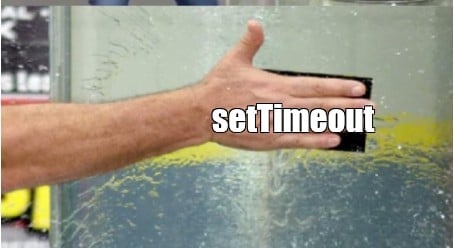
Let's defer emitting the events to the next iteration of the event loop -
function startDrag(event: MouseEvent, piece: string, rankIndex: number, fileIndex: number) {
  ...
  setTimeout(() => {
    emit('pieceTouched', {
      fileIndex: fromFile,
      rankIndex: fromRank,
    })
  }, 0)
}
function onDragEnd(event: MouseEvent) {
  ...
  setTimeout(() => {
    emit('movePlayed', movePlayed)
    playMoveSound()
  }, 0)
  ...
}
Let's see how we are doing now -
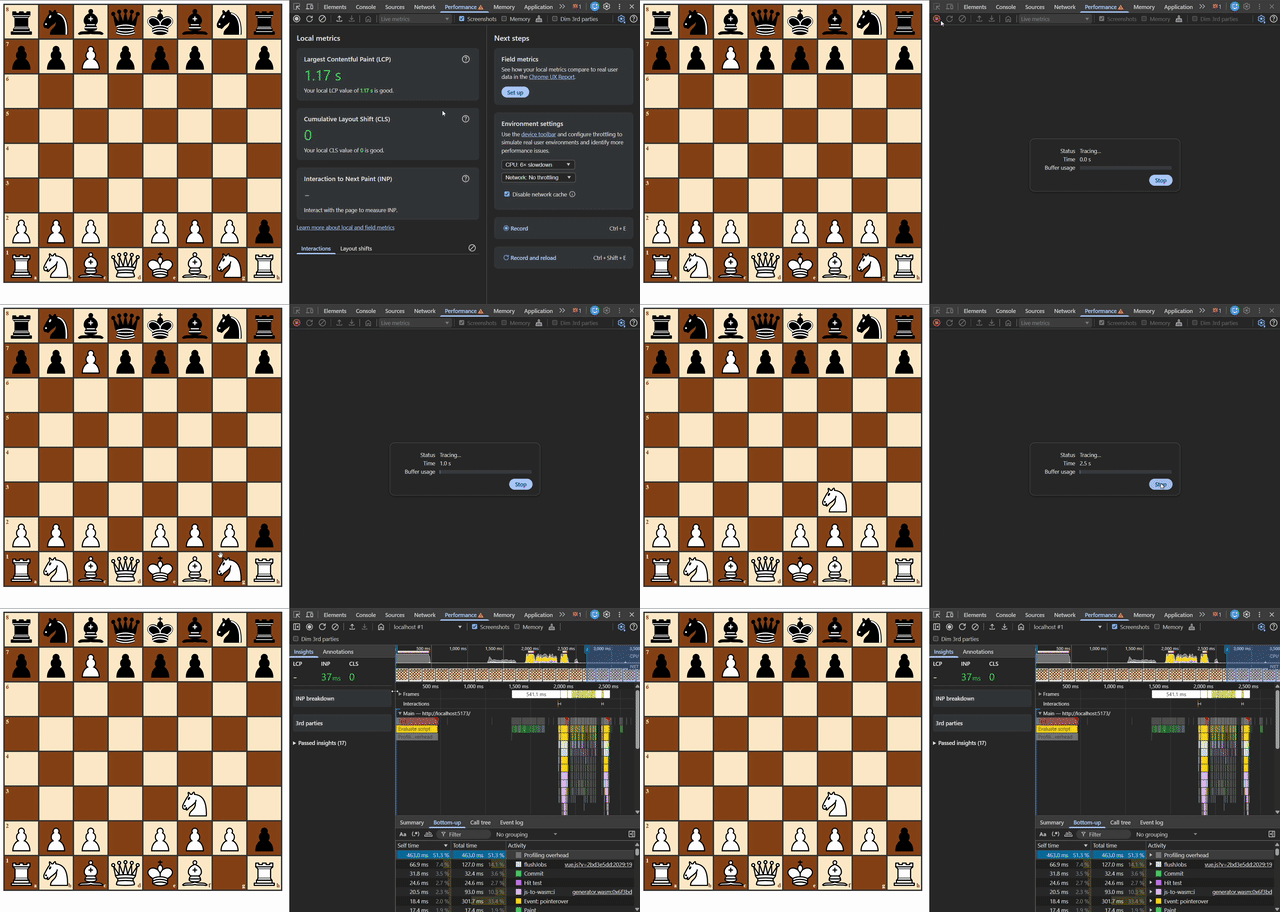
37ms!! That's the best we can pull off for this tiny BareBoard.
Conclusion
Performance optimization on the web is crucial for an open source library adoption, most of the times it is almost always about choreographing when those instructions run. By understanding how the browser’s Event Loop actually interacts with the Call Stack and Web APIs, we were able to turn a janky 350ms freeze into a smooth 37ms interaction.
Github: https://github.com/8bye8/bareboard
Npm: https://www.npmjs.com/package/@8bye8/bareboard
Credits
The Event Loop | Jake Archibald : https://www.youtube.com/watch?v=qz6yDqjMVfw
Optimizing INP | A deep dive: https://www.youtube.com/watch?v=cmtfM4emG5k
Demystifying Asynchronous Programming Part 2: Node.js EventEmitter:
https://www.codementor.io/@simenli/demystifying-asynchronous-programming-part-2-node-js-eventemitter-7r51ivby4
Interaction to Next Paint (INP): https://web.dev/articles/inp
Avoid large, complex layouts and layout thrashing: https://web.dev/articles/avoid-large-complex-layouts-and-layout-thrashing
