Every Testing Library test you have written runs against a simulated DOM. You know this. You accepted it years ago, along with the small pile of things that come with it: no real layout, nothing ever drawn on a screen, jsdom throwing on APIs it does not implement, and the quiet suspicion that a passing test and a working component are not quite the same claim.
I co-maintain twd-js, which runs tests inside your actual dev server. It was built for flow testing: visit a route, click through the app, assert on what the user sees. Component testing was the thing it did not do, and I said so in print when I compared it to Vitest Browser Mode.
Then I tried calling render() inside a TWD test, mostly to see what would break.
import { render, screen, cleanup } from "@testing-library/react";
import { describe, it, afterEach } from "twd-js/runner";
import { AppProvider } from "@/context/AppContext";
import { twd } from "twd-js";
import { Add } from "../Add";
import { componentHost, restorePage } from "@/twd-tests/support/componentHost";

describe("Add Component", () => {
  afterEach(() => {
    cleanup();
    restorePage();
  });

  it("renders the Add component", () => {
    // componentHost() is a blank div on an empty page. More on it below.
    render(<AppProvider><Add /></AppProvider>, { container: componentHost() });

    twd.should(screen.getByText("Add Item"), "be.visible");
  });
});
Nothing broke. The component mounts into the page, the sidebar shows it running, and the assertion checks an element that exists in a real browser. Same Testing Library API, no fake DOM under it.
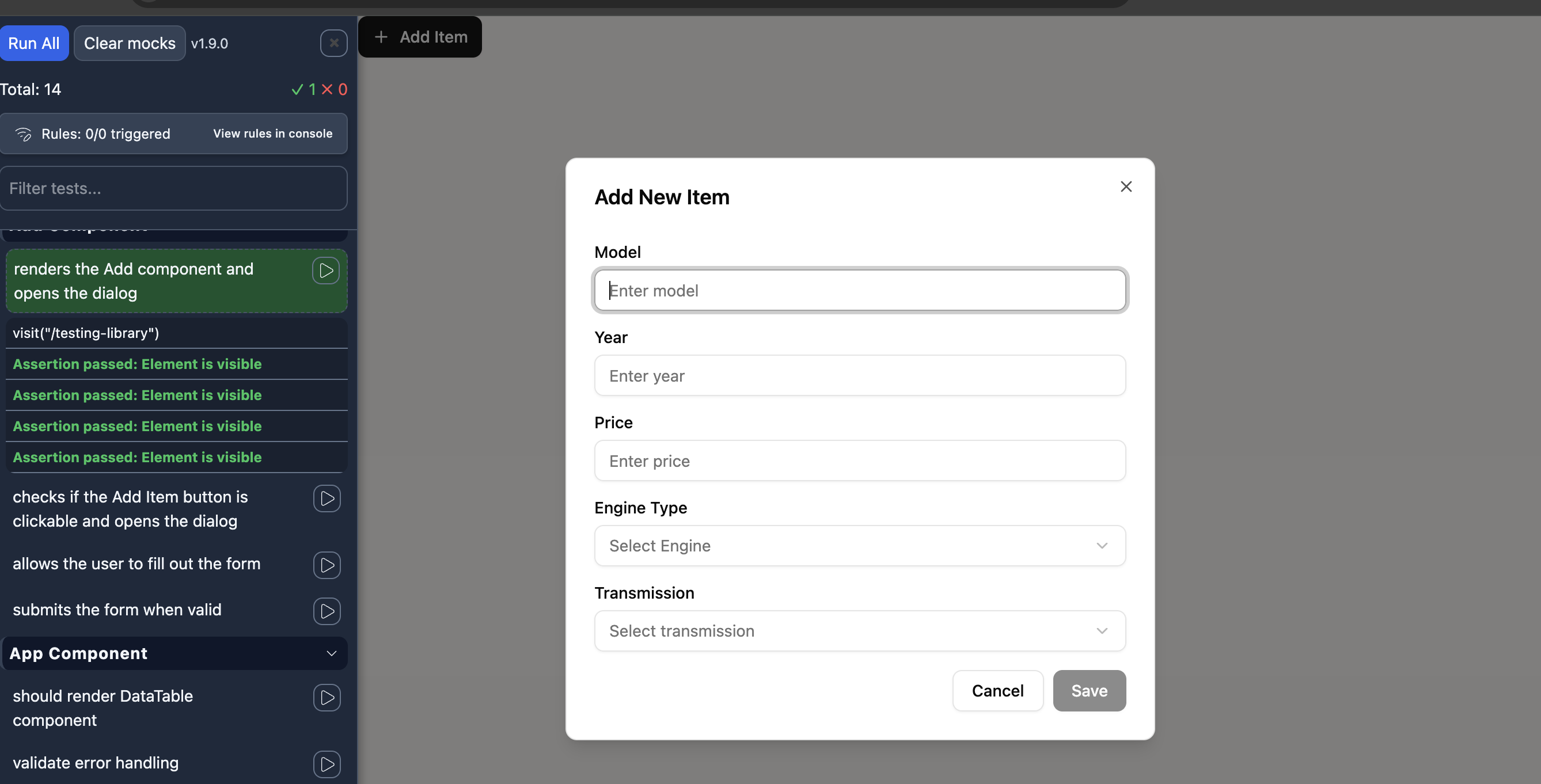
That AppProvider is the real one, not a test double. Add uses a hook that reads from context and posts to an API, and in a real browser both of those work, so there is nothing to stand in for. That turns out to matter more than the missing jsdom.
Why this works at all
Testing Library was never tied to jsdom. @testing-library/react renders a component into a DOM node and @testing-library/dom queries it. jsdom is just the DOM most people hand it. Give it a real one and the same code runs, except now the component is actually on a screen, with a real size, a real position, and your CSS applied to it.
TWD already runs inside your app in the browser, so the real DOM is right there. render() uses it.
The setup
One helper, and no changes to your app.
render() appends its container to document.body, so the component lands after the app, a full viewport below the layout. The app is also still on the page, so screen matches its elements as well as the ones your test just rendered. Both of those are the same problem: the app is in the way.
const HOST_ID = "twd-component-host";
const APP_ROOT_ID = "root";

let appRoot: HTMLElement | null = null;
let placeholder: Comment | null = null;

export function componentHost(): HTMLElement {
  detachApp();

  let host = document.getElementById(HOST_ID);
  if (!host) {
    host = document.createElement("div");
    host.id = HOST_ID;
  }
  if (!host.isConnected) {
    document.body.prepend(host);
  }

  host.innerHTML = "";
  return host;
}

export function restorePage(): void {
  document.getElementById(HOST_ID)?.remove();
  attachApp();
}

function detachApp(): void {
  if (placeholder) return;

  const root = document.getElementById(APP_ROOT_ID);
  if (!root) return;

  appRoot = root;
  placeholder = document.createComment(" app detached by twd component test ");
  root.replaceWith(placeholder);
}

function attachApp(): void {
  if (!placeholder || !appRoot) return;

  placeholder.replaceWith(appRoot);
  placeholder = null;
  appRoot = null;
}
Detaching the app root is not the same as emptying it. root.innerHTML = "" pulls the DOM out from under React while it still holds references to those nodes, and the app does not come back. Moving the node out and putting it back leaves the references intact, so restorePage() returns a live app.
prepend rather than append puts the component at the top of the page instead of below where the app used to be, so you can watch it run without scrolling.
The payoff is that screen behaves exactly like it does in jsdom. The only thing in the document is what your test rendered, which also covers anything the component renders through a portal, since that lands on document.body rather than inside the container.
One detail worth keeping: cleanup() and restorePage() belong in afterEach, not beforeEach. In jsdom the environment is torn down for you between files. In a real browser it is not, so renders stack up, and your flow tests need the app back before they run.
That is the whole setup. Your app does not change.
Two traps
screenDom will not find your component. TWD exposes screenDom, a wrapper around Testing Library queries scoped to your app root so it never matches the TWD sidebar. Testing Library's render() mounts outside that root. I probed it in a real app to be sure:
container.parentElement=<body>   inside #root=false
screen: found   screenDom: not found   screenDomGlobal: found
So use Testing Library's own screen, or TWD's screenDomGlobal, which queries the whole document. If you pick screenDomGlobal, keep queries specific, because it can also match elements inside the sidebar.
Everything else works normally. twd.should takes any element you hand it, whether a query found it in your app or in a component you just rendered.
Your test pattern probably says .ts. Component tests are .tsx. A pattern of /**/*.twd.test.ts skips them silently, with no error and no missing-file warning. They simply never appear in the sidebar:
twd({
  testFilePattern: "/**/*.twd.test.{ts,tsx}",
}),
If you also run Vitest in the same repo, exclude the browser tests from it. Vitest matches *.test.tsx by default, collects the TWD files, finds no describe it recognises, and fails the run with No test suite found in file:
test: {
  exclude: [...configDefaults.exclude, "**/*.twd.test.*"],
},
Both kinds of test, one run
This is the part I did not expect to matter as much as it does.
Component tests and flow tests are now the same kind of artifact. They are files in the same project, running in the same browser, in the same session, against the same instrumented bundle. So one command runs both:
$ npx twd-cli run
Running 14 test(s)...
Code coverage data written to .nyc_output/out.json

--- Run complete ---
  Passed: 14 | Failed: 0 | Skipped: 0
  Duration: 6.9s
Ten of those drive the whole app through routing, search, sorting and deletion. Four render a single dialog component in isolation. One coverage file comes out the other end, covering both.
That last part is usually where multi-runner setups get tedious. Component coverage in one report, end-to-end coverage in another, and a merge step that someone maintains. Here there is nothing to merge, because there was only ever one run.
Where each style fits
Rendering a component in isolation is the right move when the component is the subject: a form's validation states, a dialog that opens and closes, a table that sorts. You skip the navigation, you skip the fixtures, and the test says exactly what it is about.
Flow tests stay the right move for anything that crosses a boundary. Routing, data loading, a sequence of screens, state that survives a navigation. Rendering a component in isolation to test those means rebuilding the app around it, which is how component test files end up longer than the components.
The useful change is not that one replaced the other. It is that choosing between them is now a decision about scope, made per test, instead of a decision about which runner and which DOM you are committing to.
Try it
If you already have Testing Library tests, the fastest way to see this is to copy one, change the imports for describe and it to twd-js/runner, and hand render() the component host.
The example app from this post is on GitHub, with the same component tested in jsdom and in the browser side by side: kevinccbsg/frontend-challenge.
In the next post I look at what happened when I put those two versions next to each other. The jsdom test mocked the hook it was testing through, and once I stopped mocking, it turned out the mocks had been doing most of the work.


