Hoi hoi!
I'm @nyaomaru, a frontend engineer. Thanks to my daily Duolingo streak, Dutch is finally starting to sound slightly less like one extremely long word. Progress! 🦉
In my previous article, I introduced DSA View View, a tool for visualizing data structures and algorithm execution.

{% embed https://dev.to/nyaomaru/i-built-a-tool-to-visualize-dsa-lets-learn-together-dsa-view-view--djo %}
That article covers:
- Why I decided to study DSA again
- What DSA View View is
- How to use it
- How I plan to study with it
So if this is your first time meeting Mr. View, the previous article is a good place to start.
This time, we're opening the hood.
This is the first half of the implementation story, covering everything from the moment a user writes TypeScript to the moment DSA View View generates an input form for that implementation.
We'll mainly look at:
- The overall architecture and FSD
- Runtime type guards with
is-kit
- The
Monaco Editor
- Static
TypeScript analysis
- Compilation with
Babel
- Extracting function signatures from the AST
- Generating the Verification form
You can find the source code here:
{% embed https://github.com/nyaomaru/dsa-view-view %}
All right, let's take a look together!
📝 Designing DSA View View
DSA View View has four main responsibilities:
- Editor
- Compile
- Runtime
- Visualize
There is also a Verification step in the UI, where the user provides input values before the code is executed.
The overall flow looks like below.
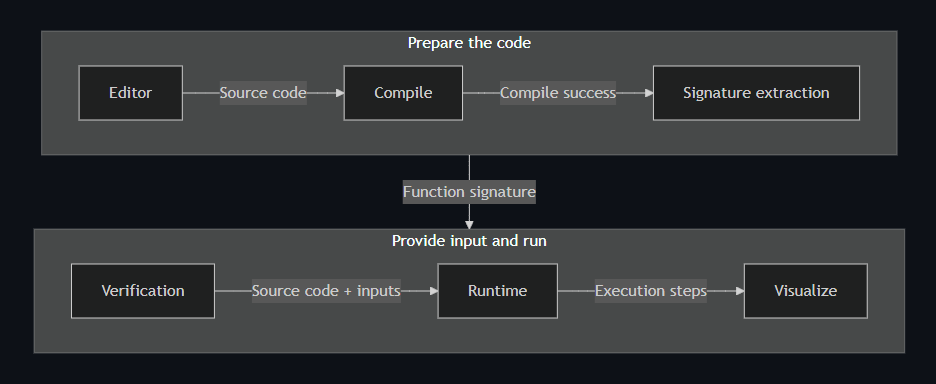
Each part is already a little complicated on its own, and they interact with one another quite deeply.
I could see during the design phase that a flat project structure would eventually leave future-me wandering around the repository like a lost hiker. 🌲
So I decided to use FSD (Feature-Sliced Design).
I previously wrote about how I learned FSD here.
https://dev.to/nyaomaru/lets-learn-feature-sliced-design-fsd-15bb
A simplified version of the project structure looks like this.
src/
├── app/                # App startup and global styles
├── pages/
│   └── main/           # Main page that composes the features
├── widgets/
│   ├── editor-panel/   # UI around the editor
│   ├── control-panel/  # Compile / Verification / Runtime controls
│   └── header/
├── features/
│   ├── code-editing/   # Monaco Editor, formatting, and parsing
│   ├── compilation/    # Compile behavior
│   ├── code-execution/ # AST transforms, execution, step recording, input forms
│   ├── visualization/  # Visualization detection and views
│   └── shareable-url/
├── entities/
│   ├── code/           # Code, types, and compile results
│   ├── execution/      # ExecutionState and ExecutionStep
│   ├── data-structure/ # TreeNode, ListNode, and friends
│   └── algorithm-example/
└── shared/
    ├── ui/             # Generic components such as Button, Card, and Dialog
    └── lib/            # Guards, cloning, serializers, and other utilities
For example, features/code-execution owns the behavior of executing code.
On the other hand, ExecutionState and ExecutionStep describe domain concepts, so they live in entities/execution.
Then pages/main combines the individual features and coordinates the overall flow:
- After Compile succeeds, extract the signature and move to Verification
- After receiving the inputs, start the Runtime
- When the Runtime step changes, highlight the corresponding line in the Editor
Each slice is consumed through a public API such as index.ts, and dependencies are allowed to flow only from higher layers to lower layers.
I also verify those dependency directions and public API boundaries with architecture tests.
Drawing those boundaries helps prevent the classic.
"I changed the Runtime. Why is the Editor broken now?"
A mystery nobody ordered.
🛡️ is-kit: Protecting the App from unknown Hell
FSD can organize dependency directions, but it cannot automatically make values entering the application safe.
In DSA View View, mysterious unknown values come flying in from many directions:
- AST nodes returned by
Babel Parser
- Messages sent between
Web Workers
- JSON restored from a shareable URL
- Runtime snapshots recorded from user code
- Arrays, trees, graphs, and heaps being inspected as visualization candidates
TypeScript is wonderfully reliable at compile time.
But at runtime, it does not interrogate a value and ask.
"Are you really an ExecutionState, or are you just wearing its name tag?"
That is where my type guard library, is-kit, comes in.
is-kit is a small, zero-dependency library for building and composing reusable TypeScript type guards.
import {
  and,
  arrayOf,
  define,
  hasKey,
  isArray,
  isNumber,
  isObject,
  isString,
  not,
  oneOfValues,
  or,
  predicateToRefine,
  type Guard,
} from "is-kit";

const isNumericString = and(
  isString,
  predicateToRefine<string>((value) => {
    return value.trim() !== "" && Number.isFinite(Number(value));
  }),
);

const isNonArrayObject = and(isObject, not(isArray));
const isNumericValue = or(isNumber, isNumericString);
const isNumericArray = arrayOf(isNumericValue);
Small guards can be combined like LEGO bricks to create more complicated runtime checks.
For example, the code that finds class methods in an AST defines a guard.
const isMethodNodeType = oneOfValues("ClassMethod", "MethodDefinition");

const hasType = hasKey("type");

const isMethodLikeNode: Guard<MethodLikeNode> = and(
  isObject,
  define<MethodLikeNode>(
    (value) => hasType(value) && isMethodNodeType(value.type),
  ),
);
After a value passes this guard, it is narrowed from a plain unknown to MethodLikeNode.
The guard can then be passed directly to filter.
const members = classNode.body.body.filter(isMethodLikeNode);
This is extremely convenient.
Without is-kit, checks like this would have multiplied across the repository:
typeof value === "object" &&
value !== null &&
"type" in value &&
Array.isArray(...)
Eventually, slightly different versions of the same guard would appear everywhere.
Six months later, I would be asking:
"What is the difference between this isObject and that isObject?"
And congratulations—we would have built a second maze inside the first maze.
At the time of writing, shared guards are used from around 69 files under src.
If Monaco and Babel are the stars on stage, is-kit is the very serious bouncer standing at every entrance to the AST, Worker, share URL, Runtime, and Visualization layers.
Mr. Unknown is not getting in.
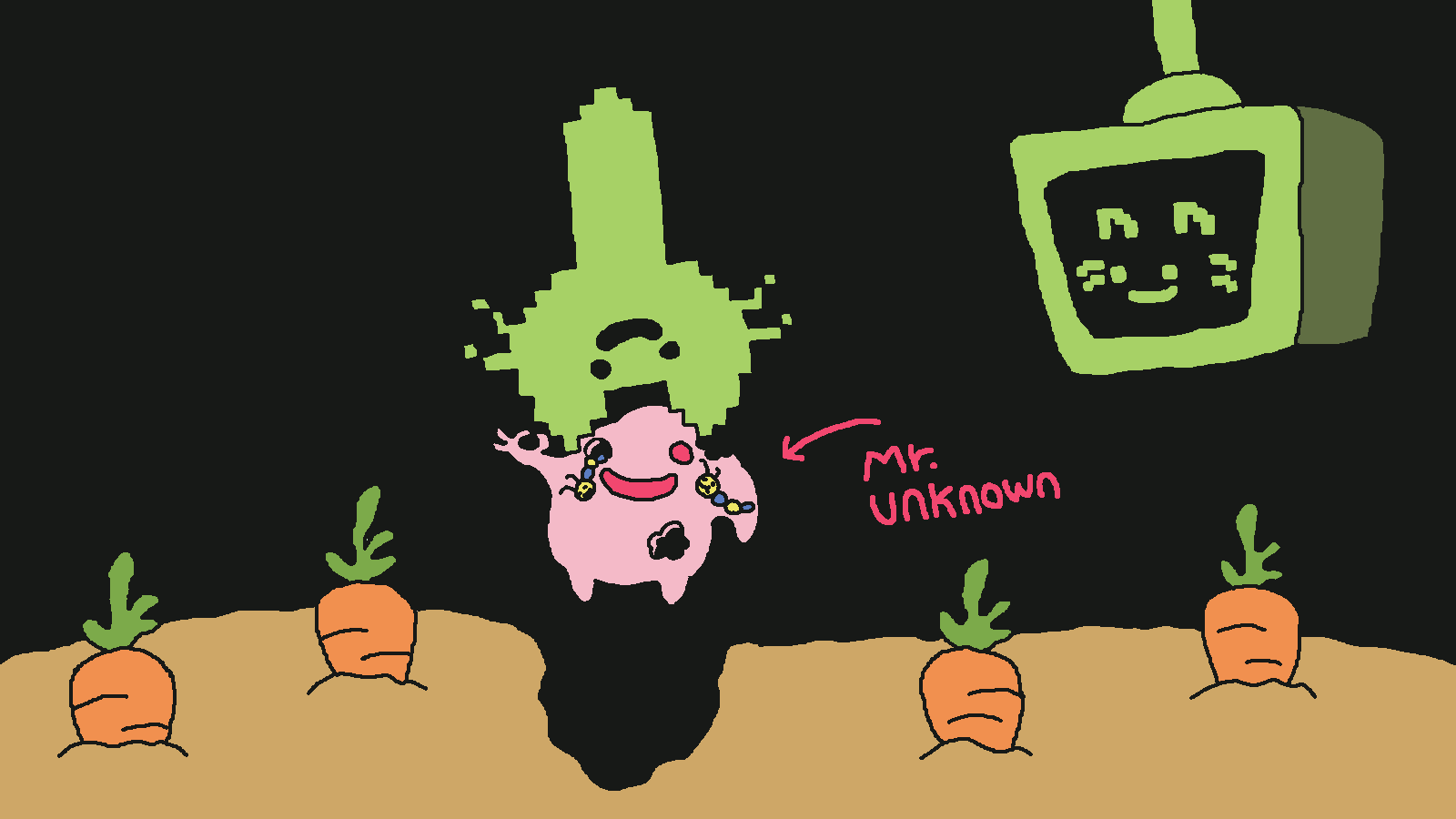
I also use Zod in the Verification forms, but the responsibilities are different:
is-kit: Internal narrowing, filtering, and reusable runtime guardsZod: Input form schemas, validation messages, and user-facing errors
Instead of making one library solve every problem, is-kit handles internal runtime safety while Zod handles user input validation.
I am very glad I built is-kit before building this application. Fighting all those unknown values with my bare hands would have made me the first thing that needed visualizing.
✏️ Editor
The Editor uses Monaco Editor.
Monaco is the browser-focused editor component also used by VS Code, giving the application syntax highlighting, completion, and TypeScript diagnostics.
The downside is that Monaco is not exactly tiny.
Loading everything immediately made the initial display heavier, so DSA View View first renders a lightweight textarea.
The same textarea is also used as the <Suspense> fallback, preventing the editor area from becoming empty while Monaco is loading.
<textarea
  aria-label="Code Editor"
  value={value}
  onChange={(event) => onChange(event.target.value)}
  onFocus={onActivate}
/>
Behind the scenes, DSA View View waits briefly and prepares Monaco with requestIdleCallback.
If the browser does not support requestIdleCallback, loading starts normally. If the user focuses the textarea before that, Monaco preparation begins immediately.
const CodeEditor = lazy(() =>
  prepareCodeEditorModule().then((module) => ({
    default: module.CodeEditor,
  })),
);
Once loading finishes, the lightweight editor is replaced by Monaco while preserving the same source code.
It looks like an editor, but secretly it is still a textarea.
A tiny editor body-double strategy.
Static TypeScript Analysis
Static analysis uses the TypeScript Worker included with Monaco.
The TypeScript Language Service runs in a separate Worker from the editor itself and returns type and syntax problems as markers.
Those markers are converted into the application's CompilationError model and used to control the Compile button and display errors.
type CompilationError = {
  line: number;
  column: number;
  message: string;
  severity: "error" | "warning";
};
The Compile button is disabled only when an error exists. Warnings alone do not prevent compilation.
One important detail is that Babel does not perform TypeScript type checking.
The responsibilities are:
- Monaco's
TypeScript Worker: Diagnose types and syntax
Babel: Transform TypeScript syntax into JavaScript
Keeping that distinction clear saved me from blaming Babel for crimes it did not commit.
Registering DSA Classes in the Editor
Many LeetCode problems provide classes such as TreeNode and ListNode automatically.
DSA View View also provides common classes so users do not have to declare them every time:
TreeNodeListNodeGraphNode / _NodeTrieNodePriorityQueueMinHeap / MaxHeapDequeUnionFind / DSUCounter
Monaco provides a mechanism called setExtraLibs, which lets the application add these type definitions to the Editor:
monaco.typescript.typescriptDefaults.setExtraLibs([
  {
    content,
    filePath: "ts:algorithm-visualizer-prepared-classes.ts",
  },
]);
However, setExtraLibs only supports type analysis inside the Editor. It does not magically create those classes at Runtime.
So the Compile and Runtime pipelines also prepend the same class definitions to the user's code as a prelude.
If the user declares a class, interface, or type with the same name, DSA View View skips injecting the prepared definition.
Imagine carefully writing your own ListNode, only for another ListNode to emerge from behind it.
That is not type safety. That is a summer horror movie.
Formatting uses Prettier.
The Prettier core, TypeScript plugin, and Estree plugin are dynamically imported only when needed and registered as Monaco's Document Formatting Provider.
Users can therefore format their code with Command/Ctrl + S or Shift + Alt + F.
So far, I have described "Compile" as if it were one large operation.
Internally, however, the FSD slice features/compilation does not own the whole flow.
When the user presses the Compile button, pages/main coordinates these operations:
features/compilation checks whether the TypeScript can be transformed into JavaScript- The parser in
features/code-editing extracts the function or class signature
- If everything succeeds, the UI moves to Verification
features/code-execution displays an input form matching that signature
To the user, this feels like one continuous Compile step.
Inside the application, each responsibility remains separate.
The application uses Babel to transform TypeScript.
const prepared = prepareTypeScriptCodeWithClasses(code);

const result = transform(prepared.code, {
  presets: ["typescript"],
  filename: "input.ts",
});
DSA View View runs entirely in the browser, so it is not invoking tsc on a Node.js server.
Instead, it uses @babel/standalone to transform TypeScript syntax into JavaScript in the browser.
Before transformation, the application prepends any prepared classes that the user has not declared themselves.
If the source contains imports for those prepared classes, they are removed because the browser execution environment cannot resolve those modules.
Again, an important reminder:
Babel's TypeScript preset primarily removes type information. It does not type-check the program.
Monaco handles type errors. Babel checks whether the syntax can be transformed.
The generated JavaScript from this stage is also not executed directly on the main thread.
For the Runtime, the original source is instrumented separately and then executed inside a Web Worker.
That is the fun part—and the topic of the next article.
After Compile succeeds, DSA View View needs to build an input form.
Suppose the user writes this function:
function trap(height: number[]): number {
  // ...
}
The source code is parsed into an AST with Babel Parser, and DSA View View extracts information like this:
{
  name: "trap",
  parameters: [
    {
      name: "height",
      type: "number-array",
      optional: false,
    },
  ],
  returnType: "number",
}
The parser supports more than ordinary function declarations:
- Function declarations
- Arrow functions assigned to variables
- Function expressions assigned to variables
- LeetCode-style factory functions that return another function
- Class declarations
For a class, the parser extracts the constructor and callable methods. private methods are currently excluded.
For class-design problems such as LRUCache and MedianFinder, it extracts the class name, constructor, method names, and arguments.
When the source contains multiple helper classes, DSA View View avoids prioritizing prepared classes as solution candidates and compares the number of callable methods to select the likely design class.
This selection is heuristic, so it cannot perfectly identify every possible class structure yet.
There are always more creative ways to write JavaScript than I expect. JavaScript considers this a feature.
For ordinary functions, the input form is built from the extracted signature using React Hook Form and Zod.
Supported input types include:
numberstringbooleannumber[] / string[] / boolean[]number[][] / string[][] / boolean[][]TreeNodeListNodeGraphNode / _Node
The input UI and validation behavior change depending on the type.
For example, a number[] accepts both:
1, 2, 3
and:
[1, 2, 3]
Both formats are converted into a real array that can be passed to the Runtime.
For TreeNode, the application constructs a tree from a level-order array.
When a problem has multiple TreeNode parameters, users can also select a specific node from the first root.
For ListNode, users can build a linked list from an array or node-based input and specify the cycle position.
For GraphNode, a cyclic graph structure is constructed from a LeetCode-style adjacency list.
Class-design problems use a different UI.
Instead of the normal parameter form powered by React Hook Form and Zod, DSA View View displays the same Operations and Arguments JSON format used by LeetCode.
For example, MedianFinder uses:
Operations: ["MedianFinder", "addNum", "addNum", "findMedian"]
Arguments:  [[], [1], [2], []]
This form validates class-design-specific requirements, including:
- The number of operations matches the number of argument lists
- The first operation matches the class name
So the Compile button starts a chain of separate responsibilities:
- Babel verifies that transformation is possible
- AST analysis extracts the signature
- The Verification layer generates the appropriate input form
pages/main connects the entire flow from the Editor to Verification
🎯 Summary
In this article, we followed the path from writing TypeScript in DSA View View to generating the inputs needed for execution.
The broad flow is:
- Render a lightweight
textarea first
- Prepare Monaco Editor in the background
- Diagnose types and syntax with the
TypeScript Worker
- Use Babel to check whether the
TypeScript can be transformed into JavaScript
- Extract the function or class signature from the AST
- Generate a Verification form based on the detected types
The important design decision was not forcing the Editor, diagnostics, syntax transformation, and input UI into one giant operation.
Instead:
is-kit safely narrows unknown values from the AST, Workers, JSON, and runtime snapshots- Monaco's
TypeScript Worker diagnoses types and syntax
- Babel transforms
TypeScript syntax into JavaScript
- AST analysis extracts the signature needed by the Verification UI
- The Verification form validates inputs and converts them into Runtime values
pages/main connects the separate steps and advances the UI
Keeping those responsibilities separate made the flow much easier to understand and extend.
In the next article, we will finally enter the heart of DSA View View: the Runtime.
That is where Mr. View stops politely waiting beside the Editor and starts watching every move your variables make. 👀
There are still unsupported patterns and types, so Issues and PRs are always welcome!
And if you enjoy the project, I would be very happy if you left a GitHub ⭐!
https://github.com/nyaomaru/dsa-view-view