A Wireshark dissector for DVRIP/Sofia protocol found on Xiongmai based IP cameras.
Full working dissector code is available at a DVRIP analysis repository.
Full writeup of a sample IP camera on which this dissector was tested is available at Besder 6024PB-XMA501 IP camera security investigation repository.
Table of Contents
Usage
Linux
cp dvripWireshark.lua /usr/lib/wireshark/plugins/
Windows
Copy dvripWireshark.lua to %APPDATA%\Wireshark\plugins
DVRIP/Sofia Ports
This dissector is based on a DVRIP Wireshark Dissector for Port TCP/37777 (Dahua IP camera), which can be found here: https://github.com/r4bit999/dvrip-analysis/tree/master
DVRIP/Sofia protocol found in Xiongmai-based IP cameras run on the following ports:
- TCP/34567 for local controls and media stream.
- TCP/6611 for cloud controls and media stream.
- UDP/34569 and UDP/34571 for local configs.
- UDP/7999 and UDP/8765 for cloud configs.
Test Device
Tested on Besder 6024PB-XMA501 IP camera:
Model: XM530_50X50-WG_8M
Firmware version: V5.00.R02.00030747.10010.349f17
Aside from the main DVRIP/Sofia message header, protocol's media payloads have their own headers. All media payload header fields (except first 4 bits - signature that indicates the type of a media payload) are reordered to their little-endian (LE) values.
Media payload headers were reconstructed based on Xiongmai bitstream frame format document.
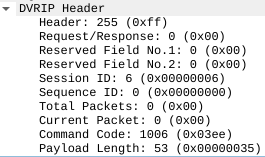
Header description of a single DVRIP/Sofia message is based on Digital Video Recorder Interface Protocol document, the actual diagram being on page 7.

- BIT 0: message header bit, fixed as 0xFF.
- BIT 1: observed to be equal to 0 for requests and equal to 1 for responses from the IP camera.
- BIT 2: reserved bit 1:
- Equals
0 when H.264 video codec is used (BIT4 = 0x02 on I-Frame header).
- Equals
1 when H.265 video codec is used (BIT4 = 0x12 on I-Frame header).
- BIT 3: reserved bit 2:
- Equals
128 when DVRIP message contains audio frames.
- Equals
0 otherwise.
- BIT 4-7: session ID. Assigned by the camera after successful login. Needs to be present in every subsequent message.
- BIT 8-11: sequence number. Increments from 0 after startup, and after reaching the (unknown) maximum, starts from 0 again.
- BIT 12: total number of messages in a single packet. Value of 0 or 1 indicate a single message per packet.
- BIT 13: number of a current message in a packet. Meaningful only when the value of total packets (BIT 12) is greater than 1.
- BIT 14-15: command code (also called message id). The code defines what action to perform.
- BIT 16-19: data (payload) length. Length of a JSON payload, which starts immediately after DVRIP/Sofia header.

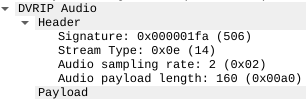
- BIT 0-3: signature
- BIT 4: audio codec (0x0e = G711A)
- BIT 5: sampling rate (0x02 = 8kHz sampling)
- BIT 6-7: length of audio payload

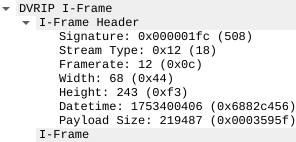
- BIT 0-3: signature
- BIT 4: video codec (0x01 = MPEG4, 0x02 = H.264, 0x12 = H.265)
- BIT 5: encoded framerate (variable; 1-25 for PAL, 1-30 for NTSC)
- BIT 6: low 8 bits of image width; the value is actual width divided by 8
- BIT 7: low 8 bits of image height; the value is actual height divided by 8
- BIT 8-11: datetime of the capture
- BIT 12-15: length of I-Frame payload
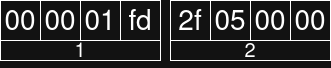
First 4 bits of an I-Frame payload (BITS 16-19) are equal to 0x00000001
Same exact header fields are shared between I-Frames (FC) and snapshots (FE).
Extension of I-Frames.
- BIT 0-3: signature
- BIT 4-7: length of P-Frame payload
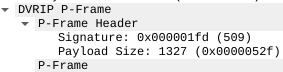
First 4 bits of a P-Frame payload (BITS 8-11) are equal to 0x00000001

- BIT 0-3: signature
- BIT 4: general information (unconfirmed)
- BIT 5: unused value
- BIT 6-7: payload length
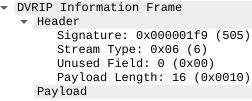
Used for information transmission. First bit after signature (bit 4):
- 0x01 - general information.
- 0x06 - unknown value.
Saving Streams
This dissector is programmed to reconstruct audio and video streams from the packet capture (.pcap) file. In Wireshark GUI, navigate to the Tools menu and select DVRIP Save Streams entry. In the pop-up dialog box, enter the desired folder to save streams in.
File names of saved streams are structured as follows:
<camera-ip-address>_<reserved-bit-1>_<reserved-bit-2>_<audio|video>.<g711|h265>
Cloud Communications
Same logic is used both for local and cloud communications with the IP camera. Only observed difference is that for local communications, port TCP/34567 is used and for cloud communications, it is port TCP/6611.
DVRIP/Sofia Protocol Field List
DVRIP/Sofia protocol fields used in this protocol dissector:
| Field Name | Filter Name | Description |
|---|
| DVRIP_header | dvrip.header | Full DVRIP/Sofia header |
| DVRIP_header_id | dvrip.header_id | First byte of DVRIP header, observed to be 0xFF |
| DVRIP_req_resp | dvrip.req_resp | Request/response byte. 0x00 for request and 0x01 for response |
| DVRIP_reserved_1 | dvrip.reserved_1 | Reserved bit 1. Indicates video stream |
| DVRIP_reserved_2 | dvrip.reserved_2 | Reserved bit 2. Indicates audio stream |
| DVRIP_session_id | dvrip.session_id | ID of an established session |
| DVRIP_sequence_id | dvrip.sequence_id | Sequence ID. Message number in the current session |
| DVRIP_total_packets | dvrip.total_packets | Number of messages in a single packet. 0 or 1 indicate a single message |
| DVRIP_current_packet | dvrip.current_packet | current message in a packet. Meaningful only when total packets > 1 |
| DVRIP_command_code | dvrip.command_code | Command code/Message ID. Identifies an action to perform |
| DVRIP_payload_size | dvrip.payload_size | Payload size of a current message |
| DVRIP_payload_JSON_RAW | dvrip.data | JSON data payload. Starts immediately after header |
| DVRIP_newline | dvrip.newline | Trailin newline after JSON payload |
| DVRIP_cloud_ip | dvrip.cloud_ip | IP address of cloud relay |
| DVRIP_home_ip | dvrip.home_ip | Public IP address of a home network |
| DVRIP_device_id | dvrip.device_id | Serial number of IP camera |
| DVRIP_device_mac | dvrip.device_mac_address | MAC address of IP camera |
| DVRIP_encrypted | dvrip.encrypted | Encrypted payload of a message |
| DVRIP_signature | dvrip.signature | Signature of media frame |
| DVRIP_stream_type | dvrip.stream_type | Video stream type |
| DVRIP_framerate | dvrip.framerate | Stream framerate |
| DVRIP_width | dvrip.width | Width of video frame (divided by 8) |
| DVRIP_height | dvrip.height | Height of video frame (divided by 8) |
| DVRIP_datetime | dvrip.datetime | Start date of the stream |
| DVRIP_media_payload_size | dvrip.media_payload_size | Payload size of media frame |
| DVRIP_sampling_rate | dvrip.sampling_rate | Audio sampling rate |
| DVRIP_unused_field | dvrip.unused_field | Unused field in information frame header |
