Introduction
Hello everyone!
This is the second installment in our series on AI agent development using Motia and the Strands Agent SDK!
{% embed https://dev.to/mashharuki/introduction-to-ai-agent-development-with-motia-x-strands-agent-sdk-1enk %}
In the previous post, we explored setting up the backend as an API server. In this article, we'll focus on the frontend and how to call those APIs!
Note: I won't be diving into the backend implementation details here, so if you're interested in that, please check out the previous post!
I hope you enjoy reading this to the end!
Source Code Used in This Post
The complete source code for this project is available in the following GitHub repository:
https://github.com/mashharuki/Motia-Strands-Agent-Sample
API Features and Endpoints
Here is a summary of the functions and endpoints implemented in the backend:
| Method | Endpoint | Feature | Implementation |
|---|
| GET | /tickets | Fetch ticket list | Node.js |
| POST | /tickets | Create new ticket | Node.js |
| POST | /tickets/triage | Ticket triage | Python |
| POST | /tickets/escalate | Ticket escalation | Python |
| POST | /tickets/ai-assistant | Call AI Assistant | Node.js |
Frontend Overview
The frontend is built using React.js + Vite.
Since it primarily involves calling the APIs we've built, the process is very similar to a standard backend integration.
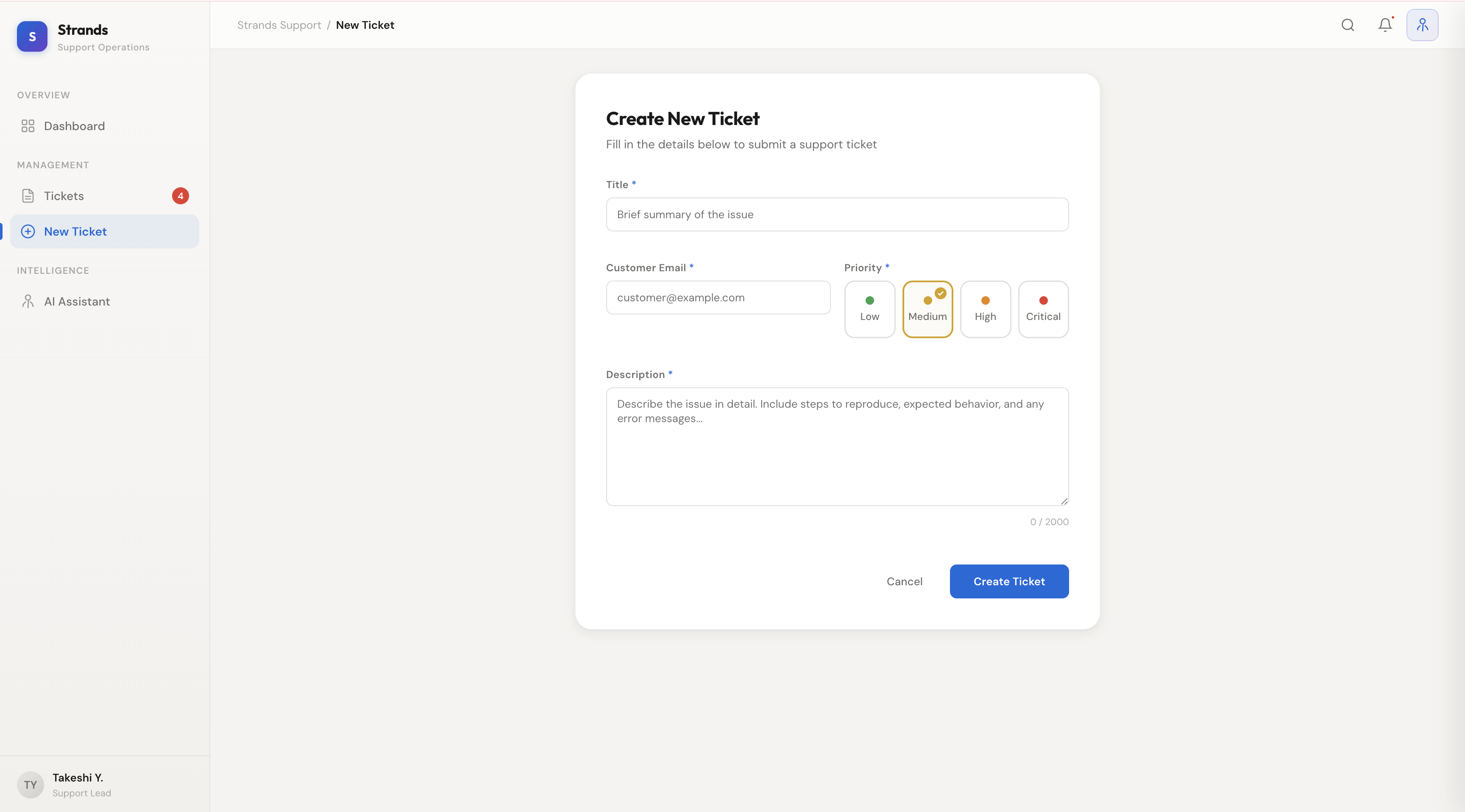
UI Design
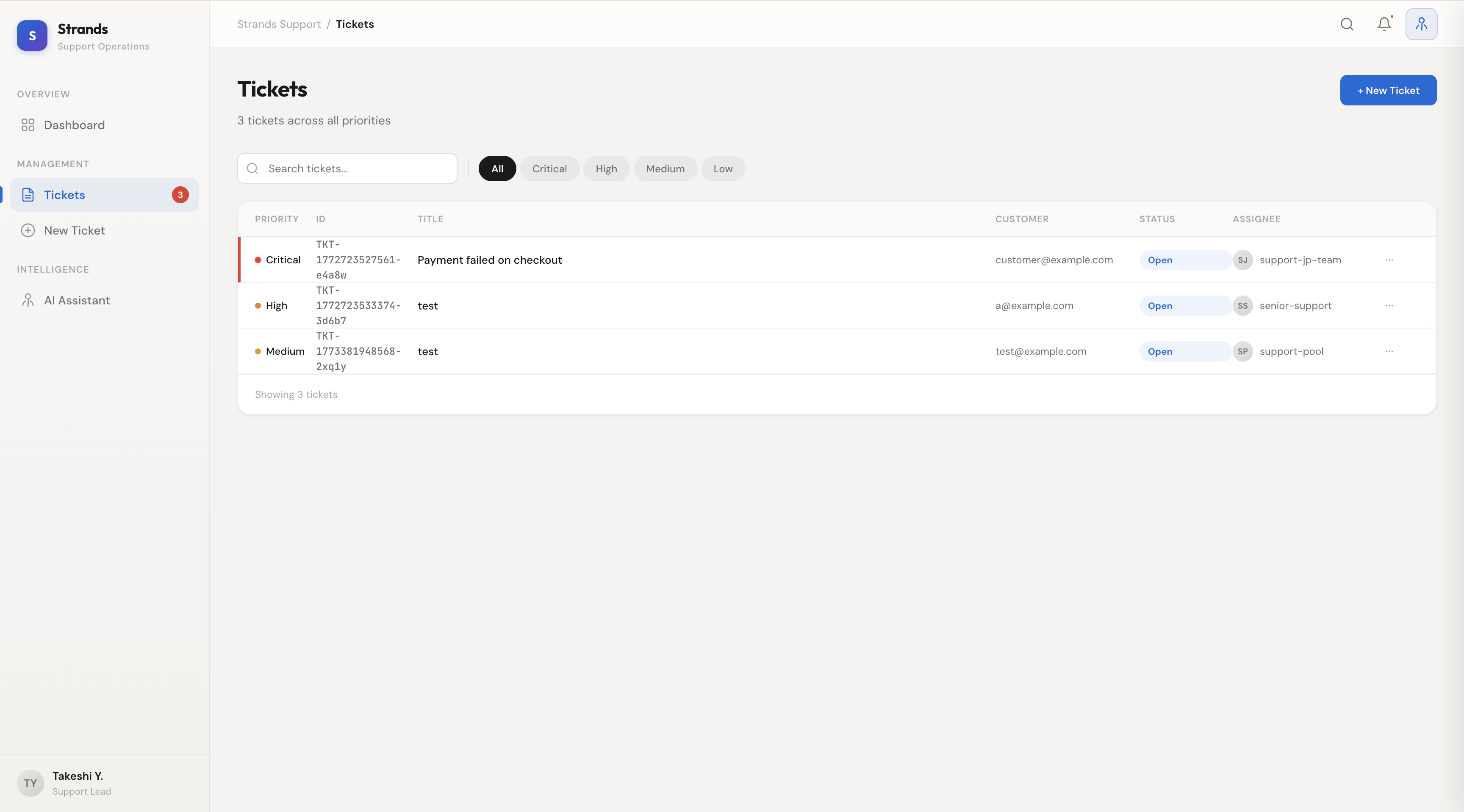
The UI consists of a Sidebar, Topbar, Main Content area, and an AI Panel.
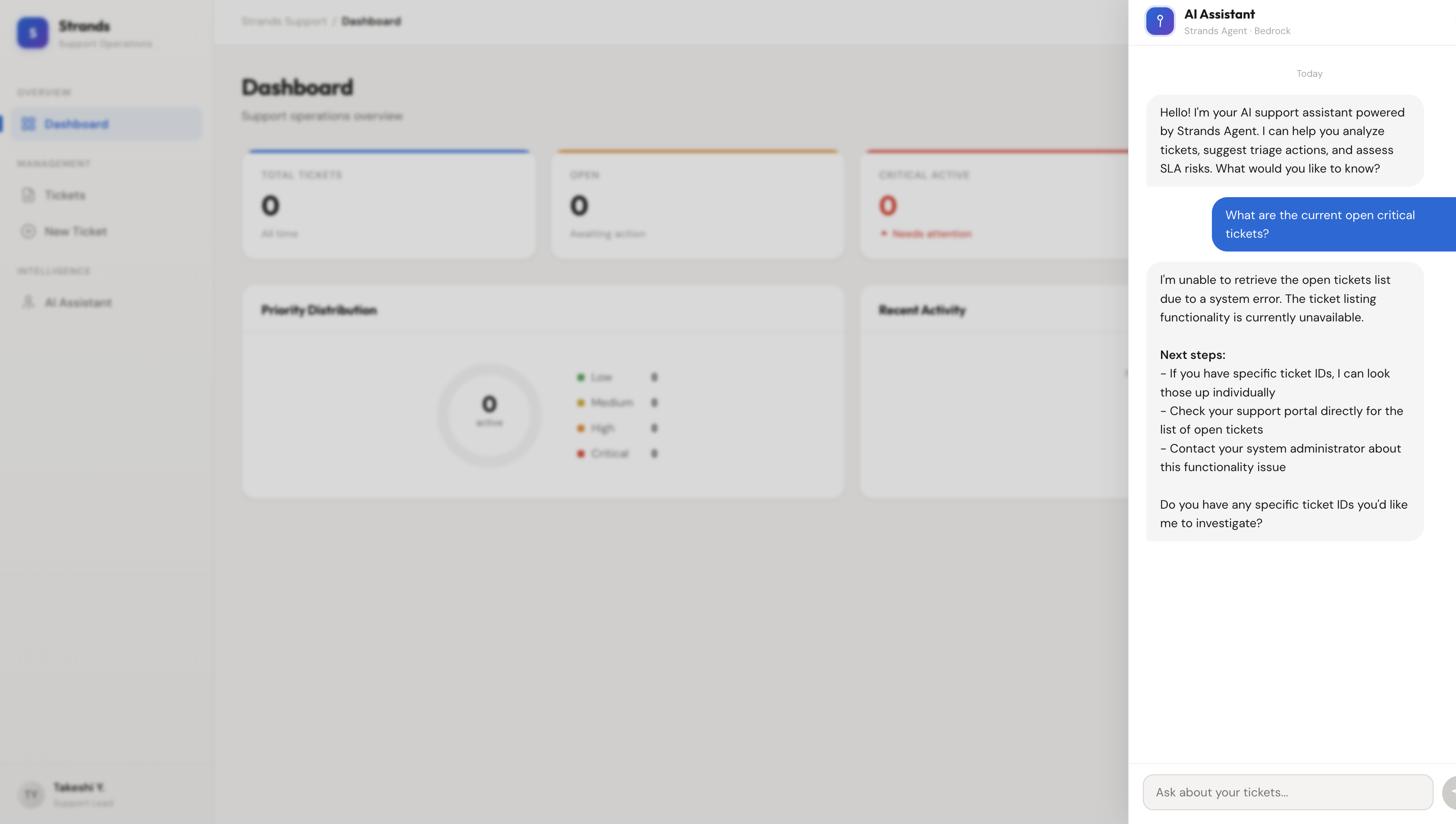
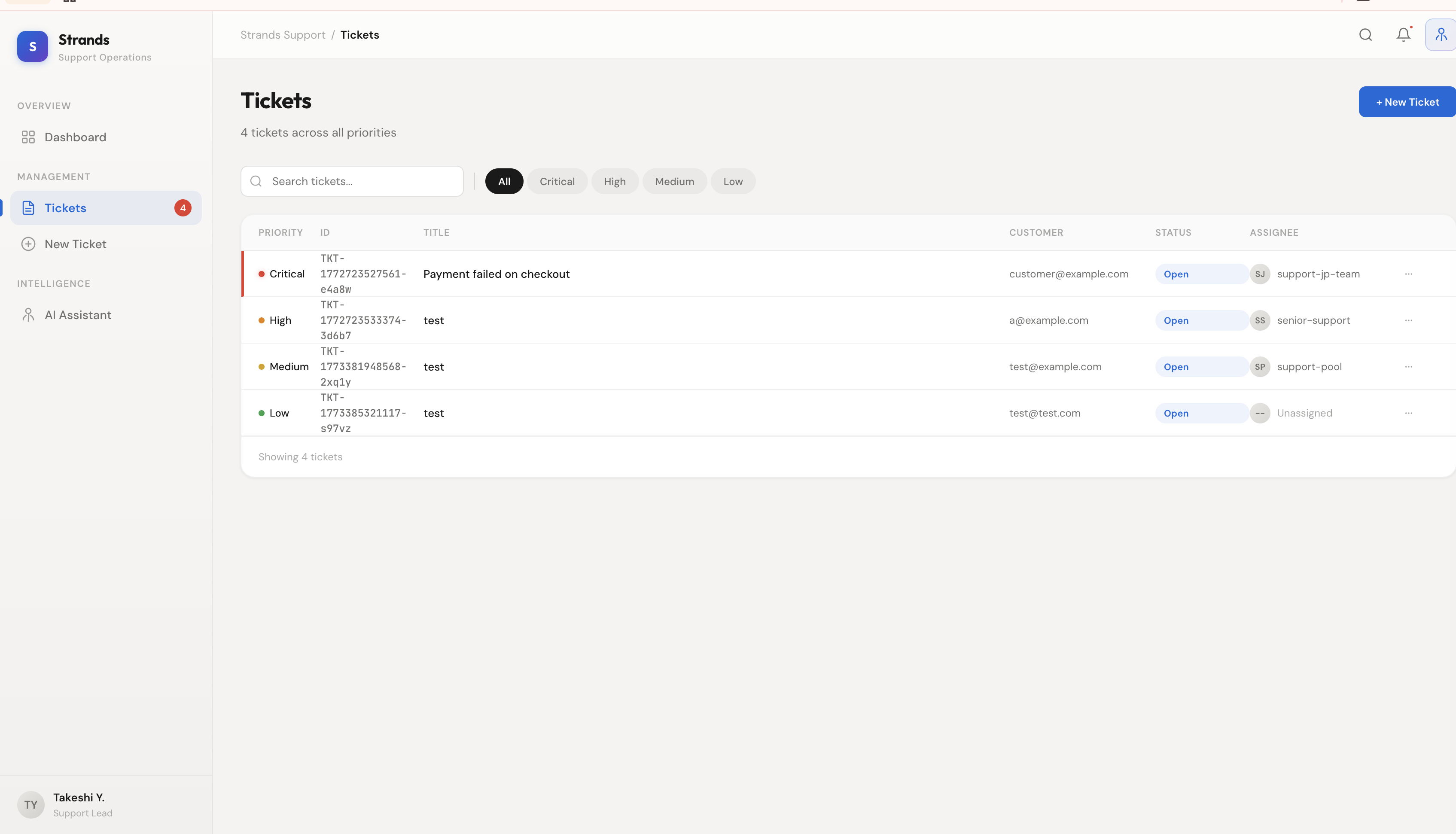
It's designed as a dashboard where you can easily view the list and status of open tickets.
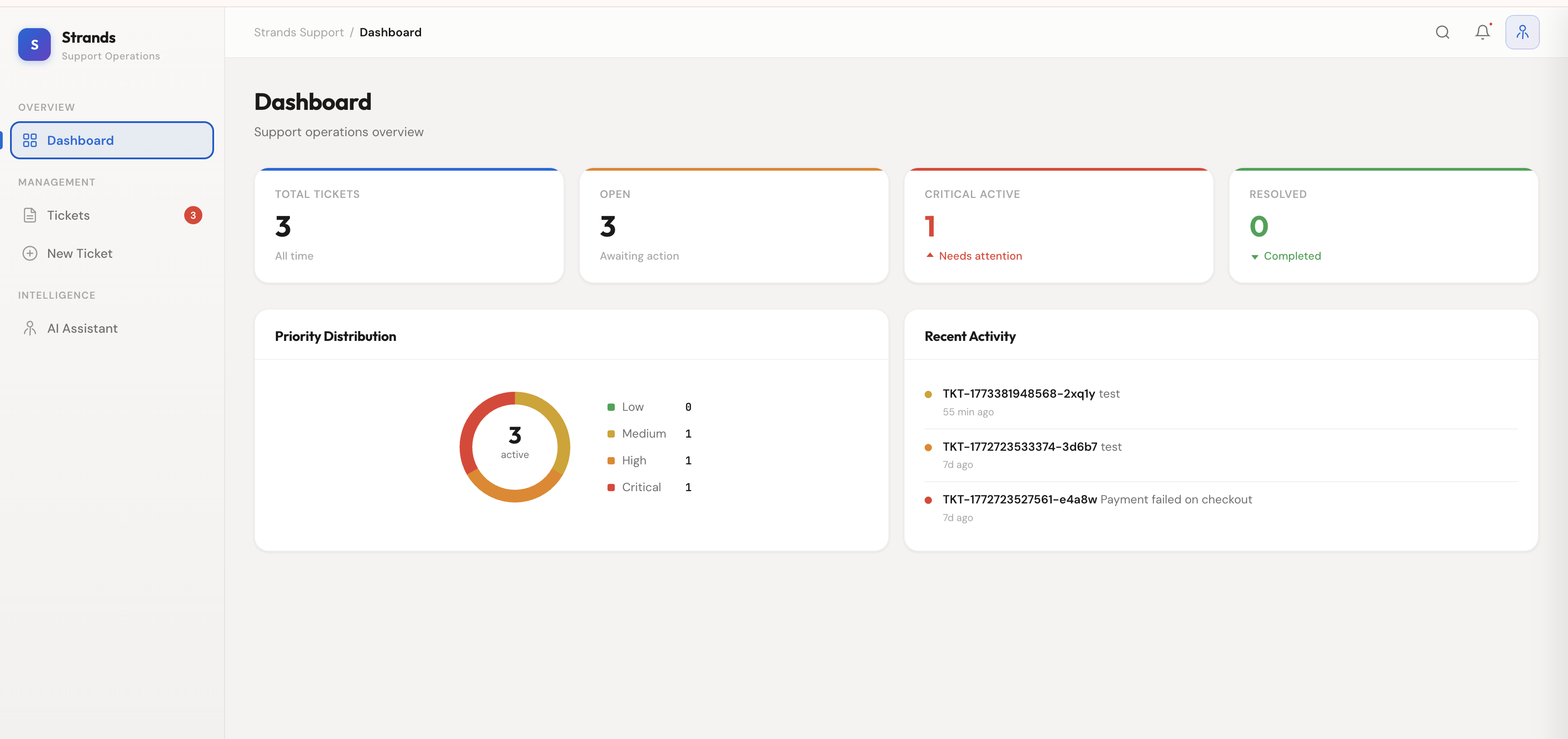
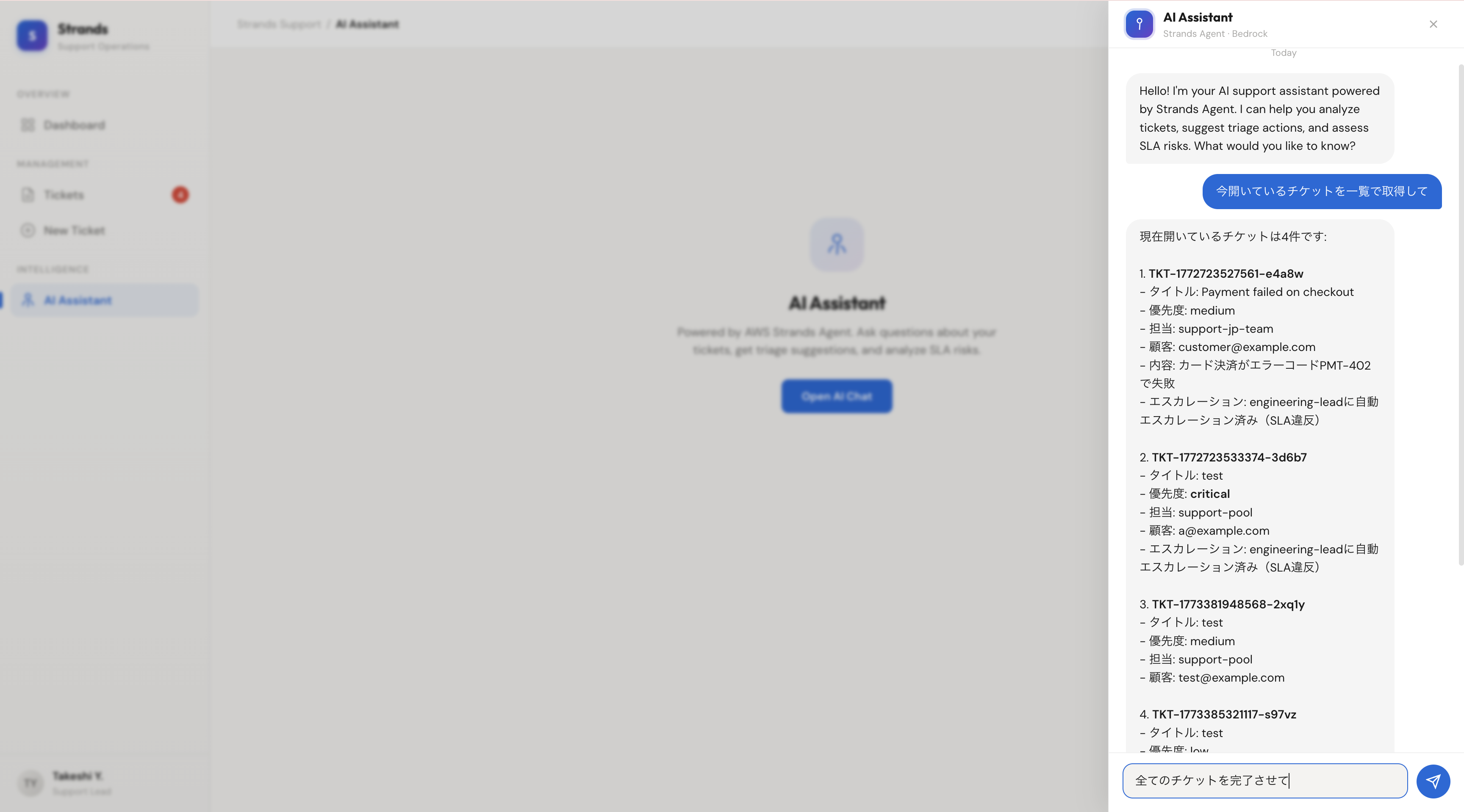
The AI Assistant feature can be accessed by entering text in the chat column on the right side.
Since we've implemented a tool that allows the AI to fetch the ticket list, you can ask about the current status of your open tickets!
Implementation Highlights
In src/lib/api.ts, we've defined a common request<T>() function to wrap our API calls.
- It adds
Content-Type: application/json by default.
- It throws an
Error with the response body for non-2xx status codes.
- It handles returned JSON as typed data.
/**
 * Common request processing
 * @param path
 * @param options
 * @returns
 */
async function request<T>(path: string, options?: RequestInit): Promise<T> {
  const res = await fetch(`${BASE_URL}${path}`, {
    ...options,
    headers: {
      "Content-Type": "application/json",
      ...options?.headers,
    },
  });
  if (!res.ok) {
    const body = await res.text();
    throw new Error(body || `Request failed: ${res.status}`);
  }
  return res.json();
}
We then wrap the callable APIs into the following api client object:
/**
 * API Client
 */
export const api = {
  // Fetch ticket list
  getTickets: async () => {
    const data = await request<Ticket[] | { tickets: unknown[] }>("/tickets");
    const rawTickets = Array.isArray(data)
      ? data
      : Array.isArray(data?.tickets)
        ? data.tickets
        : [];
    return rawTickets.map(normalizeTicket).filter((t): t is Ticket => t !== null);
  },
  // Create a ticket
  createTicket: (payload: CreateTicketPayload) =>
    request<CreateTicketResponse>("/tickets", {
      method: "POST",
      body: JSON.stringify(payload),
    }),
  // Triage a ticket
  triageTicket: (payload: TriagePayload) =>
    request<Ticket>("/tickets/triage", {
      method: "POST",
      body: JSON.stringify(payload),
    }),

  // Escalate a ticket
  escalateTicket: (payload: EscalatePayload) =>
    request<Ticket>("/tickets/escalate", {
      method: "POST",
      body: JSON.stringify(payload),
    }),
  // Query the AI Assistant
  aiAssistant: (payload: AIAssistantPayload) =>
    request<AIAssistantResponse>("/tickets/ai-assistant", {
      method: "POST",
      body: JSON.stringify(payload),
    }),
};
Actual API Call Examples
Fetching Tickets API
/**
 * Fetch tickets from the API and update state
 */
const fetchTickets = useCallback(async () => {
  try {
    // Fetch by calling the API
    const data = await api.getTickets();
    setTickets(Array.isArray(data) ? data : []);
  } catch {
    // API may not be running yet
  }
}, []);
AI Assistant API
const sendMessage = useCallback(
  async (text: string) => {
    if (!text.trim() || loading) return;
    setShowSuggestions(false);
    const userMsg: Message = {
      id: ++msgId,
      role: "user",
      content: text.trim(),
    };
    setMessages((prev) => [...prev, userMsg]);
    setInput("");
    setLoading(true);

    try {
      // Prepare the payload
      const payload = contextTicketId
        ? { prompt: text.trim(), ticketId: contextTicketId }
        : { prompt: text.trim() };
      // AI Assistant API (calls Amazon Bedrock via Strands Agent)
      const res = await api.aiAssistant(payload);
      const aiMsg: Message = {
        id: ++msgId,
        role: "ai",
        content: typeof res.answer === "string" ? res.answer : "",
      };
      setMessages((prev) => [...prev, aiMsg]);
    } catch (err) {
      const errMsg: Message = {
        id: ++msgId,
        role: "ai",
        content: `Error: ${err instanceof Error ? err.message : "Failed to get response"}`,
      };
      setMessages((prev) => [...prev, errMsg]);
    } finally {
      setLoading(false);
    }
  },
  [loading, contextTicketId],
);
Ticket Triage API
const handleTriage = async () => {
  setTriageLoading(true);
  try {
    // Call the Triage API!
    await api.triageTicket({
      ticketId: ticket.ticketId,
      assignee: triageAssignee,
      priority: triagePriority,
    });
    showToast(`Ticket ${ticket.ticketId} triaged successfully`, "success");
    onRefresh();
  } catch (err) {
    showToast(
      `Triage failed: ${err instanceof Error ? err.message : "Unknown error"}`,
      "error",
    );
  } finally {
    setTriageLoading(false);
  }
};
Ticket Escalation API
const handleEscalate = async () => {
  if (!escalateReason.trim()) return;
  setEscalateLoading(true);
  try {
    await api.escalateTicket({
      ticketId: ticket.ticketId,
      reason: escalateReason.trim(),
    });
    showToast(`Ticket ${ticket.ticketId} escalated`, "success");
    setEscalateReason("");
    onRefresh();
  } catch (err) {
    showToast(
      `Escalation failed: ${err instanceof Error ? err.message : "Unknown error"}`,
      "error",
    );
  } finally {
    setEscalateLoading(false);
  }
};
Summary
That's it for this post!
Once the backend is set up, calling it from the frontend feels very similar to working with any other standard API.
In the next installment, we'll look into containerizing the backend with Docker and deploying it to AWS using CDK!
Thank you for reading!
