Introduction: The Internet Runs on Rules
The internet is not magic. It’s a carefully negotiated contract between machines.
Every email you send, every video you stream, every API call your backend makes—none of it happens randomly. Data moves because rules exist that define how information is packetized, how it is delivered, and what happens when things go wrong.
At the heart of this contract sit two transport protocols: TCP and UDP.
They solve the same problem—moving data between systems—but with different philosophies. One prioritizes reliability and order, the other prioritizes speed and minimal overhead. Understanding when to use each is not academic trivia; it’s a core architectural decision that impacts performance, scalability, and user experience.
And layered on top of this is HTTP, often misunderstood, frequently misattributed, and routinely confused with TCP itself.
Let’s clear the fog in this blog!!
What Are TCP and UDP? (High-Level View)
At a very high level, TCP and UDP are transport-layer protocols. Their job is simple in theory:
Move data from one machine to another.
How they choose to do that is where everything changes.
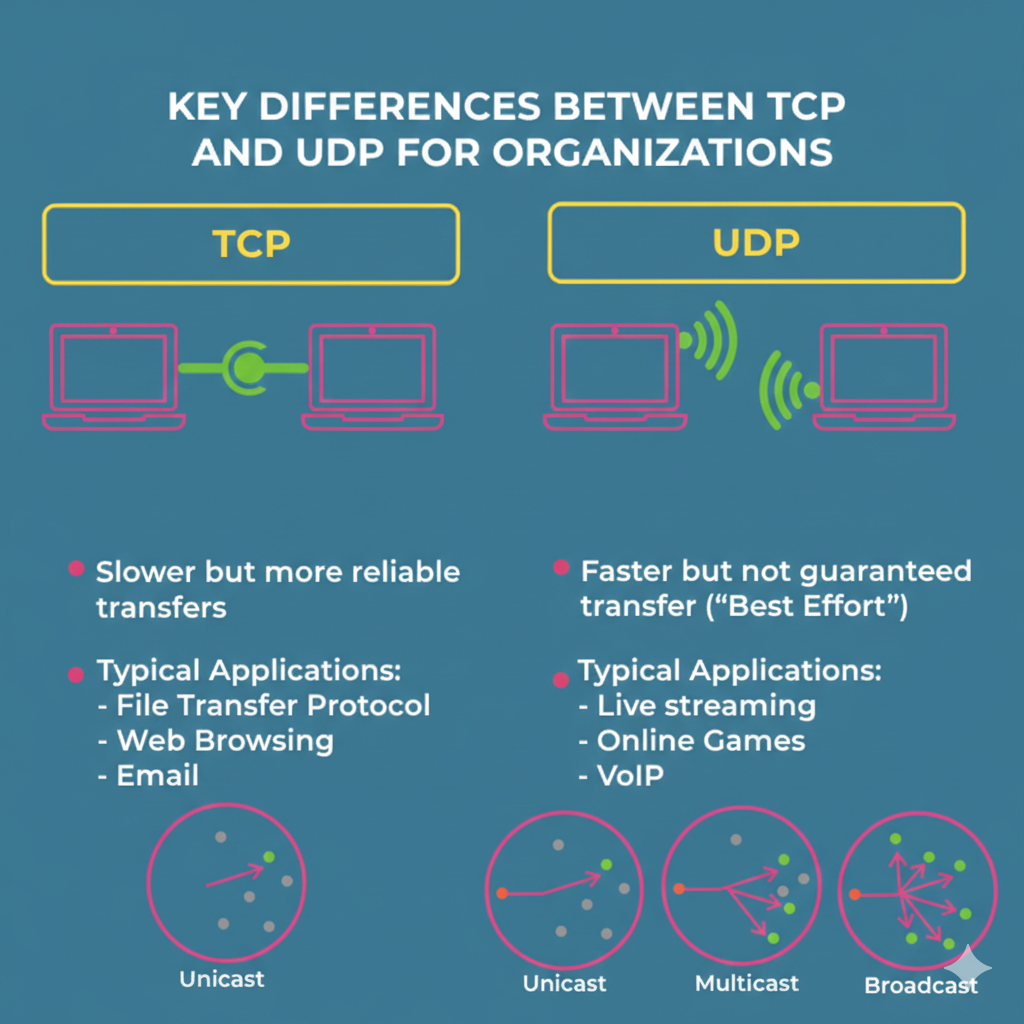
UDP — The Fast Announcement System:
The User Datagram Protocol is also called connectionless, unreliable transport protocol.
There are no host-to-host communication, It relies on Process-to-Process communication (based on Ports). Unlike TCP, UDP does not establish a connection before sending data, nor does it guarantee delivery, order, or error correction.
Now the questions arise, "If there are no reliability, no error-handling, no ordering, then why to use it??"
Well with every disadvantages, there also comes some advantages. UDP is a simple protocol that use minimum overhead. If a process wants to send a message but doesn't care whether it's reached or not, it can use UDP. Sending a message by using UDP takes much less interaction between sender and receiver than using DCCP, SCTP, TCP making it ideal for time-sensitive applications where speed is prioritised over reliability..
UDP Header: UDP packets, also called as User Datagrams, have a fixed size header of 8 bytes.
| Field | Size | Description |
|---|
| Source Port | 16 bits | Sender’s port number. |
| Destination Port | 16 bits | Receiver’s port number. |
| Length | 16 bits | Total length of UDP header and data. |
| Checksum | 16 bits | Used for error detection (optional in IPv4, mandatory in IPv6). |
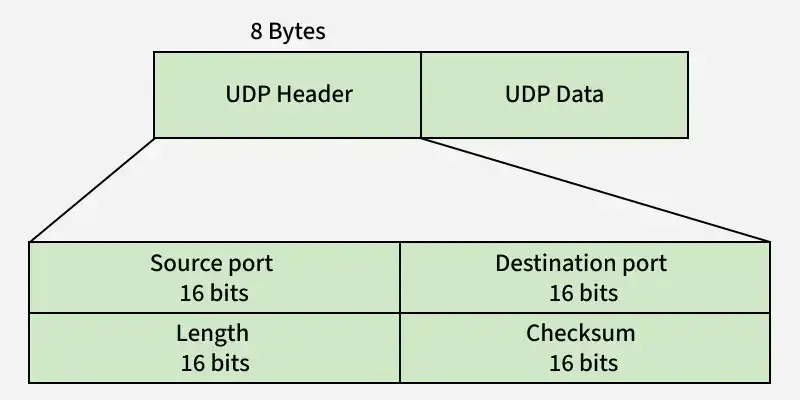
Unlike TCP, checksum in UDP is optional. If checksum is not calculated then the field will be filled with 1s.
Features:
- Less-Reliable
- No Error control & Flow control
- No Retransmission
- Fast
- No ordering
- No Congestion
Common Use Cases of UDP:
- Broadcasting
- Video Conferencing
- Voice over IP (Services like WhatsApp voice calls, Wi-Fi calling)
- Online Gamings
- Live Video Streaming
- Music Streaming
- DNS Query/Resolution
TCP — The Reliable Courier
Transmission Control Protocol is a Connection-oriented, Reliable transport protocol.
It's a core protocol of the Internet Protocol suite (TCP/IP), responsible for reliable, ordered, and error-checked delivery of data between applications over a network. As it's a Process-to-Process protocol like UDP, therefore it uses the Port numbers. Developed in the 1970s by Vint Cerf and Bob Kahn, TCP operates at the Transport Layer (Layer 4) of the OSI model and ensures that data sent from one device reaches another correctly and in the same order it was sent.
Now a question should arise "How this Protocol can achieve the Reliability, Error Handling, Order Checking??"
A reliable connection is established between Client and Server via a Three-way Handshake before data transfer even begins. It ensures that both sides are synchronised and ready to communicate using Positive Acknowledgement with Retransmission (PAR):
- Each segment sent must be acknowledged.
- If a segment is lost or corrupted (detected using the checksum), the receiver discards it, and the sender retransmits.
But before knowing about 3-way handshake in detail, first we need to know about "What is Segment??"
A TCP segment consists of data bytes to be sent and a header that is added to the data by TCP as shown:
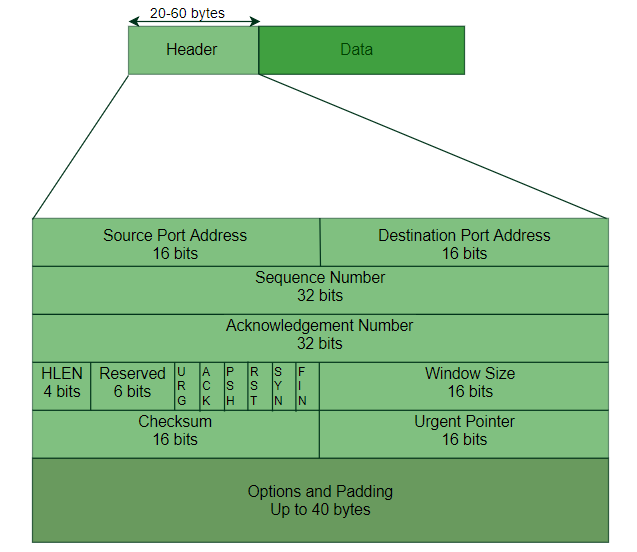
The header of a TCP segment can range from 20-60 bytes. 40 bytes are for options. If there are no options, a header is 20 bytes else it can be of upmost 60 bytes. Header fields:
- Source Port / Destination Port (16 bits each): Identify sending and receiving applications.
- Sequence Number (32 bits): Position of the first byte in this segment, used for ordering.
- Acknowledgement Number (32 bits): Next byte expected by the receiver (confirms data received).
- Header Length (HLEN): Size of the header (5–15 words, i.e., 20–60 bytes).
- Window Size: Receiver’s buffer size (for flow control).
- Checksum: Error detection (mandatory).
- Urgent Pointer: Position of urgent data (if URG flag is set).
- Control Flags (1 bit each):
- URG: Urgent data
- ACK: Acknowledgement valid
- PSH: Push data immediately
- RST: Reset connection
- SYN: Synchronize sequence numbers
- FIN: Terminate connection
So what actually happens in 3-way handshake is stated below step-by-step:
- Step 1 (SYN): In the first step, the client wants to establish a connection with a server, so it sends a segment with SYN (Synchronize Sequence Number) which informs the server that the client is likely to start communication.
- Step 2 (SYN + ACK): Server responds to the client request with SYN-ACK signal bits set. Acknowledgement(ACK) signifies the response of the segment it received and SYN signifies with what sequence number it is likely to start the segments with.
- Step 3 (ACK): The client acknowledges the response of the server and they both establish a reliable connection with which they will start the actual data transfer.
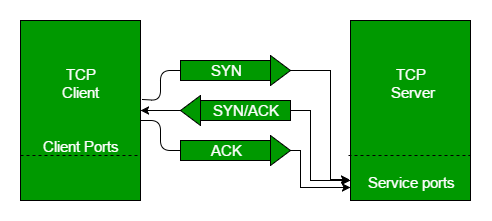
Like the establishemt of the connection, Three-way Handshake is also used in connection termination. Though there's also another option available which is Four-way Handshake with half-close, but in most of the modern case implementation, 3-way handshake is used.
Features:
- Reliable
- Error control & Loss-detection
- Flow control
- Retransmission
- Slow
- Ordering
- Congestion Control
Common Use Cases of TCP:
- Web-Browsing (HTTP, HTTPS)
- Text-Communication
- Email (SMTP, IMAP)
- File Transfer (FTP, SFTP)
What Is HTTP—and Where It Fits
The Hypertext Transfer Protocol (HTTP) is an Application level protocol that is mainly used to access the data that are on the World Wide Web (www). Basically it enables the connection in between the server and the clients (Web Browsers).
It operates on a request-response model, where a client sends a request to a server, which then responds with the requested resource, such as an HTML page(texts, image, or video). HTTP is stateless, meaning each request is independent. It runs over TCP and has evolved through versions like HTTP/1.1, HTTP/2, and HTTP/3, with each improving performance, security, and efficiency.
HTTP functions as a combination of FTP and SMTP.
HTTP uses the services of TCP on the port 80.
Understanding HTTP Request and Response
HTTP Request
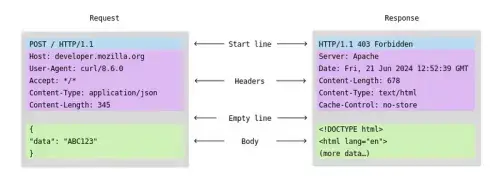
An HTTP request is how your browser asks the server for something. It includes:
- HTTP Version: The version of HTTP (like HTTP/1.1 or HTTP/2) that is being used.
- URL: The specific address of the resource (e.g., https://www.example.com/about).
- HTTP Method: The type of action being requested (e.g., GET to retrieve information, POST to send data, PUT to send document from server etc).
- HTTP Request Headers: Extra information (metadata) about the request, like what kind of browser you're using or what kind of content you’re expecting.
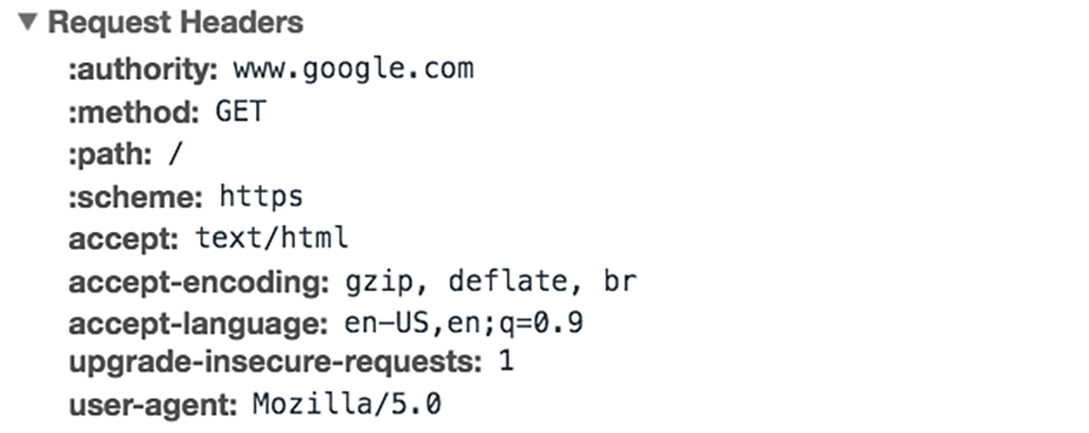
- HTTP Request Body: In some cases, the request will include a body that contains data (e.g., when you submit a form).
HTTP Response
An HTTP response is the server’s answer to your request. It includes:
- HTTP Status Code: A number that tells you if the request was successful or not (e.g.,
200 OK means everything is fine, 404 Not Found means the requested page doesn’t exist, 500 Internal Server Error means server site related error might be crash).
- Response Headers: Information about the response (Metadata), like what kind of data is being sent (e.g., Content-Type: text/html means it’s an HTML page).
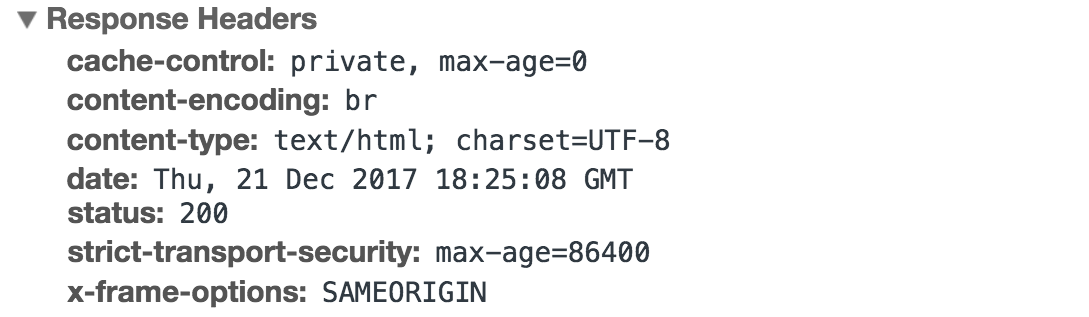
- Response Body: The content that the server sends back (e.g., HTML code that the browser will use to display the webpage).
More about HTTP Methods
An HTTP method, sometimes referred to as an HTTP verb, indicates the action that the HTTP request expects from the queried server. For example,
| Method | Action |
|---|
| GET | Client requests from the Server |
| HEAD | Request information about document but the not the document itself |
| POST | Sends information from Client to Server |
| PUT | Sends document from Server to Client |
| DELETE | Request the Sever to delete the specified resource |
| OPTION | Inquiry about available options |
More about HTTP Status Codes
HTTP status codes are standardized three-digit numbers returned by a server in response to a client's request. They are grouped into five classes based on the first digit:
- 1xx (Informational): The request was received, and the process is continuing.
- 2xx (Success): The request was successfully received, understood, and accepted.
- 3xx (Redirection): Further action is required to complete the request.
- 4xx (Client Error): The request contains bad syntax or cannot be fulfilled.
- 5xx (Server Error): The server failed to fulfill an apparently valid request.
✅ Note: The most commonly encountered codes are 200 (OK), 404 (Not Found), 400 (Bad Request), 500 (Internal Server Error), and 301/302 (Redirects).
You don’t need to memorize these flags—but understanding why they exist explains how TCP guarantees order and reliability.
The Relationship Between TCP and HTTP (Deep Dive)
The Critical Clarification: HTTP Runs on Top of TCP
At a fundamental level, HTTP and TCP operate at different layers and solve different classes of problems.
- TCP operates at the transport layer
- HTTP operates at the application layer
This separation is intentional and foundational to how the internet scales.
When we say “HTTP runs on top of TCP”, we mean this literally in terms of layering:
HTTP does not send data directly over the network.
It relies on TCP to carry its data reliably from one endpoint to another.
HTTP is completely unconcerned with:
- Packet loss
- Retransmissions
- Ordering of bytes
- Congestion control
All of that responsibility is delegated to TCP.
Step-by-Step: What Actually Happens During an HTTP Request
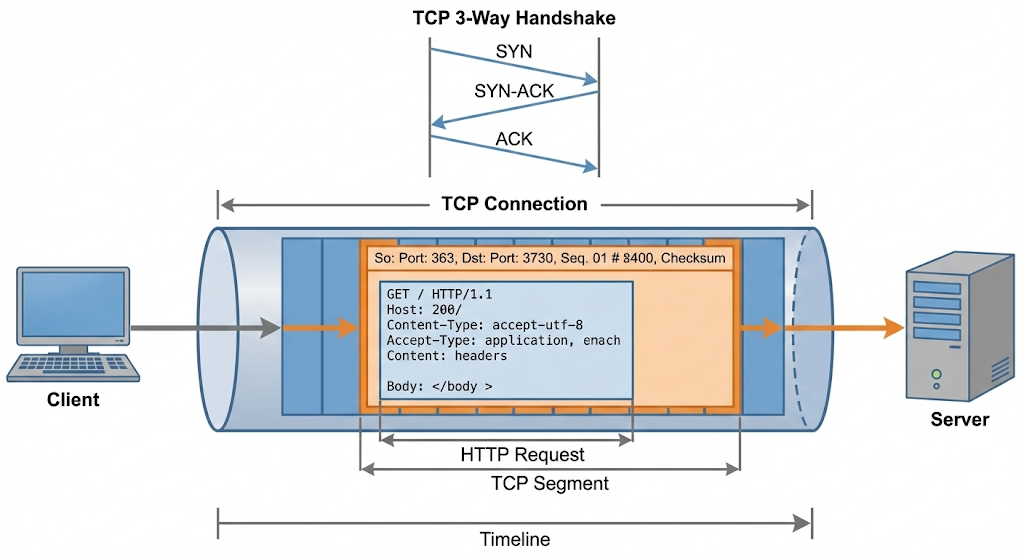
When you type a URL into a browser and hit Enter, the following sequence occurs (simplified but accurate):
a. TCP Connection Establishment
- The client and server perform a TCP handshake.
- This creates a reliable, bidirectional communication channel.
- From this point on, both sides agree on sequence numbers, window sizes, and delivery guarantees.
b. HTTP Constructs the Request
- HTTP formats the request as structured text (method, headers, body).
- Example: GET /api/users HTTP/1.1
- HTTP does not worry about packet boundaries or fragmentation.
c. TCP Transmits the Data
- TCP breaks the HTTP message into segments.
- Each segment is numbered, tracked, and retransmitted if lost.
- TCP ensures all bytes arrive, in order, exactly once.
d. HTTP Interprets the Response
- Once TCP delivers the byte stream, HTTP parses it.
- Status codes, headers, and body are interpreted at the application level.
Why HTTP Does Not (and Cannot) Replace TCP
A common misconception is assuming that HTTP could somehow “handle everything” on its own. This is architecturally incorrect.
Different Responsibilities, Different Layers
HTTP defines semantics
- What does this request mean?
- Is this a GET or POST?
- What does this response mean?
- How should the response be interpreted?
TCP defines mechanics
- How do bytes move across unreliable networks?
- What happens when packets are lost?
- Are the packets sent in order?
- How is congestion managed?
HTTP is deliberately designed without transport logic. This is not a limitation—it is a strength.
Conclusion: Protocols Are Design Decisions, Not Just Theory
TCP, UDP, and HTTP are not competing technologies—they are collaborating layers, each solving a different class of problems.
- TCP exists to make unreliable networks usable
- UDP exists to make real-time systems possible
- HTTP exists to standardize communication on the web
Choosing between TCP and UDP is not about which protocol is “better”.
It’s about what your system values more—reliability or latency, correctness or responsiveness.
HTTP does not replace TCP.
It depends on it.
Once you understand this layering, networking stops feeling abstract. You stop memorizing protocols and start designing systems intentionally.
And that is the real goal—not passing an exam, but making informed architectural choices in real-world software.