Our attempt to build a prototype recreating the matrix rain effect last week forced us to revise the mini Pygame framework. The implementation of the idea yielded a mixed result that I previously overlooked. No, it wasn’t due to my take on the Actor model, in case you’re wondering. What could the problem be then?

Cute doge on an adventure. Image courtesy of Microsoft Copilot.
The Vision: Searching for Order in the Matrix
So what is this Actor model thing, you may wonder. Having originated from our experiment with Pygame through building a tic-tac-toe game, the framework was a “side-product” of the project. Extracting the framework out through refactoring was done in the hope of making it portable and applicable for other projects. It worked, as shown in the previous article, but it wasn’t perfect. We identified some problems too, namely inefficiency in the management of application state and the event dispatch lookups.
I can already hear criticism from afar saying the latter is just a design failure, but since we are fixing the data structure, why not just fix both in one go?
Jokes aside, let’s start by looking into the Actor model. Skipping a formal definition of the term, we let the code be a reference to the discussion. For the scope of this article, the model is merely something that looks like this sample code returned by Gemini.
@dataclass
class UpdateState:
    """Message to change state (Write)"""
    key: str
    value: Any

@dataclass
class GetState:
    """Message to request state (Read)"""
    key: str
    reply_to: asyncio.Future # Used to send the result back

async def producer(inbox: asyncio.Queue):
    """Simulates a system event updating state (Write)"""
    await asyncio.sleep(1)
    print("[Producer] Sending update: score = 100")
    await inbox.put(UpdateState("score", 100))

async def consumer(inbox: asyncio.Queue):
    """Simulates a UI element needing to read state (Read)"""
    await asyncio.sleep(2)
    print("[Consumer] I need the 'score'...")

    # Create a 'return envelope'
    future = asyncio.get_event_loop().create_future()
    await inbox.put(GetState("score", future))

    # Wait for the Actor to fill the envelope
    result = await future
    print(f"[Consumer] Received score: {result}")
A loop is running in the background reading from a queue (denoted by the inbox argument in the coroutine functions) expecting one of the two dataclasses above, each representing a type of request. When it is an UpdateState, the value is changed. Otherwise, the value is returned via the asyncio.Future. Some disassembly was done to the model to keep it simple, though essentially we now can restrict access to the state only through the mailbox (or inbox in the snippet).
On the other hand, fixing the event dispatch problem merely involves a slight redesign of the application state. Ideally, we should aim for a near O(1) performance, let’s just use a hashmap for the purpose, preferably a frozendict(). Roughly speaking, we want the application state that stores events handlers as shown below:
@dataclass(frozen=True)
class Application:
    ...
    events: frozendict[tuple[Element, int], EventHandler]
We are storing the handlers into a frozendict to stick with functional principles as much as possible. Immutability is the key to writing predictable and idempotent functions.
Another advantage of adopting the Actor model is it opens up a possibility of clean separation from other components. When there is a possibility of overdoing things, you may already know by now I am always there. My attempt to overengineer for the sake of learning eventually caused a major rewrite, though fortunately the implementation still centers around what we have discussed so far. Sit tight, as we are diving deep into an adventure full of misjudgments.
Trekking Inward: Drafting the Actor Blueprint
Doesn’t sound like an adventure so far?
Think of a request trekking into an application via a queue. The previous section would be like a roughly sketched overview map. Now is the time to join a relatively steady stream of requests. Looking at our map, we see some landmarks: a scheduler, a mailbox (basically a queue), some processing logic, and lastly a mechanism to reply. Implementing this in the context of our little Pygame framework is the goal we are trying to achieve here. There is some flexibility I wish to implement, specifically regarding how the request affects the application state.
Let’s start by requests.
An actor only responds to requests, and the outcome would be different depending on the types. Requests are then passed into an actor through a mailbox, in our case, a queue. Everything seems perfectly fine, until you see a small and almost illegible fine print in the map — Pygame is generally not thread safe, i.e. we run all Pygame code within the same thread. That means we need to be really aware when passing Pygame objects through queues, for instance, passing them through a multiprocessing Queue will end up a crash due to serialization failure.
Each request represents an action we want to do with the data, either a retrieval or a mutation. We start by defining a mutation request, the SetRequest:
@dataclass
class Operation:
    op: Callable
    args: tuple = field(default_factory=tuple)
    kwargs: dict = field(default_factory=dict)

@dataclass
class SetRequest[Data]:
    operation: Operation

    async def __call__ (self, data: Data) -> Data:
        return await self.operation.op(
            data, *self.operation.args, **self.operation.kwargs
        )
Instead of consolidating all the application state changes within one huge monolithic match-case statement, SetRequest delegates the mutation logic definition to the caller. Unfortunately, this also means the caller needs to be aware of the state’s internal structure. Despite that downside, the delegation should promote the caller to do a small, localized change to the state that holds multiple pieces of data.
On the other hand, there are cases where we want the current state. Retrieving multiple slivers of current state one at a time to complete a task can be rather inefficient as our requests could be stuck queuing up when traffic is busy, and that makes me think. The reason we are making the queries is to get things done; what if we bundle the processing logic over, like we did with SetRequest too? Rather than repeating the “fill in the blanks” exercise once for each sentence, we are doing the whole essay all at once. In short, bundling the retrieval requests into one execution request results in smaller queues. For that goal, we implement ExecuteRequest as such:
@dataclass
class ExecuteReply:
    tag: UUID
    payload: Any

@dataclass
class ExecuteReplyTo:
    tag: UUID
    mailbox: Queue[ExecuteReply]

@dataclass
class ExecuteRequest[Data]:
    operation: Operation
    reply_to: ExecuteReplyTo | None = None

    async def __call__ (self, data: Data) -> None:
        result = asyncio.create_task(
            self.operation.op(data, *(self.operation.args), **(self.operation.kwargs))
        )

        if self.reply_to:
            asyncio.create_task(
                asyncio.to_thread(
                    self.reply_to.mailbox.put,
                    ExecuteReply(self.reply_to.tag, await result),
                )
            )
In most cases, we do not expect the caller to care when the request is completed. What’s wrong with having an asyncio.Future like we saw earlier? The short answer is no, but I would like to defer this until we are discussing the overengineering part. Yet, if the caller cares about the reply, the request requires a recipient mailbox, and an identifier UUID for the recipient.
A scheduler is then built to bind everything together. It takes two arguments, namely the application state that it manages, and a mailbox that acts as the single point of entry for the state. Refer to the snippet below for a simplified implementation:
async def state_scheduler[Data](state: [Data], mailbox: Queue[SetRequest[Data] | ExecuteRequest[Data]]):
    result = state
    while True:
        try:
            match request := await asyncio.to_thread(mailbox.get, timeout=0.001):
                case SetRequest():
                    result = await request(result)

                case ExecuteRequest():
                    asyncio.create_task(request(result))

        except Empty:
            pass
Some may find the snippet resembles a reduce function that loops infinitely. On each iteration, the result should only get replaced if a SetRequest is received. Imagine if the state isn’t immutable, even the execute request would have a chance of breaking the integrity of the object. Both SetRequest and ExecuteRequest are also expected to implement the__call__ dunder as shown in respective snippet. Remember the metaphor on bundling the “fill in the blanks” exercise into a callable when we discussed ExecuteRequest? It gets scheduled for execution here.
The Versatility of __call__: A Python Developer's Secret Weapon
The Bumpy Ride: Overengineering the Parallel Dream
“If it’s worth doing, it’s worth overdoing”
I didn’t watch a lot of MythBusters growing up, but this motto has a special place in my heart. Hang on tight, this is also where our relaxing boat ride gets a little bumpy. The Actor model offers a possibility to cleanly separate the state away from the rest of the application. Seems like a good opportunity to further split the application to multiple processes right? The application state actor, display update loop, as well as the event dispatch loop will all run independently, right?
Let’s overengineer this project, because more processes in parallel means faster execution, right?
Running each component in a separate process is done through the usual ProcessPoolExecutor setup. Further discussion on the topic can be found in the AsyncIO article series and hence we are skipping the details here. Why dedicate a section for the topic then?
Remember we deferred the discussion of having an asyncio.Future for replies? Turns out AsyncIO has the same constraint as Pygame — the objects should stay within the thread. As we know, objects get serialized when they are sent through a cross-process queue. Recreating an asyncio.Future in another process will raise an exception, causing the execution to fail.
For the same reason, we are also avoiding sending Pygame objects through cross-process queues.
You might notice that ExecuteReplyTo takes a tag UUID and mailbox. According to the dataclass definition we know mailbox is another cross-process queue, but what does the tag identifier do?
It is a key to our registry of asyncio.Future that lives only in the caller’s process, as shown below:
async def inbox_consume(
    inbox: Queue[ExecuteReply], futures: dict[UUID, asyncio.Future]
) -> None:
    with suppress(Empty):
        reply = await asyncio.to_thread(inbox.get_nowait)

        if futures[reply.tag]:
            futures[reply.tag].set_result(reply.payload)
Each process maintains its own registry and a cross-process queue. A loop is set up to run inbox_consume repeatedly such that the corresponding asyncio.Future objects get notified as soon as the reply arrives.
As an example, this is how it works in action:
async def some_callable(state) -> bool:
    ...

    return True

async def caller(...):
    done_future = uuid4()
    futures[done_future] = asyncio.Future()
    game_in.put(
        ExecuteRequest(
            Operation(some_callable),
            ExecuteReplyTo(done_future, futures_mailbox),
        ),
    )
    await futures[done_future]
Here’s a brief explanation to the snippet above:
- All callables defined for SetRequest and ExecuteRequest receive the current state as the first argument
- We register a new asyncio.Future to a UUID tag before firing the ExecuteRequest.
- The tag and the future_mailbox to update the registry of asyncio.Future are sent as a ExecuteReplyTo object.
- The bundled some_callable runs in the process where the state lives.
- Back in the caller’s process, since the ExecuteRequest expects a return value, we perform a blocking await at the corresponding entry in the registry of asyncio.Future.
Some Pygame objects are stored within the application state object, so it runs in the process that calls the Pygame API. While it seems like we managed to split the application into three separate processes, if we are delegating all requests back to the process that manages Pygame anyway, is the added complexity worth it?
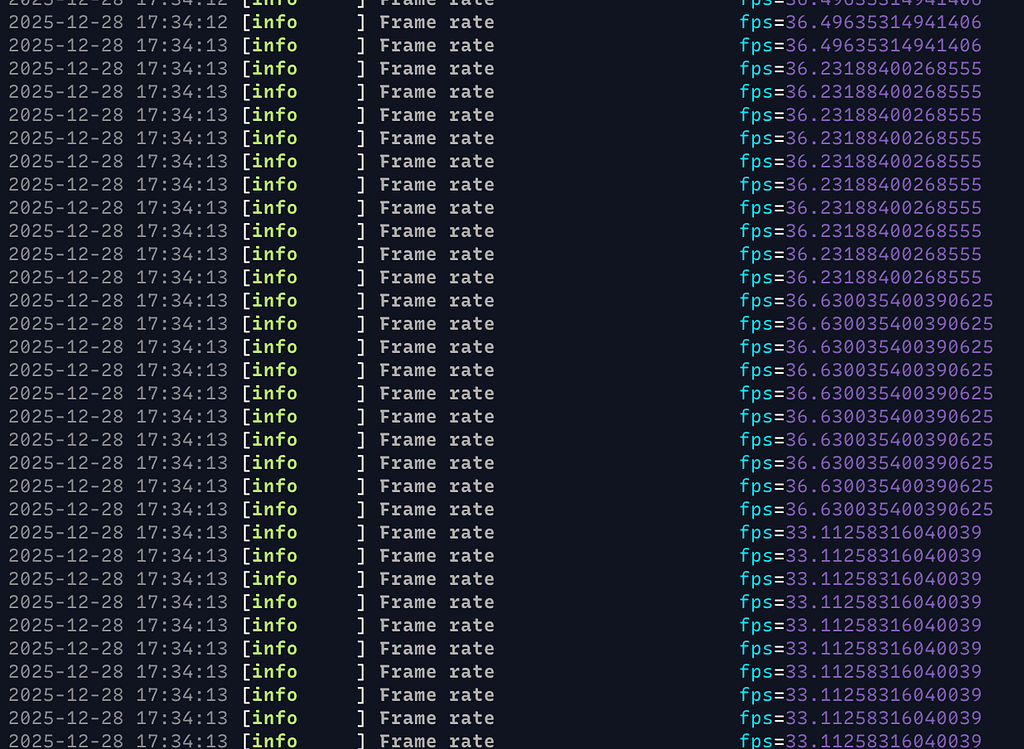
Silently screaming at the low FPS
Grab onto something quick, as we are heading towards a waterfall.
The Waterfall: A 30 FPS Reality Check
Though there were hiccups, the code eventually ran. For a while I was quite proud of myself for getting everything assembled properly. I still remember the realization came about an hour later when I was staring at the code on pushing visual changes to the application window. That was the fall off a cliff moment. So what went wrong? The separation into multiple processes was not such a good idea eh?

Photo by Aditya Chinchure on Unsplash
Pygame.time.Clock has a method called .tick(). It is meant to be called once per frame. If a framerate is specified, it would block until time is up to prevent premature frame update. That practically means the callable sent by the process managing the display is going to be blocking the process hosting the scheduler for the Actor (which also holds the application state containing Pygame objects). Considering this callable also gets sent repeatedly in an infinite loop, it means the Actor process is constantly blocking, leaving little room for concurrency.
Another bottleneck that I underestimated is how the serialization works through the cross-process queue could potentially slow things down. If I was falling when the realization of the blocking operation happened, recognizing this bottleneck is when my boat and I plunged into the water down the cliff. The struggle to get back to the surface almost became measurable, when I started to compare the frame per second figures.
Instead of hitting the 60fps target, we are only seeing frame rate in the 30s. It is obvious that the added complexity that involves cross-process message passing is the culprit. Measuring is going to be hard, but I would imagine the constant conversion between an actual project and serialized form would contribute to the delay.
We are now stuck in the middle of nowhere; the expedition failed.
What’s next?
The Principled Pivot: Painting with Experience
We failed the mission to cleanly separate the components into independent processes. Despite that, I am still happy throughout the adventure. The expedition pushed me far enough from my comfort zone and all the insights gained were valuable. Failing is never a problem, as long as we are learning something through it.
Like many fellow engineers, I do have a fair share of failures when I write code. Every new project I work on is not unlike an expedition into the unknown. While the outcome is important, we need to be aware of every step we take too. If experience is a painting, the trail of foot steps is exactly how lines are formed in an image.

Photo by Andrey Novik on Unsplash
So what do we learn in this in-progress painting of our Pygame experiment?
Looking at the bright side, I really liked how the application state is now managed through the Actor model. After removing the multi-process setup, certain parts would be greatly simplified. Overall, it is much more manageable than my poorly implemented model. Another revision is definitely happening and hopefully the fps count recovers.
Lastly, thanks for another year of support, and I shall write again soon. Bonne Année.
Finally, I’d like to acknowledge the editorial and research support provided by Gemini in producing this write-up. While the architecture and the hard-learned lessons are mine, Gemini acted as a second set of eyes — helping me audit the sentence-to-sentence flow, cross-referencing patterns like the Active Object and the “Ask” pattern, and ensuring that my “expedition” through the code was as clear to you as it was bumpy for me. It’s been a collaborative effort to ensure that even my failures are presented with the technical rigor they deserve.


