In Part 3, we explored one of TWD’s core features — network mocking — and completed our first full set of tests.
Now, it’s time to take the next step: running those tests in the terminal so we can integrate them into a CI workflow.
To do this, we’ll use Puppeteer and one of TWD’s utilities, reportResults, to display test results directly in the console.
Before You Start
If you’re following along from Part 3, you can continue as is. But if you want to reset your repo or make sure you're on the correct branch:
# Repo git clone *Emails are not allowed*:BRIKEV/twd-docs-tutorial.git
git reset --hard
git clean -d -f
git checkout 04-ci-integration
npm run serve:dev
Running Tests in the Terminal
TWD exposes its runner on the window object, which means you can programmatically execute your tests from any environment — including tools like Puppeteer.
Here’s the basic version of that script:
import { reportResults } from 'twd-js/runner-ci';

const TestRunner = window.__testRunner;
const testStatus = [];
const runner = new TestRunner({
  onStart: () => {},
  onPass: (test) => {
    testStatus.push({ id: test.id, status: "pass" });
  },
  onFail: (test, err) => {
    testStatus.push({ id: test.id, status: "fail", error: err.message });
  },
  onSkip: (test) => {
    testStatus.push({ id: test.id, status: "skip" });
  },
});
const handlers = await runner.runAll();
// report results
reportResults(handlers, testStatus);
That’s the core logic we need to run TWD tests headlessly — but we still need a way to access the window context.
Let’s do that by using Puppeteer.
Step 1. Install Dependencies
npm install --save-dev puppeteer
Step 2. Create a CI Script
Let’s create a new file: scripts/run-tests-ci.js:
import puppeteer from "puppeteer";
import { reportResults } from 'twd-js/runner-ci';

const browser = await puppeteer.launch({
  headless: true,
  args: ['--no-sandbox', '--disable-setuid-sandbox'],
});
const page = await browser.newPage();
console.time('Total Test Time');
try {
  // Navigate to your development server
  console.log('Navigating to http://localhost:5173 ...');
  await page.goto('http://localhost:5173');
  // wait to load data-testid="twd-sidebar"
  await page.waitForSelector('[data-testid="twd-sidebar"]', { timeout: 10000 });
  console.log('Page loaded. Starting tests...');
  // reload page
  // Execute all tests
  const { handlers, testStatus } = await page.evaluate(async () => {
    const TestRunner = window.__testRunner;
    const testStatus = [];
    const runner = new TestRunner({
      onStart: () => {},
      onPass: (test) => {
        testStatus.push({ id: test.id, status: "pass" });
      },
      onFail: (test, err) => {
        testStatus.push({ id: test.id, status: "fail", error: err.message });
      },
      onSkip: (test) => {
        testStatus.push({ id: test.id, status: "skip" });
      },
    });
    const handlers = await runner.runAll();
    return { handlers: Array.from(handlers.values()), testStatus };
  });
  console.log(`Tests to report: ${testStatus.length}`);

  // Display results in console
  reportResults(handlers, testStatus);

  // Exit with appropriate code
  const hasFailures = testStatus.some(test => test.status === 'fail');
  console.timeEnd('Total Test Time');
  process.exit(hasFailures ? 1 : 0);

} catch (error) {
  console.error('Error running tests:', error);
  process.exit(1);
} finally {
  console.log('Closing browser...');
  await browser.close();
}
Step 3. Add the Script to package.json
{
  "scripts": {
    // ...
    "test:ci": "node scripts/run-tests-ci.js"
  }
}
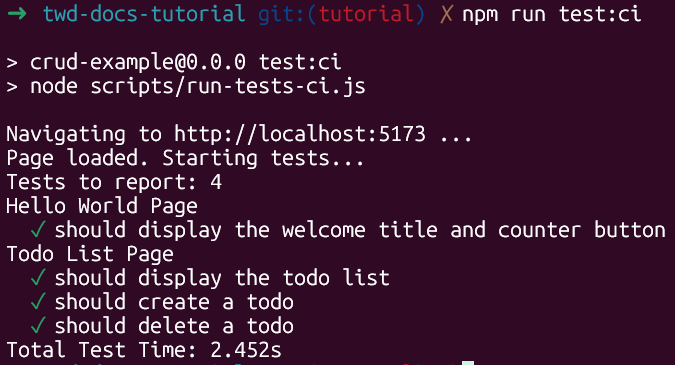
Now, with your development server running in another terminal, execute:
npm run test:ci
And you should see something like this:
GitHub Actions Integration
We’re still working on a built-in CI solution, but for now you can easily integrate TWD with GitHub Actions using Puppeteer.
Create a file at .github/workflows/ci.yml:
name: CI - PR Tests

on:
  pull_request:
    branches: [ main ]

jobs:
  test:
    runs-on: ubuntu-latest

    steps:
      - name: Checkout repository
        uses: actions/checkout@v5

      - name: Setup Node.js
        uses: actions/setup-node@v5
        with:
          node-version: 24
          cache: 'npm'

      - name: Install dependencies
        run: npm ci

      - name: Start Vite dev server
        run: |
          nohup npm run dev > vite.log 2>&1 &
          npx wait-on http://localhost:5173
        env:
          CI: true

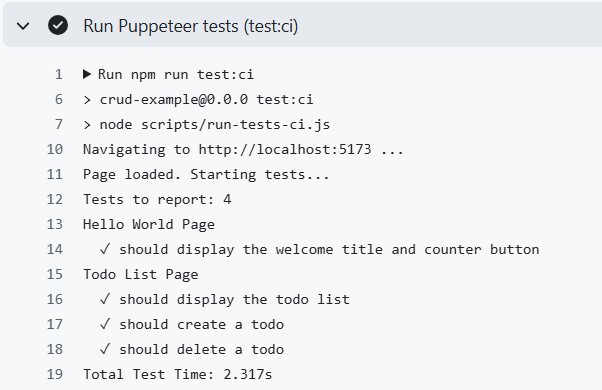
      - name: Run Puppeteer tests (test:ci)
        run: npm run test:ci
        env:
          CI: true
And that’s it — your tests will now run automatically in CI.
What’s Next
We’ve learned how TWD integrates smoothly into CI workflows.
The next step is to collect code coverage, the last missing piece of most testing setups — and that’s exactly what we’ll cover in the next post.
You can always check out our official docs to learn more.


