You write down how work should go. Plan first, then build, run the checks, get a review, open a pull request. You put it in a README, a CLAUDE.md, a pile of skills. Then you hand a task to an agent and it jumps straight to editing files. Ten minutes later it has committed to the wrong branch, and the skill you wrote for exactly this case was never opened.
That gap between the process you have and the process the agent follows is what I built Agent World to close. It runs Claude Code and Antigravity agents, gives them a workflow to follow and a playbook that says what each one is told and when, and it holds their edits, commits and push until you have approved the plan and pressed Run. You watch it all in a pixel office, with a little character for each agent. That part is for fun, so it comes last.
Workflows: a pipeline the agent has to walk
A workflow is an ordered list of steps: plan, build, checks, review, commit, pull request. Each step can say which skills and instructions the agent gets, and which steps wait for you. A project can have its own workflow, and it wins over your global one.
Every task that changes code becomes a run, drawn like a CI pipeline. Each step goes green when it passes, and shows its own state when it fails, gets skipped or is stopped. Every message the agent receives while a task is open names the step it is on and tells it to do only that step's work. That keeps the rule alive after a long conversation gets summarised.
The engine that walks the steps is plain code outside the model. No LLM decides what step comes next, so it adds no tokens to the agent's context beyond the brief for the current step.
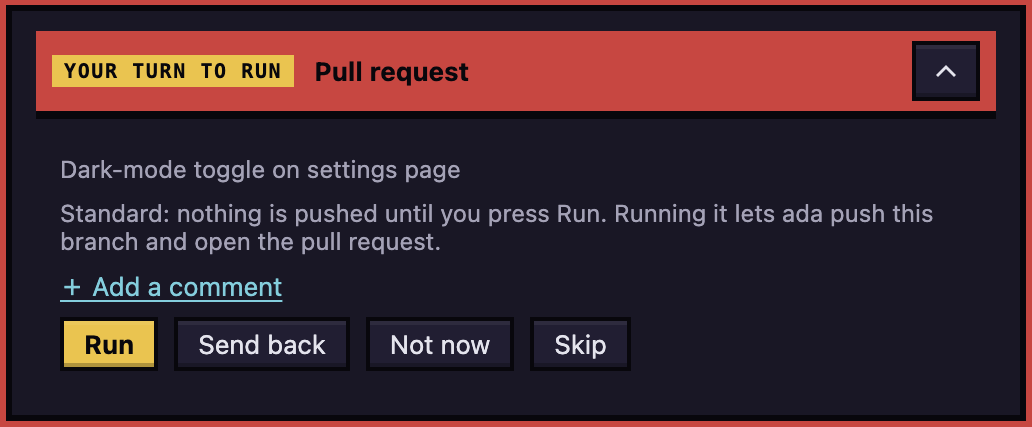
Some of it is enforced, not just asked. Until you approve the plan, file edits are held by a hook (a plugin for Antigravity). Commits are held by git itself, even ones made with --no-verify. A push of the agent's branch waits until the plan and the review findings are settled, and nothing is pushed until you press Run on the card in the agent's chat.
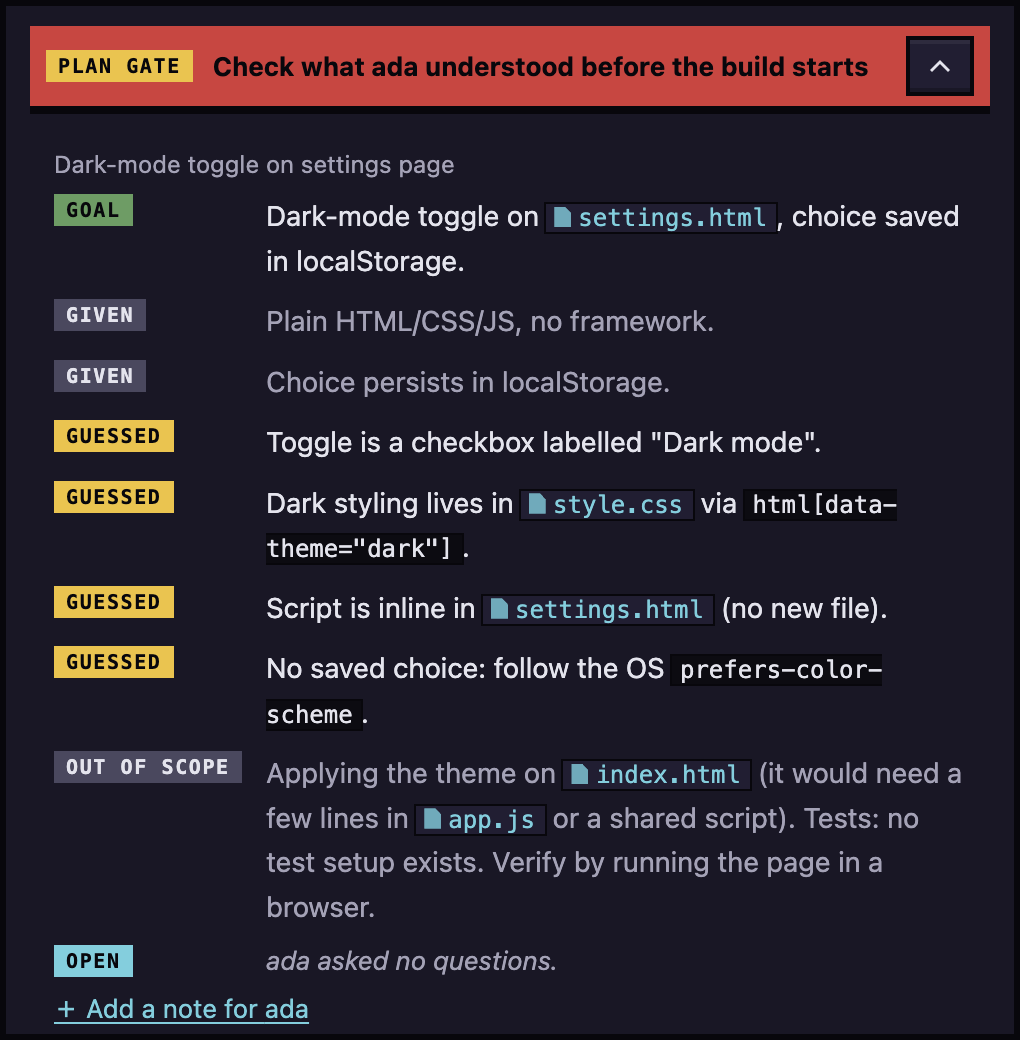
The plan is the first thing you check. Before the build starts, the agent shows what it understood as a goal, what it was given, what it guessed and what is out of scope. Reading the guesses takes a minute and catches the wrong turn before any code exists.
Then the pull request step waits for you, with Run, Send back, Not now and Skip.
The holds have limits, and the docs list them. A shell command like sed -i is only caught later, at the commit. An agent that removes git's environment variables or sets its own core.hooksPath skips the push hold. These holds stop an agent that is trying to follow its instructions from getting ahead of you. They are not a lock against one set on getting around them.
The playbook: what each agent is told, and when
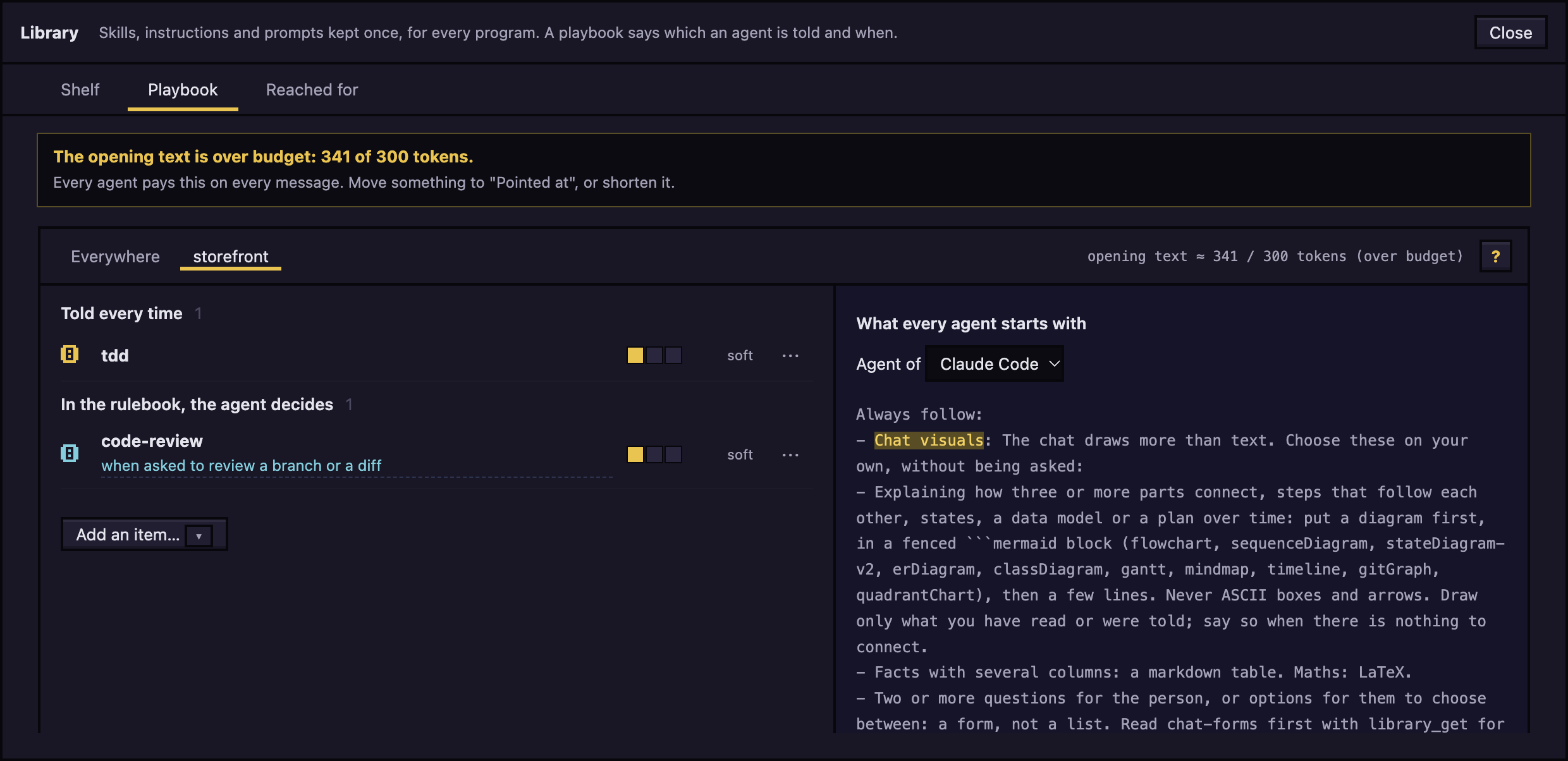
Skills, instructions and prompts live in one library, shared by every project and both programs. An item does nothing until a playbook rule picks it. A rule can tell the agent every time, point at the item with a one-line "when to use it", attach it to a workflow step, or switch it off. Rules apply everywhere or to one project, and the project rule wins.
The pointed-at mode matters because it saves tokens. Only the "when" line sits in the agent's opening text, and the agent reads the full item when its work matches. A hard rule goes further and asks the agent to say why it passed an item over.
The app also measures whether the rules work. It counts, per item, when a prompt looked related and whether the agent then read it. A rule that is reminded often and never read gets flagged, and so does one that most agents said no to, with a button to write a narrower "when". Only whether a prompt looked related is kept, never the prompt itself.
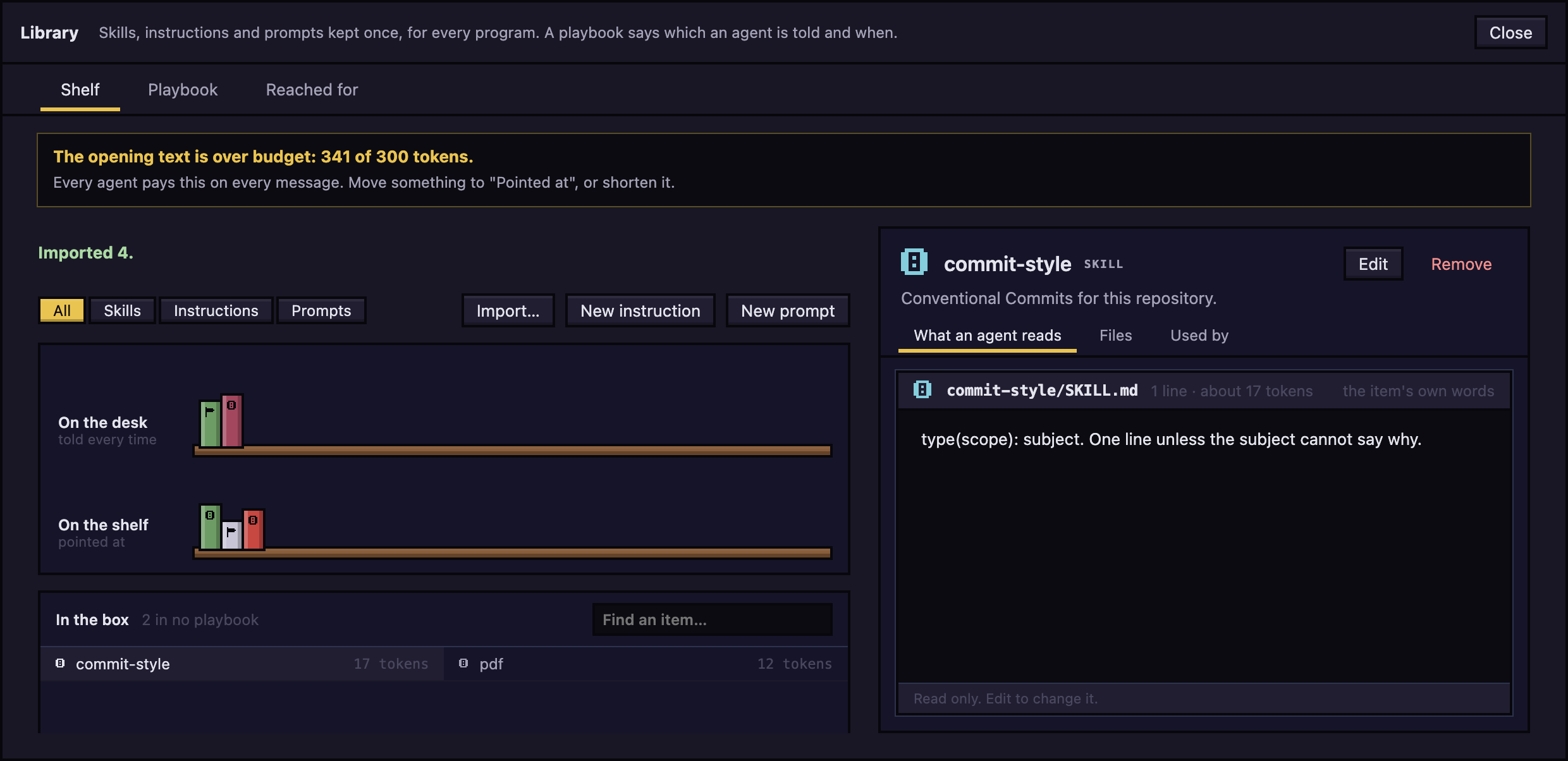
A Playbook and tools window lists every skill, MCP server and tool the programs know, in one place. For each skill you can see where it lives and who used it in the last 30 days. You can connect an MCP server to see what it offers, test an entry before saving it, and set each tool to Allow, Ask or Deny for the agents the app runs.
Preview shows a web page beside the chat. The dev server an agent started appears on its own, and you can click an element on the page and send it to the agent as words and a picture. Agents can drive their own Preview page too: they open pages, click, resize to a phone and take screenshots. A site on the internet opens only once you allow it, and a page whose certificate fails shows a warning first.
The cherry on top: an office
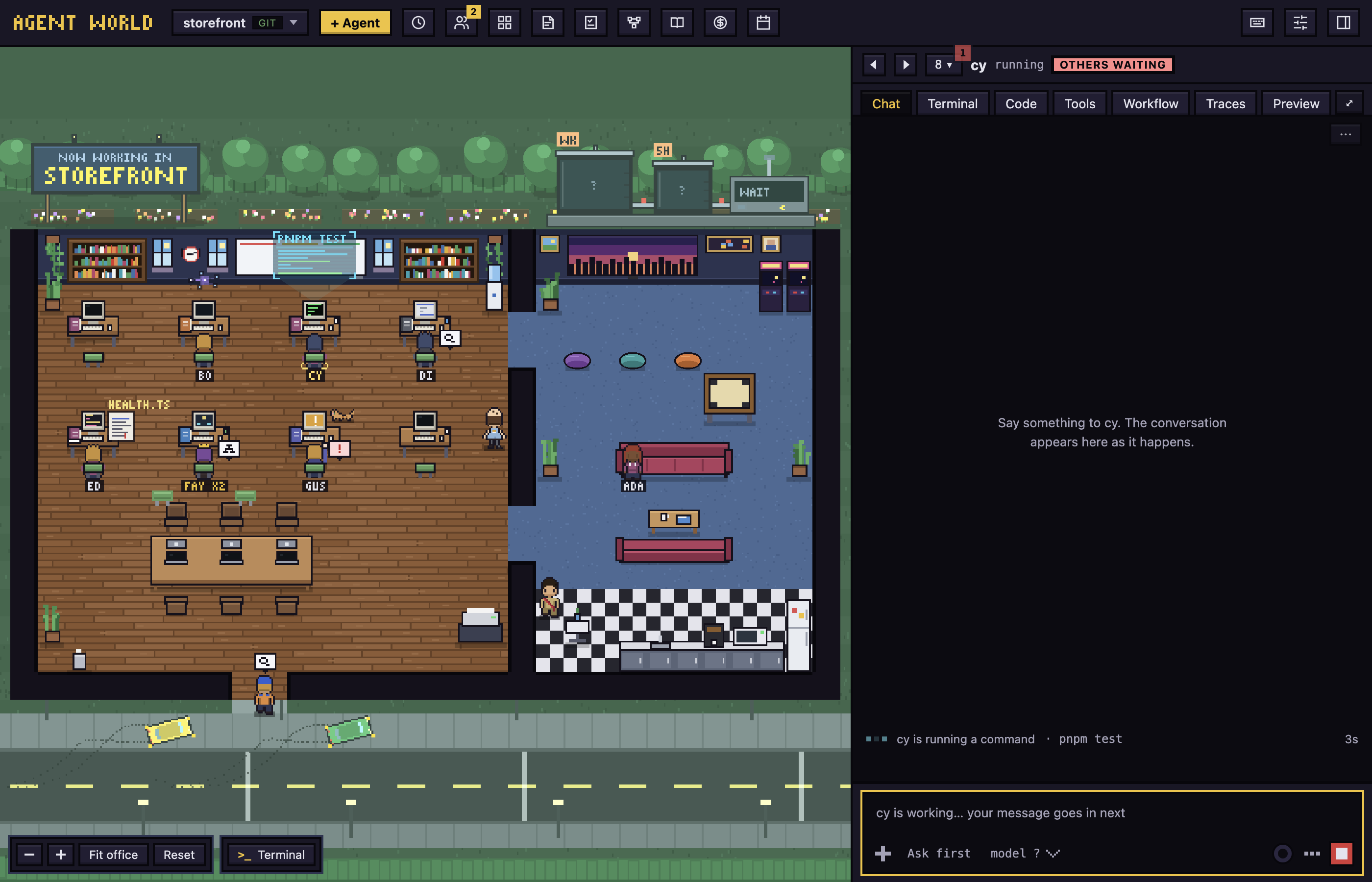
Instead of a wall of status badges, each project is an office floor and each agent is a character at a desk. What the character does is what the agent does: thinking, researching, running a command, waiting for you, or asleep. A permission request shows above its head and you allow or deny it in one click.
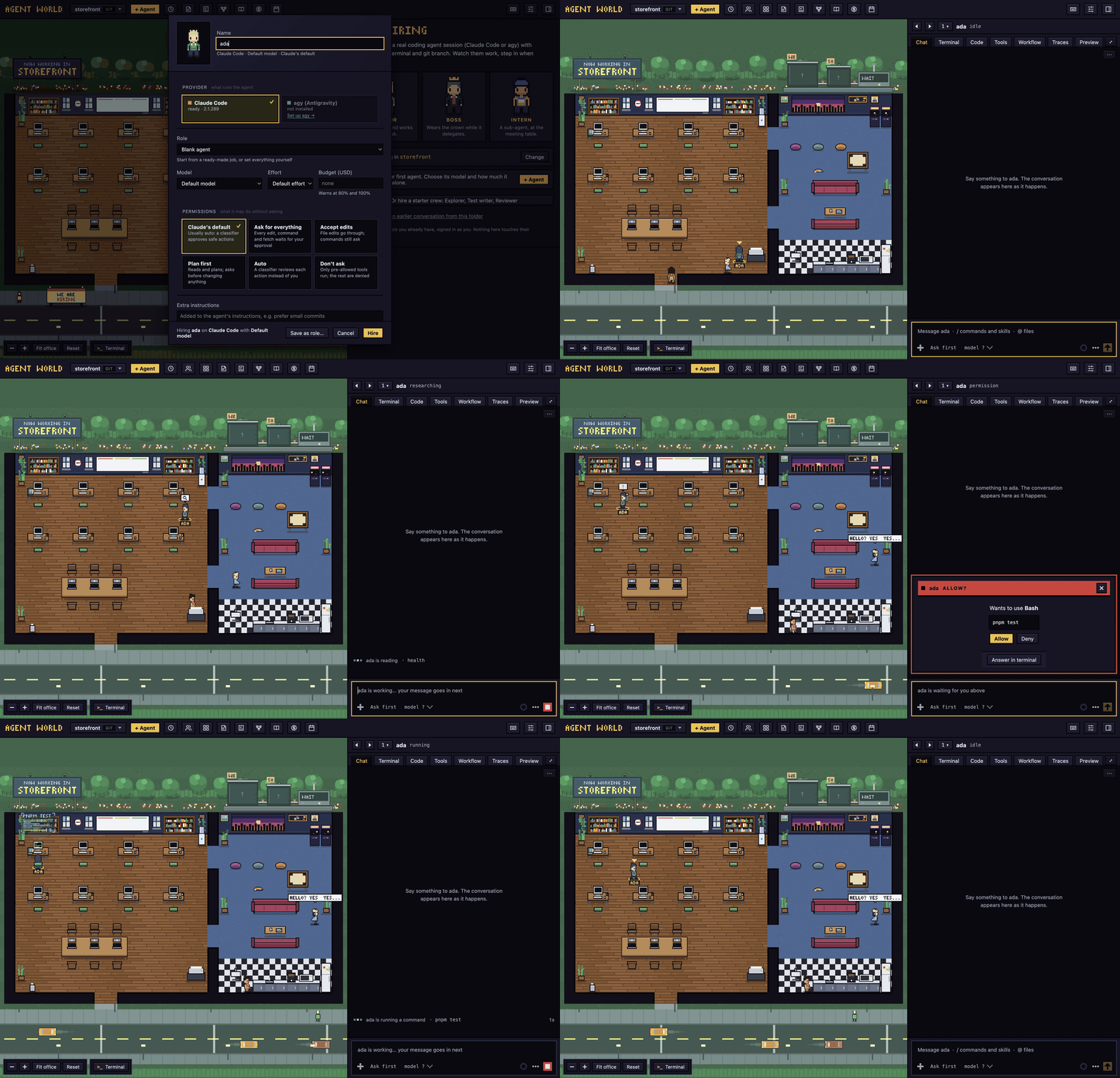
The characters show real state, so they are useful, but they are the least important part. What matters is that agents follow a process you chose, and you can see where each one stands without opening five terminals.
How it stays out of your way
Every agent is your own claude or agy session, running in a terminal the app owns, so the app learns what it does from hooks instead of scraping files. Your claude is unmodified and nothing in ~/.claude changes. You sign in once, in a terminal inside the app, and the app never handles your login. Each agent works in its own git worktree on a branch called aw/<name>, so two agents cannot overwrite each other, and removing one never deletes uncommitted work.
Who it is for
It suits a developer running several agents across their own repositories, who has a process they want followed. If you run a single agent on a small task, a terminal is enough.
Where it stands
It has been used on macOS. The Mac app is not signed with an Apple Developer ID yet, so the first launch needs one extra click on Open Anyway. There is a Linux beta, and Windows is not supported. I have no user numbers to quote.
Why I built it
Coding agents changed the way I work. I hand a task to one agent, then another to a second, then a third, and for a while it felt like having a small team.
I tried a lot of tools to manage that team: grid views, terminal-based agent managers, polished interfaces, even Claude's own app. Each of them was fine, and each of them bored me within a day. They all showed me the same thing, terminals in boxes, and a wall of boxes is still a wall of boxes. I wanted something I would enjoy opening every morning, built the way I like to work, that I would keep using long after the novelty wore off. So I built an office I could look at.
Then the second problem showed up, and it was bigger. Claude Code and agy are good and efficient, but neither one follows what I tell it for long. Skills never got invoked at the right time. A flow I described in the morning was gone by the afternoon. I had written skills for specific situations and watched agents walk right past them. With the app owning the sessions, I could finally count it: a rule fired, and the agent read nothing.
One case settled it. Landing a branch could only be done with a button in the app. An agent I asked in chat to "commit and merge" just did it, sailed past the gate, and the run sat at "ready to land" for work that had already landed. The gate existed and nothing enforced it. I moved the check into git itself, so it holds whatever program makes the move.
That is why workflows and the playbook are the product and the office is the garnish. The office is what gets me to open the app. The workflows and the playbook are what make the agents do what I asked.
Try it
It is open source under Apache 2.0. On a Mac, download the dmg from the releases page or use Homebrew:
brew tap hodkep/tap
brew trust --cask hodkep/tap/agent-world
brew install --cask hodkep/tap/agent-world
Pick a project folder, click + Agent, give it a name, and it walks in. Workflows and the playbook are switches in Settings under Features, so turn them on first.
