A few weeks after I shared Fizzdoc, someone left this under it:
Running entirely in-browser is a strong accessibility claim for screen reader and keyboard-only users, since it avoids page reloads tied to server uploads. But does each of the tools have proper ARIA labelling, visible focus states, and keyboard-accessible controls for file selection and conversion options, or are some reliant on drag-and-drop with no keyboard alternative?
My answer, if I'm honest, was: I think so? I had added labels as I went, and the file picker was a real button. But "I think so" across 75 tools and 17 languages is not an answer.
So I stopped guessing and measured it.
Step 1: make the question a test
I didn't want a one-off audit that goes stale the next time I add a tool. I wanted the answer to be a test that fails.
Fizzdoc already had about 1,400 browser tests in Playwright. I added one more file that runs axe, the open-source accessibility engine, on every page:
export async function problems(page: Page) {
  const { violations } = await new AxeBuilder({ page })
    .withTags(['wcag2a', 'wcag2aa', 'wcag21a', 'wcag21aa', 'wcag22aa'])
    .analyze();
  return violations
    .filter((v) => v.impact === 'serious' || v.impact === 'critical')
    .flatMap((v) => v.nodes.map((node) => `${v.id}: ${node.target.join(' ')}`));
}

for (const { path } of PAGES.filter((page) => page.lang === 'en'))
  test(`passes the accessibility check at ${path}`, async ({ page }) => {
    await page.goto(path);
    expect(await problems(page)).toEqual([]);
  });
Two decisions in there:
- English pages only. The other 16 languages are generated from the same templates, so they share the markup. Testing them again would be 1,200 tests that find nothing new.
- One test per page, not one loop. My first version looped over all pages inside a single test, and it timed out. One test per page lets Playwright run them in parallel: 89 pages in about four minutes.
Step 2: read the results
I expected a long list. I got one finding, repeated on all 89 pages:
label-content-name-mismatch: .star-btn
The "Star" button in the header shows the word "Star" and the GitHub star count. Its aria-label said "Star Fizzdoc on GitHub". That looks helpful, and it's wrong: someone using voice control says what they see ("click Star 41"), and the browser can't match it, because the accessible name doesn't contain the visible text.
The fix was to delete the aria-label and let the visible text be the name. It removed code instead of adding it.
Nothing else came up on the static pages. Labels, focus outlines, contrast and the live region that announces "Done" were already fine.
Step 3: the part a scanner can't see
A clean axe report does not mean a page is accessible. Axe checks what is in the page. It can't tell you whether a control that only reacts to a mouse drag can be used at all.
So I went through the editors by hand, with the mouse unplugged, and asked one question of every control: can I do this with the keyboard?
Most could. The crop frame in the Photo Editor, the photos in the Collage Maker and the trim markers in the audio cutter already moved with arrow keys. Three things could not:
| Control | With a mouse | With a keyboard, before |
|---|
| Text and emoji on a photo | Drag to place | Nothing |
| Erase / Restore brush | Paint on the picture | Nothing |
| Redaction boxes on a PDF | Drag to draw | Nothing |
All three are the same kind of problem: a canvas that listens for pointer events and nothing else.
Step 4: one pattern, three fixes
I used the same approach for each, so a keyboard user only has to learn it once:
- The canvas becomes focusable when there is something to do on it.
- Arrow keys move the thing. Shift makes the steps bigger.
- One key does the action: Space paints, Enter adds, Delete removes.
- A short hint under the controls says so.
For text layers, that's a few lines next to the existing pointer code:
canvas.addEventListener('keydown', (event) => {
  if (painting() || !layers.length) return;
  const step = { ArrowLeft: [-1, 0], ArrowRight: [1, 0], ArrowUp: [0, -1], ArrowDown: [0, 1] }[event.key];
  if (event.key === 'PageDown' || event.key === 'PageUp') {
    // pick the next or previous layer
  } else if (!selected) return;
  else if (step) {
    const by = event.shiftKey ? 0.1 : 0.02;
    selected.x = Math.min(1, Math.max(0, selected.x + step[0] * by));
    selected.y = Math.min(1, Math.max(0, selected.y + step[1] * by));
    redraw();
  } else if (event.key === 'Delete' || event.key === 'Backspace') remove.click();
  else return;
  event.preventDefault();
});
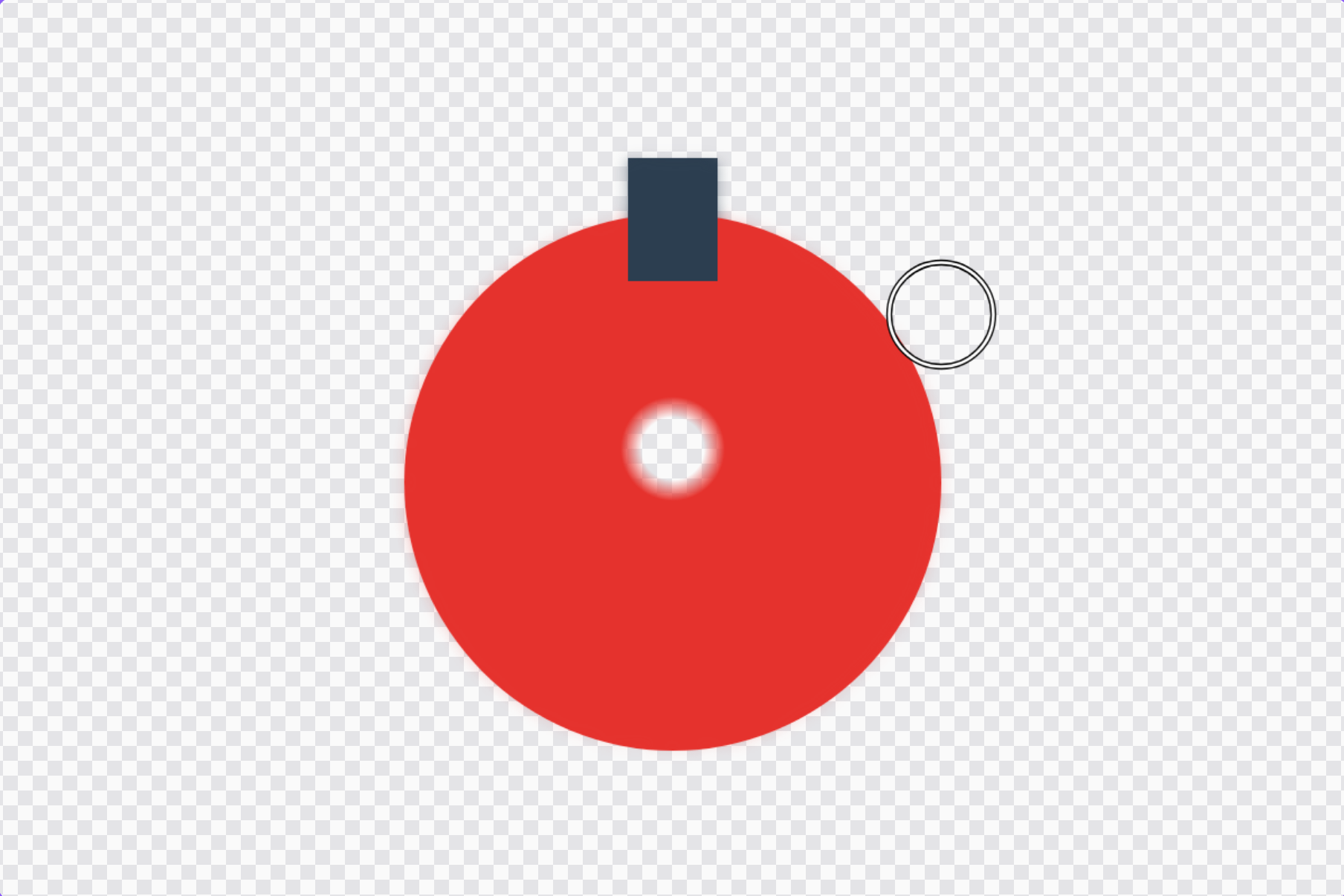
The brush needed more thought. A brush has no "selected thing" to move, so the keyboard gets its own cursor: a ring the size of the brush that appears on the picture when you press an arrow key, moves with the arrows, and paints when you press Space. It goes through the same code as a mouse stroke, so Undo works the same.
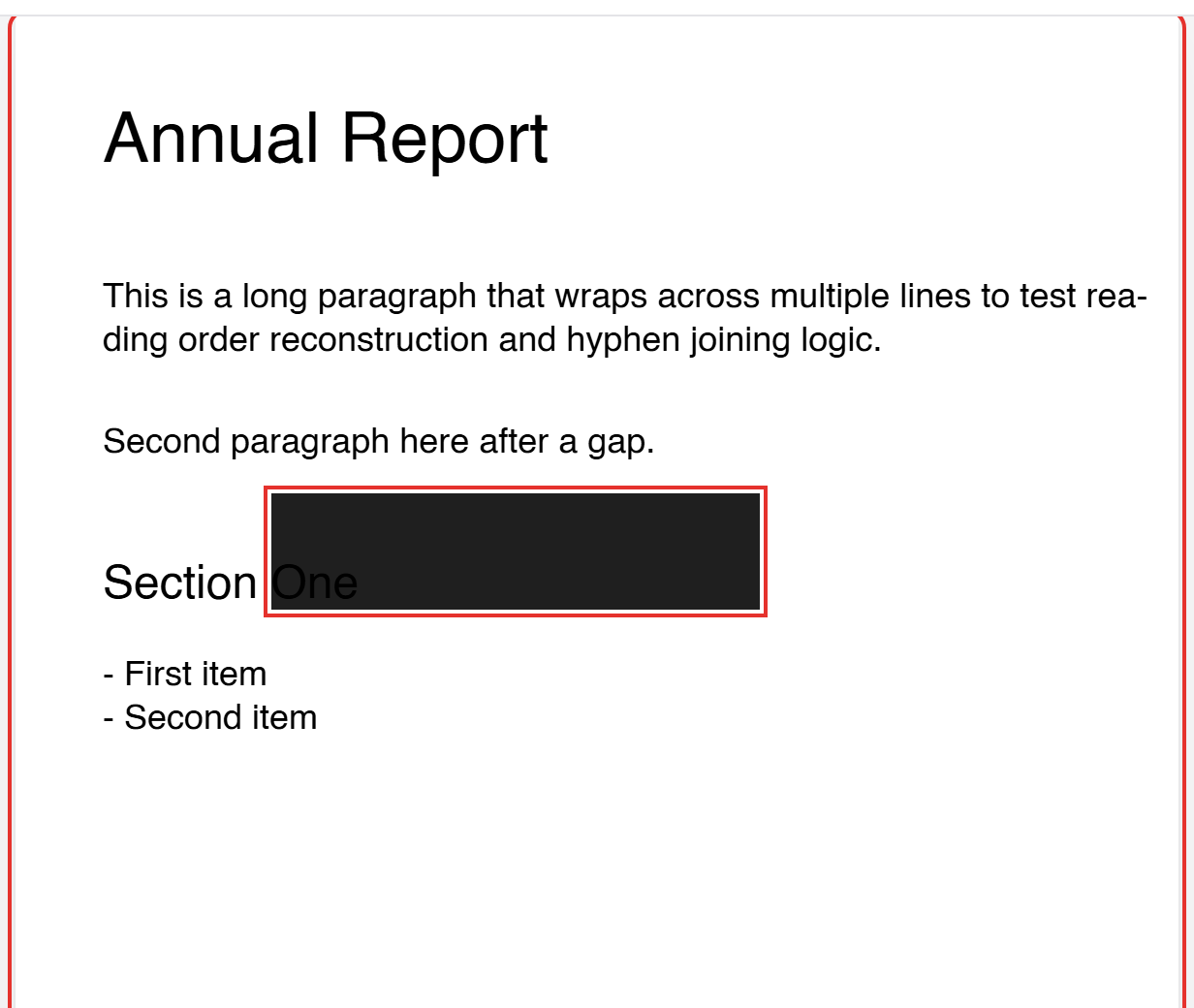
For redaction, Enter drops a box in the middle of the focused page, arrows move it, Shift and arrows resize it.
Two rules for all three:
- Never handle Tab. Focus has to be able to leave.
- Nothing changes for mouse and touch. Every one of these is an extra listener next to the old ones.
Step 5: scan the editors too, with a file open
The first scan only saw each tool before a file was chosen. The editors build most of their controls after that. So I added a second test that opens a file in each editor and scans again.
That found the second real problem: in Remove Background, the hidden file input behind the "Your photo" button had no label. One line.
Step 6: prove it with tests that have no mouse
The last tests use the keyboard only. For example, redaction:
await overlay.focus();
await overlay.press('Enter');
await expect(box).toHaveCount(1);
await overlay.press('ArrowRight');   // it moved
await overlay.press('Shift+ArrowRight'); // it got wider
await overlay.press('Delete');
await expect(box).toHaveCount(0);
If someone (me) breaks keyboard access later, CI fails.
The honest scorecard
| Result |
|---|
| Pages scanned | 89, plus 3 in the dark theme |
| Editors scanned with a file open | 6 |
| Automated findings | 2 (a mislabelled button, an unlabelled file input) |
| Mouse-only controls found by hand | 3 |
| All fixed | Yes |
| New tests | 97 |
And what I have not done:
- No screen reader testing with real users. I checked names and roles, and that status messages are announced. That is not the same as someone who uses NVDA or TalkBack every day trying to redact a PDF.
- The canvas previews are pictures. A blind user can run the Photo Editor's controls, but can't perceive the result. I don't have a good answer for that yet.
- The new keyboard hints are in English in the other 16 languages for now.
What I'd tell someone starting this
- Put axe in your test suite before you audit anything. It took an hour and it will keep working for years.
- Expect the scanner to find little and miss a lot. Mine found 2 problems. Unplugging the mouse found 3 bigger ones.
- Grep for
pointerdown. Every place you listen for a pointer and not a key is a place a keyboard user is locked out.
- Pick one keyboard pattern and reuse it. Arrows move, Shift is bigger, one key acts.
- Say what you didn't test. It's more useful than a badge.
To whoever asked: thanks for pushing. The answer is now "yes, and here are the tests".
Fizzdoc is free and open source: 75 PDF, photo and audio tools that run entirely in your browser.
If you use a screen reader or keyboard and something on Fizzdoc is in your way, please open an issue. I'll fix it.
Originally published on my blog.
