Introduction
A software PLC does not need a physical controller sitting inside a cabinet to execute industrial control logic. Its runtime can live entirely on a conventional computer, communicating with other systems through familiar industrial protocols while relying on an ordinary operating system underneath and that changes the security picture.
When assessing a SoftPLC, it is easy to concentrate on the services it exposes: Modbus TCP, management interfaces, perhaps a programming environment. Yet the control logic has to get onto the machine somehow. It has to be stored, compiled, and loaded into a runtime. The host operating system participates in every one of those operations.
I wanted to investigate what happens when an attacker can reach that layer.
The question guiding this research was simple: could someone modify a SoftPLC's active control logic through its deployment environment, replace the existing program, and execute the altered logic without following the usual management workflow?
I began with Beremiz. That did not go particularly well. After nearly nine hours spent trying to understand its internal architecture and communication mechanisms, I changed targets and moved to OpenPLC v3. Even then, my first approach ran into trouble. I eventually abandoned the management API route, turned my attention to SSH, and spent another long stretch figuring out how to make the entire process work remotely.
The resulting proof of concept replaced the active Structured Text program, compiled the substituted logic, restarted the runtime, and verified the resulting process-image changes through Modbus TCP. This is how I got there.
1. The First Target: Beremiz
Beremiz was my original target for this investigation. I wanted to examine whether an attacker could modify a SoftPLC's control logic through its deployment environment and demonstrate the result in an isolated lab.
The difficulty appeared before I could properly reach that question.
Beremiz has a fairly involved architecture. Its IDE-to-runtime communication relies on an Embedded Remote Procedure Call (eRPC) subsystem and custom target connectors. Understanding that communication path became a substantial undertaking in itself. The transport and framing mechanisms were not especially convenient to inspect or reproduce manually.
Its deployment workflow also introduced more friction than I wanted for this particular experiment. I was aiming for lightweight, script-driven testing. Instead, I found myself trying to understand the machinery connecting the IDE, target, and runtime before I could meaningfully investigate the control-logic execution path. Nearly nine hours went into that effort.
Eventually, I decided to stop and change targets. I wasn't getting the evidence I wanted, and continuing to reverse-engineer the deployment infrastructure would have consumed even more time. I moved to OpenPLC v3.
2. A New Target: OpenPLC v3
OpenPLC v3 offered a more accessible environment for the investigation. Its management application, project storage, compilation process, and runtime gave me several concrete components to examine.
I provisioned an isolated Ubuntu 24.04 virtual machine using Multipass. The machine was deliberately modest: two virtual CPUs, 2 GB of memory, and a 10 GB virtual disk. Nothing elaborate. I needed a target I could inspect, modify, stop, and restart without disturbing my workstation.
Lab configuration
| Component | Configuration |
|---|
| Target | OpenPLC v3 |
| Operating system | Ubuntu 24.04 |
| Virtualization | Multipass |
| CPU | 2 vCPUs |
| Memory | 2 GB |
| Disk | 10 GB |
| Management interface | HTTP, port 8080 |
| Runtime interface | Modbus TCP, port 502 |
| Remote administration | SSH, port 22 |
After provisioning the VM, I installed the build dependencies, cloned the OpenPLC v3 repository, installed the Linux runtime, and started the application.
The management dashboard was then accessible from my host workstation over HTTP.
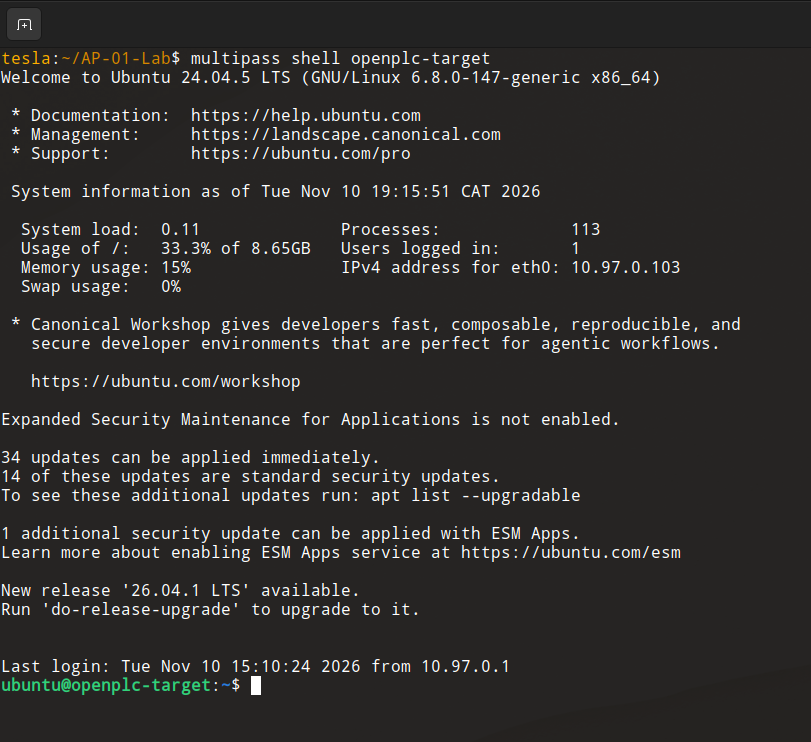
OpenPLC v3 running inside the isolated Ubuntu 24.04 virtual machine.
With the target operational, I could begin mapping its exposed services and deciding where to start.
3. Reconnaissance: What Was Exposed?
I started from the host workstation with network reconnaissance. The immediate objective was to identify the services listening on the target and determine which ones might provide a route into the OpenPLC deployment.
Three services stood out.
| Port | Service | Observation |
|---|
| 22 | SSH | Remote host administration available |
| 502 | Modbus TCP | OpenPLC runtime interface |
| 8080 | HTTP | Flask-based management dashboard |
The HTTP application was served by Werkzeug on port 8080. Modbus TCP was reachable on port 502, and SSH was available on port 22.
That last service would become particularly important later. At this point, however, I was more interested in the management application. It was the obvious place to begin examining how programs were uploaded, compiled, and started.
3.1 Looking inside the management application
I began inspecting the HTTP application and its routes.
Several endpoints redirected unauthenticated requests to the login page. These included routes associated with program management, hardware configuration, compilation logs, and application settings.
I was able to authenticate using the credentials configured for this particular lab instance. Once logged in, I acquired a Flask session cookie and began examining the management workflow.
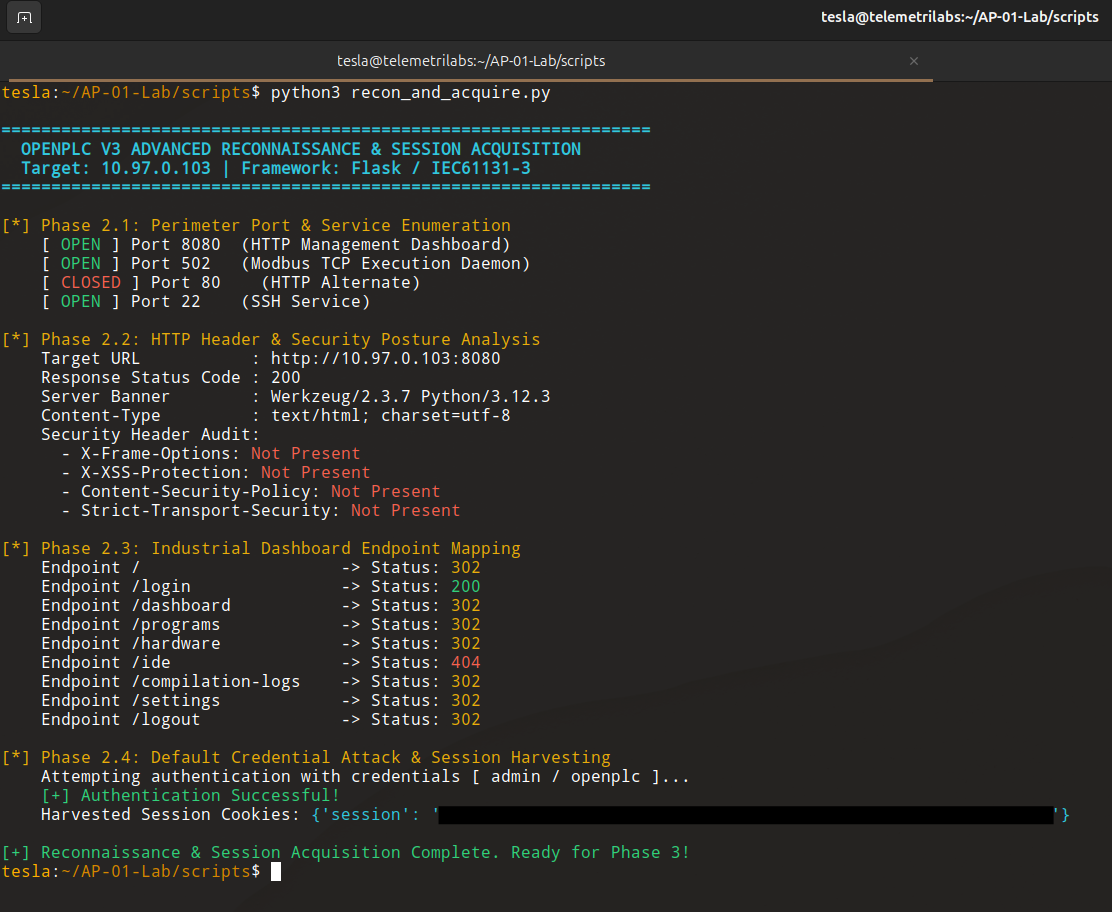
The reconnaissance script identified the HTTP management interface, Modbus TCP runtime, and SSH service.
My next objective was to reproduce the relevant dashboard operations through HTTP requests. If I could automate the deployment workflow, I could use it to deliver and execute a modified control program. That was the plan, anyway.
4. The API Attempt
I started interacting with the management interface programmatically.
Authentication worked. I obtained a session and explored the endpoints involved in program management and compilation. The intention was to reproduce the sequence that would normally happen through the browser, including triggering compilation.
Then the session behavior began getting in the way.
During my attempts to trigger compilation, the session kept getting refreshed or invalidated. Subsequent requests were redirected to the login page, interrupting the sequence. I could authenticate and reach the management interface, but I couldn't get the automated workflow to proceed consistently.
It was an irritating obstacle. I spent time trying to work around it, but I wasn't getting a reliable result.
There is a something worth preserving here, though. I observed session-related interruptions while automating the management workflow. I did not establish the underlying cause, nor did I demonstrate a vulnerability in OpenPLC's session-management implementation.
4.1 The obvious way
I had another option sitting right in front of me.
The HTTP dashboard was exposed. I had authenticated successfully. The normal program-management workflow was available through the browser. I could upload a replacement program, compile it, and start the runtime.
I mean it was straightforward, but then I hesitated.
The dashboard route felt almost too obvious. I wanted to know whether the same result could be achieved through another access path, particularly one that interacted with the host rather than relying on the management application.
During reconnaissance, I had also identified SSH on the target. I started wondering whether I could use it to perform the same operations directly. I didn't have a complete attack plan. I wasn't sitting there with a finished sequence of commands. It was just a question: Could I do this through SSH instead?
That question sent the investigation in a different direction.
5. The SSH Pivot
SSH provided a way to interact with the Ubuntu host independently of the Flask dashboard.
For this experiment, I adopted a specific threat scenario: an attacker had already obtained valid SSH credentials for an account with sufficient privileges to modify the OpenPLC project and manage the runtime process. I was not attempting to steal credentials, bypass SSH authentication, or demonstrate an unauthenticated compromise. Those were outside the scope of this experiment.
What I wanted to establish was whether that level of host access could be used to substitute the active control logic and execute it.
The practical requirements began to take shape:
✔ Transfer a replacement Structured Text program to the target.
✔ Replace the active project file in OpenPLC's storage directory.
✔ Invoke the compilation pipeline.
✔ Stop the existing runtime process.
✔ Launch the newly compiled runtime.
✔ Verify the modified program through Modbus TCP.
On paper, the sequence was fairly compact. Getting it to work was another matter.
5.1 An Unexpected Compilation Problem
One of the first obstacles appeared in the Structured Text program itself.
My replacement program kept failing during compilation. The error was particularly frustrating because the problem was a small syntactical difference at the end of the configuration block.
I had written:
END CONFIGURATION
OpenPLC expected:
END_CONFIGURATION
That underscore made all the difference.
What made this confusing was that my original baseline program also used END CONFIGURATION. It was already running in the lab, so I initially assumed the same structure would be accepted by the compiler. The existing runtime continued executing its previously compiled program, even though subsequent compilation attempts were reporting errors. That distinction wasn't immediately obvious to me.
I spent nearly an hour trying to understand what was wrong. I went through the source code, looking for an explanation, but the issue wasn't immediately apparent. Eventually, I examined the compiler's source more closely and traced the problem back to the expected syntax. It was a small detail, but it held up the entire experiment.
Once I corrected the terminator to END_CONFIGURATION, I could move forward with the deployment work.
There was no elegant shortcut. I kept investigating, adjusting the approach, and trying to make the individual operations work together. Eventually, I had enough of the deployment process understood to automate it.
6. Preparing the Replacement Program
I created a Structured Text payload named malicious_blink.st.
The program needed to produce an observable change. I didn't need an elaborate control routine; I needed a small piece of logic that would make it possible to distinguish the modified program from the baseline.
I used a located variable:
ExploitTrigger AT %MW0 : INT;
This maps the variable to memory word zero in the OpenPLC process image.
The payload uses a counter-based mechanism to toggle the value of ExploitTrigger between zero and one after every five execution cycles. This gave me a predictable state change that I could inspect externally through Modbus TCP.
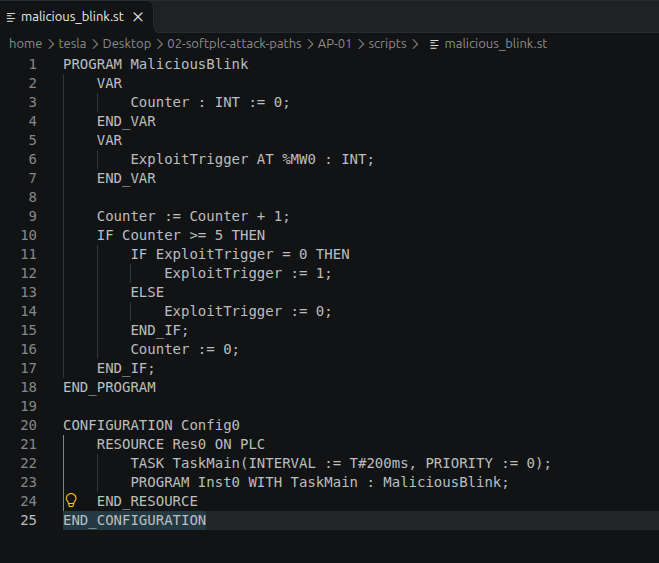
The replacement Structured Text program, including the located variable mapped to %MW0.]
The payload was ready. The remaining task was to get it into the active project, compile it, and bring the runtime back up.
7. Automating the Deployment
I built a Python script called deploy_and_verify.py to automate the SSH-based workflow.
It used SCP to transfer the payload and SSH to perform the privileged operations on the target. The script handled the replacement of the active project file, compilation, and runtime restart.
The process had several stages.
7.1 Transferring the payload
The script first staged malicious_blink.st on the target VM.
This left the local research payload separate from the active OpenPLC project until the replacement step.
7.2 Replacing the active program
The staged file was copied into OpenPLC's Structured Text storage directory:
/home/ubuntu/OpenPLC_v3/webserver/st_files/
The script then replaced the active Structured Text file.
7.3 Running the compiler
With the replacement file in place, the script invoked OpenPLC's compilation pipeline.
The compiler generated the C source files and supporting artifacts required to build the runtime:
POUS.c
POUS.h
LOCATED_VARIABLES.h
VARIABLES.csv
Config0.c
Config0.h
One line in the output was particularly relevant:
varName: __MW0 varType: INT
The compiler had recognized the located memory variable and its integer type. The compilation then completed successfully.
Compiling main program...
Compilation finished successfully!
This was an important checkpoint. The replacement logic had made it through the compilation process.
7.4 Restarting the runtime
After compilation, the script terminated the existing core/openplc process and launched the newly compiled runtime binary.
The difference here matters. This was a process restart, not a live update of an executing control program. The old runtime was stopped, and the newly compiled binary was started.
The entire sequence was now automated.
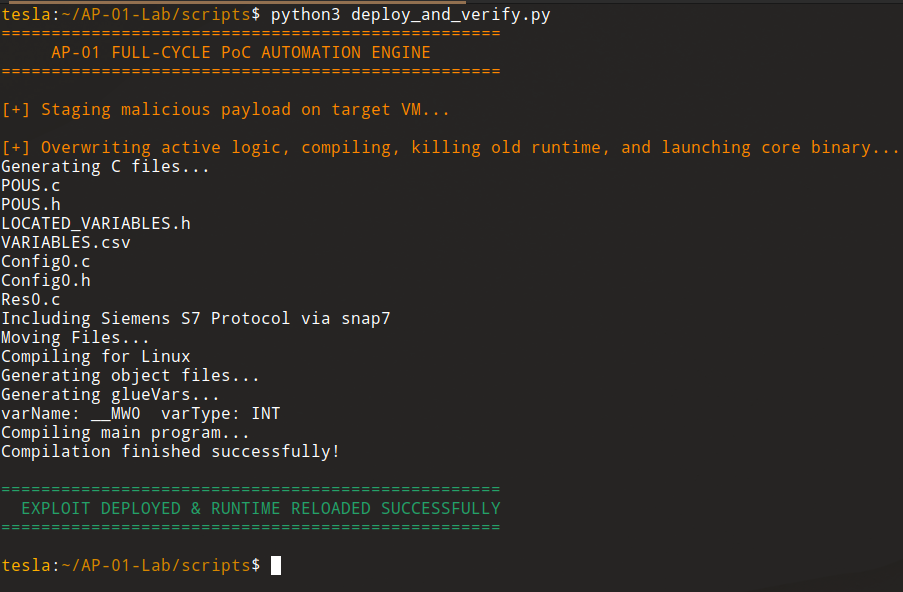
The deployment script completed the file replacement and compilation workflow, then restarted the OpenPLC runtime
The terminal output showed that the payload had been staged, the compilation had completed, and the runtime had been reloaded successfully. Now I needed to verify what was actually executing.
8. Verifying the Modified Process Image
A successful compiler run did not, by itself, prove that the modified logic was executing. I needed an independent observation from the runtime.
Before deploying the replacement program, I had queried two holding registers through Modbus TCP. Both returned zero. I retained a screenshot of that baseline observation.
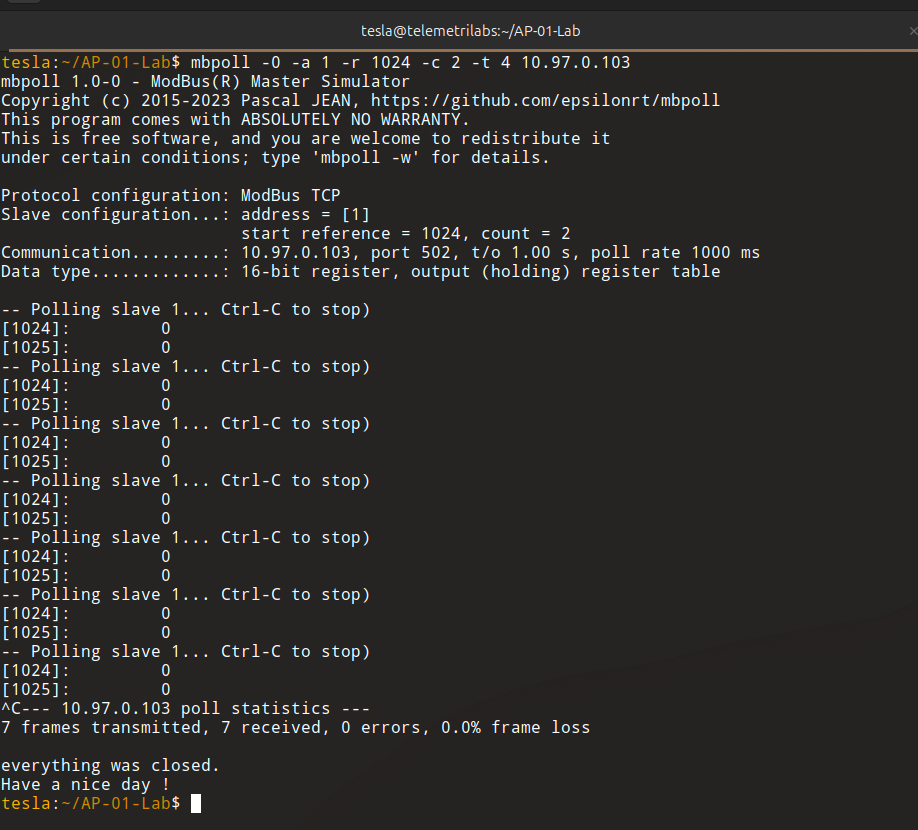
Before deployment, holding registers 1024 and 1025 both returned zero.
After the deployment, I ran the same query:
mbpoll -0 -a 1 -r 1024 -c 2 -t 4 10.97.0.103
This queried two 16-bit holding registers, beginning at reference 1024.
The post-deployment output was:
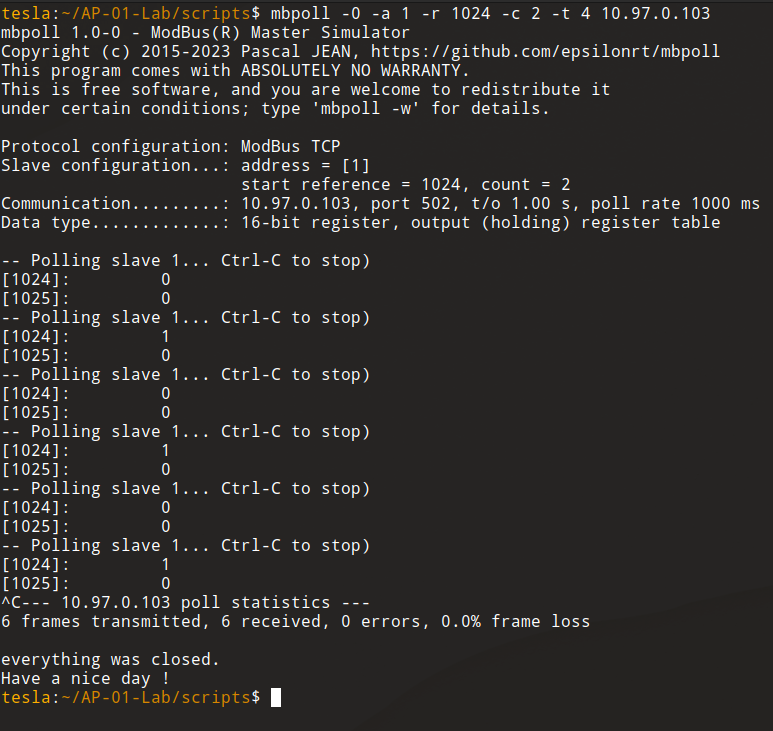
After deployment, holding registers 1024 and 1025 returned 0 and 1.
There it was.
Register 1024 alternated between zero and one. Register 1025 remained at zero. All six Modbus requests received valid responses, with no frame loss.
8.1 What the evidence tells us
The compiler output and the Modbus observations support the result together.
The compiler identified the located variable as __MW0 with type INT. After the replacement program was compiled and the runtime restarted, the holding register associated with that variable began changing as expected.
In this lab configuration, %MW0 was observable through Modbus TCP at holding register 1024.
The baseline observation showed both queried registers at zero. Following deployment, register 1024 began alternating between zero and one. That behavior matched the payload's intended operation.
This is evidence that the replacement logic was compiled, loaded by the restarted runtime, and executing in a way that changed the exposed process image.
I did not connect physical PLC hardware or an actuator to the experiment. The demonstrated result was a modification of the software PLC's process image, observed through its Modbus interface. I am not claiming a physical process response.
9. What the Experiment Demonstrated
The experiment established a working host-level path for unauthorized control-logic modification in my OpenPLC v3 lab.
With valid SSH credentials and sufficient privileges, the deployment could be modified remotely. The proof of concept performed the following operations:
- Staged a replacement Structured Text program on the target.
- Replaced the active OpenPLC project file.
- Invoked the compiler to generate a new runtime binary.
- Terminated the existing runtime process.
- Started the newly compiled runtime.
- Verified the modified program's behavior through Modbus TCP.
The important finding concerns the trust placed in the host environment surrounding the SoftPLC.
The management dashboard is one way to deploy control logic. It is not the only component capable of affecting what ultimately executes. Project files reside on the host. Compilation happens there. The runtime is a host process. Anyone who obtains sufficient control over those components may be able to change the program that the SoftPLC executes.
9.1 SSH exposure and administrative privileges
SSH being reachable does not automatically make a SoftPLC vulnerable to control-logic substitution.
The attack path I demonstrated required valid credentials and enough privileges to modify the project, invoke compilation, and manage the runtime. Without those conditions, the specific workflow would not have been possible as implemented.
There are several ways an attacker might obtain credentials in a real environment: a compromised administrator workstation, credential reuse, credentials exposed in automation scripts, accidental disclosure, or misuse of an account that already has administrative privileges. Those are plausible acquisition scenarios, not findings from this experiment. I did not test them.
The demonstrated weakness lies in what an attacker can do after obtaining the required host access. If SSH access is insufficiently restricted and a privileged account is compromised, the attacker may gain the ability to replace the control logic itself.
9.2 A different route from the management interface
The initial investigation focused on the HTTP management application. The final proof of concept took another route.
I did not exploit the dashboard's upload endpoint, bypass its authentication, or rely on its manual deployment workflow. I used SSH to interact with the underlying operating system and modify the active OpenPLC project directly. These are distinct access paths with different security boundaries.
A dashboard-based attack would depend on access to the management application and its deployment functions. The SSH-based route depends on host authentication and operating-system privileges. The latter was the path I successfully demonstrated.
10. Limitations and Scope
The results need to be understood within the boundaries of the experiment.
- SSH credentials were assumed. Credential theft, disclosure, and authentication bypass were not demonstrated.
- Sufficient privileges were required. The deployment account needed permission to replace the active project, compile the program, and manage the runtime.
- The experiment used an isolated target. All testing was performed against a dedicated OpenPLC v3 virtual machine.
- No physical process was connected. Verification concerned the software process image exposed through Modbus TCP.
- A runtime restart was necessary. The proof of concept did not demonstrate live modification of an executing program.
- The register mapping was specific to this lab. The observed mapping between
%MW0 and holding register 1024 was verified in this environment. It should not be assumed to be identical across all OpenPLC deployments.
These boundaries describe what was and was not established. The host-level control-logic substitution itself was demonstrated.
11. Conclusion
I started with Beremiz, spent nearly nine hours trying to understand its internals, and eventually changed targets. OpenPLC v3 gave me a more accessible environment, although the first approach I tried there didn't work as smoothly as I had hoped.
I initially attempted to automate the management interface. The session interruptions and repeated redirects made that workflow unreliable. The dashboard itself was available, and I could have used it directly. Instead, I wondered whether SSH could provide another route.
That question cost me another seven hours.
I had to work out how to stage the replacement program, identify the active project file, invoke the compiler, and restart the runtime remotely. Once those pieces came together, I automated the process and ran it against the target.
The compiler completed successfully. The runtime restarted. Modbus polling showed the expected changes in the process image.
The experiment demonstrated that an attacker with valid SSH credentials and sufficient host privileges could substitute the active control logic in this OpenPLC v3 deployment, compile it, and execute it without using the dashboard's manual upload workflow.
There is a broader lesson here for SoftPLC deployments. The security of the control runtime cannot be considered separately from the machine hosting it. Administrative access, project-file integrity, compiler execution, and runtime management all influence what logic eventually runs.