This article was originally published on Hashnode: Fine in Chrome, broken in Preview. It is republished here with light edits.
Disclosure: we make LensUp's PDF editor, the browser tool where we ran into both bugs, so we have a direct connection to the product mentioned here. This write-up was drafted and edited with AI assistance; the bugs, test results and reproduction scripts come from our own testing, and the scripts are public so you can check every claim yourself.
We build a PDF editor that runs in the browser. It opens a PDF, lets you add text, a signature or a highlight, fill in form fields, and writes the result back as an incremental update. We checked every save with three renderers: pdf.js (Firefox and many web viewers), pdfium (Chrome) and poppler (most Linux tools). All three were happy.
Then we rendered the same files with Apple's PDFKit, the engine behind Preview on the Mac, the Files app on iOS and PDFs in Safari. It showed two problems none of the others did: a translucent highlighter that turned into an opaque bar or a sentence that vanished, and form answers printed twice on top of each other.
Neither problem shows up if you only test on Linux or in Chrome. Here are both, with small scripts that reproduce them on any Mac in a few seconds: github.com/ppop123/pdfkit-pitfalls.
Some background
An incremental update appends to a PDF instead of rewriting it. The new and changed objects go at the end, followed by a new cross-reference section that points back to the previous one. That's how signed PDFs stay signed, and it's why saving an edit doesn't mean rewriting the whole file: only the edit is written.
The cross-reference section comes in two forms. The classic one is an xref table followed by a trailer. PDF 1.5 added cross-reference streams (/Type /XRef), which usually come with object streams (/Type /ObjStm): many small non-stream objects compressed together into one stream.
We opened files for incremental update with pdf-lib (the @cantoo/pdf-lib fork, which supports incremental updates) and saved with the defaults, which turn object streams on. So whatever the original file used, our update ended in an XRef stream, with our new dictionaries packed into an object stream.
What PDFKit does with that
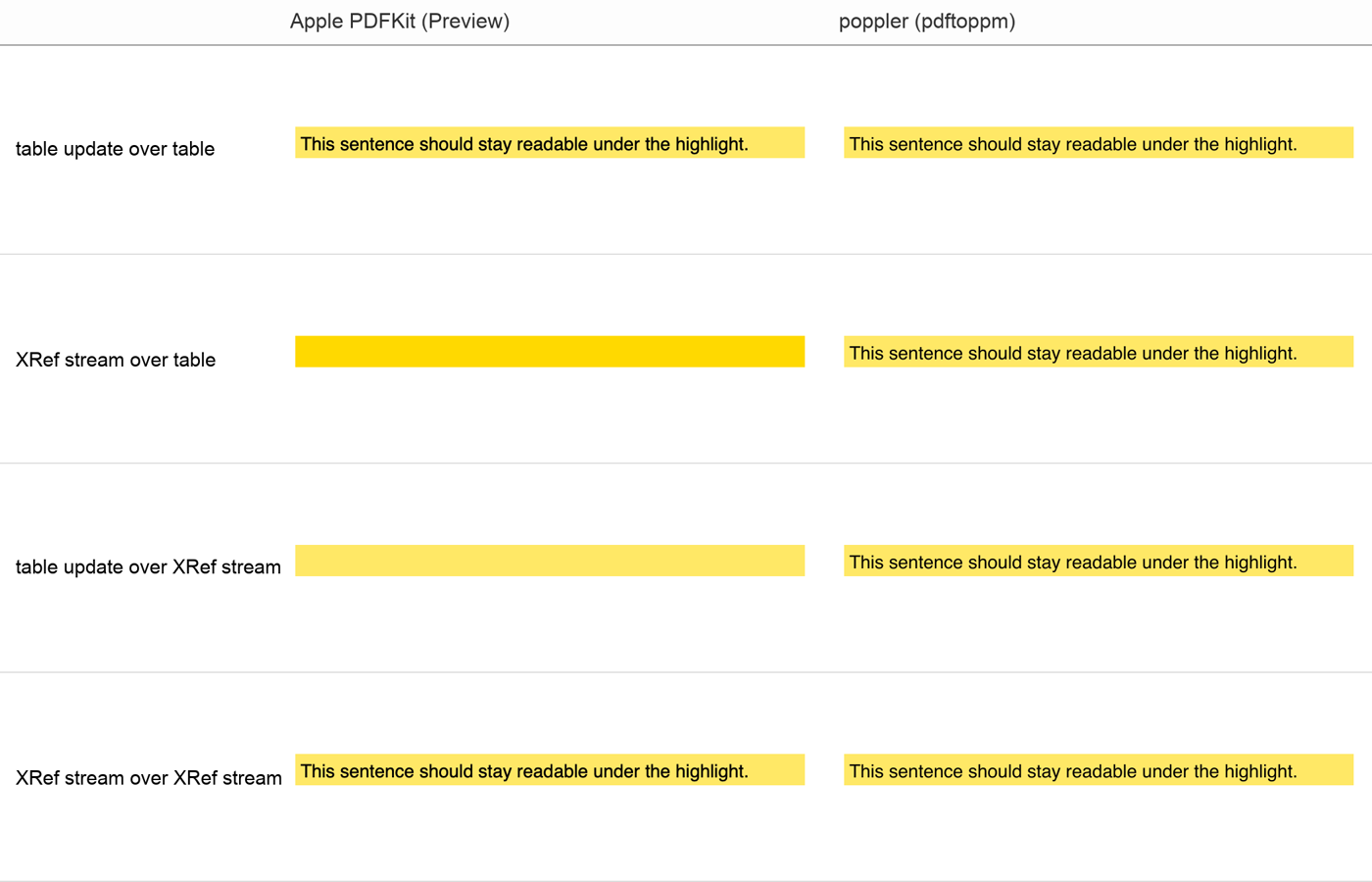
Take a one-page PDF that ends in a classic xref table and append a highlighter stroke: a yellow rectangle drawn through an ExtGState with 60% opacity and the Multiply blend mode. Written as a table-based update, it renders the same everywhere. Written as an XRef stream with the ExtGState inside an object stream, poppler still draws it correctly, but PDFKit shows an opaque yellow bar where the sentence was.
Render it with CG_PDF_VERBOSE=1 set, and CoreGraphics says why:
encountered unexpected object type: 7.
missing or invalid object number.
missing or invalid cross-reference stream.
It gives up on the update's XRef stream. Objects the update wrote out on their own are still found: the rectangle itself is drawn. Objects inside the update's object stream are not, and the ExtGState is one of them. Without it the rectangle is painted fully opaque, on top of the text.
The reverse breaks too. Over an original that ends in an XRef stream, an update written with a classic table gets:
failed to find start of cross-reference section.
font `Helvetica-7098480789' not found in document.
This time it's the original's object stream that gets lost, and the font was in it. The highlight is there; the sentence is gone.
| Original's last section | Update written as | PDFKit |
|---|
xref table | xref table | fine |
xref table | XRef stream with object streams | loses the objects in the update's object stream |
| XRef stream | xref table | loses the objects in the original's object streams |
| XRef stream | XRef stream | fine |
In our editor's checks, pdf.js, pdfium and poppler accepted all four combinations. That's exactly why a Linux-only test suite never caught it.
The fix
Look at where the original's last startxref points. If it lands on the keyword xref, the last section is a table; otherwise it's a stream. Then write the update in the same form:
// The form of the original's last cross-reference section: 'table' or 'stream'.
function xrefForm(bytes) {
  const tail = new TextDecoder('latin1').decode(bytes.subarray(Math.max(0, bytes.length - 2048)));
  const found = [...tail.matchAll(/startxref\s+(\d+)/g)];
  const offset = found.length ? Number(found[found.length - 1][1]) : NaN;
  if (!(offset >= 0 && offset < bytes.length)) return 'table';
  let i = offset;
  while (i < bytes.length && /\s/.test(String.fromCharCode(bytes[i]))) i += 1;
  return new TextDecoder('latin1').decode(bytes.subarray(i, i + 4)) === 'xref' ? 'table' : 'stream';
}

const doc = await PDFDocument.load(bytes, { forIncrementalUpdate: true });
// … edit …
const saved = await doc.save({ useObjectStreams: xrefForm(bytes) === 'stream' });
Hybrid-reference files, whose trailer is a table that also points to an XRef stream, end in a table, so they count as 'table' here.
Gotcha 2: PDFKit draws filled text fields itself
What PDFKit does
A form field's look is supposed to come from its appearance stream (/AP): a small content stream in which the writer draws the value. For a text field that has a value, PDFKit does something else. It draws the value (/V) itself with CoreText, in the font named by the field's default appearance string (/DA), and it drops the text-showing operators (BT … Tj … ET) from the appearance stream. Everything else in the appearance stream it still paints, such as paths and Form XObjects.
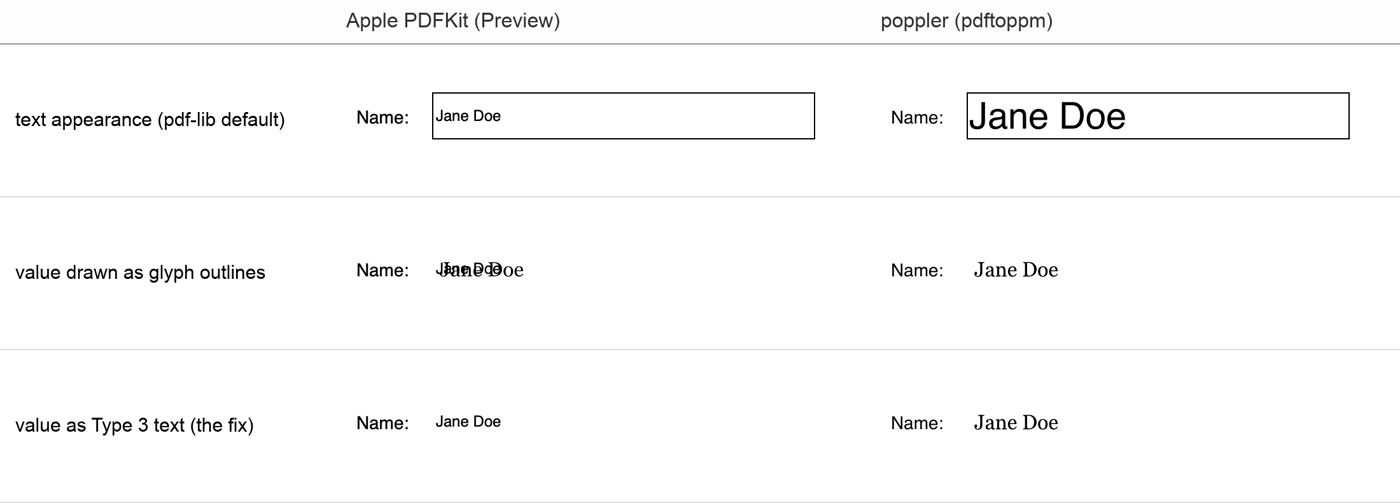
You can see the first half even with pdf-lib's own appearance. In the first row below, poppler draws pdf-lib's auto-sized Helvetica, while PDFKit ignores it and draws its own rendering of the value at a different size.
Why that bit us
Our text engine shapes text itself (joining Persian and Arabic, ordering mixed-direction text, falling back between fonts) and draws the result as glyph outlines, so every reader shows exactly the same glyphs. In a field's appearance, those outlines are paths. PDFKit painted the paths and then drew /V again with CoreText on top: two copies of every answer, as in the second row. On a real IRS W-9 the two copies didn't even line up, because PDFKit left-aligned its copy while our appearance was right-aligned.
None of these stopped the second drawing: making the field read-only, setting /NeedAppearances to false, removing the /Tx BMC … EMC marked content, or changing the font or color in /DA.
The fix
Write the value as text after all, just not in a real font: use a Type 3 font whose glyph procedures are the same outlines. PDFKit drops text-showing operators, Type 3 included, and draws the value once in its own rendering. pdf.js, pdfium and poppler draw the Type 3 glyphs, which are our outlines. That's the third row.
The trade-off is that in Preview you get PDFKit's rendering of the value (its font from /DA, its alignment), not yours. For us that was acceptable, since CoreText shapes Persian correctly.
Two related notes:
- Dropdowns and list boxes are different. PDFKit doesn't redraw them, so for choice fields we kept the outlines.
- Acrobat had its own problem with outlines. Acrobat Reader drew our outline appearances in some forms but left the box blank in others (fields created by pdf-lib, with a
/MK background color). It drew the Type 3 version in both.
Bonus gotcha from Acrobat: Reader extensions (/UR3)
Many official forms, the W-9 among them, carry usage rights (/Perms /UR3, "Reader extensions"): a signature over the file as issued. Change the file and Acrobat Reader opens it with:
This document enabled extended features in Adobe Acrobat Reader. The document has been changed since it was created and use of extended features is no longer available.
Every save changes the file, so on save we now remove /UR3 and the older /UR from /Perms (and /Perms itself if nothing else is left). A certification signature (/DocMDP) stays. iText does the same thing with removeUsageRights. To be clear about what we've checked: we saw the warning in Acrobat Reader, and we haven't re-tested the fixed files there yet.
How to test with PDFKit without clicking through Preview
PDFKit is scriptable from Swift in about twenty lines: open the file with PDFDocument, draw page 1 into a bitmap with PDFPage.draw(with:to:) (form widgets included), and write a PNG. Run it with CG_PDF_VERBOSE=1 and CoreGraphics prints what it didn't like. The repo's render-pdfkit.swift does exactly that. qlmanage -t, the Quick Look thumbnailer, goes through PDFKit too.
If you compare against pdfium from Python: pypdfium2 doesn't draw form fields unless you call pdf.init_forms() first. Without it, every field looks empty, which is easy to mistake for a bug in your writer.
Takeaways
- Three renderers agreeing on a file doesn't mean the viewer on every Mac and iPhone will. If your PDFs reach Apple devices, render them with PDFKit, in CI on a macOS runner or at least by hand.
- In an incremental update, match the cross-reference form of the file you're updating.
- For a filled text field, PDFKit draws the value itself. Avoid drawing the value into the appearance as paths; text in a Type 3 font works everywhere we tested.
The reproductions, in Node and Swift, are MIT-licensed: github.com/ppop123/pdfkit-pitfalls.
About the author: the team behind this post builds LensUp Scanner, a free set of browser tools for scanning documents and working with PDFs. If you have seen other PDFKit quirks, the pdfkit-pitfalls repo is open to issues and pull requests.