Most users would schedule their tasks using a cronjob, and that's perfectly reasonable
Introduction
I will assume you are running on a linux machine with systemd (which you should be if you're running on a server), other init systems such as runit or openRC are not taken into consideration
The content is mainly targeted for servers, however you can apply these concepts to your personal machines
What is a cronjob
Cronjobs are essentially used for scheduling tasks at certain intervals or exact time(s)
The task could be a shell script, a command, a call, anything you may need
Example Usage
Creating a cronjob is very easy
This would echo the current datetime in ISO format to file /tmp/cronjob_running.txt every minute
Simple, easy and straightforward
Problem
This works fine and well for personal, simple or non important tasks.
But let's take this job:
0 0 * * * /usr/local/sbin/postgresql_backup.sh >> /var/log/postgres/backups/backup.log 2>&1
This job would run the postgresql_backup.sh script every day at 00:00 and output the logs AND errors to /var/log/postgres/backups/backup.log
What happens when the machine goes down at 00:00? or something even more probable, cron's systemd unit (like cronie) stops or does not start because someone forgot to (re)enable it.
Answer: The job never runs
Systemd timers
What is systemd
It's the core init unit of your linux system, when your machine boots up, the kernel will load it with a pid of 1
A systemd timer is, as the name suggests, a timer that is managed by systemd
So basically, the solution is already integrated into your Operating System, you're just not using it!
What's more, they have more precision than cronjobs do and they support much finer scheduling granularity.
How to create these timers
Now I'll be honest, creating them is a bit of a pain and not as quick as cronjobs, but we'll talk about the differences at the end!
For the sake of simplicity I'll keep the example very straightforward, but note you can really get a bit more complex with these
First, you create a user systemd unit by running:
systemctl --user edit --force --full example-unit.service
We're creating a user scoped timer for this example, but for more serious work like a database backup, use sudo and omit user, like this: sudo systemctl edit --force --full example-unit.service
The --force --full flags are used to create the unit if it doesn't exist, I use the systemctl edit command so that if we exit with an empty file, we won't have issues, plus it does create a backup for us which is handy
- Then put this into the content
[Unit]
Description=Our Example systemd Unit

[Service]
ExecStart=/usr/bin/echo "Hello There!"

[Install]
WantedBy=default.target
Save and exit
Reload your systemd daemon:
systemctl --user daemon-reload
Run the unit
systemctl --user start example-unit.service
Nothing happens, why? where's my output?
You inspect your service like any other systemd unit.. with status subcommand
Run this
systemctl --user status example-unit.service
You get something similar to this:
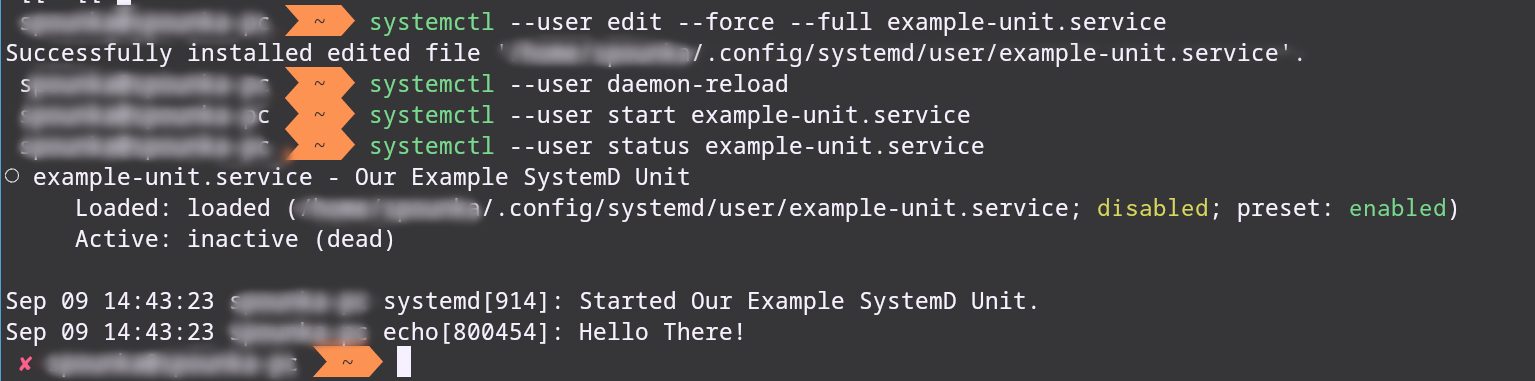
But where's the schedule here?
Well, this is why I said
creating them is a bit of a pain and not as quick as cronjobs
The Timer
Finally, it's time we create the actual timer unit
Run this command:
systemctl --user edit --force --full example-unit.timer
The same goes here, omit the --user flag and add sudo if doing a system wide timer!
- Add this
[Unit]
Description=Running Our Example Unit regularly

[Timer]
OnCalendar=*:0/1
# This here is our magic flag
Persistent=true
Unit=example-unit.service

[Install]
WantedBy=timers.target
- Save and exit
Run this command
systemctl --user start example-unit.timer
NOTE: We're only starting the timer here, if we reboot the machine the timer will not persist
For the timer to remain enabled, you do systemctl --user enable --now example-unit.timer
- Here's what you get:

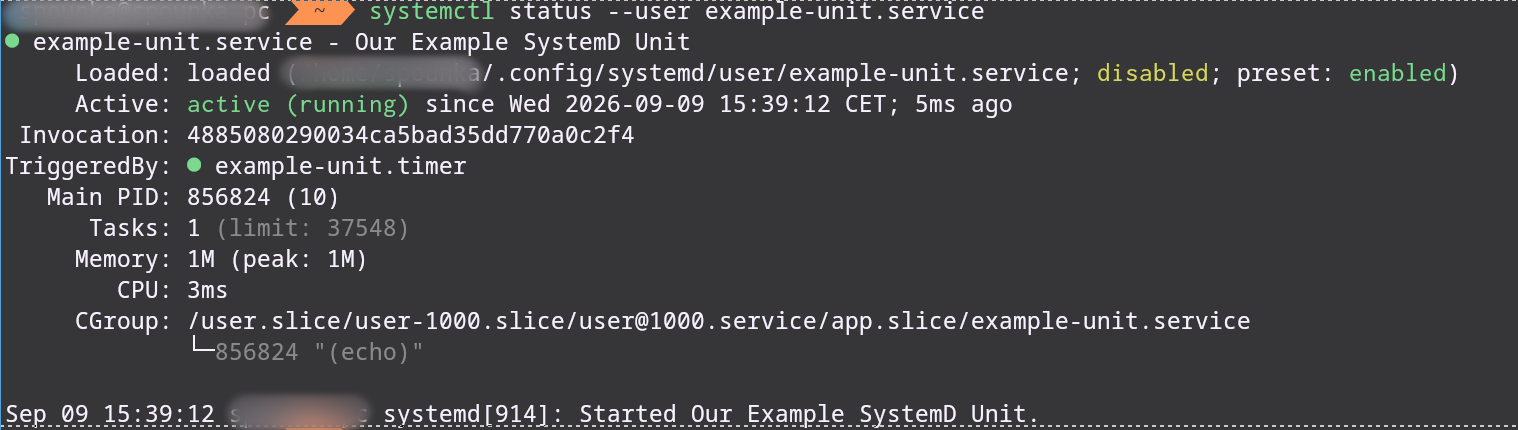
This will run our unit every minute, and with our magic Persistent=true even if your machine goes down, or for whatever reason it gets missed due to some random bit flipping, your timer WILL run when it gets the chance
It stores the last execution timestamp on disk. When the timer becomes active, systemd checks this file, and if the target trigger time passed while the system was powered off it immediately triggers the service.
Comparing systemd timers to other solutions
Now for more informed readers, you may know of anacron which is a perfectly reasonable solution however there are some differences you need to be aware of.
Here's a comparison to systemd timers, cronjobs and anacron
| Solution | Simple to create | Flexible Scheduling | Runs on missed tasks |
|---|
| Systemd | ❌ | ✅ | ✅ |
| Anacron | ✅ | ❌ | ✅ |
| Cronjob | ✅ | ✅ | ❌ |
anacron doesn't have that much flexibility, they have daily basis checkup, which you may or may not want, so beware of that
Systemd timers Scheduling
You may have noticed that we used the OnCalendar keyword in our timer, it's not the only one! there are more things you can configure
Monotonic Timers
These basically run relative to something, it can be relative to system boot, it can be time since the unit was activated!
Here's a small table of keywords and schedules you can have that I borrowed from this great Article
| Keyword | Meaning |
|---|
| OnActiveSec | Schedule the task relative to the time when the timer unit itself is activated |
| OnBootSec | Schedule task relative to the system boot time |
| OnStartupSec | Schedule the task relative to the time when systemd started |
| OnUnitActiveSec | Schedule the task relative to the last time the service unit was active |
| OnUnitInactiveSec | Schedule the task relative to the last time the service unit was inactive |
Seconds are used as the default unit of time. We can specify a different unit after the value (e.g. 15m for fifteen minutes)
Realtime Timers
These are the ones that use the OnCalendar keyword
The basic syntax is:
OnCalendar=Mon *-*-* 12:30:00
           │   │ │ │ │  │  │
           │   │ │ │ │  │  └── SECOND
           │   │ │ │ │  └───── MINUTE
           │   │ │ │ └──────── HOUR
           │   │ │ └────────── DAY OF MONTH
           │   │ └──────────── MONTH
           │   └────────────── YEAR
           └────────────────── WEEKDAY
Conclusion
Systemd Timers are great for scheduling important tasks or interacting with a daemon that you already installed.
So are they the solution for everything? No, they're cumbersome to create and honestly I don't like the way it's handled.
Use the right tool for the job, if it's a business critical backup that runs twice a day? a very important data collection task? Use systemd timers, if it's simply another task that would not harm if it was missed once, use cronjobs, they're much easier to create
There are many things that I have not mentioned in this article, and things I didn't go into depth into but I hope this article helps future engineers with their journey in automating and scheduling