Shipping software used to be risky.
A new deployment could introduce bugs, break critical workflows or affect thousands (or millions) of users instantly.
For many teams, releasing software meant:
- Deploying late at night 🌙
- Monitoring dashboards anxiously 📊
- Hoping nothing breaks 🤞
Modern engineering teams solved this problem using Feature Flags.
Feature flags allow developers to release code without immediately exposing new features to users.
Instead of deploying and hoping everything works, teams can control feature visibility dynamically.
🧠 What Are Feature Flags?
A Feature Flag (also called a Feature Toggle) is a mechanism that enables or disables functionality in an application without deploying new code.
In simple terms:
if feature_flag_enabled:
    show_new_feature()
else:
    use_old_behavior()
The application contains both code paths, but the feature flag decides which one runs.
This allows developers to separate deployment from release.
Key idea:
- Deployment → Shipping code to production
- Release → Making the feature available to users
Feature flags allow these two processes to happen independently.
🎯 Why Feature Flags Matter
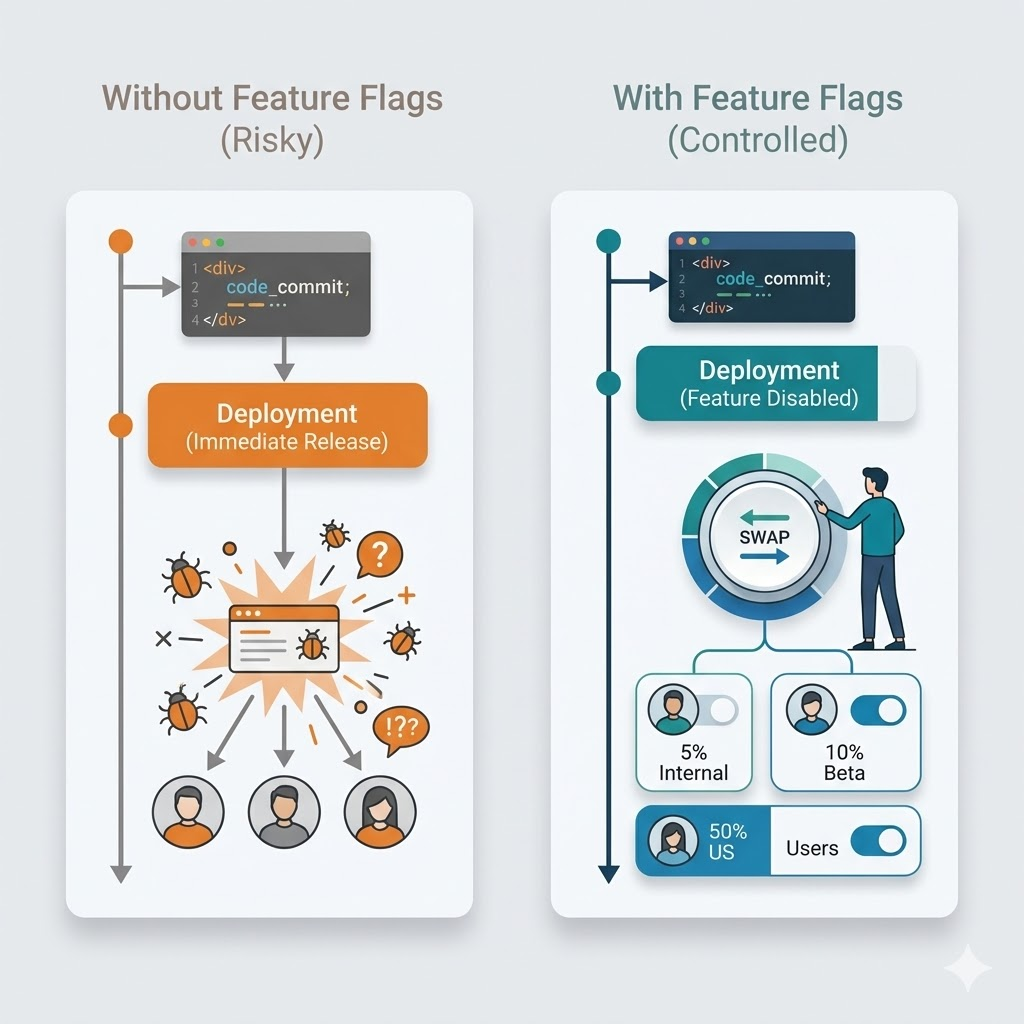
Feature flags dramatically reduce the risk of releasing software.
Without Feature Flags
Deploy → Feature immediately live
If something breaks, the only option is rollback.
With Feature Flags
Deploy → Feature disabled → Enable gradually
If something goes wrong, simply turn the feature off.
No redeployment required.
Benefits of Feature Flags
Feature flags enable:
- ✅ Safer releases
- ✅ Gradual rollouts
- ✅ Instant rollback
- ✅ Production testing
- ✅ Controlled experiments
🛒 Real-World Example
Imagine launching a new checkout system for an e-commerce platform.
Without Feature Flags
Deploy new checkout → All users see it
If checkout fails → Revenue stops immediately 💥
With Feature Flags
Deploy new checkout → Feature disabled
Enable for 5% users
Monitor metrics
Gradually increase rollout
If problems appear, the feature can be disabled instantly.
🧩 Types of Feature Flags
Not all feature flags are used for the same purpose.
Understanding their types helps design systems properly.
1️⃣ Release Flags
Used to gradually release new features.
Example:
new_checkout_enabled
Purpose:
- Control feature rollout
- Reduce release risk
Release flags are usually temporary and removed once the feature is stable.
2️⃣ Experiment Flags (A/B Testing)
Used for product experiments.
Example:
checkout_variant_A
checkout_variant_B
Users may see different versions of a feature.
Metrics measured include:
- 📈 Conversion rate
- 📊 Engagement
- 🔁 Retention
3️⃣ Operational Flags
Used to control system behavior during incidents.
Example:
disable_recommendation_engine
If a system starts failing, the feature can be disabled instantly.
Operational flags are useful during production outages.
4️⃣ Permission Flags
Used to control access based on user roles.
Example:
admin_dashboard_enabled
Only certain users or roles see the feature.
This is commonly used for:
- internal tools
- beta programs
- admin dashboards
⚙️ Feature Flags vs Configuration Flags
These concepts are often confused.
Feature Flags
Used to control product functionality.
Characteristics:
- Temporary
- Used for rollouts
- Tied to releases
Example:
enable_new_upload_ui = true
Configuration Flags
Used to control system configuration.
Characteristics:
- Usually permanent
- Not tied to releases
Example:
max_upload_size = 20MB
Understanding this difference prevents misuse of feature flags.
🧪 Simple Implementation Example (Go)
Here is a simple feature flag example in Go:
type FeatureFlags struct {
    NewCheckout bool
}

func Checkout(flags FeatureFlags) {
    if flags.NewCheckout {
        newCheckoutFlow()
    } else {
        oldCheckoutFlow()
    }
}
Feature flag values may come from:
- configuration files
- environment variables
- databases
- remote config services
🌐 Remote Feature Flag Systems
In production, feature flags are often managed remotely.
Popular platforms include:
- LaunchDarkly
- Split
- Flagsmith
These systems allow teams to:
- toggle features instantly ⚡
- target specific users 🎯
- monitor rollout metrics 📊
No redeployment required.
📈 Gradual Rollouts
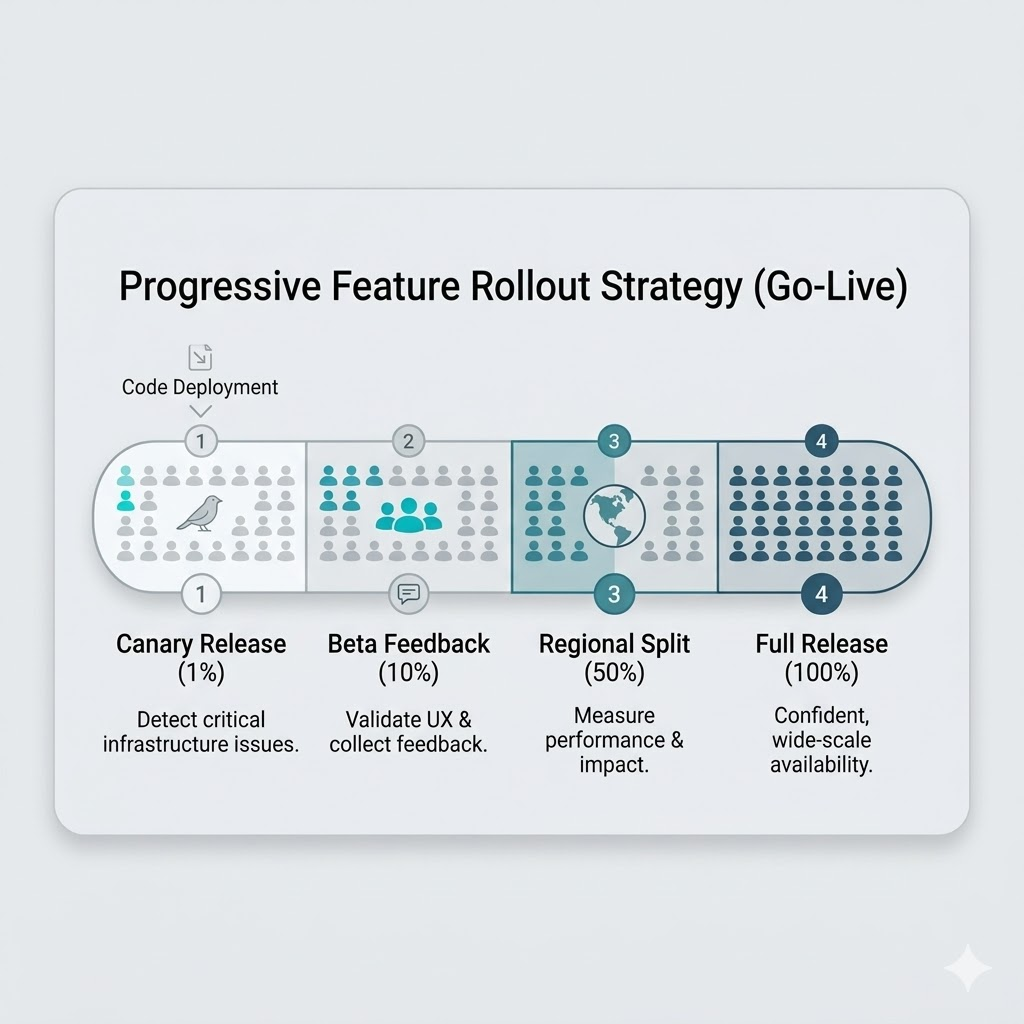
One of the most powerful capabilities of feature flags is progressive rollout.
Example rollout strategy:
1% users → monitor
10% users → monitor
50% users → monitor
100% users → full release
This dramatically reduces release risk.
Problems can be detected before the feature reaches everyone.
🎯 Targeted Rollouts
Feature flags can also target specific user segments.
Examples:
- internal employees
- beta testers
- specific countries
- premium users
Example logic:
if user.country == "US":
    enable_feature()
This enables testing directly in production environments.
🐤 Canary Releases
Feature flags are commonly used with canary releases.
A canary release exposes a feature to a small subset of users first.
This helps detect:
- performance issues
- unexpected errors
- unusual user behavior
before rolling it out globally.
🌑 Dark Launching
Another advanced technique is Dark Launching.
The feature is deployed but hidden from users.
The system still runs the feature in the background to test performance.
Example:
recommendation_engine_running = true
recommendation_visible = false
This helps test infrastructure safely before exposing the feature.
⚠️ The Hidden Problem: Feature Flag Debt
Feature flags are powerful, but they introduce a new problem:
Feature Flag Debt
Over time, many flags remain in the codebase long after the feature is released.
Example:
if old_feature_flag:
But the feature is already permanent.
This leads to:
- messy code
- confusion
- technical debt
Flags should be removed once they are no longer needed.
🚨 Common Mistakes With Feature Flags
Many teams misuse feature flags.
Here are common pitfalls.
1️⃣ Flag Explosion
Too many flags make systems difficult to understand.
Every flag increases system complexity.
Checking flags in very hot paths may affect performance.
Flag evaluation should be fast and lightweight.
3️⃣ Long-Lived Release Flags
Release flags should be temporary.
Once rollout finishes, remove them.
4️⃣ Mixing Flags With Business Logic
Feature flags should control behavior, not implement complex logic.
Avoid deeply nested conditions like:
if flagA and not flagB and flagC
✅ Best Practices
Successful teams follow several important practices.
1️⃣ Treat Flags as Temporary
Every release flag should have an expiration plan.
2️⃣ Track Flag Ownership
Each flag should have an owner responsible for cleanup.
3️⃣ Monitor Feature Rollouts
Always observe metrics when enabling a feature.
Examples:
- error rate
- latency
- user behavior
4️⃣ Use Clear Naming
Bad naming:
flag123
Better naming:
checkout_v2_release
Clear names improve maintainability.
5️⃣ Remove Flags After Release
Cleaning up unused flags keeps the codebase healthy.
⚡ Feature Flags Enable Modern DevOps
Feature flags are a key component of modern engineering practices.
They enable:
- 🚀 Continuous deployment
- 🧪 Safe experimentation
- 🔄 Instant rollbacks
- 🎯 Controlled feature releases
Instead of fearing deployments, teams can release features with confidence.
🏁 Final Thoughts
Feature flags fundamentally change how software is delivered.
They transform deployments from risky events into controlled experiments.
But like any powerful tool, they must be used carefully.
Without discipline, feature flags can create complexity and technical debt.
When implemented correctly, they become one of the most powerful tools in a developer’s toolbox.
