This is the second part of my series where I explain challenges I faced while building a bash-like terminal in C. My goal with this project is to get some C and low-level systems experience; if you are interested, tag along.
In my first post, I detailed my switch from C++ to C and the reasoning. After that switch-up, I did more research on the way terminals are coded in real life. During my research, I read about parent and child processes and got curious.
Why couldn’t I implement something similar?
Challenge #1: Child/Parent processes
To explain the challenge, I need to explain how computer processes work. (I will slightly simplify it)
Running a program creates a process with a unique ID, called a process ID (PID in short). Let’s say our code has a PID of 500. If there is an error in the code and it crashes, the process will also crash, and we would lose the terminal.
This system would be too fragile and risky in an environment with only a terminal.
So we could instead create a copy of the current process, with all the same information and point in the code. And we would call this copied process a child process. This child process would have a different PID, let’s say 501, to distinguish it from the parent process.
Now we could run the command in the child process while the parent process waits, and if the command fails, only the child process crashes. Our original (PID 500) would keep running.
In C, this copying of a process is done by using fork(). It has a lot more to it than I explained here, but that would be a separate blog post that I will write in the future.
Challenge #2: fork() is different in Windows machines
After reading about how fork() can be a safety net, I started coding right away. Turns out, the function calls for Windows and Unix devices (linux/MacOS) are different, which I didn’t pay attention to.
When I was done coding, my show command, which lists the files in the current directory, worked in WSL (Windows Subsystem for Linux), but my VS Code showed red squiggly lines, which meant there had to be an error.
Then, after running it in Windows, there it was. My error. Now this gave me 2 options:
- Make the terminal Unix-only (no Windows Support)
- Use the alternative for Windows as well as
fork()
I went with option 2. After some digging, I found the alternative method.
I used an if statement to run different methods based on device version, but it gave an error. Indicating fork() isn’t a recognized function; I knew that. I thought the if statement wouldn’t run the Unix part and avoid fork().
The error was a compiling error, not run-time. Since the compiler didn’t accept this approach, my initial assumption had to be wrong.
I went back to digging online; here is the issue. When C code is compiled, the compiler runs through each possibility, and in an if statement, both the if and else sections are a possibility.
But there was a way for the compiler to check an if statement before compiling it. Instead of using
if(is_windows){
 // WINDOWS
}
else {
 // UNIX
}
I needed to write it as
#if defined(_WIN32) || defined(_WIN64)
 // WINDOWS
#else
 // UNIX
#endif
This is called a C preprocessor directive, and it runs before the compilation starts. This way the compiler doesn’t see the code for non-matching OS at all.
I think there is clarification I need to make. Linux doesn’t just use fork() it also needs to use exec() to execute the desired command. Whereas Windows can just run CreateProcess(), which both creates the child process and runs it.
Challenge #3: changes in child process don’t affect the parent
Once I got it working with Unix, I tried to run some of my other functions. I had previously written a command called go which allowed me to navigate between directories.
I ran go, there was no error. But it didn’t change directories. I was confused and checked my method for changing directories; it seemed fine. I went to the older version of the code, and it was running smoothly.
After running in debug mode, I realized the child process was changing directories, not the parent process.
As my command go was a state-changing command, I had to use it in my parent process. This would be true for any command that I was planning to write in the future.
To work around this issue, I could have categorized specific commands as “state-changing” and run them directly on the parent process. I have some ideas for organizing my commands, but it requires a revamping of the code, which I am planning for the future.
All this seemed too much to deal with, considering the state of the code I was at. So I took a different approach:
- Made
fork() only work for Unix
- Used
fork() to only run unrecognized commands; this allowed any bash command to be functional
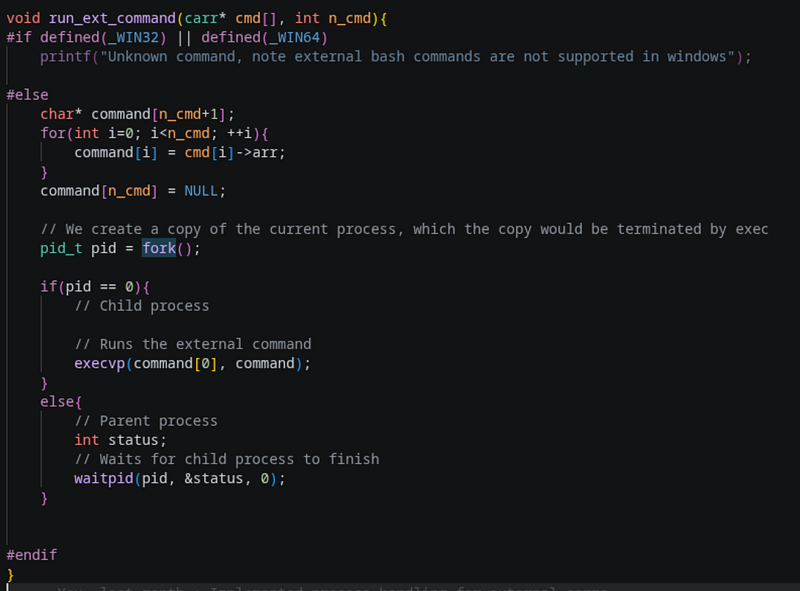
The end result of this going back and forth, a snippet from current version of the code
If you would like to connect with me, you can check out my socials:


