A practical breakdown of an interactive Vue 3 portfolio with secure n8n automation, Turnstile verification, rate limiting, Google Sheets and Telegram integration.
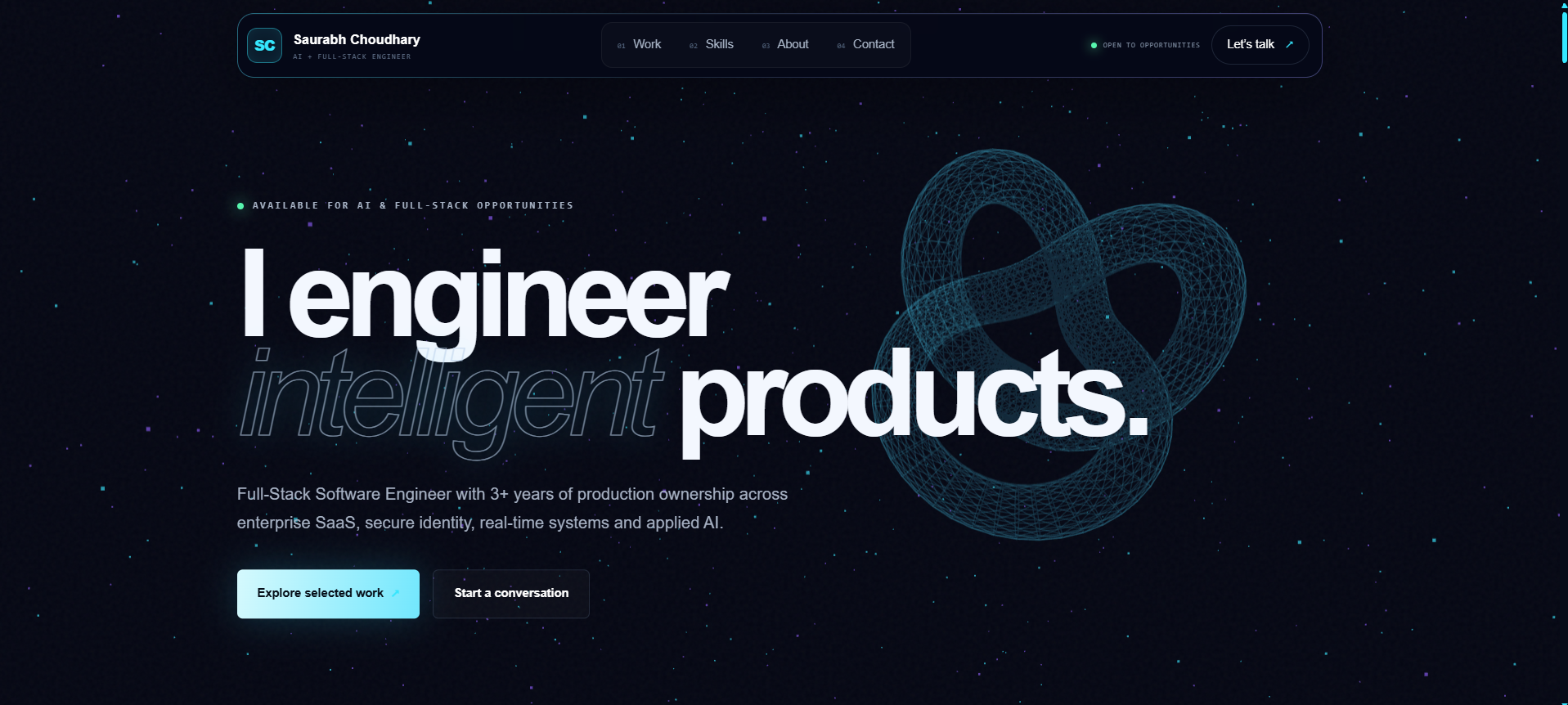
A developer portfolio should demonstrate more than visual design.
While building my new portfolio, I wanted to create an application that reflected the kind of production systems I enjoy working on: modular frontend architecture, secure form processing, workflow automation, third-party integrations and cloud deployment.
The result is an interactive portfolio built with Vue 3, TypeScript, Vite, Three.js and Anime.js.
Instead of connecting the contact form directly to a basic email service, I created a complete automation workflow using n8n. The workflow validates and sanitizes every request, detects bots using a honeypot, applies per-IP rate limiting, verifies Cloudflare Turnstile tokens, stores verified leads in Google Sheets and sends Telegram notifications.
In this article, I will explain the architecture, implementation decisions, security layers, deployment process and limitations behind the project.
Live portfolio: https://saurabhzaiswal.vercel.app
Source code: https://github.com/saurabhzaiswal/saurabh-portfolio
Automation infrastructure: https://github.com/saurabhzaiswal/portfolio-n8n-infrastructure
What I Wanted to Build
My goal was not to build only a static portfolio page.
I wanted the project to demonstrate:
- modern Vue architecture,
- TypeScript-based frontend development,
- interactive 3D visuals,
- modular feature organization,
- secure contact-form handling,
- workflow automation,
- server-side validation,
- bot protection,
- third-party integrations,
- cloud deployment,
- and clear technical documentation.
The portfolio therefore became a small production system rather than only a personal landing page.
Technology Stack
Frontend
- Vue 3
- TypeScript
- Vite
- Tailwind CSS
- Three.js
- Anime.js
- Axios
- Cloudflare Turnstile
- Vercel Analytics
- n8n
- Cloudflare Turnstile Siteverify API
- Google Sheets
- Telegram Bot API
- Render
- PostgreSQL
Deployment
- Vercel for the Vue frontend
- Render for n8n
- Render PostgreSQL for n8n persistence
High-Level Architecture
The portfolio frontend is deployed on Vercel.
The contact form sends requests to an n8n production webhook running on Render.
The full request flow is:
Portfolio Visitor
→ Vue Contact Form
→ n8n Webhook
→ Per-IP Rate Limit
→ Validation and Sanitization
→ Honeypot Check
→ Cloudflare Turnstile Verification
→ Google Sheets
→ Telegram Notification
→ Success Response
A more detailed version looks like this:
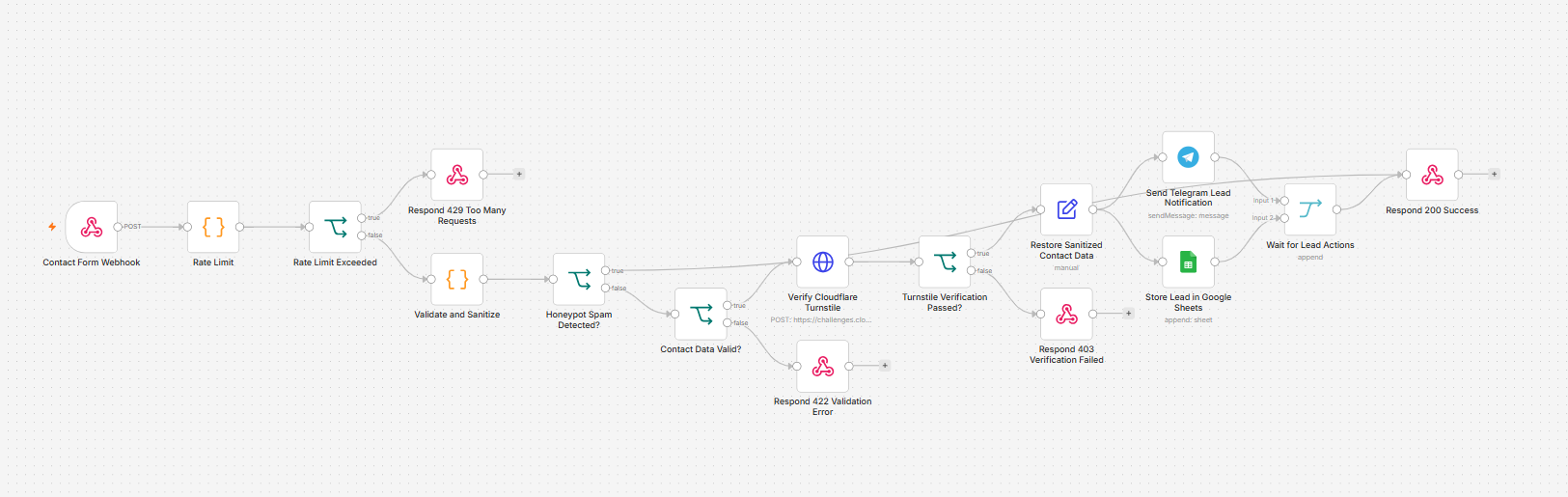
Contact Form Webhook
→ Rate Limit
→ Rate Limit Exceeded?
   ├── Yes → Respond 429 Too Many Requests
   └── No  → Validate and Sanitize
             → Honeypot Spam Detected?
                ├── Yes → Generic 200 Success Response
                └── No  → Contact Data Valid?
                           ├── No  → Respond 422 Validation Error
                           └── Yes → Verify Cloudflare Turnstile
                                    → Turnstile Verification Passed?
                                       ├── No  → Respond 403 Verification Failed
                                       └── Yes → Restore Sanitized Contact Data
                                                  ├── Store Lead in Google Sheets
                                                  └── Send Telegram Lead Notification
                                                       ↓
                                                  Wait for Lead Actions
                                                       ↓
                                                  Respond 200 Success
Frontend Architecture
The contact feature is divided into small modules instead of placing all logic inside one Vue component.
src/
├── components/
│   └── contact/
│       ├── ContactForm.vue
│       └── TurnstileWidget.vue
├── composables/
│   └── useContactForm.ts
├── services/
│   └── contact.service.ts
├── types/
│   └── contact.ts
└── utils/
    └── contact-validation.ts
This structure keeps the UI, business logic, API calls, validation and types separate.
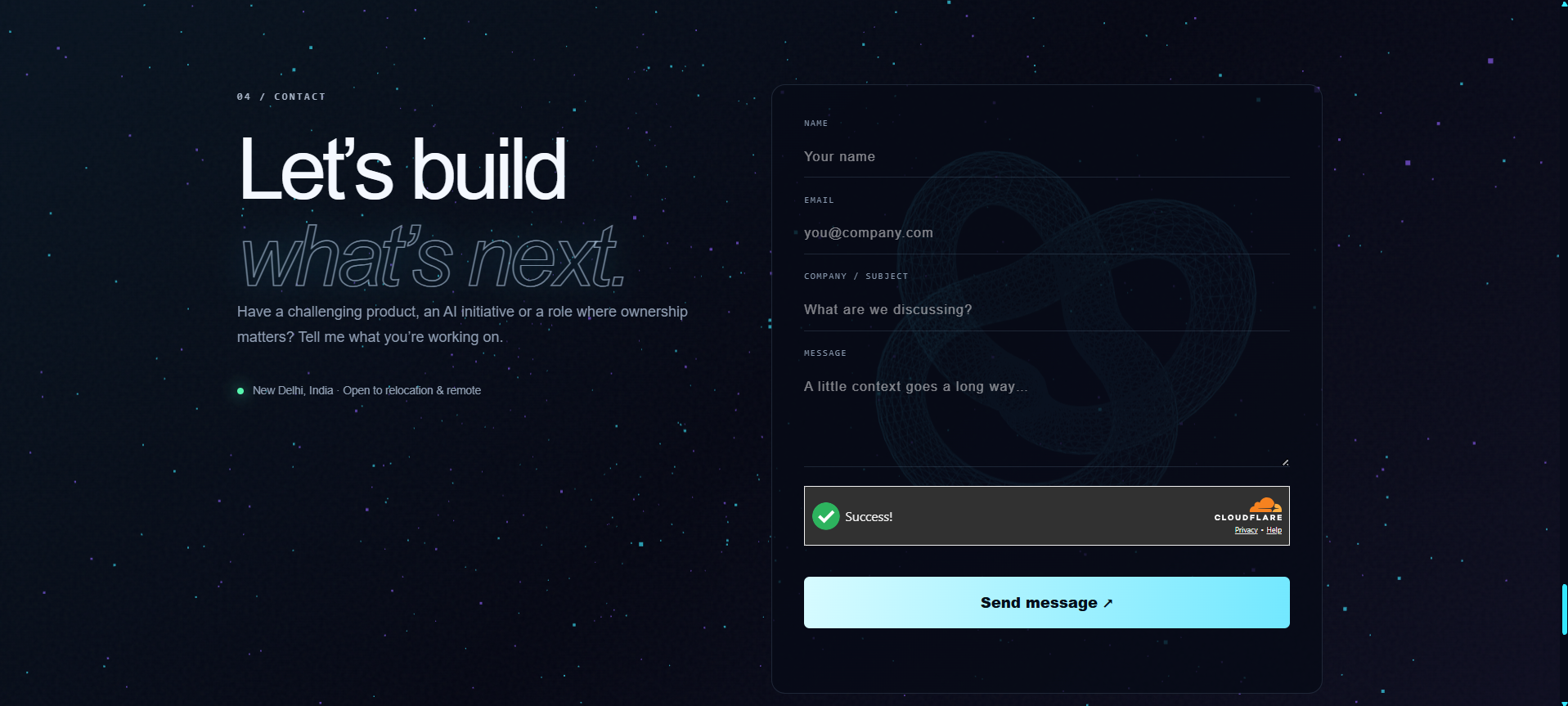
ContactForm.vue is responsible for rendering the form and handling user interaction.
It includes:
- name input,
- email input,
- subject input,
- message input,
- a hidden honeypot field,
- the Cloudflare Turnstile widget,
- field-level error messages,
- loading state,
- success and error messages,
- and form submission.
The component does not contain every piece of business logic. Most form behavior is delegated to the useContactForm composable.
This makes the component easier to read, test and maintain.
The Turnstile component is responsible for loading and rendering Cloudflare Turnstile.
It emits three important events:
verified
expired
error
When verification succeeds, it returns a temporary token:
emit("verified", token);
That token is included in the contact request:
{
  "turnstileToken": "generated-turnstile-token"
}
The frontend uses a public site key:
VITE_TURNSTILE_SITE_KEY=
The private Turnstile secret is never included in the frontend bundle.
It remains only inside the server-side n8n workflow.
The composable manages the contact form state.
It handles:
- reactive form values,
- validation errors,
- loading state,
- success state,
- status messages,
- Turnstile token state,
- API submission,
- form reset,
- and Turnstile reset.
I did not use Pinia for this feature because the form state belongs to one local feature and does not need to be shared across the whole application.
The frontend validates the form before submission to improve user experience.
The validation includes:
- required name,
- name length limits,
- valid email format,
- required subject,
- subject length limits,
- required message,
- message length limits,
- and required Turnstile token.
However, frontend validation is not treated as a security boundary.
Browser-side validation can be bypassed, so the important checks are repeated inside n8n.
The service uses Axios to send requests to the n8n webhook.
Example payload:
{
  "name": "Example User",
  "email": "*Emails are not allowed*",
  "subject": "Project discussion",
  "message": "I would like to discuss a software engineering opportunity.",
  "website": "",
  "turnstileToken": "generated-token"
}
The service handles:
- request timeouts,
- network failures,
403 Turnstile errors,422 validation errors,429 rate-limit errors,- server errors,
- and API-provided messages.
Because Render free services may sleep after inactivity, the request timeout is longer than a typical API call:
timeout: 70_000
This gives the n8n service time to wake up before the request fails.
Why I Used n8n
I wanted the contact workflow to be easy to inspect and modify without building a separate backend application only for form processing.
n8n allowed me to create a visual workflow that still performs backend-style responsibilities:
- validation,
- sanitization,
- branching,
- rate limiting,
- external API calls,
- Google Sheets storage,
- Telegram notifications,
- and HTTP responses.
The workflow is deployed as a self-hosted n8n instance on Render.
The workflow begins with a Webhook node.
Development endpoint:
http://localhost:5678/webhook-test/contact
Production endpoint:
https://n8n-service-71j0.onrender.com/webhook/contact
The workflow is configured to respond through dedicated response nodes. This allows different branches to return different HTTP status codes.
The allowed production browser origin is:
https://saurabhzaiswal.vercel.app
This restricts normal browser cross-origin requests to the deployed portfolio.
CORS is useful, but it is not a replacement for authentication, validation or bot protection because non-browser clients can send requests directly.
Step 2: Per-IP Rate Limiting
The first processing node applies a lightweight rate limit before the workflow performs expensive validation or external API calls.
The current policy is:
Maximum requests: 2
Window: 60 seconds
Key: visitor IP
The workflow uses n8n global static data:
const store = $getWorkflowStaticData("global");
The code reads the IP from common proxy headers:
const ip =
  getFirstHeader(headers["cf-connecting-ip"]) ||
  getFirstHeader(headers["x-forwarded-for"]) ||
  getFirstHeader(headers["x-real-ip"]) ||
  "unknown";
It stores request counts for each IP address and calculates:
clientIp
rateLimited
requestCount
retryAfterSeconds
The decision node checks:
{{ $json.rateLimited }}
When the threshold is exceeded, the workflow returns:
429 Too Many Requests
Example response:
{
  "success": false,
  "message": "Too many requests. Please wait a minute and try again.",
  "retryAfter": 45
}
Important limitation
This implementation is intentionally simple.
It is appropriate for a low-traffic, single-instance portfolio workflow, but it is not an atomic or distributed rate limiter.
Possible limitations include:
- simultaneous workflow executions can race,
- static workflow data is not an atomic counter,
- multiple n8n instances would not share a strict counter,
- and restarts or workflow changes may affect stored state.
For a larger production system, I would use:
- Cloudflare edge rate limiting,
- Redis,
- or an atomic PostgreSQL implementation.
Documenting this limitation is important because a security control should not be presented as stronger than it actually is.
Step 3: Server-Side Validation and Sanitization
The next Code node validates and normalizes the incoming request.
It processes:
name
email
subject
message
website
turnstileToken
timestamp
IP address
user agent
Its responsibilities include:
- converting supported values to strings,
- trimming whitespace,
- enforcing maximum lengths,
- validating the email shape,
- removing or neutralizing unsafe content,
- detecting the honeypot field,
- collecting validation errors,
- preserving the Turnstile token,
- and recording request metadata.
The frontend improves user experience, but the n8n workflow remains the authoritative validation layer.
Step 4: Honeypot Spam Detection
The form contains a hidden field named website.
Normal visitors do not see or fill this field.
Many basic bots automatically fill every available field, so the workflow treats a non-empty website value as suspicious.
The decision node checks:
{{ $json.isSpam }}
The routing is:
true  → Respond 200 Success
false → Continue validation
This behavior is intentional.
A detected bot receives a generic success response such as:
{
  "success": true,
  "message": "Thank you! Your message has been received successfully."
}
But internally:
No Turnstile verification
No Google Sheets row
No Telegram notification
Returning a generic success response prevents the bot from learning that the honeypot detected it.
Step 5: Validation Result
The workflow checks:
{{ $json.isValid }}
If validation fails, it returns:
422 Unprocessable Entity
Invalid submissions never reach Google Sheets or Telegram.
Step 6: Cloudflare Turnstile Verification
After the payload passes validation, the workflow verifies the Turnstile token server-side.
The HTTP Request node calls:
POST https://challenges.cloudflare.com/turnstile/v0/siteverify
The request includes:
{
  "secret": "SERVER_SIDE_SECRET",
  "response": "VISITOR_TOKEN",
  "remoteip": "VISITOR_IP"
}
The secret is stored only inside n8n.
It must never be added to Vue source code, a VITE_* environment variable, GitHub, public documentation or browser requests.
If verification fails, the workflow returns:
403 Forbidden
The Turnstile HTTP Request node replaces the current n8n item with Cloudflare's response.
To preserve the original form data, I added a node named:
Restore Sanitized Contact Data
It restores fields from the earlier validation node:
name
email
subject
message
timestamp
ip
userAgent
Example expression:
{{ $('Validate and Sanitize').item.json.name }}
After this step, downstream nodes can again use simple field mappings.
Step 8: Google Sheets Lead Storage
Every verified lead is appended to a Google Sheet.
Suggested columns:
Timestamp
Name
Email
Subject
Message
IP
User Agent
Status
Source
Google Sheets gives me a simple lead log without exposing credentials to the frontend.
Step 9: Telegram Notification
The workflow also sends an immediate Telegram alert.
Example:
📩 New Portfolio Lead

Name: Example User
Email: *Emails are not allowed*
Subject: Project discussion

Message:
I would like to discuss an opportunity.

Time: 25 July 2026, 4:00 PM
Source: Portfolio
This allows me to review new enquiries without repeatedly checking the spreadsheet.
Step 10: Waiting for Lead Actions
After the sanitized payload is restored, the workflow creates two branches:
Restore Sanitized Contact Data
├── Store Lead in Google Sheets
└── Send Telegram Lead Notification
Both branches connect to a Merge node named:
Wait for Lead Actions
The Merge node ensures the final success response is returned after both configured operations finish.
Step 11: Final Success Response
When the configured lead actions complete, n8n returns:
{
  "success": true,
  "message": "Message received — I’ll reply shortly."
}
The Vue application then displays the success message, clears the form, clears the Turnstile token and resets the Turnstile widget.
HTTP Response Design
| Status | Meaning |
|---|
200 | Submission accepted or generic bot response |
403 | Turnstile verification failed |
422 | Submitted data failed validation |
429 | Per-IP request limit exceeded |
500 | Unexpected workflow or integration failure |
Local Development
The frontend runs locally at:
http://localhost:5173
Local n8n runs at:
http://localhost:5678
Development environment:
VITE_TURNSTILE_SITE_KEY=YOUR_PUBLIC_TURNSTILE_SITE_KEY
VITE_CONTACT_ENDPOINT=/api/contact
The Vite development server proxies requests to the n8n test webhook:
server: {
  port: 5173,
  proxy: {
    "/api/contact": {
      target: "http://localhost:5678",
      changeOrigin: true,
      rewrite: () => "/webhook-test/contact",
    },
  },
},
Production Deployment
Vue frontend on Vercel
VITE_CONTACT_ENDPOINT=https://n8n-service-71j0.onrender.com/webhook/contact
VITE_TURNSTILE_SITE_KEY=YOUR_PUBLIC_TURNSTILE_SITE_KEY
Any value prefixed with VITE_ is included in the browser bundle and must never contain a private secret.
n8n on Render
The Render Blueprint provisions:
n8n-service
n8n-db
The deployment uses the official n8n Docker image, a Render Web Service, Render PostgreSQL, a generated n8n encryption key and automatically configured database credentials.
Recommended non-secret environment values:
N8N_HOST=n8n-service-71j0.onrender.com
N8N_PROTOCOL=https
N8N_EDITOR_BASE_URL=https://n8n-service-71j0.onrender.com/
N8N_WEBHOOK_URL=https://n8n-service-71j0.onrender.com/
N8N_PROXY_HOPS=1
GENERIC_TIMEZONE=Asia/Kolkata
TZ=Asia/Kolkata
NODE_OPTIONS=--max-old-space-size=384
Private values include:
N8N_ENCRYPTION_KEY
DB_POSTGRESDB_PASSWORD
Telegram bot token
Google OAuth client secret
Cloudflare Turnstile secret
Render Free-Tier Considerations
Render free web services may sleep after inactivity.
The first request can therefore take longer while the service starts.
The free PostgreSQL plan may also have retention or expiry limitations, so workflow exports and private backups should be maintained.
Security Layers
The contact workflow currently uses multiple defensive layers:
- Client-side validation for user experience
- Server-side validation in n8n
- Input sanitization
- Maximum field lengths
- Per-IP request limiting
- Honeypot spam detection
- Cloudflare Turnstile verification
- Restricted CORS origin
- Server-only secret keys
- OAuth-based Google Sheets access
- Generic responses for detected bots
No single layer is treated as sufficient by itself.
Frontend validation is useful for usability, but it is not trusted as the security boundary.
Untrusted visitor content is also never rendered using Vue's v-html.
Challenges I Faced
1. Render cold starts
The n8n service can sleep on the free tier, so the first request may be slower.
I handled this by increasing the frontend request timeout.
2. Preserving data after Turnstile verification
The HTTP Request node replaced $json with Cloudflare's response.
I solved this by restoring the sanitized payload from the earlier validation node.
3. Waiting for multiple integrations
The workflow needed to wait for both Google Sheets and Telegram.
A Merge node now waits for the configured branch inputs before returning success.
4. Avoiding noisy bot submissions
The honeypot branch returns a generic success response while silently dropping the submission.
5. Adding rate limiting without another service
For the current low-traffic setup, I used n8n workflow static data.
I also documented why this should later be replaced with Cloudflare, Redis or PostgreSQL for stronger enforcement.
Future Improvements
- Move rate limiting to Cloudflare edge rules
- Add a custom domain for n8n
- Add Redis or atomic PostgreSQL-based counters
- Make Telegram failures non-blocking
- Add a separate error workflow
- Add workflow monitoring and alerts
- Improve backup automation
- Move to paid persistent infrastructure if traffic grows
Repository Documentation
Portfolio repository
Includes the Vue frontend, contact components, composables, API service, validation utilities, SEO configuration and deployment documentation.
View the portfolio repository
n8n infrastructure repository
Includes the Render Blueprint configuration, sanitized workflow export, node-by-node workflow documentation, security notes and workflow publishing guidance.
View the n8n infrastructure repository
Final Thoughts
This project started as a personal portfolio, but it became an opportunity to combine frontend engineering, workflow automation, security and cloud deployment in one practical system.
The most valuable part was treating the contact form as a real production workflow instead of a simple UI feature.
I worked across Vue component architecture, TypeScript, 3D web experiences, form validation, input sanitization, rate limiting, bot protection, API integration, workflow automation, deployment and technical documentation.
There are still improvements to make, but the current version already demonstrates how a portfolio can go beyond design and become a complete engineering project.
Live Portfolio
https://saurabhzaiswal.vercel.app
Source Code
https://github.com/saurabhzaiswal/saurabh-portfolio
Automation Infrastructure
https://github.com/saurabhzaiswal/portfolio-n8n-infrastructure
Feedback on the architecture, workflow and implementation is welcome.