If you have ever seen a team argue about whether they can ship a risky change, an error budget is the tool that ends the argument with a number. Here is how it works, with the formulas and a simple way to turn it into alerts.
What an error budget is
An uptime target has a second number hidden inside it. Say you promise 99.9% uptime. You are also saying that 0.1% is allowed to fail. Put that 0.1% into real time, and that is your error budget: the downtime you can have before you break the promise.
This changes how you look at downtime. It stops being a mistake to feel bad about and becomes a budget you can spend: on a risky deploy, on a slow service you depend on, or on a migration. When the budget runs low you slow down. When it is healthy you can move fast.
An SLO is your reliability target, for example 99.9%. The gap to 100% is the failure you are allowed. Multiply that gap by the length of the window, and you get real time you can spend.
error budget = window x (1 - SLO)
A 99.9% SLO over a 30-day month is 2,592,000 seconds times 0.001. That is 43 minutes and 12 seconds. That is the whole budget for the month, shared across every incident, not a fresh 43 minutes each day.
So three nines is not "never go down". It is a 43-minute budget each month. Every extra nine costs about ten times more engineering, for downtime that most users never notice. This is why Google says that 100% is the wrong target for almost every service.
Burn rate is the speed
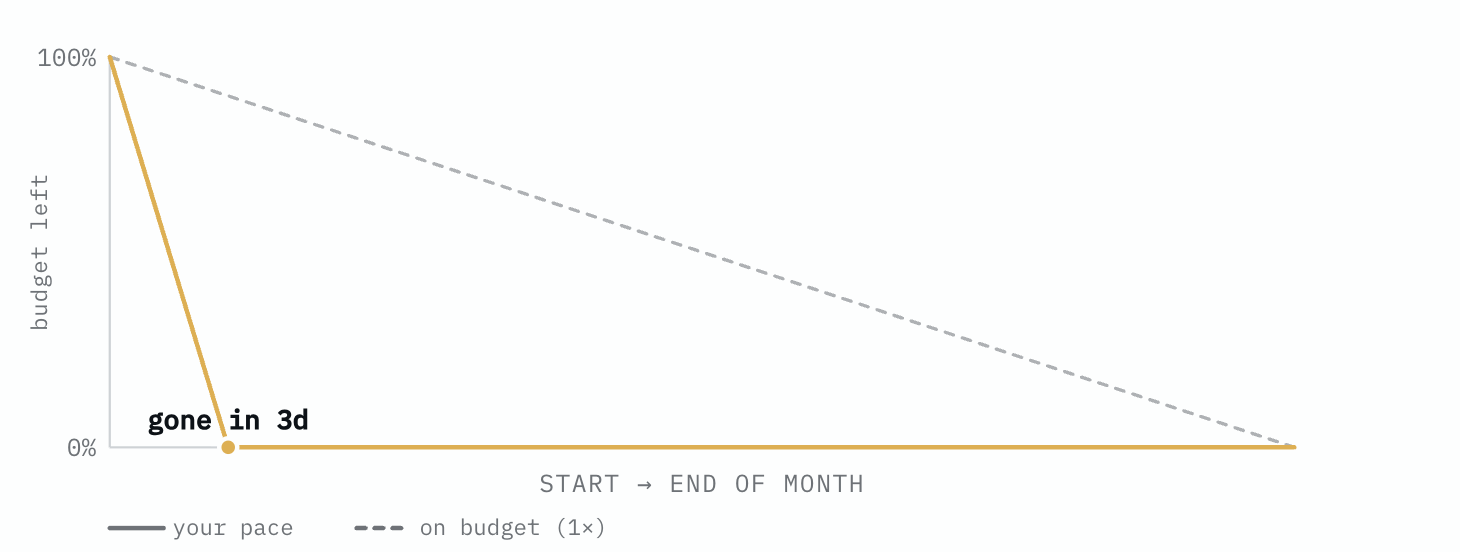
The total tells you how much you can spend. It does not tell you how fast. Two services can both sit at 99.9% for the month: one loses the budget slowly, the other loses it all in a single bad hour. Burn rate tells them apart.
burn rate = (1 - measured) / (1 - SLO)
A burn rate of 1x spends the whole window exactly. 2x spends it in half the time. Below 1x, you finish the month with budget left. Above 1x, the rate tells you the deadline:
budget runs out in = window / burn rate
At 2x, a 30-day budget is gone in fifteen days. At 14.4x it is gone in about two days. That same 14.4x spends 2% of the budget in one hour, which is the level most fast alerts are set to.
Turning burn rate into alerts
One threshold is not enough. It either alerts too late or it sends too many false alarms. The common fix uses two windows: a long one to confirm the problem is real, and a short one to clear the alert quickly once you fix it. Both have to be burning for the alert to fire. For a 30-day budget, these are the usual settings:
- Fast page: 2% of the budget in 1 hour (with a 5-minute short window). This is a 14.4x burn.
- Page: 5% in 6 hours (30-minute short window). This is a 6x burn.
- Slow ticket: 10% in 3 days (6-hour short window). This is a 1x burn.
The fast page catches a sudden outage. The slow ticket catches a slow problem that would still use up the whole month if nobody looked.
The rule is the point
The math is the easy part. The value comes from a rule you agree on before anything breaks. The rule is simple. When the budget runs out, risky launches stop, and the team works on reliability until the budget grows back. While the budget is healthy, you ship and you take the risk.
One more rule keeps it fair. If you never spend your budget, your SLO is too strict, and you are paying for reliability that no user asked for.
Try the numbers
I turned these formulas into a free, no sign-up error budget calculator. You enter an SLO and your measured availability, and it shows budget spent, budget left, burn rate, and a burn-down chart. There is also an uptime SLA calculator with the full downtime-per-nine table.
How does your team set its SLOs and alert thresholds? I would like to hear what works in practice.