Getting Started with AI Workspace is not really about learning another shiny AI tool. It is about changing the shape of the work itself—from a prompt and a scrolling answer into something visible, editable, debatable and, eventually, useful.
Getting Started with AI Workspace means using AI to build editable visual work, not merely collecting another wall of generated text. In Jeda.ai, consultants and MBA instructors can turn questions, files, data, and team discussions into matrices, mind maps, flowcharts, strategic frameworks, and collaborative decisions on one shared canvas.
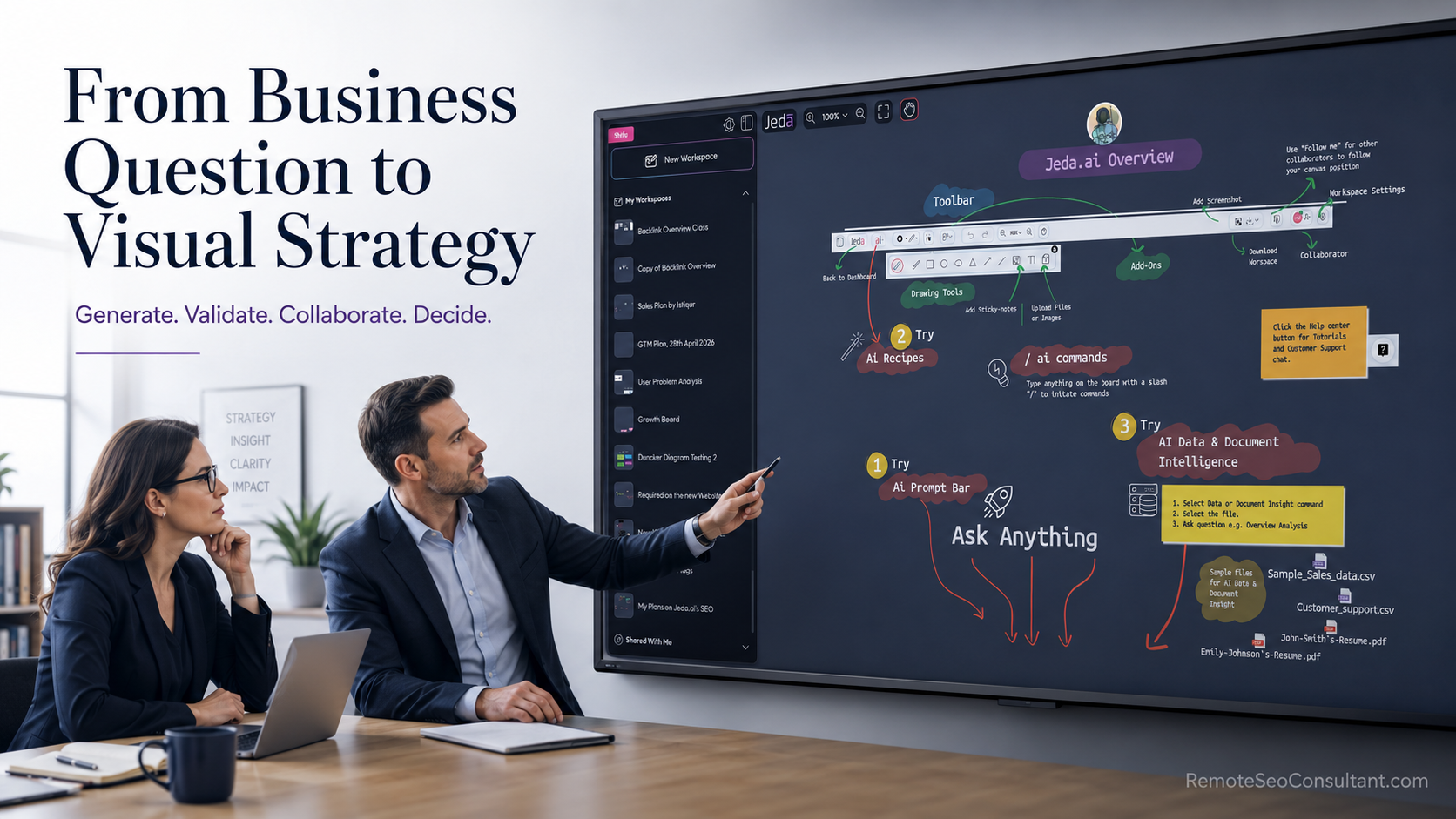
An AI workspace turns business questions into editable frameworks, diagrams, and collaborative decisions.
What does Getting Started with AI Workspace actually mean?
An AI workspace is a digital environment where artificial intelligence helps people create, organize, analyze, and refine work inside a shared space.
That definition is accurate. It is also a bit bloodless.
The difference becomes clearer in a familiar scene: a long client document is open, somebody has pasted six AI answers into a slide, the meeting starts in nine minutes, and the room smells faintly of coffee that should have been thrown away an hour ago. Everyone has information. Nobody can quite see the decision.
A chatbot can explain the problem.
A visual AI workspace can help the team expose the parts of it:
- assumptions;
- competing options;
- evidence and missing evidence;
- dependencies;
- risks;
- next actions;
- the awkward bit nobody wanted to put in the executive summary.
For a management consultant, a loose market-entry question might become a matrix, a risk map, and an implementation flow.
For an MBA instructor, a case study might become a stakeholder map, a decision tree, and an argument students can pull apart. Not politely, necessarily. That is often where the learning starts.
The output is not simply “more visual.” The unit of work changes. Instead of receiving an answer and then carrying it through Docs, slides, whiteboards, messages, and seventeen slightly different copies, the team works on an evolving artifact.
And this matters now.
McKinsey’s 2025 global survey reported that 88 percent of respondents said their organizations regularly used AI in at least one business function. Yet nearly two-thirds said their organizations had not started scaling AI across the enterprise, and only 39 percent reported any enterprise-level EBIT impact. The technology is everywhere. Embedded, repeatable value? Much less so.
That gap is not glamorous. It is workflow.
Why is an AI workspace different from a chatbot?
A chatbot usually gives a linear response. It can be brilliant, clumsy, oddly confident, or all three within forty seconds.
An AI workspace gives the response somewhere to live.
That sounds small. It isn’t.
With a visual workspace, you can inspect the structure behind an answer, edit one part without rewriting everything, connect a recommendation to its evidence, and invite other people to challenge the same object. The conversation becomes a working surface.
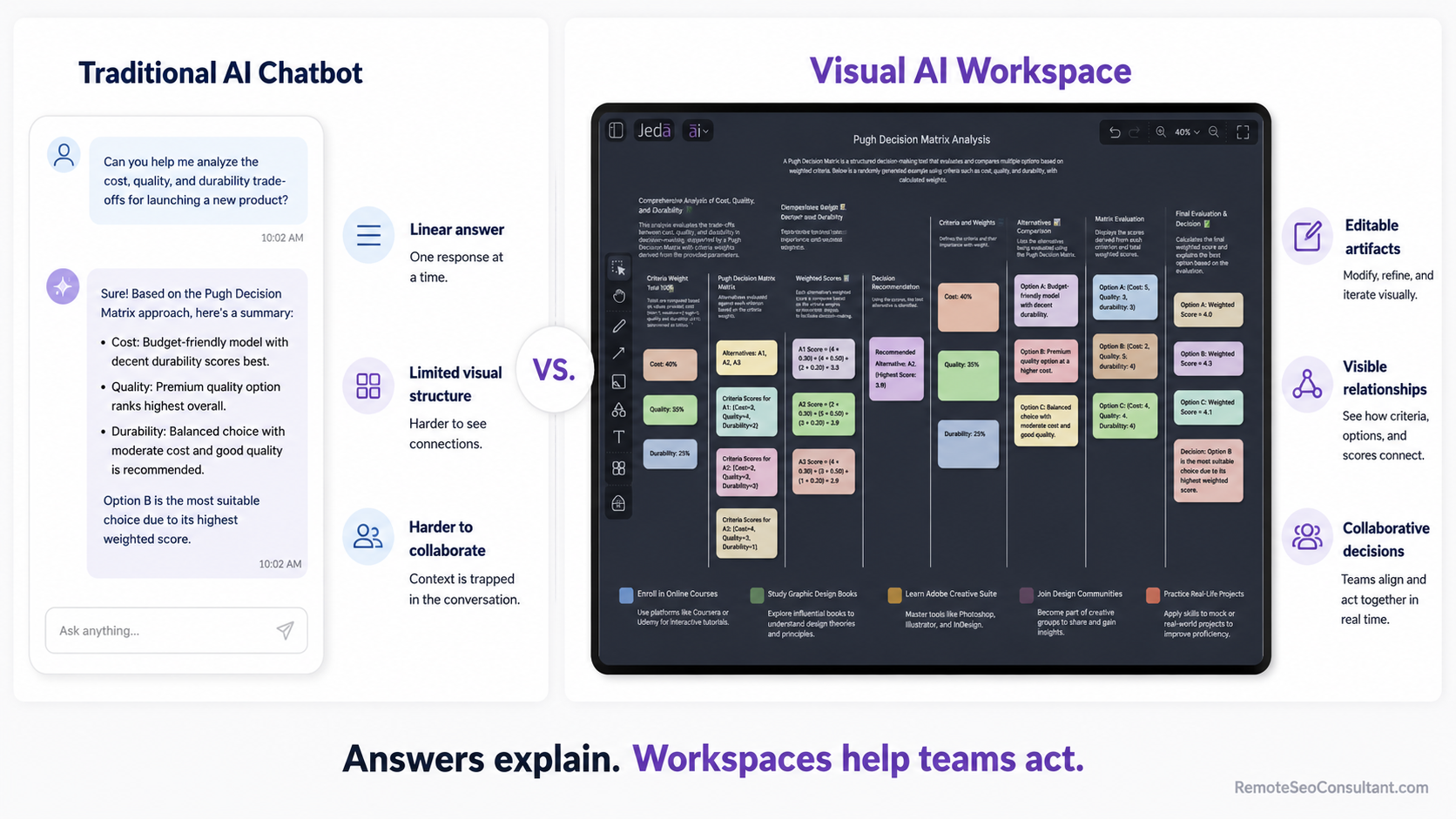
A chatbot produces an answer. An AI workspace creates an editable artifact that teams can inspect, refine, and use.
The practical distinction looks like this:
| Traditional AI interaction | Visual AI workspace |
|---|
| One prompt produces one answer | One question can become several connected artifacts |
| Structure remains buried in paragraphs | Relationships become visible |
| Collaboration happens somewhere else | Review and revision happen around the work |
| Context is repeatedly copied | Context stays attached to the evolving analysis |
| Output often ends at “interesting” | Output can move toward a decision |
No, visual structure does not automatically make the reasoning good. A beautiful matrix can still be nonsense wearing a tailored suit.
The benefit is that weak reasoning becomes easier to see.
Why does this matter for consultants and MBA instructors now?
Because both groups are being pushed—sometimes shoved—past casual AI experimentation.
McKinsey’s 2025 research found that organizations gaining more value from AI were more likely to redesign workflows, not merely add AI on top of yesterday’s operating model. The old model is a little like attaching a jet engine to a wheelbarrow. Exciting noise. Questionable steering.
Business schools are moving too. AACSB’s January 2026 report drew on examples from nearly 50 schools and described a shift from isolated pilots toward strategic integration across teaching, learning, research, and operations.
EDUCAUSE, meanwhile, surveyed 1,960 higher-education professionals for its 2026 report on AI and work. A separate June 2026 EDUCAUSE report, based on 438 faculty and staff, focused on how AI is changing assessment design, expectations, and academic-integrity practices.
So the real question for instructors is no longer, “Will students use AI?”
They already do.
The better question is: can the course make AI-supported reasoning visible enough to critique?
For consultants, the question is similar. Clients do not need another confident paragraph. They need to understand what was assumed, what was tested, where the evidence sits, and what happens Monday morning.
How do you begin inside Jeda.ai?
Start smaller than your ambition. Seriously.
Do not open the workspace and attempt to generate a complete transformation strategy, operating model, board presentation, implementation plan, and inspirational closing quote in one heroic prompt. That is how digital soup happens.
Begin with one decision.
Jeda.ai’s official site currently describes the product as a visual AI workspace with 11 AI commands, 18 AI models, and more than 300 AI Recipes on a collaborative canvas. Those numbers are useful, but the menu is not the method. The method is learning how to move from a business question to a structure that people can inspect.
Watch the full Getting Started with Jeda.ai tutorial on YouTube
Step 1: Begin with a business question, not a feature
After opening a workspace, write down the decision you are trying to support.
Not the topic. The decision.
Weak starting point:
European retail expansion.
Better:
Should a US-based specialty retailer enter Germany, France, or the Netherlands first, and which entry mode offers the best balance of speed, control, and operating risk?
A useful beginner prompt usually names:
- the organization or case;
- the decision;
- the audience;
- the market or operating context;
- the constraints;
- the expected depth.
For example:
Create a strategic market-entry analysis for a US specialty retailer considering Germany, France, and the Netherlands. Compare market attractiveness, localization needs, operational risk, competitive intensity, and recommended entry modes. The audience is the executive leadership team.
This is not prompt sorcery. It is ordinary problem definition, which remains stubbornly important despite the lasers and sparkles.
Step 2: Choose the visual output that matches the thinking
The format should follow the mental task.
Use a matrix when the audience must compare categories or alternatives.
Use a mind map when the team needs to explore a broad issue and uncover branches, gaps, or hidden connections.
Use a flowchart when sequence, ownership, or decision logic matters.
Use a wireframe when the work concerns an interface, page, or digital experience.
Use an infographic when the job is to communicate a structured summary quickly.
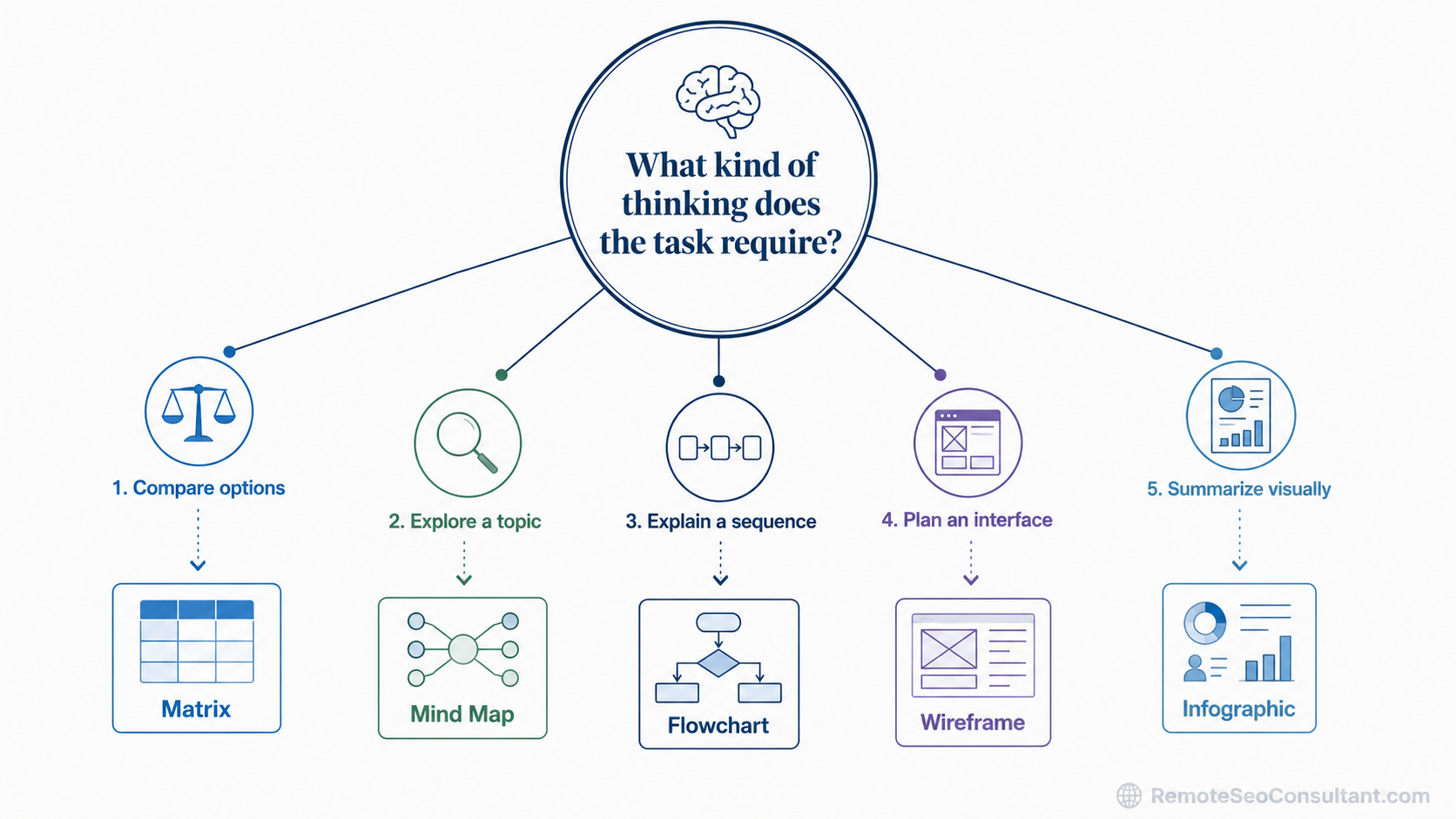
Choose the visual structure based on the type of thinking required—not on which format looks most impressive.
A frequent beginner error is choosing the output that looks most dramatic.
That is backwards.
A mind map is not “better” than a matrix. A flowchart is not more strategic because it has arrows. Choose the structure that makes the disagreement easier to understand.
Once you choose the output, review the settings that affect how it will be generated.
Depending on the command, that can include:
- automatic, column, or grid layouts for matrices;
- horizontal or vertical layouts for mind maps and flowcharts;
- web search for current external information;
- a single reasoning model;
- multiple models and an aggregation model.
One model is enough for many tasks.
Multi-model reasoning becomes more useful when the decision is uncertain, politically sensitive, technically complex, or expensive to get wrong. Different models may emphasize different risks. Sometimes they merely disagree in three elegant dialects, which is less magical but still revealing.
Use additional models when the contrast itself has value.
Step 4: Generate the visual—and inspect the logic before admiring it
Press Generate.
Then resist the small dopamine hit of a polished output. Read it like a skeptical colleague.
Ask:
- Are the categories distinct?
- Are critical factors missing?
- Which statements are facts, and which are assumptions dressed as facts?
- Is the recommendation connected to the stated objective?
- Has current information been verified?
- Would a client, executive, or student understand why one item leads to another?
- What would change the conclusion?
This is where expertise re-enters the room.
AI can accelerate the first draft, sometimes dramatically. It does not inherit responsibility for your recommendation.
For consultants, treat the generated visual as a hypothesis map.
For instructors, treat it as a provocation. Students can circle unsupported claims, rearrange categories, add counterevidence, or defend why the AI’s neat conclusion is—frankly—a mess.
Step 5: Edit, connect, and deepen the canvas
The first visual is not the finish line. It is raw material.
You can:
- move and restyle objects;
- edit the text inside nodes;
- add arrows and connectors;
- attach sticky notes;
- create new connected nodes;
- fold or unfold branches;
- duplicate useful structures;
- select part of a visual and transform it into another format;
- extend a relevant area with AI.
Suppose a SWOT analysis identifies “digital distribution capability” as a strength.
Select that area and deepen it into a mind map covering:
- current platforms;
- capability gaps;
- data quality;
- talent;
- operating ownership;
- investment requirements;
- success measures.
Then convert the most important branch into an implementation flow.
That little chain—matrix to mind map to flowchart—is where a workspace starts feeling less like an answer generator and more like a thinking system. Slightly grand phrase, yes, but the practical difference is real.
Step 6: Use AI Recipes when consistency matters
AI Recipes provide guided forms for established analytical and business frameworks.
They are useful when a team needs a repeatable structure rather than a blank prompt. A SWOT analysis, PESTEL, decision tree, business model, root-cause analysis, or process framework can begin from a known method and then be adapted.
A guided recipe can ask for:
- the subject;
- the objective;
- the audience;
- internal and external factors;
- supporting context;
- a file or dataset;
- preferred output and layout.
For instructors, this creates a common analytical scaffold. Different student groups can work from the same framework and still arrive at different conclusions.
For consultants, it helps standardize the starting point across workstreams without pretending every client problem is identical. Because they never are. Even when the slide says “repeatable methodology.”
Step 7: Collaborate, present, and make the disagreement useful
Invite colleagues, students, or stakeholders into the workspace.
Let them annotate, question, edit, and—most importantly—identify what does not make sense.
The point is not to reach artificial harmony. A healthy strategy session often contains friction. You want productive friction, the kind that exposes assumptions before they become budget lines.
Use presentation or Follow Me features to guide people through the same canvas. Keep each section tied to one of four things:
- the problem;
- the evidence;
- the recommendation;
- the next action.
An infinite canvas can become an infinite attic. Label things. Delete things. Leave some air.
What does this look like in a consulting engagement?
Consider a consultant preparing for a retail performance engagement.
The client request arrives as:
Help us improve performance across stores and digital channels.
It is vague, important, and slightly terrifying. Standard Tuesday.
A practical visual AI workflow could be:
- Build a diagnostic mind map covering operations, customer experience, supply chain, technology, organization, and finance.
- Convert the strongest branches into an evidence matrix.
- Add relevant client documents or approved datasets.
- Run a structured framework such as SWOT, root-cause analysis, or PESTEL where appropriate.
- Challenge uncertain findings using additional research or multiple models.
- Turn recommendations into an implementation flowchart.
- Assign owners, dependencies, and measures.
- Present the reasoning—not just the answer.
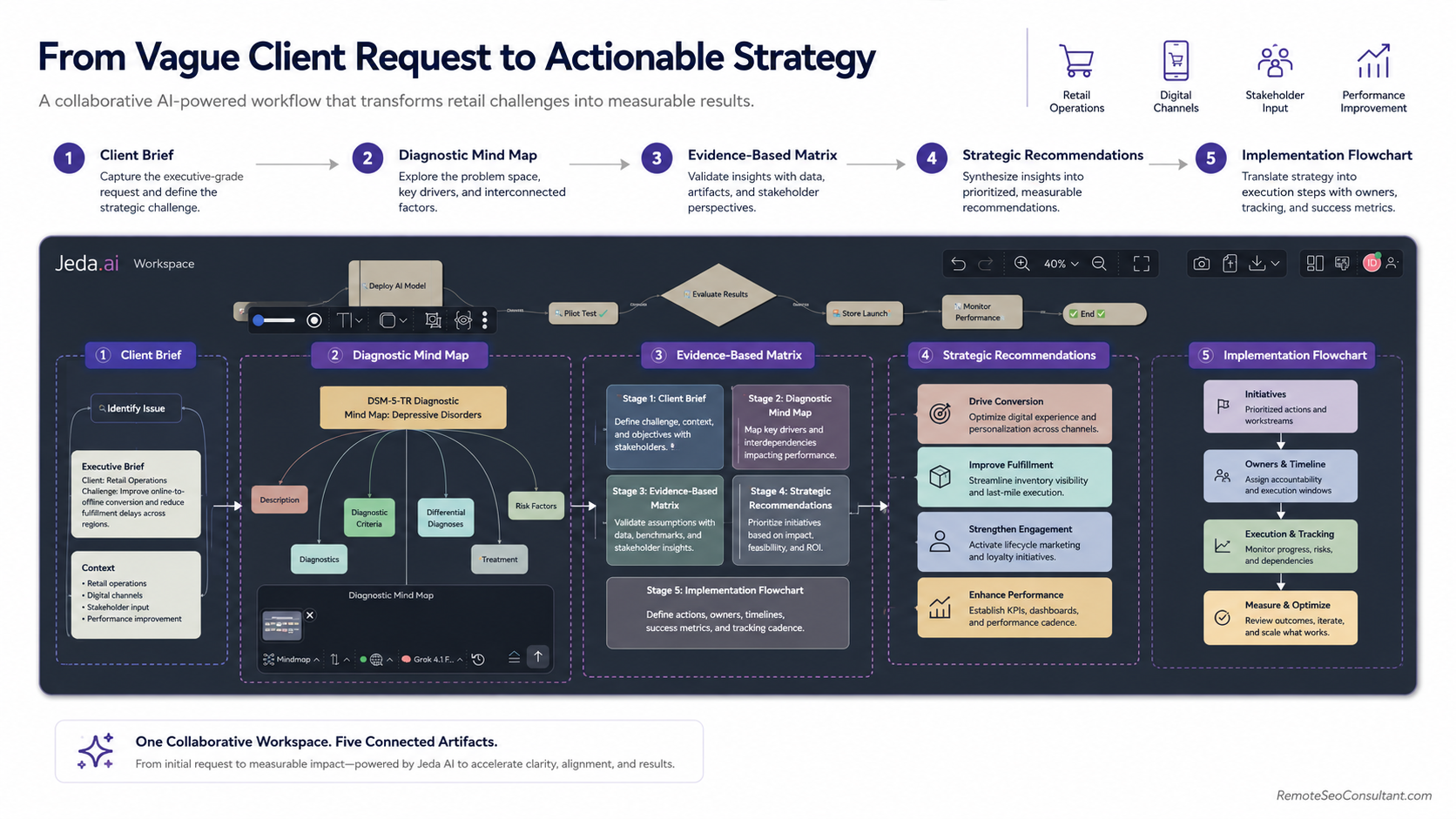
A visual AI workflow can connect problem framing, diagnosis, evidence, recommendations, and implementation planning.
During my work across SEO, web development, SaaS growth, and now as Remote GTM Manager at Jeda AI, I have repeatedly seen a quiet failure pattern: teams rush to polish the recommendation before they have made the reasoning inspectable.
The slide looks finished.
The thinking is still wet paint.
For a closer look at role-specific applications, see Jeda.ai’s guide to visual AI for management consulting.
How can an MBA instructor use the same workflow?
Imagine a strategy course built around a legacy manufacturer facing digital disruption.
Before class, the instructor generates:
- a stakeholder mind map;
- a five-forces analysis;
- a capability-gap matrix;
- a strategic decision tree;
- three competing scenarios.
During class, students do not merely consume those artifacts. They attack them—constructively.
Ask them to identify where the AI:
- made an unsupported assumption;
- ignored a stakeholder;
- flattened an ethical issue;
- confused correlation with causation;
- recommended action without discussing implementation;
- used tidy language to conceal uncertainty.
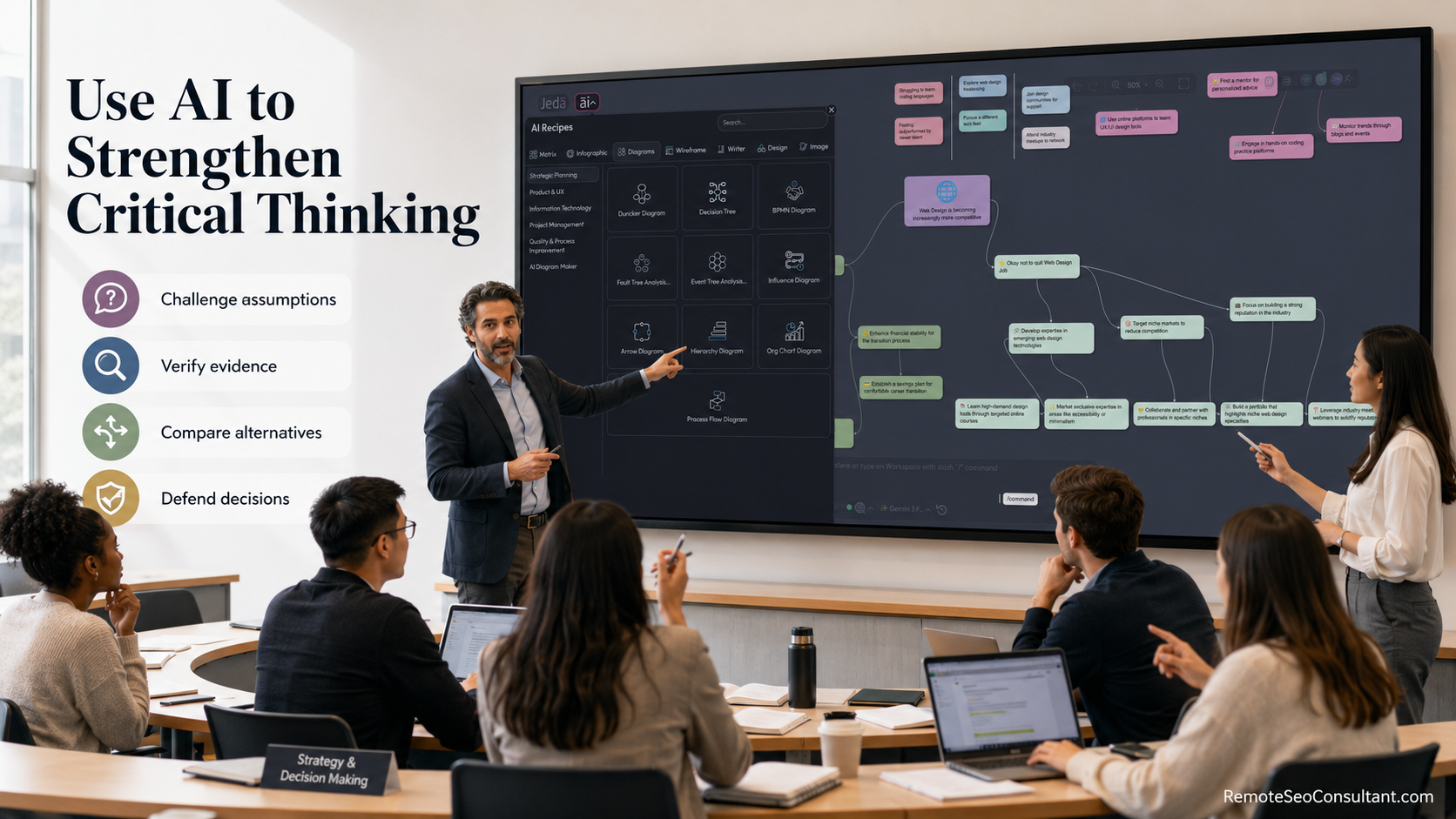
Instructors can use AI-generated frameworks as objects for critique, debate, revision, and evidence-based decision-making.
This is the part I find genuinely exciting—and a little uncomfortable.
AI can make student work look finished before the reasoning is mature. The gloss arrives early. Judgment takes longer.
That is why visual critique matters. When assumptions are placed in boxes, connected by arrows, and linked to decisions, students can point to the exact place where the argument bends or breaks.
AACSB’s 2026 framework shows business schools moving from ad hoc experiments toward broader institutional integration. EDUCAUSE’s June 2026 assessment research likewise reflects educators adjusting assessment design and expectations as AI use becomes normal rather than novel.
The instructor remains essential, not as a human plagiarism alarm, but as the designer of scrutiny.
What is the best beginner framework?
Use this:
Question → Visual → Validate → Deepen → Decide
It is simple enough to remember when the room gets noisy.
1. Question
Define the decision, the audience, and the constraint.
2. Visual
Choose the structure that exposes the kind of thinking required.
3. Validate
Challenge facts, assumptions, evidence, omissions, and bias.
4. Deepen
Expand the areas that materially affect the decision. Ignore the decorative branches.
5. Decide
Convert analysis into a recommendation, owner, action, experiment, or next question.
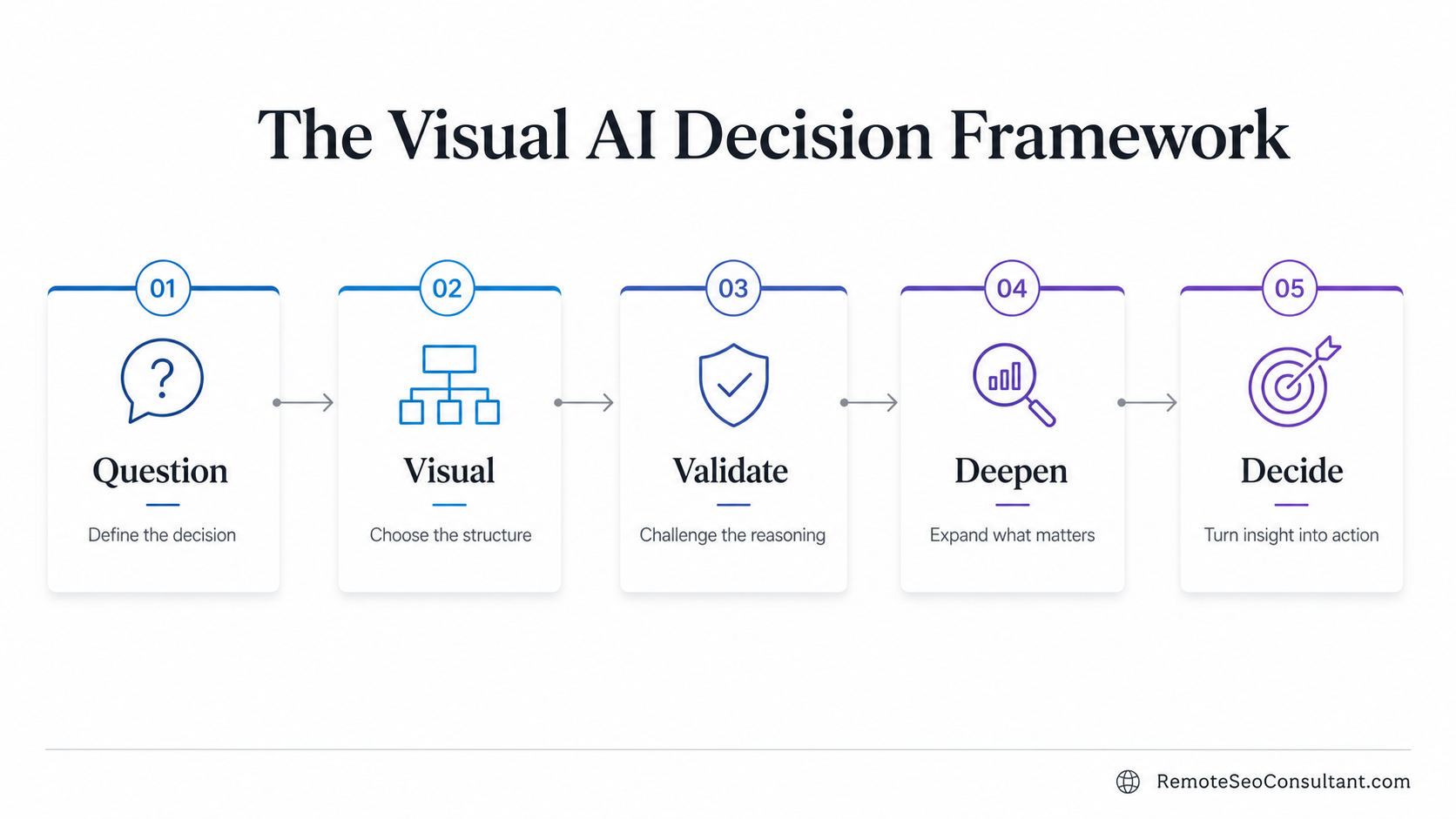
The Question–Visual–Validate–Deepen–Decide framework keeps AI-assisted analysis focused on action rather than output volume.
There is a slight redundancy between “validate” and “deepen.” Good. Real thinking loops. It rarely marches like five obedient boxes across a slide.
Sometimes deeper analysis invalidates the original question. Sometimes a flowchart reveals that the recommended strategy has no owner. Sometimes the smartest next step is to stop generating.
That counts as progress.
A 20-minute Getting Started with Visual AI exercise
Try this without exploring every menu.
Minutes 1–3: Define the decision
Use a real question:
Should a mid-sized professional-services firm launch an AI-enabled advisory service?
Minutes 4–7: Generate a matrix
Compare:
- market demand;
- internal capability;
- competitive pressure;
- delivery risk;
- revenue potential.
Minutes 8–11: Challenge the output
Mark:
- unsupported claims;
- suspiciously vague language;
- duplicate categories;
- missing stakeholders;
- factors that would reverse the recommendation.
Minutes 12–15: Deepen one issue
Select “delivery risk” and generate a mind map around:
- talent;
- data;
- quality control;
- client expectations;
- governance;
- pricing.
Minutes 16–18: Convert insight into action
Turn the most important branch into a flowchart with steps, owners, gates, and measures.
Minutes 19–20: Invite one other person
Ask:
Which assumption would you challenge first, and what evidence would change your mind?
The answer may be annoying.
Excellent.
Who benefits most from an AI workspace?
An AI workspace is especially useful when work contains ambiguity, multiple stakeholders, competing interpretations, or a need to explain reasoning.
Management and business consultants
Use it for discovery, issue trees, strategic analysis, process mapping, workshop synthesis, and implementation planning.
MBA and executive-education instructors
Use it for case preparation, classroom debate, group analysis, scenario design, and responsible AI exercises.
Use it to connect ideas with priorities, owners, dependencies, and metrics.
Business analysts and project leaders
Use it to transform documents, requirements, datasets, and stakeholder comments into inspectable structures.
It is less useful for a simple factual lookup.
Not every question needs a canvas. Sometimes the answer really is three sentences and a link. A rare and beautiful event.
What mistakes should beginners avoid?
Treating the first output as the answer
It is a draft. Often a useful one. Still a draft.
Follow client, institutional, legal, and organizational policies for confidential documents, student records, personal data, and intellectual property.
Using multiple models for theatre
More models can reveal blind spots. They can also produce three times the material and no additional clarity.
Confusing polish with truth
A beautifully aligned diagram may contain a rotten assumption in the center.
Generating everything at once
Start with one decision and one useful visual. Expand what matters.
Removing people from the conversation
The purpose of visual AI is not to automate judgment out of the room. It should make human judgment better informed, more visible, and harder to fake.
Key takeaways
- An AI workspace turns generated content into editable visual artifacts.
- Begin with a decision, not a feature.
- Match the format to the task: matrices compare, mind maps explore, and flowcharts clarify sequence.
- Validate before polishing.
- Deepen only the parts that affect the decision.
- Use recipes when consistency and methodology matter.
- Use additional models when contrasting perspectives creates real value.
- Keep confidential data inside approved boundaries.
- Collaboration should expose assumptions, not merely collect comments.
- The final output should lead to an action, lesson, experiment, or sharper question.
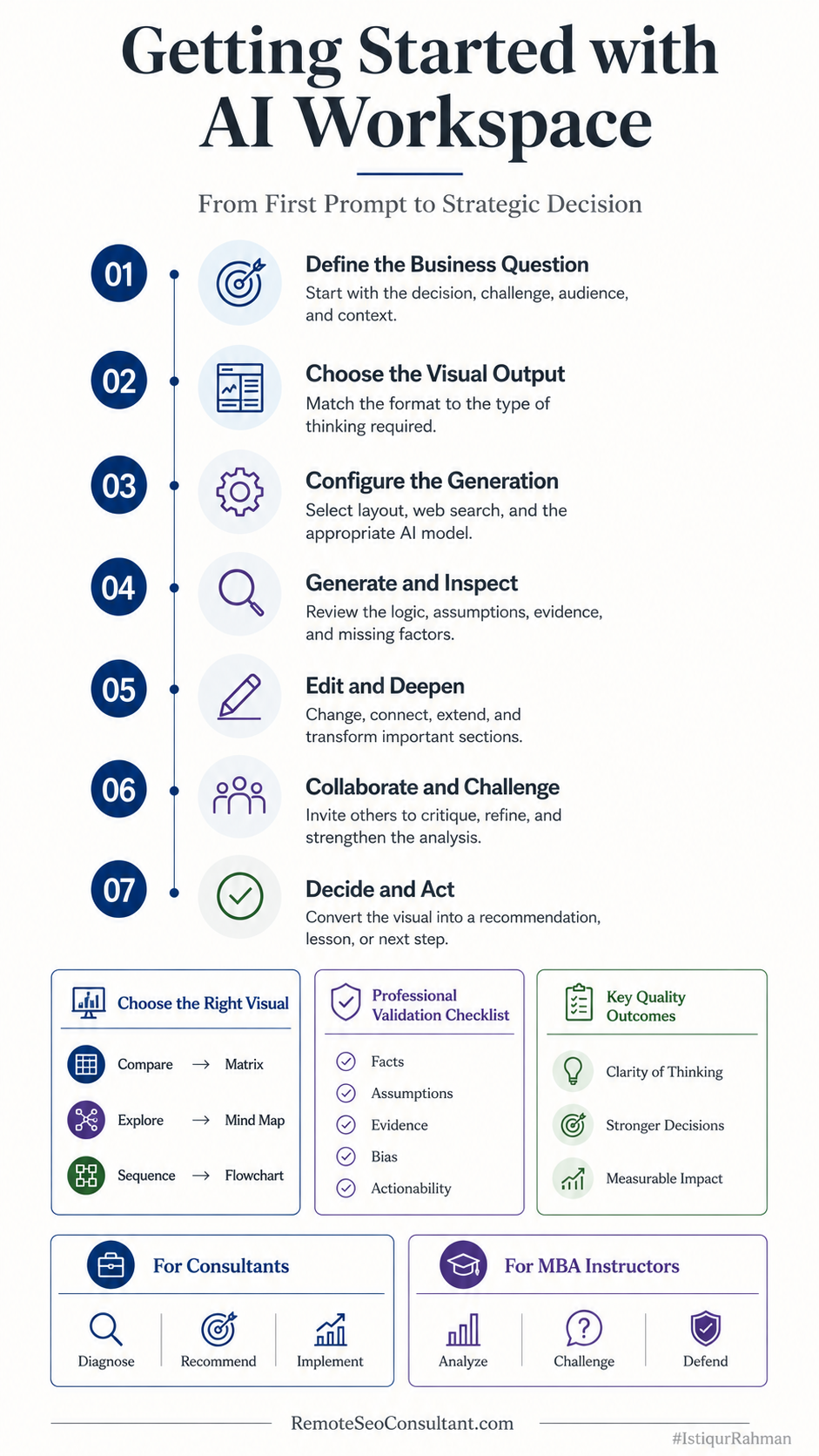
The complete beginner workflow for turning a business question into a collaborative, visual AI-assisted decision.
Frequently asked questions
What is an AI workspace?
An AI workspace is a shared environment where AI helps users generate, organize, analyze, edit, and present work. Unlike a standalone chatbot, it keeps visual artifacts, context, and collaboration together.
Do I need design experience to use visual AI?
No. Begin with a structured output such as a matrix, mind map, or flowchart. The AI creates the initial structure, and you edit it using selection, formatting, drawing, and connector tools.
Is an AI workspace useful for management consulting?
Yes. It can support discovery, strategic frameworks, process analysis, workshop synthesis, recommendations, and implementation planning. The consultant still owns validation, confidentiality, and professional judgment.
How can MBA instructors use visual AI responsibly?
Use AI-generated frameworks as material for critique. Require students to verify claims, identify assumptions, disclose AI use where required, and defend their conclusions.
Should I use one model or several?
Use one model for routine work. Consider several when the issue is uncertain, consequential, contested, or likely to benefit from meaningfully different perspectives.
Can an AI workspace replace PowerPoint or a learning-management system?
Not entirely, and that is not really the point. It can strengthen the reasoning and visual-development stage before the work is presented, taught, exported, or documented elsewhere.
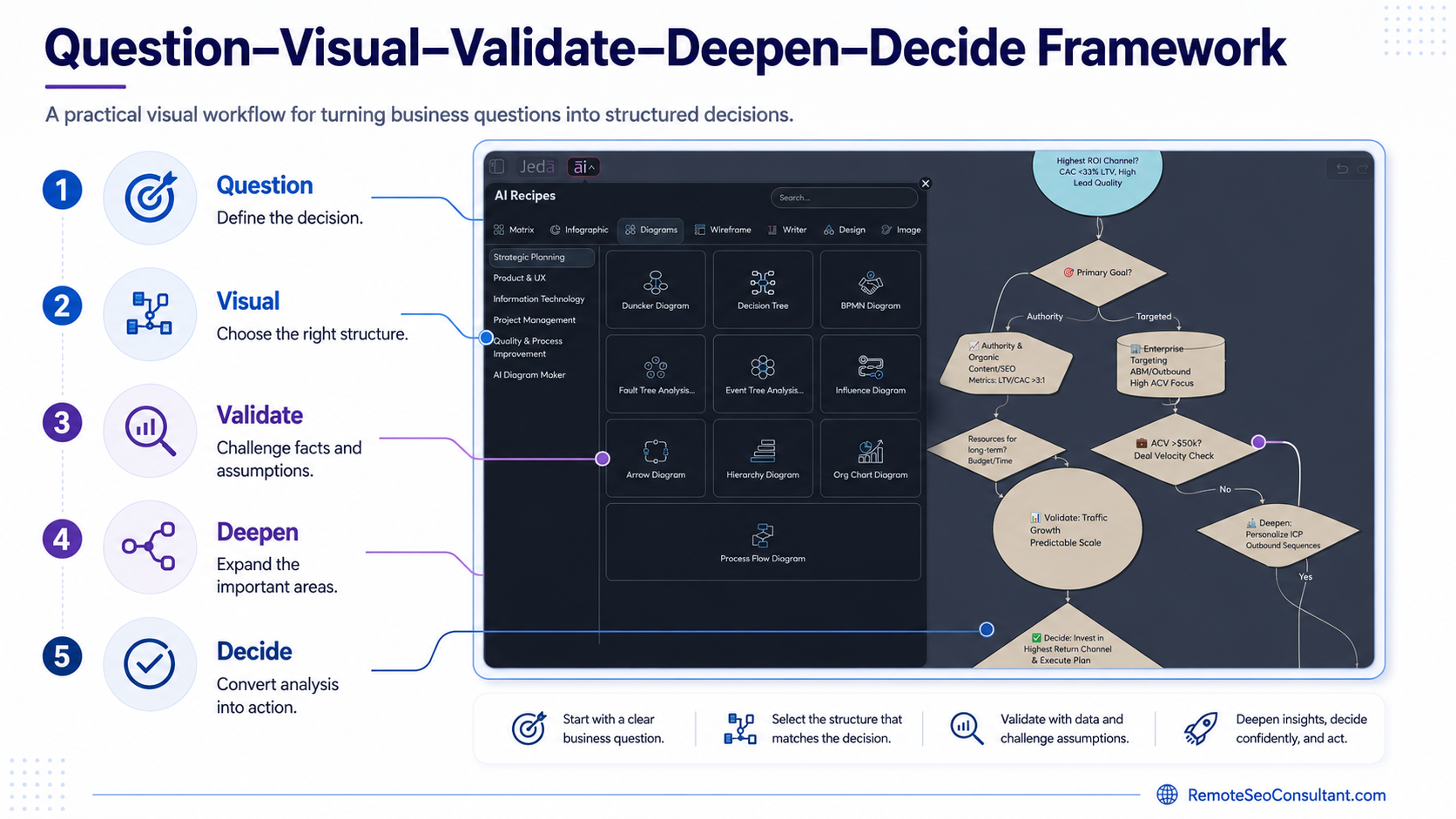
Getting Started with Visual AI five-step decision framework
About the author
Md. Istiqur Rahman is the Remote GTM Manager at Jeda AI and a Remote SEO Consultant for SaaS and eCommerce. He is also a website designer and developer specializing in WordPress and Webflow, with more than 17 years in professional practice.
Follow me on X and Facebook.
The next step
Watch the embedded beginner tutorial, then open one real project.
Not a fake sample. Not “AI strategy for a coffee shop” unless you genuinely run one.
Use a client problem, a course case, a process nobody understands, or a decision your team keeps postponing. Build one visual. Challenge it. Invite another human. Decide what happens next.
The point is not to produce more AI content. Heaven knows we have enough.
The point is to make the reasoning visible enough to improve—and that is Getting Started with AI Workspace.
Sources
[1]: McKinsey & Company, “The State of AI in 2025: Agents, Innovation, and Transformation,” November 5, 2025.
[2]: AACSB International, “A Framework for Artificial Intelligence in Business Education: Exemplars and Critical Themes for Successful Integration,” January 13, 2026.
[3]: EDUCAUSE, “The Impact of AI on Work in Higher Education,” January 12, 2026.
[4]: EDUCAUSE, “The Impact of AI on Learning Assessment,” June 2026.
[5]: Jeda.ai, “AI Workspace for Framework-Driven Strategic Visual Thinking,” accessed June 29, 2026.