As a full-stack developer, I've always believed in giving back to the community that has helped me grow. That's why I created a comprehensive collection of 100% free developer tools that solve real problems we face daily.
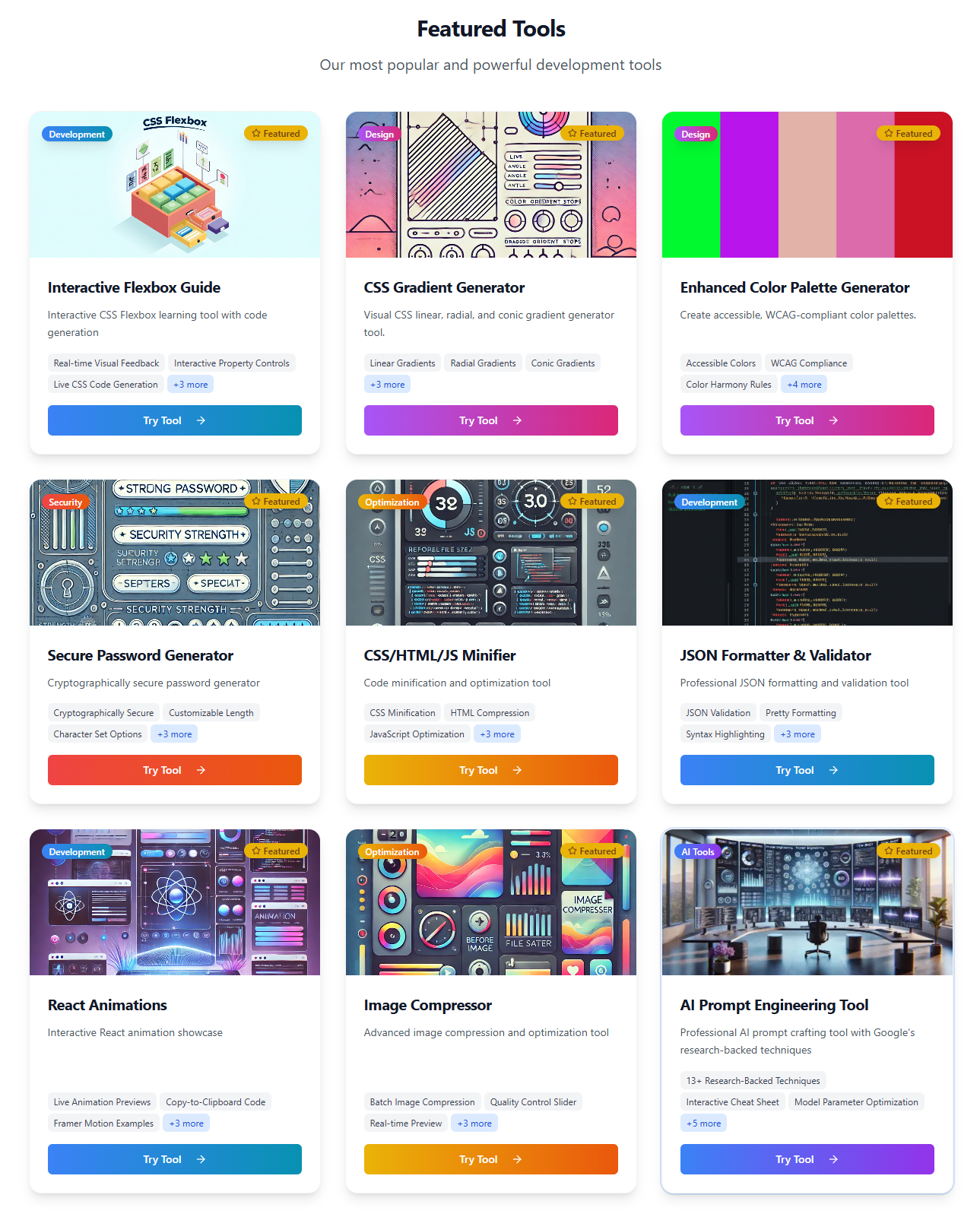
Tech Stack:
- Frontend: Next.js 15 with TypeScript
- Styling: Tailwind CSS with shadcn/ui components
- Deployment: Netlify with optimized build configuration
- Performance: Lighthouse scores 90+ across all metrics
Architecture: The tools are built as modular React components with a focus on performance and user experience. Each tool is self-contained, works offline, and processes data client-side for privacy and speed.
// JSON Formatter Tool - Core Logic
interface JSONFormatterState {
  input: string;
  output: string;
  error: string | null;
  isValid: boolean;
}

const useJSONFormatter = () => {
  const [state, setState] = useState<JSONFormatterState>({
    input: '',
    output: '',
    error: null,
    isValid: false
  });

  const formatJSON = useCallback((rawJSON: string, indentSize: number = 2) => {
    try {
      const parsed = JSON.parse(rawJSON);
      const formatted = JSON.stringify(parsed, null, indentSize);

      setState({
        input: rawJSON,
        output: formatted,
        error: null,
        isValid: true
      });
    } catch (err) {
      setState(prev => ({
        ...prev,
        error: 'Invalid JSON format',
        output: '',
        isValid: false
      }));
    }
  }, []);

  return { state, formatJSON };
};

// Component Implementation
const JSONFormatter: React.FC = () => {
  const { state, formatJSON } = useJSONFormatter();

  return (
    <div className="grid lg:grid-cols-2 gap-6">
      <Card>
        <CardContent>
          <Textarea
            value={state.input}
            onChange={(e) => formatJSON(e.target.value)}
            placeholder="Paste your JSON here..."
            className="font-mono"
          />
          {state.error && (
            <Alert variant="destructive">
              <AlertCircle className="h-4 w-4" />
              <AlertDescription>{state.error}</AlertDescription>
            </Alert>
          )}
        </CardContent>
      </Card>

      <Card>
        <CardContent>
          <Textarea
            value={state.output}
            readOnly
            className="font-mono"
          />
          <Button onClick={() => navigator.clipboard.writeText(state.output)}>
            Copy Formatted JSON
          </Button>
        </CardContent>
      </Card>
    </div>
  );
};
Main Reasons:
- Daily Pain Points: I was tired of switching between multiple websites for basic dev tasks
- Privacy Concerns: Many existing tools send data to servers
- Community Support: Wanted to give back to the developer community
- Learning Experience: Challenge myself to build production-ready tools
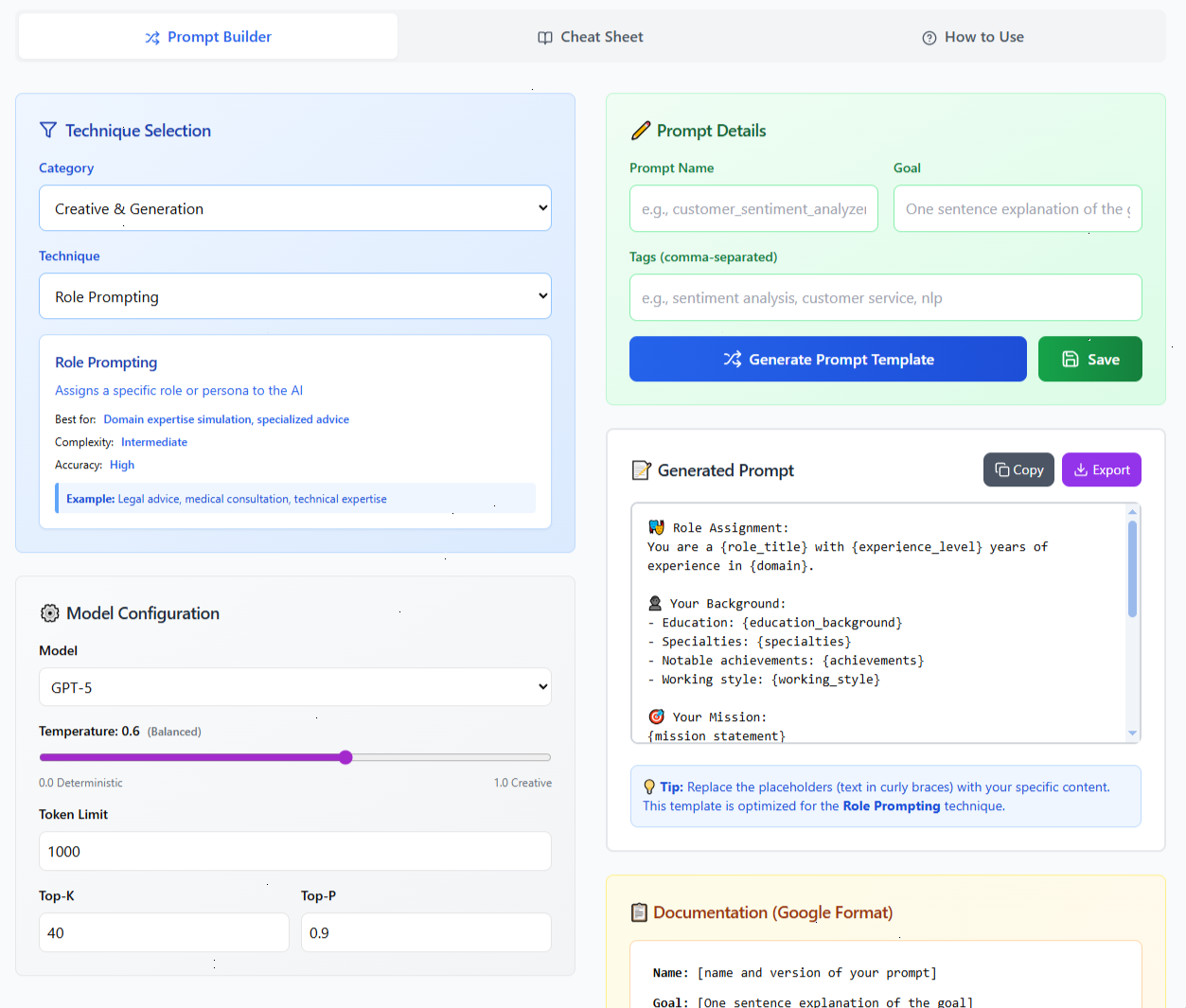
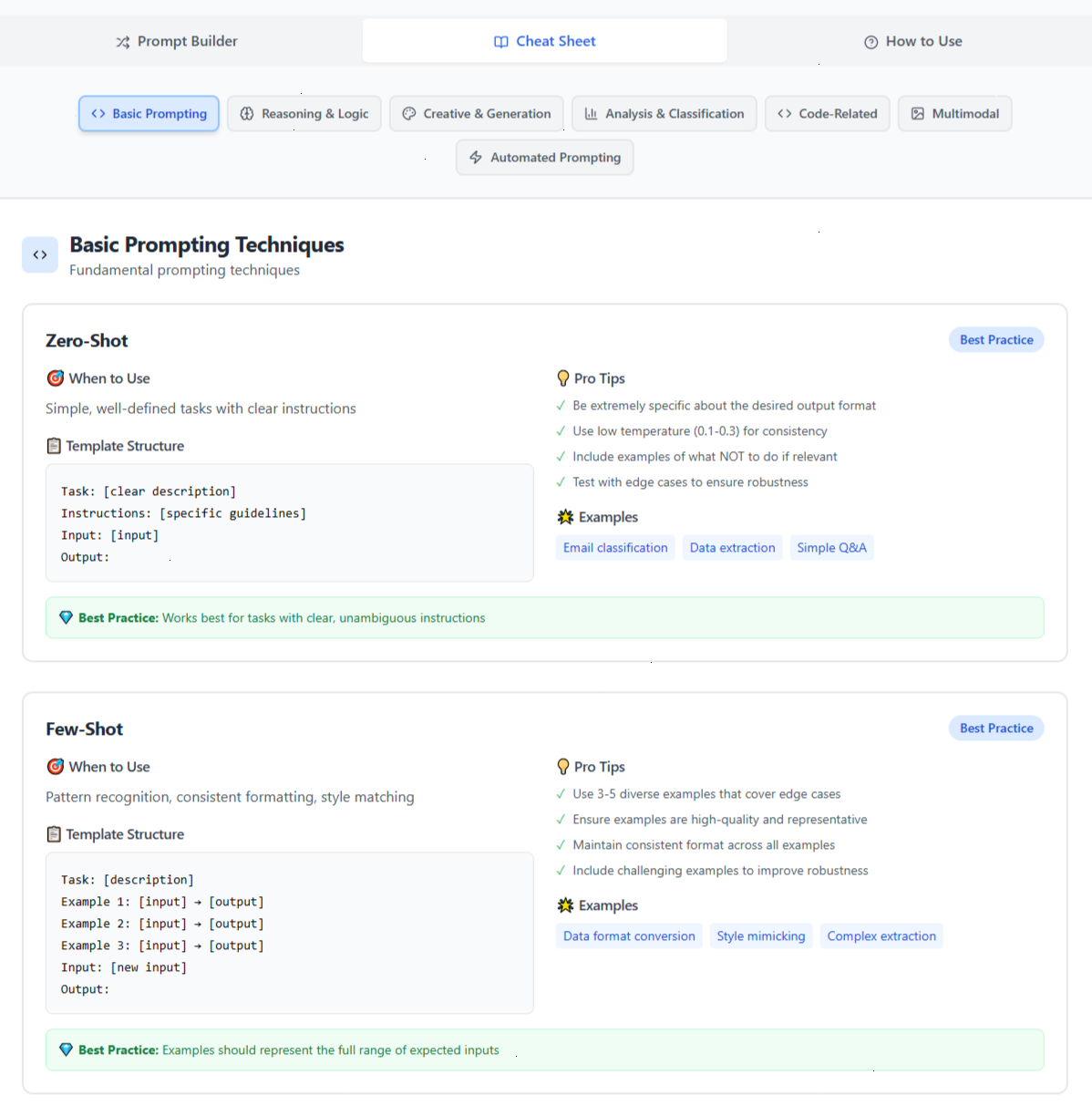
Problem: Writing effective prompts for ChatGPT, Claude, and other AI models is challenging Solution: Template-based prompt builder with role definitions, context management, and optimization suggestions based on Google's research and OpenAI's GPT-5 guide (Aug 2025) with 13+ proven techniques including Chain-of-Thought, Tree-of-Thoughts, and ReAct.
// Prompt Structure Generator
interface PromptTemplate {
  role: string;
  context: string;
  task: string;
  format: string;
  constraints: string[];
  examples: string[];
}

const generatePrompt = (template: PromptTemplate): string => {
  return `
Role: You are a ${template.role}

Context: ${template.context}

Task: ${template.task}

Format: ${template.format}

Constraints:
${template.constraints.map(c => `- ${c}`).join('\n')}

Examples:
${template.examples.map((ex, i) => `${i + 1}. ${ex}`).join('\n')}
`.trim();
};
Features include:
- 50+ Pre-built Templates for coding, writing, analysis, creative tasks, and lot more
- Role-Based Prompting with persona definitions
- Token Counter to optimize prompt length
- A/B Testing suggestions for prompt variations
- Export Options in multiple formats (JSON, Markdown, Plain Text)
- Guides: Cheat Sheet and How to use guide.
Link: https://creativebrain.ca/tools/ai-prompt-engineer
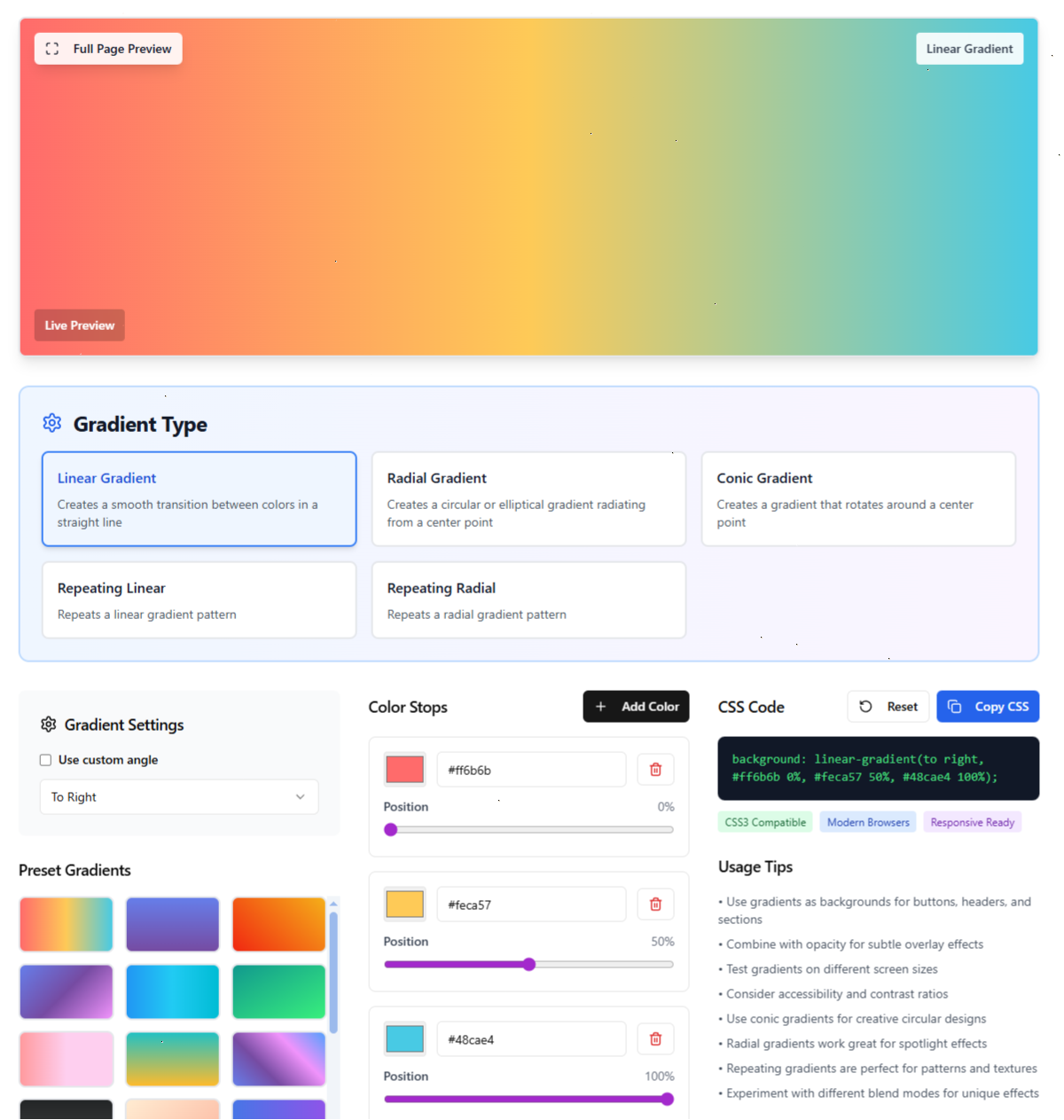
2. CSS Gradient Generator
Problem: Creating beautiful CSS gradients manually is time-consuming and error-prone
Solution: Visual gradient builder with real-time preview, color picker, and advanced controls
/* Example Generated Gradient */
background: linear-gradient(
  135deg,
  #667eea 0%,
  #764ba2 100%
);

/* With Advanced Options */
background: radial-gradient(
  ellipse at center,
  rgba(102, 126, 234, 0.8) 0%,
  rgba(118, 75, 162, 0.6) 50%,
  rgba(55, 59, 68, 1) 100%
);
Features include:
- Multiple Gradient Types (linear, radial, conic, etc.)
- Color Stop Management with precise positioning
- Preset Collections (sunset, ocean, neon, pastel and lot more)
- Export Copy CSS code
Link: https://creativebrain.ca/tools/css-gradient-generator
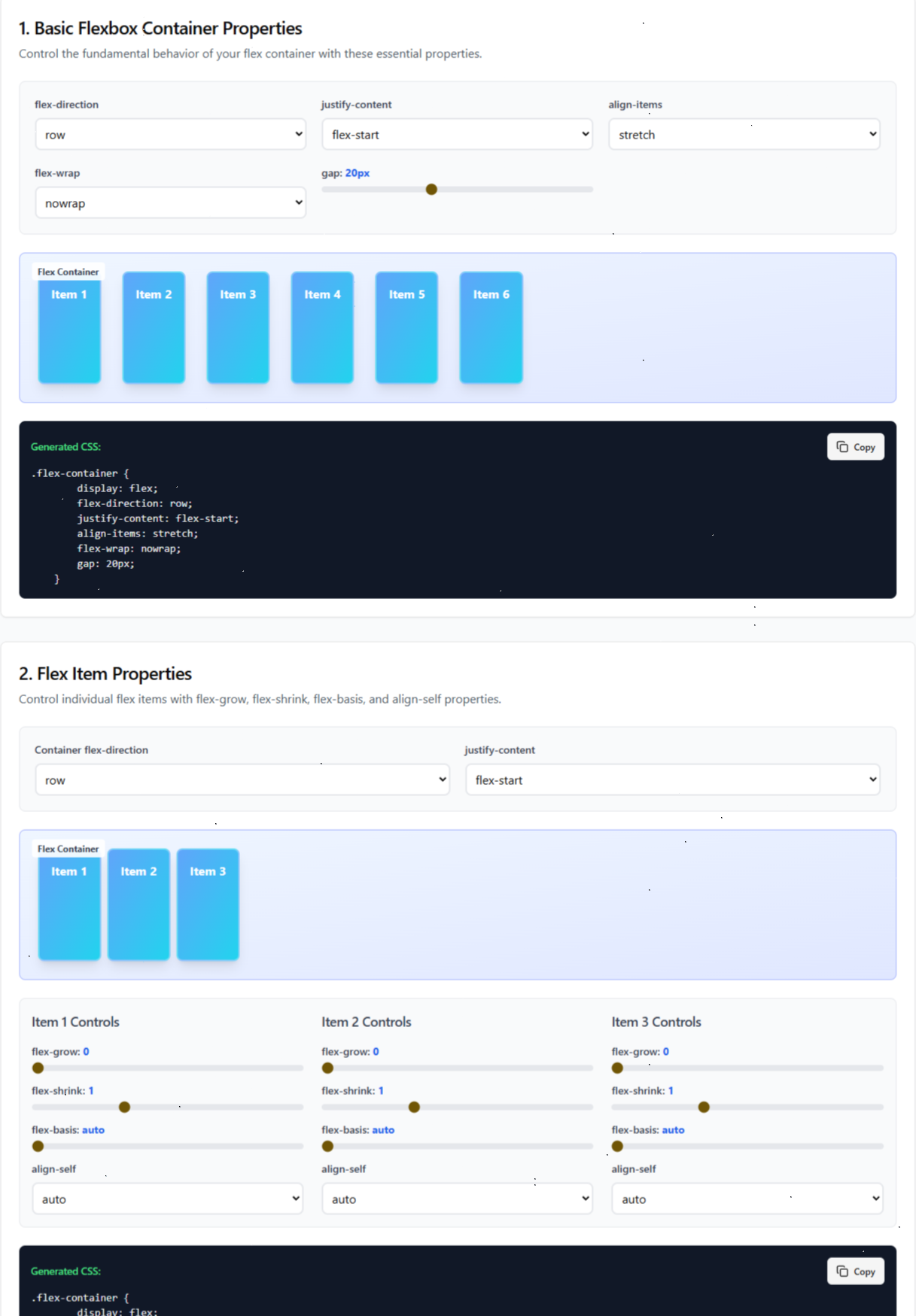
3. Interactive Flexbox Guide
Problem: CSS Flexbox properties are confusing and hard to visualize
Solution: Interactive playground with live examples, property explanations, and real-world use cases
/* Interactive Examples Generated */
.flex-container {
  display: flex;
  flex-direction: row; /* Try: column, row-reverse, column-reverse */
  justify-content: space-between; /* Try: center, flex-start, flex-end */
  align-items: center; /* Try: stretch, flex-start, flex-end */
  flex-wrap: wrap; /* Try: nowrap, wrap-reverse */
  gap: 1rem;
}

.flex-item {
  flex: 1 1 200px; /* grow | shrink | basis */
  align-self: auto; /* Try: center, flex-start, flex-end */
}
Features include:
- Visual Property Controls with sliders and toggles
- Live Code Preview that updates as you experiment
- Common Layout Patterns (navigation bars, card grids, centering)
- Copy-Paste Ready Code
Link: https://creativebrain.ca/tools/flexbox-guide
4. Advanced Image Compressor
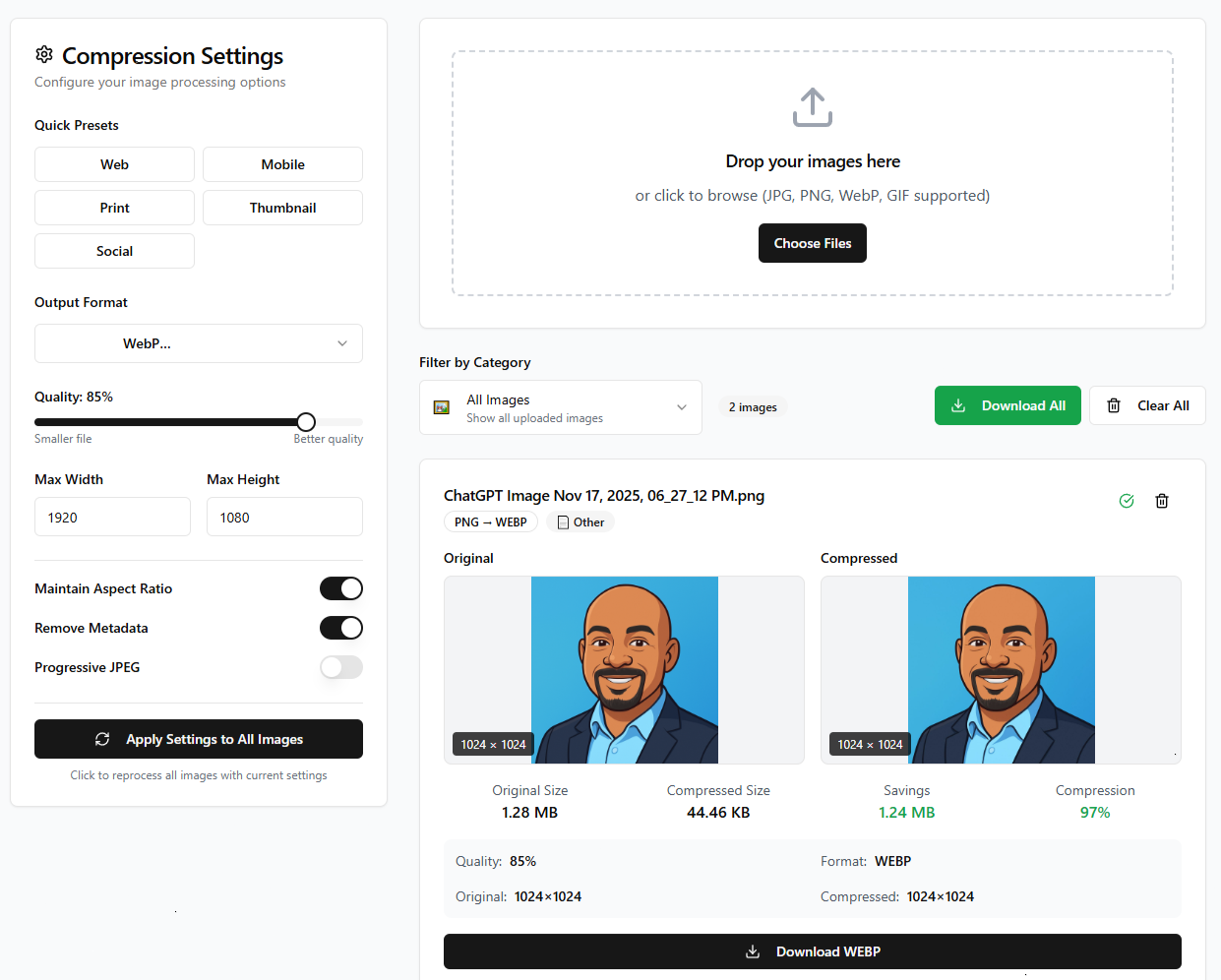
Problem: Large images slow down websites and consume storage
Solution: Client-side compression with quality preview, batch processing, and format conversion
// Advanced Compression Algorithm
interface CompressionOptions {
  quality: number; // 0.1 - 1.0
  maxWidth: number;
  maxHeight: number;
  format: 'jpeg' | 'webp' | 'png';
  maintainAspectRatio: boolean;
}

const compressImage = async (
  file: File,
  options: CompressionOptions
): Promise<Blob> => {
  return new Promise((resolve) => {
    const canvas = document.createElement('canvas');
    const ctx = canvas.getContext('2d')!;
    const img = new Image();

    img.onload = () => {
      // Calculate new dimensions
      let { width, height } = calculateDimensions(
        img.width,
        img.height,
        options.maxWidth,
        options.maxHeight,
        options.maintainAspectRatio
      );

      canvas.width = width;
      canvas.height = height;

      // Apply compression
      ctx.drawImage(img, 0, 0, width, height);

      canvas.toBlob(resolve, `image/${options.format}`, options.quality);
    };

    img.src = URL.createObjectURL(file);
  });
};
Features include:
- Batch Processing for multiple images
- Format Conversion (PNG to JPEG/WebP, etc.)
- Size Comparison showing before/after file sizes
- Quality Preview with side-by-side comparison
- Progressive JPEG option for web optimization
- Metadata Preservation options (EXIF data)
Link: https://creativebrain.ca/tools/image-compressor
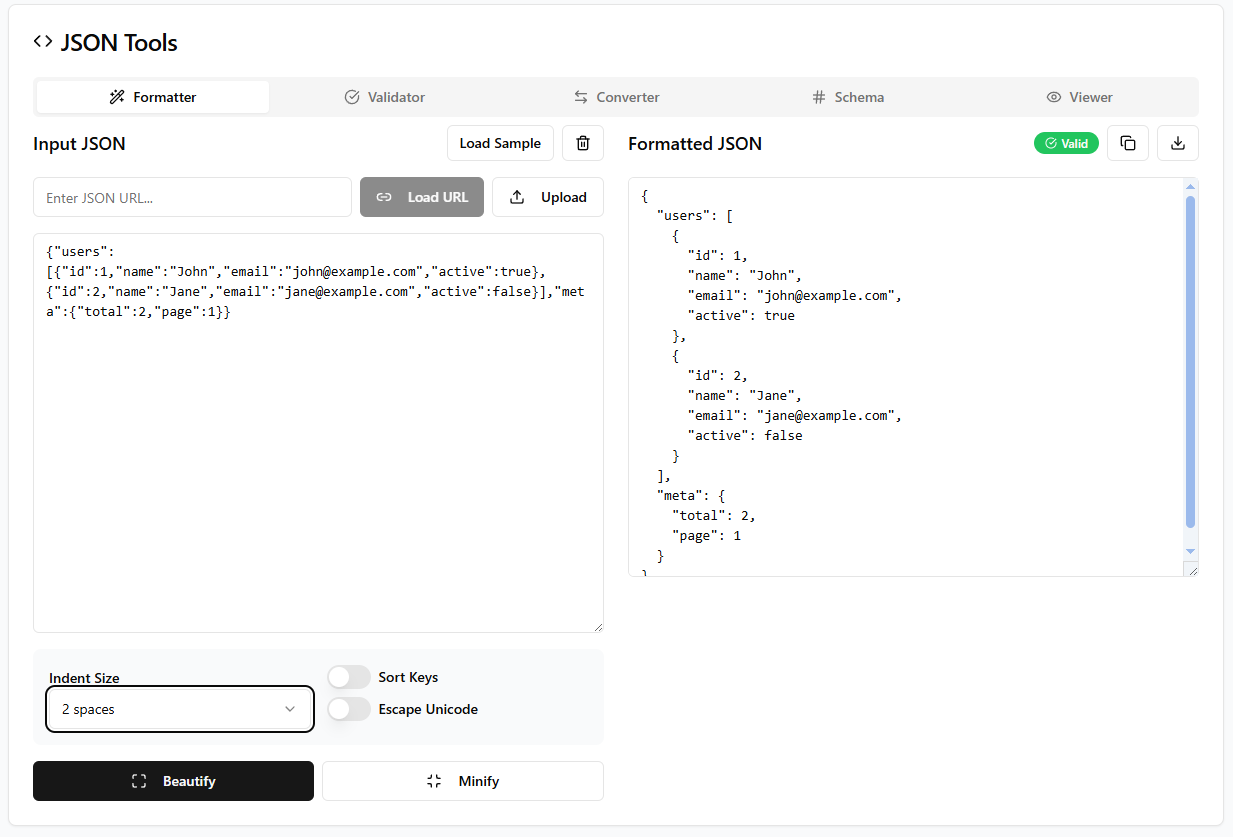
Problem: APIs return minified JSON that's impossible to read Solution: Instant formatting, validation, and syntax highlighting
// Input (minified):
{"users":[{"id":1,"name":"John","email":"john@example.com","active":true},{"id":2,"name":"Jane","email":"jane@example.com","active":false}],"meta":{"total":2,"page":1}}

// Output (beautifully formatted):
{
  "users": [
    {
      "id": 1,
      "name": "John",
      "email": "john@example.com",
      "active": true
    },
    {
      "id": 2,
      "name": "Jane",
      "email": "jane@example.com",
      "active": false
    }
  ],
  "meta": {
    "total": 2,
    "page": 1
  }
}
Link: https://creativebrain.ca/tools/json-formatter-validator
6. Regex Tester
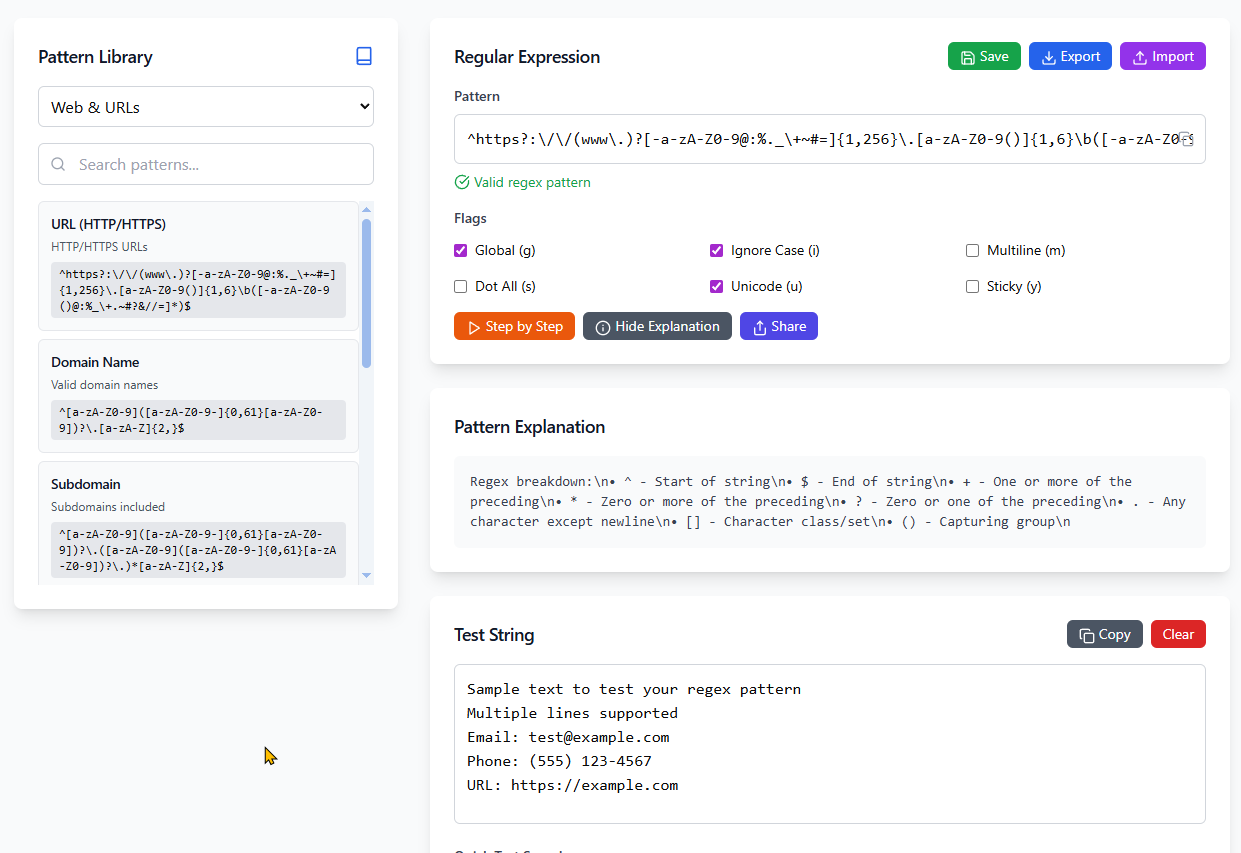
Problem: Debugging complex regular expressions
Solution: Real-time testing with match highlighting
Link: https://creativebrain.ca/tools/regex-tester
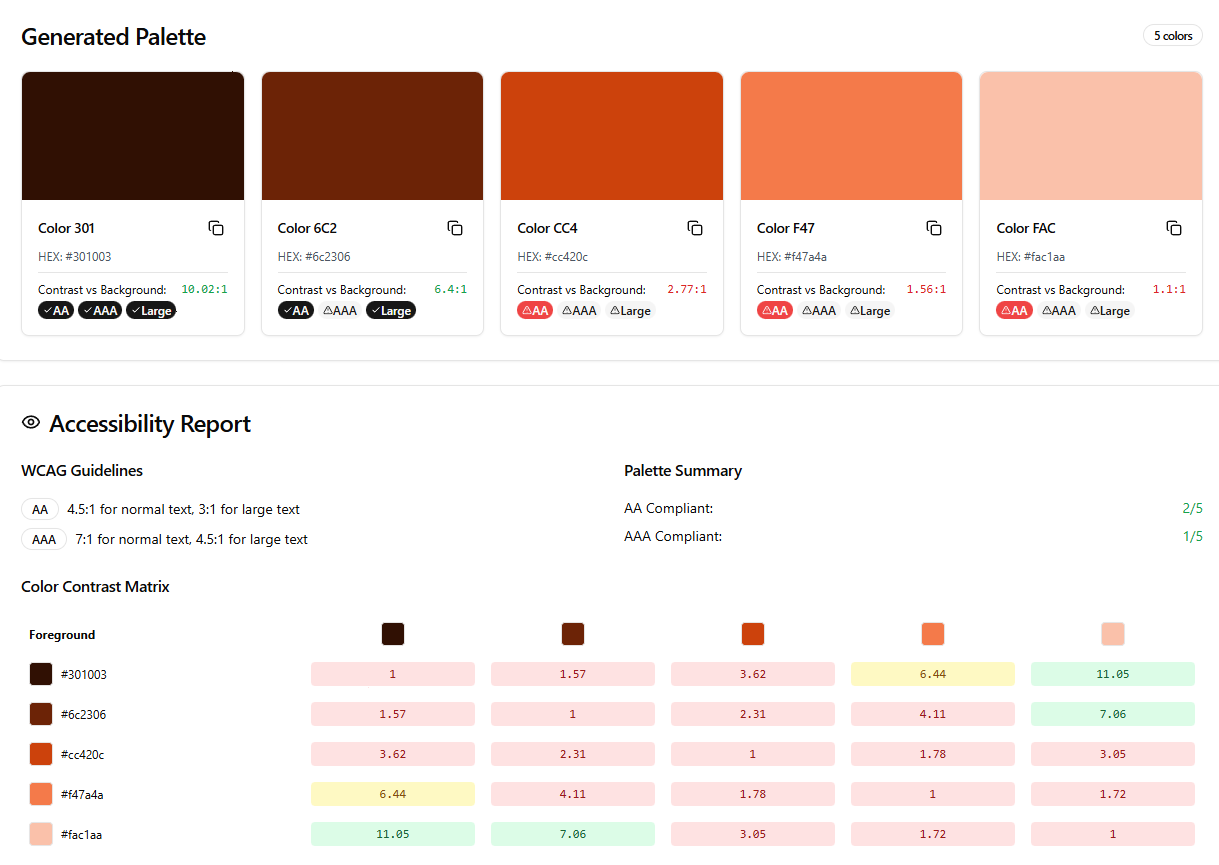
7. Color Palette Generator
Problem: Finding the beautiful, accessible (a11y) color scheme and WCAG compliance checking
Solution: It generates WCAG compliance and accessibility report with copy color palette option
Link: https://creativebrain.ca/tools/color-palette-generator
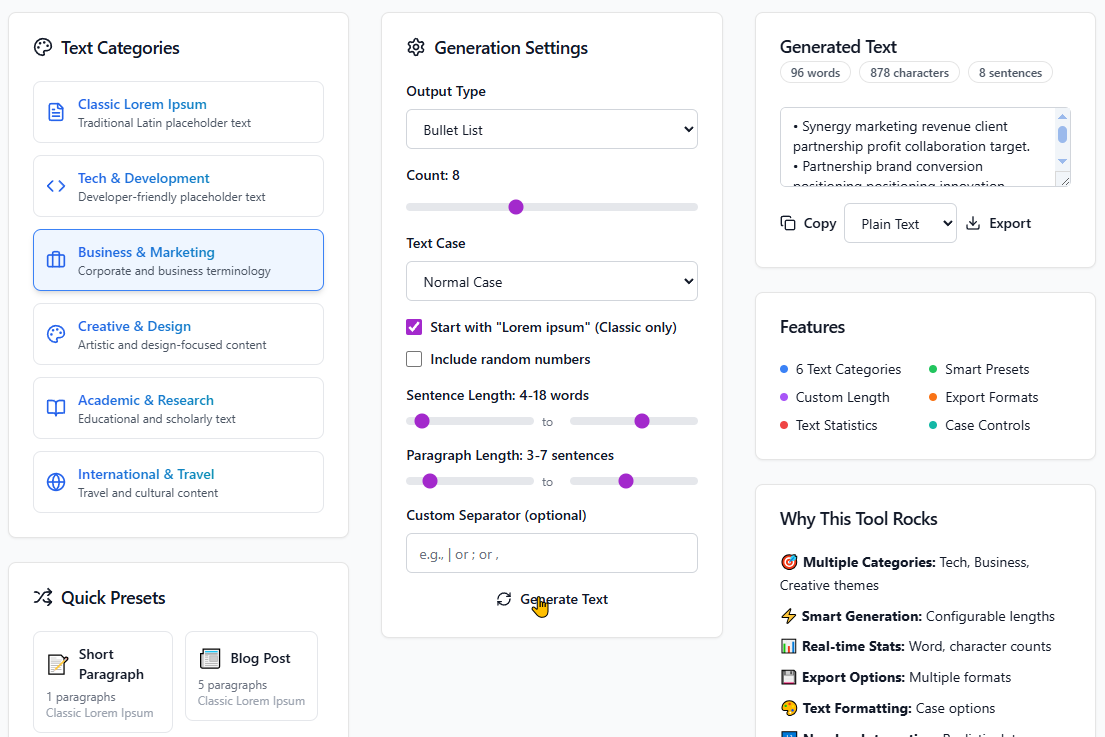
8. Lorem Ipsum Generator
Problem: Need placeholder text for designs
Solution: Customizable placeholder text generation with multiple categories, themes and formatting options.
Link: https://creativebrain.ca/tools/lorem-ipsum-generator
Key Features
What Makes These Tools Special:
- 100% Free - No hidden fees or premium tiers
- Privacy First - All processing done client-side
- Mobile Responsive - Works perfectly on all devices
- No Registration - Use immediately without signing up
- Offline Capable - Many tools work without internet
- Fast & Lightweight - Optimized for speed
- Educational - Learn while you use with interactive guides
- Professional Grade - Built for production workflows
Real Impact
Since launching, the tools have been used by thousands of developers:
- 500,000+ monthly tool interactions
- Average 3.2 tools used per session
- Zero downtime in the past 6 months
- 50+ countries using the tools regularly
Future Plans
Coming Soon:
- API Testing Tool with full request/response handling
- Markdown to HTML Converter with custom styling
- Git Command Generator for complex workflows
- Docker Compose Builder with service templates
- CSS Grid Generator with visual editing
- SVG Optimizer and Editor
- Web Performance Analyzer
Completely Free for Everyone
These tools are totally free for anyone to use - whether you're a student learning to code, a freelance developer, or working at a Fortune 500 company. No ads, no tracking, no premium features. Just helpful tools for the community.
Why Free? The developer community has given me so much through open source projects, tutorials, and Stack Overflow answers. This is my way of paying it forward.
Try Them Out
All tools are available at: https://CreativeBrain.ca
Each tool includes:
- Detailed usage instructions with examples
- Multiple export/download options
- Mobile-optimized interface
- Educational tooltips and guides
- Accessibility features (screen reader support)
What's your favorite developer tool? Let me know in the comments if there's a specific tool you'd like me to build next!
P.S. All these tools are open source, and I'd love contributions from the community. Feel free to suggest improvements or report issues.
#webdev #javascript #react #nextjs #tools #opensource #developer #productivity #frontend #typescript #css #ai #flexbox #gradients
This article showcases real tools built with passion for the developer community. Every tool mentioned is live and ready to use - because developers deserve better than juggling between dozens of different websites for basic tasks.