The selenium webdriver exception message 'chromedriver' executable needs to be in PATH is triggered if selenium could not find the chromedriver file based on the user's code that calls webdriver.Chrome(executable_path='chromedriver'). It is the user or programmer's responsibility to let selenium know this executable_path. Defining a path in windows OS can be challenging sometimes as the user has to do some editing in the system environment variables. Is there any other way to define the path? Sure there is, and we will discuss this issue, including some ways to solve it.
1. What is the problem? #
Our trouble starts when we try to use the power of selenium. Selenium is a tool for automating web browsers. It can interact with web pages such as web scraping, browser automation and others. To manipulate these pages, selenium needs a program called chromedriver for chrome browsers.
1.1. Error message replication #
I will use python selenium version 3.141.0 to reproduce this error message. The parameter executable_path which you will see soon is not yet deprecated in this selenium version. First we need to install selenium from command line:
pip install selenium==3.141.0

Let us create a code which will scrape some quotes from https://quotes.toscrape.com/.
Filename: sample.py
code
from selenium import webdriver

# Define the path of the chrome driver to be used by selenium.
# Selenium expects that the chromedriver.exe path is in the
# Path variable on the systems environment variable.
driver = webdriver.Chrome(executable_path='chromedriver')

url = 'https://quotes.toscrape.com/'
driver.get(url)

quotes = driver.find_elements('xpath', '//span[@class="text"]')

for q in quotes:
    print(q.text)

driver.quit()
In the line:
driver = webdriver.Chrome(executable_path='chromedriver')
The chromedriver is the default value of the executable_path parameter. Selenium expects the file chromedriver.exe to be in the window's system environment variable.
Run the script from command line
python sample.py
output
selenium.common.exceptions.WebDriverException: Message: 'chromedriver' executable needs to be in PATH. Please see https://sites.google.com/a/chromium.org/chromedriver/home
'chromedriver' executable needs to be in PATH.
Right we got the exception message. It is not that difficult to interpret that message. Selenium cannot find the chromedriver.exe, as we have not yet revised our system environment variables. We also have not downloaded yet the chromedriver.exe. In the next section, we will solve this issue.
2. How to avoid this error? #
Let us continue from the Error message replication in section 1.1. We will fix this error step by step. I am going to use windows 10.
2.1. Add chromedriver path in the system environment variables #
Step 1
Download the chromedriver.exe and be sure to download the chromedriver version that is similar to the version of the chrome browser you use.
To check the chrome browser version, see the following guide.
(1) Open the browser and press the menu.
(2) Select/Hover help.
(3) Press About.
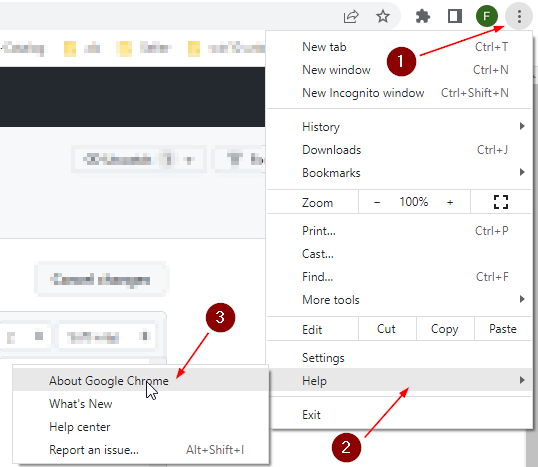
And we will see this.

Now download the chromedriver at https://chromedriver.chromium.org/downloads. Keep note on the version. Once done unzip it and put it in C:\selenium_chrome_driver folder.
Tree
C:\selenium_chrome_driver
    chromedriver.exe
That means chromedriver.exe is under the selenium_chrome_driver folder. Both are under drive C. We have to remember this location because we will use it in 2 of the 3 solutions to fix this issue.
Step 2
Let us try to access the system environment variables from your desktop or laptop.
(1) Search button
(2) Type environ
(3) Press the Edit the system ...
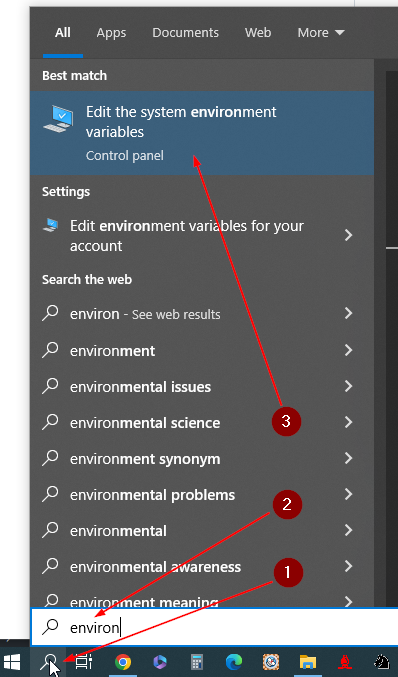
And we will see this.
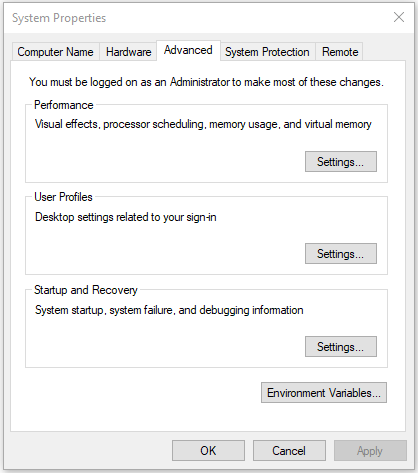
Step 3
(1) Press the button.
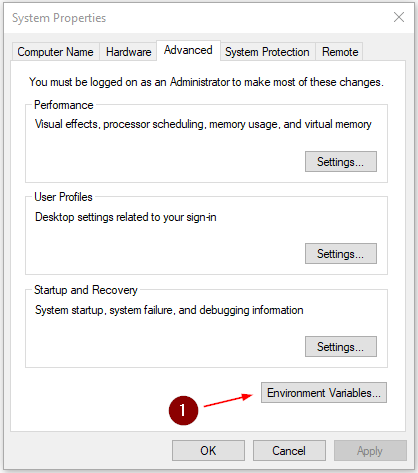
And we will see this.
Step 4
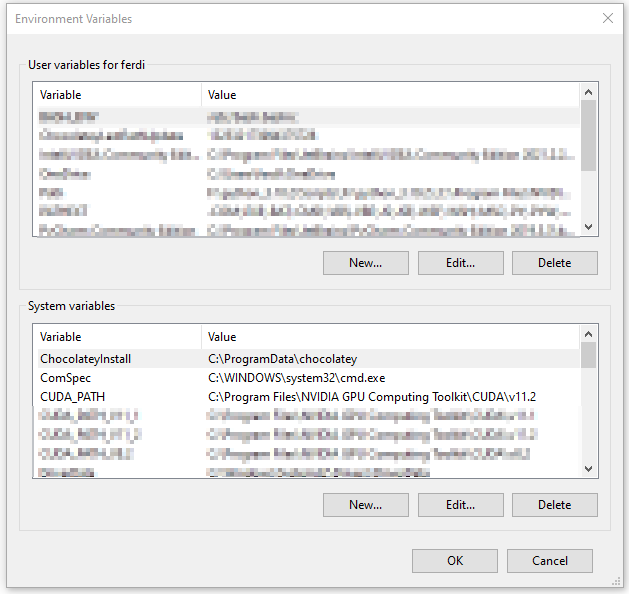
Find the Path variable name from System variables.
(1) Use the scroll to find it if necessary.
(2) That is our target, select it.

Step 5
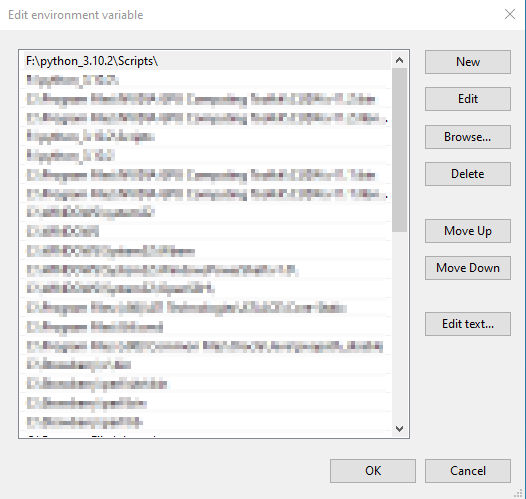
(1) Select the path
(2) Press edit button so we can add the chromedriver.exe path.

And we will see this.
Step 6
(1) Press the new button.
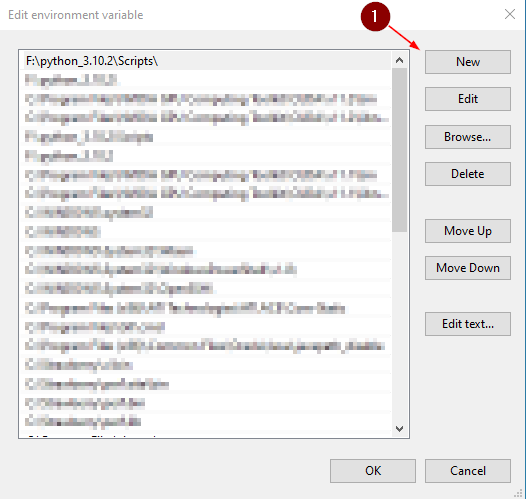
And we will see this.
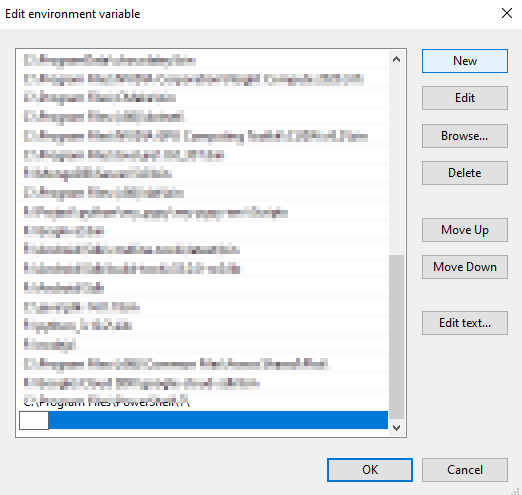
Step 7
(1) Type the path of our chromedriver.exe.
(2) Press OK
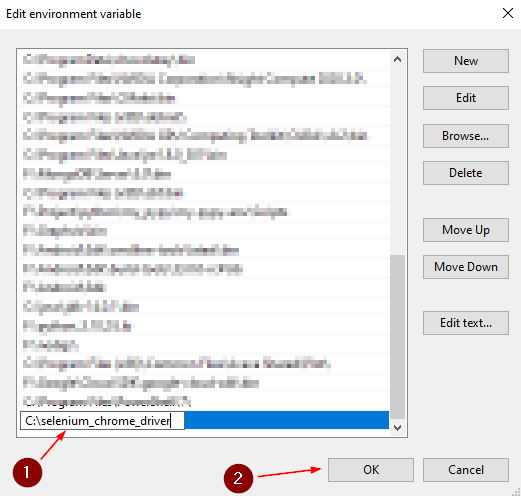
Press OK for all windows to exit and we are done.
How to check if chromedriver.exe path is set?
Close all the opened console and open a new console. Check if chromedriver.exe path has been successfully added to the Path variable in the system environment variables.

All right it is there. Although the chromedriver.exe is located in C:\selenium_chrome_driver, the executable can now be called from any other directory. This is the point of adding the chromedriver path to the Path variable in the system environment variables. We can now create our code or script from any directory and selenium will be able to find it.
For example, we can create sample.py from any drive or folder like F:\samples\sample.py or C:\myscraper\sample.py and others.
Now let us run the sample.py from the code at the top.
PS F:\Project\my_selenium_3>python sample.py
output
“The world as we have created it is a process of our thinking. It cannot be changed without changing our thinking.”
“It is our choices, Harry, that show what we truly are, far more than our abilities.”
“There are only two ways to live your life. One is as though nothing is a miracle. The other is as though everything is a miracle.”
“The person, be it gentleman or lady, who has not pleasure in a good novel, must be intolerably stupid.”
“Imperfection is beauty, madness is genius and it's better to be absolutely ridiculous than absolutely boring.”
“Try not to become a man of success. Rather become a man of value.”
“It is better to be hated for what you are than to be loved for what you are not.”
“I have not failed. I've just found 10,000 ways that won't work.”
“A woman is like a tea bag; you never know how strong it is until it's in hot water.”
“A day without sunshine is like, you know, night.”
2.2. Define the path directly #
Here is the code that inform selenium on the location of the chromedriver.exe directly in the executable_path parameter.
code
from selenium import webdriver

# Define the path directly.
driver = webdriver.Chrome(executable_path='C:/selenium_chrome_driver/chromedriver.exe')

url = 'https://quotes.toscrape.com/'
driver.get(url)

quotes = driver.find_elements('xpath', '//span[@class="text"]')

for q in quotes:
    print(q.text)

driver.quit()
output
“The world as we have created it is a process of our thinking. It cannot be changed without changing our thinking.”
“It is our choices, Harry, that show what we truly are, far more than our abilities.”
“There are only two ways to live your life. One is as though nothing is a miracle. The other is as though everything is a miracle.”
“The person, be it gentleman or lady, who has not pleasure in a good novel, must be intolerably stupid.”
“Imperfection is beauty, madness is genius and it's better to be absolutely ridiculous than absolutely boring.”
“Try not to become a man of success. Rather become a man of value.”
“It is better to be hated for what you are than to be loved for what you are not.”
“I have not failed. I've just found 10,000 ways that won't work.”
“A woman is like a tea bag; you never know how strong it is until it's in hot water.”
“A day without sunshine is like, you know, night.”
2.3. Use webdriver-manager #
The code below uses the webdriver-manager package.
"""Scrapes quotes from the given url.

The url is 'https://quotes.toscrape.com/'.
We need to install the following packages.
  pip install selenium==3.141.0
  pip install webdriver-manager
"""
from selenium import webdriver
from webdriver_manager.chrome import ChromeDriverManager

# Use webdriver manager.
driver = webdriver.Chrome(ChromeDriverManager().install())

url = 'https://quotes.toscrape.com/'
driver.get(url)

quotes = driver.find_elements('xpath', '//span[@class="text"]')

for q in quotes:
    print(q.text)

driver.quit()
If we run this, the output will be the same as in the previous output. The main advantage of this solution is we no longer have to download the chromedriver.exe or touching the system environment variable, etc. What is required is to install the new package together with the usual selenium.
From command line install the following.
pip install selenium==3.141.0
pip install webdriver-manager
The chromedriver binary does not need to be downloaded if the webdriver-manager is utilized.
The selenium exception or error message 'chromedriver' executable needs to be in PATH pops up if the webdriver.Chrome() is instantiated without defining the executable_path of the chromedriver.exe. Selenium needs this browser driver to do its work. This error can be prevented by either properly defining the path of chromedriver.exe in the Path's variable in the system environment variables, directly use the path in the executable_path parameter, or use the webdriver-manager for a more modern approach.
The latest version of python selenium is currently 4.8.0. The executable_path parameter is now deprecated if it is used as in section 2.2.
- ChromeDriver - WebDriver for Chrome. (n.d.). Retrieved January 30, 2023, from https://chromedriver.chromium.org/home
- ChromeDriver - WebDriver for Chrome - Downloads. (n.d.). https://chromedriver.chromium.org/downloads
- Quotes to Scrape. (n.d.). Retrieved January 31, 2023, from https://quotes.toscrape.com/
- Selenium with Python — Selenium Python Bindings 2 documentation. (n.d.). Retrieved February 3, 2023, from https://selenium-python.readthedocs.io/index.html
- Selenium-Dev. (n.d.). Selenium. Retrieved January 30, 2023, from https://www.selenium.dev/
- selenium==3.141.0. (2018, November 1). PyPI. Retrieved January 31, 2023, from https://pypi.org/project/selenium/3.141.0/
- selenium==4.8.0. (2023, January 23). PyPI. Retrieved February 2, 2023, from https://pypi.org/project/selenium/4.8.0/
- webdriver-manager. (2022, November 16). PyPI. Retrieved January 31, 2023, from https://pypi.org/project/webdriver-manager/