With the release of Angular 16, the framework introduced a powerful new reactive primitive: signals. Signals provide a new way to manage reactivity in your applications, enabling more predictable and efficient UI updates. But how do they compare with the well-established observables? When should you use one over the other? And how do features like computed() come into play?
In this post, we’ll explore Angular signals in depth, compare them with observables, and provide practical use cases to guide your decision-making.
What Are Angular Signals?
Signals are reactive values that notify dependents when their value changes. They are designed to be synchronous, fine-grained, and easy to use.
A signal is created using the signal() function and acts as a state container:
import { signal } from '@angular/core';

const count = signal(0);

console.log(count());   // Reading value: 0
count.set(5);           // Setting value
count.update(c => c + 1); // Updating value: 6
Key Characteristics:
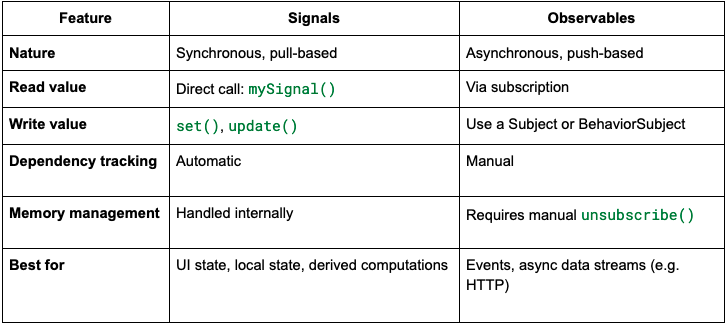
- Synchronous: Reading a signal gives you its value immediately.
- Dependency Tracking: When used inside a computed signal or an effect, it registers itself as a dependency.
- Reactive: Automatically propagates changes to anything that depends on it.
Using computed() with Signals
One of the most powerful aspects of signals is the computed() function. It allows you to create derived signals, similar to computed properties in other reactive frameworks like Vue.js.
import { signal, computed } from '@angular/core';

const price = signal(100);
const quantity = signal(2);

const total = computed(() => price() * quantity());

console.log(total()); // Output: 200

quantity.set(3);
console.log(total()); // Output: 300
The computed signal automatically recalculates when any of its dependencies change. No manual subscriptions are needed.
Signals vs Observables
Let’s compare Angular signals with RxJS observables across different dimensions:
When to Use Signals
✅ Use Signals When:
- Managing local UI state (e.g. toggle, counters, forms)
- Creating computed values that derive from other signals
- You need fine-grained change detection (only dependent parts re-render)
- You want simpler and more declarative reactivity
Example: Component-local state
@Component({
  selector: 'app-counter',
  template: `
    <button (click)="increment()">Add</button>
    <p>Count: {{ count() }}</p>
  `
})
export class CounterComponent {
  count = signal(0);

  increment() {
    this.count.update(c => c + 1);
  }
}
Avoid Signals When:
- You’re dealing with asynchronous data (e.g. HTTP requests, WebSocket streams)
- You need to compose multiple async streams using RxJS operators (
mergeMap, switchMap, etc.)
- You’re integrating with libraries heavily based on RxJS
When to Use Observables
✅ Use Observables When:
- Working with asynchronous streams (e.g. user inputs, API responses)
- Using RxJS operators to transform streams
- Handling event-based programming (e.g. WebSockets, form events)
- Managing global app state with side effects (e.g. NgRx)
Example: Async HTTP data
@Component({
  selector: 'app-data',
  template: `
    <ng-container *ngIf="data$ | async as data">
      <p>{{ data.title }}</p>
    </ng-container>
  `
})
export class DataComponent {
  data$ = this.http.get('/api/data');

  constructor(private http: HttpClient) {}
}
Interoperability: Signals and Observables
Angular provides utility functions to convert between signals and observables:
toSignal() – Observable to Signal
import { toSignal } from '@angular/core/rxjs-interop';

const signalFromObservable = toSignal(myObservable$, { initialValue: null });
toObservable() – Signal to Observable
import { toObservable } from '@angular/core';

const observableFromSignal = toObservable(mySignal);
This enables seamless integration of both paradigms.
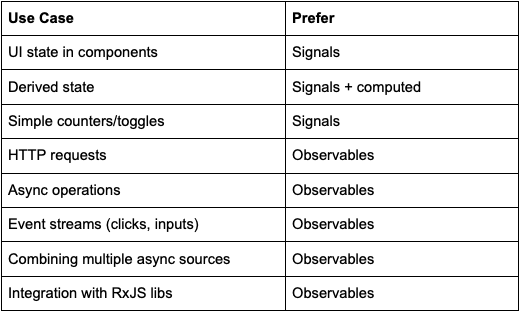
Use Case Summary
Final Thoughts
Signals represent a shift toward synchronous, declarative state management in Angular. While Observables will always have a place—especially for async operations—signals make state management in UI components much simpler and more intuitive.
Use signals for local, synchronous UI state and computed values. Use observables for asynchronous workflows and complex stream operations. And when needed, bridge the two with Angular’s interop utilities.
The future of Angular is signal-first but observables aren’t going anywhere. Choosing the right tool for the job is key.